DemandWare Integration - Payment terminal Adyen - Free user manual and instructions
Find the device manual for free DemandWare Integration Adyen in PDF.


User questions about DemandWare Integration Adyen
0 question about this device. Answer the ones you know or ask your own.
Ask a new question about this device
Download the instructions for your Payment terminal in PDF format for free! Find your manual DemandWare Integration - Adyen and take your electronic device back in hand. On this page are published all the documents necessary for the use of your device. DemandWare Integration by Adyen.
USER MANUAL DemandWare Integration Adyen
Snort description of Adyen payment system
4
Use case : Redirect....6
Use case : Credit Card 9
Changes to pipelines, templates 16
Changes in BASIC_CREDIT : 16
Changes in CO-Summary : 16
Pipelines in the Adyen Cartridge....17
Adyen API payments / Credit Card payments....17
The Afterpay pipeline.... 18
Adyen account configuration....19
Business Manager configuration 20
Additional configuration 20
1. Summary
This cartridge enables a DemandWare store to use the Adyen payment service.
The merchant has to open an account with Adyen first and after installation of the cartridge needs to configure some items in the Demandware Business Manager as well as in the Adyen back office to make the integration work.
Adyen offers a test environment, so the integration can be tested before switching to the Adyen production environment.
The integration consists of a site import file which has the following contents :
- a cartridge called 'int_adyen'
- an extension cartridge to the Business Manager (bm_adyen) which enables the display of Adyen specific information in order details.
● A site-template archive containing new attributes and settings
● an example 'skin' which is used for styling the Adyen hosted payment page (HPP) - this document.
The integration is based on the SiteGenesis demo store which DemandWare provides.
The cartridge is almost totally plug and play, only one change needs to be made in one of the SiteGenesis pipelines (COSummary).
2.1 Functional Overview
Short description of Adyen payment system
Adyen can receive payments in 2 ways :
- via the Adyen API using SOAP or POST. A result is returned right away. This can only be used for Credit Cards. The cartridge uses POST via the Adyen REST API.
- via the 'redirect model' where a form containing certain fields is POSTed to Adyen and the shopper is redirected to Adyen's HPP *. After completing the payment, the shopper is returned to the shop's resultURL. This resultURL can be configured and contains the result of the payment (success or failed).
Compared to the API, the redirect model offers much more payments methods as well as some other functionality.
However, if you decide to handle creditcard payments yourself, you can use API payments. The stored creditcard data could then be used for returning customers, saving them the trouble of entering their details again.
Payment results are sent asynchronously to a 'notification URL' at the Merchant (DW) site. Payments can change status over time (Authorised, Refunded, Cancelled etc) so it is very important that these statuses are received and processed in the backoffice.
In both cases the 'two phase ordering' approach is used, where the order is first created but only 'placed' after a payment has been authorised (which is now standard behaviour in Sitegenesis).
*(Hosted Payment Page - which can be skinned so it will look like the store)
Registered and unregistered shoppers will be able to follow the standard SG flow with the following changes :
- Adyen redirect, Adyen API and Gift Certificates (GC) will be the only payment options
- if only redirect is enabled: no entering of creditcard details in the billing step (as this is done on the Adyen HPP) a redirect to Adyen after clicking the continue button on the order summary page (only if no GCs are used and/or they don't cover the whole amount)
- if Adyen API payments are enabled: credit card details are entered and stored in your DW shop, for other payments methods you can still redirect to the HPP but can disable creditcards via the configuration of your skin
- a return to the DW order confirmation page after completing (or cancelling) the payment.
The next page describes the use cases in detail
Adyen HPP. If the debug setting is checked you will see a button before the redirect, which gives you a
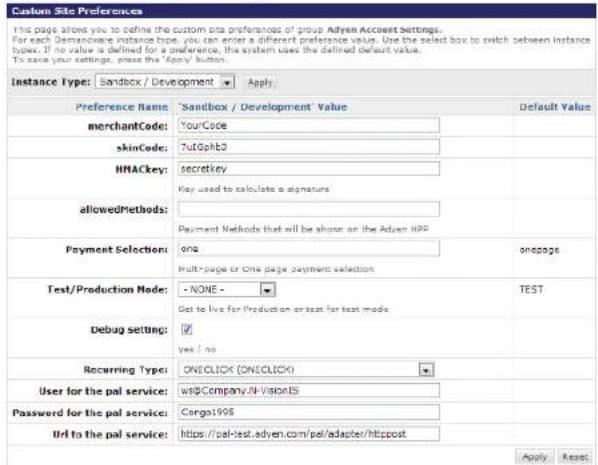
Custom Site Preference Groups > Adyen Account Settings
chance to inspect the contents of the form being sent to Adyen.
After selecting a product and entering your address you should select 'Adyen' as the Payment Method and click the 'CONTINUE' button :
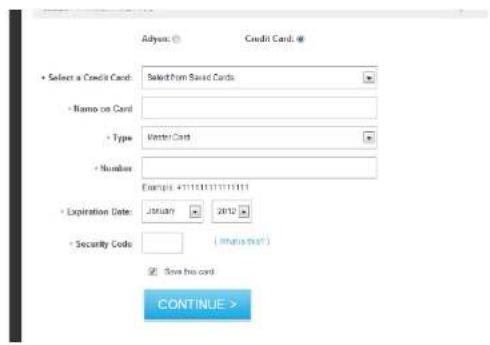
You will see the checkout page and can press the 'SUBMIT ORDER' button.
If debug is enabled you will see a small button. You can then check the form that will be submitted via Chrome's 'inspect' method (or a 'view source' on other browsers).

![●body is "ext gen" class="ext gen(+)" ●idc style "displayonly" class="dev-object de-object page" id="ext gen(+)".dly [1] "type="open", "select="let", "output="user", "test-size (int_wgen)" datalHTML="http://localhost:08006/target/rt/int_wgen/default/default/default.html">> ●form name="showFore" id="showFore" action="https://test.wogen.com/hp/pay.shtml" method="post"> input type="hidden" name="skinCase" value="7169433" input type="hidden" name="merchantCode" value="viewvision" input type="hidden" name="supportlink" value="masterscan.com" input type="hidden" name="shopperReference" value="ashWtbc(DBT2510xNtNetf1) input type="hidden" name="recurringContract" value="ONECLOCK" input type="hidden" name="allowsMethod" value input type="hidden" name="merchantReference" value="0000265" input type="hidden" name="shipforCode" value="201-05-0612012012021000" input type="hidden" name="sessionValidity" value="2018-04-041204202100" input type="hidden" name="berichtigSize" value="boxPUPCPLPwCrlctnong123s1" input type="hidden" name="payentAmount" value="1154" input type="hidden" name="currencyCode" value="1154" input type="hidden" name="resFull" value="https://key01.tech-prm-wu1.du.demandware.net/odemandware-store/silcs-NL-S1#default/wenShowConfirmation" input type="small" value="pay" style="margin-left_100px"](/content/2026/06/1188780/images/97655884986b3fe80de8b49b3bf87167196f2daa3728a2fdcebc5bbcc1650486.jpg)
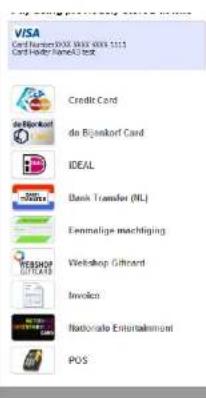
If debug is not enabled you will be redirected immediately and will see a list of payment methods (depends on your country).

positive
Next Step. Enter your Pay
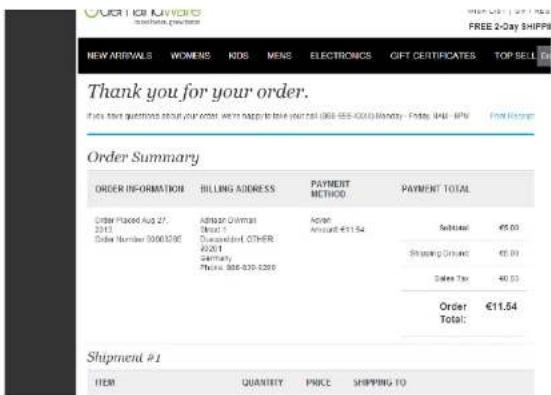
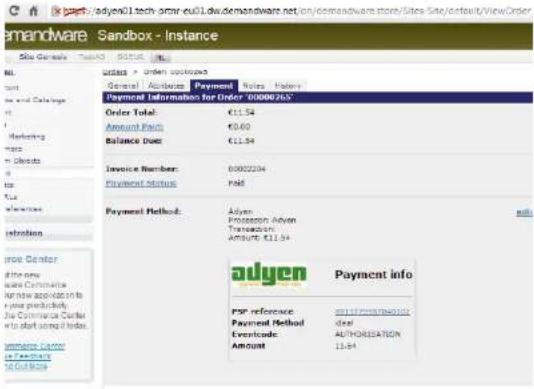
In business manager you can check the result of the payment in the Payment tab of the order detail screen (Payment Status should be Paid and the Adyen Eventcode should be AUTHORISATION):
Custom Site Preference Groups > Adyen Account Settings
Custom Site Preferences
adapter are correct.
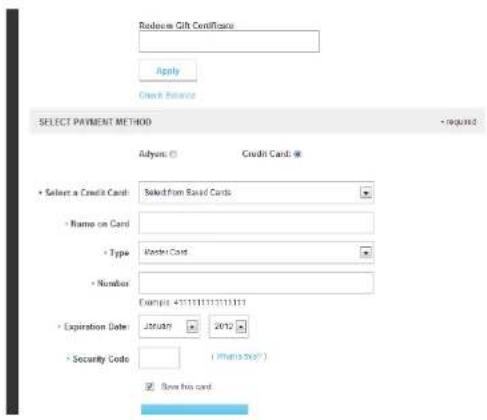
Enter the card details and click 'CONTINUE'
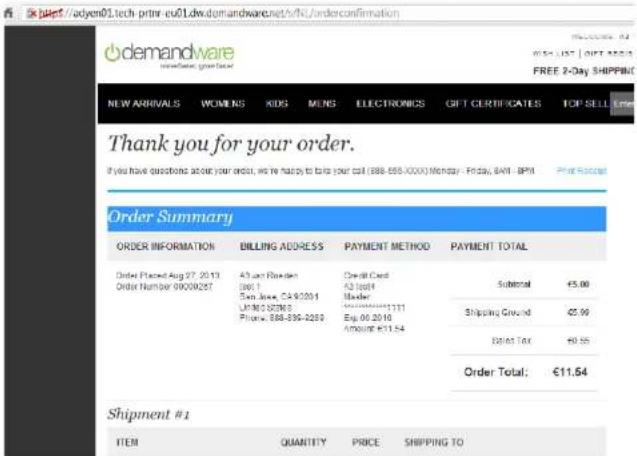
In BM, check the order status :
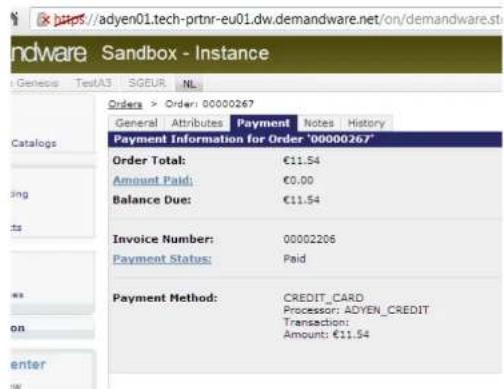
- You will need a configured Adyen account
- You'll probably want to style (skin) the Adyen HPP so that it matches the look and feel of your store. See the Adyen skin manual or contact Adyen support for more info.
- Successful Authorisations lead to a 'Paid' order status
- Unsuccessful Authorisations lead to a 'not Paid' order status
- Refunds lead to a 'not Paid' order status (even if the status was 'Paid' before)
- Payments are 'captured' according to setting in the Adyen backoffice
2.4 Compatibility
Based on DW version 13.3.1 and SiteGenesis 2.0
- If only redirect is used, all the payment data is entered into the Adyen HPP by the shopper and no Creditcard data will be stored inside DemandWare (except the brand of card used).
- The shopper email address and shopper ID used in DemandWare will be sent to Adyen to enable recurring and/or 'one click' payments.
3.1 Setup
Please install the int_adyen cartridge in the regular way using UX studio and the downloaded zip file.
3.2 Configuration
Import attributes and settings from within BM (Administration > Site Development > Site Import & Export).
Load the 'site-template.zip file'
The following configuration items will be added :
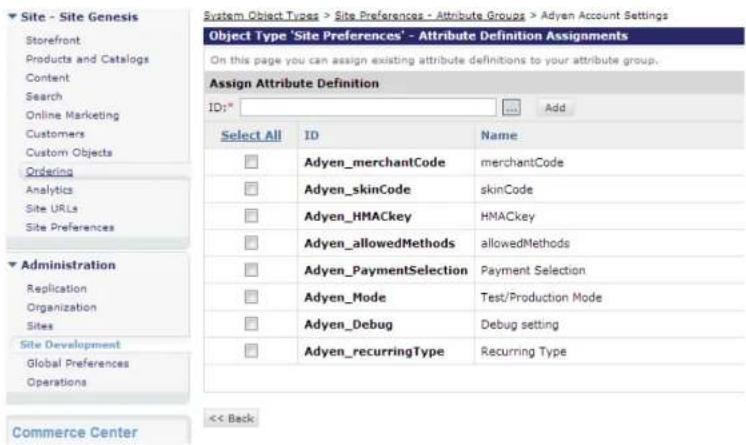
For configuration of these parameters see the section about testing below
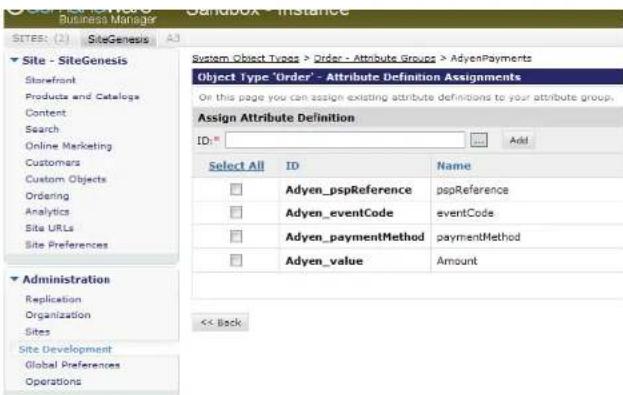
Please see section 5.2 about the use of these attributes
The following steps are needed to complete the integration :
• Install cartridge
- Import site template (system objects)
- Change COSummary pipeline
- Configure Merchant's Adyen Account in the Adyen Backoffice
- Configure Adyen parameters in DW
- Test
• Create Skin for Adyen HPP
All in all, these steps should not require more than a few hours (creating the Skin can require several hours depending on complexity of styling).
Note that the name of your storefront site ID should match the name in the site template - otherwise you will get import errors. See 'Additional Configuration' in section 3.5.
Also note that the payment methods 'Adyen' and 'Credit Card' and the payment processors 'Adyen' and Adyen-Credit' will be created from the site template.
Below is an example of a skin styled to look like the SiteGenesis store (note that this page is hosted on an Adyen Server):
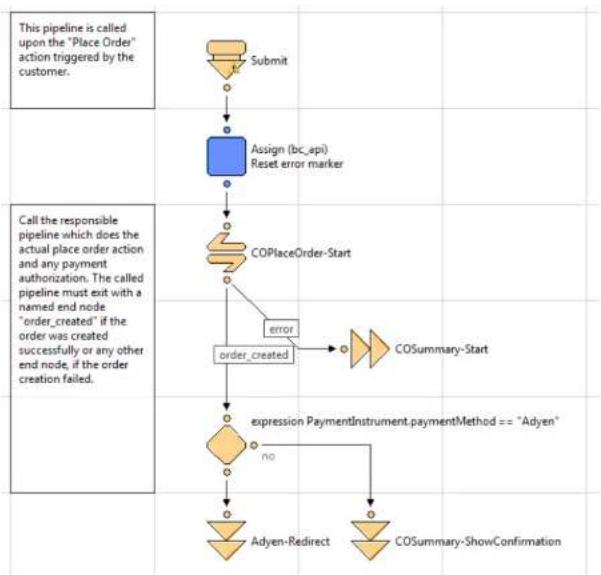
Instead of showing a confirmation page, the shopper is redirected to Adyen using the Adyen-redirect pipeline.
The confirmation page is shown only when the amount is covered by a Gift Certificate
Change the Submit pipeline so it will look like below :
flowchart
graph TD
    A["Submit"] --> B["Assign (bc_api) Reset error marker"]
    B --> C["COPlaceOrder-Start"]
    C --> D["order_created"]
    D --> E{expression PaymentInstrument.paymentMethod == "Adyen"}
    E -->|no| F["Adyen-Redirect"]
    E -->|yes| G["COSummary-ShowConfirmation"]
    H["This pipeline is called upon the "Place Order" action triggered by the customer."] --> A
    I["Call the responsible pipeline which does the actual place order action and any payment authorization. The called pipeline must exit with a named end node "order_created" if the order was created successfully or any other end node, if the order creation failed."] --> C
Pipelines in the Adyen Cartridge
Contains pipelines to handle the redirect to Adyen and to process notifications.
The COSummary-ShowConfirmation pipeline has been recreated here and will be called by Adyen when the shopper returns. You will not need to change anything.
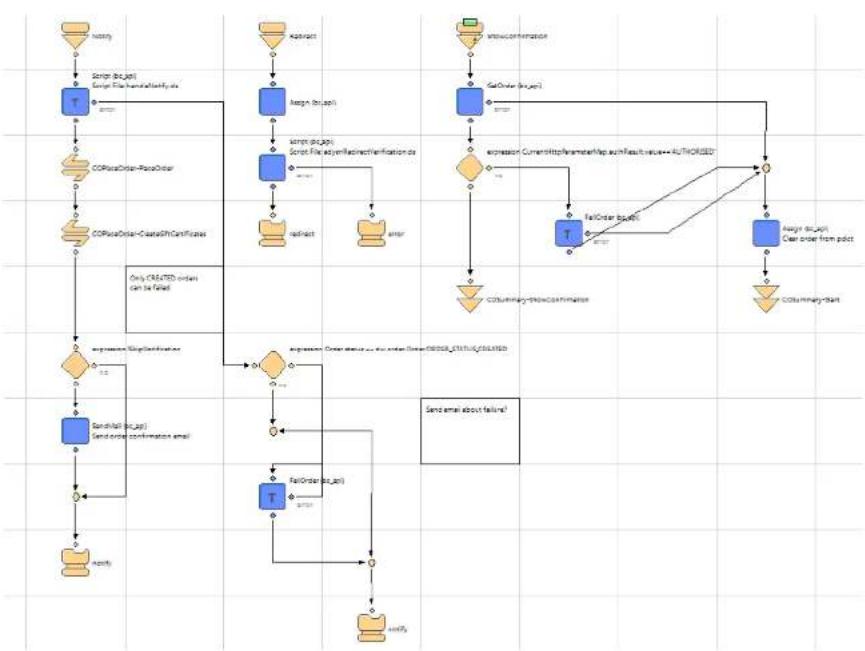
Adyen API payments / Credit Card payments
These are handled in the separate Adyen-Credit pipeline.
This effect calls a script which is configured in the Adyen backbone (settings) to perform individualizations: OpenInvoice Retrieve Details). The adress/URL of the script should point to the Afterpay pipeline in the Adyen cartridge.
Example :
https://adyen01.tech-prtnr-eu01.dw.demandware.net/on/demandware.store/Sites-SiteGenesis-Site/default/Adyen-Afterpay
Capturing the payment can be done via the Adyen CA or by setting up auto capture (contact Adyen support)
IP check
You can enhance the security of the nofitation delivery by checking the IP address of the incoming call against the IP address of the Adyen servers. In the cartridge the script ipCheck.ds can be used for that – you should insert it in the Notify pipeline (after the Start Node).
3.4 External Interfaces
None
Make sure you have an Adyen test account. Configure your account and then configure the Adyen settings in the BM.
Test Creditcards
In case you want to test creditcards as a payment method, Adyen provides some test numbers you can use. Please check the following link as these numbers may change :
https://support.adyen.com/index.php?/Knowledgebase/Article/View/11/0
Adyen account configuration
Here are some items that need to be configured in the Adyen Customer Area (CA) for the Adyen Integration to work correctly. You can find the CA at https://ca-test.adyen.com.
HMAC key
Secret key used to calculate a signature over the payment fields sent to Adyen. This should match what is used in the Adyen configuration settings in your DW site.
SkinCode
Code of the skin you want to use. You can use different skins, each having a different configuration, style, language etc
Notification URL and test page
URL where Adyen should send notification messages to. The script at this URL should always reply with [accepted], otherwise Adyen will keep sending messages. The URL will point to your DW store e.g.:
https://adyen01.tech-prtnr-eu01.dw.demandware.net/on/demandware.store/DemosSiteGenesis-Site/default/Adyen-Notify
The Notification URL and it's response can be tested from within the CA.
Payment Methods
You can select which payment methods should be displayed by configuring your skin. This can also be influenced with the 'allowedMethods' parameter that can be sent to Adyen for each payment.
T-21100--J-Li-
Business Manager configuration
Please read the Adyen Integration manual for more info about these attributes.
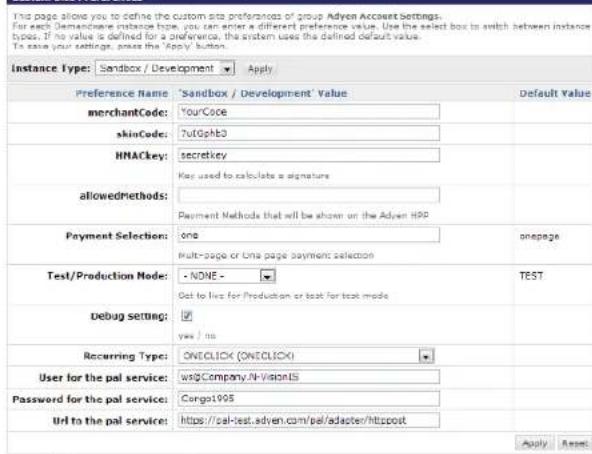
Some example settings are shown below :
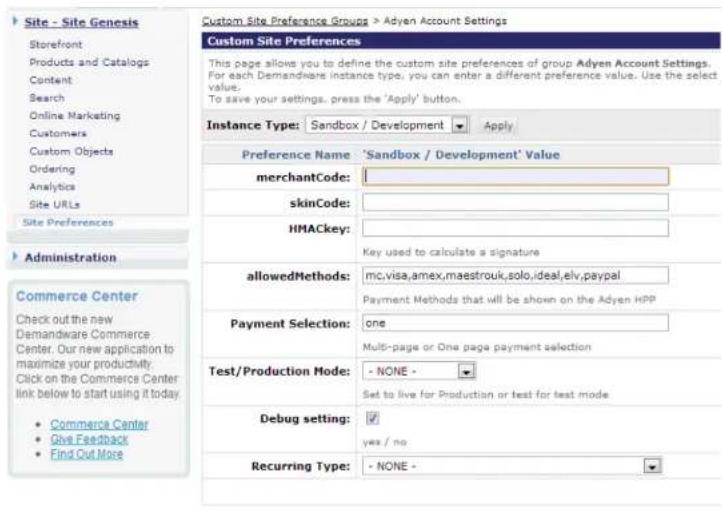
The Debug Setting set to 'yes' shows a 'pay' button before doing the redirect to Adyen. This allows you to check the parameters sent to the HPP.
Additional configuration
You may need to change the ID of the storefront application. This can be defined in the file int_adyen.properties in the templates/resources directory of the int_adyen cartridge.
example entry:
# defines what ID the storefront application cartridge has - default is app_id demandware.core.cartridge=SiteGenesisNew
4.1 Data Storage
For each order which resulted in a payment attempt on the Adyen HPP, the payment results are available in the following fields :
● PSP Reference - unique Adyen ID of this event
- Payment Method
- Eventcode - AUTHORISED, CANCELLATION, REFUND etc
- Amount – Amount paid
They are stored here by the Adyen_Notification pipeline which receives the notification messages from Adyen.
On top of that, all the communication to/from Adyen is logged in the log file directory available via webDAV. Please check this first in case you have any problems.
4.2 Availability
In case of problems with the connection to Adyen please contact the Adyen support department.
Please supply as much information as possible (Merchant account, skincode, time, order number, PSPReference etc. etc.). Also check the log file mentioned above.
4.3 Support
In case of problems with the integration, missing features, etc. please contact the Adyen support department or your Adyen account manager.
5.1 Roles, Responsibilities
The store administrator should check the correct configuration of the Adyen Merchant account in the Adyen BackOffice (CA) and should check the reception of the Adyen notification messages on a regular basis.
Also check the payments received to see if they contain the expected data (currencyCode, amount, shopperEmail, etc)
5.2 Business Manager
Please configure the settings relevant to the Adyen integration as described in section 3.5.
After a completed payment, the Payments tab of the order will then look like this :
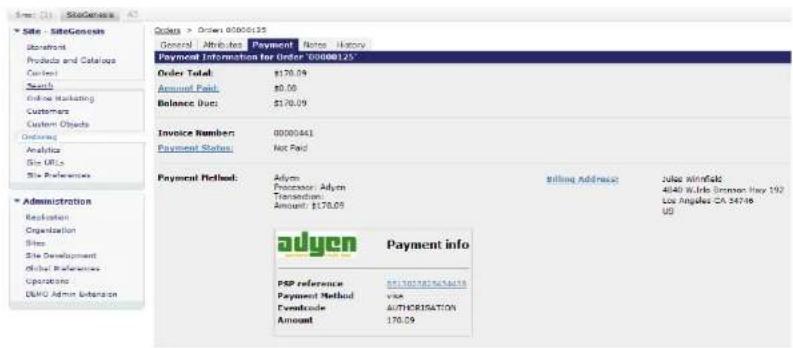
Note that you can click on the PSP reference to go directly to the payment details in the Adyen backoffice (if you have logged in first).
In the Adyen backoffice you can also link back to DW by setting Merchant Settings > Merchant
Sma: (2) SiteGenesis A3
Site - SiteGenesis
Storefront
Products and Catalogs
Content
Search
Online Marketing
Customers
Custom Objects
Ordering
Analytics
Site URLs
Site Preferences
Administration
Replication
Organization
Sites
Site Development
Global Preferences
Operations
DEMO Admin Extension
Orders > Order: 00000124
General Attributes Payment Notes History
Payment Information for Order '00000124'
Order Total: \$204.08
Amount Paid: \$0.00
Balance Due: \$204.08
Invoice Number: 00000440
Payment Status: Not Paid
Payment Method: Adyen
Processor: Adyen Transaction
Amount: \$204.08

Payment info
PSP reference 8813032964180602
Payment Method visa
Eventcode REFUND
Amount 204.08
This integration provides no new functionality
- 'Session validity' and 'Shipbeforedate' are not used.
● Partial payments are not supported
| Version | Date | Changes |
| 1.0.0 | April 27, 2011 | Initial release |
| 1.0.1 | May 20, 2011 | GC changes |
| 2 | June 06,2013 | Plug and play, API payments |
| 2 | August 16,2013 | Minor changes to documentation |