WMi1010 - Washing machine Caple - Free user manual and instructions
Find the device manual for free WMi1010 Caple in PDF.


User questions about WMi1010 Caple
0 question about this device. Answer the ones you know or ask your own.
Ask a new question about this device
Download the instructions for your Washing machine in PDF format for free! Find your manual WMi1010 - Caple and take your electronic device back in hand. On this page are published all the documents necessary for the use of your device. WMi1010 by Caple.
USER MANUAL WMi1010 Caple
THIS APPLIANCE COMPLIES WITH EUROPEAN DIRECTIVES
EMC 89/336/ECC
LOW VOLTAGE 73/23/ECC
ECC-LABELLING 93/68/ECC
IMPORTANT: You must read this instruction book before installing or using this appliance and retain it for future use.
Caple Products
Telephone 0870 2411142
Facsimile 0117 982 6878
INSTALLATION INSTRUCTIONS
Positioning

text_image
COUNTERNUT ADJUSTABLE FEETAfter your washing machine has been placed in the desired location, level it by means of the front left foot, then the counter nut must be locked by means of the special key provided.
Warning: if the machine is not perfectly leveled, it will be unstable, noisy and may lead to malfunctions and broken parts. Do not place the machine on mats or carpets.
Water connection
natural_image
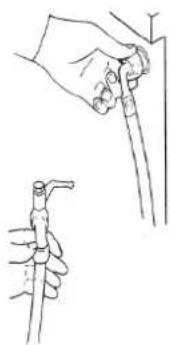
Line drawing of two hands holding a tool, one pointing at the tip and the other holding a cap (no text or symbols)COLD WATER HOSE = WHITE HOSE HOT WATER HOSE = BLACK HOSE
Connect the water supply hoses to hot & cold water taps with a 3/4" (gas type) fitting, insert the rubber sealing washers supplied with the machine and fully tighten the ring nuts. If the water tap is new or has not been used for a long time it is recommended to let the water run for a while before completing the connection. Connect the other end of the water supply hose to the machine and again insert the rubber washer between the hose and the solenoid valve fitting.
Drain Hose
text_image
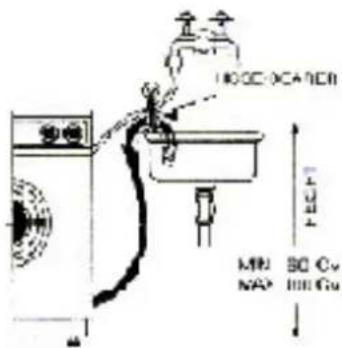
LOCC-SCANNER MAX NAP 30 V 100µF LOCCInsert the drain hose into a drain pipe (with a minimum internal diameter of 4cm) or hook it on a sink or bathtub, without crimping or creating any sharp curves. The hose should be positioned at a height ranging from a minimum of 60cm to a maximum of 100cm as shown in the figure.
Electrical Connection
Make sure that the electrical system can support the maximum current load indicated on the rating plate on the rear side of the machine. The washing machine should be connected to an electrical grounded outlet, as prescribed by law. This outlet must be easily accessible after the installation of the washing machine.
If the supply card is damaged, it should be replaced by a special cable available at the manufacturers or at the technical service.
The company will not be responsible for any damage to persons or things due to non-compliance with these instructions.
CLEANING AND MAINTENANCE
This washing machine does not require any particular maintenance. At the end of each wash, it is recommended to leave the door open so that air will circulate and dry the interior of the machine. The external parts of the machine should never be cleaned with abrasive detergents since this would ruin the enamel coating as well as the synthetic parts.
Removing and cleaning filter
natural_image
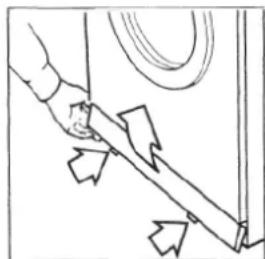
Simple line drawing of a hand holding a tool with directional arrows indicating movement or force (no text or symbols)Remove the plastic base guard at the bottom of the machine by pressing and pulling upwards on the two tabs.
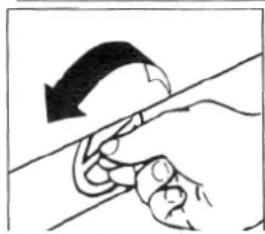
Place a rag under the washing machine to adsorb any residual water. The filter is located under the base. Turn the filter handle counterclockwise and pull out the filter. Clean it under running water. Reinsert the filter and turn the handle clockwise until it is completely locked. WARNING: water may leak from the filter if it is not properly tightened. Remember to clean the filter frequently to avoid excessive clogging.
natural_image
Illustration of a hand holding a curved object with an arrow indicating direction (no text or symbols)TECHNICAL FEATURES
Length 595 mm
Depth 530 mm
Height 850 mm
Capacity
Cotton 5 kg max. of dry linen
Synthetic and mixed fabrics. 2,5 kg max. of dry linen
Wool 1 kg max, of dry linen
Voltage and frequency 230 V / 50 Hz
Fuse 10 amp
Water pressure required in water mains min. 0.1 Mpa (1 Bar) max. 1.0 Mpa (10 Bar)
BEFORE CALLING THE TECNICAL SERVICE CENTRE
Check if plug is inserted
Check that power is available
Check that the door is properly closed
Check that the water tap is open
Check that the water supply hose and water drain hose are not blocked
NOTE: - if you have to call the service centre, specify the model of your washing machine and if necessary the Serial Number which is indicated on the rating plate on the back of the machine.
How to use your washing machine economically and ecologically.
Optimum load - Always try to use the washing machine at full load, as this will use less water, washing powder and energy than two smaller loads.
You want to use the pre-wash? - Only use the pre-wash for very dirty linen. If you don't use the pre-wash, you save from 5% to 15% in energy, washing powder, water and time.
Is a high temperature wash required? - To avoid high temperature washing, treat particularly dirty items with a stain remover or leave the worst stains to soak beforehand. You will save energy in this way.
FUNCTIONS AND PREPARATION FOR WASHING
Detergent dispenser

text_image
1 2 4 3 AThe detergent dispenser is divided into four compartments
- Pour washing detergent in this compartment for the prewash cycle (MAX 45 grams).
-
Washing detergent in this compartment for the wash cycle (MAX 130 grams).
-
Pour bleaching liquid into this compartment following the advice on the packing (do not exceed in quantity over the filter grid)
-
Pour softener into this compartment following the advice on the packing (max 60 ml - do not exceed in quantity over the filter grid)
Close the dispenser after the detergent compartments have been filled. It is recommended to use non-foaming detergents and a softener in case of hard water.
Cleaning of the dispenser
It is advisable to clean the compartment regularly, as explained below: - press lever (A) and slide the compartment out of it's housing;
- Remove the siphon cover of compartment 3-4;
- Wash everything with running water;
- Replace the siphon cover in the compartment making sure it fits perfectly in its housing;
- Replace the compartment in its housing.
Door

Use the handle to open the door.
During the wash cycle, a special safety device keeps the door locked. To open the door, turn off the machine using the ON-OFF switch and wait 2 minutes before turning the handle to open the door.
Sorting clothes
natural_image
Simple line drawing of a hand holding a piece of dough or dough, with no text or symbols present.Each of the following groups should be sorted and washed separately according to the cycle specified in the cycle table:
- White and resistant colored fabrics
• Non-resistant colored fabrics
• Delicate fabrics (silk, polyester, nylon, etc.) - Wool
Washing Operations
- Sort the clothes
- Place them uniformly inside the drum
- Select the most suitable cycle for the fabrics (see wash cycle table)
- Set the cycle by following the instructions in the "control panel" section and turn on the machine by pushing the ON/OFF button.
WARNING: Set the cycle only when the machine is off. - Always turn the control dial clockwise. If you pass the desired position, make a complete turn and reset the dial to the exact position.
CONTROL PANEL
text_image
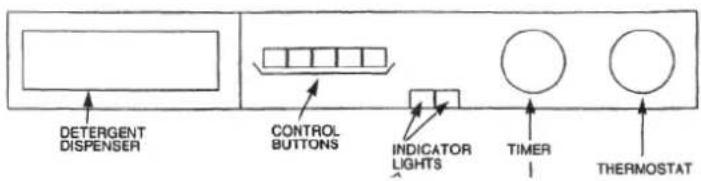
DETERGENT DISPENSER CONTROL BUTTONS INDICATOR LIGHTS TIMER THERMOSTATTo become familiar with your machine functions, compare the symbols on the control panel with those described below.
ON/OFF

By pressing this button the machine turns on and executes the set wash cycle. It is used to turn the washing machine on and off.
POWER INDICATOR

When lit, it indicates that the washing machine is electrically energized.
HALF LOAD

Reduces the amount of water used in the wash and rinse cycles, thus greatly reducing water and electricity consumption as well as the amount of washing detergent. It is used to wash a reduced load of dry clothes (MAX 2.5 kg).
ENERGY SAVINGS

By pressing this button the washing temperature will remain at 60^ C thus greatly reducing the electricity consumption. It is used for slightly dirty clothes on white normal wash cycles with or without prewashing and in particular wash detergents recommended for washing at 60^ C or liquid detergents.
COLD WASH

When this button is pressed, the machine will not use the wash water heater. It is used for slightly dirty clothes or for temperature-sensitive fabrics.
SPIN BY-PASS BUTTON

By pushing this button the washing machine will not spin during or at the end of the wash cycle. This function is used for no-spin fabrics.
SPIN SELECTION BUTTON
SPIN SELECTION BUTTON
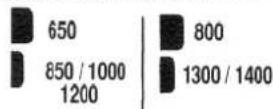
By pushing this button (according to the model type) the machine will perform the final spin at the maximum spin speed setting (i.e. 850-1000-1200-1300-1400). It is used for resistant fabrics so that there will be less water in the wash at the end of the spin cycle.
SPINNING INDICATOR LIGHT
850 1000
When lit it indicates that the final spin at the maximum rotation speed has been selected.
SUPPLEMENTARY RINSING
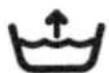
By pushing it, the number of rinsings will be increased by a unit, both in the delicate and in the normal programs.
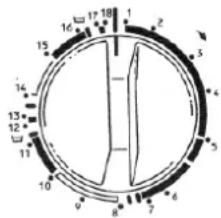
TIMER DIAL
text_image
12 15 17 18 1 2 3 4 5 6 7 8 9 10 11 12 13 14 15Used to select the wash cycles and to display them during operation. To select the cycles, turn the dial clockwise until the mark coincides with the selected cycle. WARNING: Do not turn the timer dial while the machine is energized. Do not turn the timer dial counterclockwise.
THERMOSTAT DIAL
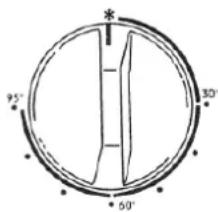
text_image
95° 60° 30°To set the temperature, turn the dial until the mark coincides with the selected temperature. It is used to regulate the washing temperature from 30^ C to 95^ C based on the selected wash cycle and the type of fabrics to be washed. It is recommended to follow the wash cycle table. By turning the dial to this symbol the machine will perform a cold wash cycle, which is particularly indicated for delicate temperature-sensitive fabrics.
AUTOMATIC NO-WRINKLE
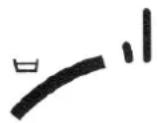
In the delicate and wool cycles, the washing machine will stop after the last rinse without draining the water. To drain water and perform a short spin cycle, set the timer dial to the delicate spin cycle (see wash cycle table). To drain only the water, set the timer dial to the drain cycle (see wash cycle table). In both cases the machine will complete the cycle automatically.
DOOR OPENING KNOB
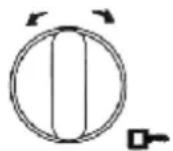
On the models where this function is provided, the door can be opened simply by turning the knob either to the right or to the left.
WARNING!
If the washing machine is not used for a long period of time, the door may not open spontaneously the first time when the handle is turned. In this case, turn the handle and pull the door at the same time.
COTTON AND LINEN CYCLES
| Cycles Description | Type of fabric | Detergent dispenser to be used | Thermostat position | Wash cycle description | |
| 1 | Very dirty | For very dirty Resistant (cotton, (linen) fabrics, also With organic stains | 1-2(3-4) | 40^-95^ | Wash prewashWash from 40^ to 95^ RinseIntermediate and final spin |
| 2 | Very dirty | For very dirty resistant fabrics (sheets, shirts, tablecloths) | 2(3-4) | *40^-95^ | Wash from 40^ to 95^ RinseIntermediate and final spin |
| 3 | Very dirty | For normally dirty resistant fabrics (sheets, shirts, tablecloths) | 2(3-4) | 40^-60^ | Wash from 40^ to 60^ RinseIntermediate and final spin |
| 4 | Slightly dirty | For slightly dirty solid-color resistant fabrics (sheets, shirts, tablecloths) | 2-(4) | * - 40^ | Wash from * to 40^ RinseIntermediate and final spin |
| 5 | Rinse Bleaching | To rinse white resistant fabrics and clothes | (3) | RinseIntermediate and final spin | |
| 6 | Softener | To soften fabrics and clothes | 4 | Last rinseFinal spin | |
| 7 | Spin | Final spin | |||
* EN 60456 Prog. 2/60°C
WASH CYCLES FOR SYNTHETIC AND MIXED FABRICS
| CyclesDescription | Type of fabric | Detergent dispenser to be used | Thermostat position | Cycle Description | |
| 8 | Normally dirty | For normally dirty delicate and synthetic fabrics | 2-(4) | 40^ - 60^ | Wash from 40^ to 60^ RinseStops with water in drum |
| 9 | Normally dirty | For normally dirty delicate and synthetic fabrics which require warm washing | 2-(4) | * - 40^ | Wash from * to 40^ RinseStops with water in drum |
| 10 | Rinse | To rinse delicate and synthetic fabrics and clothes | (4) | RinseStops with water in drum | |
| 11 | Softener | To soften delicate and synthetic fabrics and clothes | 4 | Last rinseStops with water in drum | |
| 12 | Delicate spin | Delicate spin | |||
| 13 | Drain | To drain water without spinning | Drain water with drum spinning at low speed | ||
WOOL CYCLE
| 14 | Virgin wool | For wool clothes that requires very delicate wash in warm water | 2-(4) | * - 30° | Wash from * at 30°C Rinse Stops with water in drum |
| 15 | Rinse | To rinse delicate. synthetic Fabrics and clothes | (4) | Rinse Stops with water in drum | |
| 16 | Softener | To soften delicate and synthetic fabrics and clothes | 4 | Last rinse Stops with water in drum | |
| 17 | Delicate spin | Wool spin | |||
| 18 | Drain | To drain water without drum spinning | Drain water without drum spinning |
FITTING DÉCOR DOOR
Make holes on the wooden door according to the instructions enclosed with the machine.
• Take hinges (A) out of the bag and fix them to the door.
• Take jack (B), its support (C) and fix one to the other by means of screws (G).
• Install hinges (A), jack (B) and separator (E) to the door.
• Fix stopping hook (D) to front panel of the washing machine by means of screws (F).
- Insert caps (H) into the holes, as shown in the figure.
• Make holes into the base and fix magnets (L).
DOOR OPENING REVERSAL
To open the door from left to right, follow the instructions by turning the position of the holes. If the machine is to be fitted underneath a work surface and the distance that the appliance needs to be raised is greater than 10 mm, then a solid one-piece baseboard should be used.
