
EFLU3750 - Remote control toy E-flite - Free user manual and instructions
Find the device manual for free EFLU3750 E-flite in PDF.


| Product Type | Radio-Controlled Model Aircraft (RC Jet) |
| Brand | E-flite |
| Model | EFLU3750 (EFL UMX A-10 BNF Basic) |
| Wingspan | 22.1 in (562 mm) |
| Height | 20.3 in (516 mm) |
| Wing Area | 83.7 sq. in. (5.40 dm²) |
| Weight | 5.9 oz (167 g) |
| Motor | (2) BL180M 13500Kv Brushless Inrunner |
| Receiver | DSMX UM 6-Channel AS3X with Twin Brushless ESC |
| Servos | (4) 2.3g Performance Linear Long Throw Servo (SPMSA2030L) |
| Recommended Battery | 800mAh 2S 7.4V 30C Li-Po (EFLB8002SJ30) |
| Recommended Charger | Celectra 2S 7.4V DC Li-Po Charger (EFLUC1007) |
| Recommended Transmitter | Full range Spektrum DSM2/DSMX with dual rates (DXe and up) |
| Control System | 6-channel, AS3X stabilization, dual rates, expo |
| Center of Gravity | 34–36 mm from leading edge at wing root |
| Material | Foam (EPO) construction |
| Flight Time | Approximately 5 minutes (recommended timer for first flight) |
| Age Recommendation | Not for children under 14 years |
| Safety Features | Low Voltage Cutoff (LVC), Over Current Protection (OCP) |
| Warranty | Limited warranty by Horizon Hobby, LLC |
Frequently Asked Questions - EFLU3750 E-flite
User questions about EFLU3750 E-flite
0 question about this device. Answer the ones you know or ask your own.
Ask a new question about this device
Download the instructions for your Remote control toy in PDF format for free! Find your manual EFLU3750 - E-flite and take your electronic device back in hand. On this page are published all the documents necessary for the use of your device. EFLU3750 by E-flite.
USER MANUAL EFLU3750 E-flite
natural_image
Line drawing of a vintage military aircraft with twin engines and fuselage (no text or symbols)Instruction Manual
Bedienungsanleitung
All instructions, warranties and other collateral documents are subject to change at the sole discretion of Horizon Hobby, LLC. For up-to-date product literature, visit www.horizonhobby.com and click on the support tab for this product.
Meaning of Special Language:
The following terms are used throughout the product literature to indicate various levels of potential harm when operating this product:
NOTICE: Procedures, which if not properly followed, create a possibility of physical property damage AND little or no possibility of injury.
CAUTION: Procedures, which if not properly followed, create the probability of physical property damage AND a possibility of serious injury.
WARNING: Procedures, which if not properly followed, create the probability of property damage, collateral damage, and serious injury OR create a high probability of superficial injury.

WARNING: Read the ENTIRE instruction manual to become familiar with the features of the act before operating. Failure to operate the product correctly can result in damage to the product,onal property and cause serious injury.
This is a sophisticated hobby product. It must be operated with caution and common sense and requires some basic mechanical ability. Failure to operate this product in a safe and responsible manner could result in injury or damage to the product or other property. This product is not intended for use by children without direct adult supervision. Do not use with incompatible components or alter this product in any way outside of the instructions provided by Horizon Hobby, LLC. This manual contains instructions for safety, operation and maintenance. It is essential to read and follow all the instructions and warnings in the manual, prior to assembly, setup or use, in order to operate correctly and avoid damage or serious injury.
Age Recommendation: Not for children under 14 years. This is not a toy.
Safety Precautions and Warnings
- Always keep a safe distance in all directions around your model to avoid collisions or injury. This model is controlled by a radio signal subject to interference from many sources outside your control. Interference can cause momentary loss of control.
- Always operate your model in open spaces away from full-size vehicles, traffic and people.
- Always carefully follow the directions and warnings for this and any optional support equipment (chargers, rechargeable battery packs, etc.).
• Always keep all chemicals, small parts and anything electrical out of the reach of children. -
Always avoid water exposure to all equipment not specifically designed and protected for this purpose. Moisture causes damage to electronics.
-
Never place any portion of the model in your mouth as it could cause serious injury or even death.
- Never operate your model with low transmitter batteries.
- Always keep aircraft in sight and under control.
• Always use fully charged batteries. - Always keep the transmitter powered on while aircraft is powered.
- Always remove batteries before disassembly.
• Always keep moving parts clean.
• Always keep parts dry.
• Always let parts cool after use before touching.
• Always remove batteries after use. - Always ensure failsafe is properly set before flying.
- Never operate aircraft with damaged wiring.
- Never touch moving parts.
Table of Contents
Transmitter and Receiver Binding......4
Low Voltage Cutoff (LVC) 4
ESC/Receiver Arming, Battery Installation and Center of Gravity....5
Control Centering 6
Factory Control Horn Settings....6
Dual Rates and Expos 6
Landing Gear Removal....7
Control Direction Test....8
AS3X Direction Test....9
Flying Tips and Repairs....10
Motor Service 11
Post Flight Checklist 12
Troubleshooting Guide ......12
Troubleshooting Guide (Continued)....13
Limited Warranty 13
Warranty and Service Contact Information .....15
IC Information....15
FCC Information....15
Compliance Information for the European Union..16
Replacement Parts....59
Optional Parts and Accessories 60
Specifications

other
| Dimension | Value | | ----------------- | ----------- | | Width (in) | 22.1 in (562mm) | | Height (in) | 20.3 in (516mm) | | Wing Area | 83.7 sq. in. (5.40 dm2) | | Weight (g) | 5.9 oz |


Installed
(2) Motors: BL180M, 13500Kv inrunner brushless motor
Receiver: DSMX ^® UM 6-Ch AS3X ^® w/Twin Brushless ESC
(4) 2.3-Gram Performance Linear Long Throw Servo (SPMSA2030L)
Required to Complete
Recommended Battery: 800mAh 2S 7.4V 30C Li-Po, (EFLB8002SJ30)
Battery Charger: Celectra™ 2S 7.4V DC Li-Po Charger (EFLUC1007)
Recommended Transmitter: Full range Spektrum™ DSM2®/DSMX® with dual-rates (DXe and up)
Preflight Checklist
| √ | |
| 1. Charge flight battery. | |
| 2. Install flight battery in aircraft (once it has been fully charged). | |
| 3. Bind aircraft to transmitter. | |
| 4. Make sure linkages move freely. | |
| 5. Perform Control Direction Test with transmitter. | |
| 6. Perform AS3X Control Direction Test with aircraft. | |
| √ | |
| 7. Set dual rates. | |
| 8. Adjust center of gravity. | |
| 9. Perform a radio system Range Check. | |
| 10. Find a safe and open area. | |
| 11. Plan flight for flying field conditions. | |
| 12. Set flight timer for 5 minutes for first flight. | |
Transmitter and Receiver Binding
For a list of compatible DSM2/DSMX transmitters, please visit www.bindnfly.com
| ✓ Binding Procedure | |
| CAUTION: When using a Futaba transmitter with a Spektrum DSM® module, you must reverse the throttle channel and rebind. Refer to your Spektrum module manual for binding and failsafe instructions. Refer to your Futaba transmitter manual for instructions on reversing the throttle channel. | |
| 1. Refer to your transmitter's unique instructions for binding to a receiver (location of transmitter's Bind control). | |
| 2. Make sure the flight battery is disconnected from the aircraft. | |
| 3. Ensure the transmitter is powered OFF. | |
| 4. Connect the flight battery to the aircraft and turn the aircraft upright. The receiver LED will begin to flash (typically after 5 seconds). | |
| 5. Ensure that control surface trims are centered and the throttle and throttle trims are in the low position to correctly set the failsafe. | |
| 6. Put your transmitter into bind mode. Refer to your transmitter's manual for binding button or switch instructions. | |
| 7. After 5 to 10 seconds, the receiver status LED will turn solid, indicating that the receiver is bound to the transmitter. If the LED does not turn solid, refer to the Troubleshooting Guide at the back of the manual. | |
For subsequent flights, power ON the transmitter for 5 seconds before connecting the flight battery.
Low Voltage Cutoff (LVC)
When a Li-Po battery is discharged below 3V per cell, it will not hold a charge. The aircraft's ESC protects the flight battery from over-discharge using Low Voltage Cutoff (LVC). Once the battery discharges to 3V per cell, the LVC will reduce the power to the motor in order to leave adequate power to the receiver and servos to land the aircraft.
When the motor power decreases, land the aircraft immediately and replace or recharge the flight battery.
Always disconnect and remove the Li-Po battery from the aircraft after each flight. Charge your Li-Po battery to about half capacity before storage. Make sure the battery charge does not fall below 3V per cell. Failure to unplug a connected battery will result in trickle discharge.
For your first flights, set your transmitter timer or a stopwatch to 5 minutes. Adjust your timer for longer or shorter flights once you have flown the model.
NOTICE: Repeated flying to LVC will damage the battery.
ESC/Receiver Arming, Battery Installation and Center of Gravity
NOTICE: Always keep material or debris away from the intake. When armed, the rotor will turn in response to throttle movement and could ingest in any loose objects.
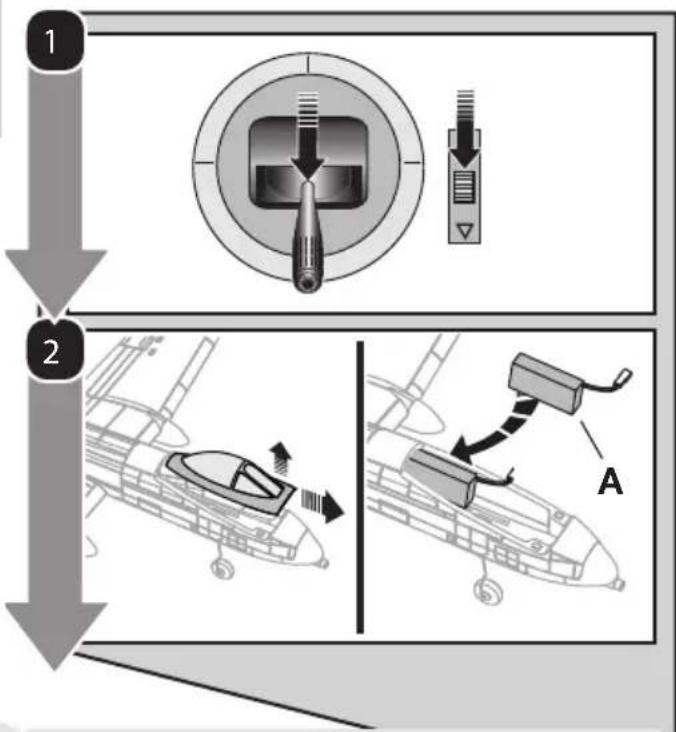
Arming the ESC/receiver also occurs after binding as previously described, but subsequent connection of a flight battery requires the following steps.
- Lower the throttle and throttle trim to the lowest settings on your transmitter.
- Remove the battery/canopy hatch from the fuselage and install a flight battery (A) all the way to the back of the battery comportment.
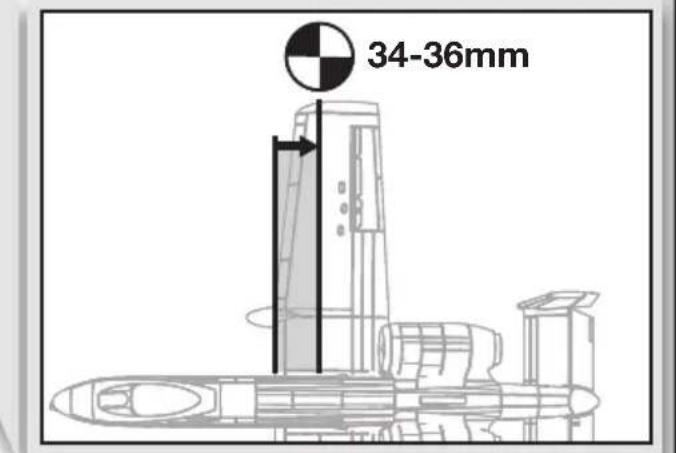
Center of Gravity (CG)
The CG location is 34-36mm back from the leading edge of the wing at the root. Balance the airplane inverted on this recommended CG mark with all landing gear installed. Adjust as needed by sliding the battery forward or back.
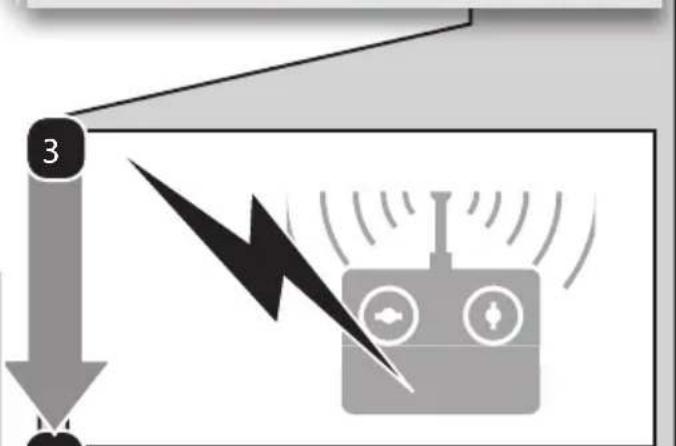
- Power on your transmitter, then wait 5 seconds.
- Connect the battery to the ESC, noting proper polarity. Keep the plane immobile and away from wind for 5 seconds to allow the AS3X system to initialize.
A successful connection is indicated by:
- A series of tones
- A continuous LED

CAUTION: Always disconnect the Li-Po y from the ESC when not flying to eliminate r supplied to the motor. The ESC does not an arming switch and will respond to any mitter input when a signal is present.

CAUTION: Always disconnect the Li-Po rty from the ESC when not flying to avoid discharging the battery. Batteries discharged voltage lower than the lowest approved ge may become damaged, resulting in loss of remance and potential fire when batteries charged.

Control Centering
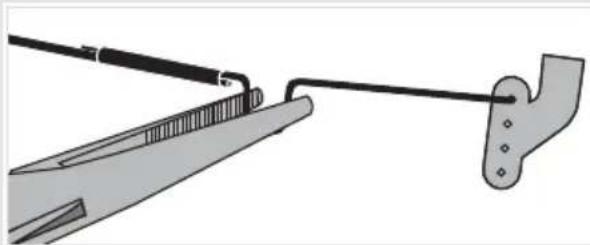
Before the first flights, or in the event of an accident, make sure control surfaces are centered when the transmitter controls and trims are neutral. The transmitter sub-trim must be set to zero. Adjust the linkages mechanically if the control surfaces are not centered. Use of the transmitter sub-trims may not correctly center the aircraft control surfaces due to the mechanical limits of linear servos.
- Make the U-shape narrower to make the connector shorter. Make the U-shape wider to make the linkage longer.
- Ensure that the leading edge of both the horizontal stabilizers are 1mm above the lower edge of the side panel, as shown in the image to the right.
natural_image
Diagram of a cable being inserted into a clip, showing wire and clamping mechanism (no text or symbols)Factory Control Horn Settings
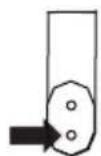
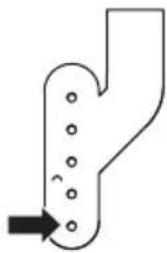
The illustration shows the factory settings for linkages on the control horns. Linkage connections on the control horns directly affect aircraft response.
Rudder
Ailerons
natural_image
Simple line drawing of a Y-shaped pipe with circular holes and an arrow pointing to it (no text or symbols)Elevator
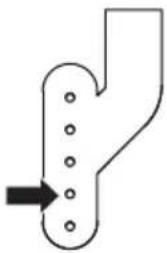
natural_image
Simple line drawing of a Y-shaped pipe with circular holes and an arrow pointing to the left side (no text or symbols)Dual Rates and Expos
To obtain the best flight performance, we recommend using a DSM2/DSMX transmitter capable of Dual Rates and Expo. Before binding, ensure that you are starting with a blank acro model in your transmitter. Set wing type and servo reversing to normal.
The suggested settings shown here are the recommended starting settings. Adjust according to the individual preferences after the initial flight.
NOTICE: Do not set your transmitter travel adjust over 100%. If the TRAVEL ADJUST is set over 100%, it will not result in more control movement, it will overdrive the servo and cause damage.
It is normal for linear servos to make significant noise. The noise is not an indication of a faulty servo.
| Dual Rates Expos | ||||
| High | Low | High | Low | |
| Aileron 100% | 70% | 10% | 0% | |
| Elevator 100% | 70% | 10% | 0% | |
| Rudder 100% | 70% | 10% | 0% | |
Tip: For landing, we recommend using high rate elevator.
Landing Gear Removal
- Carefully pull the gear straight out of the retainer clip that secures it into the fuselage.
When needed, assemble in reverse order.
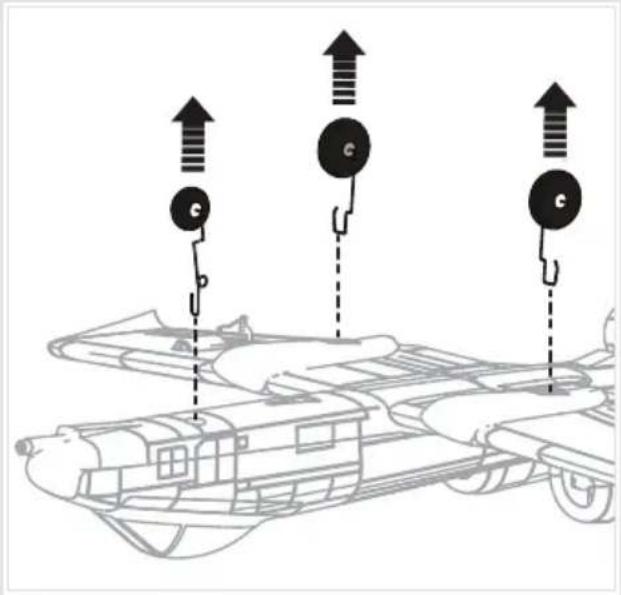
When the landing gear is reinstalled, make sure the nose gear is angled forward as shown.

natural_image
Technical line drawing of a spacecraft or aircraft interior with a directional arrow indicating motion (no text or symbols present)Control Direction Test
You should bind your aircraft and transmitter before doing these tests.
Move the controls on the transmitter to make sure the aircraft control surfaces move correctly and in the proper direction.
Make sure the tail linkages move freely and that paint or decals are not adhered to them.
| ElevatorAilero | Transmitter Command | Aircraft Reaction |
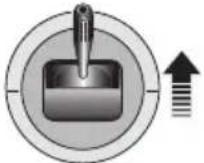 | Down E' elevator 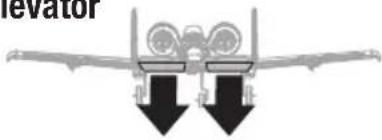 | |
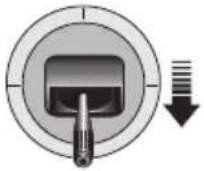 | Up Elevator  | |
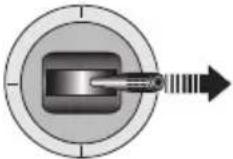 | Right R  | |
 | Left R  | |
 | Right Rudder  | |
 | Left Rudder  |
Arrows indicate the direction of the trailing edge of the control surface.
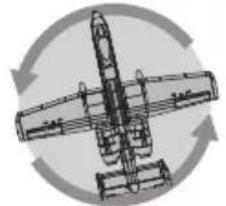
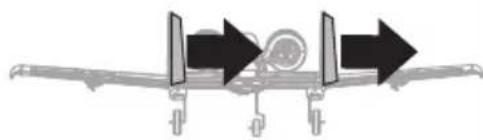
AS3X Direction Test
You should bind your aircraft and transmitter before doing these tests.
Move the controls on the transmitter to make sure the aircraft control surfaces move correctly and in the proper direction.
Make sure the tail linkages move freely and that paint or decals are not adhered to them.
| Aircraft movement | AS3X Reaction |
 | 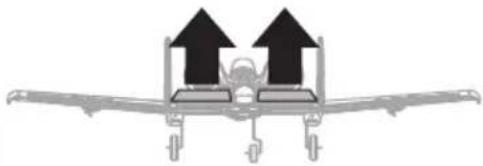 |
 | 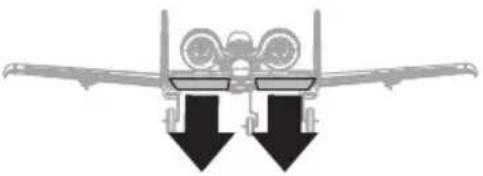 |
 |  |
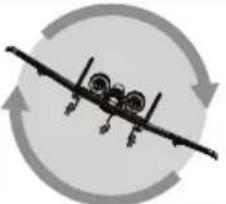 | 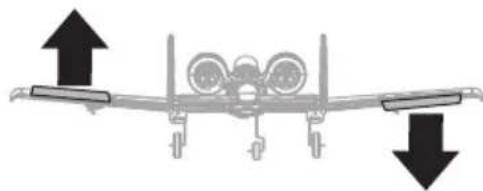 |
 |  |
 | 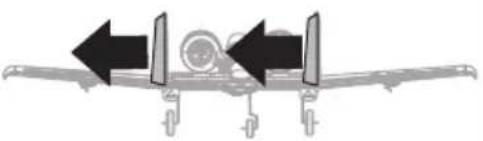 |
Arrows indicate the direction of the trailing edge of the control surface.
Flying Tips and Repairs
Range Check your Radio System
After final assembly, range check the radio system with the aircraft. Refer to your specific transmitter instruction manual for range test information.
Flying
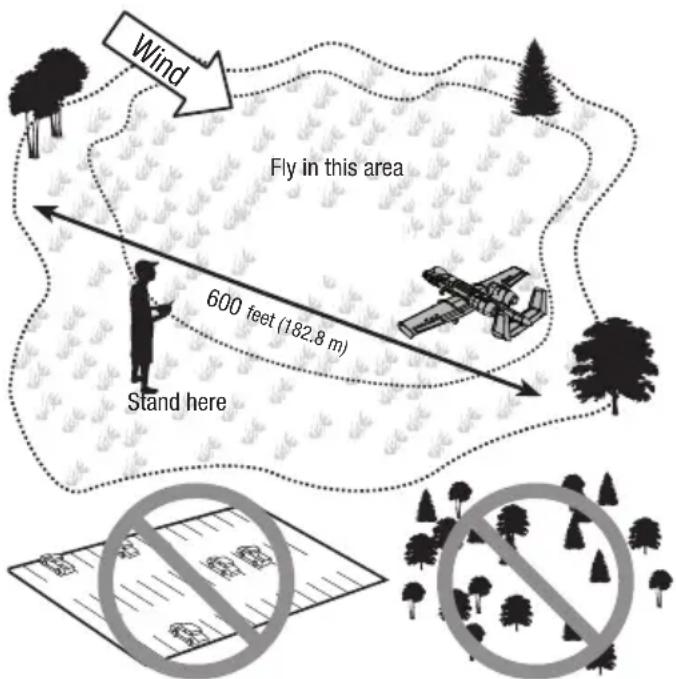
We recommend flying your aircraft outside in no greater than moderate winds or inside in a very large indoor facility. Always avoid flying near houses, trees, wires and buildings. Be careful to avoid flying in areas where there are many people, such as busy parks, schoolyards or soccer fields. Consult local laws and ordinances before choosing a location to fly your aircraft.
Hand Launching
Hold the aircraft just behind the wings. Apply full throttle with a little up elevator and give a firm toss directly into the wind with the nose pointed slightly up (5–10 degrees above the horizon). After the model gains altitude, decrease the throttle as you desire.
The A-10 has a high thrust line. If the model is not launched with enough airspeed or the throttle is added quickly at very low airspeed the aircraft will pitch down slightly. Adding some up elevator trim for the first few hand launches is recommended, until you are comfortable with the launching characteristics of this aircraft.
Tip: The electric ducted fans (EDF) acts like a jet aircraft, so control is generated by airspeed rather than air from a propeller moving over the control surfaces.
Takeoff
Taxi the aircraft in position for takeoff (facing into the wind if flying outdoors). Gradually increase the throttle to full power, holding a small amount of up elevator and steering with the rudder. Climb gently to check trim. Once the trim is adjusted, begin exploring the flight envelope of the aircraft.
Landing
Always land into the wind. Fly the landing pattern with a slightly nose high attitude. Use throttle management to control the decent rate of the aircraft.
During flare, keep the wings level and the airplane pointed into the wind. Gently lower the throttle while pulling back on the elevator to bring the aircraft down on the main wheels or to belly land without landing gear.
NOTICE: Always fully lower the throttle when landing the aircraft to prevent intake of foreign objects, which can damage the ducted fan and motor.
Failure to lower the throttle stick and trim to the lowest possible positions during a crash could result in damage to the ESC in the receiver unit, which may require replacement.
Over Current Protection (OCP)
The aircraft is equipped with Over Current Protection. OCP protects the ESC from overheating and stops the motor when the transmitter throttle is set too high and the rotor cannot turn. OCP will only activate when the throttle is positioned just above 1/2 throttle. After the ESC stops the motor, fully lower the throttle to re-arm the ESC.
Disassembly

CAUTION: DO NOT handle the rotor or motor while the flight battery is connected. Personal injury could result.
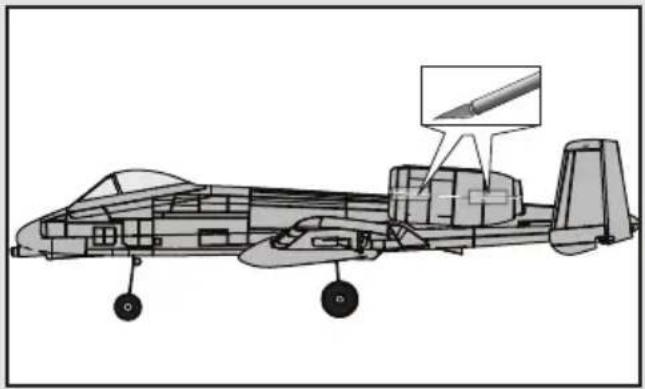
- The lower half of the nacelle hatch is secured to the top half using glue and clear tape. Carefully cut the clear tape and follow the seam with a knife to cut the glue and remove the bottom half of the nacelle.
NOTICE: Removing tape or decals can damage paint on your aircraft. Avoid pinching or otherwise damaging any wires when opening or closing the fuselage.
- Disconnect the motor from the receiver.
- Carefully remove the lower half of the nacelle (A) from the upper half of the nacelle.
- Remove the 4 screws (B) and fan unit (C) from the upper nacelle half.
- Put a small flat blade screwdriver in the motor mount hole (D) and carefully push the rotor (E) away from the motor shaft. Rotate the rotor while prying it away from the motor (F) to avoid bending the motor shaft.
- Remove the 4 screws (G) and motor from the motor mount.
Assembly
- Assemble in reverse order, connecting the top and bottom half of the nacelle with clear tape and or foam safe CA.
NOTICE: Always install the motor mount so that the rotor faces the front of the fuselage and the hole in the unit faces the bottom of the fuselage.
natural_image
Technical line drawing of a military aircraft with visible structural components and an inset detail (no text or symbols)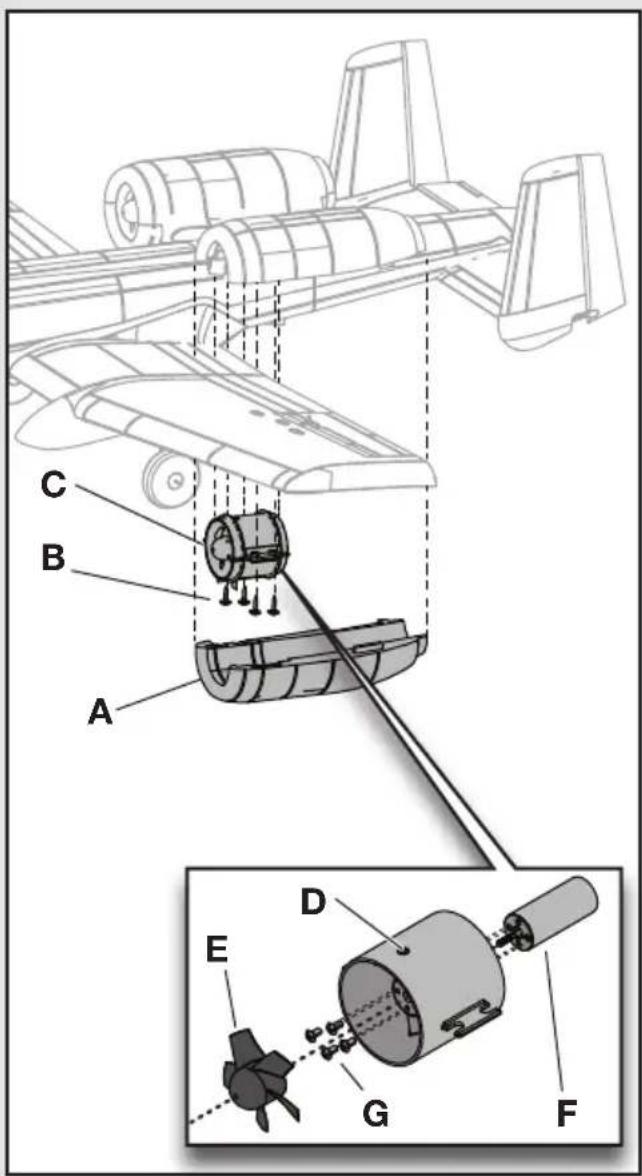
Post Flight Checklist
| √ | |
| 1. Disconnect the flight battery from the ESC (Required for safety and battery life). | |
| 2. Power OFF the transmitter. | |
| 3. Remove the flight battery from the aircraft. | |
| 4. Recharge the flight battery. | |
| √ | |
| 5. Store the flight battery apart from the aircraft and monitor the battery charge. | |
| 6. Make note of the flight conditions and flight plan results, planning for future flights. | |
Troubleshooting Guide
| AS3X | ||
| Problem Possible Cause Solution | ||
| Control surfaces not at neutral position when transmitter controls are at neutral | Control surfaces may not have been mechanically centered from factory | Center control surfaces mechanically by adjusting the U-bends on control linkages |
| Aircraft was moved after the flight battery was connected and before sensors initialized | Disconnect and reconnect the flight battery while keeping the aircraft still for 5 seconds | |
| Model flies inconsistently from flight to flight | Aircraft was not kept immobile for 5 seconds after battery was plugged in | Keep the aircraft immobile for 5 seconds after plugging in the battery |
| Trims are moved too far from neutral position | Neutralize trims and mechanically adjust linkages to center control surfaces | |
| Controls oscillate in flight, (model rapidly jumps or moves) | Rotor is unbalanced, causing excessive vibration | Remove rotor and motor. Check motor shaft for straightness and replace rotor if damaged |
| Problem Possible Cause Solution | ||
| Aircraft will not respond to throttle but responds to other controls | Throttle stick and/or throttle trim too high Reset controls with throttle stick and throttle trim at lowest setting | |
| Throttle channel is reversed Reverse throttle channel on transmitter | ||
| Motor disconnected from receiver Open fuselage and make sure motor is connected to the receiver | ||
| Flight battery charge is low Fully recharge flight battery | ||
| Extra motor noise or extra vibration | Damaged rotor or motor Replace damaged parts | |
| Rotor out of balance Balance or replace the rotor | ||
| Reduced flight time or aircraft underpowered | Flight battery charge is low Completely recharge flight battery | |
| Flight battery damaged Replace flight battery and follow flight battery instructions | ||
| Flight conditions may be too cold Make sure battery is warm before use | ||
| Battery capacity too low for flight conditions Replace battery or use a larger capacity battery | ||
| LED on receiver flashes and aircraft will not bind to transmitter (during binding) | Transmitter too near aircraft during binding process | Power off transmitter, move transmitter a larger distance from aircraft, disconnect and reconnect flight battery to aircraft and follow binding instructions |
| Bind switch or button not held long enough during bind process | Power off transmitter and repeat bind process. Hold transmitter bind button or switch until receiver is bound | |
| Aircraft or transmitter is too close to large metal object, wireless source or another transmitter | Move aircraft and transmitter to another location and attempt binding again | |
| LED on receiver flashes rapidly and aircraft will not respond to transmit-ter (after binding) | Less than a 5-second wait between first powering on transmitter and connecting flight battery to aircraft | Leaving transmitter on, disconnect and reconnect flight battery to aircraft |
| Aircraft bound to different model memory (ModelMatchTM radios only) | Select correct model memory on transmitter and disconnect and reconnect flight battery to aircraft | |
| Flight battery/transmitter battery charge is too low | Replace/recharge batteries | |
| Transmitter may have been bound to a different model (or with a different DSM Protocol) | Select the right transmitter or bind to the new one | |
| Aircraft or transmitter is too close to large metal object, wireless source or another transmitter | Move aircraft and transmitter to another location and attempt linking again | |
| Control surface does not move | Control surface, control horn, linkage or servo damage | Replace or repair damaged parts and adjust controls |
| Wire damaged or connections loose Do a check of wires and connections, con-nect or replace as needed | ||
| Flight battery charge is low Fully recharge flight battery | ||
| Control linkage does not move freely Make sure control linkage moves freely | ||
| Controls reversed Transmitter settings reversed Adjust controls on transmitter appropriately | ||
| Motor loses power Damage to motor or power components Do a check of motor and power components for damage (replace as needed) | ||
| Motor power quickly decreases and in-creases then motor loses power | Battery power is down to the point of receiver/ESC Low Voltage Cutoff (LVC) | Recharge flight battery or replace battery that is no longer performing |
| Servo locks or freezes at full travel | Travel adjust value is set above 100%, overdriving the servo | Set Travel adjust to 100% or less and/or set sub-trims to Zero and adjust linkages mechanically |
Limited Warranty
What this Warranty Covers
Horizon Hobby, LLC, (Horizon) warrants to the original purchaser that the product purchased (the "Product") will be free from defects in materials and workmanship at the date of purchase.
What is Not Covered
This warranty is not transferable and does not cover (i) cosmetic damage, (ii) damage due to acts of God, accident, misuse, abuse, negligence, commercial use, or due to improper use, installation, operation or maintenance, (iii) modification of or to any part of the Product, (iv) attempted service by anyone other than a Horizon Hobby authorized service center, (v) Product not purchased from an authorized Horizon dealer, or (vi) Product not compliant with applicable technical regulations, or (vii) use that violates any applicable laws, rules, or regulations.
OTHER THAN THE EXPRESS WARRANTY ABOVE, HORIZON MAKES NO OTHER WARRANTY OR REPRESENTATION, AND HEREBY DISCLAIMS ANY AND ALL IMPLIED WARRANTIES, INCLUDING, WITHOUT LIMITATION, THE IMPLIED WARRANTIES OF NON-INFRINGEMENT, MERCHANTABILITY AND FITNESS FOR A PARTICULAR PURPOSE. THE PURCHASER ACKNOWLEDGES THAT THEY ALONE HAVE DETERMINED THAT THE PRODUCT WILL SUITABLY MEET THE REQUIREMENTS OF THE PURCHASER'S INTENDED USE.
Purchaser's Remedy
Horizon's sole obligation and purchaser's sole and exclusive remedy shall be that Horizon will, at its option, either (i) service, or (ii) replace, any Product determined by Horizon to be defective.
Horizon reserves the right to inspect any and all Product(s) involved in a warranty claim. Service or replacement decisions are at the sole discretion of Horizon. Proof of purchase is required for all warranty claims. SERVICE OR REPLACEMENT AS PROVIDED UNDER THIS WARRANTY IS THE PURCHASER'S SOLE AND EXCLUSIVE REMEDY.
Limitation of Liability
HORIZON SHALL NOT BE LIABLE FOR SPECIAL, INDIRECT, INCIDENTAL OR CONSEQUENTIAL DAMAGES, LOSS OF PROFITS OR PRODUCTION OR COMMERCIAL LOSS IN ANY WAY, REGARDLESS OF WHETHER SUCH CLAIM IS BASED IN CONTRACT, WARRANTY, TORT, NEGLIGENCE, STRICT LIABILITY OR ANY OTHER THEORY OF LIABILITY, EVEN IF HORIZON HAS BEEN ADVISED OF THE POSSIBILITY OF SUCH DAMAGES. Further, in no event shall the liability of Horizon exceed the individual price of the Product on which liability is asserted. As Horizon has no control over use, setup, final assembly, modification or misuse, no liability shall be assumed nor accepted for any resulting damage or injury. By the act of use, setup or assembly, the user accepts all resulting liability. If you as the purchaser or user are not prepared to accept the liability associated with the use of the Product, purchaser is advised to return the Product immediately in new and unused condition to the place of purchase.
Law
These terms are governed by Illinois law (without regard to conflict of law principals). This warranty gives you specific legal rights, and you may also have other rights which vary from state to state. Horizon reserves the right to change or modify this warranty at any time without notice.
WARRANTY SERVICES
Questions, Assistance, and Services
Your local hobby store and/or place of purchase cannot provide warranty support or service. Once assembly, setup or use of the Product has been started, you must contact your local distributor or Horizon directly. This will enable Horizon to better answer your questions and service you in the event that you may need any assistance. For questions or assistance, please visit our website at www.horizonhobby.com, submit a Product Support Inquiry, or call the toll free telephone number referenced in the Warranty and Service Contact Information section to speak with a Product Support representative.
Inspection or Services
If this Product needs to be inspected or serviced and is compliant in the country you live and use the Product in, please use the Horizon Online Service Request submission process found on our website or call Horizon to obtain a Return Merchandise Authorization (RMA) number. Pack the Product securely using a shipping carton. Please note that original boxes may be included, but are not designed to withstand the rigors of shipping without additional protection. Ship via a carrier
that provides tracking and insurance for lost or damaged parcels, as Horizon is not responsible for merchandise until it arrives and is accepted at our facility. An Online Service Request is available at http://www.horizonhobby.com/content/_service-center_render-service-center. If you do not have internet access, please contact Horizon Product Support to obtain a RMA number along with instructions for submitting your product for service. When calling Horizon, you will be asked to provide your complete name, street address, email address and phone number where you can be reached during business hours. When sending product into Horizon, please include your RMA number, a list of the included items, and a brief summary of the problem. A copy of your original sales receipt must be included for warranty consideration. Be sure your name, address, and RMA number are clearly written on the outside of the shipping carton.
NOTICE: Do not ship LiPo batteries to Horizon. If you have any issue with a LiPo battery, please contact the appropriate Horizon Product Support office.
Warranty Requirements
For Warranty consideration, you must include your original sales receipt verifying the proof-of-purchase date. Provided warranty conditions have been met, your Product will be serviced or replaced free of charge. Service or replacement decisions are at the sole discretion of Horizon.
Non-Warranty Service
Should your service not be covered by warranty, service will be completed and payment will be required without notification or estimate of the expense unless the expense exceeds 50% of the retail purchase cost. By submitting the item for service you are agreeing to payment of the service without notification. Service estimates are available upon request. You must include this request with your item submitted for service. Non-warranty service estimates will be billed a minimum of 12 hour of labor. In addition you will be billed for return freight. Horizon accepts money orders and cashier's checks, as well as Visa, MasterCard, American Express, and Discover cards. By submitting any item to Horizon for service, you are agreeing to Horizon's Terms and Conditions found on our website http://www.horizonhobby.com/content/_service-center_render-service-center.
ATTENTION: Horizon service is limited to Product compliant in the country of use and ownership. If received, a non-compliant Product will not be serviced. Further, the sender will be responsible for arranging return shipment of the un-serviced Product, through a carrier of the sender's choice and at the sender's expense. Horizon will hold non-compliant Product for a period of 60 days from notification, after which it will be discarded.
Warranty and Service Contact Information
| Country of Purchase Horizon Hobby Phone Number/Email Address Address | |||
| United States of America | Horizon Service Center (Repairs and Repair Requests) | servicecenter.horizonhobby.com/RequestForm/ | 4105 Fieldstone Rd Champaign, Illinois, 61822 USA |
| Horizon Product Support (Product Technical Assistance) | productsupport@horizonhobby.com877-504-0233 | ||
| Sales | websales@horizonhobby.com800-338-4639 | ||
| United Kingdom | Service/Parts/Sales: Horizon Hobby Limited | sales@horizonhobby.co.uk+44 (0) 1279 641 097 | Units 1–4 , Ployters Rd, Staple Tye Harlow, Essex, CM18 7NS, United Kingdom |
| Germany | Horizon Technischer Service Sales: Horizon Hobby GmbH | service@horizonhobby.de+49 (0) 4121 2655 100 | Christian-Junge-Straße 1 25337 Elmshorn, Germany |
| France | Service/Parts/Sales: Horizon Hobby SAS | infofrance@horizonhobby.com+33 (0) 1 60 18 34 90 | 11 Rue Georges Charpak 77127 Lieusaint, France |
IC Information
IC ID: 6157A-EFLAS6410NBLT
Under Industry Canada regulations, this radio transmitter may only operate using an antenna of a type and maximum (or lesser) gain approved for the transmitter by Industry Canada. To reduce potential radio interference to other users, the antenna type and its gain should be so chosen that the equivalent isotropically radiated power (e.i.r.p.) is not more than that necessary for successful communication.
This device complies with Industry Canada licence-exempt RSS standard(s). Operation is subject to the following two conditions: (1) this device may not cause interference, and (2) this device must accept any interference, including interference that may cause undesired operation of the device."
FCC Information
FCC ID: BRWEFLAS6410NBLT
This equipment has been tested and found to comply with the limits for Part 15 of the FCC rules. These limits are designed to provide reasonable protection against harmful interference in a residential installation. This equipment generates uses and can radiate radio frequency energy and, if not installed and used in accordance with the instructions, may cause harmful interference to radio communications.
However, there is no guarantee that interference will not occur in a particular installation. If this equipment does cause harmful interference to radio or television reception, which can be determined by turning the equipment off and on, the user is encouraged to try to correct the interference by one or more of the following measures:
- Reorient or relocate the receiving antenna.
- Increase the separation between the equipment and receiver.
- Connect the equipment to an outlet on a circuit different from that to which the receiver is connected.
This device complies with part 15 of the FCC rules. Operation is subject to the following two conditions: (1) This device may not cause harmful interference, and (2) this device must accept any interference received, including interference that may cause undesired operation.
Note: Modifications to this product will void the user's authority to operate this equipment.
Compliance Information for the European Union
CE
EFL UMX A-10 BNF Basic (EFLU3750)
EU Compliance Statement: Horizon Hobby, LLC hereby declares that this product is in compliance with the essential requirements and other relevant provisions of the RED Directive.
A copy of the EU Declaration of Conformity is available online at: http://www.horizonhobby.com/content/support-render-compliance.
Instructions for disposal of WEEE by users in the European Union

This product must not be disposed of with other waste. Instead, it is the user's responsibility to dispose of their waste equipment by handing it over to a designated collections point for the recycling of waste electrical and electronic equipment. The separate collection and recycling of your waste equipment at the time of disposal will help to conserve natural resources and ensure that it is recycled in a manner that protects human health and the environment. For more information about where you can drop off your waste equipment for recycling, please contact your local city office, your household waste disposal service or where you purchased the product.
© 2016 Horizon Hobby, LLC.
E-flite, AS3X, UMX, DSM, DSM2, DSMX, ModelMatch, Bind-N-Fly, Celectra and the Horizon Hobby logo are trademarks or registered trademarks of Horizon Hobby, LLC.
The Spektrum trademark is used with permission of Bachmann Industries, Inc.
Futaba is a registered trademark of Futaba Denshi Kogyo Kabushiki Kaisha Corporation of Japan.
All other trademarks, service marks and logos are property of their respective owners. US 7,898,130. US D578,146. PRC ZL 200720069025. PRC ZL 2007001249, US 8,672,726.
Other patents pending.



- Meaning of Special Language:
- Age Recommendation: Not for children under 14 years. This is not a toy.
- Safety Precautions and Warnings
- Table of Contents
- Specifications
- Installed
- Required to Complete
- Preflight Checklist
- Transmitter and Receiver Binding
- Low Voltage Cutoff (LVC)
- ESC/Receiver Arming, Battery Installation and Center of Gravity
- Center of Gravity (CG)
- Control Centering
- Factory Control Horn Settings
- Dual Rates and Expos
- Landing Gear Removal
- Control Direction Test
- AS3X Direction Test
- Flying Tips and Repairs
- Range Check your Radio System
- Flying
- Hand Launching
- Takeoff
- Landing
- Over Current Protection (OCP)
- Disassembly
- Assembly
- Post Flight Checklist
- Troubleshooting Guide
- Limited Warranty
- What this Warranty Covers
- What is Not Covered
- Purchaser's Remedy
- Limitation of Liability
- Law
- WARRANTY SERVICES
- Questions, Assistance, and Services
- Inspection or Services
- NOTICE: Do not ship LiPo batteries to Horizon. If you have any issue with a LiPo battery, please contact the appropriate Horizon Product Support office.
- Warranty Requirements
- Non-Warranty Service
- Warranty and Service Contact Information
- IC Information
- IC ID: 6157A-EFLAS6410NBLT
- FCC Information
- FCC ID: BRWEFLAS6410NBLT
- Compliance Information for the European Union
- CE
- Instructions for disposal of WEEE by users in the European Union
Brand : E-flite
Model : EFLU3750
Category : Remote control toy