PT2815SS - Cooker BAUMATIC - Free user manual and instructions
Find the device manual for free PT2815SS BAUMATIC in PDF.


User questions about PT2815SS BAUMATIC
0 question about this device. Answer the ones you know or ask your own.
Ask a new question about this device
Download the instructions for your Cooker in PDF format for free! Find your manual PT2815SS - BAUMATIC and take your electronic device back in hand. On this page are published all the documents necessary for the use of your device. PT2815SS by BAUMATIC.
USER MANUAL PT2815SS BAUMATIC
PT2815SS 90cm Multi-function twin cavity cooking theatre
Instruction manual
User Manual for your Baumatic
PT2815SS
90 cm Multi-function twin cavity cooking theatre

natural_image
Modern stainless steel electric stove with dual doors and control knobs (no visible text or symbols)
text_image
Baumatic®You will be mine ...
NOTE: This User Instruction Manual contains important information, including safety & installation points, which will enable you to get the most out of your appliance. Please keep it in a safe place so that it is easily available for future reference; for you or any person not familiar with the operation of the appliance.
DD 22/02/07
Contents
| Environmental note | 4 | ||||||||||||
| Important safety information | 5 - 9 | ||||||||||||
| S | p | e | c | i | f | i | c | a | t | i | o | n | s |
| Thermostat control knob (main oven) | 11 | ||||||||||||
| Oven function selector knob (main oven) | 11 | ||||||||||||
| Oven function and thermostat control knob (secondary oven) | 11 | ||||||||||||
| O | v | e | n | p | r | o | g | r | a | m | m | e | |
| Oven | programmer/timer | display | 12 | ||||||||||
Setting and using the oven programmer/timer 13
| Selecting | manual | operation | mode | 13 | |
| Setting | the | time | of | day | 13 |
| Setting | the | minute | minder | function | |
| Setting | the | duration | function | 15 | |
| Setting | the | end | cook | function | 16 |
| Setting the start and end time function | 17 | ||||
Selecting a cooking function and temperature
| Selecting | manual | operation | mode | 18 | |||||
| Before | first | use | 18 | ||||||
| Selecting a main oven function | 18 - 19 | ||||||||
| Thermostat control knob (main oven) | 20 | ||||||||
| Selecting an oven function and temperature (secondary oven) | 20 | ||||||||
| O | v | e | n | o | p | e | r | a | t |
| Cooking | guidelines | 21 | |||||||
| Warnings | 21 | - | |||||||
| Using | the | ceramic | hob | top | 22 | |||||||
| Using | the | hob | top | zones | 22 | |||||||
| Using the dual zone on the ceramic hob | 23 | |||||||||||
| H | o | b | g | u | i | d | e | l | i | n | e | s |
Cleaning and maintenance
| Cleaning the ceramic hob top | 26 | |||||||
| A f t e r | e | a | c | h | u | s | e | |
| Cleaning table | 2 | 6 | ||||||
| Using a ceramic hob scraper | 26 - 27 | |||||||
| Using a specialist ceramic hob cleaner | 27 | |||||||
| Replacing the oven bulb | 27 | |||||||
| Removing the oven door for cleaning | 28 | |||||||
| Removing the inner door glass for cleaning | 29 |
| I | n | s | t | a | l | l | a | t | i | o | n | ||
| Positioning | 30 | - | 32 | ||||||||||
| E | l | e | c | t | r | i | c | a | l | c | o | n | |
| Connecting the main supply cable | 32 - 33 | ||||||||||||
| Replacing the mains supply cable | 33 | ||||||||||||
My appliance isn't working correctly 34 - 35
| Baumatic Ltd. Conditions of guarantee | 36 |
| Contact | details | 37 |
Environmental note
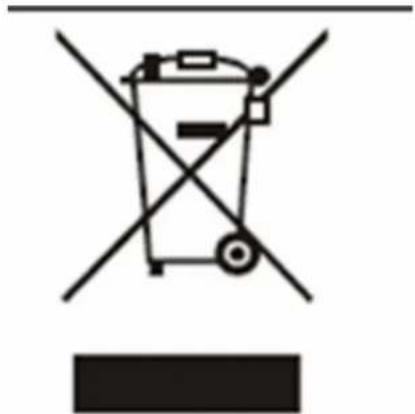
This appliance is marked according to the European directive 2002/96/EC on Waste electrical and Electronic Equipment (WEEE). By ensuring this product is disposed of correctly, you will help prevent potential negative consequences for the environment and human health, which could otherwise be caused by inappropriate waste handling of this product.
The symbol

on the product, or on the documents accompanying the product, indicates that this appliance may not be treated as household waste. Instead it shall be handed over to the applicable collection point for the recycling of electrical and electronic equipment.
Disposal must be carried out in accordance with local environmental regulations for waste disposal.
For more detailed information about treatment, recovery and recycling of this product, please contact your local city office, your household waste disposal service or the shop where you purchased the product.
natural_image
Symbol of a trash bin crossed with a diagonal line, no text or numbers present- The packaging materials that Baumatic uses are environmentally friendly and can be recycled.
- Please discard all packaging material with due regard for the environment.
Important safety information

text_image
Warning symbol with exclamation mark inside triangleYour safety is of the utmost importance to Baumatic. Please make sure that you read this instruction booklet before attempting to install or use the appliance. If you are unsure of any of the information contained in this booklet, please contact the Baumatic Technical Department.
General Information
- This appliance is designed for domestic household use and for the cooking of domestic foodstuffs.
- IMPORTANT: The adjacent furniture and all materials used in the installation must be able to withstand a minimum temperature of 85°C above the ambient temperature of the room it is located in, whilst in use.
- Certain types of vinyl or laminate kitchen furniture are particularly prone to heat damage or discolouration at temperatures below the guidelines given above.
- Any damage caused by the appliance being installed in contravention of this temperature limit will be the liability of the owner.
- For use in leisure accommodation vehicles, please refer to the appropriate information given in the installation instructions for this appliance.
○ IMPORTANT: Baumatic Ltd. DO NOT recommend that this appliance is installed on any type of marine vessel. - The use of this appliance for any other purpose or in any other environment without the express agreement of Baumatic Ltd. will invalidate any warranty or liability claim.
- Your new appliance is guaranteed against electrical or mechanical defects, subject to certain exclusions that are noted in Baumatic's Conditions Of Guarantee. The foregoing does not affect your statutory rights.
- Repairs may only be carried out by Baumatic Service Engineers or their authorised service agent.
Warning and safety instructions
- This appliance complies with all current European safety legislation. Baumatic do wish to emphasise that this compliance does not remove the fact that the appliance surfaces will become hot during use and retain heat after operation.
Child Safety
○ Baumatic strongly recommend that babies and young children are prevented from being near to the appliance and not allowed to touch the appliance at any time. During and after use, all surfaces will become hot.
- If it is necessary for younger family members to be in the kitchen, please ensure that they are kept under close supervision at all times.
General Safety
√ Make sure that you understand the controls before using the appliance.
√ Check that all of the controls on the appliance are turned off after use.
√ Always stand back when opening the oven door, this will allow heat to disperse.
√ Take care when removing items from the oven, as the contents may be hot.
√ Always keep the oven doors closed when the oven is not in use.
√ Always follow the basic principles of food handling and hygiene, this will prevent the possibility of bacterial growth.
√ Always keep ventilation slots clear of obstructions.
√ Keep fingers away from the hinge areas when closing the door, otherwise you may trap them.
√ Oven gloves should be used when placing food in the oven cavity and when removing it. Care should be taken to avoid direct contact with any of the elements in the appliance.
- DO NOT LEAVE THE APPLIANCE UNATTENDED WHILST IN USE.
Do not place heavy objects on the oven door or lean on the oven door when it is open, as this can cause damage to the oven door hinges. Nobody should be allowed to sit or stand on any part of the cooker.
Do not store chemicals, food stuffs, pressurised containers in or on the cooker or in cabinets immediately above or next to the cooker.
Do not heat up unopened food containers, as pressure can build up which may cause the container to burst.
Do not place flammable or plastic items on or near the hob burners, these types of materials should also not be placed in the oven or the compartment below the oven.
Do not leave heated oil or fat unattended, as this is a fire risk. You should not fill a deep fat frying pan more than one third full of fat or oil, you should also not use a lid.
- Do not allow fat or oil to build up in the oven trays, grill pan or oven base.
Do not place pans or baking trays directly on the base of the oven cavity, or line it with aluminium foil.
Do not grill food containing fat without using the grill trivet. The grill trivet should never be covered with aluminium foil.
- Do not place hot enamel parts in water, leave them to cool first.
Do not allow vinegar, coffee, milk, saltwater, lemon, tomato juice or any liquid with high sugar content to remain in contact with the enamel parts of the appliance. Spillages should be wiped up immediately.
- Do not allow electrical fittings or cables to come into contact with areas on the appliance that get hot.
Do not use the appliance to heat the room it is located in or to dry clothing. No clothing should be placed over or near to the hob burners or oven door.
- Do not install the appliance next to curtains or soft furnishings.
Do not attempt to lift or move cooking appliances by using the oven door or handle, as this may cause damage to the appliance or result in injury to the person lifting the appliance.
Cleaning
- Cleaning of the oven should be carried out on a regular basis.
- Great care should be taken whilst using this appliance and when following the cleaning procedure.
- IMPORTANT: The appliance must be disconnected from the mains before following the cleaning procedure.
Installation

text_image
Warning symbol with exclamation mark inside triangleThis appliance must be correctly installed by a suitably qualified person, strictly in accordance with the manufacturer's instructions. Please see the specific section of this booklet that refers to installation.
○ Baumatic Ltd. declines any responsibility for injury or damage, to person or property, as a result of improper use or installation of this appliance.
- Heat, steam and moisture will be created during use of the appliance, take care to avoid injury and ensure that the room is adequately ventilated. If the appliance is going to be used for prolonged periods of time, then additional ventilation may be required.
- Please consult with your qualified installer if you are in any doubt about the amount of ventilation that you will require.
Declaration of conformity
This appliance complies with the following European Directives:
-73/23/EEC regarding "low voltage"
-89/336/EEC regarding "electromagnetic disturbances"
-90/396/EEC regarding "gas appliances"
-89/109/EEC regarding "materials in contact with food".
- The above directives comply with 93/68/EEC regarding CE marking.
The manufacturer declares that the oven is built using certified materials and requires the appliance to be installed in accordance with the standards currently in force. This appliance must be used by a trained person for domestic purposes only.
Specifications

text_image
895 880 - 930 600Product dimensions:
Height: 880 - 930 mm
Width: 895 mm
Depth: 600 mm
Product specifications:
- 5 zone ceramic hob:
○ 1 x 1.50/2.40 kW hyperspeed oval zone
○ 1 x 2.10 kW hyperspeed zone
○ 2 x 1.80 kW hyperspeed zones
○ 1 x 1.20 kW hyperspeed zone - 8 function main oven
- 5 function secondary oven
- Oven energy efficiency class: C
o Main oven capacity: 52 litres
○ Secondary oven capacity: 31 litres
○ Storage compartment capacity: 40 litres
- LED fully programmable timer
- 2 Cooling fans
- Thermostatically controlled grills
- Double glazed removable doors
○ Adjustable feet
Standard accessories:
- Removable side racks
- 3 x Safety shelves
- 2 x Enamelled drip trays with handles
○ 2 x Trivets
Optional extras:
○ BPS1 Pizza stone
Electrical details
Rated Voltage: 230 Vac 50 Hz Supply Connection: 36 A (double pole switched fused outlet with 3mm contact gap)
Max Rated Inputs: 13 kW
Mains Supply Lead: 3 core x 6 mm ^4 (not supplied)
Oven Light Bulb: E14 25 W/300°C screw type pigmy
For future reference please record the following information which can be found on the rating plate and the date of purchase which can be found on your sales invoice. The rating plate for your oven can be located by opening the door of the storage compartment.
Model Number
Serial Number
Date of Purchase ....
Control Panel
Thermostat control knob (main oven)

text_image
max 225 200 175 150 125 100 80 60 40 0- Use this control knob to control the temperature in the oven.
Oven function selector knob (main oven)

natural_image
Circular diagram with a central rectangle and surrounding symbols (no text or labels)- Use this control knob to select the oven function and turn on the oven light in the main oven.
Oven function and thermostat control knob (secondary oven)
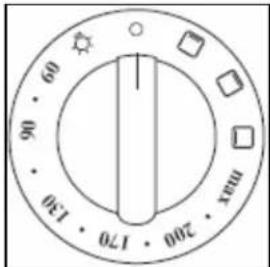
- Use this control knob to select the oven function and turn on the oven light in the secondary oven.
Oven programmer/timer

text_image
23:58 1. Minute minder 2. Duration 3. End cook 4. Manual operation - 5. Minus + 6. Plus
text_image
8 9 23:58Oven programmer/timer display
7) "Auto" function symbol
8) "Minute minder" symbol
9) "Manual operation" symbol.
Setting and using the oven programmer/timer
Selecting manual operation mode
After your appliance is connected to your mains supply for the first time, the numbers on the timer display will flash. Before you can select a cooking function or set a temperature, you must set the appliance into "manual operation" mode.
To select manual operation mode, press the "manual operation" button (4) on the control panel.
Setting the time of day
After setting your oven for manual operation, you should also set the time of day.
Use the "minus" button (5) and "plus" button (6) to adjust the time that appears in the display. After getting the display to the correct time, release the "minus" and "plus" buttons. After a few seconds the time will fix in the display and you will be able to use your oven.
Setting the minute minder function (main and secondary oven)
You are able to set the minute minder at any time, regardless of whether an oven function has been selected. You can set a period of time using the minute minder function and an alarm will sound when this period of time has elapsed.
Press the "minute minder" button (1), the display will show a value of 00:00. Set the period of time that you wish the minute minder to countdown for, by using the "minus" (5) and "plus" (6) buttons.
Once the display has got to your desired countdown time, let go of the "minus" and "plus" buttons. The minute minder symbol (8) will appear on the timer display.
Once a countdown time has been set, it is possible to shorten or lengthen the time by using the "minus" (5) or "plus" (6) buttons.
- An alarm will sound when the countdown time has elapsed. The alarm can be silenced by pressing the "minute minder" button (1).
- Important: The oven will continue to heat once the alarm has been silenced. If you have finished cooking, then you should turn the oven function selector and thermostat control knob to 0.
Setting the duration function (main oven only)
This function will allow you to set a countdown time similar to the minute minder function. However the oven will no longer continue to heat, once the countdown period has elapsed.
- Use the thermostat control knob to set the temperature that you require. The manual operation symbol (9) will appear on the display.
- Use the oven function selector knob to select the mode of cooking that you require.
- It is then possible to set the duration of the cooking time that you require.
Press the "duration" button (2) and the display will show a value of 00:00. Set the period of time that you wish the duration function to countdown for, by using the "minus" (5) and "plus" (6) buttons.
Once the display has got to your desired countdown time, let go of the "minus" and "plus" buttons. The countdown will start immediately and the word AUTO (7) will appear on the timer display.
Once a countdown time has been set, it is possible to shorten or lengthen the time by using the "minus" or "plus" buttons. - An alarm will sound when the countdown time has elapsed and the oven will switch off. The word AUTO will flash and the heating symbol will disappear. The alarm can be silenced by pressing the "duration" button.
- You will need to return the oven to manual operation mode, once the duration function has been used. To do this you should press the "manual operation" button (4), the word AUTO will disappear from the display and the manual operation symbol will appear instead.
- Important: If you do not turn the thermostat control knob and oven function selector knob to 0. Then the appliance will continue to operate as soon as you press the "manual operation" button.
Setting the end cook function (main oven only)
This function is similar to the duration function, however instead of selecting a period of time that you wish the oven to switch off after. You select the time of day that you wish the oven to switch off at.
- Use the thermostat control knob to set the temperature that you require. The manual operation symbol (9) will appear on the display.
- Use the oven function selector knob to select the mode of cooking that you require.
Press the "end cook" button (3) and the display will show a value of 00:00. Set the time of day that you wish the oven to stop cooking at by using the "minus" (5) and "plus" (6) buttons. The timer will calculate how long the cooking time will be, based on the time of day that you have selected and show it on the display.
Once the display has got to the time of day that you want the oven to stop cooking at, let go of the "minus" and "plus" buttons. The countdown will start immediately and the word AUTO symbol (7) will appear on the timer display. - When the time is set, it can be modified by pressing the "minus" and "plus" buttons.
When the time of day reaches the end of cooking time that you set, the oven will switch off and an alarm will sound. The word AUTO will flash and the heating symbol will disappear. The alarm can be silenced by pressing the "end cook" button. - You will need to return the oven to manual operation mode, once the end cook function has been used. To do this you should press the "manual operation" button (4), the word AUTO will disappear from the display and the manual operation symbol will appear instead.
- Important: If you do not turn the thermostat control knob and oven function selector knob to 0. Then the appliance will continue to operate as soon as you press the "manual operation" button.
Setting the start and end time function (main oven only)
This function will allow you to set a time in the future that the oven switches on at and a time that the oven will switch off at.
- Use the thermostat control knob to set the temperature that you require. The manual operation symbol (9) will appear on the display.
- Use the oven function selector knob to select the mode of cooking that you require.
Press the "duration" button (2) and the display will show a value of 00:00. Set the period of time that you wish to cook for, by using the "minus" (5) and "plus" (6) buttons. The word AUTO (7) will appear on the timer display. - Immediately press the "end cook" button (3) and the timer display will show the value 00:00. Set the time of day that you want the oven to switch off at, using the "minus" (5) and "plus" (6) buttons.
- The oven will calculate what time it needs to switch on at, so that your food will cook for the length of time that you selected. It will automatically switch itself on, once it reaches the time of day that it has calculated.
When the time of day reaches the end of cooking time that you set, the oven will switch off and an alarm will sound. The word AUTO will flash and the heating symbol will disappear. The alarm can be silenced by pressing the "end cook" (3) or "duration" button (2). - You will need to return the oven to manual operation mode, once the start and end time function has been used. To do this you should press the "manual operation" button (4), the word AUTO will disappear from the display and the manual operation symbol will appear instead.
- Important: If you do not turn the thermostat control knob and oven function selector knob to 0. Then the appliance will continue to operate as soon as you press the "manual operation" button.
Selecting a cooking function and temperature
Selecting manual operation mode
After your appliance is connected to your mains supply for the first time, the numbers on the timer display will flash. Before you can select a cooking function or set a temperature, you must set the appliance into "manual operation" mode.
To select manual operation mode, press the "manual operation" button (4) on the control panel.
Before first use
To remove any residue from the oven that may have been left from the manufacturing process, you should select either the fan or conventional oven function and turn the thermostat dial to its maximum temperature setting. For the secondary oven you should select the conventional oven function and select its maximum temperature setting.
- It is perfectly normal for a smell to be produced during this process.
- You should make sure that any windows in the room are left open during this process.
- It is advisable for you not to remain in the room whilst the burning off process is taking place.
- You should leave each oven on maximum setting for 30 – 40 minutes.
○ IMPORTANT: You should not burn off both ovens simultaneously.
Selecting a main oven function

natural_image
Circular diagram with a central rectangle and surrounding symbols (no text or labels)The main oven function selector knob should be turned clockwise and used to select the particular mode of cooking that you require. The appliance will utilise different elements within the oven cavity, depending on the oven function that you select. When a function is selected, the power indicator light will come on.
There are eight cooking functions available on your appliance:

OVEN LIGHT: Separate light control which allows the light to be switched on, even when the oven is switched off.

DEFROST MODE: The fan runs without heat to reduce the defrosting time of frozen foods. The time required to defrost the food will depend on the room temperature, the quantity and type of food. Always check food packaging for the defrosting instructions.

CONVENTIONAL OVEN (top and lower element): This method of cooking provides traditional cooking, with heat from the top and lower elements. This function is suitable for roasting and baking on one shelf only.
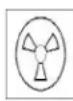
FAN OVEN: This method of cooking uses the circular element while the heat is distributed by the fan. This results in a faster and more economical cooking process. The fan oven allows food to be cooked simultaneously on different shelves, preventing the transmission of smells and tastes from one dish onto another.

HALF GRILL: This method of cooking utilises the inner part only of the top element, which directs heat downwards onto the food. This function is suitable for grilling small portions of bacon, toast and meat etc. The thermostat control knob must be turned to its maximum setting.

FULL GRILL: This method of cooking utilises the inner and outer parts of the top element, which directs heat downwards onto the food. This function is suitable for grilling medium or large portions of sausages, bacon, steaks, fish etc. Ideally the thermostat control knob should be set to 200°C

FAN AND GRILL: This method of cooking utilises the top element in conjunction with the fan, which helps to provide a quick circulation of heat. This function is suitable where quick browning is required and "sealing" the juices in, such as steaks, hamburgers, some vegetables etc.

FAN AND LOWER ELEMENT: This method of cooking utilises the bottom element in conjunction with the fan, which helps to circulate the heat. This function is suitable for sterilising and serving jars.
Thermostat control knob (main oven)
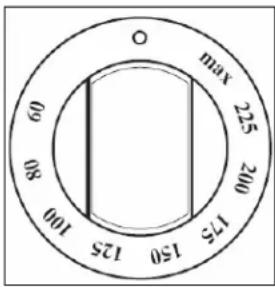
text_image
max 225 200 175 150 125 100 08 06 OThe oven thermostat control knob should be turned clockwise and it sets the required temperature of the oven. It is possible to regulate the temperature within a range of 60 - 250°C.
Selecting an oven function and temperature (secondary oven)

If you turn the control knob clockwise, it will automatically select a conventional oven function and you can regulate the temperature between 60 - 250°C.
To use one of the other functions, you should turn the dial past the max. setting and select the following functions.

OVEN LIGHT: Separate light control which allows the light to be switched on, even when the oven is switched off.

UPPER ELEMENT ONLY: This method of cooking uses the outer part of the top element to direct gentle heat downwards onto food. For gentle cooking, browning or keeping cooked dishes warm.

LOWER ELEMENT ONLY: This method of cooking uses the lower element to direct heat upwards to the food. For slow-cooking recipes or for warming up meals.

GRILL ELEMENT ONLY: This method of cooking utilises the top element, which directs heat downwards onto the food. This function is suitable for grilling small portions of bacon, toast and meat etc.
Oven operating light
This light will come on to indicate that the oven's heating elements are in operation. The light will turn off when the temperature set on the thermostat control knob has been reached. It will cycle on and off throughout the cooking time.
You should not place food inside the cavity, until the correct cooking temperature has been reached.
Cooking guidelines
- Please refer to the information given on food packaging for guidance on cooking temperatures and times. Once familiar with the performance of your appliance, temperatures and times can be varied to suit personal preference.
- If you are using the fan oven function, then you should follow the information given on the food packaging for this particular mode of cooking.
○ Make sure that frozen foods are thoroughly thawed before cooking, unless the instructions on the food packaging advise that you can "cook from frozen". - You should pre-heat the oven and not place food inside of it until the oven operating light has gone off. You can choose not to pre-heat when using the fan oven mode; however you should extend the cooking time given on the food packaging by approximately ten minutes.
Before cooking, check that any unused accessories are removed from the oven. - Place cooking trays in the centre of the oven and leave gaps between the trays to allow air to circulate.
- Try to open the door as little as possible to view the dishes.
- The oven light will remain on during cooking.
Warnings
- Keep the oven door closed when using any of the grill or oven functions.
- Do not use aluminium foil to cover the grill pan or heat items wrapped in aluminium foil under the grill. The high reflectivity of the foil could potentially damage the grill element.
- You should never line the base of your oven with aluminium foil.
During cooking, never place pans or cookware directly onto the bottom of the oven. They should always be placed on the shelves provided. - The grill heating element becomes extremely hot during operation, avoid touching it inadvertently when handling the food which you are grilling.
- Important: Be careful when opening the door, to avoid contact with hot parts and steam.
- The drip tray handle should only be used to reposition the drip tray and NOT for removing it from the oven cavity. When removing the drip tray, you should ALWAYS use an oven glove.
- The drip tray handle should not be left in position when the appliance is switched on.
○ IMPORTANT: In case of fire, close the main valve of the gas supply and switch off the electricity supply to the appliance. NEVER pour water onto burning oil.
Using the ceramic hob top
Using the hob top zones
○ Each zone on the ceramic hob top is controlled by a control knob.
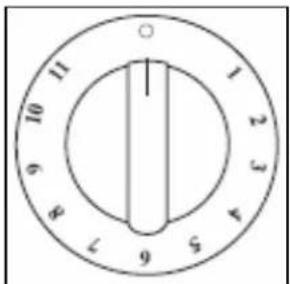
text_image
1 2 3 4 5 6 7 8 9 10 11 1To activate a zone, position the control knob between 1 - 11.
○ A warning neon on the control panel will light, to indicate that a zone has been switched on.
○ Each zone has a residual heat indicator which will light when one or more of the cooking areas go above a temperature of 60^ C.
- You should select a control knob position that is suitable for the particular cooking that you are carrying out. See the table below for guidance on the most appropriate control knob position.
| Pos. | Heat Intensity | Use |
| 0 | Off | |
| 1 - 2 | Very slow | For melting butter, chocolate, etc.For heating small amounts of liquid. |
| 3 - 4 | Low | For heating larger amounts of liquid.For preparing slow-cooking creams and sauces. |
| 5 - 6 | Medium-Low | For thawing frozen foods and cooking stews, cooking at boiling or lower temperatures. |
| 7 - 8 | Medium | For boiling foods, roasting delicate meats and fish. |
| 9 - 10 | High | For braising chops and steaks, for large meat soups. |
| 11 | Very high | For boiling large amounts of water and frying. |
- When you have finished cooking on a particular zone, it is important to make sure that the control knob is turned back to 0 (the off position).
- The warning light on the control panel will inform you if a cooking area is turned on or off.
- The residual heat indicator will remain lit until the temperature of the cooking area has fallen below 60°C.
Using the dual zone on the ceramic hob
- The central zone on your hob top is a dual zone.
To activate the first area of the dual zone, you should rotate the control knob between 1 - 11 and select the heat setting of your choice.
To activate the second area of the dual zone as well, you should rotate the knob past 11 and then turn it back to the heat setting of your choice.
To return to only one area operating, return the control knob to zero and then turn it back to your desired heat setting.
○ IMPORTANT: When using the dual zone, it is important that the control knob is only turned clockwise. - When you have finished cooking on a particular zone, it is important to make sure that the control knob is turned back to 0 (the off position).
○ A warning light on the control panel will inform you if a cooking area is turned on or off.
Hob guidelines
- The first few times the hob top is used, it may give off an acrid, burning smell. This smell will disappear completely with repeated use.
- The worktop is fitted with cooking areas of different diametre and power.
-
The positions where the heat will radiate from are clearly marked on the hob top. The saucepans must be positioned exactly on these zones for efficient heating to occur. Pans should have the same diametre as the cooking zone that they are being used on.
-
You should not use saucepans with rough bottoms, as this can scratch the ceramic surface.
Before use, make sure that the bottoms of the saucepans are clean and dry.
When cold, the bottom of the pans should be slightly concave, as they expand when hot and lie flat on the surface of the hob. This will allow the heat to transfer more easily. - The best thickness for the bottom of the pans is 2 – 3 mm of enameled steel and 4 – 6 mm for stainless steel with sandwich type bottoms.
- If these rules are not followed, then there will be a great loss of heat and energy. Heat not absorbed by the saucepan, will spread to the hob, frame and surrounding cabinets.
○ Preferably cover pans with a lid to permit cooking at a lower heat.
○ Always cook vegetables and potatoes, etc. in as little water to reduce cooking times. - For a faster heat up of a zone, you can turn the control knob to 11. Then when the contents of the saucepan are boiling, you may turn the control knob to a lower setting.
- Food or liquid that has a high sugar content may damage the hob top if it comes into contact with the ceramic hob surface. Any spillages should be wiped up immediately, however this may not prevent the hob surface from becoming damaged.
○ IMPORTANT: The ceramic hob surface is tough; however it is not unbreakable and can be damaged. Especially if pointed or hard objects are allowed to fall on it with some force.
DO NOT USE THE HOB IF THE SURFACE BECOMES BROKEN OR CRACKED. YOU SHOULD CONTACT THE BAUMATIC SERVICE DEPARTMENT IMMEDIATELY.

text_image
Warning symbol with exclamation mark inside triangleCleaning operations must only be carried out when the oven is cool.
The appliance should be disconnected from your mains supply before commencing any cleaning process.
The oven should be thoroughly cleaned before it is operated for the first time and after each use. This will avoid residual food stuffs becoming baked on the oven cavity. After residues have been baked on several times, they are far more difficult to remove.
- Never clean the oven surfaces by steam cleaning.
- The oven cavity should only be cleaned with warm soapy water, using either a sponge or soft cloth. No abrasive cleaners should be used.
- Any stains that may appear on the bottom of the oven will have originated from food splashes or spilt food, these splashes occur during the cooking process. These could possibly be a result of the food being cooked at an excessively high temperature or being placed in cookware that is too small.
- You should select a cooking temperature and function that is appropriate for the food that you are cooking. You should also ensure that the food is placed in an adequately sized dish and that you use the drip tray where appropriate.
- Outer parts of the oven should only be cleaned with warm soapy water, using either a sponge or soft cloth. No abrasive cleaners should be used.
- If you use any form of oven cleaner on your appliance, then you must check with the manufacturer of the cleaner that it is suitable for use on your appliance.
- Any damage that is caused to the appliance by a cleaning product will not be fixed by Baumatic free of charge, even if the appliance is within the guarantee period.
Cleaning the ceramic hob top

Any residues that are left on the hob top surface from cleaning agents will damage it. You should remove any residues with water and a little washing up.

Abrasive cleaners or sharp objects will damage the hob surface; you should clean it using water and a little washing up liquid.

Although it is easier to clean some deposits whilst the hob surface is still warm. You should take care not to burn yourself if cleaning the hob surface when it is still warm.
After each use
- Wipe the appliance over with a damp cloth and a little washing up liquid.
- Dry the appliance by rubbing the surface with a clean cloth.
Cleaning table
| Type of deposit | Remove immediately? | Remove when the appliance has cooled down? | What should I use to remove the deposit? |
| Sugar or food/liquid containing sugar | Yes | No | Ceramic scraper |
| Tin foil or plastic | Yes No Ceramic hob | scraper | |
| Fat splashes No Yes | Ceramic hob | cleaner | |
| Metallic discolourations | No | Yes | Ceramic cleaner |
| Water splashes or water rings | No | Yes | Ceramic cleaner |
hob hob
Using a ceramic hob scraper
It is possible to purchase a specialist ceramic hob scraper from supermarkets and/or hardware stores.
You should follow the instructions given by the manufacturer of the ceramic hob scraper. However the following general guidelines should also be followed:-

text_image
Warning symbol with crossed hand and crossbones, indicating no protection or resistance
natural_image
Hand holding a tool over four circular objects, no text or symbols visible- The scraper should be placed on the ceramic surface at an angle.
- Residues should be removed by sliding the blade carefully over the ceramic surface.
- The ceramic surface should be wiped with a damp cloth and a small amount of washing up liquid.
- Dry the appliance by rubbing the surface with a clean cloth.
Using a specialist ceramic hob cleaner
It is possible to purchase specialist ceramic hob cleaner/conditioner.
You should follow the instructions given by the manufacturer of the specialist ceramic hob cleaner. You should ensure that it is suitable for use on your appliance.
Replacing the oven bulb

IMPORTANT: The oven must be disconnected from your mains supply before you attempt to either remove or replace the oven bulb.
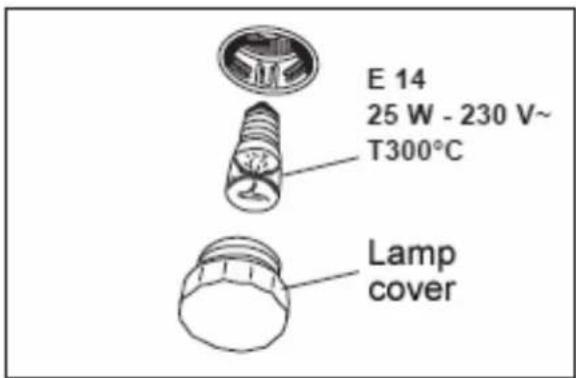
text_image
E 14 25 W - 230 V~ T300°C Lamp cover- Remove all oven shelves, the drip tray and the side rack that is on the same side as the oven light.
- Unscrew the lamp cover.
○ Unscrew the bulb and remove it from its holder.
○ Replace the bulb with a 25 W/300°C, screw type pigmy.
- Do not use any other type of bulb.
- Screw the lamp cover back into its original position.
Removing the oven door for cleaning
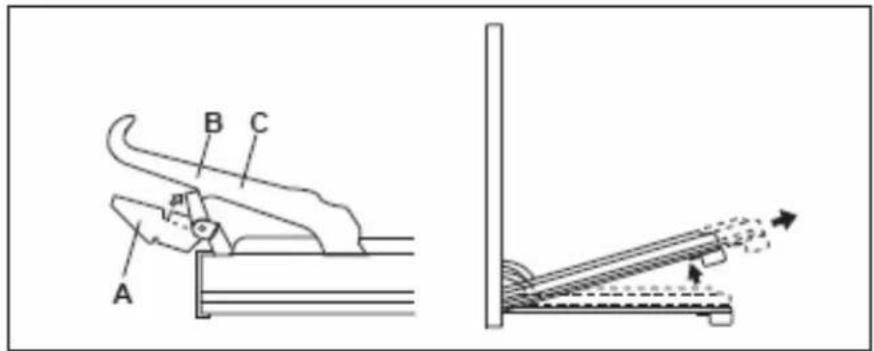
text_image
A B C- Open the oven door fully.
○ The hinges (A) are provided with two movable hooks (B).
- Rotate the hooks into the slot (C).
- You should grip the sides of the door at the centre and then incline it slightly towards the oven cavity and then by pulling it gently away from the oven cavity.
○ IMPORTANT: You should make sure that the door is supported at all times and that you place the door on some padded material whilst cleaning it.
- The oven door and door glass should only be cleaned using a damp cloth and a small amount of detergent. The cloth MUST NOT have come into contact with any form of cleaning product or chemical previously.
- Replace the oven door by introducing the hinges back into their relevant slots. Before closing the doors DO NOT FORGET TO RESET THE MOVABLE HOOKS.
- DO NOT attempt to move the hooks whilst the door is not attached to the oven, as the hinges are under high spring tension and injury may result.
Removing the inner door glass for cleaning

natural_image
Three-step diagram showing hand positioning of a mechanical component, with arrows indicating motion direction (no text or symbols)To facilitate cleaning, the inner door glass can be lifted out of the oven door.
- Open the door halfway, and then using both hands pull the inner door glass out of the oven door.
The oven door glass should only be cleaned with warm soapy water, using either a sponge or soft cloth. These should not have come into contact with any other chemical previously. Do not use any abrasive cleaner that could cause damage to the glass.
- Remember that if the surface of the glass panel becomes scratched, this could lead to a dangerous failure.
When refitting, make sure that the glass is correctly seated in the door recess and the correct way round. You should slide the door glass back into its original position.

natural_image
Pure technical line drawing of a mechanical assembly with diagonal lines, no text or symbols present○ IMPORTANT: Do not attempt to remove the door glass only using one hand.
Installation

The installation must be carried out by a suitably qualified person, in accordance with the current version of the following.
- UK Regulations and Safety Standards or their European Norm Replacements.
○ Building Regulations (issued by the Department of the Environment).
○ Building Standards (issued by the Scottish Development Department).
○ IEE Wiring Regulations. - Electricity At Work Regulations.
- Gas Safety (Installation and Use) (Amendment) Regulations.
Positioning

The adjacent furniture and all materials used in the installation must be able to withstand a minimum temperature of 85^ C above the ambient temperature of the room it is located in, whilst in use.
- Your appliance is heavy, so you should be careful when moving or positioning it.
Do not try to move the cooker by pulling on either the door, handle or control panel.

- The cooker is designed to slot in between 600 mm deep cabinets, which are spaced approximately 1000 mm apart.
- It can also be used as freestanding, with a cabinet to one side, in a corner setting or with its back to a wall.
- IMPORTANT: It should not be installed at the end of a run of cabinets, if there is a cabinet at immediate right angles to the cooker door.
- The wall behind the cooker and 450 mm above and across the width of the cooker should be an incombustible material and preferably an easy clean surface, such as ceramic tiles.
- Any overhanging surface or cooker hood should be at least 700 mm above the hob top.
- Baumatic do not recommend that the cooker is positioned below wall cupboards, as the heat and steam from the appliance and what is being cooked, may damage the cupboard and its contents.
- The cooker may be located in a kitchen, or a bedroom, but not in a room containing a bath or shower. The cooker must not be installed in a bedroom of less than 20m ^3 in size.
o LPG models must not be installed in a room or internal space below ground level (e.g. in a basement).

text_image
Diagram illustrating battery disassembly and inspection process with labeled 'OK' and 'NO' states- The cooker is fitted with four legs that can be adjusted to match the height of your kitchen cabinets.
To assemble them it is necessary to raise the cooker and to screw the four legs into position, on each corner of the base of the appliance.
○ IMPORTANT: They must be screwed clockwise into position and not just slotted into the holes on each corner. You must screw them through the brackets that are also provided.
Electrical connection

This appliance must be installed by a qualified person in accordance with the latest edition of the I.E.E. Regulations and in compliance with Baumatic's instructions.
Before connecting the appliance, make sure that the supply voltage marked on the rating plate corresponds with your mains supply voltage.
WARNING: THIS APPLIANCE MUST BE EARTHED.
- This appliance must be wired into a 36 A double pole switched fused spur outlet, having 3 ~mm contact separation and placed in an easily accessible position adjacent to the appliance. It should not be located above the appliance and no more than 1.25 ~m away from it.
- The spur outlet must still be accessible even when your oven is located in its operating position.
○ Cable type: H05 RRF 3 core x 6 mm²
Connecting the mains supply cable
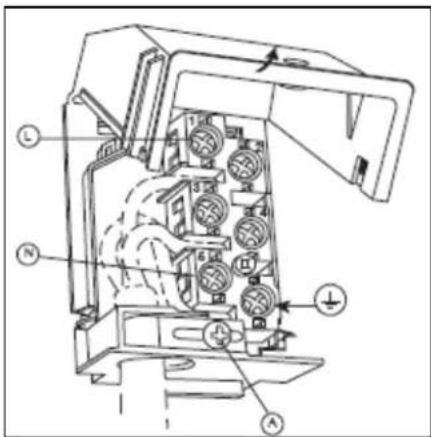
text_image
Technical diagram of an electrical switchgear with labeled components and directional arrows indicating flow or movement.IMPORTANT
The wires in the mains lead are coloured in accordance with the following code:
GREEN AND YELLOW BLUE
B R O W N
EARTH NEUTRAL
- Open the mains terminal block cover as shown, unscrew the cable clamp (A) and unscrew (not fully) the screws in the mains terminal block (L, N, E) which secure the three wires of the mains cable.
○ Fit the cable and refit the cable clamp (A).
- Allow sufficient cable length for the cooker to be pulled out for cleaning, but do not let it hang closer than 50mm to the floor.
- The cable can be looped if necessary, but make sure that is not kinked or trapped when the cooker is in position.
Replacing the mains supply cable
If the mains supply cable is damaged, then it must be replaced by an appropriate replacement which can be obtained from the Baumatic Spares Department.
The mains supply cable should be replaced in accordance with the following instructions:
- Switch the appliance off at the control switch.
- Open the box of the supply board.
- Unscrew the clamp (A) fixing the cable.
- Replace the cable with one of the same length and in accordance with the specification given above.
- The "green-yellow" earth wire must be connected to the terminal marked 12 . It must be about 10 mm longer than the live and neutral wires.
- The "blue" neutral wire must be connected to the terminal marked with letter (N) - the live wire must be connected to the terminal marked with letter (L).
My appliance isn't working correctly
- The oven isn't coming on.
* Check that the oven is in manual operation mode.
* Check that you have selected a cooking function and a cooking temperature.
- There appears to be no power to the oven and grill.
* Check that the appliance has been connected to the electrical mains supply correctly.
* Check that the mains fuses are in working order.
* Check that the operating instructions for setting the time of day and putting the appliance into manual operation mode have been followed.
- The grill function works but the main oven does not.
* Check that you have selected the correct cooking function.
- The grill and top oven element is not working, or cuts out for long periods of time during use.
* Allow the oven to cool for approximately 2 hours. Once cool, check whether the appliance is again working properly.
○ My food is not cooking properly
* Ensure that you are selecting the correct temperature and the correct cooking function for the food that you are cooking. It may be appropriate to adjust your cooking temperature by plus or minus 10°C, to achieve the best cooking results.
○ My food is not cooking evenly
* Check that the oven has been installed correctly and is level.
* Check that the correct temperatures and shelf positions are being used.
- The oven light is not working
* Refer to page 27 and follow the "Replacing the oven bulb" section.
- I am getting condensation in my oven
* Steam and condensation is a natural by product of cooking any food with high water content, such as frozen food, chicken etc.
* You may get condensation in the oven cavity and forming between the oven door glasses. This is not necessarily a sign that the oven is not working correctly.
* Do not leave food in the oven to cool after it has been cooked and the oven has been switched off.
* Use a covered container, where practical, when cooking to reduce the amount of condensation that forms.

text_image
Warning symbol with exclamation mark inside triangleIMPORTANT: If your appliance appears not to be operating correctly, then you should disconnect it from your mains supply and then contact the Baumatic Service Department on telephone number (0118) 933 6911.
DO NOT ATTEMPT TO REPAIR THE APPLIANCE YOURSELF.
Please note that if an engineer is asked to attend whilst the product is under guarantee and finds that the problem is not the result of an appliance fault, then you may be liable for the cost of the call out charge.
The appliance must be accessible for the engineer to perform any necessary repair. If your appliance is installed in such a way that an engineer is concerned that damage will be caused to the appliance or your kitchen, then he will not complete a repair.
This includes situations where appliances have been tiled in, sealed in with sealant, have wooden obstructions placed in front of the appliance, like plinths. Or any installation other than the one specified by Baumatic Ltd. has been completed.
Please refer to the conditions of guarantee document on page 36 of this instruction manual for clarification of this.
Baumatic Ltd. Conditions of guarantee
Dear Customer,
Your new Baumatic appliance comes complete with a free 12 month guarantee covering both parts and labour costs resulting from defective materials or workmanship.
Baumatic also gives you the opportunity to automatically extend the guarantee period for a further 12 months at no extra cost, giving an initial guarantee period of 24 months. The extended guarantee period applies to England, Scotland, Wales and Northern Ireland only.
To qualify for your full 24 months guarantee you must register your appliance within 28 days of purchase to be covered under this guarantee. This can be done online via: www.baumatic.co.uk or through returning the guarantee card which can be found in each new Baumatic appliance.
* In addition, your appliance is covered by a 5 year parts warranty. Baumatic Ltd will provide free of charge the parts required to repair the appliance, only if they are fitted by a Baumatic engineer, for any defect that arises due to faulty materials or workmanship within a period of 5 years from the original purchase date.
* An additional 1 to 3 year insurance scheme for labour is available should you wish to extend the warranty period.
Should any person other than an authorised representative of Baumatic Ltd interfere with the appliance, the policy is negated and Baumatic Ltd will be under no further liability.
The guarantee covers the appliance for normal domestic use only, unless otherwise stated.
Any claims made under the terms of the guarantee must be supported by the original invoice/bill of sale issued at the time of purchase.
This guarantee is transferable only with the written consent of Baumatic Ltd.
If the appliance fails and is considered either not repairable or uneconomical to repair between 12 months (2 years if registered) and five years, a free of charge replacement will not be offered.
The guarantee for any replacement will only be for the remainder of the guarantee on the original product purchased.
The guarantee does not cover:
- Sinks and taps
- Failure to comply with the manufacturers instructions for use.
- The replacement of cosmetic components of accessories
- Accidental damage or wilful abuse.
- Subsequent loss or damage owing to the failure of the appliance or electrical supply
- Incorrect installation
- Losses caused by Acts of God, civil war, failure to obtain spare parts, strikes or lockouts
- Filters, fuses, light bulbs, external hoses, damage to bodywork, paintwork, plastic items, covers, baskets, trays, shelves, burner bases, burner caps, decals, corrosion, rubber seals.
In the course of the work carried out it may be necessary to remove the appliance from it operating position. Whilst all reasonable care will be taken, Baumatic Ltd cannot accept responsibility for damage sustained to any property whatsoever in this process.
This guarantee is in addition to and does not diminish your statutory or legal rights.
Contacting Baumatic Ltd
Sales
Service
Spares
Technical/Advice
TEL: 0118 933 6900
TEL: 0118 933 6911
TEL: 0118 933 6922
0118 933 6933
FAX: 0118 931 0035
FAX: 0118 986 9124
FAX: 0118 933 6942
0118 933 6942
For ROI (Republic of Ireland), please contact one of the numbers below:
TEL: 01-6266798
FAX: 01 - 6266634
Thanks you for buying Baumatic.
* Applies to UK, Scotland, Wales & Northern Ireland only (Republic of Ireland has 1 year labour & 1 year parts warranty only)
Baumatic®
You will be mine ...
Headquarters
Baumatic Ltd.
Baumatic Buildings,
6 Bennet Road,
Reading,
Berkshire
RG2 0QX, United Kingdom
Sales Telephone
+44 118 933 6900
Sales Fax
+44 118 931 0035
Service Telephone
+44 118 933 6911
Service Fax
+44 118 986 9124
Spares Telephone
+44 118 933 6922
Technical / Advice Telephone
+44 118 933 6933
E-mail:
sales@baumatic.co.uk
technical@baumatic.co.uk
Http (Internet site):
www.baumatic.com
Baumatic
www.baumatic.com