PMT555BT - Car stereo CALIBER - Free user manual and instructions
Find the device manual for free PMT555BT CALIBER in PDF.


User questions about PMT555BT CALIBER
0 question about this device. Answer the ones you know or ask your own.
Ask a new question about this device
Download the instructions for your Car stereo in PDF format for free! Find your manual PMT555BT - CALIBER and take your electronic device back in hand. On this page are published all the documents necessary for the use of your device. PMT555BT by CALIBER.
USER MANUAL PMT555BT CALIBER
BLUETOOTH HANDSFREE KIT AND FM TRANSMITTER
PMT 555BT Device Features:
- Bluetooth hands-free kit with built-in microphone.
• Built-in MP3 player and FM transmitter, with full frequency: 87.5-108MHz.
• Supports USB/SD card and 3.5mm line-in function.
• RDS technology (Radio data system), transmit track name and artist information to radio display.
- Charger function, can charge iPhone, iPod and other mobile devices through the USB port.
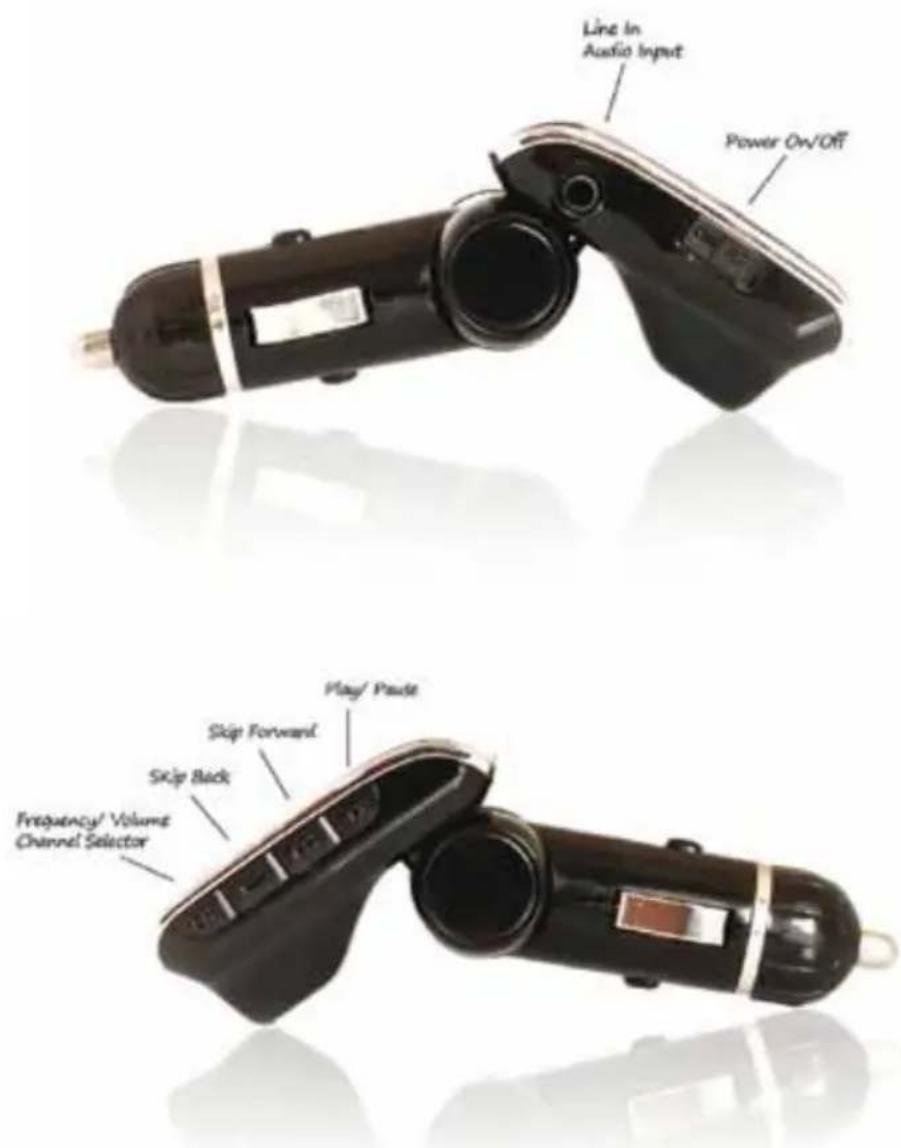
Using The Bluetooth Hands-Free & FM Transmitter:
- Insert the PMT 555BT into your vehicle's cigarette lighter or power port.
- Tune your radio to an unused FM frequency (between 87.5-108MHz), then match the same frequency on the PMT 555BT by using the buttons on the unit or on the remote control.
- Bluetooth Pairing:
- The first time you activate the hands-free function, the PMT 555BT needs to be Bluetooth paired with your mobile phone.
- Turn on your mobile phone's Bluetooth function, then search for new devices "PMT555BT", once found, pair and connect it by using the original password "0000".
- The Bluetooth symbol on the LED screen will stop flashing after it is connected with your mobile phone.
- While the MP3 Player is in use, your music will automatically switch to incoming call/telephone state if there is an incoming call.
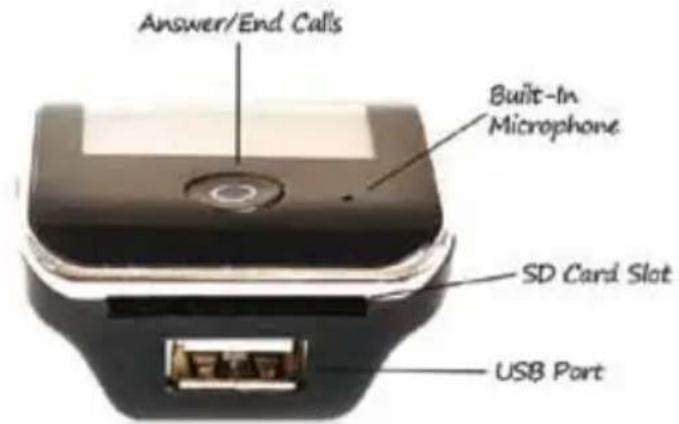
• To answer calls: Press ○ button on the PMT 555BT; or press 🔍 key on remote controller.
• To end calls: Press ○ button again; Or press ⚫ key again on remote controller.
- Making calls: Use your mobile phone to dial the number directly.
Once the connection is established, you can talk to through the PMT 555BT directly.
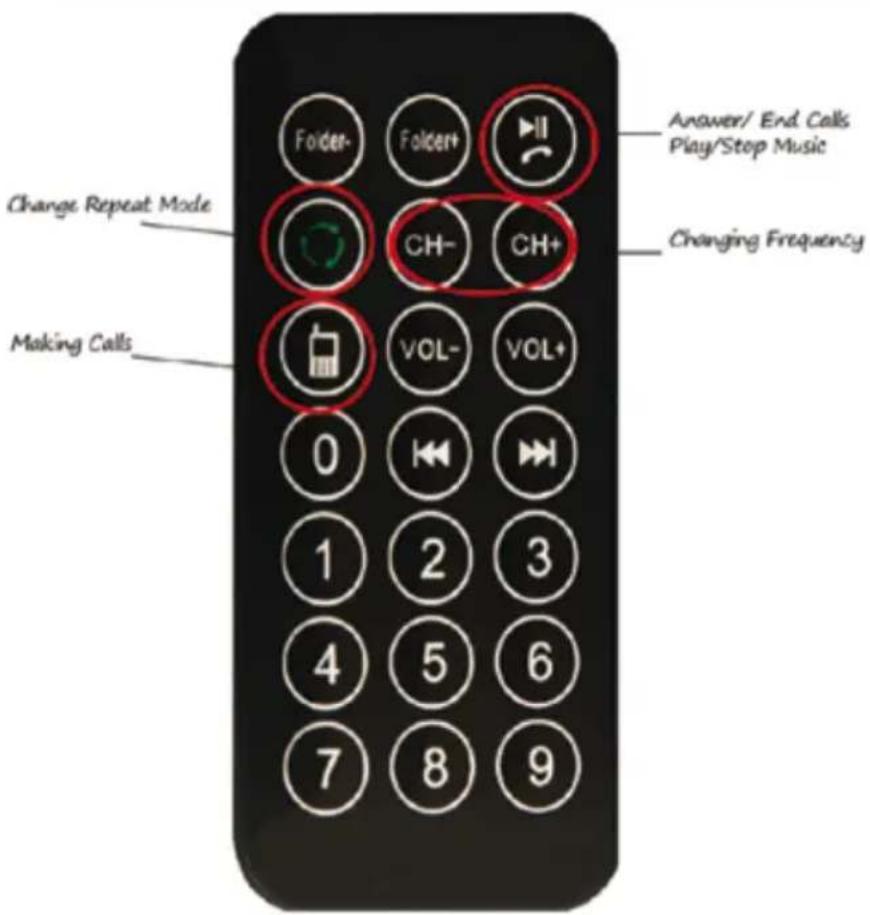
PMT 555BT Infrared Remote Control:
Playing Your Music:
The PMT 555BT allows for playback of your music via a multiple of external devices such as USB memory stick, SD card, or any compatible audio device (such as a mobile phone or MP3 player) using the included 3.5mm audio line-in cable or wirelessly through Bluetooth.
- Insert the PMT 5555BT into your vehicle's cigarette lighter or power port.
- Tune your radio to an unused FM frequency (between 87.5-108MHz), then match the same frequency on the PMT 555BT by using the buttons on the unit or on the remote control.
Playing Music Via iPhone/ iPod/ Mobile/ MP3 Player:
-
Line-in function: Use the provided 3.5mm audio cable to connect your iPhone/ iPod/ mobile phone / MP3 player/ external devices with the PMT 555BT. (Please note: When using line-in function, All functions and playback can only be controlled via the controls on your iPhone, iPod, external device etc. Remember to press "Play/Pause" to stop all music from USB /SD).
-
Play your music via your iPod on your iPhone or mobile device wirelessly once it is Bluetooth paired.
Playing Music Via USB Memory Stick/ SD Card:
- Slot a USB memory stick or SD card into the ICE Device. It plays and transmits MP3 files automatically. (You have to copy the MP3 files onto the USB memory stick or SD card in advance).
Operations:
| Operation PMT 55BT Remote Control | ||
| How to answer/end incoming phone call | Press  " button Press " " " button Press " " | button  |
| Play/pause the music | Play: Press "Play/Pause" button Pause: Press "Play/Pause" button again | Press [2DYS] button |
| Changing the frequency | Press "CH" button firstPress [YYX71]: increase frequencyPress  : decrease fre-quency : decrease fre-quency | Press "CH+" button to increase the frequencyPress "CH-" button to decrease the frequencyOr press the number of the frequency you desire, then press "CH+" again to confirm |
Selecting the music Press "  next songPress next songPress  : previous song : previous song | Press  " button to play the next songPress " button to play the next songPress  " button to play the previous songOr pre " button to play the previous songOr pre  serial number of the song then press t serial number of the song then press t  firm firm | |
| Adjusting the volume | Press "CH" button, then select the "Change Volume" option, then press the "CH" button again to confirm::Press  ": increase volumePress ": increase volumePress  : decrease volume : decrease volume | Press  - " to increase the volumePress [BAD7] " to reduce the volume - " to increase the volumePress [BAD7] " to reduce the volume |
Operations cont.:
| Operation PMT 55BT Remote Control | ||
| Change repeat mode | Cannot be controlled by the PMT 555BT, only from the remote. | Press “ ”buttonSelect:Repeat AllRandomIntroNormalRepeat OneFolderRepeat Folder ”buttonSelect:Repeat AllRandomIntroNormalRepeat OneFolderRepeat Folder |
| Switching folders/albums | N/A Press“Folder+” or “Folder -” | |
WWW.CALIBER.NL
CAUBER HEAD OFFICE · The Netherlands · Fax: +31 (0)416 69 90 01 · E-mail: info@caliber.nl