C1239-0001 - Tripod OConnor - Free user manual and instructions
Find the device manual for free C1239-0001 OConnor in PDF.


| Product Type | Fluid Head for Tripod (Model 1030D/1030Ds) |
| Brand | OConnor |
| Model | C1239-0001 (Tripod) / 1030D-1030Ds (Fluid Head) |
| Height (incl. platform) | 6.6 in (16.8 cm) |
| Width | 7.6 in (19.3 cm) |
| Depth | 4.6 in (11.7 cm) |
| Weight | 8.7 lb (3.9 kg) |
| Maximum Payload (1030D) | 30 lb (13.9 kg) |
| Maximum Payload (1030Ds) | 41 lb (18.6 kg) |
| Tilt Range (1030D) | ±90° |
| Tilt Range (1030Ds) | ±60° |
| Pan Range | 360° |
| Counterbalance | Continuous stepless via magnetic folding crank |
| Pan and Tilt Drag | Ultra-smooth fluid drag, adjustable 1 to 5 |
| Pan and Tilt Locks | Friction locks with lever adjustment |
| Base Type | 100 mm ball base (standard), optional 150 mm or Mitchell |
| Camera Platform | Quick-release with safety catch; mini Euro or large Euro (optional) |
| Handle Mounting | Two rosettes (left and right); telescoping handle included |
| Illuminated Bubble Level | Yes, with CR2032 battery (lasts approx. 25 sec per press) |
| Power (Battery) | 1 × CR2032 3V (for bubble level) |
| Material | High-strength alloy construction |
| Color | Black |
| Maintenance | Wipe with lint-free cloth; mild detergent only; replace battery as needed |
| Included Accessories | Telescoping handle, camera mounting plate, 100 mm ball base |
| Manufacturer | Vitec Group Videocom Division (OConnor) |
| Country of Origin | USA |
Frequently Asked Questions - C1239-0001 OConnor
User questions about C1239-0001 OConnor
0 question about this device. Answer the ones you know or ask your own.
Ask a new question about this device
Download the instructions for your Tripod in PDF format for free! Find your manual C1239-0001 - OConnor and take your electronic device back in hand. On this page are published all the documents necessary for the use of your device. C1239-0001 by OConnor.
USER MANUAL C1239-0001 OConnor
Operators Guide
C1239-4980/1
OConnor 1030D/1030Ds
Fluid Head
Copyright © 2011 The Vitec Group plc
All rights reserved throughout the world. No part of this document may be stored in a retrieval system, transmitted, copied or reproduced in any way, including, but not limited to photocopy, photograph, magnetic or other record without the prior agreement and permission in writing of the Vitec Group plc.
Trademarks
OConnor™ is a registered trademark of the Vitec Group plc.
Important information about this document
Information contained within this document is subject to change. Camera Dynamics Limited reserves the right, without notice, to make changes in equipment design or performance as progress in engineering, manufacturing or technology may warrant.
Published by
Vitec Group Videocom Division Technical Publications Department William Vinten Building, Western Way Bury St Edmunds, Suffolk IP33 3TB United Kingdom E-mail: technical.publications@vitecgroup.com
Preface
Congratulations on the purchase of your new 1030D/1030Ds fluid head from OConnor!
We want you to get the most from your new 1030, and therefore encourage you to read this operator's guide to familiarize yourself with its many features, some of which may be new to you. It also covers essential health and safety information and a section on maintenance that will ensure your new product is kept in perfect condition.
Please register your purchase online at www.ocon.com.
Features and benefits of your new 1030
- The 1030D/Ds is the smallest in OConnor's Ultimate range of fluid heads and features OConnor's stepless counterbalance system as well as ultra-smooth pan and tilt fluid drag designed for cine-style shooting.
- A new collapsible counterbalance crank handle makes balancing the payload easier. The new 1030 has all controls on the camera operator's side of the head (on the left or 'smart' side) and features platform scales and two rosette handle mountings on either side of the head.
- OConnor's patented fluid drag system allows extremely quick pan movements from one position to another, recovering instantly without any springback.
- You can set up easily in low light conditions using the illuminated bubble level.
Safety – read this first
Warning symbols in this Operators Guide

Where there is a risk of personal injury or injury to others, comments appear highlighted by the word 'WARNING!'—supported by the warning triangle symbol.
Where there is a risk of damage to the product, associated equipment, process or surroundings, comments appear highlighted by the word 'CAUTION'.
Disposal of waste batteries
Batteries included with this product must not be treated as household waste. By ensuring these batteries are disposed of correctly, you will help prevent potentially negative consequences for the environment and human health, and help conserve natural resources.
Refer to the section ‘Replacing the battery’ (page 17) in this manual for instructions on how to remove the battery from the product safely. Hand the battery over to the applicable collection point for recycling waste batteries.
Contact information
For further information or advice about the Ultimate range of fluid heads, please contact OConnor at:
OConnor
2701 N. Ontario St.
Burbank, CA 91504
USA
Or visit our website www.ocon.com and use the contact form.
Technical specification
Dimensions
Height (incl. camera platform) 6.6 in. (16.8 cm)
Width 7.6 in. (19.3 cm)
Depth 4.6 in. (11.7 cm)
Weight 8.7 lbs (3.9 kg)
Payloads and ranges
Note: Payload capacity and tilt ranges are based on a C of G height of 6" (15 cm).
1030D
Capacity (see counterbalance graph, Figure 3)
Minimum payload.... 0 lbs (no load)
Maximum payload 30 lbs (13.9 kg)
Tilt range. ±90°
Pan range....360°
Counterbalance .... continuous
1030Ds
Capacity (see counterbalance graph, Figure 4)
Minimum payload.... 0 lbs (no load)
Maximum payload 41 lbs (18.6 kg)
Tilt range. ±60°
Pan range....360°
Counterbalance .... continuous
Mounting
Base 100 mm ball base (standard)
150 mm ball base, Mitchell base (optional)
Camera mounting platform.... mini Euro or large Euro (optional)
Contents
Page
Preface .... 3
Features and benefits of your new 1030 .... 3
Safety – read this first .... 4
Warning symbols in this Operators Guide 4
Contact information 4
Technical specification .... 5
Components 7
Introduction 9
Counterbalance 9
Ultra-smooth fluid drag....9
Pan and tilt locks 9
Illuminated bubble level 10
Handle mounting 10
Camera mounting platform 10
Bases....10
Operation 11
Installing the head 11
Handles 11
Mounting the camera....11
Stability....12
Balancing the head 12
Fore and aft balance 13
Payload weight and counterbalance 14
Pan and tilt locks 14
Pan and tilt fluid drag 15
Storing the head.... 15
Servicing....16
General 16
Routine maintenance....16
Cleaning....16
Adjusting the lock levers 16
Replacing the battery....17
Components
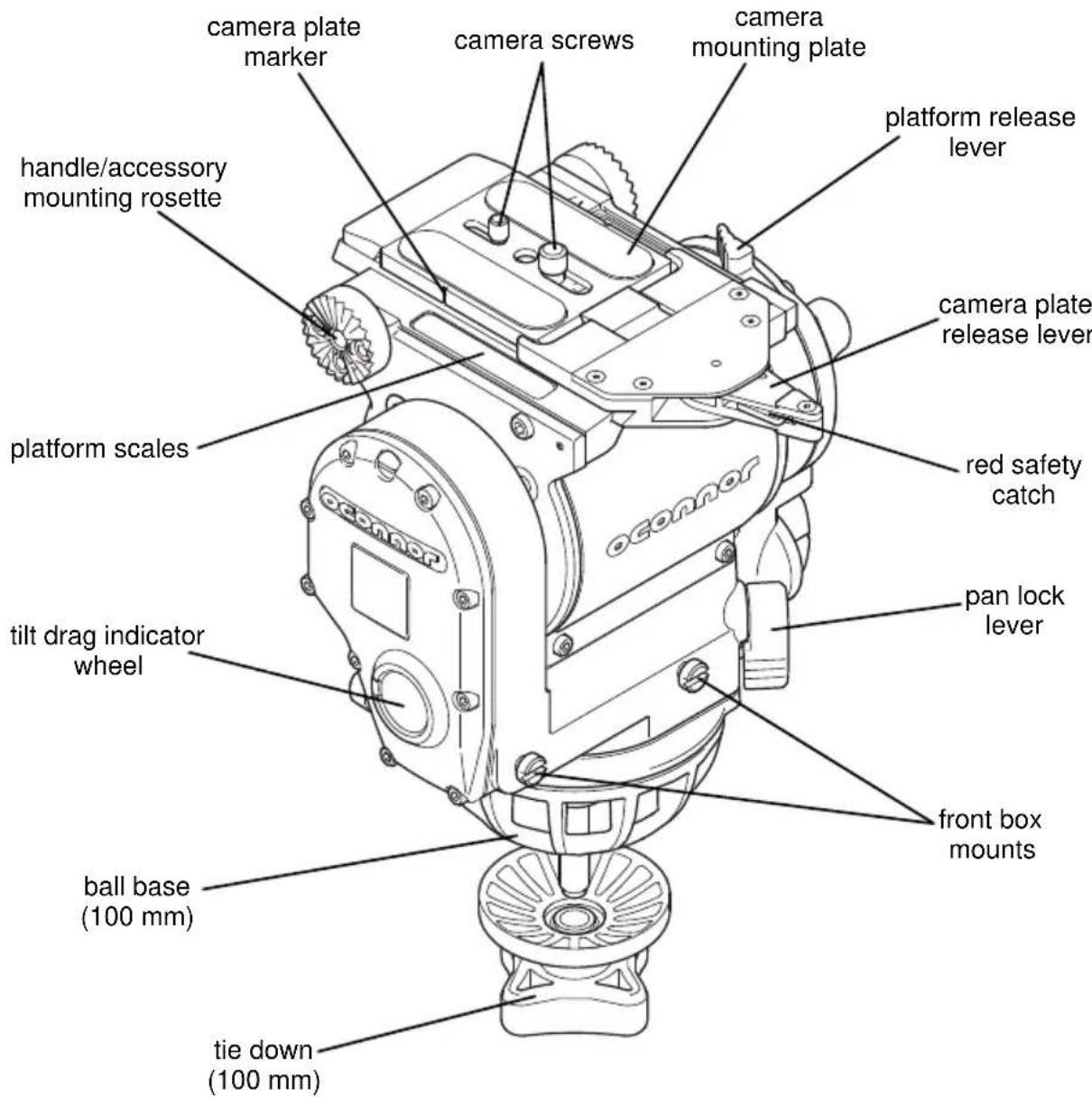
Figure 1 1030D/Ds Fluid Head, right-hand side (front)

Figure 2 1030D/Ds Fluid Head, left-hand side (rear)
Introduction
The 1030D/Ds fluid head comprises a patented sinusoidal counterbalance mechanism for true and accurate balance, stepless drag assemblies for ultra-smooth pan and tilt motions. It comes complete with an adjustable top platform with detachable camera mounting plate, a telescoping handle, and a 100 mm ball base.
The 1030 head features provisions for mounting a front box and for attaching an eye-piece leveler or other accessories at the rear.
Counterbalance
The balance mechanism is adjusted by the counterbalance crank on the rear of the head. The crank has a magnetic folding handle. Maximum and minimum payloads that can be balanced are dependent on the weight of the camera and accessories, and on the Center of Gravity (C of G) height. The counterbalance graphs for the 1030 heads show the range of loads and C of G heights that can be maintained in balance (see pages 12 and 13).
The counterbalance is continuous and can be adjusted all the way to zero (no counterbalance), and the head can still be tilted within its specified tilt range (see 'Technical specification', page 5).
CAUTION!
- Do NOT overcrank or undercrank the crank handle (i.e. wind the crank handle above or below the end stops). Adjusting the counterbalance crank by force can seriously damage the head.
- Before operating the head, ensure that the crank handle is returned to its folded position.
Ultra-smooth fluid drag
Both the pan and tilt mechanisms incorporate OConnor's patented ultra-smooth fluid drag to ensure smooth movement. The pan drag adjustment knob and indicator wheel are located on the left side of the head, below the level bubble, and the tilt drag adjustment knob is located on the lower right rear of the head with the indicator wheel on the right side end cover.
Both controls are continuously adjustable from 1 through 5.
Pan and tilt locks
Friction locks on each axis allow the head to be locked at any desired position. The pan lock lever is on the lower left front of the head, at a convenient angle for manual operation, and the large tilt lock lever sits just above the level bubble on the left side of the head, for easy operation.
The 1030D/Ds has a reversed pan break in comparison to previous versions of the 1030. This has been done to match the break arrangement of the larger OConnor heads (see 'Pan and tilt locks' on page 14), to further ease the transition from larger payload camera setups to smaller payload camera setups for the operator.
Illuminated bubble level
The bubble level on the left side of the head can be illuminated by pressing the bubble level illumination button. The light will extinguish after approximately 25 seconds. When the head leaves the factory a battery is installed and tested.
Handle mounting
Two handle mounting rosettes are located at the rear of the head, on the left and right side. A telescoping extension handle is supplied and is attached using the handle clamp, with angular adjustment available on the rosette serrations. An additional handle or other accessories can also be installed.
Camera mounting platform
The camera is attached to the head by means of a top platform mechanism. Two quick-release top platforms using different mechanisms are available. They are secured by means of a platform stop—a 6/32 x 1/4 in. socket head cap screw that requires a 7/64 in. hex drive wrench.

WARNING!
Ensure the camera platform is attached securely. The platform stop must be fixed before mounting the camera/payload.
The head comes standard with an adjustable camera mounting platform. The camera can be released quickly by pressing the red safety catch and rotating the camera plate release lever approximately 180° in a clockwise direction. At the end of lever travel the platform hook retracts and the spring mechanism ejects the camera mounting plate allowing easy removal of the camera/payload from the head.
Bases
The 1030 head is supplied with a 100 mm ball base as standard. However, like all other Ultimate range fluid heads from OConnor, the base can be exchanged either for a Mitchell base and tie down, or a 150 mm ball base and tie down. All bases are secured by eight small fasteners—the 4-40 x .375 in. socket head cap screws require a 3/32 in. hex drive wrench.
Operation
Installing the head
The 1030D/Ds fluid head can be installed onto standard tripods using the 100 mm ball base or, alternatively, a 150 mm ball base or Mitchell base, and tie downs as required.

WARNING!
Do NOT fit the head to a tripod that cannot support the combined mass of the head and payload (refer to 'Technical specification' on page 5 for the maximum payload capacity of the relevant head).
After securely mounting the head onto the tripod, use the bubble level to set it level. If necessary, press the bubble level illumination button to view the bubble level in poor light conditions. The bubble will be lit for approximately 25 seconds.
Handles
Install the handle(s) on the rosette handle mount(s) and adjust the position before tightening the handle clamp(s). Adjust the length of the telescoping handle as desired.
Mounting the camera

WARNING!
- Ensure that the weight and C of G height of the total payload is within the range for which the head is designed.
- If you are installing the head on a crane, pedestal, or dolly, you must lock these before installing the camera.
To mount the camera:
- Level the head and engage the tilt lock.
- Remove the camera mounting plate. Press the red safety catch to unlock the camera plate release lever and rotate the lever approx. 180° in a clockwise direction to eject the mounting plate.
- Attach the mounting plate to the bottom of the camera.
- Insert the mounting plate into the platform. Push it into the groove towards the front of the head, then down until the platform hook engages with an audible 'click' (the plate release lever will have jumped back approx. 90° upon the 'click'). The camera is now captive, but not locked.
- To lock the camera mounting plate, push in the red safety catch and rotate the camera plate release lever counterclockwise, approx. 90° to the left. The red safety catch will engage locking the lever, and thus securing the camera and payload.
- Install the remainder of the payload (lens, zoom and focus controls, viewfinder, etc.) before unlocking the tilt lock.
Stability

WARNING!
When mounting the head on a tripod, it is possible to set the tripod legs so that the C of G of the tilted payload falls outside the footprint of the tripod, leading to instability.
Use the mid-level or floor spreader to ensure that the tripod legs are spread sufficiently, so that the C of G of the tilted payload remains within the footprint of the tripod.
Balancing the head
Make sure that the head is level before balancing. Check the bubble level to verify that the head itself is level and make sure that the platform is also level.
NOTE: It is important that the handle(s) and all camera accessories (lens, zoom and focus controls, viewfinder, etc.) are fitted in their operational position before balancing the head. Any equipment fitted or adjusted later can unbalance the head requiring the camera setup to be rebalanced.
Balancing the 1030 head achieves two objectives: First, when a head is correctly balanced, the operator will only need a minimum amount of effort to move the camera. Second, once balanced, the head and its payload can be set to any tilt position and the head will maintain this position with 'hands off'.
The chart below shows the range of load and C of G heights that can be maintained in balance. The area below the balance curve (to the left) corresponds to load/C of G combinations that can be balanced over the full tilt range of ±90° for the 1030D (Figure 3) and ±60° for the 1030Ds head (Figure 4), respectively. The area above the balance curve (to the right) corresponds to load/C of G combinations that exceed the capacity of the head.
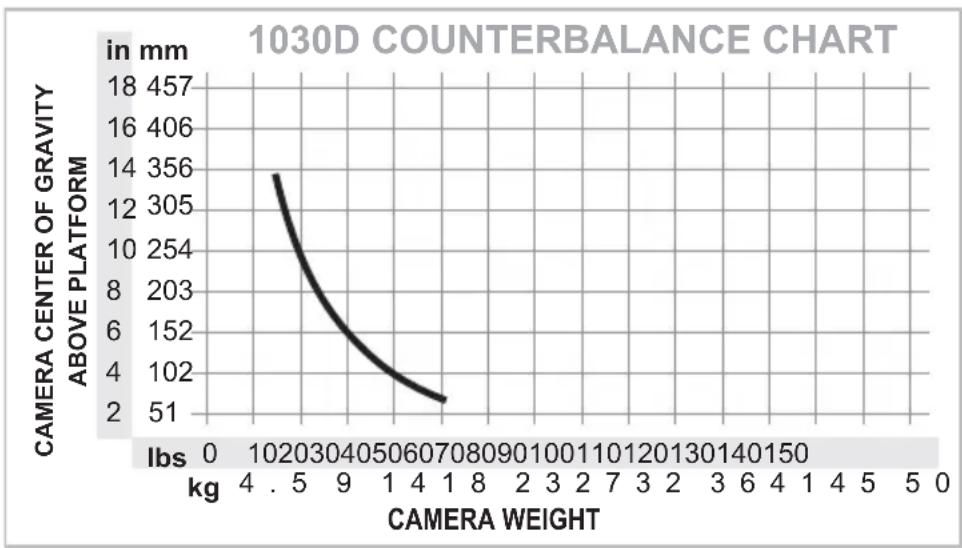
Figure 3 Counterbalance chart - 1030D

Figure 4 Counterbalance chart - 1030Ds
Fore and aft balance

WARNING!
When positioning the payload, it is important to be aware of the potential danger that an unbalanced payload will fall away suddenly.
Always be prepared for this by maintaining a firm hold of the handle, until the balance is set correctly.
- Make sure the tilt lock is engaged and that the camera and all accessories are installed in their operating positions.
- Set the tilt drag adjustment knob to '1' (lowest setting).
- Initially, set the counterbalance quite low.
- Holding the handle to steady the platform, disengage the tilt lock.

WARNING!
In the event of the head falling away violently, increase the counterbalance setting.
- Tilt the platform forwards and backwards and determine whether the camera payload is front or back heavy. Depending on the payload weight, it may be necessary to adjust the counterbalance to enable the payload to be correctly balanced fore and aft.
- If it is not in balance, re-engage the tilt lock.
-
Disengage the platform release lever by pulling it away from the platform.
-
Carefully slide the camera payload and platform forwards or backwards, until the payload is balanced fore and aft. The horizontal balance is correct when no perceptible tilting force can be felt on the handle with the platform level and the tilt lock disengaged.
-
Lock the platform to secure the balanced camera payload in position. Engage the platform release lever by pushing it firmly towards the platform.
-
If there is insufficient movement in the platform to achieve balance: Determine in which direction the mounting plate needs to be moved to achieve correct balance. Remove the payload from the head, reattach the mounting plate to the camera in the required position, remount the load and repeat the horizontal balancing procedure.
-
The camera mounting plate is marked and the head has scales on both sides; make a note of the “balanced” position to simplify rebalancing this particular payload.
Payload weight and counterbalance
The fore and aft balance must be set before adjusting the payload weight and counterbalance.
-
Using the handle tilt the platform downwards and upwards. When correctly balanced, there should be no perceptible tilting force on the handle at any angle of tilt and the head should remain in any tilt position to which it is set.
-
If necessary, adjust the counterbalance as follows:
-
If the head tends to fall away when the platform is tilted, set the platform level and turn the crank handle clockwise to increase the counterbalance.
-
If the head tends to spring back when the platform is tilted, set the platform level and turn the crank handle counterclockwise to decrease the counterbalance.
-
Using the handle tilt the platform upwards and downwards to recheck the balance. Adjust the counterbalance, until balance is achieved.
-
When balancing is complete, check that the fore and aft balance is still correct. Readjust the position of the platform, if necessary.
-
Exercise the head through the full range of pan and tilt to confirm that it operates smoothly.
Pan and tilt locks
The pan and tilt friction locks are operated by levers on the left side of the head.
Rotate the pan lock lever clockwise to engage the pan lock.
Rotate the tilt lock lever counterclockwise to engage the tilt lock.
CAUTION! The locks should be applied whenever the camera/head is left unattended.
If a lock does not fully engage at the end of the lock lever travel, refer to ‘Adjusting the lock levers’ on page 16 in the Servicing section.
Pan and tilt fluid drag
Both the pan and tilt mechanisms incorporate the OConnor ultra-smooth fluid drag system to ensure smooth movement. The pan drag adjustment knob is located below the level bubble on the left side of the head and the tilt drag adjustment knob on the lower right rear of the head. Both controls are continuously adjustable from 1 through 5.
To increase drag, turn the knob clockwise, towards a higher setting.
To decrease drag, turn the knob counterclockwise, towards a lower setting.
Storing the head
When shooting is finished and the head is to be stored, head settings (i.e. counterbalance and fluid drag) should be left unchanged. This will reduce wear on the head's mechanisms and save time on the next shoot. The head should be covered or stored in a bag/case when not in use.
Servicing
General
The 1030D/Ds Ultimate fluid head is robustly made to high engineering standards and little attention is required to maintain serviceability except for regular cleaning. Repairs and any adjustments beyond those described in this manual should be carried out by qualified persons only. Contact OConnor headquarters (see page 4), your local OConnor office or representative.
Routine maintenance
Replace the battery whenever the bubble level illumination is inadequate.
During normal use, check the following:
- Check the effectiveness of the pan and tilt locks. Reset as necessary (refer to 'Adjusting the lock levers' on page 16 for instructions).
- Check the operation of the illumination of the bubble level. Replace the battery as necessary (refer to ‘Replacing the battery’ on page 17).
No further routine maintenance is required.
Cleaning
During normal operation the only cleaning required is a periodic wipe-down with a lint-free cloth. The head should be covered or stored in a bag/case when not in use. Any dirt that accumulates during storage or periods of non-use may be removed with a vacuum cleaner. Particular attention should be paid to the camera mounting area.
NOTE: Do NOT use solvent-based or oil-based cleaners, abrasives or wire brushes to remove accumulations of dirt as these will damage the protective surfaces. Use mild, detergent-based cleaners only.
Use out-of-doors under adverse conditions may require special attention. Salt spray should be washed off immediately using fresh water. Sand and dirt act as an abrasive and should be removed using a vacuum cleaner.
Adjusting the lock levers
If the pan and/or tilt friction locks do not fully engage at the end of the lock lever travel, adjust the lever position as follows:
- Rotate the lock lever to the "locked" position (see Figure 5).
- The lock lever is attached by means of an M4 x 8 mm screw. Carefully peel off the lock label to expose the screw. Using a 2.5 mm Allen or hex key remove the screw.
- Pull the lock lever off the hexagonal shaft, rotate it approx. 30° away from the “locked” end of travel, and reinstall it.
- Tighten the screw. Reapply the lock label.
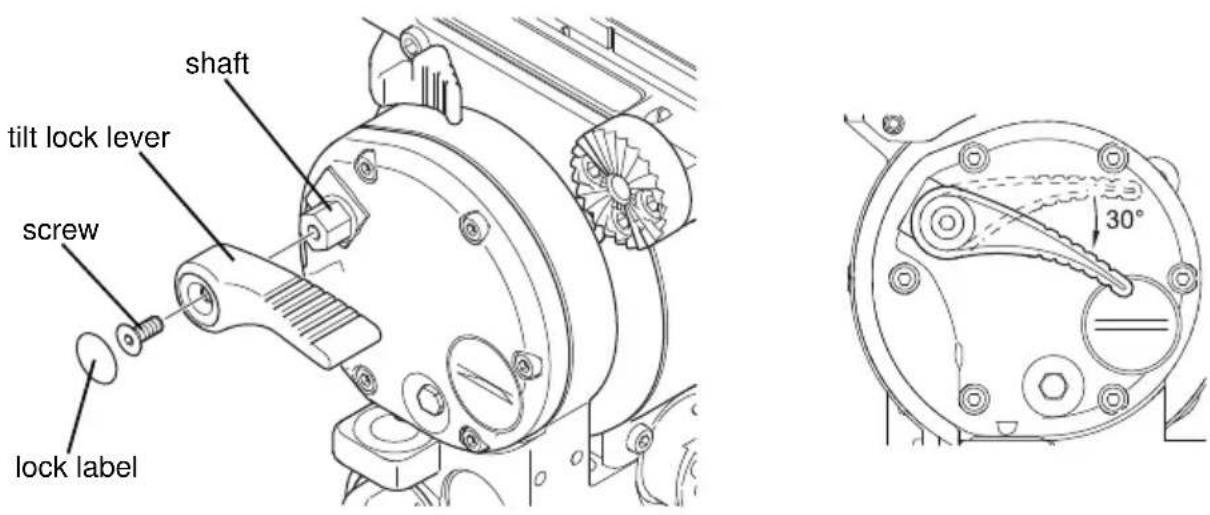
Figure 5 Adjusting the pan and tilt lock levers
Replacing the battery
The battery illuminates the bubble level. It should be replaced whenever the illumination becomes inadequate.
- If required, rotate the tilt lock lever to access the battery cover (Figure 6).
- Use a coin or flat-blade screwdriver to unscrew the battery cover.
- Carefully pull the battery out of its compartment using the ribbon.
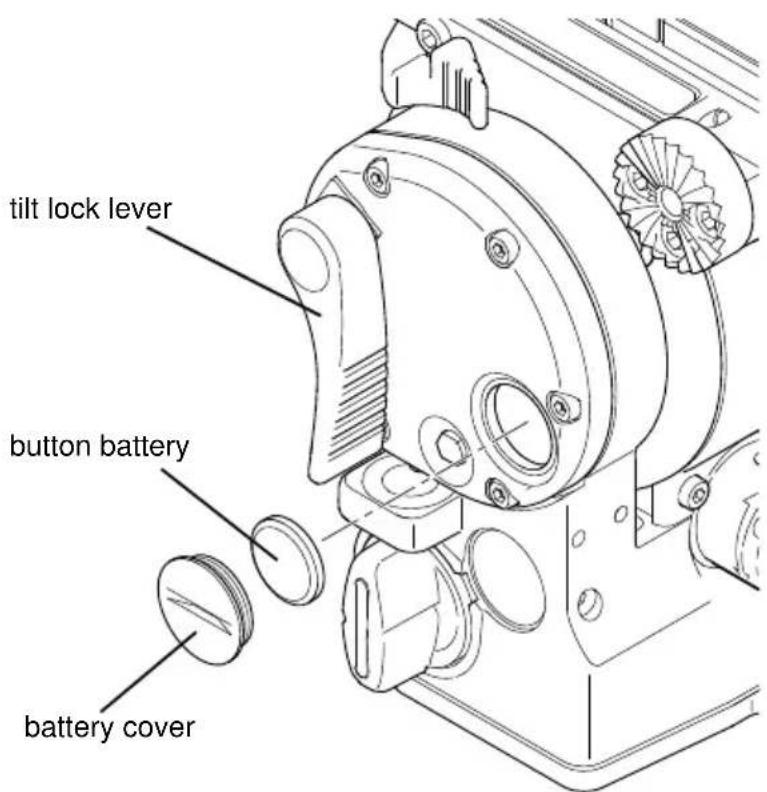
Figure 6 Replacing the battery
-
Fit a replacement CR 2032 3V battery in the compartment, ensuring that the positive side (+) of the battery faces outermost and that the ribbon is correctly positioned.
-
Replace the battery cover and tighten using a coin or flat-blade screwdriver.
-
Press the bubble level illumination button and verify that the bubble level lights up. It should be lit for approximately 25 seconds.
oconnor
Headquarters
2701 N. Ontario St.
Burbank, CA 91504
USA
Tel: +1 818 847 8666
Fax: +1 818 847 1205
USA
709 Executive Blvd
Valley Cottage, NY 10989
USA
Tel: +1 845 268 0100
Jianwai Ave., Chaoyang District
YongAn Dongli A No. 8
100022 Beijing
China
Tel: +86 10 8528 8748
Fax: +86 10 8528 8749
France
www.ocon.com - sales@ocon.com


YouTube
Germany
Gebäude 16
Planiger Straße 34
55543 Bad Kreuznach
Germany
Tel: +49 671 483 43 30
Fax: +49 671 483 43 50
Erfurter Straße 16
85386 Eching
Germany
Tel: +49 89 321 58 200
Fax: +49 89 321 58 227
Japan
P.A. Bldg. 4F
3-12-6 Aobadai
Meguro-ku
Tokyo 153-0042
Japan
Tel: +81 3 5457 1381
Fax: +81 3 5457 1382
Singapore
6 New Industrial Road
02-02 Hoe Huat Industrial Bldg.
Singapore 536199
Tel: +65 6297 5776
Fax: +65 6297 5778
UK
William Vinten Building
Western Way
Bury St. Edmunds
Suffolk IP33 3TB
UK
Tel: +44 1284 752121
Fax: +44 1284 750560
Sales Fax: +44 1284 757929

- OCONNOR 1030D/1030DS
- FLUID HEAD
- COPYRIGHT © 2011 THE VITEC GROUP PLC
- TRADEMARKS
- IMPORTANT INFORMATION ABOUT THIS DOCUMENT
- PUBLISHED BY
- PREFACE
- FEATURES AND BENEFITS OF YOUR NEW 1030
- SAFETY – READ THIS FIRST
- WARNING SYMBOLS IN THIS OPERATORS GUIDE
- DISPOSAL OF WASTE BATTERIES
- CONTACT INFORMATION
- TECHNICAL SPECIFICATION
- DIMENSIONS
- PAYLOADS AND RANGES
- 1030D
- 1030DS
- MOUNTING
- CONTENTS
- PAGE
- PREFACE .... 3
- SAFETY – READ THIS FIRST .... 4
- CONTACT INFORMATION 4
- TECHNICAL SPECIFICATION .... 5
- COMPONENTS 7
- INTRODUCTION 9
- OPERATION 11
- SERVICING....16
- COMPONENTS
- INTRODUCTION
- COUNTERBALANCE
- CAUTION
- ULTRA-SMOOTH FLUID DRAG
- PAN AND TILT LOCKS
- ILLUMINATED BUBBLE LEVEL
- HANDLE MOUNTING
- CAMERA MOUNTING PLATFORM
- WARNING
- BASES
- OPERATION
- INSTALLING THE HEAD
- HANDLES
- MOUNTING THE CAMERA
- TO MOUNT THE CAMERA
- STABILITY
- BALANCING THE HEAD
- FORE AND AFT BALANCE
- PAYLOAD WEIGHT AND COUNTERBALANCE
- PAN AND TILT FLUID DRAG
- STORING THE HEAD
- SERVICING
- GENERAL
- ROUTINE MAINTENANCE
- CLEANING
- ADJUSTING THE LOCK LEVERS
- REPLACING THE BATTERY
- OCONNOR
- HEADQUARTERS
- USA
- FRANCE
- GERMANY
- JAPAN
- SINGAPORE
- HOE HUAT INDUSTRIAL BLDG
- UK
Brand : OConnor
Model : C1239-0001
Category : Tripod