EXT-DVI-141SBP - Accessoires et périphériques informatiques Gefen - Free user manual and instructions
Find the device manual for free EXT-DVI-141SBP Gefen in PDF.


User questions about EXT-DVI-141SBP Gefen
0 question about this device. Answer the ones you know or ask your own.
Ask a new question about this device
Download the instructions for your Accessoires et périphériques informatiques in PDF format for free! Find your manual EXT-DVI-141SBP - Gefen and take your electronic device back in hand. On this page are published all the documents necessary for the use of your device. EXT-DVI-141SBP by Gefen.
USER MANUAL EXT-DVI-141SBP Gefen
ASKING FOR ASSISTANCE
Technical Support:
Telephone (800) (818) 545-6900 772-9100
Fax (818) 772-9120
Technical Support Hours:
8:00 AM to 5:00 PM Monday thru Friday.
Write To:
Gefen Inc.
C/O Customer Service
20600 Nordhoff St.
Chatsworth, CA 91311
support@gefen.com
www.gefen.com
Notice
Gefen Inc. reserves the right to make changes in the hard ware, packaging and any accompanying doc u men ta tion without prior written notice.
The DVI Super Booster Plus is a trademark of Gefen Inc.
© 2008 Gefen Inc., All Rights Reserved
TABLE OF CONTENTS
1 Introduction
2 Features
3 Panel Layout
4 Connecting and Operating the DVI Super Booster Plus
5 Auto Equalization
6 Specifications
7 Warranty
INTRODUCTION
Congratulations on your purchase of the DVI Super Booster Plus. Your complete satisfaction is very important to us.
The DVI Super Booster Plus extends the length of any DVI cable by regenerating the DVI signal before it is output to the DVI monitor or projector. The DVI Super Booster Plus will clean out the digital noise (sparkles) in your picture. The DVI Super Booster Plus is connected with a DVI (male to male) cable from the computer DVI graphic port to the DVI Super Booster input. The DVI Super Booster's output uses a second DVI (male to male) cable to go from the output to any DVI display or projector with a DVI connector. The DVI Super Booster Plus regenerates the video signal so it must be placed at the end of the cable run, close to the display.
Features
- Perfects digital video sent over long stretches of DVI cables
- Extends DVI displays away from the HDTV source
- Maintains highest Single Link resolutions up to 1080p/1920x1200
• Supports DDWG standard for DVI compliant monitors - HDCP Compliant
Includes:
(1) DVI Super Booster
(1) 5VDC Power Supply
(1) User's Manual
PANEL LAYOUT
Front Panel
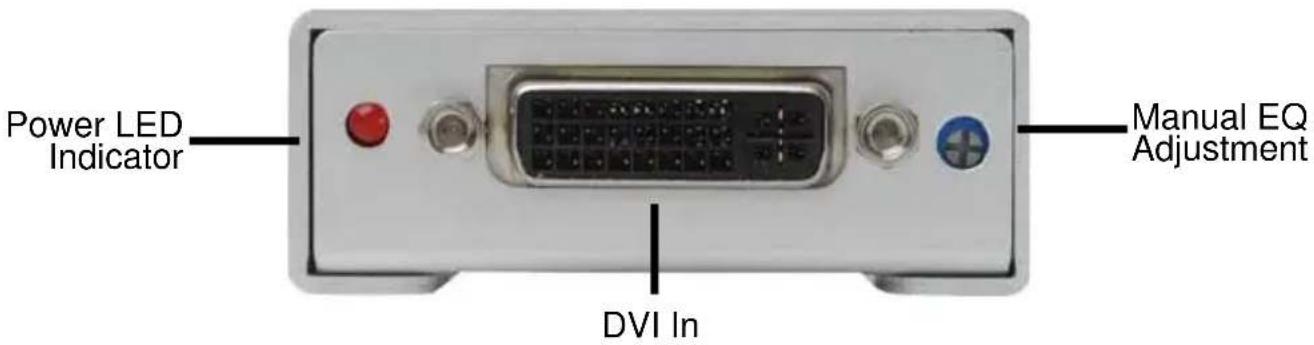
text_image
Power LED Indicator DVI In Manual EQ AdjustmentBack Panel

text_image
DVI OutCONNECTING AND OPERATING THE DVI DETECTIVE
Connect the long DVI cable from the source into the "DVI In" on the front of the 1. DVI Super Booster Plus. The DVI Super Booster Plus is placed next to your display to regenerate the DVI signal.
Connect a short DVI cable from the "DVI Out" connection in the back of the DVI 2. Super Booster Plus to your display or projector
Plug the 5V DC power supply into the DVI Super Booster Plus.3.
Plug the 5VDC wall mount power supply into the wall outlet.4.
Manual Equalization
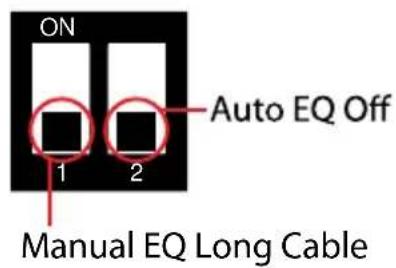
By default, the DVI Super Booster Plus is set to manual equalization. The service Dip Switch 2, located on the underside of the unit behind a silver colored metallic sticker, must be in the OFF position for manual EQ to be enabled. Dip Switch 1 relates to manual EQ short and long cable settings. By default, Dip Switch 1 is in the long cable mode (OFF). Adjust the EQ Trim Pot on the front of the unit to eliminate video noise by inserting a small fl at-head tool into the Trim Pot port. Turn the Trim Pot in very small increments to EQ the video signal until all video noise is eliminated. If a short cable is being used and there is either video noise that cannot be tuned out or no image at all in the long cable mode, change the manual EQ setting to short cable mode by turning Dip Switch 1 to the ON position. Re-insert the adjustment tool and EQ the video signal. Use the diagram on the next page to locate and view the location and settings of the Dip Switches.
AUTO EQUALIZATION
text_image
ON 1 2 Auto EQ Off Manual EQ Long Cable
text_image
ON Auto EQ ON 1 2 Manual EQ Short Cable
text_image
Rem tape DipRemove the silver tape to expose the Dip Switch Bank
Dip Switch 2 can be used to turn on the automatic equalization function. Use this setting for ease of setup as this mode will automatically tune out unwanted video noise. To do this, turn Dip Switch 2 to the ON position. No manual adjustments to the EQ can be made in this mode using the EQ Trim Pot on the front of the unit. Dip Switch 1 will not have any effect in this mode. If video noise is still present in automatic EQ mode, return to manual EQ mode by turning Dip Switch 2 to the OFF position and manually tune the signal using the instructions on the previous page.
SPECIFICATIONS
Video Amplifier Bandwidth 165 MHz
Input Video Signal 1.2 volts p-p
Input DDC Signal 5 volts p-p (TTL)
Maximum Single Link Range 1920 x 1200 x 60hz
DVI Input/Output Connector Type ...... DVI-D
Power Consumption .... 5 Watts (max)
Power Supply.... 5VDC
Dimensions 1.75"W x 1"H x 2.25"D
Shipping Weight 2 Lbs