
AT-VGA180ASR - AV Transmitter Atlona - Free user manual and instructions
Find the device manual for free AT-VGA180ASR Atlona in PDF.


| Product Type | AV Transmitter / Extender |
| Brand | Atlona |
| Model | AT-VGA180ASR |
| Input Interface | VGA (15-pin D-sub) |
| Output Interface | RJ-45 (Ethernet) for transmission over Cat5/6 |
| Video Resolution Support | Up to 1920x1200 (WUXGA) or 1080p |
| Transmission Distance | Up to 100 meters (328 feet) via Cat5e/6 |
| Power Supply | 5V DC, 2A (external power adapter included) |
| Dimensions (W x D x H) | 105 x 80 x 28 mm |
| Weight | 150 g |
| Operating Temperature | 0°C to 40°C |
| Storage Temperature | -20°C to 60°C |
| Humidity | 20% to 90% RH (non-condensing) |
| LED Indicators | Power, Link/Active |
| Housing Material | Metal |
| Mounting Options | Desktop or wall-mountable (bracket included) |
| Main Functions | Extend VGA video and audio signal over long distances using a single Cat cable |
| Included Accessories | Power adapter, user manual, mounting kit |
| Safety Precautions | Do not expose to moisture; use only with specified power supply |
| Maintenance | Clean with a soft, dry cloth; avoid solvents |
| Reparability | No user-serviceable parts inside; contact Atlona support for repairs |
Frequently Asked Questions - AT-VGA180ASR Atlona
User questions about AT-VGA180ASR Atlona
0 question about this device. Answer the ones you know or ask your own.
Ask a new question about this device
Download the instructions for your AV Transmitter in PDF format for free! Find your manual AT-VGA180ASR - Atlona and take your electronic device back in hand. On this page are published all the documents necessary for the use of your device. AT-VGA180ASR by Atlona.
USER MANUAL AT-VGA180ASR Atlona
Atlona Mini VGA Extender with Audio
AT-VGA180AS
AT-VGA180AR
User Manual

User Manual
| One-Port Mini Transmitter : AT-VGA180ASOne-Port Mini Receiver : AT-VGA180AR | TABLE OF CONTENTS | |
| 4 | Package Contents | |
| 4 | Introduction | |
| 4 | Key Features | |
| 5 | Panel Description | |
| 6 | Installation and Operation | |
| 10 | Specification | |
| 11 | SAFETY INFORMATION | |
| 12 | WARRANTY |
User Manual
| / Package Contents 1. AT-VGA180ASR x 1 (sender AT-VGA180AS and receiver AT-VGA180AR units) 2. M-F VGA cable x 1 3. M-F VGA adapter x 1 4. Universal Power Adapter x 1 5. User manual x 1 | 7. Transmitter and Receiver build with LEDs to indicate system status 8. Transmitter takes DC5V power from USB port 9. Receiver build in EQ to adjust image quality | |
| / Introduction AT-VGA180ASR is the smallest AV Extender in the industry; the main body is as big as a VGA connector and able to transmit VGA + Audio by a single Cat5e cable up to 180m. With its simplified design, you can install the extender very easily and save space. You can use it to broadcast AV signal from PC, KVM switch, matrix AV switcher and applied in the device extension of projector, plasma TV, LCD TV, LCD monitor, HDTV, and CRT. It can also be integrated with splitter and selector to fulfill different AV application. | / Panel Description AT-VGA180AS | |
| / Key Features This system can send VGA and Audio signal from Transmitter by Cat5/5e/6 cable, and broadcast to Receiver. The standard maximum broadcasting distance is 180m Compact design with VGA and Audio transmit function Maximum supported distance and resolution: 2048x1536@180m Use Cat5 Enhance UTP cable (350MHz bandwidth) for better quality Software free, pure hardware design, support Plug & Play Support VGA, SVGA, XGA, TFT_LCD, LCD TV, PDP, Projector with DDC2B function | AT-VGA180AR | |
| 1 To VGA Output 2 To Audio Output 3 To USB Power(DC5V) 4 Rj-45 System Link 5 V&H Sync Activity Blinking : No signal LED ON : Active | ||
| 6 Video Focus 7 Power Jack 8 To Monitor 9 To Speaker | ||
User Manual
(3) Some PC might have tight space to connect AT-VGA180AS to VGA port, you may take one short male-female VGA connector to connect in between AT-VGA180AS and VGA output port.

2. Receiver AT-VGA180AR installation and UTP Connection
(1) Power Up: Plug power adapter to the Receiver and connect to monitor and speaker. The LED above RJ-45 port should blink to indicate the unconnected status of AV signal.
You can also use a short VGA cable (in the package) to connect in between Receiver and monitor and place the receiver in other place.

Projector PDP LCD CRTTV
Video Monitor & Speaker

Optional Power Adaptor with a USB 5VDC power output
(2) Function Test: Turn on your PC or VGA player, the LED of Transmitter will blink before VGA signal is turned ON and remain ON after VGA signal is turned ON.

Installation Diagram of System Transmitter AT-VGA180AS

User Manual
(2) Selection of UTP Cable: For best VGA resolution, please use Cat5 Enhanced cable (350MHz bandwidth), the maximum extended length of one section (one pair of Transmitter or Receiver) should not exceed 180 meters. The connector must be made by 568B/568B type.
PAIR 3
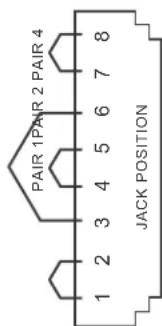
The EIA/TIA definition of 568B in the pin assignment is (1) orange white, (2) orange, (3) green white, (4) blue, (5) blue white, (6) green, (7) brown white, and (8) brown
(3) Connect UTP Cable: Plug two ends of UTP cable to Transmitter and Receiver's RJ45 SYSTEM LINK ports, the monitor and speaker connected to Receiver should work now and the LEDs above RJ-45 port should remain ON. You can adjust the FOCUS control of Receiver to have the best VGA display.

Projector PDP LCD CRTTV
Video Monitor & Speaker

Installation Diagram of Receiver AT-VGA180AR
(4) Function Test: After above installation, you will be able to broadcast the AV signal to Receiver's connected monitor and speaker.
(5) Problem and Solving: If you find unstable image or audio problems after installation, please confirm following list or contact your direct vendor for further assistance:
a. Check if PC's VGA resolution and frequency over the limit of monitor display, if so, please change the VGA configuration from Windows Control panel.
b. Try to connect Monitor and speaker directly to a PC, and ensure the basic function of these devices.
c. When using LCD or same type monitor, there might have some image offset or blinking, please adjust the position, clock or phase of the LCD monitor, or simply press Auto Adjust / Tune to have a better image solution.
3. Other Integration and Application:
Please contact your local dealer or distributor for further information.
User Manual
SAFETY INFORMATION
Safeguards
Avoid excessive humidity, sudden temperature changes or temperature extremes.
Keep this product away from wet locations such as bathtubs, sinks, laundries, wet basements and swimming pools.
Use only accessories recommended by ATLONA to avoid fire, shock or other hazards.
Unplug the product before cleaning. Use a damp cloth for cleaning. Do not use cleaning fluid or aerosols, which could enter the unit and cause damage, fire or electrical shock. Some substances may also mar the finish of the product.
Never open or remove unit panels or make any adjustments not described in this manual. Attempting to do so could expose you to dangerous electrical shock or other hazards. It may also cause damage to your AT-VGA180ASR. Opening the product will void the warranty. Do not attempt to service the unit. Instead disconnect it and contact your Authorised ATLONA reseller or contact ATLONA directly.
Precautions
FCC Regulations state that any unauthorized changes or modifications to this equipment not expressly approved by the manufacturer could void the user's authority to operate this equipment. Operate this product using only the included external power supply. Use of other power supplies could impair performance, damage the product or cause fires.
In the event of an electrostatic discharge, this device may automatically turn off. If this occurs, unplug the device, and plug it back in. Protect and route power cords so they will not be stepped on or pinched by anything placed or against them. Be especially careful of plug-ins, or cord exit points from this product.
| Model AT-VGA180AS AT-VGA180AR | ||
| Description Super Mini AV Transmitter Super Mini AV Receiver | ||
| AV Input VGA x 1, Audio x 1 RJ45 x 1 | ||
| AV Output RJ45 x 1 VGA x 1, Audio Mono x 1 | ||
| Video CTRL - Video EQ | ||
| LED Power and Video Status | ||
| Video Quality Maximum VGA Resolution and Distance : 2048x1536@180m | ||
| Power Consumption USB DC5V Power, 200mA AC7.5V, 250mA | ||
| Environmental Condition | * Operation Temp.: 0~50 * Storage Temp.: -20~60 degree C* Humidity: 10~90% | |
User Manual
WARRANTY
LIMITED ONE YEAR WARRANTY
ATLONA by Lenexpo Electronics warrants only to the initial purchaser of this product for a period of one year from the date of purchase from an Authorized ATLONA Reseller, the product will be free of electrical and mechanical defects that materially affect the products operation as described in this users manual. Within this period, ATLONA will, at it's sole option, repair or replace any components, which fail of normal use or refund the net original price.
DISCLAIMER OF WARRANTY
ALL IMPLIED WARRANTIES OF MERCHANTABILITY OR FITNESS FOR A PARTICULAR PURPOSE ARE LIMITED TO ONE YEAR FROM PURCHASE; ALL OTHER EXPRESS OR IMPLIED CONDITIONS, REPRESENTATIONS AND WARRANTIES, INCLUDING ANY IMPLIED WARRANTY OF NON-INFRINGEMENT, ARE DISCLAIMED. Some jurisdictions do not allow limitations on how long an implied warranty lasts, so the above limitation may not apply to you. This warranty gives you specific legal rights, and you may also have other rights, which vary by jurisdiction.
LIMITATION OF LIABILITY
TO THE EXTENT NOT PROHIBITED BY LAW, IN NO EVENT WILL ATLONA OR ITS SUPPLIERS BE LIABLE FOR ANY LOST REVENUE, PROFIT OR DATA, OR FOR SPECIAL INDIRECT
CONSEQUENTIAL, INCIDENTAL, OR PUNITIVE DAMAGES, HOWEVER CAUSED REGARDLESS OF THE THEORY OF LIABILITY, ARISING OUT OF OR RELATED TO THE USE OF OR INABILITY TO USE THE PRODUCT, EVEN IF ATLONA HAS BEEN ADVISED OF THE POSSIBILITY OF SUCH
(INCLUDING NEGLIGENCE), OR OTHERWISE, EXCEED THE AMOUNT PAID BY YOU FOR THE PRODUCT. The foregoing limitations will apply even if any warranty or remedy provided to you falls its essential purpose. Some jurisdictions do not allow the exclusion or limitation of incidental or consequential damages, so the above limitation of or exclusion may not apply to you.
Disclaimer
This document is provided for technical information for the user. It does not create any warranty with respect to the product, and does not modify or enhance the terms of the warranty that may accompany this product. ATLONA reserves the right to modify the information in this document as necessary. ATLONA holds no responsibility for any errors that may appear in this document. Customers should take appropriate action to ensure their use of the product does not infringe upon any patents. ATLONA respects valid patent rights of third parties.
Trademarks and Copyrights
All other product names or marks referenced herein are trademarks or registered trademarks of their respective owners.
ATLONA 2151 O' circle Ave. Sin D
San Jose CA 95131 oll Free: 1-877-536-3976
International: 408-954-8762 FAX: 408-954-8792
Website: www.ationa.com E-MAIL: info@ationa.com


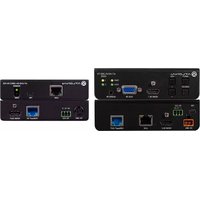


Brand : Atlona
Model : AT-VGA180ASR
Category : AV Transmitter