
AT-DVIDF40SR - AV Transmitter Atlona - Free user manual and instructions
Find the device manual for free AT-DVIDF40SR Atlona in PDF.


| Product Type | DVI Extender (Transmitter and Receiver set) |
| Brand | Atlona |
| Model | AT-DVIDF40SR |
| Input Interface | 1 x DVI-D (Single Link) |
| Output Interface | 1 x DVI-D (Single Link) |
| Transmission Medium | 1 x CAT5e/6 UTP (up to 40m) |
| Maximum Distance | 40 meters (131 ft) via CAT5e/6 |
| Supported Resolution | Up to 1920x1200@60Hz (1080p compatible) |
| HDCP Compliance | Yes |
| EDID Management | Built-in EDID emulation |
| Power Supply | 5V DC via USB or included power adapter |
| Power Consumption | < 2.5W |
| Dimensions (W x D x H) | 85mm x 60mm x 22mm |
| Weight | Approx. 120g per unit |
| Operating Temperature | 0°C to 50°C |
| Storage Temperature | -20°C to 70°C |
| Chassis Material | Metal (aluminum) with plastic end panels |
| Indicators | Power and Link LEDs |
| Installation | Plug-and-play, no software required |
| Maintenance & Cleaning | Wipe with dry, soft cloth; do not use liquids or solvents |
| Safety Warnings | Keep away from water, do not expose to extreme heat |
| Spare Parts & Repairability | No user-serviceable parts; contact Atlona support for issues |
| General Information | Designed to extend DVI signals over long distances with minimal loss |
Frequently Asked Questions - AT-DVIDF40SR Atlona
User questions about AT-DVIDF40SR Atlona
0 question about this device. Answer the ones you know or ask your own.
Ask a new question about this device
Download the instructions for your AV Transmitter in PDF format for free! Find your manual AT-DVIDF40SR - Atlona and take your electronic device back in hand. On this page are published all the documents necessary for the use of your device. AT-DVIDF40SR by Atlona.
USER MANUAL AT-DVIDF40SR Atlona
DVI Dual-link Extenders over Fiber Optic AT-DVIDF40SR
SENDER

natural_image
Exterior view of a black electronic device with IATA 0, DVHN, and AT-DVIDF40S labels (no readable text beyond branding)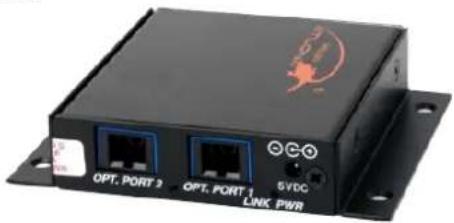
RECEIVER

natural_image
Black electronic device with I/O port, DNA tag, and AT-DV1CF40R label (no readable text or symbols beyond branding)
natural_image
Exterior view of a black wireless device with two ports and a logo (no readable text or symbols beyond labels)User Manual
TABLE OF CONTENTS
- Introduction 2
- Package Contents 2
- Applications 2
- Features 3
- Specifications 3
- Connection and Operation 4
- Troubleshooting 4
- Safety Information 5
- Warranty 6
- Atlona Product Registration 7
INTRODUCTION
Congratulations! You are now the owner of one of the most advanced technologies to transmit digital video over extreme distances. The Atlona AT-DVIDF40SR utilizes Fiber Optic technology to transmit resolutions up to 2560x1600 over 1500ft. This has tremendous advantages over older transmission technologies, such as copper. Atlona utilizes high bandwidth in the design of the unit, so there is no conversion or compression of the signal, thus preserving your picture!
PACKAGE CONTENT
• 1 x AT-DVIDF40SR (Transmitter and Receiver are included)
• 1 x Instruction Manual
- 2 x 5V/1A Power Supply
- 4 x Wall Brackets
APPLICATIONS
With Dual link resolution, here are several excellent applications where this technology can be applied.
- Connecting a Desktop Computer in a command and control center to a commercial grade projector (Ben-Q, Projection Design, Digital projection, Christie, etc).
- Dell, HP, 30", 27", and 24" Apple, Dell, Gateway, HP, NEC, Quinux, Samsung, and other high-resolution desktop monitors.
- Pro-AV Broadcast where a pixel-for-pixel transfer of video information is necessary over a long distance.
Why is Fiber Optic needed?
- Fiber is one of the only transport mediums that is 100% secure connection. This is seen in government and corporate areas where a security is an issue.
- Fiber Optic cables are also 100% immune to EMI interference. Excellent for Medical areas where EMI is an issue (MRI machines are a good example)
- Longer distance. General distance for DVI extension over copper is 150ft, whereas Fiber can be run up to 1000ft.
Why go for Dual Link DVI?
- Single link DVI only allows a max resolution of 1920x1200. Dual-link DVI allows you to achieve much higher resolutions, up to 2560x1600. Our Dual Link extender is also backwards-compatible with Single link DVI.
- Dual Link DVI is still the preferred connection medium for displays that have a native resolution of over 1920x1200.
FEATURES
• Full Compliance with DVI Dual Link Standard.
• Transmission of full DVI bandwidth over 1000 ft at resolutions up to 2560x1600
- Supports full DDC2 standard, allows for full Bi-Directional communication of EDID between source and display.
- HDCP 2.0 support.
• Medically certified, including UL Class A Certification, CE, Class 1 FDA approved; Laser will turn off in case of fiber cable disconnect.
- Utilizes only 2x Multi-mode Fiber pair, other competitors use 3x fiber in combination with additional Cat5e/6, resulting in costlier runs.
- Capable of supporting all major PC and HD resolutions from 640x480(VGA), up to 2560x1600 (WQXGA).
SPECIFICATIONS
| Resolution Support from 640x480 (VGA) up to 2560x1600 (WQXGA) up to 1000ft, including support of popular Dual-Link Resolutions: QXGA (2048×1536) HDTV 1080p (1920×1080) WUXGA (1920×1200) WQXGA (2560×1600) | |
| EDID/DDC Fully bi-directional communication; Supports true DDC content, HDCP&HDMI 1.3 capable | |
| Video bandwidth 2.25Gbps data rate | |
| DVI Connector 24+1pin female (DVI-D Digital Only) | |
| Fiber Connector 2 x Multi-Mode SC style | |
| DVI Hot Plug Full Support | |
| Power 5V/1A | |
| Weight (LB) 0.45 | |
| Dimensions (inch) 0.75 x 2.75 x 3.0 | |
| Universal Power Adaptor included | will work on 110/220v worldwide systems |
| Hermetically sealed enclosure | |
Connection of the AT-DVIDF40SR is very simple, and easy: OPTICAL, DVI, and POWER: The sequence you will connect is in this order:
-
OPTICAL CABLES: Make sure you connect your Optical connections to both the sender, and receiver unit. The AT-DVIDF40SR requires 2 Multi-Mode SC cables, in either 50 or 62 micron size. When connecting the Fiber Optic cables for the first time, remove any dust caps that may be on the cable. Also wipe down the tips with a lint-free cloth dampened in Alcohol to ensure that no particles have come in contact with tip.
-
DVI-D CABLES: Now that you have connected the Optical cables, proceed with connecting the DVI-D cables from your source to the transmitter unit, and your display cable to the sender unit. Atlona HIGHLY recommends you use an Atlona 24 pin, Dual Link DVI cable for best performance. We conveniently offer two cables for such an application:
ATD-14010-2 Atlona Dual Link DVI-D cable. Best for short connections, CL2-CL3 rated for in-wall use.
http://www.atlona.com/2M-6FT-ATLONA-DVI-TO-DVI-DIGITAL-VIDEO-CABLE.html
ATP-14009-2 Atlona Plenum Dual Link cable. Excellent for plenum conduits.
http://www.atlona.com/2M-6.6ft-Atlona-Plenum-DVI-Dual-Link-Male-Male-Cable.html
- POWER ADAPTORS: Once your DVI-D cables have been connected to both sender and receiver unit, go ahead and plug in the power adaptors that come included. Atlona Supplies two 5V 1.2a power supplies. There is no order in which the AT-DVIDF40SR needs to be powered.
TROUBLESHOOTING
- One of the most common installation issues that occurs is incorrect finishing of Fiber Optic Cables. Make sure that the Fiber Optic tips are fully polished, since a rough tip can result in signal loss.
- Ensure that tips are dust-free and are folly cleaned. Dirty tips can result in a loss of signal quality, resulting in no picture.
- 50 Micron MultiMode cable will give you optimum results. The unit is also capable with 62 micron cable as well.
- Verify that you see both POWER, and OPTICAL link lights are on at both units. If you do not see two lights on per unit, please follow this procedure:
- For POWER light, check to ensure that the power adaptor is fully plugged into the extender, and wall receptacle. Verify that power is indeed on at the wall receptacle.
- For OPTICAL light, check the condition of your fiber optic cables. Are they damaged in any way? Fiber optic cables are very sensitive to severe bends, and can fail to transmit the signal if a significant bend snaps the internal cable. Check your DVI source, and verify it is sending a picture.
SAFETY INFORMATION
Safeguards
To reduce the risk of electric shock, do not expose this product to rain or moisture void the warranty and safety features. Do not modify the wall plug. Doing so will
If the wall plug does not fit into your local power socket, hire an electrician to replace your obsolete socket. be easily accessible in the case it requires This equipment should be installed near the socket outlet and the device should disconnection.
Precautions
FCC regulations state that any unauthorized changes or modifications to this equipment, not expressly approved by the manufacturer, could void the user's authority to operate this equipment.
Operate this product using only the included external power supply. Use of other power supplies could impair performance, damage the product, or cause fires.
In the event of an electrostatic discharge this device may automatically turn off. If this occurs, unplug the device and plug it back in.
Protect and route power cords so they will not be stepped on or pinched by anything placed on or against them. Be especially careful of plug-ins or cord exit points from this product.
Avoid excessive humidity, sudden temperature changes or temperature extremes.
Keep this product away from wet locations such as bathtubs, sinks, laundries, wet basements, fish tanks, and swimming pools.
Use only accessories recommended by Atlona to avoid fire, shock, or other hazards.
Unplug the product before cleaning. Use a damp cloth for cleaning and not cleaning fluid or aerosols.
Such products could enter the unit and cause damage, fire, or electric shock. Some substances may also mar the finish of the product.
Never open, remove unit panels, or make any adjustments not described in this manual. Attempting to do so could expose you to dangerous electrical shock or other hazards. It may also cause damage to your AT-DVIDF-40SR. Opening the product will void the warranty.
Do not attempt to service the unit. Disconnect the product and contact your authorized Atlona reseller or contact Atlona directly.
WARRANTY
Limited Warranty
Atlona Technologies warrants that (a) its products (the AT-DVIDF40SR) will perform substantially in accordance with the accompanying written materials for a period of 3 years from the date of receipt and (b) that the product will be free from defects in materials and workmanship under normal use and service for a period of 3 years. In the event applicable law imposes any implied warranties, the implied warranty period is limited to 3 years from the date of receipt. Some jurisdictions do not allow such limitations on duration of an implied warranty, so the above limitation may not apply to customers that fall within those areas.
Customer Remedies
Atlona Technologies' and its suppliers' entire liability and Customer's exclusive remedy shall be, at Atlona Technologies' decision, either return of the price paid for the product, repair, or replacement of the product that does not meet this Limited Warranty and which is returned to Atlona Technologies with a copy of the Customer's receipt. This Limited Warranty is void if failure of the product has resulted from accident, abuse, misapplication, or natural occurrence. In example but not limited to: power surges (electrical storms, local power outage), dropping the product (or items on the product), contact with fluids, and physical misconduct (i.e. kicking or punching). Any replacement product will be warranted for the remainder of the original warranty period.
No other warranties
To the maximum extent permitted by applicable law, Atlona Technologies and its suppliers disclaim all other warranties, either expressed or implied, including, but not limited to, implied warranties of merchantability and fitness for a particular purpose, with regard to the product and any related written materials. This Limited Warranty gives customer specific legal rights. Customers may have other rights depending on the jurisdiction.
No liability for damages
To the maximum extent permitted by applicable law, in no event shall Atlona Technologies or its suppliers be liable for any damages arising out of the use of or inability to use this product, even if Atlona Technologies has been advised of the possibility of such damages. Such damages include but are not limited to: special, incidental, consequential, or indirect damages for personal injury, loss of business profits, business interruption, loss of business information, or any other pecuniary loss.
Atlona Technologies' and its suppliers' entire liability under any provision of this agreement shall be limited to the amount actually paid by you for the product. Some Jurisdictions do not allow the exclusion or limitation of liability for consequential or incidental damage. The above limitations may not apply to you in such jurisdictional cases.
ATLONA PRODUCT REGISTRATION
Thank you for purchasing this Atlona product. - We hope you enjoy it and will take an extra few moments to register your new purchase.
Registration creates an ownership record if your product is lost or stolen and helps ensure you'll receive notification of performance issues and firmware updates.
At Atlona, we respect and protect your privacy, assuring you that your registration information is completely secure. Atlona product registration is completely voluntary and failure to register will not diminish your limited warranty rights.
To register go to: http://www.atlona.com/registration



Brand : Atlona
Model : AT-DVIDF40SR
Category : AV Transmitter