SpaceMaker CO95 - Fridge Applica - Free user manual and instructions
Find the device manual for free SpaceMaker CO95 Applica in PDF.


| Product Type | Compact Refrigerator |
| Brand | Applica |
| Model | SpaceMaker CO95 |
| Color | White |
| Capacity | 4.5 cu ft (127 liters) |
| Dimensions (H x W x D) | 32.5 x 18.5 x 20.5 inches (82.6 x 47 x 52.1 cm) |
| Weight | 44.1 lbs (20 kg) |
| Power Supply | 115 V, 60 Hz, 1.5 A |
| Energy Consumption | 350 kWh/year |
| Noise Level | 40 dB |
| Refrigerant | R600a |
| Adjustable Thermostat | Yes, mechanical dial |
| Interior Light | Incandescent bulb |
| Reversible Door | Yes, user-reversible |
| Number of Shelves | 1 wire shelf, 1 glass shelf |
| Door Storage | 2 gallon-sized bins, 1 small bin |
| Freezer Compartment | Small freezer with ice tray |
| Defrost Method | Manual defrost |
| Climate Class | N (normal: 60-90°F / 16-32°C) |
| Certifications | UL listed, Energy Star |
Frequently Asked Questions - SpaceMaker CO95 Applica
User questions about SpaceMaker CO95 Applica
0 question about this device. Answer the ones you know or ask your own.
Ask a new question about this device
Download the instructions for your Fridge in PDF format for free! Find your manual SpaceMaker CO95 - Applica and take your electronic device back in hand. On this page are published all the documents necessary for the use of your device. SpaceMaker CO95 by Applica.
USER MANUAL SpaceMaker CO95 Applica
Please Read and Save this Use and Care Book
Register your product online at www.prodprotect.com/applica, for a chance to WIN \$100,000!
For US residents only
Accessories/Parts (USA/Canada)
When using electrical appliances, basic safety precautions should always be followed, including the following:
Read all instructions.
☐ To protect against risk of electrical shock do not immerse cord, plugs or appliance in water or other liquid.
☐ Close supervision is necessary when any appliance is used by or near children.
☐ Make sure appliance is OFF when not in use, before putting on or taking off parts, and before cleaning.
□ Avoid contacting moving parts.
☐ Do not operate any appliance with a damaged cord or plug or after the appliance malfunctions, or is dropped or damaged in any manner. Return appliance to the nearest authorized service facility for examination, repair or electrical or mechanical adjustment. Or, call the appropriate toll-free number on the cover of this manual.
☐ The use of attachments not recommended or sold by the manufacturer may cause fire, electric shock or injury.
☐ Do not use outdoors.
☐ Do not open pressurized (aerosol-type) cans.
☐ Do not open cans of flammable liquids such as lighter fluids.
☐ To reduce the risk of fire or electric shock, do not operate any heating appliance beneath the mounted unit.
☐ Do not mount the storage bracket/unit over or near any portion of a heating or cooking appliance, or a sink or basin.
SAVE THESE INSTRUCTIONS.
This product is for household use only.
POLARIZED PLUG (120V Models Only)
This appliance has a polarized plug (one blade is wider than the other). To reduce the risk of electric shock, this plug is intended to fit into a polarized outlet only one way. If the plug does not fit fully into the outlet, reverse the plug. If it still does not fit, contact a qualified electrician. Do not attempt to modify the plug in any way.
TAMPER-RESISTANT SCREW
Warning: This appliance is equipped with a tamper-resistant screw to prevent removal of the outer cover. To reduce the risk of fire or electric shock, do not attempt to remove the outer cover. There are no user-serviceable parts inside. Repair should be done only by authorized service personnel.
ELECTRICAL CORD
a) A short power-supply cord (or detachable power-supply cord) is to be provided to reduce the risk resulting from becoming entangled in or tripping over a longer cord.
b) Longer detachable power-supply cords or extension cords are available and may be used if care is exercised in their use.
c) If a long detachable power-supply cord or extension cord is used,
1) The marked electrical rating of the detachable power-supply cord or extension cord should be at least as great as the electrical rating of the appliance,
2) If the appliance is of the grounded type, the extension cord should be a grounding-type 3-wire cord, and
3) The longer cord should be arranged so that it will not drape over the countertop or tabletop where it can be pulled on by children or tripped over.
Note: If the power supply cord is damaged, it should be replaced by qualified personnel; in Latin America, by an authorized service center.
Product may vary slightly from what is illustrated.
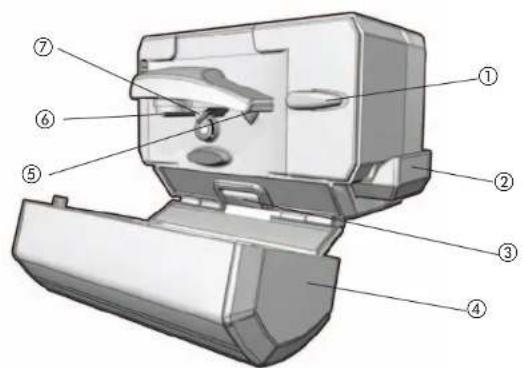
text_image
Exploded view diagram of a mechanical device with numbered parts labeled ① through ⑦A1
- Bag cutter
- Knife sharpener
- Bottle opener
- Cover
† 5. Blade assembly with magnet (Part # CO001) (White), (Part # CO002) (Black)
- Locating post
- Piercing lever
- Cord storage (not shown)
- Cord management hook (not shown)
† 10. Mounting Kit (Part # CO003-01) White, (Part # CO003-02) Black (not shown)
Note: † indicates consumer replaceable/removable parts
4
text_image
B A CA2
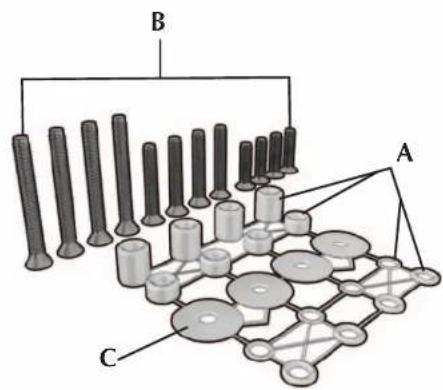
† 1. Mounting Parts
(Part # SDC-MOUNTING KIT)
A. 16 Spacers
4 1/2"
4 1/4"
4 3/16"
4 1/16
B. 12 Screws
4 1"
4 1½"
4 2¼"
C. 4 Washers
- Mounting Template (in box)
You will also need:
- Tape
• Ruler (or you may cut out the ruler provided on the template)
• Electric drill with a 14 " drill bit
GETTING STARTED
- Remove all packing material, labels and any stickers.
- Remove and save literature.
- Unpack mounting parts and set them aside in a safe place where they will not roll away or get lost.
Important: Do not attempt to operate appliance until it is properly installed.
CHOOSE A LOCATION
When choosing your location, consider the following:
- DO make sure to mount within reach of an electrical outlet.
- DO consider your normal work patterns in the kitchen when choosing location.
- DO NOT mount over any heating or cooking appliance such as your range or oven.
• DO NOT mount over or near a sink.
- DO NOT mount under, in front of or behind any under-cabinet light fixtures.
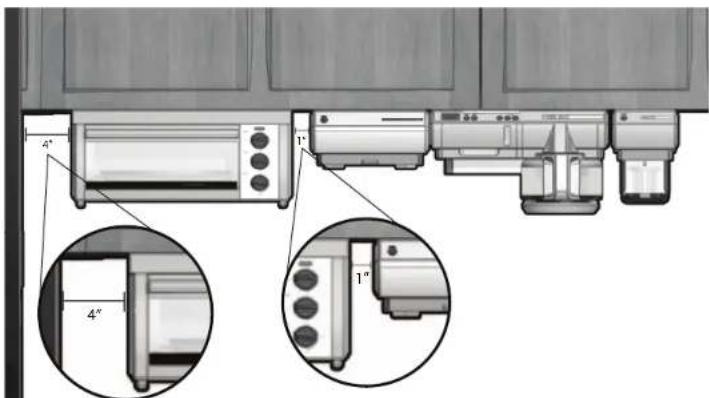
Note: If mounting multiple +SpaceMaker™ appliances and you are installing your appliance next to the SpaceMaker™ oven (Fig. A.3):
- Allow at least 1" between the control panel side of the oven and the appliance.
- Allow at least 4" between the side opposite the control panel of your oven and adjacent wall or other appliance. You can mount the other appliances flush to one another.
text_image
Technical diagram showing front and side views of a kitchen appliance with labeled parts and angular measurementsA.3
Note: If you are connecting this appliance to the receptacle of another tSpaceMaker™ appliance such as the toaster oven or coffeemaker, make sure you can easily unplug the appliance following use.
DETERMINE CABINET TYPE
Prior to installation, determine if your cabinet has a flat bottom (B) or an overhang molding (C). If your cabinet is flat, follow STANDARD INSTALLATION; if the cabinet has an overhang molding, refer to OVERHANG MOLDING INSTALLATION.
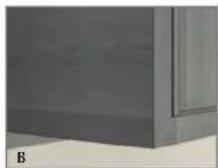
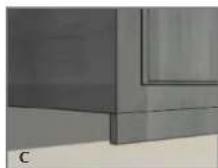
STANDARD INSTALLATION (FLAT CABINET)
Important: Always wear protective glasses or goggles to prevent injury when drilling.
- Clear countertop under installation area to avoid getting dust or debris on other appliances or items. Open cabinets and remove contents to make mounting easier.
- Clean both the underside and topside of the bottom panel of the cabinet.
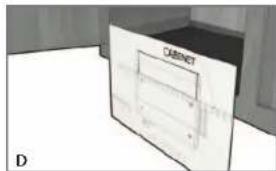
- With cabinet doors open, place mounting template flush against the surface of the underside of your cabinet, making sure to align thick line on template with bottom front edge of your cabinet (D).
text_image
DIMNET DImportant: Do not align screw holes on template directly under the partition between cabinets, as this will prevent you from installing the appliance properly. Pay close attention to where the drill holes will be set so as not to damage your cabinets during mounting. Drilling through your cabinet's partition may cause damage to cabinets and prevent proper installation.
-
Fold the template along the edge of your cabinet so the thick line is straight with bottom front edge; pull template tight and tape down to hold in place.
-
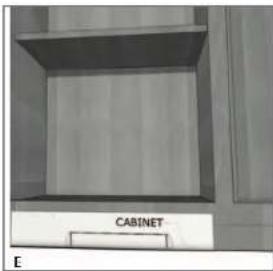
Drilling from under the cabinet up, drill holes through the 4 places marked on the template, using a 1/4-inch drill bit (E).
text_image
CABINET EImportant: Always ensure you are drilling straight up through the marked mounting holes on the template. Drilling at an angle may prevent proper installation and may damage cabinets if the drill bit pierces the partition.
- Once holes are drilled, remove tape and mounting template.
- Wipe dust and debris off the topside and underside of the cabinet surface.
- Place a washer inside the cabinet over each of the 4 holes you drilled.
-
Hold appliance in place, aligning front of unit with front edge of cabinet; drilled holes on cabinet should be aligned with mounting holes on the unit.
-
Drop one of your screws through each of the washers covering the holes in the cabinet, from inside the cabinet down.
Note: To determine which screws to use, you must have enough of the screw exposed underneath the cabinet to properly thread the screw into the nut.
- Screwing from inside the cabinet down into appliance holes, tighten 4 screws in place to secure appliance to cabinet.
Note: Always tighten screws to ensure the appliance does not move or shake during operation.
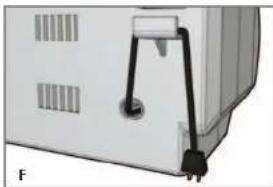
- Pull out cord from cord storage behind appliance and plug into standard electrical outlet. Extra cord can be fed back into storage or hung over cord management hook behind unit (F).
natural_image
Close-up of a white electronic device with black connectors and ventilation slots (no visible text or symbols)Note: If you are connecting this appliance to the receptacle of another tSpaceMaker™ appliance such as the toaster oven or coffeemaker, make sure you can easily unplug the appliance following use.
- Your +SpaceMaker™ appliance is now ready for use!
OVERHANG MOLDING INSTALLATION
For cabinets with an overhang molding (see Illustration C)
Important: Always wear protective glasses or goggles to prevent injury when drilling.
Note: Spacers are provided in case your cabinet has an overhang molding at the front edge. Only use spacers on the rear screws of the appliance to ensure it is level with the front.
-
Clear countertop under installation area to avoid getting dust or debris on other appliances or items. Open cabinets and remove contents to make mounting easier.
-
Clean both the underside and topside of the bottom panel of the cabinet.
-
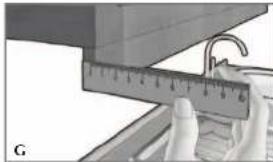
Using a ruler, measure the thickness of the overhang molding (G), accurately noting the number for use in the following step.
natural_image
Close-up of hands holding a ruler measuring a surface with a hook (no visible text or symbols)Note: If you do not have a ruler, you may cut out the paper ruler provided on the edge of your mounting template.
-
After measuring the overhang molding thickness as shown in Illustration G, look at the dashed lines on the mounting template; each line has a measurement next to it that indicates the thickness of the overhang molding used with that line. For example, if your cabinet has an overhang molding thickness of 12 , you will use the 12 " dashed line on the template.
-
Fold the template along the dashed line that matches the thickness of your overhang molding.
-
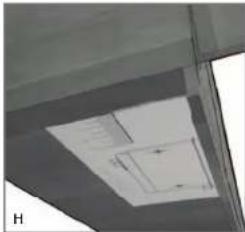
Place the folded template against the back edge of the overhang molding, making sure the side with the drill hole marks is facing down (H).
natural_image
Exterior view of a modern building ceiling with visible skylights and ventilation duct (no signage or text)Important: Do not align screw holes on template directly under the partition between cabinets, as this will prevent you from installing the appliance properly. Pay close attention to where the drill holes will be set so as not to damage your cabinets during mounting. Drilling through your cabinet's partition may cause damage to cabinets and prevent proper installation.
-
Making sure to keep the fold line straight against the back edge of the overhang molding, tape the template securely in place.
-
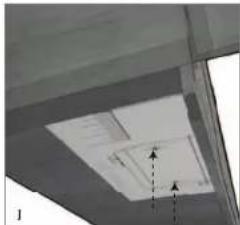
Drilling from under the cabinet up, drill holes through the 4 places marked on the template using a ¼-inch drill bit (J).
natural_image
Interior ceiling view showing a skylight and ventilation duct (no text or symbols visible)Important: Always ensure you are drilling straight up through the marked mounting holes on the template. Drilling at an angle may prevent proper installation and may damage cabinets if the drill bit pierces the partition.
- Once holes are drilled, remove tape and mounting template.
- Wipe dust and debris off the underside and topside of the cabinet surface.
- Place a washer inside the cabinet over each of the 4 holes you drilled.
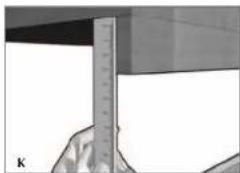
- Now, use your ruler or the paper ruler provided to measure the overhang molding height, placing your ruler vertically against the underside of the cabinet behind the overhang molding. This number determines the number of spacers you need, using a number of spacers equal to the overhang molding height. For example, a 1" overhang molding would use 2, ½" spacers on each of the rear holes (K).
natural_image
Close-up of a hand holding a ruler against a plain background (no visible text or symbols)1.3. Drop one of your screws through each of the washers covering the holes in the cabinet, from inside the cabinet down.
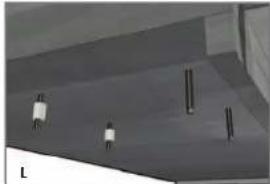
Note: To determine which screws to use, you must have enough of the screw exposed underneath the cabinet to properly thread the screw into the nut. 14. Place the appropriate number of spacers determined in step 12 on both of the rear screws to ensure the appliance will be even (L).
natural_image
3D rendered diagram of a structural component with no visible text or symbolsNote: If the height of your overhang molding is too tall to be accommodated by the number of spacers provided, you may call, toll-free, at 1-800-231-9786 to order additional spacers at no charge.
Note: For spacer installation, you may require assistance in mounting in order to hold spacers in place while securing the appliance at the same time. If assistance is not available, use a small clamp to hold the spacers in place while you position the appliance.
- Once spacers are set, hold appliance up and tighten screws to secure. Screw from inside the cabinet down.
Note: Always tighten screws to ensure the appliance does not move or shake during operation.
- Pull out cord from cord storage behind appliance and plug into standard electrical outlet. Extra cord can be fed back into storage or hung over cord management hook behind unit (see illustration F).
Note: If you are connecting this appliance to the receptacle of another SpaceMakerTM appliance such as the toaster oven or coffeemaker, make sure you can easily unplug the appliance following use.
- Your tSpaceMaker™ appliance is now ready for use!
How to Use
This appliance is for household use only.
OPENING A CAN
- Lift piercing lever.
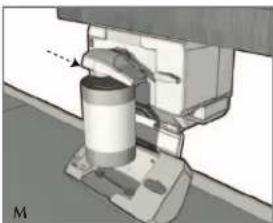
- Tip can so that the rim is under the locating post, then push down on the piercing lever, making sure the cutter blade is inside the rim of the can (M).
natural_image
Mechanical assembly diagram showing a cylindrical component mounted on a base with a dashed line indicating motion (no text or symbols present)Note: Because of the hands-free feature, it is not necessary to hold the lever down or hold the can during cutting. However, you may have to support very tall or heavy cans.
Tip: When the can is opened, the can opener will stop automatically.
- To remove the can, hold it with one hand and raise the lever with the other.
Caution: Avoid contact with the cut edges of the can or lids — they are sharp. During opening process, the design of your can opener will roll the rim of the can to prevent sharp edges; however, handle with caution and always handle cut lid with caution, as these edges are not rolled.
- Carefully discard the lid from the magnet.
Important Tips:
- Do not use this can opener to open cans with a pull tab, peel-off foil seal, or rolling key or rimless cans.
- Open frozen juices or foods in cardboard cans right from the freezer, while they are frozen.
• Aluminum lids will not stick to the magnet.
USING THE KNIFE SHARPENER
- For best results, sharpen the entire blade length in one continuous stroke.
- Insert blade to be sharpened with the end of the blade closest to the handle on the knife into the sharpening slot.
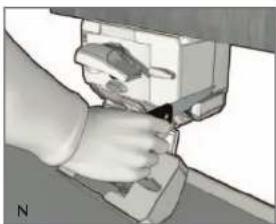
- Carefully press down on the blade and pull it toward you through the slot in one continuous stroke (N).
natural_image
Hand inserting a device into a device with a tool (no visible text or symbols)Important: Do not saw knife back and forth to sharpen. Pull through the sharpener in one direction with a continuous, slow, even motion. Failure to do so may dull or damage your blade.
- Repeat until desired sharpness is achieved.
- Wash and dry knife before using again.
Important Tips:
- Use caution when washing and drying knives after sharpening.
- Do not sharpen serrated blades, as this will smooth their edges.
- Do not sharpen scissors.
USING THE BOTTLE OPENER
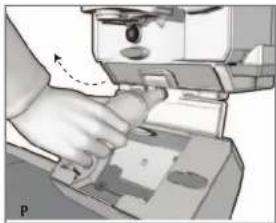
- Grasp the bottle and position cap above the lip on the back side of the bottle opener.
- Tilt bottom of the bottle away from you to catch the cap on the lip and open the bottle (P).
natural_image
Illustration of a hand using a computer to press or<|rotate_right|> a document (no visible text or symbols)USING THE BAG CUTTER
-
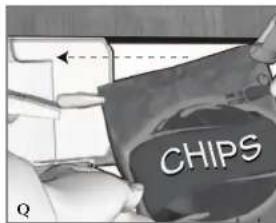
Grasp the plastic or metal foil bag to be opened by one corner, with one hand holding the top edge and the other holding the side or bottom, depending on the size of the bag.
-
Position tightly pulled corner of bag against the cutter and pull firmly to the left to open the bag (Q).
text_image
CHIPS QNote: Pulling a bag straight against the cutter will cut a line along the top of the bag; pulling at an angle will simply remove the corner.
Care and Cleaning
This product contains no user serviceable parts. Refer service to qualified service personnel.
Important: Unplug the cord before cleaning the unit.
REMOVING BLADE ASSEMBLY
-
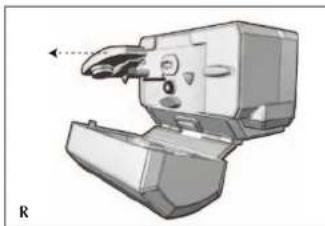
Lift the piercing lever up as far as it will go (roughly 90°).
-
Carefully grip the blade assembly and pull it away from the can opener (R).
natural_image
3D mechanical component diagram showing a lever mechanism with no visible text or symbols- Wash in sudsy water by hand and dry thoroughly. Do not put the blade assembly in the dishwasher.
- Before replacing the blade assembly, wipe the can opener body, knife sharpener and area around the geared wheel with a slightly damp cloth or sponge.
REPLACING BLADE ASSEMBLY
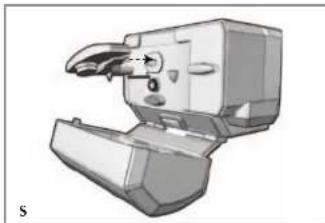
- Align key post on the blade assembly with key slot on the unit (S).
natural_image
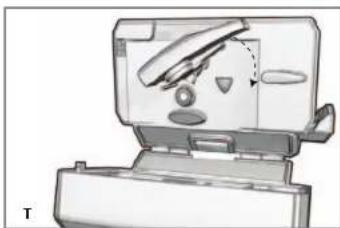
3D rendered mechanical component with no visible text or symbols- Push in blade assembly and turn clockwise until it locks into position (T).
natural_image
Illustration of a computer monitor with a stylus and control panel, no visible text or symbolstext_image
Exploded view diagram of a mechanical device with numbered parts for identificationA1
text_image
Technical diagram showing front view of a kitchen appliance with labeled dimensions and internal componentsA.3
natural_image
3D diagram of a cabinet with labeled components, no readable text or symbols presenttext_image
CABINET Enatural_image
Close-up of a white electronic device with black connectors and ventilation slots (no visible text or symbols)natural_image
Close-up of a hand holding a ruler measuring a surface, with no visible text or symbolsnatural_image
Interior ceiling view showing a skylight and ventilation duct (no text or symbols visible)natural_image
Interior ceiling view showing a skylight and ventilation duct (no text or symbols visible)natural_image
Close-up of a hand holding a ruler measuring a surface (no visible text or symbols)natural_image
3D rendered diagram of a ceiling structure with vertical supports and horizontal lines (no text or symbols)natural_image
Mechanical assembly diagram showing a cylindrical component mounted on a base with a dashed arrow indicating motion (no text or symbols present)natural_image
Hand inserting a device into a device (no visible text or symbols)natural_image
Illustration of a hand using a computer to interact with a device (no visible text or symbols)COMO USAR EL CORTABOLSAS
natural_image
3D mechanical component diagram showing a lever mechanism with no visible text or symbolsnatural_image
3D rendered mechanical component with no visible text or symbolsnatural_image
Diagram of a printer or printer with internal components and a paper airplane, no visible text or symbolsNOTES/NOTAS
NEED HELP?
For service, repair or any questions regarding your appliance, call the appropriate 800 number on the cover of this book. DO NOT return the product to the place of purchase. Also, please DO NOT mail product back to the manufacturer, nor bring it to a service center. You may also want to consult the website listed on the cover of this manual.
Two-Year Limited Warranty
(Applies only in the United States and Canada)
What does it cover?
- Any defect in material or workmanship; provided; however, Applica's liability will not exceed the purchase price of the product.
For how long?
- Two years after the date of original purchase
What will we do to help you?
- Provide you with a reasonably similar replacement product that is either new or factory refurbished
How do you get service?
- Save your receipt as proof of the date of sale.
- Check our on-line service site at www.prodprotect.com/applica, or call our toll-free number, 1-800-231-9786, for general warranty service
- If you need parts or accessories, please call 1-800-738-0245.
What does your warranty not cover?
• Damage from commercial use
• Damage from misuse, abuse or neglect
- Products that have been modified in any way
- Products used or serviced outside the country of purchase
- Glass parts and other accessory items that are packed with the unit
- Shipping and handling costs associated with the replacement of the unit
- Consequential or incidental damages (Please note, however, that some states do not allow the exclusion or limitation of consequential or incidental damages, so this limitation may not apply to you.)
How does state law relate to this warranty?
- This warranty gives you specific legal rights, and you may also have other rights that vary from state to state or province to province.
¿NECESITA AYUDA?
BLACK & DECKER. is a trademark of The Black & Decker Corporation, Towson, Maryland, USA Marca registrada de The Black & Decker Corporation, Towson, Maryland, E.U.
+Spacemaker is a registered trademark of General Electric Company, USA. +Spacemaker es una marca registrada de General Electric Company, EE.UU.

R32008/2-28-71E/S
Copyright © 2008 - 2009 Applica Consumer Products, Inc.

Made in People's Republic of China
Printed in People's Republic of China
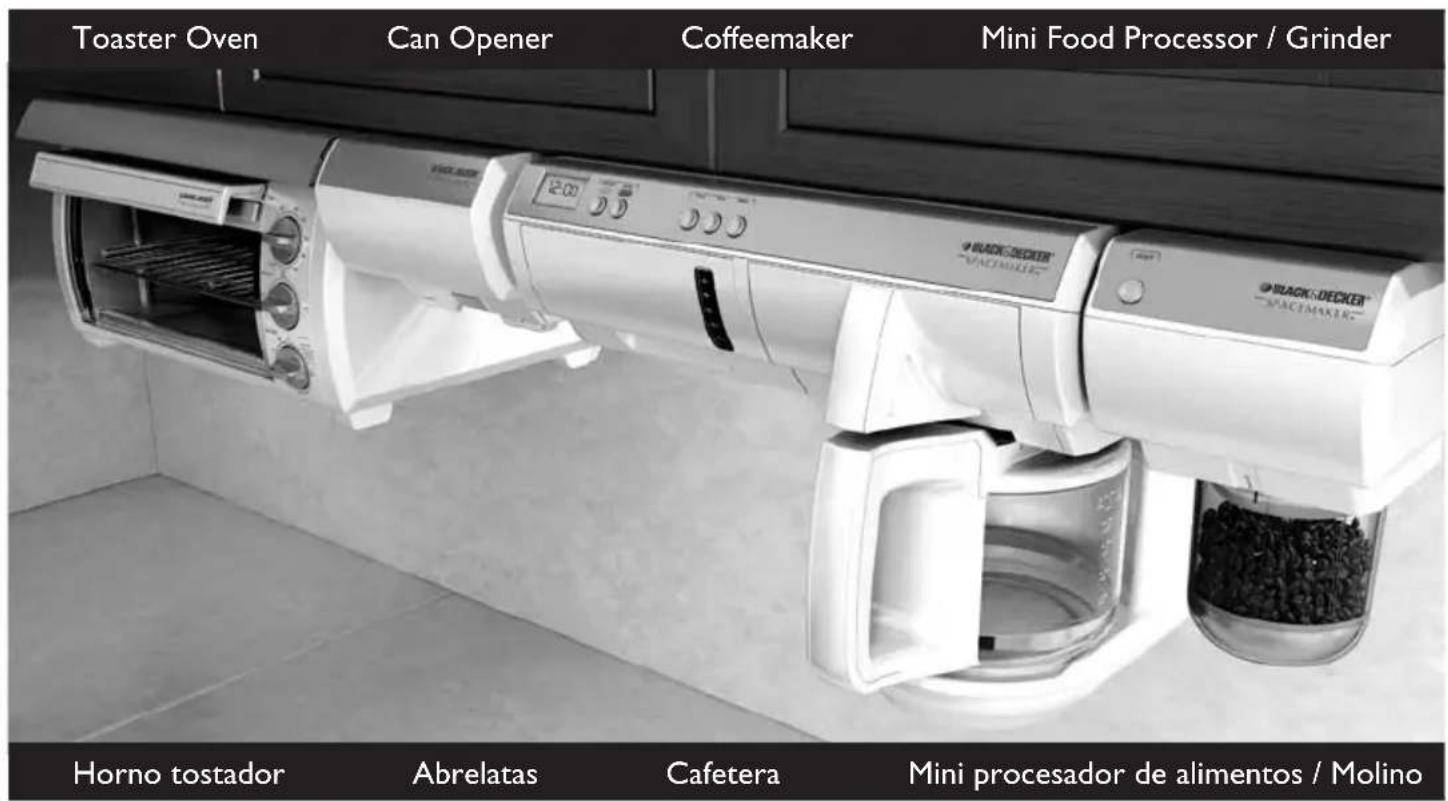
Save space and regain your counters in any kitchen with our full-line of space-saving appliances.
^ SpaceMaker™ appliances can help tackle all your kitchen tasks while keeping your counters free of clutter!
Visit www.bdspacemaker.com to learn more about †SpaceMaker™ appliances and see our latest promotional offers.
Your countertops will thank you!