
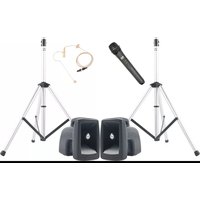
PRO-540/1D3S - Loudspeaker Anchor Audio - Free user manual and instructions
Find the device manual for free PRO-540/1D3S Anchor Audio in PDF.


| Product Type | Wireless Full Duplex Intercom System |
| Model | ProLink 500 (BP-500) |
| Frequency Range | 902-928 MHz (License Free) |
| Modulation | FSK |
| Range (Line of Sight) | 500 ft / 75 m (Duplex) |
| Number of Beltpacks per Network | 1 Master + up to 3 Remotes + unlimited "Listen Only" |
| Channel Selection | A or B |
| Power Supply | 9 VDC, 1.2 A DC (via included GC-9000 gang charger) |
| Battery Type | Three "AA" NiMH rechargeable (alkaline usable, but do not charge) |
| Battery Life | Approximately 12 hours continuous use (per charge) |
| Charging Time | 5-6 hours |
| Weight (BP-500 with batteries) | 15 oz / 0.42 kg |
| Dimensions (BP-500) | 4.5 x 6.25 x 3.75 in (114.3 x 158.75 x 95.25 mm) |
| Antenna | 1/2-wavelength dipole with RPSMA connector (max gain 1.17 dB) |
| Microphone | Dynamic, uni-directional, low impedance (sensitivity -83 dB typical) |
| Headset Specifications | 4-pin XLR connector; dynamic microphone; noise cancelling; dual (H-2000) or single ear (H-2000S) |
| Headset Driver | Dynamic, 40 mm, 300 Ω impedance |
| Frequency Response (Headphones) | 20 Hz - 20 kHz |
| Headset SPL | 91 dB ± 3 dB |
| Warranty | 2 years limited (requires online registration) |
| Country of Origin | USA |
Frequently Asked Questions - PRO-540/1D3S Anchor Audio
User questions about PRO-540/1D3S Anchor Audio
0 question about this device. Answer the ones you know or ask your own.
Ask a new question about this device
Download the instructions for your Loudspeaker in PDF format for free! Find your manual PRO-540/1D3S - Anchor Audio and take your electronic device back in hand. On this page are published all the documents necessary for the use of your device. PRO-540/1D3S by Anchor Audio.
USER MANUAL PRO-540/1D3S Anchor Audio
ProLink 500™ Wireless Intercom Owners Manual
MADE IN USA

TWO YEAR WARRANTY
A Message from the President
Congratulations on purchasing an Anchor Audio intercom system, the choice of thousands of satisfied customers including the White House, prestigious universities, school districts nationwide, police and fire departments, and all branches of the U.S. military. Our products are made of the finest materials and built with pride in the U.S.
We've incorporated the latest technology into your intercom system yet kept it simple to use. Just take a few minutes to review this manual to ensure the maximum enjoyment of your Anchor
system. Or, you can view a demonstration video complete with a trouble shooting section at www.anchoraudio.com.
Feel free to call our friendly customer support staff at 1-800-ANCHOR1 Monday thru Friday between 7:00am and 5:00pm Pacific Standard Time with any questions. We love to hear from our customers.

Janet Jacobs, President on behalf of all Anchor employees
CONTENTS
GETTING STARTED / WARRANTY INFORMATION .... 1
DEFINITIONS/APPLICATIONS / SYSTEM RANGE / RECHARGEABLE BATTERIES 2
BASIC SYTEM SETUP / BELT PACK CONTROLS / BLUETOOTH SETUP.... 3
FAQ 4
TROUBLESHOOTING/TECHNICAL SPECS 5
GETTING STARTED
Please check your new unit carefully for any damage which may have occurred during shipment. Each Anchor product is carefully inspected at the factory and packed in specially designed boxes for safe transport.
Notify the freight carrier immediately of any damage to the shipping box or product. Repack the unit in the original box and wait for inspection by the carrier's claim agent. Notify your dealer of the pending freight claim.
NOTE: All damage claims must be made with freight carrier!
RETURNING SYSTEMS FOR SERVICE OR REPAIR
For service or repair, please contact the dealer you purchased your system from or Anchor Audio Customer Service at 800.262.4671 to obtain a RA (Return Authorization) number. You may also complete an online RA request form at www.anchoraudio.com. All shipments to Anchor Audio must include a RA number and must be shipped prepaid. C.O.D. shipments will be refused and returned at your expense.
IMPORTANT: Save the shipping box & packing materials,
they were specially designed to ship your unit!
WARRANTY REGISTRATION
Visit our website at www.anchoraudio.com and select "Warranty Registration." Complete the online form to activate the two-year limited warranty on your ProLink 500 intercom system.
100-0200-000/A - 03/11
ProLink 500™ Wireless Intercom Owners Manual
natural_image
Mannequin head with black headphones and a handheld electronic device connected to its ear (no visible text or symbols)WHAT IS PROLINK 500™?
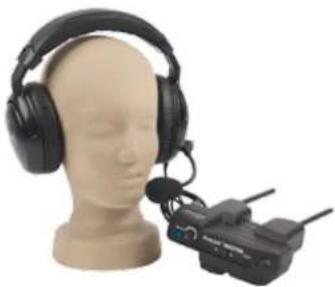
ProLink is a digital wireless, full duplex intercom system that is easy to configure and easy to operate. You can operate the MASTER belt pack with up to three REMOTE belt packs which are identified on the side label as R1, R2 or R3. You may also have an option of unlimited number of "Listen Only" beltpacks. The transmitter and receiver operate in the license free 902-928 MHz range without the need for a base station.
SYSTEM RANGE
The RF signal will travel through many solid objects. However, the more solid objects between the belt packs, the more the range will be reduced. When the belt packs are transmitting, the Transmit LED will flash red. If the signal drops out, the LED will glow solid red on REMOTE belt packs only. If the belt packs are too far apart, the REMOTE belt packs need to move closer to the MASTER belt pack.
RECHARGEABLE BATTERIES
ProLink 500 belt packs include three "AA" rechargeable batteries and AC gang charger. Fully charged batteries yield approximately five hours of continuous use. Alkaline batteries can be used. Connecting the AC charger to a belt pack with alkaline batteries installed could seriously damage the system.
INSTALL BATTERIES
- Remove battery door
- Install three "AA" NIMH batteries
- Replace battery compartment door
CHARGE BATTERIES
-
Connect gang charger (included) into charging port on the bottom of the belt packs
-
Plug gang charger into AC outlet for minimum of five hours
LED ON = battery charging LED OFF = battery charged
CAUTION: Do not attempt to charge alkaline batteries.
Some users are required (for emergency preparedness, etc.) to leave their ProLink 500 units plugged into the charger at all times.
For those applications we recommend replacing the batteries every 12 months.
DEFINITIONS AND APPLICATIONS
ProLink 500 - wireless duplex intercom system
ProLink 500 Network - requires a MASTER belt pack and includes up to three REMOTE belt packs (option of unlimited number of "Listen Only" beltpacks)
Channel - A or B channel selection for different applications
MADE IN USA

TWO YEAR WARRANTY
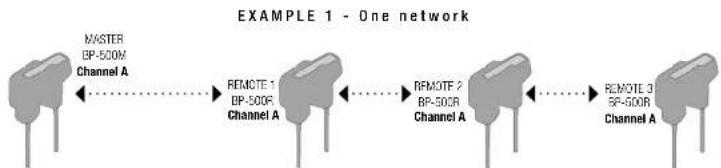
flowchart
graph LR
    A["MASTER\nBP-500R\nChannel A"] <--> B["REMOTE 1\nBP-500R\nChannel A"]
    B <--> C["REMOTE 2\nBP-500R\nChannel A"]
    C <--> D["REMOTE 3\nBP-500R\nChannel A"]
EXAMPLE 2 - Two independent networks in the same facility
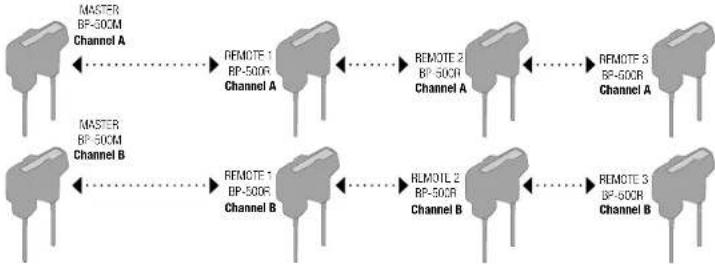
flowchart
graph LR
    subgraph_Channel_A["MASTER BP-500C Channel A"]
        A1["MASTER"] --> A2["REMOTE 1 BP-500R Channel A"]
        A2 --> A3["REMOTE 2 BP-500R Channel A"]
        A3 --> A4["REMOTE 3 BP-500R Channel A"]
    end
    subgraph_Channel_B["MASTER BP-500C Channel B"]
        B1["MASTER"] --> B2["REMOTE 1 BP-500R Channel B"]
        B2 --> B3["REMOTE 2 BP-500R Channel B"]
        B3 --> B4["REMOTE 3 BP-500R Channel B"]
    end
    A1 -.-> A2
    A2 -.-> A3
    A3 -.-> A4
    B1 -.-> B2
    B2 -.-> B3
    B3 -.-> B4
EXAMPLE 3 - Director or coach talking and listening between two channels requires the following configuration
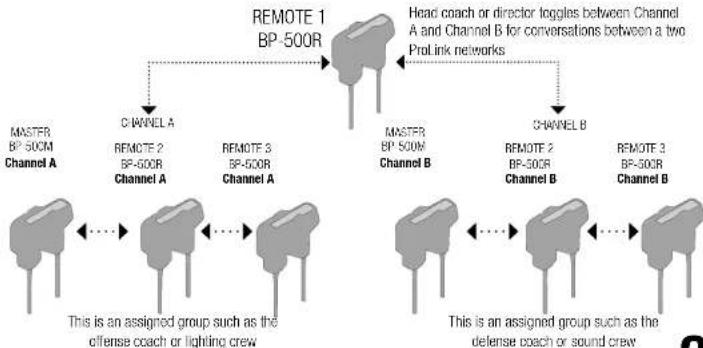
flowchart
graph TD
    A["MASTER BP-500M Channel A"] --> B["CHANNEL A"]
    B --> C["REMOTE 2 BP-500R Channel A"]
    C --> D["REMOTE 3 BP-500R Channel A"]
    D --> E["REMOTE 1 BP-500R"]
    E --> F["MASTER BP-500M Channel B"]
    F --> G["CHANNEL B"]
    G --> H["REMOTE 2 BP-500R Channel B"]
    H --> I["REMOTE 3 BP-500R Channel B"]
    I --> J["REMOTE 1 BP-500R"]
    J --> K["Head coach or director toggles between Channel A and Channel B for conversations between a two Prolink networks"]
    K --> L["This is an assigned group such as the offense coach or lighting crew"]
    L --> M["This is an assigned group such as the defense coach or sound crew"]
ProLink 500™ Wireless Intercom Owners Manual
MADE IN USA

TWO YEAR WARRANTY
BASIC SETUP AND OPERATION
- Charge the batteries 5-6 hours.
Note: Belt packs operate about ten to twelve hours of continuous use per charge. (Diagram 2) - Find the MASTER belt pack as indicated on the top label. The Master belt pack must be ON for each of the REMOTE belt packs to function. (Diagram 1)
- Plug headset cable into belt pack & adjust boom. (Diagram 2)
- Turn on power and set headset volume. Power ON LED is solid green and flashing green for LOW battery. (Diagram 1)
- Set slide switch to Push to Talk or Always On mode. (Diagram 3)
- Choose channel A or B for all belt packs. If both channels are used at the same time, two master belt packs are required (See page 6). (Diagram 1)
Note: repeat above for each member's belt pack in use.
BELT PACK CONTROLS
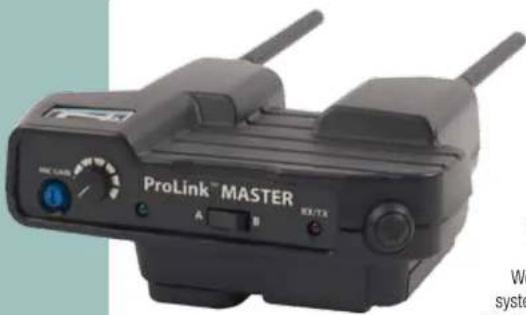
Mic Gain – controls the microphone sensitivity. Someone with a soft voice will increase the Mic Gain.
Power Knob also controls headset volume. The Power LED is solid green while ON and flashes green when batteries need recharging. A/B Channel Selection – each member of the system must be on the same channel to hear communication
RX/TX LED – flashes RED when transmitting and is SOLID RED on the Remote belt packs when out of range of the Master belt pack
PTT control – push to engage in conversation and release when done Push to Talk or Always ON slide switch for the mode of operation preferred. If you want hands free operation, select the Always On mode. Your belt pack is live at all times.
4-PIN XLR headset connector - use Anchor Audio headsets or any headset with a dynamic microphone.
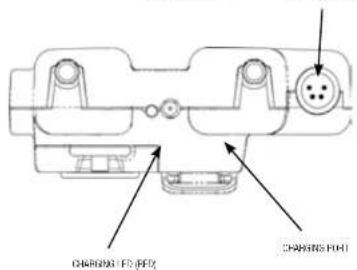
Charging Port for the GC-9000 gang charger – charge LED glows RED when charging and stops glowing when charge complete.
HEADSETS
ProLink 500 uses noise cancelling headsets with a 4-pin XLR connector. Models H-2000 (dual ear muff) and H-2000S (single ear muff) are available. The headsets include an adjustable boom microphone.
DIAGRAM 1

PROLINK 500 BELT PACK
Model Shown: BP-500M
POST TO TALK FOR ALWAYS ON SLIDE SWITCH
DIAGRAN 3

DIAGRAN 2
BLUETOOTH SETUP
- Tum ON the BT headset and put it in pairing mode to pair ("CONNECT") with ProLink 500 beltpack. Note: Every Bluetooth headset has its own pairing procedure. Refer to instructions.
- The BT will auto pair with the ProLink 500 if the BT headset has been already paired to the ProLink 500 beltpack.
- RED LED will turn ON (see on the back side of ProLink 500) in a few seconds indicating that it has paired.
- After the RED LED turns ON push the CONNECT button to activate the audio.
- If you want to switch to the wired headset on the same bellpack you will have to turn OFF/disconnect the BT headset.
- If you want to pair a new BT headset push "DISCONNECT" to delete current pairing before you start the pairing process.
ProLink 500™ Wireless Intercom Owners Manual
MADE IN USA

TWO YEAR WARRANTY
FREQUENTLY ASKED QUESTIONS
Can I use my own headset?
Yes. The ProLink 500 is designed to work with dynamic microphone elements. (Shields can be connected to chassis ground pin.)
Headset pin configuration: 1=Mic(-), 2=Mic(+), 3=Headphone(-), 4=Headphone(+)
I've run out of battery life, now what?
You can substitute "AA" alkaline batteries rechargeable batteries. However, connecting the charger to the belt pack when alkaline batteries are installed could seriously damage your belt pack.
Can my ProLink 500 work with other wireless intercom systems?
No. ProLink 500 uses proprietary design and software exclusive to the product.
Can my ProLink 500 work with wired intercom systems?
Yes. ProLink 500 uses WingMAN 500 as a modular link to PortaCom and other two-wire intercoms.
Can someone eavesdrop on my conversation?
The proprietary software makes it difficult for anyone to penetrate the wireless network. Anchor offers an encrypted model for additional security.
If I break my headset, what do I do?
The H-2000 and H-2000S headsets are covered by a 2-year warranty. Follow the instructions in the Getting Started section on page 2 for Return Authorization. ProLink 500 headsets are sold separately if a replacement is needed.
Can I add belt packs to my network?
Your intercom network can operate with one Master belt pack and up to three REMOTE belt packs. You may also add unlimited number of "Listen Only" beltpacks.
This device complies with part 15 of the FCC Rules. Operation is subject to the following two conditions: (1) This device may not cause harmful interference, and (2) this device must accept any interference received, including interference that my cause undesired operation.
"This device has been designed to operate with a 1/2 wavelength dipole antenna with RPSMA connector, and having a maximum gain of 1.17dB. Antennas not included in this list or having a gain greater than 1.17dB are strictly prohibited for use with this device. The required antenna impedance is 50 ohms."
"To reduce potential radio interference to other users, the antenna type and its gain should be so chosen that the equivalent isotropically radiated power (e.i.r.p.) is not more than that permitted for successful communication."
"Operation is subject to the following two conditions: (1) this device may not cause interference, and (2) this device must accept any interference, including interference that may cause undesired operation of the device."
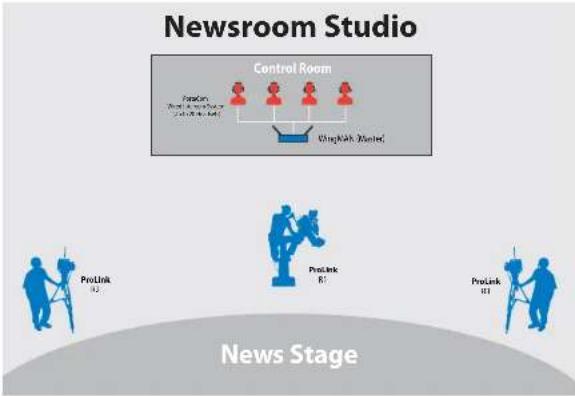
flowchart
graph TD
    A["ProLink 92"] --> B["ProLink 81"]
    C["ProLink 81"] --> D["ProLink 81"]
    E["Control Room"] --> F["ProLink 70"]
    F --> G["ProLink 70"]
    H["Control Room"] --> I["ProLink 70"]
    I --> J["ProLink 70"]
    style A fill:#f9f,stroke:#333
    style C fill:#f9f,stroke:#333
    style E fill:#f9f,stroke:#333
    style H fill:#f9f,stroke:#333
    style I fill:#f9f,stroke:#333
Example of ProLink 500 & PortaCom using WingMan Interface System
ProLink 500™ Wireless Intercom Owners Manual
MADE IN USA

TWO YEAR WARRANTY
TROUBLESHOOTING
Can't hear a person speaking?
First, verify that the MASTER belt pack is ON and within range of each of the REMOTE belt packs. Second, increase headset volume using the headset volume knob on the top of the belt pack. In extremely loud environments, you will need to use the dual ear muff headset with noise cancelling properties. If you still can't hear, your batteries may be dead. Also, verify each belt pack is on the same channel.
Microphone not picking up your voice?
First, adjust the microphone sensitivity setting on the top of the belt pack by turning the blue button incrementally until you reach desired sensitivity level. Move the microphone closer to your mouth and speak up clearly. For example, some people speak softer than others and need a more sensitive microphone level.
Background noise transmitting across system?
Reduce the microphone sensitivity setting by turning the blue button until you reach the desired level.
Transmission is weak?
Your rechargeable batteries may be running low. If batteries are weak, the green LED on the top panel will flash. Your belt pack batteries need to be recharged. If you need to keep working, you can use disposable alkaline batteries.
Proper intercom usage
Up to 4 people may talk at once. Use proper intercom etiquette – don't "talk over" others while they are speaking. Also, position the microphone to pick up a minimum of breath noise.
Warning: Changes or modifications not expressly approved by Anchor Audio, Inc. could void the user's authority to operate this device. Only use the provided belt-clip.
Scan for ProLink 500 Technical Specs

Scan for ProLink 500 Brochure
Scan for ProLink 500 Website

Scan for How to Videos & Articles
PROLINK 500 TECHNICAL SPECIFICATIONS
ProLink Bell Pack (BP-500)
RF Frequency Range 902-928MHz
Modulation FSK
Range (line of sight) Duplex 500' / 75 m
Antenna 1/2 - wavelength dipole
Power Supply 9VDC, 1.2ADC
Battery Life 12 hours
Weight 15oz./0.42kg (with batteries)
Dimensions 4.5"x6.25"x3.75
(114.3 x 158.75 x 95.25 mm)
Single-Ear (H-2000S & Dual-Ear Headphones H-2000)
Drivers Dynamic, 40mm
Impedance 300Ω +/- 15%
Frequency Response 20Hz - 20kHz
SPL 91dB +/- 3dB
Rated Power > 40mW
Distortion < 5%
Microphone Dynamic, Uni-directional,
Low impedance
Mic Sensitivity Referenced to 0dB=1W/μbar, 1kHz
Min -85 dB / Typical -83 dB /
Max -81 dB
Frequency Response 200Hz-12kHz
Connector Plug 4-pin XLR, female
Weight Single: 13 oz. / 0.37 kg
Dual: 16 oz. / 0.45 kg
FCC ID: J8ZBP-500

(Specifications Subject to Change Without Notice)
ANCHOR AUDIO CUSTOMER SERVICE 800.262.4671
FOR ADDITIONAL INFORMATION visit www.anchoraudio.com
- ProLink 500™ Wireless Intercom Owners Manual
- A Message from the President
- CONTENTS
- GETTING STARTED
- RETURNING SYSTEMS FOR SERVICE OR REPAIR
- WARRANTY REGISTRATION
- WHAT IS PROLINK 500™?
- SYSTEM RANGE
- RECHARGEABLE BATTERIES
- DEFINITIONS AND APPLICATIONS
- BASIC SETUP AND OPERATION
- BELT PACK CONTROLS
- HEADSETS
- BLUETOOTH SETUP
- FREQUENTLY ASKED QUESTIONS
- Can I use my own headset?
- I've run out of battery life, now what?
- Can my ProLink 500 work with other wireless intercom systems?
- Can my ProLink 500 work with wired intercom systems?
- Can someone eavesdrop on my conversation?
- If I break my headset, what do I do?
- Can I add belt packs to my network?
- TROUBLESHOOTING
- Can't hear a person speaking?
- Microphone not picking up your voice?
- Background noise transmitting across system?
- Transmission is weak?
- Proper intercom usage
- PROLINK 500 TECHNICAL SPECIFICATIONS
- ANCHOR AUDIO CUSTOMER SERVICE 800.262.4671
Brand : Anchor Audio
Model : PRO-540/1D3S
Category : Loudspeaker