Ear Set 1-4 - Headphones SENNHEISER - Free user manual and instructions
Find the device manual for free Ear Set 1-4 SENNHEISER in PDF.


User questions about Ear Set 1-4 SENNHEISER
0 question about this device. Answer the ones you know or ask your own.
Ask a new question about this device
Download the instructions for your Headphones in PDF format for free! Find your manual Ear Set 1-4 - SENNHEISER and take your electronic device back in hand. On this page are published all the documents necessary for the use of your device. Ear Set 1-4 by SENNHEISER.
USER MANUAL Ear Set 1-4 SENNHEISER
text_image
EAR SET 1 EAR SET 4 Instruction manual SENNHEISERContents
Safety instructions.... 2
Delivery includes 3
Ear Set 1.... 3
Ear Set 4.... 3
Ear Set 1 / Ear Set 4.... 4
Features of the Ear Set 1 / Ear Set 4 .... 4
Putting into operation 5
Wearing the ear-worn microphones 5
Adjusting the earband to the shape of your ear 6
Positioning the microphone boom towards the corner of the mouth 7
Attaching the sound inlet basket (Ear Set 4 only)....8
Treble boost using the MZC 1-1 and MZC 1-2 frequency response caps (Ear Set 1 only)....9
Attaching the connection cable to clothing.... 9
Variants 11
Ear Set 1.... 11
Ear Set 4....11
Care and maintenance 12
Cleaning the sound inlet basket.... 12
Cleaning the contacts of the connection cable.... 13
Accessories.... 15
Ear Set 1.... 15
Ear Set 4....16
Specifications 17
Specifications Ear Set 1.... 17
Specifications Ear Set 4....19
Manufacturer Declarations 21
Safety instructions
- Read this instruction manual.
- Keep this instruction manual. Always include this instruction manual when passing the product on to third parties.
- Heed all warnings and follow all instructions in this instruction manual.
- Use only a cloth for cleaning the product.
- Do not place the product near any heat sources such as radiators, stoves, or other devices (including amplifiers) that produce heat.
- Never open the device. If devices are opened by customers in breach of this instruction, the warranty becomes null and void.
- Only use attachments/accessories specified by Sennheiser.
Intended use of the device
Intended use includes:
- having read this instruction manual, especially the chapter "Safety instructions",
- using the product within the operating conditions and limitations described in this instruction manual.
"Improper use" means using the product other than as described in this instruction manual, or under operating conditions which differ from those described herein.
Delivery includes
Ear Set 1
1 Ear Set 1 ear-worn microphone
1 MZQ 02 cable clip
1 connection cable with silicone tube
1 MZC 1-1 frequency response cap, small
1 MZC 1-2 frequency response cap, large
1 adhesive tape
1 plastic transport case
1 instruction manual
Ear Set 4
1 Ear Set 4 ear-worn microphone
1 MZQ 02 cable clip
1 connection cable with silicone tube
1 MZW 4 windshield
1 adhesive tape
1 plastic transport case
1 instruction manual
Ear Set 1 / Ear Set 4
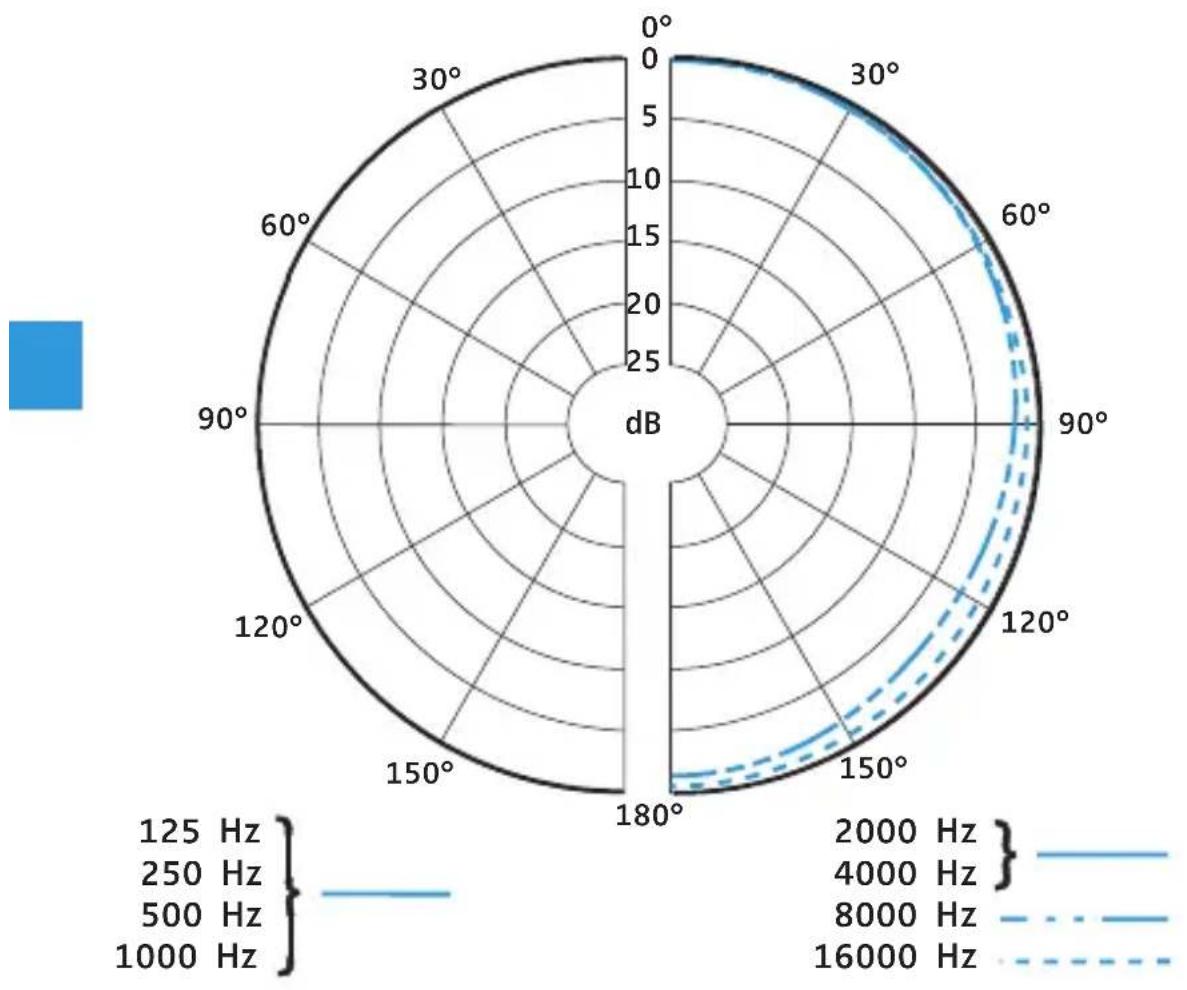
The Ear Set 1 and Ear Set 4 are high-quality pre-polarized condenser ear-worn microphones designed for professional applications. They differ from each other in their pick-up patterns (see the polar diagrams in the chapter “Specifications”).
- Ear Set 1: omni-directional
- Ear Set 4: cardioid
Features of the Ear Set 1 / Ear Set 4
- Compatible with all Sennheiser wireless microphone systems
- Individually adjustable to the ear due to flexible earband
- Cable is insensitive to structure-borne noise
- Modular design, i.e. all system components are easily interchangeable
• Very small dimensions - Very insensitive to the penetration of sweat and moisture
- High maximum sound pressure level and excellent speech intelligibility
- Based on the proven acoustics of the MKE 1 sub-miniature clip-on microphone (Ear Set 1) or the HSP 4 headmic (Ear Set 4)
- Transparent and skin-friendly hypoallergenic adhesive tape ensures a perfect fit of the microphone boom even during strong movements and provides strain relief for the cable
- Made in Germany
Putting into operation
Wearing the ear-worn microphones
Your ear-worn microphone comes with a preinstalled connection cable and is ready for operation on delivery.
The Ear Set 1 with its omni-directional pick-up pattern can be worn on the left or right ear.
Due to the directivity of its cardioid pick-up pattern, the Ear Set 4 can only be worn on the right ear.
Ear Set 1

natural_image
Simple line drawing of two human heads with blue motion arrows indicating head movement (no text or symbols)Ear Set 4

Adjusting the earband to the shape of your ear
CAUTION! Damage to the earband

The earband can break or be impaired in its function when the bend diameter is too small (< 2 cm) or when you bend it close to the connector. Also avoid frequent alternate bendings. If the earband breaks, you can be injured.
Adjust the earband to the shape of your ear as described below.
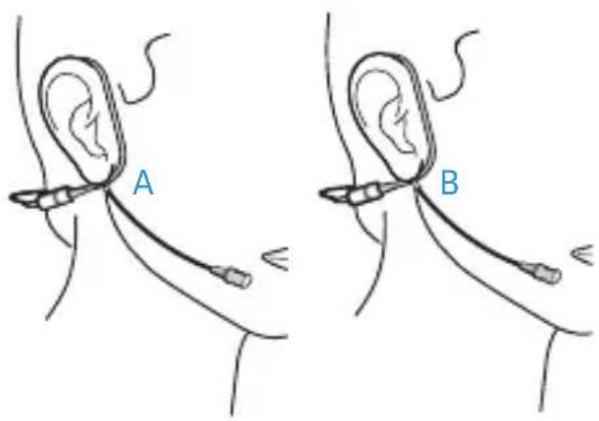
Put on the ear-worn microphone. The earband has to closely follow the shape of your ear. To improve the wearing comfort, make sure that the end of the connector is placed in front (A) or behind (B) the microphone boom.
Adjust the pre-bent earband to the individual shape of your ear. To do so, carefully bend the earband over your index finger.
text_image
A B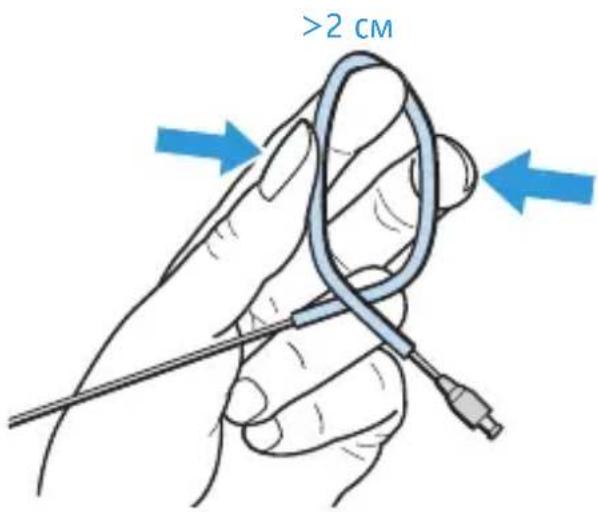
text_image
>2 cmPositioning the microphone boom towards the corner of the mouth
For best possible fit and comfort and optimum transmission quality, the microphone boom has to be adjusted to the shape of your face.
CAUTION! Damage to the microphone boom

The microphone boom can break or be impaired in its function when the bend diameter is too small (< 2 cm) or when you bend it close to the microphone. Also avoid frequent alternate bendings. If the microphone boom breaks, you can be injured.
Adjust the microphone boom to the shape of your face as described below.
If necessary, bend the earband again in order to adjust the angle of the microphone boom.
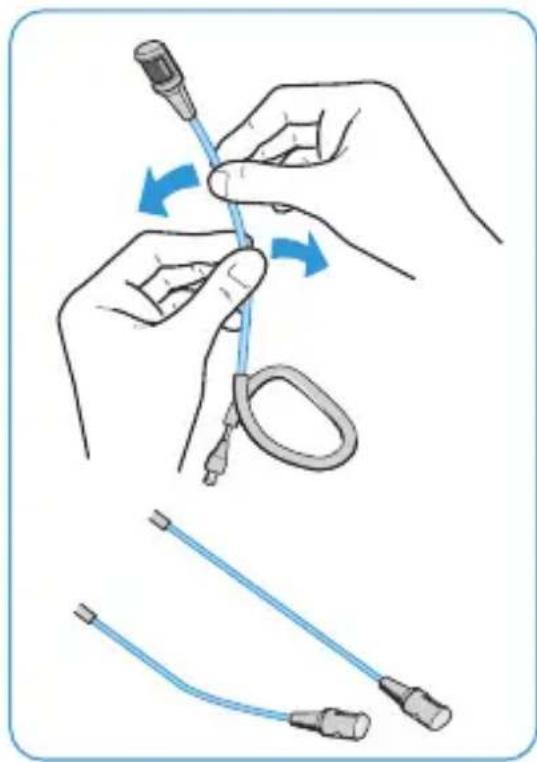
Adjust the microphone boom: You can change the length of the microphone boom by bending it. Due to the omni-directional pick-up pattern of the Ear Set 1, no particular distance between microphone and mouth has to be maintained.
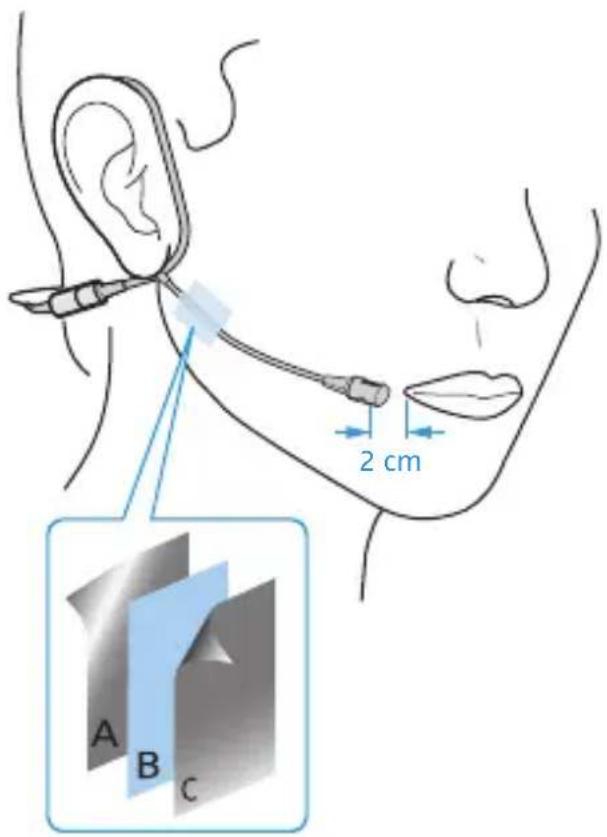
With the Ear Set 4, maintain a distance of 2 to 3 cm between microphone and mouth.
Adjust the microphone boom to the shape of your face.
natural_image
Illustration of a medical procedure showing hand positioning and cable installation steps (no text or symbols)The supplied hypoallergenic adhesive tape allows you to additionally fix the microphone boom to the cheek.
Remove the white protective foil (A).
▶ Stick the adhesive tape (B) over the microphone boom.
Remove the thin protective foil (C) from the upper side of the adhesive tape.
If necessary, apply make-up to the adhesive tape.
text_image
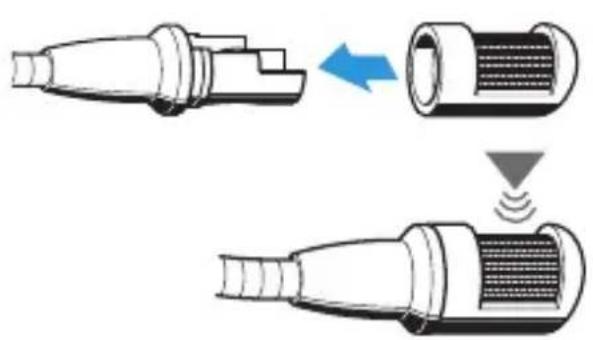
2 cm A B CAttaching the sound inlet basket (Ear Set 4 only)
Notes
Do not position the microphone directly in front of your mouth as it will pick up your breathing and plosive noises from your mouth. In addition, moisture can adversely affect the sound and performance of your microphone.
When attaching the sound inlet basket, make sure that it locks into place with an audible click.
Make sure you do not cover the sound inlet.
natural_image
Diagram showing three stages of a connector with internal structure and signal wave, no text or symbols presentTreble boost using the MZC 1-1 and MZC 1-2 frequency response caps (Ear Set 1 only)
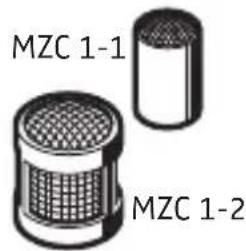
The Ear Set 1 is supplied with two different frequency response caps. These caps allow you to adjust the treble response of the microphone (see the frequency response curve in the chapter “Specifications”). In addition, the large MZC 1-2 frequency response cap attenuates wind noise by approx. 15 dB and provides an extended protection against the ingress of moisture.
text_image
MZC 1-1 MZC 1-2Slip the cap of your choice onto the microphone head until it locks into place.
Attaching the connection cable to clothing
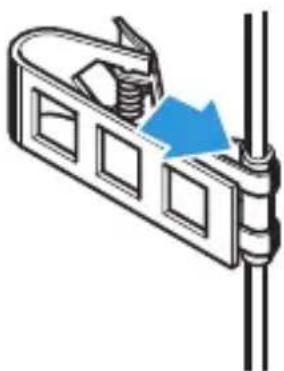
▶ Press the tube of the connection cable into the cable grip of the MZQ 02 cable clip.
▶ Attach the cable clip to the rear of your collar (see diagram on the next page).
▶ Run the connection cable under your clothing.
natural_image
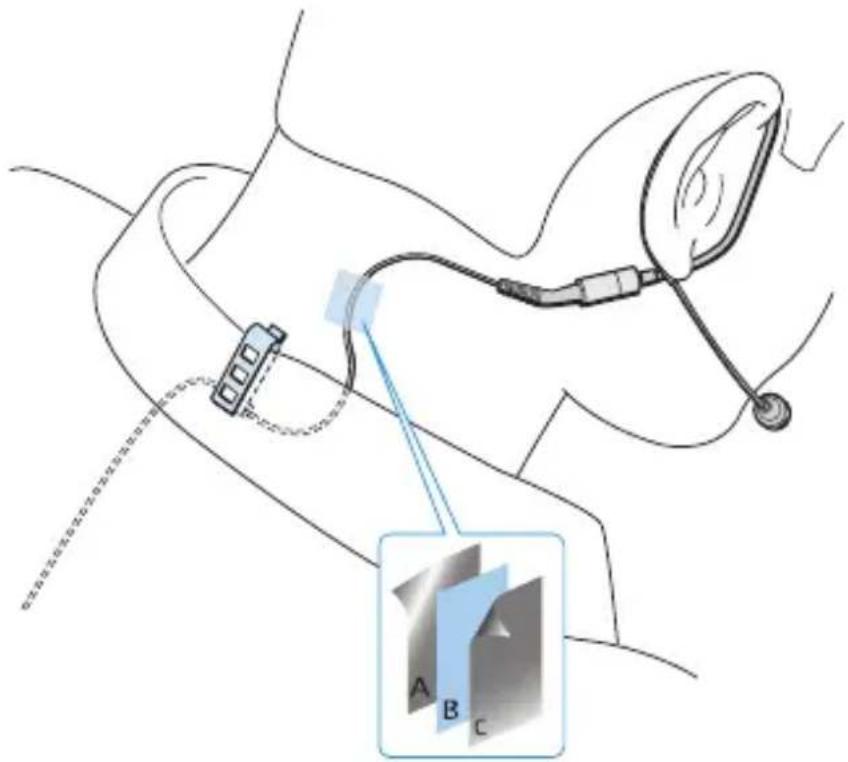
Diagram of a mechanical component with a blue arrow indicating direction (no text or symbols)The supplied hypoallergenic adhesive tape allows you to additionally fix the connection cable to the neck.
Remove the white protective foil (A).
Stick the adhesive tape (B) over the connection cable.
Remove the thin protective foil (C) from the upper side of the adhesive tape.
text_image
Medical diagram showing a medical device connected to a monitor with labeled parts A, B, and C, including a magnified inset highlighting component B.Variants
Ear Set 1
| Variants Cable and connector type Cat. No. | |
| Ear Set 1-4 Black cable with special connector 504230 | |
| Ear Set 1-4-3 Beige cable with special connector 504231 | |
| Ear Set 1-ew Black cable with 3.5 mm jack plug, lockable | 504232 |
| Ear Set 1-ew-3 Beige cable with 3.5 mm jack plug, lockable | 504233 |
Ear Set 4
| Variants Cable and connector type Cat. No. | |
| Ear Set 4-4 Black cable with special connector 504234 | |
| Ear Set 4-4-3 Beige cable with special connector 504235 | |
| Ear Set 4-ew Black cable with 3.5 mm jack plug, lockable | 504236 |
| Ear Set 4-ew-3 Beige cable with 3.5 mm jack plug, lockable | 504237 |
Care and maintenance
Cleaning the sound inlet basket
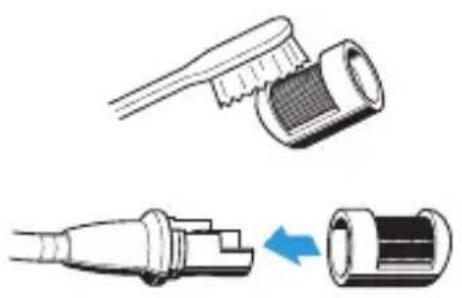
To clean or replace the sound inlet basket, carefully pull it from the capsule.
Moisten a small brush (bristle brush or toothbrush) with isopropyl alcohol.
Carefully brush off the sound inlet basket.
Allow the sound inlet basket to air dry for approx. 1 hour so that the remaining isopropyl alcohol can evaporate.
Reattach the sound inlet basket to the capsule so that it locks into place with an audible click. When attaching the sound inlet basket, make sure not to cover the sound inlet.
natural_image
Illustration of two types of toothbrushes showing different angles (no text or symbols)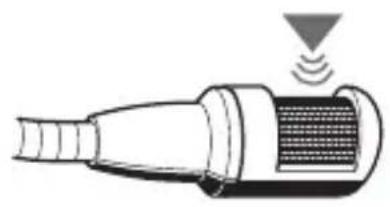
natural_image
Diagram of a handheld device with sensor waves and ventilation grille (no text or symbols)Cleaning the contacts of the connection cable
Over time, salt deposits from sweat can build up on the connector and the socket. Clean the connector and the socket using standard isopropyl alcohol.
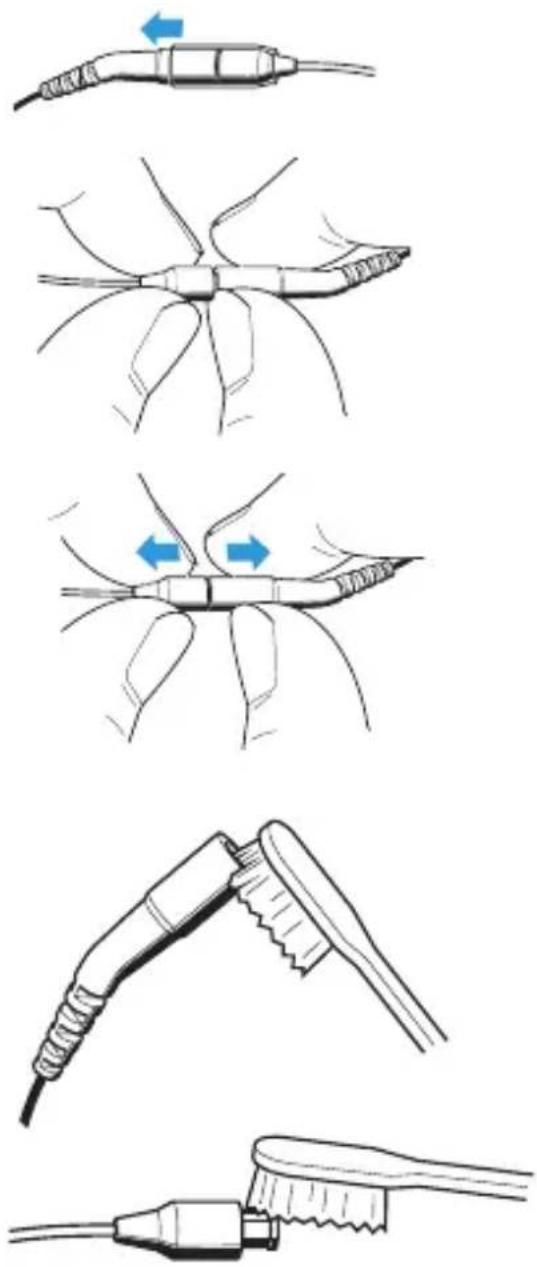
To loosen the connection:
Slide the silicone tube aside.
▶ Insert your fingernail into the join.
▶ Pull the connector and the socket apart as shown.
Moisten a small brush (bristle brush or toothbrush) with isopropyl alcohol.
Carefully brush off the connector and the socket and remove the salt deposits.
text_image
Diagram illustrating five different stages of hairpin tool application, showing how to apply a toothbrush.Rinse the connector and the socket with isopropyl alcohol to remove the remaining salt deposits.
Dry the connector and the socket using a soft cloth or a small piece of cotton wool and carefully tap them off.
Allow the connector and the socket to air dry for approx. 1 hour so that the remaining isopropyl alcohol can evaporate.
▶ Slide the silicone tube onto the connector.
Connect the connector to the socket.
Accessories
Ear Set 1
Item Cat. No.
MZC 1-1 frequency response cap, small, black 513179
MZC 1-2 frequency response cap, large, black 521701
MZC 1-1 frequency response cap, small, beige 513198
MZC 1-2 frequency response cap, large, beige 513197
MZW 01 windshield, black 521724
MZW 01 windshield, beige 521726
MZW 02 foam windshield, black 536809
MZW 02 foam windshield, beige 514524
Cable with special connector, black 530990
Cable with special connector, beige 530992
Cable with 3.5 mm jack plug, black 530994
Cable with 3.5 mm jack plug, beige 530996
Plastic transport case 535377
MZA 900 P phantom power adapter, 3.5 mm socket 500226
MZA 900 P-4 phantom power adapter, special socket 500872
MZC 1-3 make-up protector 521746
MZQ 02 cable clip, black 076659
MZQ 02 cable clip, beige 076680
Hypoallergenic adhesive tape, 10 m, transparent, can be covered with make-up 502756
Ear Set 4
Item Cat. No.
MZW 4 foam windshield, black 510862
MZW 4 foam windshield, beige 510863
Cable with special connector, black 530990
Cable with special connector, beige 530992
Cable with 3.5 mm jack plug, black 530994
Cable with 3.5 mm jack plug, beige 530996
Plastic transport case 535377
MZA 900 P phantom power adapter, 3.5 mm socket 500226
MZA 900 P-4 phantom power adapter, special socket 500872
MZQ 02 cable clip, black 076659
MZQ 02 cable clip, beige 076680
Hypoallergenic adhesive tape, 10 m, transparent, can be covered with make-up 502756
Windshield cap, black 511715
Windshield cap, beige 511716
Specifications
Specifications Ear Set 1
Frequency response 20
to 20,000 Hz ± 3 dB
Pick-up pattern omni-directional
Nominal impedance (at 1 kHz) 1 kΩ
Min. terminating impedance 4.7 kΩ
Sensitivity (at 1 kHz) 5 mV/Pa ± 2.5 dB
Diameter of mic capsule 3.3 mm
Max. sound pressure level 143 dB
Equivalent noise level 27 dB (A)
Supply current approx. 240 μA
Power supply 4.5
to 15 V
Operating temperature -10^ to +50^
Cable length 1.6 m
Diameter of boom arm 1.1 mm
Weight (without cable) 2.3 g
Connector
see "Variants" on page 11
Polar diagram Ear Set 1
radar
| Angle | Frequency Band | |-------|----------------| | 0° | 125 Hz | | 30° | 250 Hz | | 60° | 500 Hz | | 90° | 8000 Hz | | 120° | 16000 Hz | | 150° | 4000 Hz | | 180° | 2000 Hz | | 210° | 16000 Hz |Frequency response curve Ear Set 1
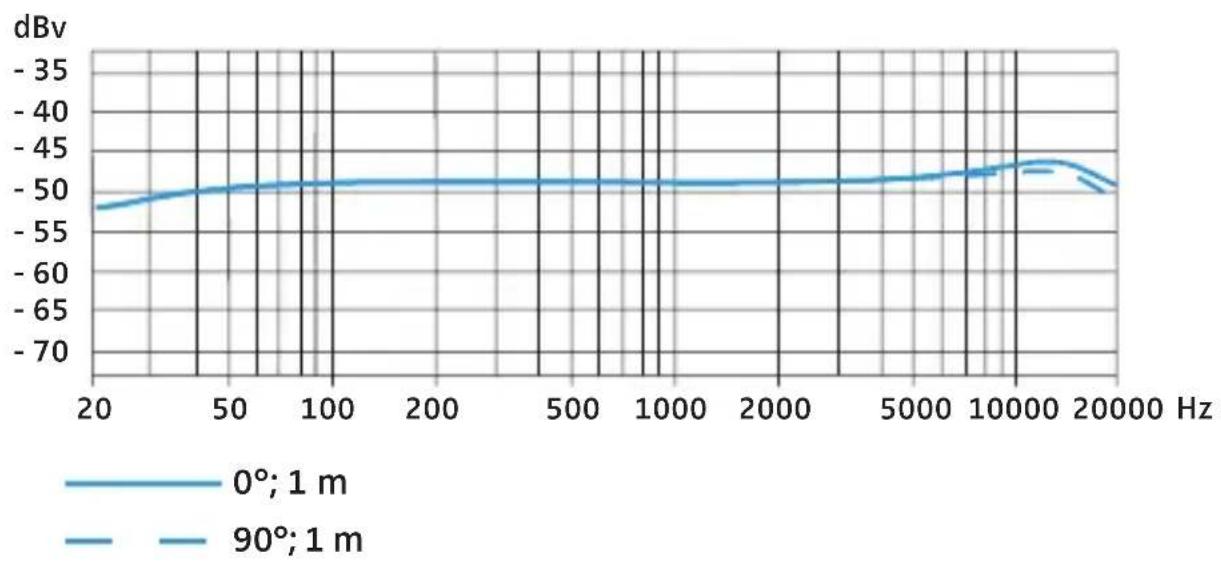
line
| Frequency (Hz) | 0°; 1 m (dBv) | 90°; 1 m (dBv) | | -------------- | ------------- | -------------- | | 20 | -52 | -53 | | 50 | -50 | -51 | | 100 | -49 | -48 | | 200 | -49 | -48 | | 500 | -49 | -48 | | 1000 | -49 | -48 | | 2000 | -49 | -48 | | 5000 | -49 | -48 | | 10000 | -47 | -46 | | 20000 | -50 | -51 |Specifications Ear Set 4
Frequency response 40 to 20,000 Hz ± 3 dB
Pick-up pattern cardioid
Nominal impedance (at 1 kHz) 1 kΩ
Min. terminating impedance 4.7 kΩ
Sensitivity (at 1 kHz) 4 mV/Pa ± 2.5 dB
Diameter of mic capsule 8.4 mm
Max. sound pressure level 150 dB
Equivalent noise level 37 dB (A)
Supply current approx. 240 μA
Power supply 4.5 to 15 V
Operating temperature -10^ to +50^
Cable length 1.6 m
Diameter of boom arm 1.1 mm
Weight (without cable) 4.6 g
Connector see "Variants" on page 11
Polar diagram Ear Set 4
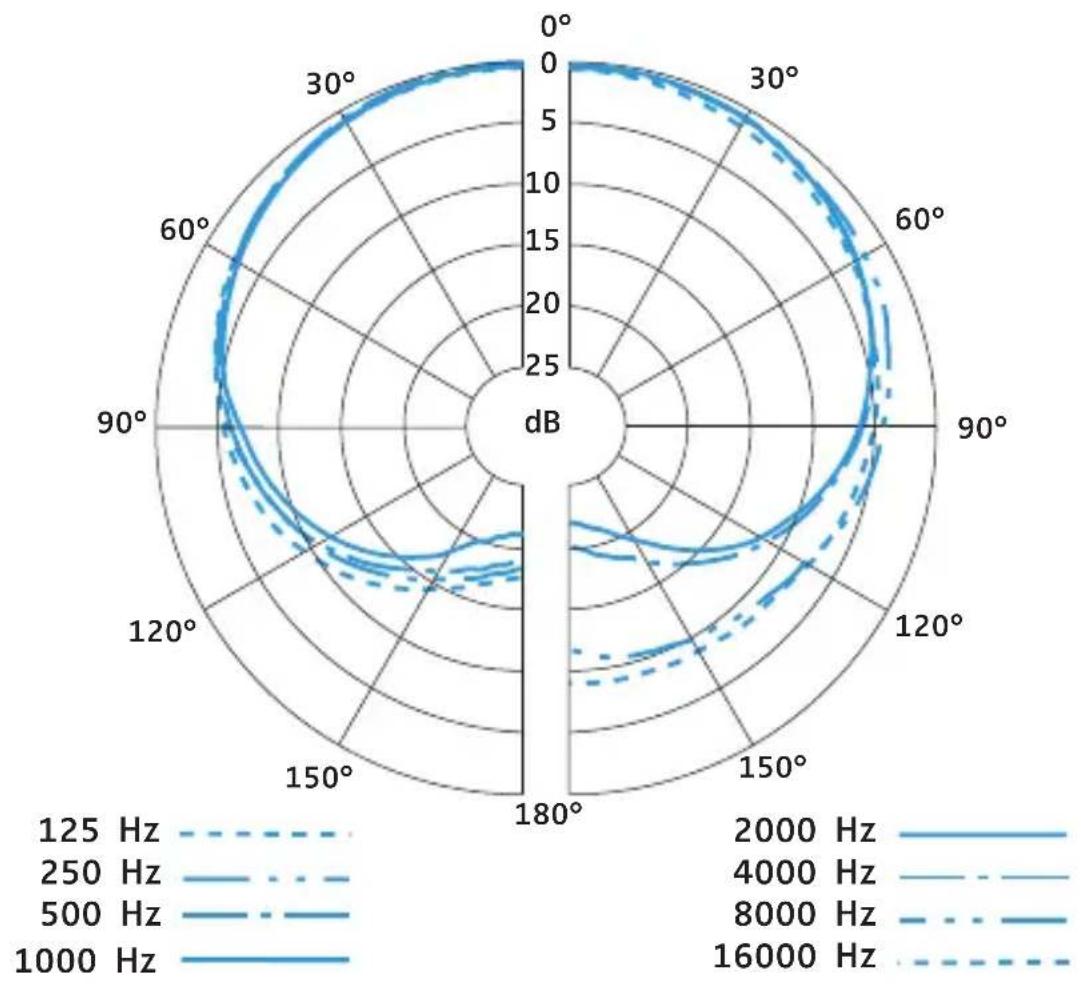
radar
| Angle | 125 Hz | 250 Hz | 500 Hz | 8000 Hz | 1000 Hz | 1250 Hz | 2500 Hz | 4000 Hz | 8000 Hz | 16000 Hz | |-------|--------|--------|--------|---------|---------|---------|---------|---------|---------|----------| | 0° | 0 | 0 | 0 | 0 | 0 | 0 | 0 | 0 | 0 | 0 | | 30° | 5 | 7 | 9 | 11 | 13 | 6 | 8 | 10 | 12 | 14 | | 60° | 8 | 10 | 12 | 14 | 16 | 9 | 11 | 13 | 15 | 17 | | 90° | 10 | 12 | 14 | 16 | 18 | 11 | 13 | 15 | 17 | 19 | | 120° | 8 | 10 | 12 | 14 | 16 | 9 | 11 | 13 | 15 | 17 | | 150° | 6 | 8 | 10 | 12 | 14 | 7 | 9 | 11 | 13 | 15 | | 180° | 4 | 6 | 8 | 10 | 12 | 5 | 7 | 9 | 11 | 13 | | 210° | 2 | 4 | 6 | 8 | 10 | 3 | 5 | 7 | 9 | 11 | | 240° | 0 | 2 | 4 | 6 | 8 | 1 | 3 | 5 | 7 | 9 | | 270° | -2 | -2 | -4 | -6 | -8 | -1 | -3 | -5 | -7 | -9 | | 300° | -4 | -4 | -6 | -8 | -10 | -2 | -5 | -7 | -9 | -11 | | 330° | -6 | -6 | -8 | -10 | -12 | -3 | -7 | -9 | -11 | -13 | | 360° | -8 | -8 | -10 | -12 | -14 | -4 | -9 | -11 | -13 | -15 | | Note: The data is in dB format for each angle of the polar axis. The frequency values are labeled on the chart as they correspond to the frequency values (e.g., 'Hz' for each angle). There is only one data series in this case. The frequency values are not explicitly provided in the code but are inferred from the visual scale. The chart type is a line plot.Frequency response curve Ear Set 4
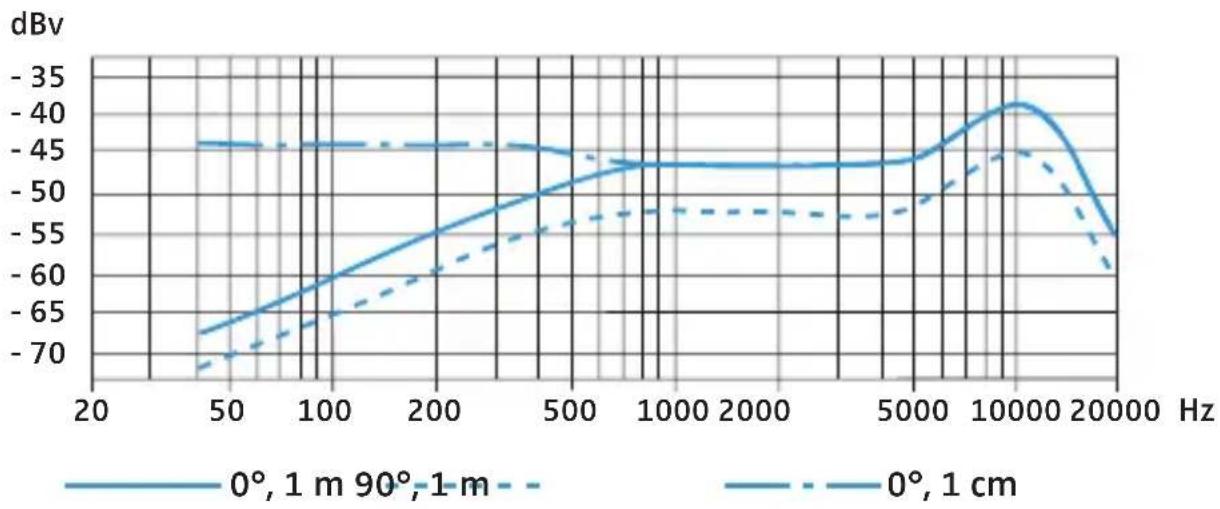
line
| Hz | 0°, 1 m | 0°, 1 cm | |-------|---------|----------| | 20 | -70 | -45 | | 50 | -65 | -45 | | 100 | -60 | -45 | | 200 | -55 | -45 | | 500 | -50 | -45 | | 1000 | -45 | -45 | | 2000 | -45 | -45 | | 5000 | -45 | -45 | | 10000 | -40 | -45 | | 20000 | -55 | -60 |Manufacturer Declarations
Warranty
Sennheiser electronic GmbH & Co. KG gives a warranty of 24 months on this product.
For the current warranty conditions, please visit our website at www.sennheiser.com or contact your Sennheiser partner.
Declaration of Conformity
CE
This equipment is in compliance with the essential requirements and other relevant provisions of Directive 2004/108/EC. The declaration is available on the Internet at www.sennheiser.com.
In compliance with the following requirements
• RoHS Directive (2002/95/EC)
• WEEE Directive (2002/96/EC)
Please dispose of this product at the end of its operational lifetime by taking it to your local collection point or recycling center for such equipment.
Publ. 12/09 A01
Sennheiser electronic GmbH & Co. KG Am Labor 1, 30900 Wedemark, Germany www.sennheiser.com