
ES2291DT - Electric razor PANASONIC - Free user manual and instructions
Find the device manual for free ES2291DT PANASONIC in PDF.


| Product Type | Ladies Wet/Dry Shaver (Household) |
| Brand | Panasonic |
| Model | ES2291DT |
| Power Source | 2 x AAA alkaline batteries (DC 3V, not supplied) |
| Weight | 110 g |
| Usage | Wet or dry shaving; can be used in shower |
| Shaving System | Outer foil and inner blade |
| Pop-up Trimmer | Yes, for longer hairs |
| Cleaning | Rinse under tap water; included cleaning brush |
| Waterproof | Yes (watertight construction) |
| Replacement Parts | Outer foil (annually), inner blade (every 2 years) |
| Accessories Included | Protection cap, cleaning brush |
| Safety Features | Do not use with damaged foil; do not disassemble housing |
| Battery Replacement | When blade speed decreases; remove if not used for long time |
| Intended Use | Household use only |
| Warranty / Service | Authorized service center; USA toll-free: 1-800-338-0552 |
Frequently Asked Questions - ES2291DT PANASONIC
User questions about ES2291DT PANASONIC
0 question about this device. Answer the ones you know or ask your own.
Ask a new question about this device
Download the instructions for your Electric razor in PDF format for free! Find your manual ES2291DT - PANASONIC and take your electronic device back in hand. On this page are published all the documents necessary for the use of your device. ES2291DT by PANASONIC.
USER MANUAL ES2291DT PANASONIC
Operating Instructions
Manual de operación
(Household) Ladies Shaver
natural_image
Line drawing of a handheld device with a separate open lid and internal structure (no text or symbols)English 2, 3-5
Español 2, 6-9
Before operating this unit, please read these instructions completely and save them for future use.
natural_image
Diagram of a handheld device with two batteries and an open mouse, showing internal components and directional arrows (no text or symbols)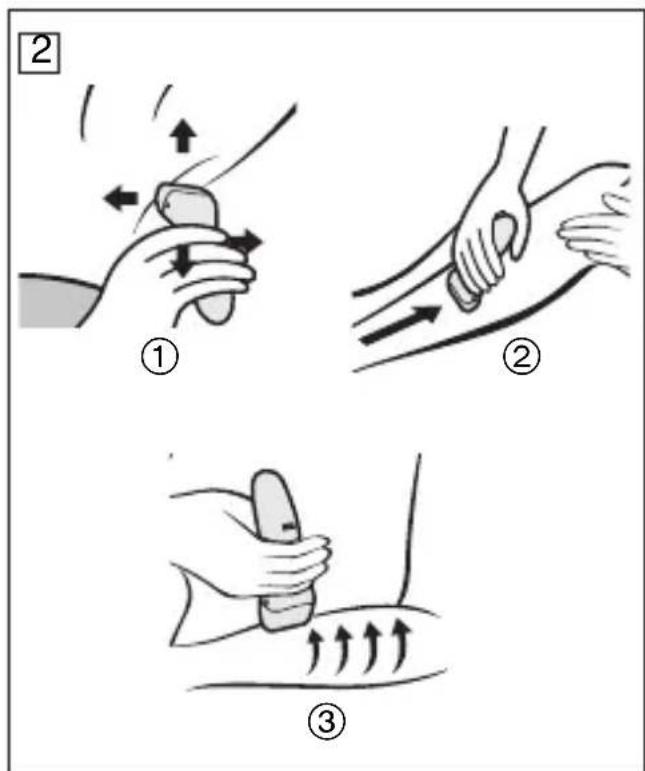

natural_image
Illustration showing a hand pressing down on a cylindrical component and then into a mechanical housing (no text or symbols)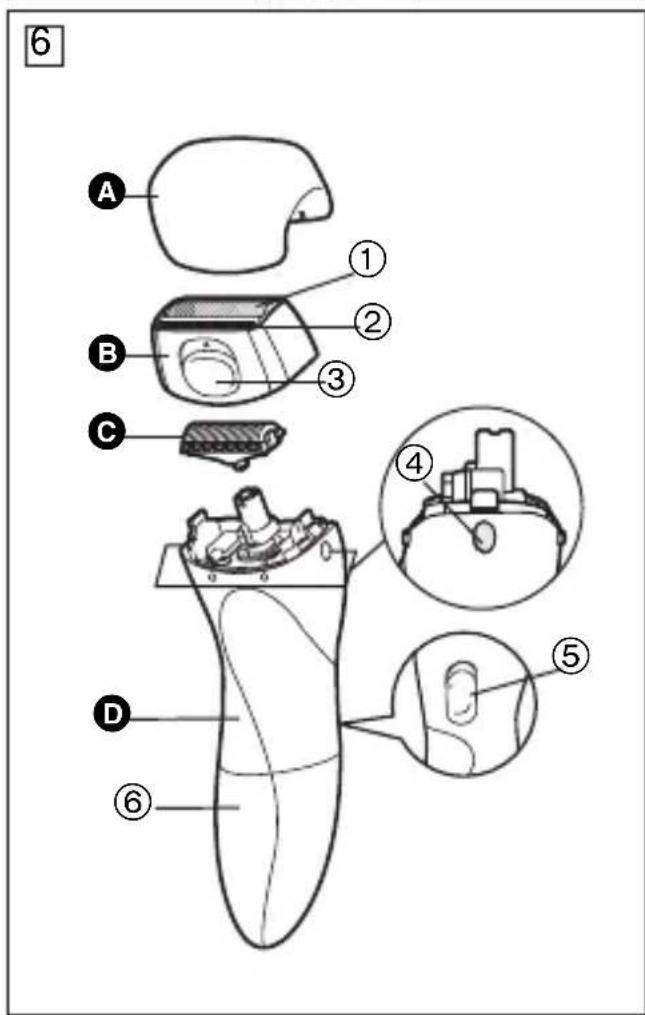
▶ Before use
This Ladies Wet/Dry Shaver can be used for wet shaving with shaving lather or for dry shaving. You can use this watertight shaver in the shower and clean it in water. Our research has shown that you can enjoy closer and smoother shaves using warm water and shaving lather. Treat yourself to wet lather shaves for at least three weeks and notice the difference. And our popup trimmer will be able to cut longer hairs with ease. Cleaning is so simple. Just rinse out the shaving head under the tap or shower.

▶ Safety precautions
- Do not leave the shaver in places where it will be exposed to high temperature or direct contact with sunlight.
- Do not leave the shaver in direct sunlight to dry with the outer foil removed.
- The outer foil is very thin. If handled improperly, it can be easily damaged. To avoid personal injury, do not use the shaver if it has a damaged foil or inner blade.
- Wash the shaver with tap water. Do not use salt water or boiling water. Do not submerge the shaver in the water for a long time.
- Do not wipe any part of the shaver with thinner, benzine or alcohol. Clean it by using a cloth dampened with soapy water.
- Do not take the housing apart as this can affect the watertight construction.
- If the shaver is not used for a long time, remove the batteries to prevent possible leakage.
- If the shaver is not working properly, have it inspected at the place of purchase or an authorized service center.
• Always use your shaver for its intended use, as described in this manual. - Never alter the appliance. Also, do not disassemble or repair it.

Replacing batteries (Fig. 1)
When the blade speed decreases, this indicates that the batteries should be replaced with new ones.
- Before replacing the batteries, wipe the shaver free of moisture to prevent the inside from getting wet.
- Do not use this shaver with weak batteries.
- Remove the batteries when not using the shaver for a long time.
- Do not use rechargeable batteries.
- Always follow the cautions printed on the batteries.
-
Check the polarities of the batteries and install them correctly.
-
Do not disassemble batteries or throw them into a fire. Do not short-circuit batteries.
- Do not mix old and new batteries.
1 Make sure the switch is in the off position, then remove the battery cover.
② Insert two AAA alkaline batteries as illustrated.
3 Reattach the battery cover.
- Listen for the clicking sound assuring you the cover has been properly attached.

Using your shaver
① Slide the OFF/ON switch.
2 Hold the shaver blade flat against the skin. Hold the shaver blade so that it is gently in contact with the skin.
- Use the pop-up trimmer to cut long hairs.
- Gently hold the blade in contact with the skin and move slowly.
- Use the pop-up trimmer to cut long hairs. - Gently hold the blade in contact with the skin and move slowly.
▶ Moving the shaver correctly (Fig. 2)
① Underarm: Lift the arm to stretch the skin and shave in various directions.
② Legs: Shave from ankles to knees.
③ Arms: Shave from outside to inside.
① Underarm: Lift the arm to stretch the skin and shave in various directions. ② Legs: Shave from ankles to knees. ③ Arms: Shave from outside to inside.

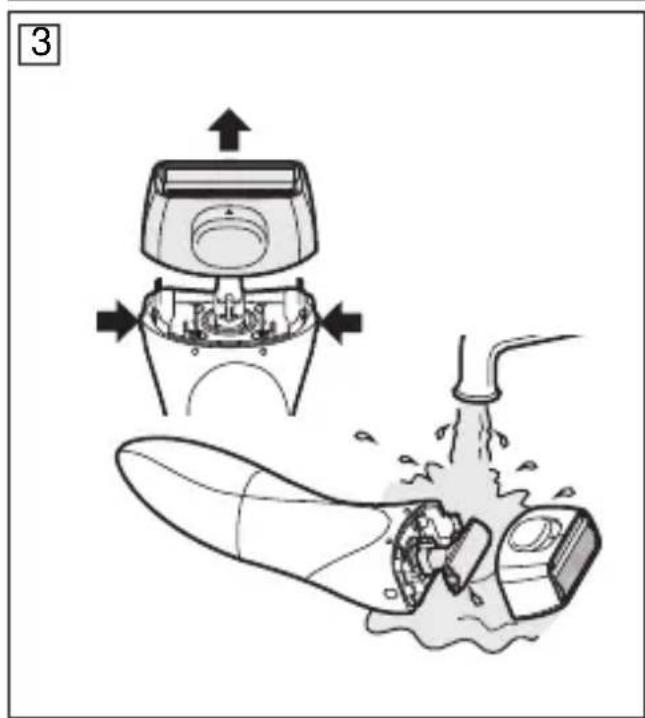
Washing your shaver (Fig. 3)
Switch off the shaver before cleaning.
1 Remove the frame while pressing both foil frame release buttons and wash in water.
② Attach the frame and wipe off all water.
③ Dry the shaver, and then attach the cap.
▶ Cleaning with the brush
-
Remove the frame.
-
Remove the inner blade by pulling it straight out and clean with the brush.
-
Remove the frame.
- Remove the inner blade by pulling it straight out and clean with the brush.

Replacing the outer foil and the inner blade
| outer foil once every year |
| inner blade once every two years |
▶ Replacing the outer foil (Fig. 4)
-
Press the foil frame release buttons to remove the outer foil frame.
-
Squeeze the front and the back side of the foil frame and lift up one of the two knobs on the outer foil.
-
Slip the foil into the frame and guide the plastic edges onto the hooks in the foil frame until it clicks into place.
-
Press the foil frame release buttons to remove the outer foil frame.
- Squeeze the front and the back side of the foil frame and lift up one of the two knobs on the outer foil.
- Slip the foil into the frame and guide the plastic edges onto the hooks in the foil frame until it clicks into place.
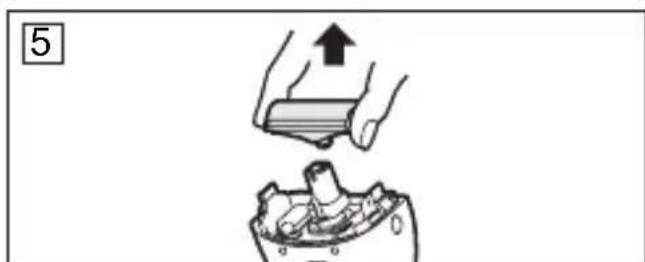
▶ Replacing the inner blade (Fig. 5)
- Squeeze the foil frame release buttons and lift the outer foil frame upward to remove it.
- Remove the inner blade by grasping it firmly at both ends and pulling straight away from the shaver.
- To insert the new inner blade, hold the blade at both ends and press downward until it snaps into place.

Specifications
Batteries: Two LR03 (AAA) alkaline dry-cell batteries (DC3V) (Sold separately)
Weight: 110 g
This product is intended for household use only.

Parts identification (Fig. 6)
A Protection cap
B Outer foil frame
① Outer foil
② Pop-up trimmer
③ Pop-up trimmer switch
© Inner blade
D Main body
④ Foil frame release button
⑤ OFF/ON switch
⑥ Battery cover
▶ Accessory:
Cleaning brush
(Please do not use accessories any other than the accessories provided.)
FOR YOUR CONVENIENCE, WE HAVE ESTABLISHED A TOLL-FREE (IN USA ONLY) NATIONAL ACCESSORY PURCHASE HOT LINE AT 1-800-338-0552.
Division of Panasonic Corporation of
North America
One Panasonic Way 2F-3
Secaucus, NJ 07094
EN MEXICO CONTACTE CON:
Panasonic de Mexico, S.A. de C.V.
Phone: (56 - 2) 8260010
EN PANAMA CONTACTE CON:
Panasonic Latin America. S.A.
P.O. Box 0816-03164
Panama, Republic of Panama
Tel : (507) 29-2955
EN BRASIL CONTACTE CON:
Panasonic do Brasil Limitada.

- ▶ Before use
- ▶ Safety precautions
- Replacing batteries (Fig. 1)
- Using your shaver
- ▶ Moving the shaver correctly (Fig. 2)
- Washing your shaver (Fig. 3)
- ▶ Cleaning with the brush
- Replacing the outer foil and the inner blade
- ▶ Replacing the outer foil (Fig. 4)
- Specifications
- Parts identification (Fig. 6)
- EN MEXICO CONTACTE CON:
- EN PANAMA CONTACTE CON:
- EN BRASIL CONTACTE CON:
Brand : PANASONIC
Model : ES2291DT
Category : Electric razor