
APPWC02W - Webcam Approx - Free user manual and instructions
Find the device manual for free APPWC02W Approx in PDF.


Pick your language and provide your email: we'll send you a specifically translated version.
| Product Type | Webcam |
| Resolution | 0.3 MP (VGA, 640x480) |
| Interface | USB 2.0 |
| Built-in Microphone | Yes |
| Driver | Driver-free (UVC compatible) |
| Chipset | Strontech SP2B6A |
| Color | Black and Silver |
| Certifications | CE, RoHS |
| Package Contents | Webcam, Mini CD (software), User Guide (English, Spanish, French, German, Italian, Portuguese) |
| Power Source | USB powered (5V) |
| Compatibility | Windows, Mac OS X (UVC) |
| Mount Type | Adjustable clip |
| Frame Rate | 30 fps (typical) |
| Image Sensor | CMOS (typical) |
| Lens | Plastic, fixed focus |
| Cable Length | Approximately 1.5 m |
| Weight | Approximately 100 g |
| Dimensions | Approximately 80 x 40 x 40 mm |
Frequently Asked Questions - APPWC02W Approx
How do I install the Approx APPWC02W webcam?
Simply plug the webcam into a USB 2.0 port on your computer. The driver-free design means no installation is needed for Windows or Mac OS. The webcam will be recognized automatically as a UVC device.
Why is my webcam not being detected?
Ensure the USB cable is firmly connected. Try a different USB port (preferably USB 2.0). Restart your computer. If using a USB hub, connect directly to the computer. Verify that your operating system supports UVC (USB Video Class) – Windows 7/8/10 and Mac OS X do.
How do I enable the built-in microphone?
The microphone is automatically enabled when the webcam is connected. In your operating system's sound settings, select 'USB Audio Device' or 'Approx Webcam' as the input device. Adjust volume levels as needed.
What is the maximum video resolution?
The webcam supports a maximum resolution of 0.3 megapixels (VGA, 640x480 pixels). It is suitable for standard video calling and basic streaming.
Does this webcam work with Mac computers?
Yes, the webcam is UVC-compatible and works with Mac OS X without additional drivers. Just plug it in and select it in applications like FaceTime, Zoom, or Skype.
How do I clean the lens?
Use a soft, dry microfiber cloth to gently wipe the lens. Avoid using liquids or abrasive materials. If needed, slightly dampen the cloth with water, but do not apply directly to the lens.
Can I use this webcam with older operating systems?
The webcam is designed for Windows 7 and later and Mac OS X 10.6 and later. For older systems, check if they support UVC. The included Mini CD may contain legacy drivers if needed.
Why is the video quality poor or blurry?
Ensure adequate lighting in the room. Adjust the focus ring on the lens (if available) – this model has a fixed focus, so keep a distance of about 30-50 cm from the webcam. Clean the lens if necessary.
How do I attach the webcam to my monitor?
The webcam has an adjustable clip that fits most monitors and laptops. Simply open the clip and place it on top of your screen. The clip includes a rubber pad to prevent scratches.
What software is included on the Mini CD?
The Mini CD contains basic drivers for legacy systems and a webcam utility software for taking photos and recording videos. However, for most modern OS, the driver-free functionality makes the CD optional.
User questions about APPWC02W Approx
0 question about this device. Answer the ones you know or ask your own.
Ask a new question about this device
No questions yet. Be the first to ask one.
Download the instructions for your Webcam in PDF format for free! Find your manual APPWC02W - Approx and take your electronic device back in hand. On this page are published all the documents necessary for the use of your device. APPWC02W by Approx.
USER MANUAL APPWC02W Approx
| OEM Product Customization Requirement | ||||
| Customer Name | APPROX IBERIA S.L. | Supplier Name | SHENZHEN APEXIS ELECTRONIC.,LTD | |
| Customer Model | APPWC02B ACM-836B | Supplier Reference Model (Part Number) | ||
| Customer Version Reference Version | V1 | |||
| Date ORDER | SEP/ 13/ 2010 | B100907PC | ||
| Product Description | WEB CAM (TURE 0.3 MP RESOLUTION, USB2.0, MIC BUILT-OUT, DRIVER FREE, WITH CD SOFTWARE) BLACK COLOR | |||
| Detailed Customization Requirements | ||||
| 1 Hardware | ||||
| Item Reference Design CustomizationRemark | ||||
| Inner components | Strontech chipset SP2B6A Strontech chipset SP2B6A |  | ||
| 2 Certification | ||||
| Item Reference Design CustomizationRemark | ||||
| CE | CERTIFICATED CERTIFICATED | |||
| ROSH | CERTIFICATED CERTIFICATED | |||
| 3 Structure | ||||
| Item Reference Design CustomizationRemark | ||||
| Housing | Material | Same as supplier | 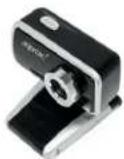 | |
| Color | Black and silver | |||
| Logo Printing | Approx logo 18"5.1mm approximately, silver color printing. Refer to file "APPWC02_housing printing.ai" | |||
| 4 Package | |||||
| Item Reference Design Custom/Remark | |||||
| Blister | Packing Type | Assembly | Approx Blister with heat sealing edges and hang hole (the hang hole is not heat sealed). | Refer to NEW FILE "APPWC02_blister-design.pdf" | |
| Material | 0.4 - 0.5 mm PVC | ||||
| SN Label | The SN label must be sticker in the S/No rectangle that you will find in the back side of blister card. | Example: 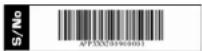 | |||
| Bilster card | Design File | Refer to artwork "APPWC02B_blistercard_ouline.ai" | |||
| Material | Same as previous order | ||||
| Color | 5-color printing (4-color printing + Pantone 877C) | ||||
| Finishing | Polish | ||||
| Guide | Design File | Refer to "APPWC02 user-guide.pdf" | |||
| Language | English | Spanish/ English/ French/ German/ Italian/ Portuguese | |||
| Size | 90 * 110 mm | ||||
| Material | 70g Writing Paper | ||||
| Color | 4-color printing in covers + Single-color printing in inner pages | ||||
| Finishing | No | ||||
| Binding | saddle satching | ||||
| Labels | SN Label | Design File | Format: Code 128 barcode | For order B100907PC: From APPWC02B1002021 to APPWC02B1003030 | ||
| Size | 35*8mm | |||||
| Position | SN Label will be sticked in back side of product housing, in blister card and in carton label. Same as previous order. | |||||
| Backlabel | Refer to "APPWC02B_backlabel.ai" | |||||
| Mini CD | CD Printing | Approx design Refer to "APPWC02_CD.ai" | 3-inch CD |  | ||
| Volume Label | Ref: APPWC02 | |||||
| Content Structure | Software | |||||
| Carton Box | Size | SAME AS LAST ORDER | 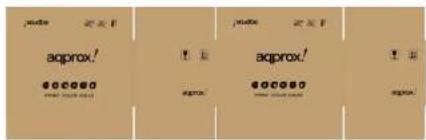 | |||
| Quantity/Carton | 10units | |||||
| Design File | Refer to "generic shipping mark.ai"NOTE: please, delete the "green point" logo | |||||
| Material | K=K | |||||
| Color | Single color printing: Black | |||||
| Carton Label | Design File | Refer to "APPWC02B_carton-label.ai". It will be sticked in both lateral sides of carton. | Example: 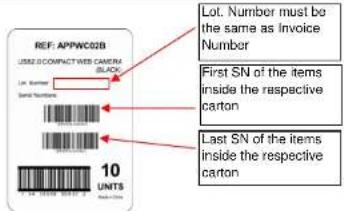 | |||
| Size | 120*170 mm | |||||
Manual assistant
Powered by Anthropic
Waiting for your message
Product information
Brand : Approx
Model : APPWC02W
Category : Webcam