MOUNT10 - Video projector MARANTZ - Free user manual and instructions
Find the device manual for free MOUNT10 MARANTZ in PDF.


| Product Type | Video Projector |
| Brand | Marantz |
| Model | MOUNT10 |
| Resolution | 1920 x 1080 pixels (Full HD) |
| Brightness | 2000 ANSI lumens |
| Contrast Ratio | 10000:1 |
| Lens | Optical zoom, manual focus |
| Light Source | Lamp (replaceable), up to 4000 hours |
| Dimensions (W x D x H) | 320 x 250 x 100 mm |
| Weight | 3.5 kg |
| Power Consumption | 250 W (max) |
| Input Connectors | HDMI, VGA, USB, Composite |
| Audio Output | 3.5 mm jack, built-in speaker (10 W) |
| Mounting | Ceiling or table mount, compatible with standard mounts |
| Noise Level | 30 dB (normal mode) |
| Operating Temperature | 5°C to 35°C |
| Safety Features | Auto power off, overheat protection |
| Cleaning | Wipe lens with soft cloth, clean filters monthly |
| Spare Parts | Replacement lamp, air filter, remote control available |
| Repairability | Modular design, user-replaceable lamp and filter |
Frequently Asked Questions - MOUNT10 MARANTZ
User questions about MOUNT10 MARANTZ
0 question about this device. Answer the ones you know or ask your own.
Ask a new question about this device
Download the instructions for your Video projector in PDF format for free! Find your manual MOUNT10 - MARANTZ and take your electronic device back in hand. On this page are published all the documents necessary for the use of your device. MOUNT10 by MARANTZ.
USER MANUAL MOUNT10 MARANTZ
VP-10S1 DLP Projector Mount
marantz®
IMPORTANT SAFETY INSTRUCTIONS
READ BEFORE INSTALLING EQUIPMENT
This product was designed and manufactured to meet strict quality and safety standards. There are, however, some installation and operation precautions which you should be particularly aware of.
- Read instructions - All the safety and operating instructions should be read before the product is operated.
- Retain instructions - The safety and operating instructions should be retained for future reference.
- Heed warnings - All warnings on the product and in the operating instructions should be adhered to.
- Follow instructions - All installation instructions should be followed.
- Use only the parts provided with the mount, along with any parts (commercially available) that are specified in this manual.
- Do not modify the mount or the parts provided with the mount.
- Do not use damaged parts. if any parts become damaged, contact your dealer.
- All bolts and screws must be tightened securely.
- Make sure not to block any ventilation openings when installing the projector.
- Special techniques and experience are required when installing the projector with this mount. Contact your dealer to install the projector for you.
- Once the projector is installed, safety checks should be conducted on a regular basis.
Warning
The ceiling should be capable of supporting a weight of at least five (5) times the projector(s) weight.
If it cannot, the ceiling must be reinforced. Proper installation procedure by qualified personnel as outlined in the installation instructions must be adhered to. Failure to do so could result in serious personal injury.
Hardware List
- Four (4) 3/8 (inch) nuts
- Four (4) 3/8 (inch) flat washers
- Two (2) 8 (mm) screws
- Fourteen (14) 6 (mm) screws
- Eight (8) 6 (mm) rubber washers
- Two (2) 8 (mm) rubber washers
- Eight (8) 6 (mm) flat washers
- One (1) Ceiling Mount #1
- Two (2) Base Plate Connectors
- One (1) Horizontal Tilt Plate #2
- One (1) Horizontal Tilt Plate #3
- One (1) Projector Plate #40
Adjustment Ranges and Load Allowances
Horizontal Tilt (yaw)[□] +/- 4 degrees
Vertical Tilt (tilt) ▪ ▪ ▪ +/- 8 degrees
Rotation[] ] [] +/- 15 degrees
Lateral Shift□□□□ +/- 4
Maximum Load Allowance
1/2 inches
450 Lbs.
MOUNT10
PROJECTOR MOUNT
INSTALLATION INSTRUCTIONS
Step 1
Base Plate Connectors #1 and Projector Mount Ceiling Plate 1 with ceiling mounting holes #2.

text_image
Figure 1 Ceiling Wire Access 8 5/8" Plate 1 14" 2 3 4 2 3 2Base Plate Connectors #1
Projector Mount Ceiling Plate 1
Insert Base Plate connectors #1 into the lateral positioning slots #3 as shown in#4 from the underside of Plate 1. The lateral positioning slots will give you 4 1/2" inches of lateral adjustment for projector alignment.
Step 2
Horizontal Adjustment Plate 2 (Base Plate Connector Holes #3).

text_image
Figure 2 Wire Access 10 5/8" 7 5/8" Plate 2Base plate connector holes #3 provide 15 degrees of horizontal adjustment.
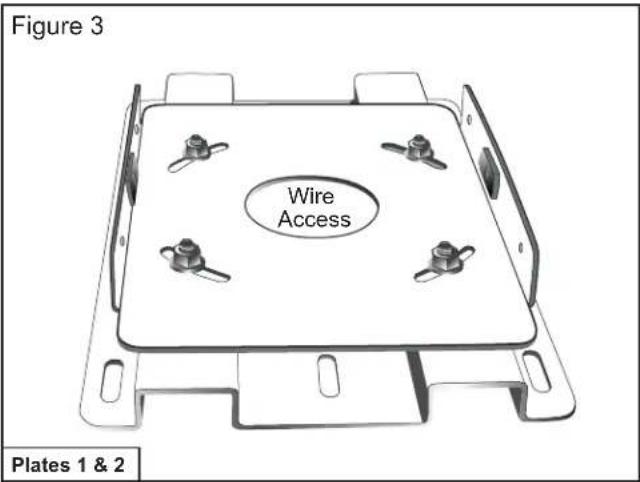
Attach horizontal adjustment Plate 2 to projector mount ceiling Plate 1 using the four (4) 3/8" (inch) nuts and washers provided.
Step 2 B
Horizontal Adjustment Plate 2 (Figure 2) attached to Projector Mount Ceiling Plate 1.
text_image
Figure 3 Wire Access Plates 1 & 2Install the combined plates (above) securely to the ceiling structure in accordance with local commercial building standards.
Use suitable hardware in adequate quantity and size depending on the installation requirements. (Please note that Projector VP-10S1 weighs 90.3 lbs. (41kgs).
Step 3
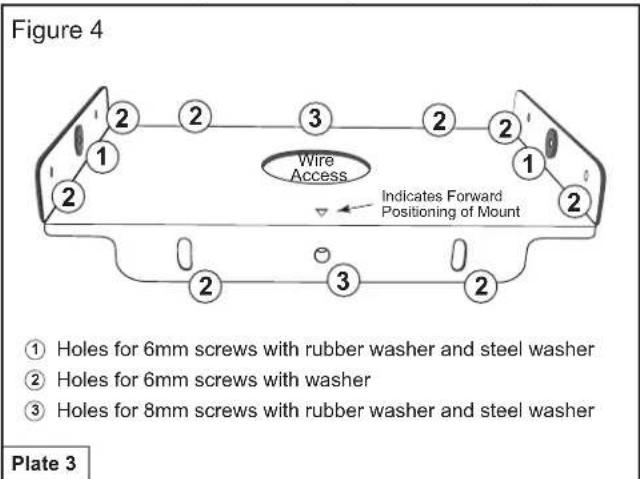
Horizontal Tilting Plate 3 Projector Mounting Plate 4
text_image
Figure 4 2 2 3 2 2 1 Wire Access Indicates Forward Positioning of Mount ① Holes for 6mm screws with rubber washer and steel washer ② Holes for 6mm screws with washer ③ Holes for 8mm screws with rubber washer and steel washer Plate 3Attach Horizontal Tilting Plate 3 to the previously combined plates (already installed on ceiling) using the two (2) 8 (mm) screws with rubber washers, steel washers and four (4) 6 (mm) screws with washers provided, as indicated in Figure 4. Install two (2) 6 (mm) screws with rubber spacers and metal washers into the welded metal studs (indicated #1) Tighten halfway.
Step 3 B
Horizontal Tilting Plate 3 Attached to Plates 1 and 2.

text_image
Figure 5 Tilting Capability Tilting Capability Plate 3The newly combined Plate 3 provides 8^0 degrees of horizontal tilt. When positioned, tighten with screws and washers provided.
Step 4

text_image
Figure 6 Indicates Forward Positioning of Mount 12 1/4" ① holes for 6mm screws with rubber washers 17" Plate 4Invert the projector and place it on a soft and flat surface. Align the six (6) rubber spacers provided with the six (6) 6 (mm) mounting holes on the projector and secure with the six (6) 6 (mm) screws provided.
Step 4 B
Projector Mounting Plate 4 (continued)
text_image
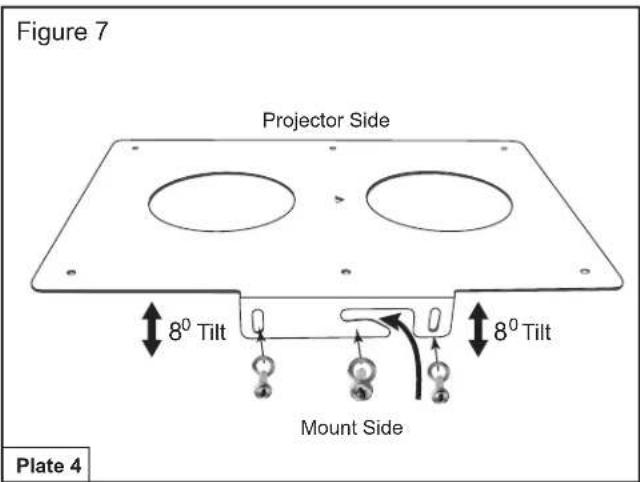
Figure 7 Projector Side 8° Tilt Mount Side 8° Tilt Plate 4Work in a group of 4 or more to carry the projector and follow manufacturer's guidelines for relocating as stated in the VP-10S1 owner's manual.
Lift and slide the projector onto the 6 (mm) screws previously installed in the metal studs of the plate on the ceiling (see arrow in Figure 7). Tighten the six (mm) screws on both sides of the mount and install four (4) 6 (mm) screws and washers into the side of the projector Mounting Plate 4.
Projector Mounting Plate 4 connected to Mounting Plate 3

text_image
Figure 8 Mounts Fully Assembled Projector Side Ceiling SideSequence of Assembly of Projector Mounting Plates

text_image
Plate 4 ↓ Step 4 Plate 3 ↓ Step 3 Plate 2 ↓ Step 2 Plate 1marantz®
1100 Maplewood Drive
Itasca, IL 60143
Phone: 630 741-0300 Fax: 630 741-0301
You can find your nearest authorized distributor or dealer
on our website at: www.marantz.com