
Ultra Pro RB80 - Range hood BROAN - Free user manual and instructions
Find the device manual for free Ultra Pro RB80 BROAN in PDF.


| Product Type | Ceiling Ventilation Fan (not for cooking areas) |
| Model Number | RB80 (ULTRA Pro™ I) |
| Installation Method | New construction and retrofit |
| Duct Size | 4 inches round (metal recommended) |
| Electrical Rating | 120 VAC, standard branch circuit |
| Motor Type | Permanently lubricated; never needs oiling |
| Ceiling Construction | Fits 2" x 8" joists, adjustable from 14" to 24" on center |
| Ceiling Pitch | Up to 12/12 (45 degrees); duct connector must point up |
| Controls | ON/OFF switch, timer, or Broan 78V/78W speed control |
| Safety Features | Must be grounded; GFCI required if over tub or shower; not for wall mounting |
| Cleaning | Remove grille and vacuum interior with dusting brush |
| Maintenance | Motor is sealed; replace if noisy; check dampers for free movement |
| Warranty | 3 years limited (parts and repair/replacement from date of purchase) |
| Spare Parts Available | Grille, mounting frame, housing, blower assembly, transition, muffler, wiring panel |
| Manufacturer | Broan-NuTone LLC, Hartford, WI, USA |
| Compliance | UL listed; must comply with local codes |
| Intended Use | General ventilation only; do not exhaust hazardous or explosive materials |
| Included Components | Mounting frame, housing, blower assembly, muffler, transition, grille, knockout plate with screws |
| Installation Tools Required | Power screwdriver, Phillips screwdriver, flathead screwdriver, pliers, wire stripper, wire cutter |
| Operating Conditions | Not for use in cooking area; do not install above or inside cooking area |
Frequently Asked Questions - Ultra Pro RB80 BROAN
User questions about Ultra Pro RB80 BROAN
0 question about this device. Answer the ones you know or ask your own.
Ask a new question about this device
Download the instructions for your Range hood in PDF format for free! Find your manual Ultra Pro RB80 - BROAN and take your electronic device back in hand. On this page are published all the documents necessary for the use of your device. Ultra Pro RB80 by BROAN.
USER MANUAL Ultra Pro RB80 BROAN
READ AND SAVE THESE INSTRUCTIONS
Installer: leave this guide with homeowner.
Register your product online at www.broan.com/register.
RB80 · RB110
ULTRA Pro™ I Ventilation Fan
with ULTRAQuick™ Installation Technology
INSTALLATION GUIDE
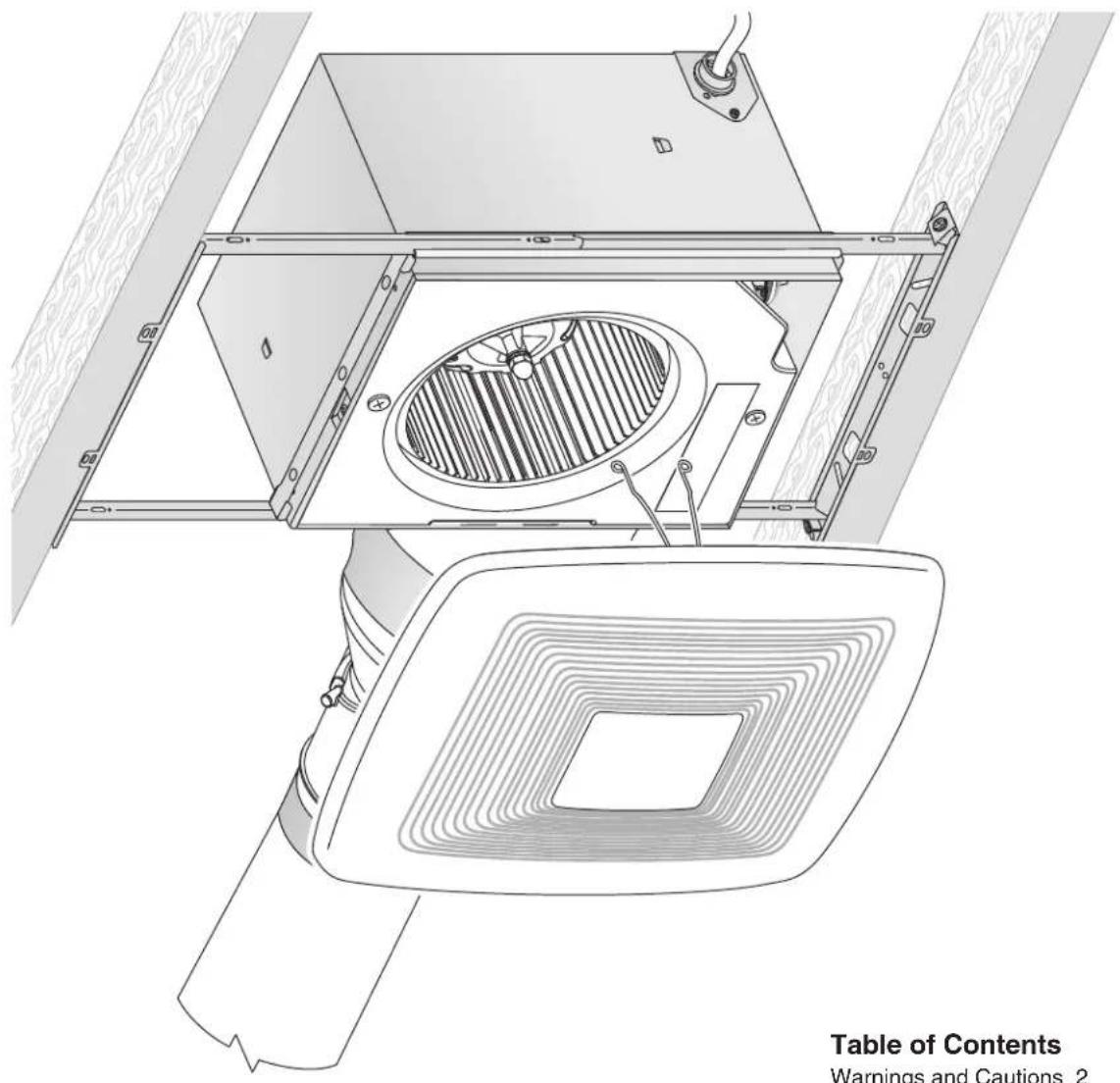
Easy installation in both new construction and retrofit
Table of Contents
Warnings and Cautions 2
Typical Installation 2
New Construction Installation 3
Retrofit Installation 7
Operation 12
Cleaning and Maintenance 12
Troubleshooting 12
Service Parts 13
Warranty 13
WARNING


TO REDUCE THE RISK OF FIRE, ELECTRIC SHOCK, OR INJURY TO PERSONS, OBSERVE THE FOLLOWING:
- Use this unit only in the manner intended by the manufacturer. If you have questions, contact the manufacturer at the address or telephone number listed in the warranty.
- Before servicing or cleaning unit, switch power off at service panel and lock the service disconnecting means to prevent power from being switched on accidentally. When the service disconnecting means cannot be locked, securely fasten a prominent warning device, such as a tag, to the service panel.
- Installation work and electrical wiring must be done by a qualified person(s) in accordance with all applicable codes and standards, including fire-rated construction codes and standards.
- Sufficient air is needed for proper combustion and exhausting of gases through the flue (chimney) of fuel burning equipment to prevent backdrafting. Follow the heating equipment manufacturer's guideline and safety standards such as those published by the National Fire Protection Association (NFPA), and the American Society for Heating, Refrigeration and Air Conditioning Engineers (ASHRAE), and the local code authorities.
- When cutting or drilling into wall or ceiling, do not damage electrical wiring and other hidden utilities.
- Ducted fans must always be vented to the outdoors.
- If this unit is to be installed over a tub or shower, it must be marked as appropriate for the application and be connected to a GFCI (Ground Fault Circuit Interrupter) - protected branch circuit.
- Use an ON/OFF switch, timer, or speed control to operate this ventilator. Use of speed control other than the Broan 78V and 78W may cause a motor humming noise.
- This unit must be grounded.
CAUTION

- For general ventilating use only. Do not use to exhaust hazardous or explosive materials and vapors.
- This product is designed for installation in ceilings up to a 12/12 pitch (45 degree angle). Duct connector must point up. DO NOT MOUNT THIS PRODUCT IN A WALL.
- To avoid motor bearing damage and noisy and/or unbalanced impellers, keep drywall spray, construction dust, etc. off power unit.
- Please read specification label on product for further information and requirements.
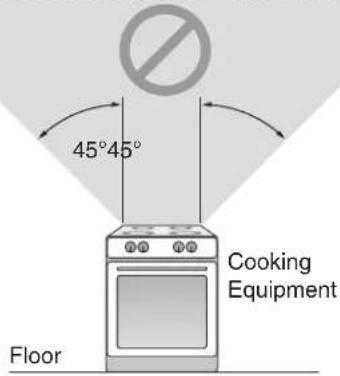
NOT FOR USE IN A COOKING AREA
Do not install above or inside this area
Typical Installation
• Installation is the same for:

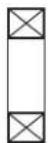
Joists

I-Joists
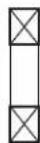
Trusses
- Fits in 2" x 8" ceiling construction.
- Infinitely adjust the fan position between joists from 14" to 24" on center.
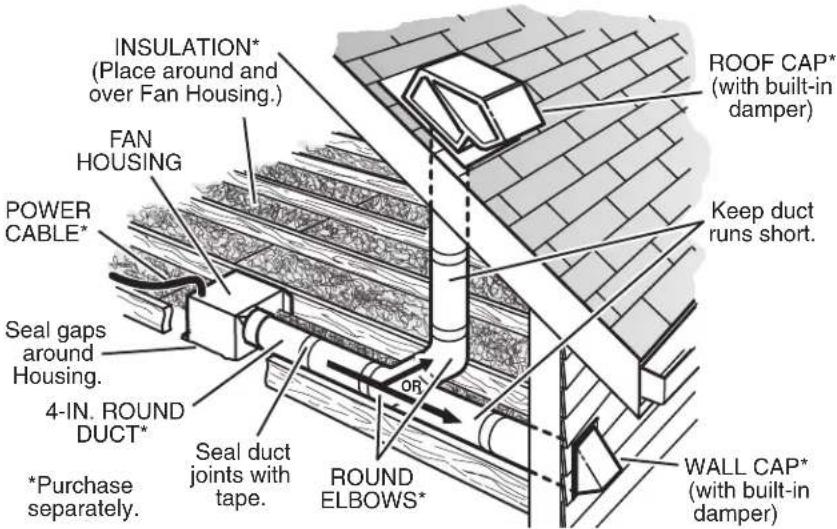
The ducting from this fan to the outside of the building has a strong effect on the air flow, noise and energy use of the fan. Use the shortest, straighest duct routing possible for best performance, and avoid installing the fan with smaller ducts than recommended. Insulation around the ducts can reduce energy loss and inhibit mold growth. Fans installed with existing ducts may not achieve their rated airflow.
New Construction Installation
Tools needed
• Power screwdriver with a Phillips bit
- Phillips screwdriver
- Flathead screwdriver
- Pliers
- Wire insulation stripper
- Wire cutter
Materials needed
- 4" round metal ducting recommended for best performance.
Use of other ducting is acceptable but may impact performance. - Roof cap or wall cap (built-in damper recommended)
- Tape to seal duct connections
• Electrical wiring and supplies per local code requirements
1 Remove Packaging
Parts Bag holds Knockout Plate and six (6) screws
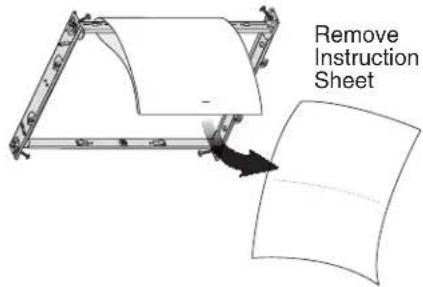
Punch out Mask from packaging. See Step 6.

natural_image
Abstract geometric diagram with interlocking shapes and arrows, no text or symbols present2 Install Mounting Frame
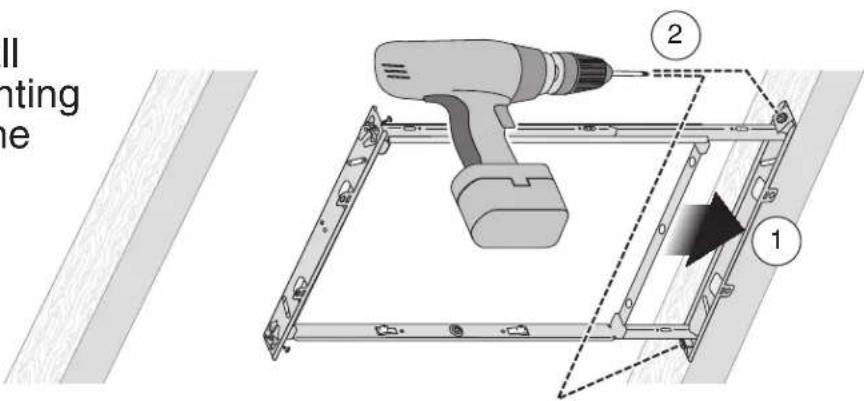

New Construction Installation
3 Snap-in and Secure Housing and Muffler

natural_image
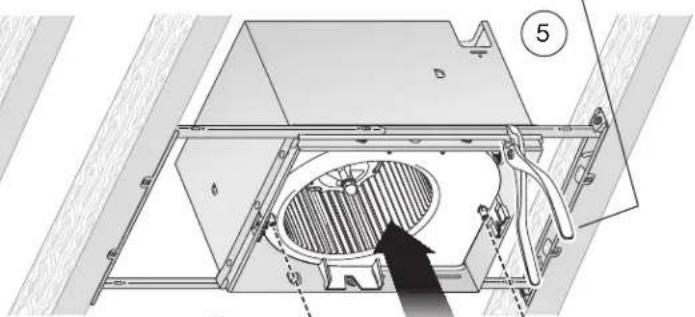
Technical diagram of a mechanical assembly with a circular component labeled '1' and internal structure (no text or symbols beyond label)Position Housing between joists and crimp channel on both sides of Mounting Frame to lock Housing in place. Do not crimp Housing.

③ Screws from Parts Bag
natural_image
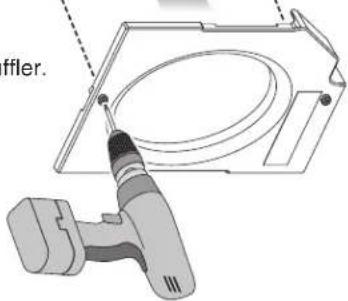
Technical diagram of a mechanical assembly with internal components and a numbered label (5), no readable text or symbols present.4 Attach Muffler.
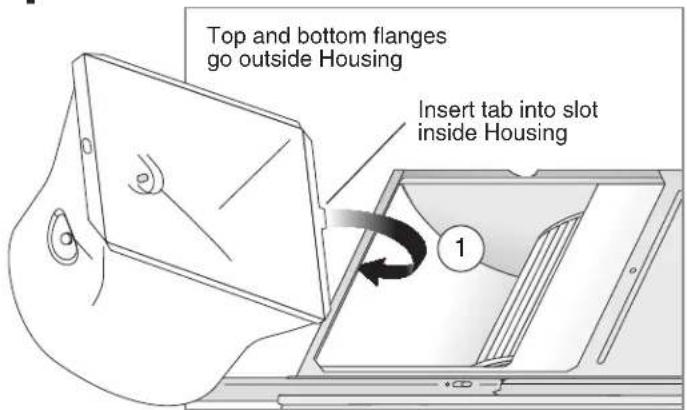
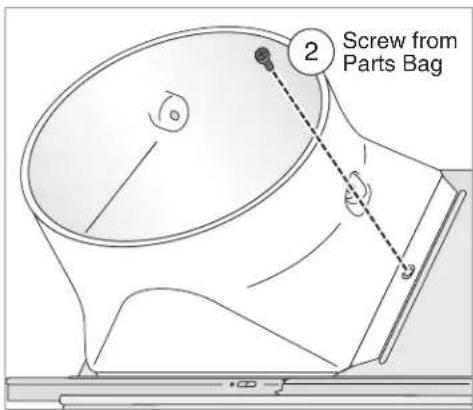
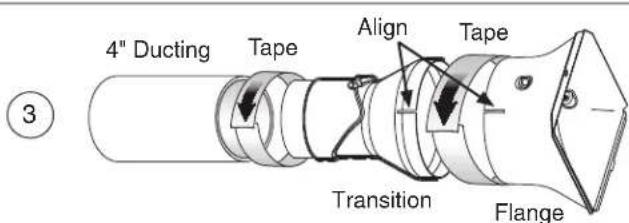
4 Attach Flange, Transition and Ducting
New Construction Installation
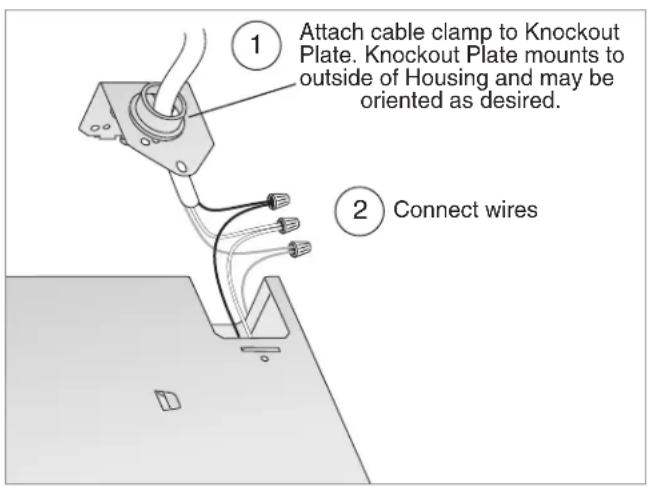
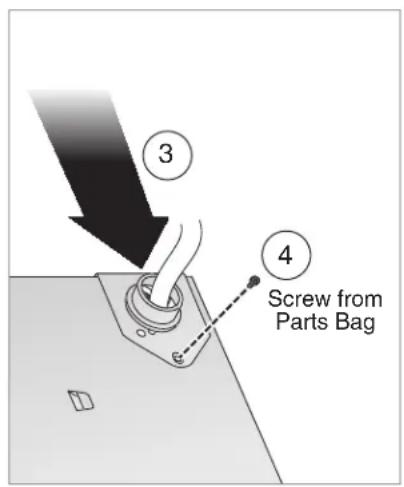
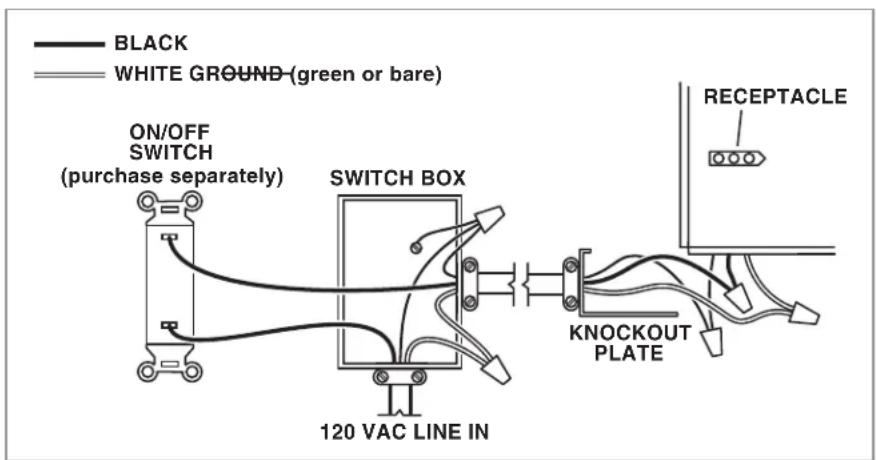
5 Connect Wires and Install Knockout Plate
- Run 120VAC electrical wiring to the installation location.
- Use proper UL-approved connectors to secure wiring to the Knockout Plate provided in Parts Bag.
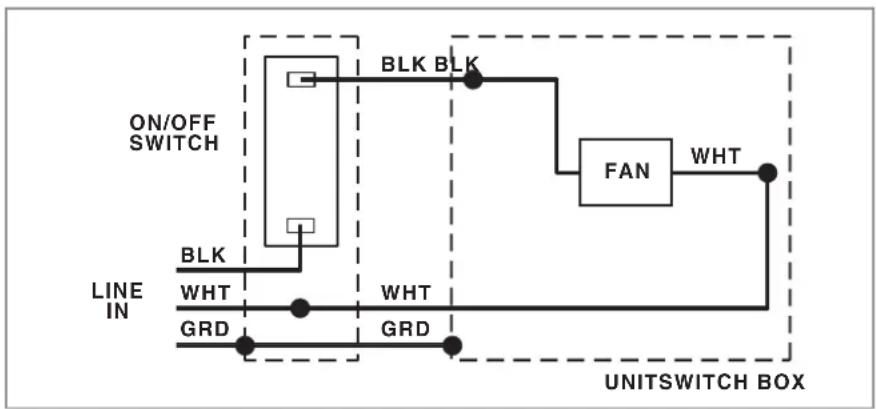
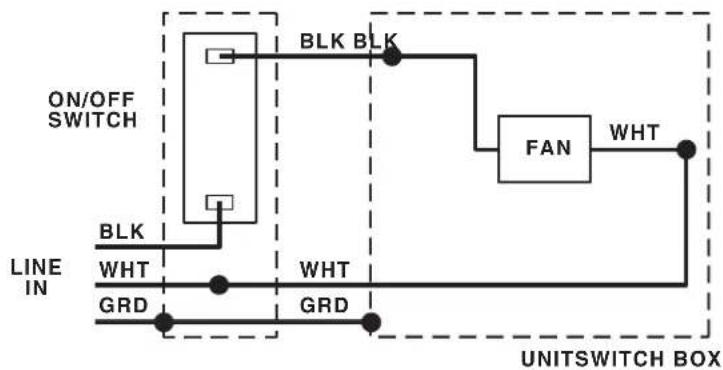
- Connect wires as shown in wiring diagram.
flowchart
graph TD
    A["ON/OFF SWITCH"] --> B["BLK"]
    B --> C["WHT"]
    C --> D["GRD"]
    D --> E["UNIT SWITCH BOX"]
    F["FAN"] --> G["WHT"]
    G --> H["BRIT"]
    I["BRIT"] --> J["BRIT"]
    K["BRIT"] --> L["BRIT"]
    M["BRIT"] --> N["BRIT"]
    O["BRIT"] --> P["BRIT"]
    Q["BRIT"] --> R["BRIT"]
    S["BRIT"] --> T["BRIT"]
    U["BRIT"] --> V["BRIT"]
    W["BRIT"] --> X["BRIT"]
New Construction Installation
6 Insert Mask and Finish Ceiling
- Tape Mask into Housing.
• Install ceiling material. - Cut out around Housing.
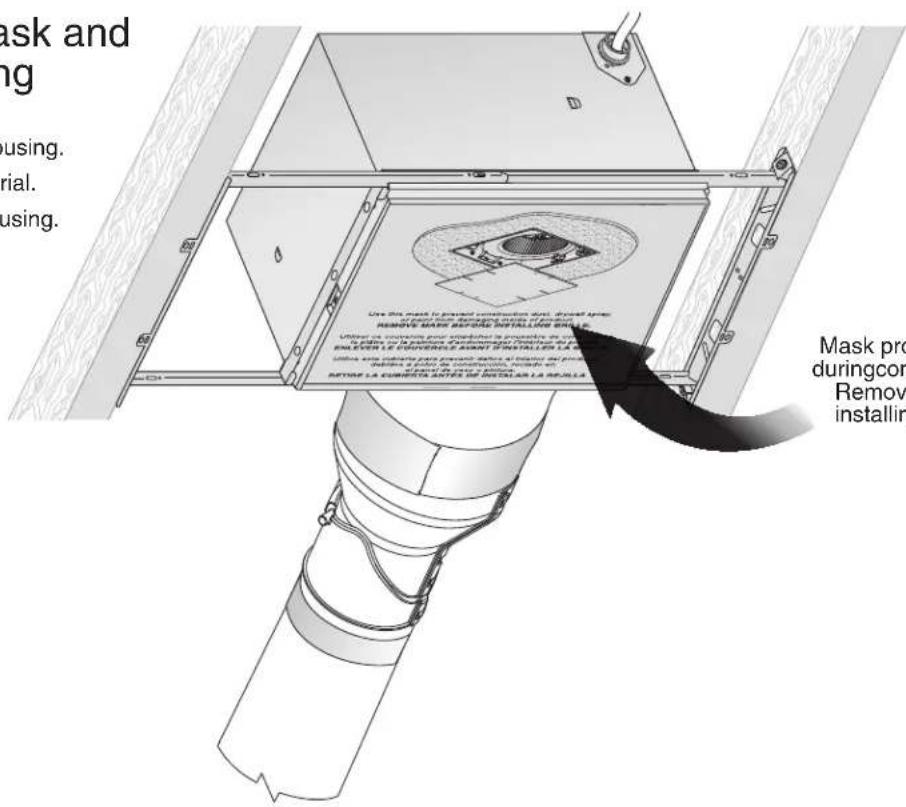
Mask protects unit duringconstruction. Removebefore installingGrille.
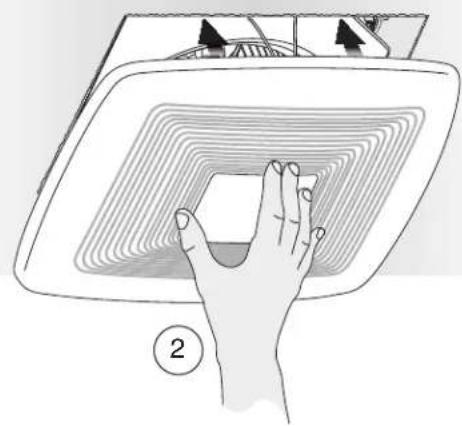
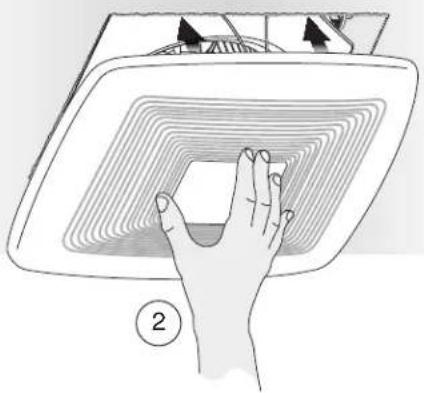
7 Install Grille

natural_image
Illustration of a hand pressing down on a curved surface with concentric contour lines, no text or symbols present.Retrofit Installation
Tools needed
• Power screwdriver with a Phillips bit
- Phillips screwdriver
- Flathead screwdriver
- Pliers
- Wire insulation stripper
- Wire cutter
- Ruler
- Pencil
- Drywall saw
- Claw hammer or pry bar
- Utility knife
Materials needed
- Tape to seal duct connections
- Existing rigid duct will require the addition of a short length of flexible duct
• Electrical wiring and supplies per local code requirements
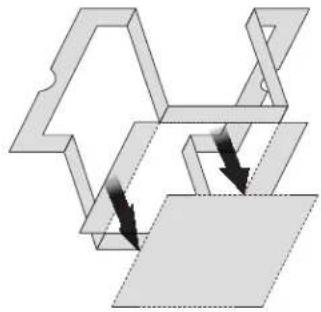
1 Remove Packaging
Parts Bag holds Knockout Plate and six (6) screws

Punch out Mask from packaging. See Step 12.
natural_image
Abstract geometric diagram with interlocking shapes and arrows, no text or symbols present2 Switch Off Power WARNING
Before removing existing fan, switch power off at service panel and lock the service disconnecting means to prevent power from being switched on accidentally. When the service disconnecting means cannot be locked, securely fasten a prominent warning device, such as a tag, to the service panel.
3 Enlarge Ceiling Opening and Remove Existing Fan

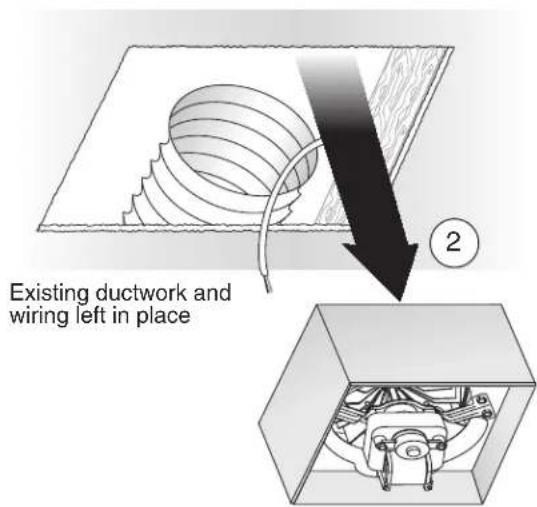
4 Examine Wiring Examine the existing wiring
Examine the existing wiring to make sure it is not damaged. If any damage is found, DO NOT CONTINUE INSTALLATION of this product. Contact a qualified person(s) for repair.
Retrofit Installation
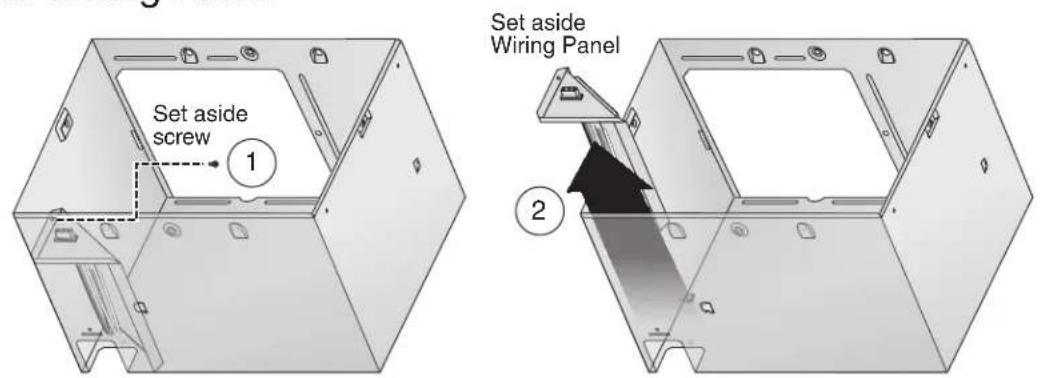
5 Remove Blower Assembly

6 Remove Wiring Panel
7 Insert Mounting Frame

Retrofit Installation
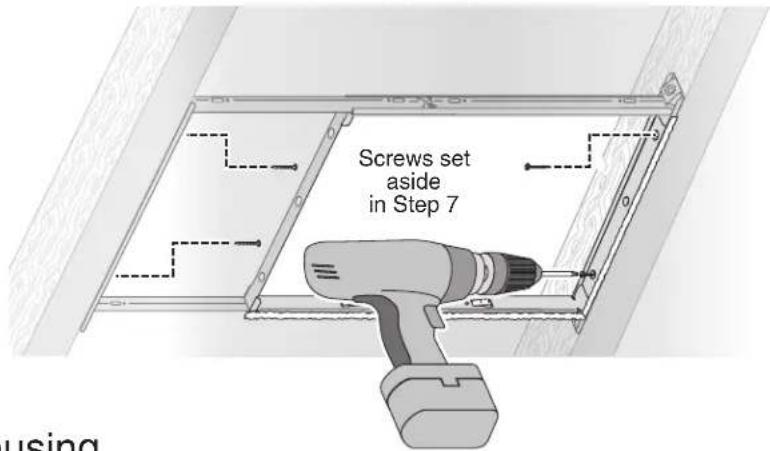
8 Secure Mounting Frame
9 Snap-in Housing
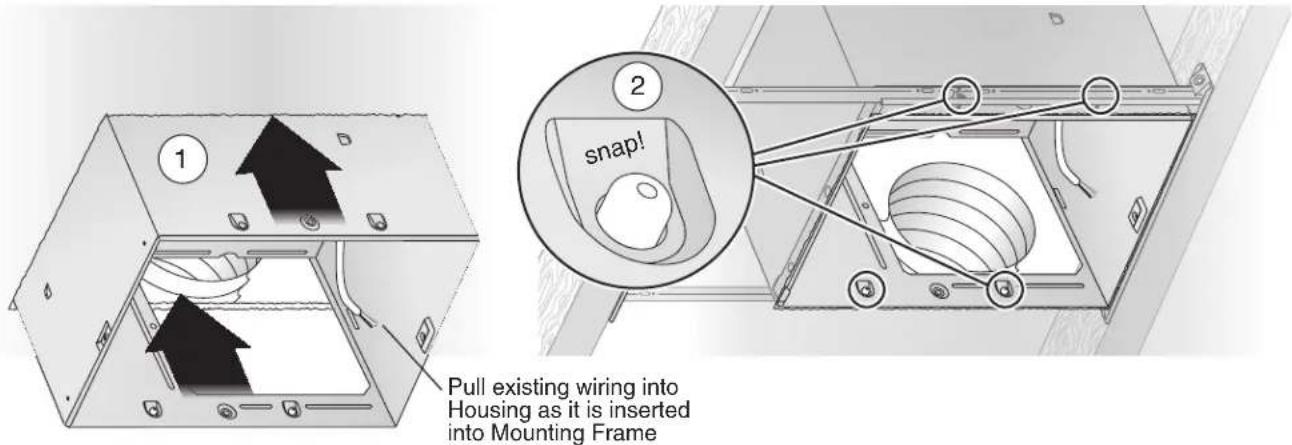
10 Attach Flange, Transition and Ducting

Retrofit Installation
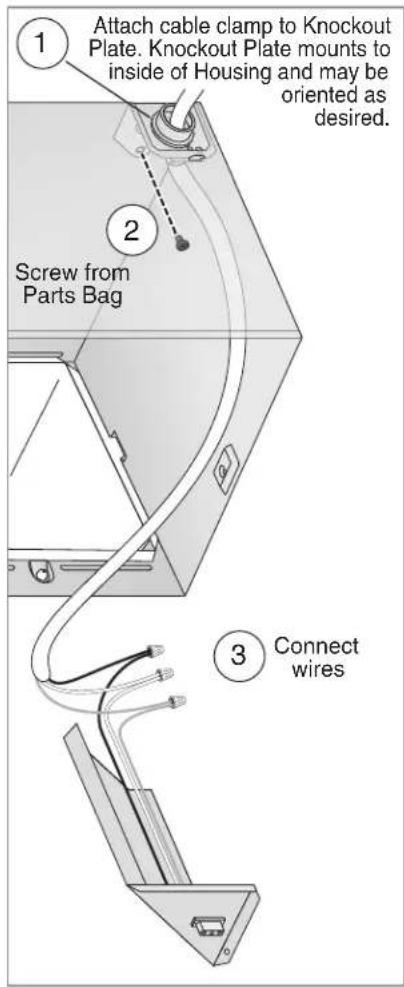
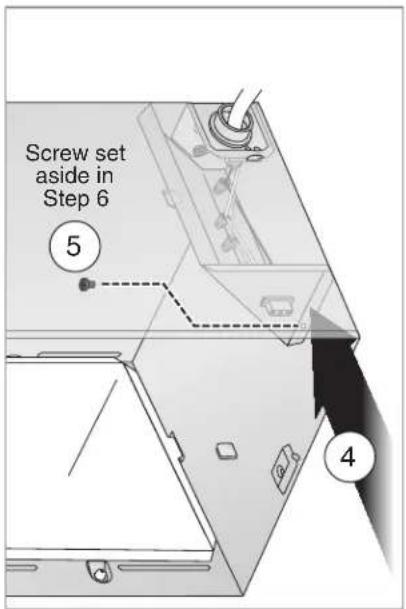
11 Install Knockout Plate, Connect Wires and Install Wiring Panel
- Use proper UL-approved connectors to secure wiring to the Knockout Plate provided in Parts Bag.
- Connect wires as shown in wiring diagram.
flowchart
graph TD
    A["ON/OFF SWITCH"] --> B["BLK"]
    B --> C["WHT"]
    C --> D["GRD"]
    D --> E["UNIT SWITCH BOX"]
    F["FAN"] --> G["WHT"]
    G --> H["BRIDGE"]
    I["BRIDGE"] --> J["BRIDGE"]
    K["BRIDGE"] --> L["BRIDGE"]
    M["BRIDGE"] --> N["BRIDGE"]
    O["BRIDGE"] --> P["BRIDGE"]
    Q["BRIDGE"] --> R["BRIDGE"]
    S["BRIDGE"] --> T["BRIDGE"]
    U["BRIDGE"] --> V["BRIDGE"]
    W["BRIDGE"] --> X["BRIDGE"]
    Y["BRIDGE"] --> Z["BRIDGE"]

Retrofit Installation
12 Insert and Secure Blower Assembly and Muffler
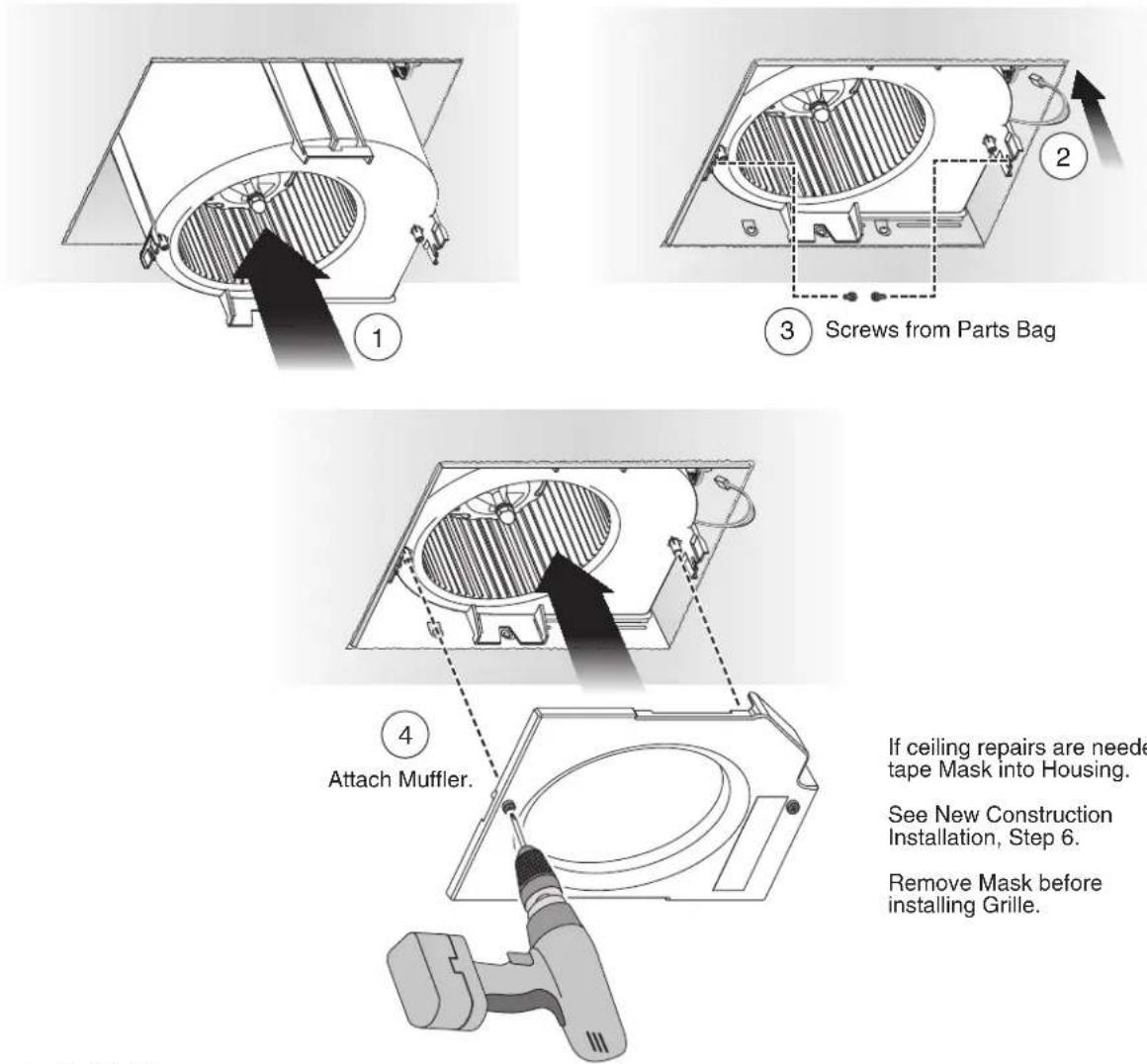
If ceiling repairs are needed, tape Mask into Housing.
See New Construction Installation, Step 6.
Remove Mask before installing Grille.
13 Install Grille

WARNING ▲ore servicing or cleaning unit, switch power off at service panel and lock the service disconnecting means to prevent power from being switched on accidentally. When the service disconnecting means cannot be locked, securely fasten a prominent warning device, such as a tag, to the service panel.
Operation
To Operate Fan
Use an ON/OFF switch, timer, or speed control to operate this ventilator. Use of speed control other than the Broan 78V and 78W may cause a motor humming noise.
Cleaning and Maintenance
To Clean
For quiet and efficient operation, long life and attractive appearance, remove Grille and vacuum interior of unit with a dusting brush attachment.
The Motor is permanently lubricated and never needs oiling. If the motor bearings are making excessive or unusual noises, replace the Motor.
Troubleshooting
Symptom: The fan does not run.
- Check for an open fuse or circuit breaker in the building's service panel.
- Check that the plug-in connection for the Motor is seated firmly in place.
- Check that the Blower Wheel spins freely.
Symptom: The fan runs erratically.
- Check that the Blower Wheel is firmly attached to the Motor shaft and both spin freely.
Symptom: The fan seems noisy.
- Check that the back draft damper in the fan's Transition pivots freely.
- Check that the back draft damper in the wall or roof cap pivots freely. These dampers are sometimes mistakenly painted shut or obstructed by bird and insect debris.
Service Parts
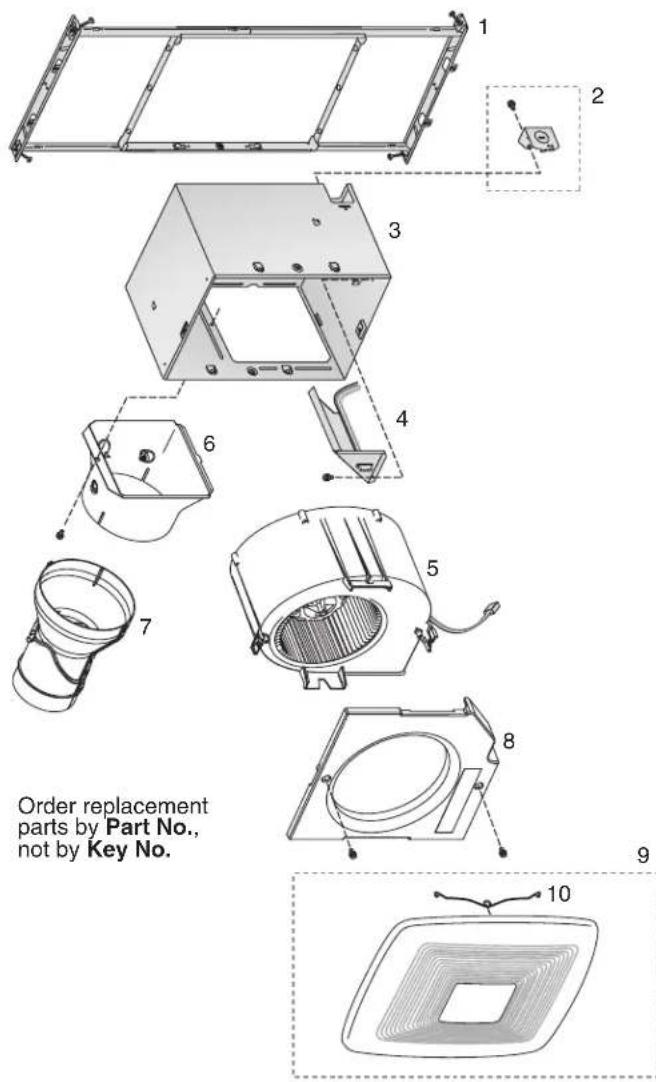
Key No. Part No. Description
1 97018349 Mounting Frame
2 97018721 Knockout Plate & Screws
3 97018382 Housing
4 97018447 Wiring Panel/Harness Assembly
5 97019405 Blower Assembly (RB80)
97019406 Blower Assembly (RB110)
6 97019520 Flange
7 97019466 Transition
8 97019565 Muffler
9 97018530 Grille Assembly (includes 10)
10 99140208 Grille Spring (2 req'd)
Warranty
Broan Ventilation Fans Limited Warranty
WARRANTY PERIOD: Broan warrants to the original consumer purchaser of its Broan Ventilation Fans (the "Fan") that your Fan will be materially free from defects in materials or workmanship for a period of three (3) years from the date of original purchase. This warranty does not cover accessories, such as speed controls, that may be purchased separately and installed with the Fan. The limited warranty period for replacement parts, and for Fans repaired or replaced under this limited warranty, shall continue for the remainder of the original warranty period.
NO OTHER WARRANTIES: THE FOREGOING WARRANTIES ARE EXCLUSIVE AND IN LIEU OF ANY OTHER WARRANTIES, EXPRESS OR IMPLIED. BROAN DISCLAIMS AND EXCLUDES ALL OTHER EXPRESS WARRANTIES, AND DISCLAIMS AND EXCLUDES ALL WARRANTIES IMPLIED BY LAW, INCLUDING WITHOUT LIMITATION THOSE OF MERCHANTABILITY AND FITNESS FOR A PARTICULAR PURPOSE. TO THE EXTENT THAT APPLICABLE LAW PROHIBITS THE EXCLUSION OF IMPLIED WARRANTIES, THE DURATION OF ANY APPLICABLE IMPLIED WARRANTY IS LIMITED TO THE PERIOD SPECIFIED FOR THE EXPRESS WARRANTY. Some states do not allow limitations on how long a implied warranty lasts, so the above limitation may not apply to you. Any oral or written description of the Fan is for the sole purpose of identifying it and shall not be construed as an express warranty.
REMEDY: During the applicable limited warranty period, Broan will, at its option, provide replacement parts for, or repair or replace, without charge, any Fan or part thereof, to the extent Broan finds it to be covered by and in breach of this limited warranty. Broan will ship the repaired or replaced Fan or replacement parts to you at no charge. You are responsible for all costs for removal, reinstallation and shipping, insurance or other freight charges incurred in the shipment of the Fan or part to Broan. This warranty does not cover (a) normal maintenance and service, (b) normal wear and tear, (c) any Fans or parts which have been subject to misuse, abuse, abnormal usage, negligence, accident, improper or insufficient maintenance, storage or repair (other than repair by Broan), (d) damage caused by faulty installation, or installation or use contrary to recommendations or instructions, (e) any Fan that has been moved from its original point of installation, (f) damage caused by environmental or natural elements, (g) damage in transit, (h) natural wear of finish, (i) Fans in commercial or nonresidential use, or (j) damage caused by fire, flood or other act of God. This warranty covers only Fans sold in the United States or through U.S. distributors authorized by Broan.
EXCLUSION OF DAMAGES: BROAN'S OBLIGATION TO PROVIDE REPLACEMENT PARTS, OR REPAIR OR REPLACE, AT BROAN'S OPTION, SHALL BE YOUR SOLE AND EXCLUSIVE REMEDY UNDER THIS LIMITED WARRANTY AND BROAN'S SOLE AND EXCLUSIVE OBLIGATION. BROAN SHALL NOT BE LIABLE FOR INCIDENTAL, INDIRECT, CONSEQUENTIAL OR SPECIAL DAMAGES ARISING OUT OF OR IN CONNECTION WITH THE FAN, ITS USE OR PERFORMANCE. Incidental damages include but are not limited to such damages as loss of time and loss of use. Consequential damages include but are not limited to the cost of repairing or replacing other property which was damaged if the Fan does not work properly.
Some states do not allow the exclusion or limitation of incidental or consequential damages, so the above limitation or exclusion may not apply to you. This warranty gives you specific legal rights, and you may also have other rights, which vary from state to state.
This warranty supersedes all prior warranties and is not transferable from the original consumer purchaser.
BROAN SHALL NOT BE LIABLE TO YOU, OR TO ANYONE CLAIMING UNDER YOU, FOR ANY OTHER OBLIGATIONS OR LIABILITIES, INCLUDING, BUT NOT LIMITED TO, OBLIGATIONS OR LIABILITIES ARISING OUT OF BREACH OF CONTRACT OR WARRANTY.
NEGLIGENCE OR OTHER TORT OR ANY THEORY OF STRICT LIABILITY, WITH RESPECT TO THE FAN OR BROAN'S ACTS OR OMISSIONS OR OTHERWISE.
This warranty covers only replacement or repair of defective Fans or parts thereof at Broan's main facility and does not include the cost of field service travel and living expenses.
Any assistance Broan provides to or procures for you outside the terms, limitations or exclusions of this limited warranty will not constitute a waiver of such terms, limitations or exclusions, nor will such assistance extend or revive the warranty.
Broan will not reimburse you for any expenses incurred by you in repairing or replacing any defective Fan, except for those incurred with Broan's prior written permission.
HOW TO OBTAIN WARRANTY SERVICE: To qualify for warranty service, you must (a) notify Broan at the address or telephone number stated below within seven (7) days of discovering the covered defect, (b) give the model number and part identification and (c) describe the nature of any defect in the Fan or part. At the time of requesting warranty service, you must present evidence of the original purchase date.
Broan-NuTone LLC, 926 West State Street, Hartford, WI 53027 (1-800-637-1453)
www.broan.com
If you must send the Fan or part to Broan, as instructed by Broan, you must properly pack the Fan or part—Broan is not responsible for damage in transit.
LEA Y CONSERVE ESTAS INSTRUCCIONES
natural_image
Abstract geometric diagram with interlocking shapes and arrows, no text or symbols presentnatural_image
Technical diagram of a mechanical assembly with internal components and directional arrow (no text or symbols)
natural_image
Illustration of a hand pressing down on a curved surface with concentric contour lines, no text or symbols present.natural_image
Pure geometric diagram showing intersecting planes and arrows without any text or symbolsnatural_image
3D diagram of a mechanical assembly inside a transparent box, showing internal components without any text or symbols.natural_image
Technical diagram of a mechanical component with internal structure and directional arrow (no text or symbols)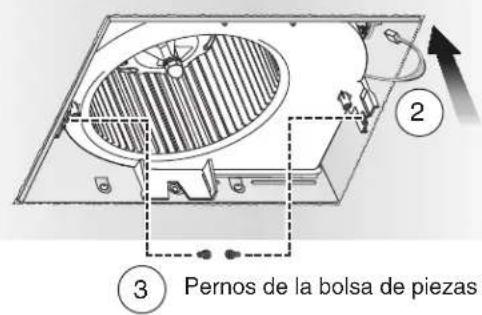
natural_image
Illustration of a hand pressing down on a curved surface with concentric contour lines, no text or symbols presentnatural_image
Simple line drawing of a square frame with concentric rings and a central hole, no text or symbols present.- READ AND SAVE THESE INSTRUCTIONS
- Easy installation in both new construction and retrofit
- Table of Contents
- WARNING
- TO REDUCE THE RISK OF FIRE, ELECTRIC SHOCK, OR INJURY TO PERSONS, OBSERVE THE FOLLOWING:
- CAUTION
- Typical Installation
- New Construction Installation
- Tools needed
- Materials needed
- Remove Packaging
- Install Mounting Frame
- Connect Wires and Install Knockout Plate
- Insert Mask and Finish Ceiling
- Install Grille
- Retrofit Installation
- Switch Off Power WARNING
- Enlarge Ceiling Opening and Remove Existing Fan
- Examine Wiring Examine the existing wiring
- Install Knockout Plate, Connect Wires and Install Wiring Panel
- Operation
- To Operate Fan
- Cleaning and Maintenance
- To Clean
- Troubleshooting
- Key No. Part No. Description
- Warranty
- Broan Ventilation Fans Limited Warranty
- LEA Y CONSERVE ESTAS INSTRUCCIONES
Brand : BROAN
Model : Ultra Pro RB80
Category : Range hood