
VisaPure Essential SC5266 - Skin Cleaner PHILIPS - Free user manual and instructions
Find the device manual for free VisaPure Essential SC5266 PHILIPS in PDF.


| Product Type | Skin cleanser (face brush) |
| Brand | Philips |
| Model | VisaPure Essential SC5266 |
| Device Dimensions | Approx. 18 cm (height) x 4 cm (diameter) |
| Weight | Approx. 150 g (including batteries) |
| Power Source | 2 AA batteries (1.5V each) |
| Battery Life | Approx. 30 minutes of continuous use |
| Number of Speed Settings | 2 (low and high) |
| Cleaning Brush Head Type | Soft bristles for gentle exfoliation |
| Timer Function | 1-minute auto shut-off with 20-second intervals |
| Water Resistance | IPX7 (waterproof up to 1 meter for 30 minutes) |
| Main Functions | Cleansing, exfoliation, massage |
| Usage Area | Face (avoid eye area) |
| Recommended Use Frequency | Once daily (up to 2 times for oily skin) |
| Brush Head Replacement Interval | Every 3 months |
| Compatible Brush Heads | Philips SC Series replacement heads |
| Material | ABS plastic, silicone grip |
| Cleaning and Maintenance | Rinse brush head after each use; replace head every 3 months |
| Safety Features | Automatic shut-off, waterproof design |
| Spare Parts Availability | Brush heads, travel case (sold separately) |
| Repairability | Non-user-serviceable; contact Philips support |
| Warranty | 2 years (manufacturer defect) |
| Item Number | SC5266/00 |
Frequently Asked Questions - VisaPure Essential SC5266 PHILIPS
User questions about VisaPure Essential SC5266 PHILIPS
0 question about this device. Answer the ones you know or ask your own.
Ask a new question about this device
Download the instructions for your Skin Cleaner in PDF format for free! Find your manual VisaPure Essential SC5266 - PHILIPS and take your electronic device back in hand. On this page are published all the documents necessary for the use of your device. VisaPure Essential SC5266 by PHILIPS.
USER MANUAL VisaPure Essential SC5266 PHILIPS
Always here to help you
Register your product and get support at www.philips.com/welcome
EN User manual 3
natural_image
Product photo of a clear plastic brush with a circular brush and filter, no visible text or symbolsSC526x
PHILIPS


1 Introduction
Thank you for choosing to buy Philips VisaPure Essential. Before you get started, we hope you will register your product at www.philips.com/welcome in order to enjoy dedicated product support and offers designed especially for you.
So what is VisaPure Essential and how can it help your skin? Cleansing is an essential part of the daily skincare routine, but traditional methods do not always leave your skin as clean and radiant as it could be. That is why we have developed VisaPure Essential - our exciting new approach to facial cleansing. Forget manual cleansing, with VisaPure Essential you can enjoy clean, radiant skin, quickly and easily every day.
VisaPure Essential combines gentle rotating and vibrating movements to cleanse deeply, remove impurities and make-up to leave skin feeling soft and fresh. Designed to complement your current routine, you can use VisaPure Essential together with your current cleanser. It also helps skincare products applied after cleansing – such as your favourite moisturiser – to be absorbed better. You will notice the cleansing effect immediately - experiencing smoother, more radiant-looking skin. VisaPure Essential comes ready to use with a brush head for normal skin. Additional brush heads for different skin types and purposes are available separately.
Ready to get started? Use VisaPure Essential twice daily to enjoy soft, cleansed skin and reveal your natural radiance. We hope you and your skin will enjoy using VisaPure Essential.
2 General description (Fig. 1)
1 Handle
2 Charging light and battery low indication
3 On/off button
4 Connection pin
5 Charging pins
6 Anti-roll ridge
7 Brush head. Your VisaPure Essential comes with one or more of the following brush heads:
- Normal brush head
- Sensitive brush head
- Extra sensitive brush head
- Exfoliation brush head
- Deep pore cleansing brush head
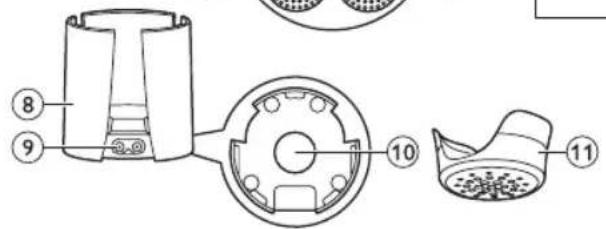
8 Charging stand
9 Appliance socket
10 Draining hole
11 Protection cap
12 Small plug
13 Adapter
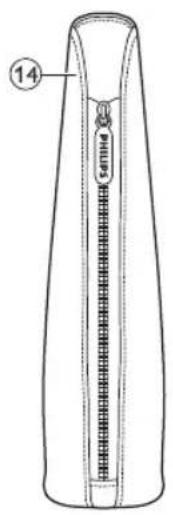
14 Travel pouch (specific types only)
The types of brush heads included depend on the VisaPure Essential type purchased.
3 Important
Read this user manual carefully before you use the appliance and save it for future reference.
3.1 Danger
- Keep the adapter dry.
3.2 Warning
- Only use the appliance in combination with the adapter supplied.
- Do not use the appliance, an attachment or the adapter if it is damaged or broken to avoid injuries.
- If the adapter is damaged, always have it replaced with one of the original type in order to avoid a hazard.
- The adapter contains a transformer. Do not cut off the adapter to replace it with another plug, as this causes a hazardous situation.
-
Fully charge the appliance at least every 3 months to sustain battery lifetime.
-
This appliance can be used by children aged from 8 years and above and by persons with reduced physical, sensory or mental capabilities or lack of experience and knowledge if they have been given supervision or instruction concerning use of the appliance in a safe way and if they understand the hazards involved.
Children shall not play with the appliance.
Cleaning and user maintenance shall not be made by children without supervision. - This appliance is NOT a toy. Keep the appliance out of the reach of children younger than 12 years.
- Do not insert metal-containing material into the socket for the appliance plug to avoid short circuiting.
3.3 Caution
- This appliance is developed and intended for cleansing the face, the neck and the décolleté, excluding the sensitive area around the eyes. Do not use the appliance for any other purpose.
- Do not use the appliance more than twice a day.
- For hygienic reasons, we advise you to not share the appliance with other people.
- Do not clean the appliance with water that is hotter than shower temperature (max. 40°C/104°F).
- Do not put the appliance or any part in the dishwasher.
-
Charge, use and store the appliance at a temperature between 10ircC / 50ircF and 40ircC / 104ircF .
-
Do not use the appliance on chapped skin, open wounds, or if you suffer from skin diseases or skin irritations, such as severe acne, sunburn, skin infection, etc.
- Do not use the appliance if you are taking steroid-based medication.
- Do not use the appliance with self-made cleansers or cleansers containing harsh chemicals or rough particles.
- If you have sensitive skin or experience skin irritation after using the appliance with the normal brush head, we advise you to switch to the sensitive brush head.
3.4 General
- Please note that the condition of the skin varies throughout the year. Facial skin can get dryer during the winter season. In that case you may reduce the treatment time or frequency, depending on the needs of your skin.
- Regular cleaning of the appliance ensures optimal results and a longer life of the appliance.
- The appliance complies with the internationally approved IEC safety regulations and can be safely used in the bath or shower and cleaned under the tap.
- The appliance is equipped with an automatic voltage selector and is suitable for mains voltages ranging from 100 to 240 volts.
3.5 Electromagnetic fields (EMF)
This Philips appliance complies with all applicable standards and regulations regarding exposure to electromagnetic fields.
4 Preparing for use
4.1 Charging the appliance
Charging the appliance takes approximately 6 hours. A fully charged appliance has a cordless operating time of up to 30 minutes.
1 Make sure the appliance is switched off.
2 Insert the small plug in the socket of the charging stand (1), put the adapter in the wall socket (2), remove the protection cap (3) and put the appliance in the charging stand (4) (Fig. 2).
3 The charging light flashes white to indicate that the appliance is charging. When the battery is fully charged, the charging light lights up white continuously (Fig. 3).
4.2 Battery-low indication
- When the battery is almost empty, the charging light flashes amber for 15 seconds. The battery still contains enough energy for a complete treatment (Fig. 4). To charge the appliance, follow the steps in section 'Charging the appliance' above.
5 Using the appliance
Make sure the appliance is fully charged before you use it for the first time.

Note:
You can either use the appliance in front of the sink, in the shower or in the bathtub.
5.1 Brushheads
Your VisaPure Essential comes with one or more of the brush heads described below.
You can use the brush head that suits your skin best.
The types of brush heads included depend on the VisaPure Essential type purchased.
5.1.1 Normal brush head
• 17000 soft bristles for deep skin cleansing
- For all skin types
- For daily use
- For optimal results, replace the brush every three months
5.1.2 Sensitive brush head
- Ultra soft bristles for a more effective, gentle cleaning
- For sensitive skin
- For daily use
- For optimal results, replace the brush every three months
5.1.3 Extra sensitive brush head
• Philips' softest bristles for ultra gentle cleansing
- For extra sensitive skin
- For daily use
- For optimal results, replace the brush every three months
5.1.4 Exfoliation brush head
• Dual layer bristles to remove dead skin cells
- For all skin types
- For weekly use
- For optimal results, replace the brush every six months
5.1.5 Deep pore cleansing brush head
- The deep pore cleansing brush helps to reduce blackheads and is designed to make pores less visible
- For all skin types
- For daily use
- For optimal results, replace the brush every three months
5.2 Daily facial cleansing with VisaPure Essential
5.2.1 Skin zones
- The face can be divided into three zones: right cheek, left cheek and T-zone. The cheek zones include the chin, the area between nose and upper lip and the area between eyes and ears. The neck and décolleté can also be divided into three zones (Fig. 5).
Note:
Do not use the appliance on the sensitive skin area around the eyes.
5.2.2 Skin Zone timer
When you switch on the appliance, it works for three periods of 20 seconds. Between these periods, there is a short pause to indicate that you should move the brush head to another skin zone.
5.2.3 Auto shut-off
The appliance automatically switches off after one minute to prevent overtreatment.
5.2.4 Cleansing procedure

Note:
You can use the appliance twice a day.
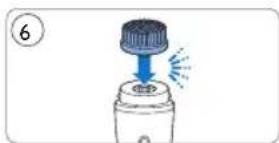
1 Push the brush head onto the connection pin until it locks into position with a click (Fig. 6).
2 Moisten the brush head with water and apply the cleanser to your face. Alternatively, you can moisten the brush head directly with liquid cleanser. Do not use the appliance with a dry brush head, as this can irritate the skin.
3 Place the brush head on your skin.
4 Press the on/off button once to switch on the appliance. Press two times to switch off the appliance or wait until it stops automatically (Fig. 7).
5 Gently move the brush head across your skin while making circular movements. Do not push the brush head too hard onto the skin to make sure the treatment remains comfortable (Fig. 8).
6 After 20 seconds, the appliance briefly pauses to let you know that you have to move to another zone. Do not overdo the cleansing and do not cleanse any zone longer than 20 seconds.
6 Cleaning and maintenance
Never use scouring pads, abrasive cleaning agents or aggressive liquids such as alcohol or acetone to clean the appliance.
6.1 Cleaning the appliance and the brush head
Clean the appliance and the brush head thoroughly with water after each use, to ensure optimum performance. Make sure the appliance is switched off before you start cleaning it.
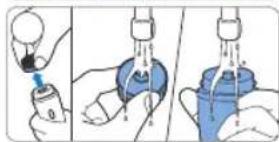
1 Rinse the handle and the brush head under the tap with warm water (max. 40°C / 104°F) (Fig. 9).
2 Clean the back of the brush head and the connection pin of the appliance under the tap at least once a week (Fig. 10).
3 Dry these parts with a towel.
6.2 Cleaning the adapter and the charging stand
Danger:
Always keep the adapter dry. Never rinse it under the tap or immerse it in water.
1 Make sure the adapter is unplugged when you clean it. Only wipe it with a dry cloth.
2 Always detach the charging stand from the adapter before you clean it (Fig. 11).
3 You can clean the charging stand with a moist cloth. Dry the charging stand before you reconnect it to the adapter (Fig. 12).
7 Storage
- Store the appliance with the brush head attached in the charging stand (Fig. 13).
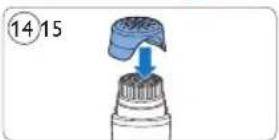
- For travelling: put the protection cap on the dry brush head to protect the brush head filaments when you take the appliance with you (Fig. 14).

Note:
Never put the protection cap on the brush head if the brush head is still wet.
8 Replacement
8.1 Brush head replacement
Worn filaments could lead to skin irritation. Therefore the brush head should be replaced every 3 months or earlier if the filaments are deformed or damaged. Replacement brush heads and additional brush head types are available from our website www.shop.philips.com/service or from the shop where you purchased your Philips beauty appliance. If you have any difficulties obtaining replacement brush heads, please contact the Philips Consumer Care Centre in your country. You find its contact details in the worldwide guarantee leaflet. You can also visit www.philips.com/support.
9 Environment
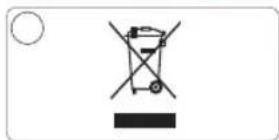
- This symbol on a product means that the product is covered by European Directive 2012/19/EU (Fig. 15).
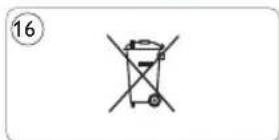
- This symbol means that the product contains a built-in rechargeable battery covered by European Directive 2006/66/EC which cannot be disposed of with normal household waste. Follow the instructions in section 'Removing the rechargeable battery' to remove the battery (Fig. 16).
- Inform yourself about the local separate collection system for electrical and electronic products and rechargeable batteries. Follow local rules and never dispose of the product and rechargeable batteries with normal household waste. Correct disposal of old products and rechargeable batteries helps prevent negative consequences for the environment and human health.
9.1 Removing the rechargeable battery before discarding the appliance
1 Remove the appliance from the charging stand, switch on the appliance and let it operate until it switches off after one minute. Repeat this action until the rechargeable battery is empty.
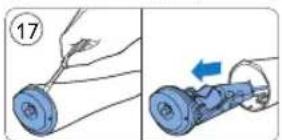
2 Insert a small flathead screwdriver between the silver-coloured ring and the anti-roll ridge and pry loose the top part off the appliance. Carefully pull the top part with the battery holder out of the housing (Fig. 17).
3 Remove the rechargeable battery from the battery holder.
Warning:
Do not attempt to replace the rechargeable battery.
Warning:
Do not reconnect the appliance to the mains after you have removed the rechargeable battery.
10 Guarantee and support
If you need information or support, please visit www.philips.com/support or read the separate worldwide guarantee leaflet.
11 Troubleshooting
This chapter summarises the most common problems you could encounter with the appliance. If you are unable to solve the problem with the information below, visit www.philips.com/support for a list of frequently asked questions or contact the Consumer Care Centre in your country.
I do not know if the appliance is suitable for use on my skin.
- Do not use the appliance on dry, chapped skin, open wounds, or when you suffer from skin diseases or skin irritation, such as severe acne, sunburn, skin infection, etc. Do not use the appliance if you are taking steroid-based medication.
The appliance does not charge.
- Make sure the socket to which you connect the appliance is live. Check whether the voltage indicated on the appliance corresponds to the local mains voltage. Check whether contact pins on the appliance are in proper contact with the contact points in the stand. If you use a socket in a bathroom cabinet, you may
need to switch on the light to activate the socket. When the light on the appliance still does not light up or when the appliance still does not charge, take it to your Philips dealer or the nearest Philips Service Centre.
The appliance does not work anymore.
- Make sure that you have pressed the on/off button properly. Charge the appliance according to the instructions in this user manual. Verify whether there is a power failure and if the wall socket is live. Check if the charging light on the appliance lights up to make sure the appliance is charging. If it does not light up or if the appliance still does not work, take it to your Philips dealer or the nearest Philips Service Centre
1 Úvod

natural_image
Simple diagram with a circle, vertical line, and starburst symbol (no text or labels)
natural_image
Illustration of a hairdryer with a blue spray effect (no text or symbols)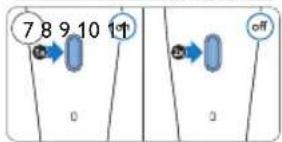

natural_image
Illustration of a person applying facial care with a brush (no text or symbols)
natural_image
Illustration of a medical procedure showing steps to lift a patient's arm and drop blood pressure (no text or symbols present)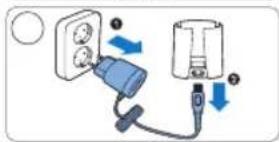

natural_image
Illustration of a hand holding a blue object with a droplet symbol nearby (no text or labels)
natural_image
Two-step diagram showing a tool interacting with a blue mechanical component, one being inserted and the other being inserted into a ring (no text or symbols)
© 2015 Koninklijke Philips Electronics N.V. Document order number: 4222.100.5260.1 09/2015

- Always here to help you
- Introduction
- General description (Fig. 1)
- Important
- Danger
- Warning
- Caution
- General
- Electromagnetic fields (EMF)
- Preparing for use
- Charging the appliance
- Battery-low indication
- Using the appliance
- Note:
- Brushheads
- Normal brush head
- Sensitive brush head
- Extra sensitive brush head
- Exfoliation brush head
- Deep pore cleansing brush head
- Daily facial cleansing with VisaPure Essential
- Skin zones
- Skin Zone timer
- Auto shut-off
- Cleansing procedure
- Cleaning and maintenance
- Cleaning the appliance and the brush head
- Cleaning the adapter and the charging stand
- Danger:
- Storage
- Replacement
- Brush head replacement
- Environment
- Removing the rechargeable battery before discarding the appliance
- Warning:
- Guarantee and support
- Troubleshooting
- Úvod
Brand : PHILIPS
Model : VisaPure Essential SC5266
Category : Skin Cleaner