VS-596 - Multifunction Cooker ViTESSE - Free user manual and instructions
Find the device manual for free VS-596 ViTESSE in PDF.


User questions about VS-596 ViTESSE
0 question about this device. Answer the ones you know or ask your own.
Ask a new question about this device
Download the instructions for your Multifunction Cooker in PDF format for free! Find your manual VS-596 - ViTESSE and take your electronic device back in hand. On this page are published all the documents necessary for the use of your device. VS-596 by ViTESSE.
USER MANUAL VS-596 ViTESSE
NOUS VIVONS GAIN We live healthy
VITESSE®
MULTI COOKER МУЛЬТИВАРКА

natural_image
Pink rice cooker with digital display and kitchen utensils on a wooden surface (no visible text or symbols)En
DEAR CUSTOMER! YOU HAVE MADE AN EXCELLENT DECISION! ViTESSE Home trade mark offers you an exclusive, high quality range of appliances for your ultimate home luxury and healthy living.
SAFETY INSTRUCTIONS
Read the operating instructions carefully before putting the appliance into operation and keep the instructions including the warranty, the receipt and, if possible, the box with the internal packing. If you give this device to other people, please also pass on the operating instructions.
SAFETY AND PRECAUTIONS
When using this appliance, follow the instructions below.
When used correctly, it will serve you for years.
Before connecting the outlet please cross check the supply voltage with the supply voltage of the device. This can be found in technical data or on the name plate.
√ If you use an extension cord, make sure it is designed for the power consumption of the device. Different voltage can cause electric shock or fire cable.
√ For safety, the appliance is to be kept and used at a sturdy and ground surface. Otherwise, it would not meet the requirements of protection against electric shock.
√ If you want to disconnect the unit from the wall outlet, then remove the power cord with hands on the plug, not the cord. Otherwise, it can lead to rupture of the cable or electric shock. Unplug this apparatus after use and during cleaning or moving.
√ Do not lay the power cord around sharp corners and edges, close to the heat source (gas or electric stove).
√ This can cause problems that do not meet the terms of the warranty.
√ Make sure that the cord will not twist or bend over the edge of the table. Place the unit on a dry level surface. Please comply with generally accepted safety rules when working with the device.
√ Do not use the appliance and packaging materials for children to play.
√ Do not allow children near the appliance. Keep the product out of reach of their place.
√ It is forbidden to use the appliance for any failures. The manufacturer is not liable for damage caused by non-compliance with safety and technician rules of use.
√ Do not allow children to use the device until they are explained and understood the instructions for safe operation.
√ Do not leave the appliance plugged unattended.
√ Do not submerge the device in water and do not use it in high humidity areas. It is forbidden to use the unit in the open air; there is risk of damage due to moisture inside.
√ Do not use the device at any failures. If it is faulty, disconnect it from the network, removing the plug from the outlet and contact an authorized service center.
√ Never try to repair the unit, or unauthorized modifications to the instrument. All maintenance and repair should be performed by an authorized service center. Unprofessional work could damage, personal injury and property damage.
√ Use of the device for purposes other than the above, is a violation of the proper operation of the device.
Operation should be carried out only in the domestic environment; the device is not intended for industrial use.
√ When the appliance is operating - do not touch the body and the cover and take care of the face and hands from the steam coming out of the valve.
√ Do not operate the appliance without the empty bowl or cup. Never touch the interior surfaces of the heated device.

www.vitesse.ru

Never connect to a power outlet other than specified power limits
Place the appliance on a flat, dry, stable surface away from sources of heat.
Never place the inner tank on the direct fire.
Keep the device away from children. Children can use the device under the supervision of Adults. Do not let them play with the device.
Do not bring your hands or face close to the holes for the steam on the top cover.
Do not block the Steam openings with towel or other items, to avoid deformation and discoloration device.
Do not immerse in water or other liquids. If you are not using the device, disconnect it from the mains.
Do not pull the power cord, hold the plug. Never bend or twist the power cord. If the power cord is damaged - do not use the device; contact an authorized service center for repairs. This device is not intended for use by persons with reduced physical, sensory or mental capabilities, a lack of knowledge or experience.
PARTS NAME
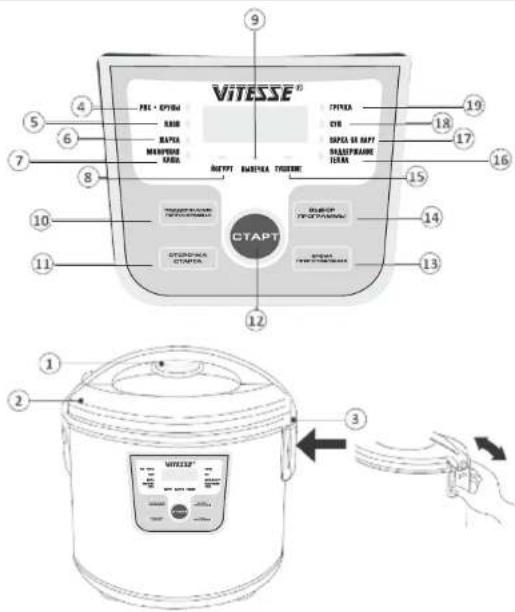
- Removable steam valve
- Lid Cover
- Condenser (designed to collect condensate when opening the lid)
- Indication program Rice
- Indication program Pilaf
- Indication program Frying
- Indication program Milk porridge
- Indication program Yogurt
- Indication Baking program
- Button "Keep Warm / Cancel"
- Button "Preset Cooking"
- The button "Start"
- The button "Cooking time"
- The button "Select program"
- Indication program Fry
- Indication Keep Warm
- Indication program Steam
- Indication program Soup
- Indication program Buckwheat

www.vitesse.ru
HOW TO OPERATE THE APPLIANCE
Micro-Computer Multi Cooker has many features! You can cook meals and soups, fried, steamed (vegetables, fish, meat), stew, bake and prepare yogurt. Regardless of the choice of the function, after cooking you can keep the food warm.
Before switching on
- Read the instructions carefully and follow these instructions mentioned.
- Open the package. Remove all accessories and manual.
- Open the cover of the Multi-Cooker by pressing the open button.
- Inner bowl (pan) has non-stick coating that helps to avoid burning your food. Clean the inside of the bowl with a soft sponge for dishes. After washing, wipe the device.
- Install all of the components.
- Before preparing the internal and external parts of the Multi-Cooker must be clean. Also make sure that between the inner pot and the heating surface there are no objects.
- Make sure the lid is tightly closed.
- Turn On the outlet.
CAUTION: Do not connect the appliance to the outlet, if it does not meet the above guidelines.
During the initial use Multi Cook we recommend to pour into the cup water, choose the program "Soup", wait until it is finished, and the water drained. This is to ensure that at least your first cooked dish did not get a particle of the conservation, and it did not have smell of plastic.
USING INSTRUCTION
PROGRAM "RICE"
Measure the rice recipe. Before Cooking - Wash it with clean water. Prepare the remaining ingredients, wash them clean, cut & Keep Ready.
- Put the rice (or grain) and seasoning in a bowl, cover with water. Can use your recipe rice based on proposed sequence. Make sure that all the ingredients (including liquid) are the marking MAX. (is located inside the bowl).
- Insert the Bowl into the housing. Gently turn it counter-clockwise, make sure that the bowl is in contact with the heating element. Close the cover until it
clicks.
NOTE: If the cover is not completely closed, the program will not work correctly.
- Connect the device to the mains output.
- Press the SELECT PROGRAM button and choose the Program "Rice"
- Press the START button to begin the cooking process, the display will flash the characters: ---
- The cooking time is set by microprocessor and cooking process will end automatically, but you can stop it by pressing keep warm / CANCEL.
- At the end of the cooking process you will hear a beep and the Multi-Cooker will automatically switch to Keep Warm mode: RICE Function LED goes out and Keep Warm LED will keep flashing, the display will show the countdown.
- Click on the keep warm / CANCEL to turn off the appliance and open the lid.
- Despite the fact that the appliance is willing to maintain the temperature of food for 8 hours or more, do not leave food in this mode for a long time, it can lead to drying of the product.
- Disconnect the unit from the mains.
PROGRAM "PILAF"
- Measure the rice with the measuring cup based on the prescription. Wash it with clean water before use. Prepare the remaining ingredients, wash them clean and cut.
- Put all ingredients in a bowl in accordance with our recommendations:
Vegetable oil 60 g
Salt and spices to taste
You can also use your own recipe pilaf, following the proposed sequence of actions and recommendations for the quantity. Make sure that all the ingredients (including liquid) are the marking MAX. (is located inside the bowl).
- Insert the Bowl into the housing. Gently turn it counter-clockwise, make sure that the bowl is in contact with the heating element. Close the cover until it

www.vitesse.ru
clicks.
NOTE: If the cover is not completely closed, the program will not work correctly.
- Close the Cover until it clicks. Connect the device to the mains.
- Press "Select Program" button and choose the Pilaf Function
- Press the START button to begin the cooking process, the display will flash the characters: ---
The cooking time is set by microprocessor and the cooking process will end automatically, but you can stop it by pressing keep warm / CANCEL.
- At the end of the cooking process you will hear a beep and the Multi-Cooker will automatically switch to Keep Warm mode: PILAF Function LED goes out and Keep Warm LED will keep flashing.
- Click on the keep warm / CANCEL to turn off the appliance and open the lid.
- Despite the fact that the appliance is willing to maintain the temperature of food for 8 hours or more, do not leave food in this mode for a long time, it can lead to drying of the product.
- Disconnect the unit from the mains.
PROGRAM "FRY"
- Prepare the necessary ingredients and keep ready.
- Make sure that all the ingredients (including liquid) were below the MAX, is located inside the bowl.
- Insert the cup into the housing. Gently turn it counter-clockwise, make sure that the cup is in contact with the heating element.
- Close the cover until it clicks. If the lid is not closed properly, the program will be on the preparation work correctly.
- Connect the device to the mains.
- Press "Select Program" button and choose the Fry Function
- Press the START button to begin the cooking process, the display will flash the characters: ---
The cooking time is set microprocessor cooking process will end automatically, but you can stop it by pressing keep warm / CANCEL. Automatic minimum cooking time: 5 minutes. You can change it by pressing the cooking time.
- Disconnect the unit from the mains.
PROGRAM "MILK PORRIDGE"
- Measure the cereal as per the desired prescription. Rinse with clean with
water before cooking
- Put all the ingredients in a bowl according to our recommendations. You can also use your recipe milk porridge, following the proposed sequence of actions and recommendations for the quantity. Make sure that all the ingredients (including liquid) were below the MAX, is located inside the bowl.
- Insert the Bowl into the housing. Gently turn it counter-clockwise, make sure that the bowl is in contact with the heating element. Close the cover until it clicks.
NOTE: If the cover is not completely closed, the program will not work correctly.
- Close the Cover until it clicks. Connect the device to the mains.
- Press "Select Program" button and choose the Milk/Porridge Function
- Press the START button to begin the cooking process, the display will flash the characters; ---
The cooking time is set by microprocessor and the cooking process will end automatically, but you can stop it by pressing keep warm / CANCEL. Automatic minimum cooking time: 30 minutes.
- At the end of the cooking process you will hear a beep and the Multi-Cooker will automatically switch to Keep Warm mode: Milk / Porridge Function LED goes out and Keep Warm LED will keep flashing.
- Click on the keep warm / CANCEL to turn off the appliance and open the lid.
- Despite the fact that the appliance is willing to maintain the temperature of food for 8 hours or more, do not leave food in this mode for a long time, it can lead to drying of the product.
- Disconnect the unit from the mains
PROGRAM "BUCKWHEAT"
-
Measure the cereal as per the desired prescription. Rinse with clean with water before cooking.
-
Put all the ingredients in a bowl according to our recommendations.
| 3. | Cereals | 2 cups | 4 cups | 6 cups | 8 cups |
| Buckwheat | 500 ml | 1200 ml | 1750 ml | 2350 ml | |
| Ground Rice | 650 ml | 1250 ml | 1900 ml | 2450 ml | |
| Barley | 700 ml | 1300 ml | 2000 ml | 2550 ml |
Measuring cup estimates are:
- 130g cereal - 1 cup

www.vitesse.ru
- 180 ml of water - 1 cup
You can also use your recipe, following the proposed sequence of actions and recommendations for the quantity. Make sure that all the ingredients (including liquid) were below the MAX, is located inside the bowl.
- Insert the Bowl into the housing. Gently turn it counter-clockwise, make sure that the bowl is in contact with the heating element. Close the cover until it clicks.
NOTE: If the cover is not completely closed, the program will not work correctly. - Close the Cover until it clicks. Connect the device to the mains.
- Press "Select Program" button and choose the Buckwheat Function
- Press the START button to begin the cooking process, the display will flash the characters: ---
The cooking time is set by microprocessor and the cooking process will end automatically, but you can stop it by pressing keep warm / CANCEL. Automatic minimum cooking time: 12 minutes. - At the end of the cooking process you will hear a beep and the Multi-Cooker will automatically switch to Keep Warm mode: Buckwheat Function LED goes out and Keep Warm LED will keep flashing.
- Click on the keep warm / CANCEL to turn off the appliance and open the lid.
- Despite the fact that the appliance is willing to maintain the temperature of food for 8 hours or more, do not leave food in this mode for a long time, it can lead to drying of the product.
- Disconnect the unit from the mains
PROGRAM "SOUP"
- Prepare the necessary ingredients and keep ready.
- Make sure that all the ingredients (including liquid) were below the MAX, is located inside the bowl.
- Insert the cup into the housing. Gently turn it counter-clockwise, make sure that the cup is in contact with the heating element.
- Close the cover until it clicks. If the lid is not closed properly, the program will be on the preparation work correctly.
- Connect the device to the mains.
- Press "Select Program" button and choose the Soup Function
- Press the START button to begin the cooking process, the display will flash the characters: ---
- The cooking time is set microprocessor cooking process will end
automatically, but you can stop it by pressing keep warm / CANCEL. Automatic minimum cooking time: 30 minutes. You can change it by pressing the cooking time.
- Disconnect the unit from the mains.
PROGRAM "STEAM"
- Pour 500-550 ml water into a bowl.
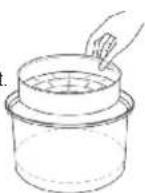
- Place the provided Steamer Basket into the bowl, as shown in the figure.
- Prepare all the food, wash them and cut. Evenly spread out in Steamer Basket and insert the cup into the housing. Gently turn it counter-clockwise, make sure that the cup is in contact with the heating element
- Close the cover until it clicks. If the lid is not closed properly, the program will be on the preparation work correctly.
- Connect the device to the mains.
- Press "Select Program" button and choose the Steam Function. Automatic cooking time: 10 Mins.
- You can change it (in the range from 1 minute to 99 Minutes) by pressing the cooking time.
| Product | Capacity | Water Volume | Time (Min) |
| Meat & Chicken | |||
| Fillet | 500 g | 600 ml | 40 |
| Chicken Breast | 500 g | 600 ml | 30 |
| Meat | 500 g | 600 ml | 30 |
| Chicken Cutlets | 500 g | 600 ml | 30 |
| Fish and Sea Food | |||
| Fish Fillets | 500 g | 600 ml | 30 |
| Vegetables | |||
| Potato | 500 g | 600 ml | 30-40 |
| Carrots | 500 g | 600 ml | 30 |
| Beet Root | 500 g | 600 ml | 40 |
| Broccoli | 500 g | 600 ml | 30 |
| Cheese | |||
| Cheese Cake | 500 g | 600 ml | 40-50 |

www.vitesse.ru
Keep in mind that these are general recommendations. Actual time may differ from the recommended values, depending on the freshness and the specific type of product, as well as your preferences.
- Press the START button to begin the cooking process, the display will show the countdown.
- At the end of the cooking process you will hear a beep and the Multi Cooker will automatically switch to Keep warm maintain the temperature of prepared dishes: steaming light goes out, starts flashing keep warm mode: Steam Function LED goes out and Keep Warm LED will keep flashing. Despite the fact that the regime is willing to maintain the temperature of food for 8 hours or more, do not leave food in this mode for a long time, it can lead to drying of the product.
- Disconnect the unit from the mains.
PROGRAM "YOGURT"
- Arrange necessary ingredients for yogurt (100 ml natural yogurt for 1 liter of milk) in small glass jars. In the bowl pour a small amount of water and the ingredients to be put into the water.
- Insert the bowl into the housing. Gently turn it counter-clockwise, make sure that the bowl is in contact with the heating element.
- Close the cover until it clicks. If the lid is not closed properly, the program will not function correctly.
- Connect the device to the mains.
- Press "Select Program" button and choose the Yogurt Function. Automatic cooking time: 8 Hours. You can change it by adjusting the cooking time.
- Press the START button to begin the process of heating, the display will flash the characters: ----
Warm-up time is set by the microprocessor, the process will end automatically, but you can stop it by pressing keep warm / CANCEL. -
When finished the heating, you will hear a beep and the Multi-Cooker will automatically switch to Keep Warm mode; YOGURT LED goes out, and the Keep Warm starts flashing.
Click on the keep warm / CANCEL to turn off the heater and open the lid. Cover the cups with yogurt lids and store in the fridge to cool.
WARNING: It is not recommended to leave the finished yogurt is in the mode of heat for a long time. The long process of fermentation contributes to the emergence of more pronounced sour taste of yogurt. -
Disconnect the unit from the mains.
PROGRAM "BAKE"
- Prepare the dough for as recommended by your chosen recipe.
- Grease the bowl with butter or margarine so that the baked product is easier to take out of the bowl. Put the dough in a bowl and line it.
- Insert the bowl into the housing. Gently turn it counter-clockwise, make sure that the cup is in contact with the heating element.
- Close the cover until it clicks. If the lid is not closed properly, the program will not function correctly.
- Connect the device to the mains.
- Press "Select Program" button and choose the Bake Function. Automatic cooking time: 20 Mins. You can change it by adjusting the cooking time.
- Press the START button to begin the process of heating, the display will flash the characters: ----Warm-up time is set by the microprocessor, the process will end automatically, but you can stop it by pressing keep warm / CANCEL.
- When finished the heating, you will hear a beep and the Multi-Cooker automatically switches to Keep Warm: BAKE indicator goes out, and Keep Warm starts flashing. Click on the keep warm / CANCEL to turn off the heater and open the lid. Despite the fact that the regime is willing to maintain the temperature of food for 8 hours or more, do not leave food in this mode for a long time, it can lead to drying of the product.
- Disconnect the unit from the mains.
- After 2-3 minutes, remove the bowl from the housing. Then turn it upside down on a tray or a grid.
Please put oven gloves or use oven gloves to remove the bowl. If the cake is left in the bowl for a long time, baking can dampen. After baking in the bowl may be left greasy stains - is permissible. Clean the bowl in accordance with the section "Cleaning and care".
PROGRAM "ROAST"
- Put the necessary ingredients and spices in a bowl, cover with water. Make sure that all the ingredients (including liquid) were below the MAX, is located inside the bowl.
- Insert the bowl into the housing. Gently turn it counter-clockwise, make sure that the cup is in contact with the heating element.
- Close the cover until it clicks. If the lid is not closed properly, the program will

www.vitesse.ru
not function correctly.
- Connect the device to the mains.
- Press "Select Program" button and choose the Roast Function. Automatic cooking time: 3 Mins. You can change it by adjusting the cooking time.
- Press the START button to begin the process of heating, the display will show the countdown.
- At the end of the cooking process you will hear a beep and the Multi Cooker automatically switches to Keep Warm: ROAST indicator goes out, and Keep Warm starts flashing, the display will show the countdown. Click on the keep warm / CANCEL to turn off the heater and open the lid. Despite the fact that the regime is willing to maintain the temperature of food for 8 hours or more, do not leave food in this mode for a long time, it can lead to drying of the product.
- Disconnect the unit from the mains.
KEEP WARM FUNCTION
This is to maintain the temperature of ready meals automatically at the end of the cooking program to indicate the same the Keep Warm Button will flash and the display will show the countdown time of the Multi Cooker in this mode. To turn off, press the Cancel Button.
Despite the fact that the appliance can maintain the temperature for 8 hours or more, do not leave food in this mode for a long time, it can lead to drying of the product.
PRESET COOKING (DELAYED START) FUNCTION
This Multi-Cooker is equipped with delayed start function, which allows you to start cooking after a set time.
- Put the ingredients into the bowl and set it into the Multi Cooker.
- Select the desired program by pressing the program selection.
- Press the PRESET COOKING. Press the COOKING TIME set the desired time delay. Pressing the button sets the minutes - press once exposes minutes (one press + 10 minutes), pressing and holding the button allows you to set the clock.
- After installation, press the START the display will show a countdown. Once the time delay is complete, the selected program will start cooking.
CLEANING AND MAINTENANCE
Before you start cleaning the instrument, make sure it is unplugged and completely cool.
P/13 P/14
To Clean the Appliance Body
Clean the housing, as necessary, with the use of clean, warm water and a soft cloth, do not use abrasive cleaners and dishwashing detergent.
To Clean the Non-Stick Bowl
Completely empty the bowl after each use. Use with dish detergent and a soft cloth, do not use abrasive cleaners. After cleaning, wipe the outside of the bowl dry.
To Clean the Condenser
The condenser is designed to collect condensate drops when opening the lid, remove and wash it after each use.
To Clean the Steam Exit Valves
Cleaning of the exhaust valve should be carried out each time after use.
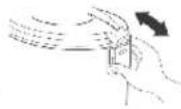
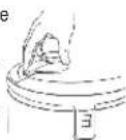
- Carefully remove the exhaust valve, as shown in the figure. Do not put much effort
- Completely disassemble the valve and rinse it under running water, then dry thoroughly, assemble in reverse order and replace.
Precautions for usage of the Non-Stick Bowl
- Use only wooden stirring paddle or a special plastic spoon.
- Do not cut food inside the pan.
- Do not pour vinegar into the pan, it can damage the non-stick coating.
- After some time, the pan may change color due to the fact that contact with the water and detergent - this is normal and the Multi-Cooker can safely be operated on.
SPECIFICATIONS
Power: 500 W
Volume of removable bowl: 3 L
Power supply: 220-240 VAC 50/60 Hz
NOTE: Due to the ongoing process of making changes and improvements,

www.vitesse.ru