
S63600CMM1 - Refrigerator AEG-ELECTROLUX - Free user manual and instructions
Find the device manual for free S63600CMM1 AEG-ELECTROLUX in PDF.


| Product type | Fridge-freezer combination |
| Brand | AEG-ELECTROLUX |
| Model | S63600CMM1 |
| Height | 2010 mm |
| Width | 595 mm |
| Depth | 660 mm |
| Supply voltage | 230-240 V |
| Frequency | 50 Hz |
| Climate class | SN, N, ST, T |
| Refrigerant | R600a (isobutane) |
| Default set temperature (refrigerator) | +5 °C |
| Default set temperature (freezer) | -18 °C |
| Autonomy in case of power failure | 18 h |
| Special functions | COOLMATIC, FROSTMATIC, Holiday, Minute Minder, Child Lock |
| Cooling technology | DynamicAir (ClimaTech) |
| Interior lighting | Long-lasting LED |
| Number of shelves | Several adjustable glass shelves |
| Number of drawers | 1 Maxibox drawer, 1 Freshbox drawer, door bins, 1 Frostmatic basket |
| Care and cleaning | Interior cleaning with warm water and mild soap; automatic defrosting of refrigerator, manual defrosting of freezer |
| Spare parts and repairability | Original parts recommended, replacement of LED lighting by an authorized service center |
| General information | User manual in French available, 84 pages |
Frequently Asked Questions - S63600CMM1 AEG-ELECTROLUX
User questions about S63600CMM1 AEG-ELECTROLUX
0 question about this device. Answer the ones you know or ask your own.
Ask a new question about this device
Download the instructions for your Refrigerator in PDF format for free! Find your manual S63600CMM1 - AEG-ELECTROLUX and take your electronic device back in hand. On this page are published all the documents necessary for the use of your device. S63600CMM1 by AEG-ELECTROLUX.
USER MANUAL S63600CMM1 AEG-ELECTROLUX
Recycle the materials with the symbol ⚙. Put the packaging in applicable containers to recycle it.
Help protect the environment and human health and to recycle waste of electrical and electronic appliances. Do not dispose appliances marked with the symbol ☒ with the household waste. Return the product to your local recycling facility or contact your municipal office.
VISIT OUR WEBSITE FOR:
- Products
- Brochures
- User manuals
- Trouble shooter
- Service information
www.aeg.com
LEGEND
⚠ Warning - Important Safety information.
i General information and tips
Environmental information
Subject to change without notice.
FOR PERFECT RESULTS
Thank you for choosing this AEG product. We have created it to give you impeccable performance for many years, with innovative technologies that help make life simpler – features you might not find on ordinary appliances. Please spend a few minutes reading to get the very best from it.
ACCESSORIES AND CONSUMABLES
In the AEG webshop, you'll find everything you need to keep all your AEG appliances looking spotless and working perfectly. Along with a wide range of accessories designed and built to the high quality standards you would expect, from specialist cookware to cutlery baskets, from bottle holders to delicate laundry bags...

natural_image
Six icon-based shopping and logistics symbols arranged in a row: cart, smartphone, gear, laptop, gift box, and cart (no text or labels)Visit the webshop at: www.aeg.com/shop
CUSTOMER CARE AND SERVICE
We recommend the use of original spare parts.
When contacting Service, ensure that you have the following data available. The information can be found on the rating plate.
Model ____
PNC ____
Serial Number ____

SAFETY INFORMATION
In the interest of your safety and to ensure the correct use, before installing and first using the appliance, read this user manual carefully, including its hints and warnings. To avoid unnecessary mistakes and accidents, it is important to ensure that all people using the appliance are thoroughly familiar with its operation and safety features. Save these instructions and make sure that they remain with the appliance if it is moved or sold, so that everyone using it through its life will be properly informed on appliance use and safety. For the safety of life and property keep the precautions of these user's instructions as the manufacturer is not responsible for damages caused by omission.
CHILDREN AND VULNERABLE PEOPLE SAFETY
- This appliance is not intended for use by persons (including children) with reduced physical, sensory or mental capabilities, or lack of experience and knowledge, unless they have been given supervision or instruction concerning use of the appliance by a person responsible for their safety.
Children should be supervised to ensure that they do not play with the appliance.
- Keep all packaging well away from children. There is risk of suffocation.
- If you are discarding the appliance pull the plug out of the socket, cut the connection cable (as close to the appliance as you can) and remove the door to prevent playing children to suffer electric shock or to close themselves into it.
- If this appliance featuring magnetic door seals is to replace an older appliance having a spring lock (latch) on the door or lid, be sure to make that spring lock unusable before you discard the old appliance. This will prevent it from becoming a death trap for a child.
GENERAL SAFETY

WARNING!
Keep ventilation openings, in the appliance enclosure or in the built-in structure, clear of obstruction.
- The appliance is intended for keeping foodstuff and/or beverages in a normal household as explained in this instruction booklet.
- Do not use a mechanical device or any artificial means to speed up the thawing process.
- Do not use other electrical appliances (such as ice cream makers) inside of refrigerating appliances, unless they are approved for this purpose by the manufacturer.
- Do not damage the refrigerant circuit.
- The refrigerant isobutane (R600a) is contained within the refrigerant circuit of the appliance, a natural gas with a high level of environmental compatibility, which is nevertheless flammable.
During transportation and installation of the appliance, be certain that none of the components of the refrigerant circuit become damaged.
If the refrigerant circuit should become damaged:
- avoid open flames and sources of ignition
– thoroughly ventilate the room in which the appliance is situated
- It is dangerous to alter the specifications or modify this product in any way. Any damage to the cord may cause a short-circuit, fire and/or electric shock.

WARNING!
Any electrical component (power cord, plug, compressor) must be replaced by a certified service agent or qualified service personnel to avoid hazard.
- Power cord must not be lengthened.
- Make sure that the power plug is not squashed or damaged by the back of the appliance. A squashed or damaged power plug may overheat and cause a fire.
-
Make sure that you can come to the mains plug of the appliance.
-
Do not pull the mains cable.
- If the power plug socket is loose, do not insert the power plug. There is a risk of electric shock or fire.
-
You must not operate the appliance without the lamp cover (if foreseen) of interior lighting.
-
This appliance is heavy. Care should be taken when moving it.
- Do not remove nor touch items from the freezer compartment if your hands are damp/wet, as this could cause skin abrasions or frost/freezer burns.
- Avoid prolonged exposure of the appliance to direct sunlight.
- Bulb lamps (if foreseen) used in this appliance are special purpose lamps selected for household appliances use only. They are not suitable for household room illumination.
DAILY USE
- Do not put hot pot on the plastic parts in the appliance.
- Do not store flammable gas and liquid in the appliance, because they may explode.
- Do not place food products directly against the air outlet on the rear wall. (If the appliance is Frost Free)
- Frozen food must not be re-frozen once it has been thawed out.
- Store pre-packed frozen food in accordance with the frozen food manufacturer's instructions.
- Appliance's manufacturers storage recommendations should be strictly adhered to. Refer to relevant instructions.
- Do not place carbonated or fizzy drinks in the freezer compartment as it creates pressure on the container, which may cause it to explode, resulting in damage to the appliance.
- Ice lollies can cause frost burns if consumed straight from the appliance.
CARE AND CLEANING
- Before maintenance, switch off the appliance and disconnect the mains plug from the mains socket.
-
Do not clean the appliance with metal objects.
-
Do not use sharp objects to remove frost from the appliance. Use a plastic scraper.
- Regularly examine the drain in the refrigerator for defrosted water. If necessary, clean the drain. If the drain is blocked, water will collect in the bottom of the appliance.
INSTALLATION

For electrical connection carefully follow the instructions given in specific paragraphs.
- Unpack the appliance and check if there are damages on it. Do not connect the appliance if it is damaged. Report possible damages immediately to the place you bought it. In that case retain packing.
- It is advisable to wait at least four hours before connecting the appliance to allow the oil to flow back in the compressor.
- Adequate air circulation should be around the appliance, lacking this leads to overheating. To achieve sufficient ventilation follow the instructions relevant to installation.
- Wherever possible the back of the product should be against a wall to avoid touching or catching warm parts (compressor, condenser) to prevent possible burn.
- The appliance must not be located close to radiators or cookers.
- Make sure that the mains plug is accessible after the installation of the appliance.
- Connect to potable water supply only (If a water connection is foreseen).
SERVICE
- Any electrical work required to do the servicing of the appliance should be carried out by a qualified electrician or competent person.
- Do not remove the LED light cover. Contact the nearest After Sales Service Force to replace the LED light board, if it is necessary.
- This product must be serviced by an authorized Service Centre, and only genuine spare parts must be used.
ENVIRONMENT PROTECTION

This appliance does not contain gasses which could damage the ozone layer, in either its refrigerant circuit or insulation materials. The appliance shall not be discarded together with the urban refuse and rubbish. The insulation foam contains flammable gases: the appliance shall be disposed according to the applicable regulations to obtain from your local authorities. Avoid damaging the cooling unit, especially at the rear near the heat exchanger. The materials used on this appliance marked by the symbol 🏠 are recyclable.
PRODUCT DESCRIPTION
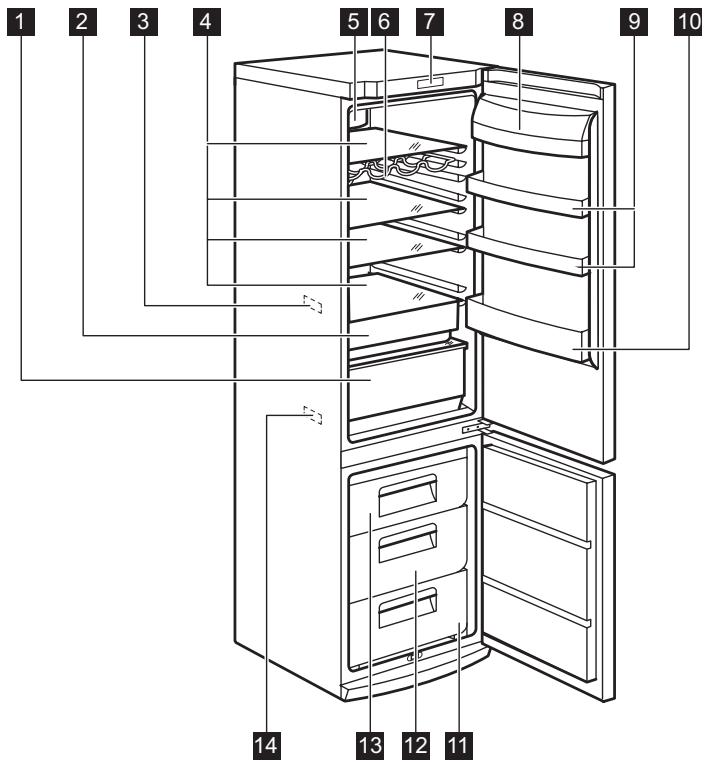
1 Maxibox drawer
2 Freshbox drawer
3 Temperature indicator
4 Glass shelves
5 DynamicAir cooling
6 Bottle rack
7 Control panel
8 Butter shelf
9 Door shelves
10 Bottle shelf
11 Freezer basket
12 Maxibox drawer
13 Frostmatic basket
14 Rating plate
CONTROL PANEL
flowchart
graph TD
    A["①"] --> B["-"]
    A --> C["+"]
    A --> D["Mode"]
    A --> E["OK"]
    A --> F["-"]
    A --> G["+"]
    H["1"] --> I["2"]
    H --> J["3"]
    H --> K["4"]
    H --> L["5"]
    H --> M["6"]
    H --> N["7"]
    H --> O["8"]
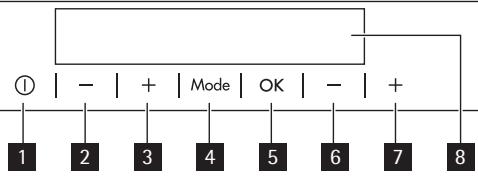
1 Appliance ON/OFF button
2 Fridge Temperature colder button
3 Fridge Temperature warmer button
4 Mode button
5 OK button
6 Freezer Temperature colder button
7 Freezer Temperature warmer button
8 Display
It is possible to change predefined sound of buttons to a loudly one by pressing together Mode button and Temperature colder button for some seconds. Change is reversible.
DISPLAY
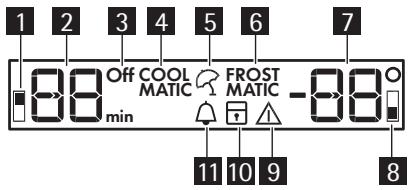
1 Fridge compartment indicator
2 Fridge temperature indicator and timer indicator
3 Fridge off indicator
4 COOLMATIC function
5 Holiday function
6 FROSTMATIC function
7 Freezer temperature indicator
8 Freezer compartment indicator
9 Alarm indicator
10 Child Lock function
11 Minute Minder function
SWITCHING ON
To switch on the appliance do these steps:
- Connect the mains plug to the power socket.
- Press the appliance ON/OFF button if the display is off.
- The alarm buzzer could operate after few seconds.
To reset the alarm refer to "High temperature alarm". - If "dEMo" appears on the display, the appliance is in demonstration mode. Refer to "What to do if...".
- The temperature indicators show the set default temperature.
To select a different set temperature refer to "Temperature regulation".
SWITCHING OFF
To switch off the appliance do these steps:
- Press the appliance ON/OFF button for 5 seconds.
- The display switches off.
- To disconnect the appliance from the power disconnect the mains plug from the power socket.
SWITCHING OFF THE FRIDGE
To switch off the fridge:
-
Press the Mode button until the corresponding icon appears.
The fridge Off indicator and the fridge compartment indicator flash.
The fridge temperature indicator shows dashes. -
Press the OK button to confirm.
-
The fridge Off indicator is shown.
SWITCHING ON THE FRIDGE
To switch on the fridge:
- Press the fridge temperature regulator.
Or:
- Press the Mode button until the corresponding icon appears.
The Fridge Off indicator flashes.
-
Press the OK button to confirm.
-
The fridge Off indicator goes off.
To select a different set temperature refer to "Temperature regulation".
TEMPERATURE REGULATION
The set temperature of the fridge and of the freezer may be adjusted by pressing the temperature regulators.
Set default temperature:
- +5°C for the fridge
- -18°C for the freezer
The temperature indicators show the set temperature.
The set temperature will be reached within 24 hours.
Fluctuations of some degrees around set temperature are normal and does not mean any fault in the appliance.

After a power failure the set temperature remains stored.
MINUTE MINDER FUNCTION
The Minute Minder function is to be used to set an acoustic alarm at the preferred time, useful for example when a recipe requires to cool down a mixture for a certain lenght of time, or when a reminder is needed in order not to forget the bottles placed in the freezer for fast cooling.
To switch on the function:
- Press the Mode button until the corresponding icon appears.
The Minute Minder indicator flashes.
The Timer shows the set value (30 minutes) for a few seconds.
- Press the Fridge Temperature button to change the Timer set value from 1 to 90 minutes.
- Press the OK button to confirm.
The Minute Minder indicator is shown.
The Timer start to flash (min).
At the end of the countdown the Minute Minder indicator flashes and an audible alarm sounds:
- Remove any drinks contained in the freezer compartment.
-
Press OK button to switch off the sound and terminate the function. It is possible to deactivate the function at any time during the countdown:
-
Press the Mode button until the Minute Minder indicator flashes.
- Press the OK button to confirm.
- The Minute Minder indicator goes off. It is possible to change the time during the countdown and at the end by pressing the Fridge Temperature colder button or the Fridge Temperature warmer button.
CHILD LOCK FUNCTION
To lock the buttons from unintentional operation select the Child Lock function.
To switch on the function:
- Press the Mode button until the corresponding icon appears.
- The Child Lock indicator flashes.
- Press the OK button to confirm. The Child Lock indicator is shown.
To switch off the function:
- Press the Mode button until the Child Lock indicator flashes.
- Press the OK button to confirm.
- The Child Lock indicator goes off.
HIGH TEMPERATURE ALARM
An increase in the temperature in the freezer compartment (for example due to an earlier power failure) is indicated by:
- flashing the alarm and freezer temperature indicators
- sounding of buzzer.
To reset the alarm:
- Press any button.
- The buzzer switches off.
- The freezer temperature indicator shows the highest temperature reached for a few seconds. Then show again the set temperature.
- The alarm indicator continue to flash until the normal conditions are restored.
When the alarm has returned the alarm indicator goes off.
DOOR OPEN ALARM
An acoustic alarm will sound if the fridge door is left open for a few minutes. The door open alarm conditions are indicated by:
- flashing Alarm indicator
- acoustic buzzer
When normal conditions are restored (door closed), the alarm will stop.
COOLMATIC FUNCTION
If you need to insert a large amount of warm food, for example after doing the grocery shopping, we suggest activating the COOLMATIC function to chill the products more rapidly and to avoid warming the other food which is already in the refrigerator.
To switch on the function:
- Press the Mode button until the corresponding icon appears.
The COOLMATIC indicator flashes.
- Press the OK button to confirm.
The COOLMATIC indicator is shown. The COOLMATIC function shuts off automatically after approximately 6 hours.
To switch off the function before its automatic end:
- Press the Mode button until the COOLMATIC indicator flashes.
- Press the OK button to confirm.
- The COOLMATIC indicator goes off.

The function switches off by selecting a different fridge set temperature.
HOLIDAY FUNCTION
This function allows you to keep the refrigerator closed and empty during a long holiday period without the formation of a bad smell.

The fridge compartment must be empty with holiday function on.
To switch on the function:
- Press the Mode button until the corresponding icon appears.
The Holiday indicator flashes.
The fridge temperature indicator shows the set temperature.
- Press the OK button to confirm.
The Holiday indicator is shown.
To switch off the function:
- Press the Mode button until the Holiday indicator flashes.
- Press the OK button to confirm.
- The Holiday indicator goes off.

The function switches off by selecting a different fridge set temperature.
FROSTMATIC FUNCTION
To switch on the function:
- Press the Mode button until the corresponding icon appears.
The FROSTMATIC indicator flashes.
- Press the OK button to confirm.
The FROSTMATIC indicator is shown.
This function stops automatically after 52 hours.
To switch off the function before its automatic end:
- Press the Mode button until the FROSTMATIC indicator flashes.
- Press the OK button to confirm.
- The FROSTMATIC indicator goes off.

Place the fresh food to be frozen in the FROSTMATIC basket.
The function switches off by selecting a different freezer set temperature.
DAILY USE
STORAGE OF FROZEN FOOD
When first starting-up or after a period out of use, before putting the products in the compartment let the appliance run at least 2 hours on the higher settings.

In the event of accidental defrosting, for example due to a power failure, if the power has been off for longer than the value shown in the technical characteristics chart under "rising time", the defrosted food must be consumed quickly or cooked immediately and then re-frozen (after cooling).
FREEZING FRESH FOOD
The freezer compartment is suitable for freezing fresh food and storing frozen and deep-frozen food for a long time. To freeze fresh food activate the FROSTMATIC function at least 24 hours before
placing the food to be frozen in the freezer compartment.
Place the fresh food to be frozen in the FROSTMATIC compartment.
The maximum amount of food that can be frozen in 24 hours is specified on the rating plate, a label located on the inside of the appliance.
The freezing process lasts 24 hours: during this period do not add other food to be frozen.
THAWING
Deep-frozen or frozen food, prior to being used, can be thawed in the refrigerator compartment or at room temperature, depending on the time available for this operation.
Small pieces may even be cooked still frozen, directly from the freezer: in this case, cooking will take longer.
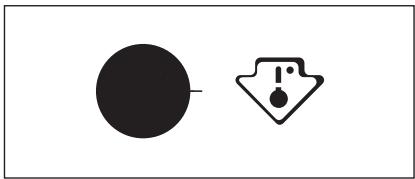
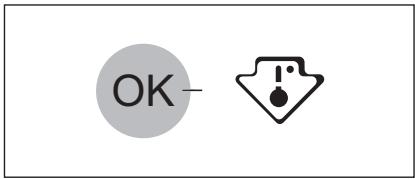
TEMPERATURE INDICATOR
Thermostat requires adjustment
natural_image
Two abstract symbols: a solid black circle and a warning symbol with an exclamation mark (no text or labels)Correct temperature
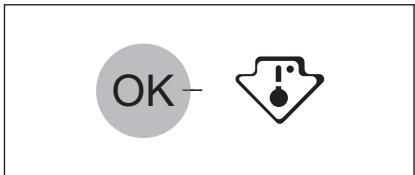
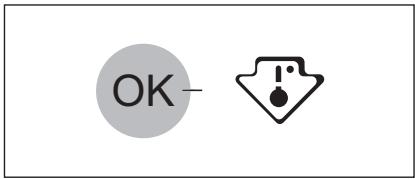
To assist you in controlling your appliance correctly we have fitted a temperature indicator to your refrigerator.
The symbol at the side indicates the coldest area in the refrigerator.
The coldest area goes from the glass shelf of the fruit and vegetable drawer to the symbol or to the shelf positioned at the same height of the symbol.
For proper storage of the food, ensure that the temperature indicator is displaying the "OK" message.
If "OK" is not displayed adjust the temperature controller to a colder setting and wait 12 hours before checking the temperature indicator again.
After putting fresh food into the appli- ance or after opening the door repeatedly for a long period, it is normal for the "OK" message to disappear.
AIR COOLING
natural_image
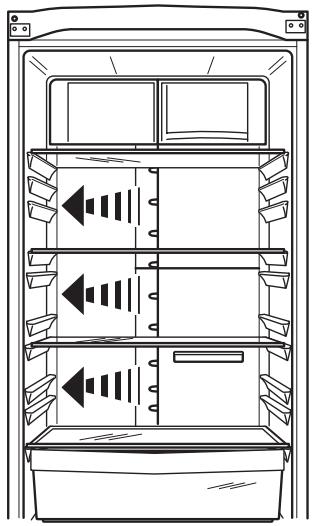
Line drawing of a refrigerator interior showing three shelves with double-headed arrows indicating flow or movement (no text or symbols)The ClimaTech technology let food cool quickly and a more uniform temperature in the compartment This device allows for rapid cooling of foods and a more uniform temperature in the compartment.
MOVABLE SHELVES
natural_image
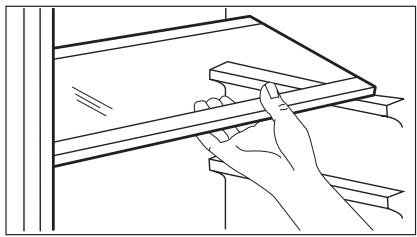
Line drawing of a hand holding a wooden plank next to a shelf (no text or symbols)The walls of the refrigerator are equipped with a series of runners so that the shelves can be positioned as desired.
BOTTLE RACK
natural_image
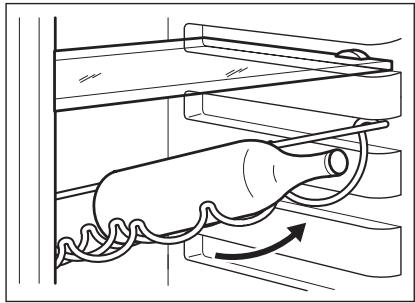
Diagram of a mechanical assembly with a cylindrical component and wavy lines indicating motion (no text or symbols)Place the bottles (with the opening facing front) in the pre-positioned shelf.

If the shelf is positioned horizontally, place only closed bottles.
This bottle holder shelf can be tilted in order to store previously opened bottles. To obtain this result, pull the shelf up so it can rotate upwards and be placed on the next higher level.
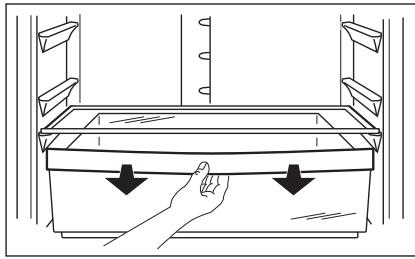
FRESHBOX DRAWER
natural_image
Line drawing of a hand pressing down on a tray with arrows indicating force or movement (no text or symbols)The drawer is suitable for storing fresh food like fish, meat, seafood, because the temperature is lower here than in the rest of the fridge
POSITIONING THE DOOR SHELVES
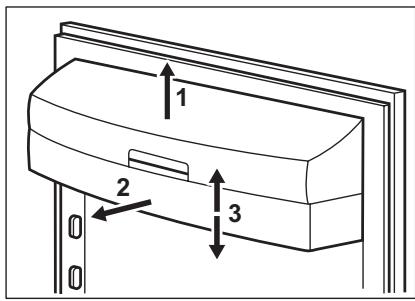
To permit storage of food packages of various sizes, the door shelves can be placed at different heights. To make these adjustments proceed as follows: gradually pull the shelf in the direction of the arrows until it comes free, then reposition as required.
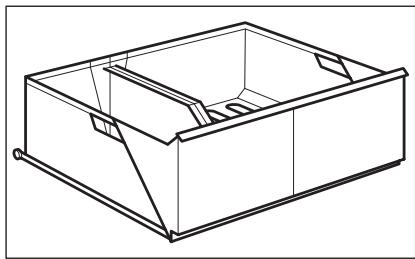
MAXIBOX DRAWER
natural_image
Line drawing of a rectangular metal enclosure with internal compartments and mounting feet (no text or symbols)The drawer is suitable for storing fruit and vegetables. There is a separator inside the drawer that can be placed in different positions to allow for the subdivision best suited to personal needs. There is a grille (if foreseen) on the bottom of the drawer to separate the fruit and vegetables from any humidity that may form on the bottom surface. Remove all parts inside the drawer for cleaning purposes.
REMOVAL OF FREEZING BASKETS FROM THE FREEZER
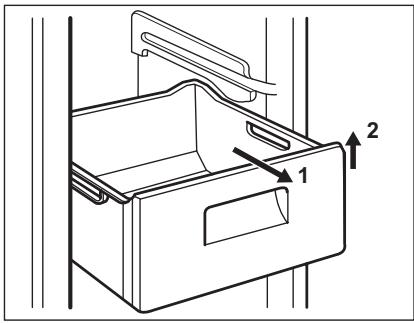
The freezing baskets have a limit stop to prevent their accidental removal or falling out. At the time of its removal from the freezer, pull the basket towards yourself and, upon reaching the end point, remove the basket by tilting its front upwards.
At the time of putting it back, slightly lift the front of the basket to insert it into the freezer. Once you are over the end points, push the baskets back in their position.
HELPFUL HINTS AND TIPS
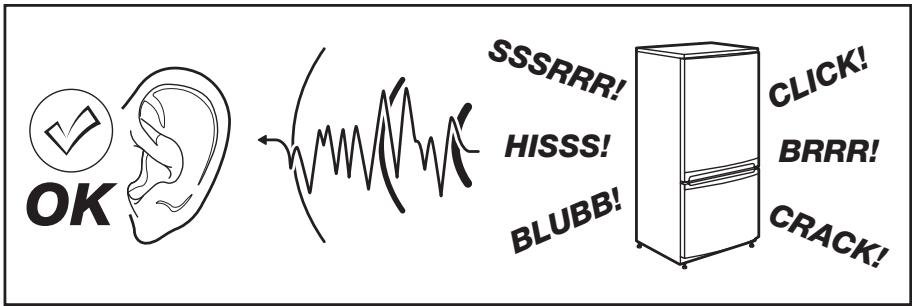
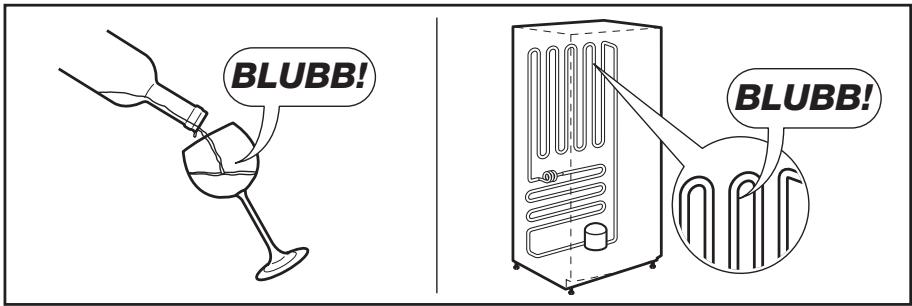
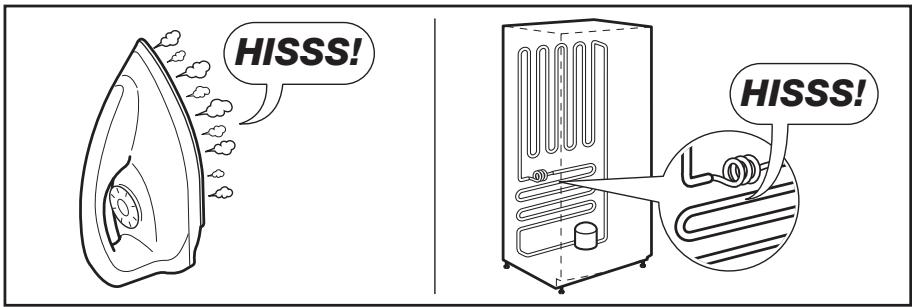
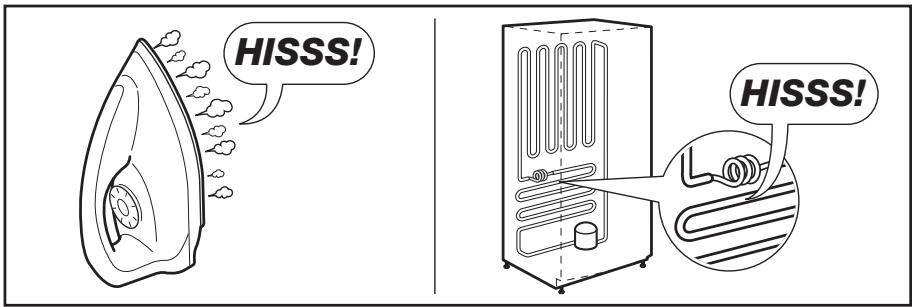
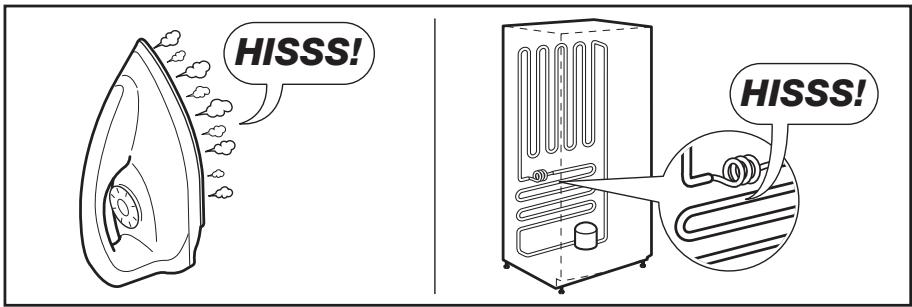
- You may hear a faint gurgling and a bubbling sound when the refrigerant is pumped through the coils or tubing. This is correct.
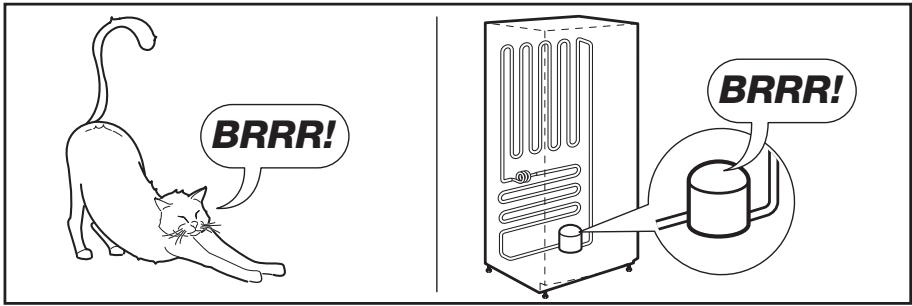
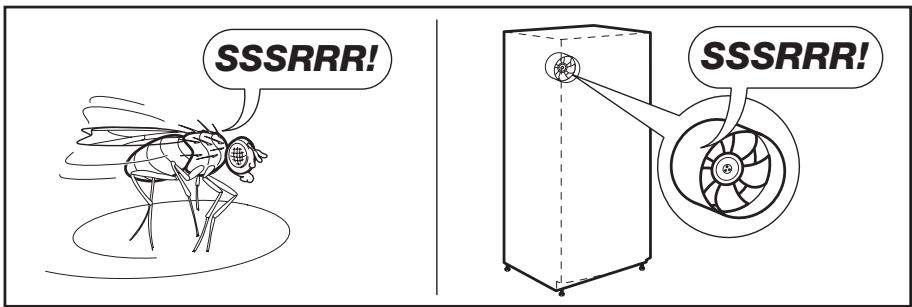
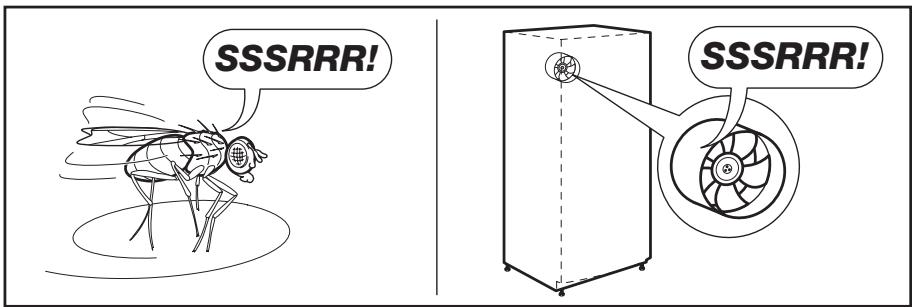
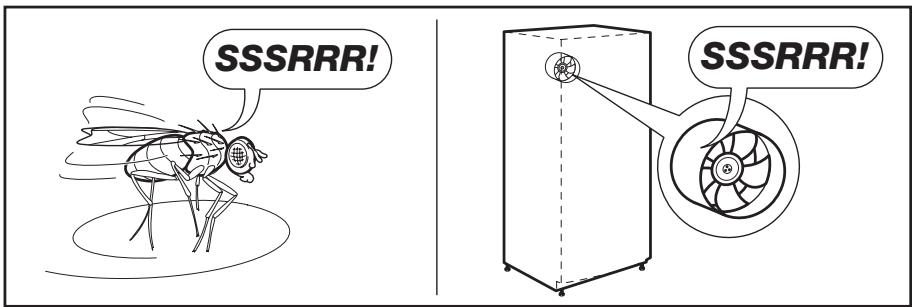
- When the compressor is on, the refrigerant is being pumped around and you will hear a whirring sound and a pulsating noise from the compressor. This is correct.
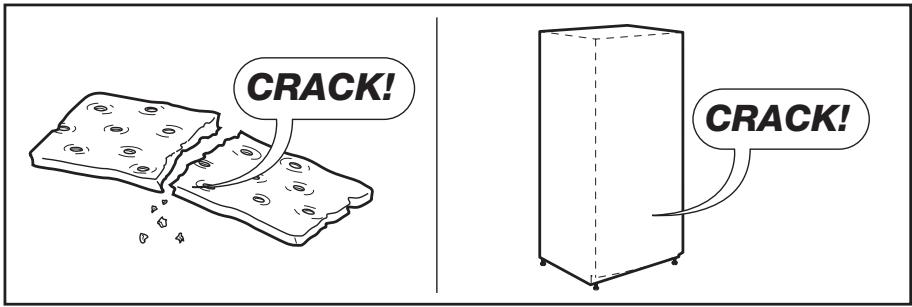
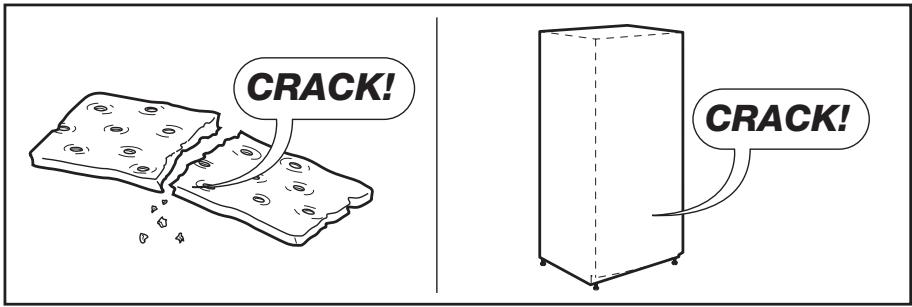
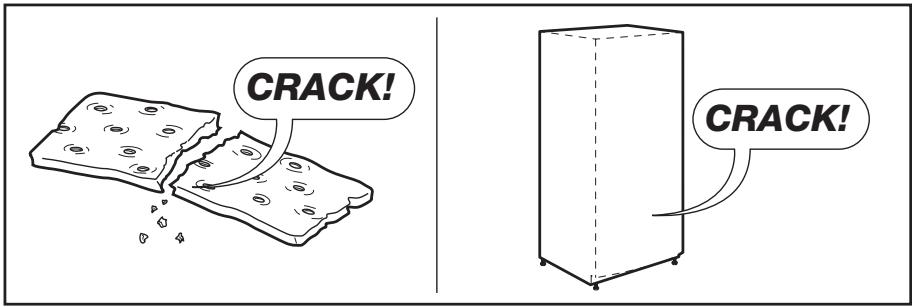
- The thermic dilatation might cause a sudden cracking noise. It is natural, not dangerous physical phenomenon. This is correct.
HINTS FOR ENERGY SAVING
To obtain the best performance:
- do not open the door frequently or leave it open longer than absolutely necessary
- do not remove the cold accumulators from the freezer basket.
HINTS FOR FRESH FOOD REFRIGERATION
To obtain the best performance:
- do not store warm food or evaporating liquids in the refrigerator
- do cover or wrap the food, particularly if it has a strong flavour
- position food so that air can circulate freely around it
HINTS FOR REFRIGERATION
Useful hints:
Meat (all types) : wrap in polythene bags and place on the glass shelf above the vegetable drawer.
For safety, store in this way only one or two days at the most.
Cooked foods, cold dishes, etc.: these should be covered and may be placed on any shelf.
Fruit and vegetables: these should be thoroughly cleaned and placed in the special drawer(s) provided.
Butter and cheese: these should be placed in special airtight containers or
wrapped in aluminium foil or polythene bags to exclude as much air as possible. Milk bottles: these should have a cap and should be stored in the bottle rack on the door.
Bananas, potatoes, onions and garlic, if not packed, must not be kept in the refrigerator.
HINTS FOR FREEZING
To help you make the most of the freezing process, here are some important hints:
- the maximum quantity of food which can be frozen in 24 hrs. is shown on the rating plate;
- the freezing process takes 24 hours. No further food to be frozen should be added during this period;
- only freeze top quality, fresh and thoroughly cleaned, foodstuffs;
- prepare food in small portions to enable it to be rapidly and completely frozen and to make it possible subsequently to thaw only the quantity required;
- wrap up the food in aluminium foil or polythene and make sure that the packages are airtight;
- do not allow fresh, unfrozen food to touch food which is already frozen, thus avoiding a rise in temperature of the latter;
- lean foods store better and longer than fatty ones; salt reduces the storage life of food;
- water ices, if consumed immediately after removal from the freezer compartment, can possibly cause the skin to be freeze burnt;
- it is advisable to show the freezing in date on each individual pack to enable you to keep tab of the storage time.
HINTS FOR STORAGE OF FROZEN FOOD
To obtain the best performance from this appliance, you should:
- make sure that the commercially frozen foodstuffs were adequately stored by the retailer;
- be sure that frozen foodstuffs are transferred from the foodstore to the freezer in the shortest possible time;
- not open the door frequently or leave it open longer than absolutely necessary;
- once defrosted, food deteriorates rapidly and cannot be refrozen;
- do not exceed the storage period indicated by the food manufacturer.
CARE AND CLEANING
CLEANING THE INTERIOR
Before using the appliance for the first time, wash the interior and all internal accessories with lukewarm water and some neutral soap so as to remove the typical smell of a brand-new product, then dry thoroughly.

Do not use detergents or abrasive powders, as these will damage the finish.

CAUTION!
Unplug the appliance before carrying out any maintenance operation.

This appliance contains hydrocarbons in its cooling unit; maintenance and recharging must therefore only be carried out by authorized technicians.
PERIODIC CLEANING
The equipment has to be cleaned regularly:
- clean the inside and accessories with lukewarm water and some neutral soap.
- regularly check the door seals and wipe clean to ensure they are clean and free from debris.
- rinse and dry thoroughly.

Do not pull, move or damage any pipes and/or cables inside the cabinet.
Never use detergents, abrasive powders, highly perfumed cleaning products or wax polishes to clean the interior as this will damage the surface and leave a strong odour.
Clean the condenser (black grill) and the compressor at the back of the appliance with a brush. This operation will improve the performance of the appliance and save electricity consumption.

Take care of not to damage the cooling system.
Many proprietary kitchen surface cleaners contain chemicals that can attack/damage the plastics used in this appliance. For this reason it is recommended that the outer casing of this appliance is only cleaned with warm water with a little washing-up liquid added.
After cleaning, reconnect the equipment to the mains supply.
DEFROSTING OF THE REFRIGERATOR
natural_image
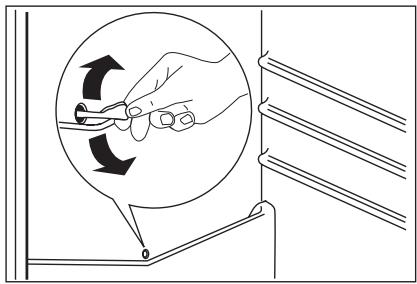
Illustration of a hand holding a tool inside a circular frame, with arrows indicating rotation direction (no text or symbols)Frost is automatically eliminated from the evaporator of the refrigerator compartment every time the motor compressor stops, during normal use. The defrost water drains out through a trough into a special container at the back of the appliance, over the motor compressor, where it evaporates.
It is important to periodically clean the defrost water drain hole in the middle of the refrigerator compartment channel to prevent the water overflowing and dripping onto the food inside. Use the special cleaner provided, which you will find already inserted into the drain hole.
DEFROSTING THE FREEZER
natural_image
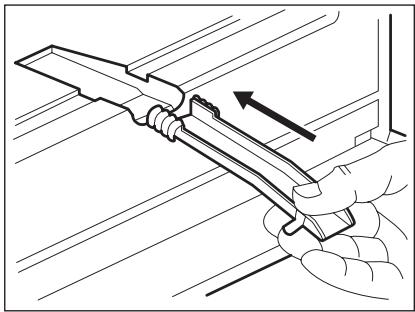
Illustration of a hand using a tool to adjust or install a mechanical component (no text or symbols visible)A certain amount of frost will always form on the freezer shelves and around the top compartment.
Defrost the freezer when the frost layer reaches a thickness of about 3-5 mm.
To remove the frost, follow the instructions below:
- pull out the plug from the wall socket or switch off the appliance
- remove any stored food, wrap it in several layers of newspaper and put it in a cool place
- remove the freezer drawers
- put insulating material around the drawers, e.g. blankets or newspapers.
Defrosting can be accelerated by placing bowls with hot water (not boiling) inside the freeze - Loosen the drainage channel from its resting position, push it in according to the illustration and place it in the bottom freezer drawer where water can collect
- carefully scrape off the ice when it starts to thaw. Use a wood or a plastic scraper
- when all the ice has melted, clean and wipe the cabinet dry, then put the drainage channel back in place.
- switch on the cabinet and replace the frozen foodstuff.
It is recommended to operate the appliance at the highest position of the thermostatic control for some hours so that it can reach the sufficient storing temperature as soon as possible.

Never use sharp metal tools to scrape off frost from the evaporator as you could damage it. Do not use a mechanical device or any artificial means to speed up the thawing process other than those recommended by the manufacturer. A temperature rise of the frozen food packs, during defrosting, may shorten their safe storage life.
WHAT TO DO IF...

CAUTION!
Before troubleshooting, disconnect the power supply. Only a qualified electrician or competent person must do the troubleshooting that is not in this manual.

There are some sounds during normal use (compressor, refrigerant circulation).
As much as the advice does not lead to result, call the nearest brand-mark service.
| Problem | Possible cause | Solution |
| The appliance is noisy. | The appliance is not supported properly. | Check if the appliance stands stable (all the four feet should be on the floor). |
| The compressor operates continually. | The Temperature regulator may be set incorrectly. | Set a warmer temperature. |
| The door is not closed correctly. | Refer to "Closing the door". | |
| The door has been opened too frequently. | Do not keep the door open longer than necessary. | |
| The product temperature is too high. | Let the product temperature decrease to room temperature before storage. | |
| The room temperature is too high. | Decrease the room temperature. | |
| The FROSTMATIC function is switched on. | Refer to "FROSTMATIC function". | |
| The COOLMATIC function is switched on. | Refer to "COOLMATIC function". | |
| Water flows on the rear plate of the refrigerator. | During the automatic defrosting process, frost de-frosts on the rear plate. | This is correct. |
| Water flows into the refrigerator. | The water outlet is clogged. | Clean the water outlet. |
| Products prevent that water flows into the water collector. | Make sure that products do not touch the rear plate. | |
| Water flows on the ground. | The melting water outlet does not flow in the evaporative tray above the compressor. | Attach the melting water outlet to the evaporative tray. |
| There is too much frost and ice. | Products are not wrapped properly. | Wrap the products better. |
| The door is not closed correctly. | Refer to "Closing the door". | |
| The temperature in the refrigerator is too low. | Set a higher temperature. | |
| The temperature in the appliance is too high. | The door is not closed correctly. | Refer to "Closing the door". |
| The product temperature is too high. | Let the product temperature decrease to room temperature before storage. | |
| Many products are stored at the same time. | Store less products at the same time. | |
| The temperature in the refrigeration is too high. | There is no cold air circulation in the appliance. | Make sure that there is cold air circulation in the appliance. |
| The temperature in the freezer is too high. | Products are too near to each other. | Store products so that there is cold air circulation. |
| The appliance does not operate. | The appliance is switched off. | Switch on the appliance. |
| The mains plug is not connected to the mains socket correctly. | Connect the mains plug to the mains socket correctly. | |
| The appliance has no power. There is no voltage in the mains socket. | Connect a different electrical appliance to the mains socket. Contact a qualified electrician. | |
| The lamp does not work. | The lamp is in stand-by. | Close and open the door. |
| "dEMo" appears on the display. | The appliance is in demonstration mode. | Keep pressed approximately 10 sec the OK button since a long sound of buzzer is heard and the display shut off for a short while: appliance start works regularly. |
CLOSING THE DOOR
- Clean the door gaskets.
- If necessary, adjust the door. Refer to "Installation".
- If necessary, replace the defective door gaskets. Contact the Service Center.
Only service is allowed to replace the lighting device. Contact your Service Center.
REPLACING THE LAMP
The appliance is equipped with a longlife LED interior light.
INSTALLATION

WARNING!
Read the "Safety Information" carefully for your safety and correct operation of the appliance before installing the appliance.
POSITIONING
Install this appliance at a location where the ambient temperature corresponds to the climate class indicated on the rating plate of the appliance:
| Climate class | Ambient temperature |
| SN | +10°C to + 32°C |
| N | +16°C to + 32°C |
| ST | +16°C to + 38°C |
| T | +16°C to + 43°C |
LOCATION
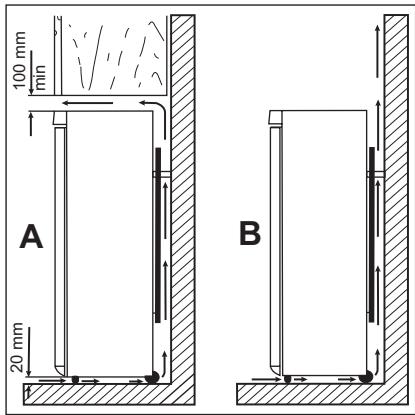
The appliance should be installed well away from sources of heat such as radiators, boilers, direct sunlight etc. Ensure that air can circulate freely around the back of the cabinet. To ensure best performance, if the appliance is positioned below an overhanging wall unit, the minimum distance between the top of the cabinet and the wall unit must be at least 100 mm. Ideally, however, the appliance should not be positioned below overhanging wall units. Accurate levelling is ensured by one or more adjustable feet at the base of the cabinet.

WARNING!
It must be possible to disconnect the appliance from the mains power supply; the plug must therefore be easily accessible after installation.
REAR SPACERS
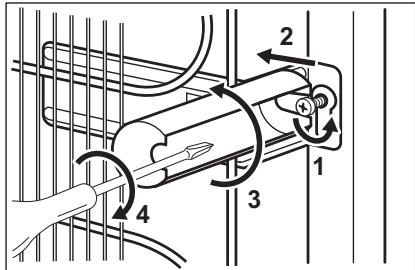
You can find the two spacers in the bag with documentation.
Do these steps to install the spacers:
- Release the screw.
- Engage the spacer below the screw.
- Turn the spacer to the right position.
- Tighten again the screws.
ELECTRICAL CONNECTION
Before plugging in, ensure that the voltage and frequency shown on the rating
plate correspond to your domestic power supply.
The appliance must be earthed. The power supply cable plug is provided with a
contact for this purpose. If the domestic power supply socket is not earthed, connect the appliance to a separate earth in compliance with current regulations, consulting a qualified electrician.
The manufacturer declines all responsibility if the above safety precautions are not observed.
This appliance complies with the E.E.C.
Directives.
LEVELLING

natural_image
Technical diagram showing a bolt and nut assembly with arrows indicating direction (no text or labels)When placing the appliance ensure that it stands level. This can be achieved by two adjustable feet at the bottom in front.
DOOR REVERSIBILITY
flowchart
graph TD
    A["A"] --> B["B"]
    B --> C["C"]
    C --> D["D"]
    D --> E["E"]
    E --> F["F"]
    F --> A
    style A fill:#f9f,stroke:#333
    style B fill:#ccf,stroke:#333
    style C fill:#cfc,stroke:#333
    style D fill:#fcc,stroke:#333
    style E fill:#ffc,stroke:#333
    style F fill:#cff,stroke:#333

WARNING!
Before carrying out any operations, remove the plug from the power socket.

To carry out the following operations, we suggest that this be made with another person that will keep a firm hold on the doors of the appliance during the operations.
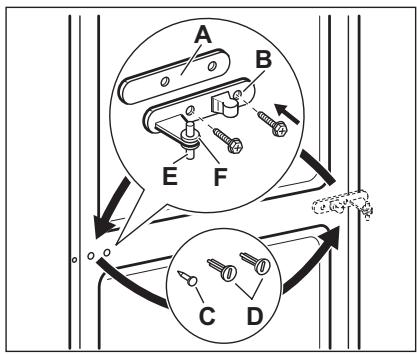
- Open the doors. Unscrew the middle hinge (B). Remove the plastic spacer (A)
- Remove the spacer (F) and move to the other side of the hinge pivot (E).
- Remove the doors.
- Remove the left-hand cover pin of the middle hinge (C, D) and move to the other side.
- Fit the pin of the middle hinge (E) into the left-hand hole of the lower door.
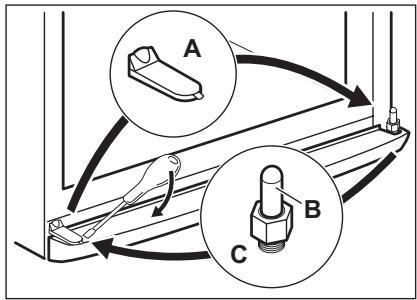

- Remove using a tool the cover (A). Unscrew the lower hinge pivot (B) and the spacer (C) and place them on the opposite side.
-
Re-insert the cover (A) on the opposite side.
-
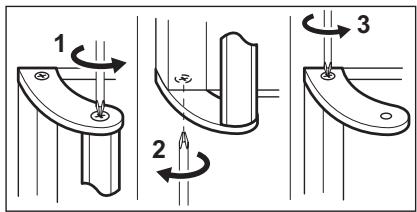
Remove the handle. Unscrew the top handle bracket from the handle rod 1). Unscrew the bottom handle bracket from the door (2)
- Remove the handle. Unscrew the top handle bracket from the handle rod (1). Unscrew the bottom handle bracket from the door (2)
- Unscrew the top handle bracket from the door (3).
-
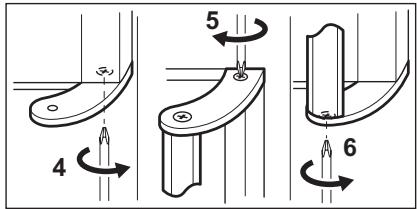
Re-screw the handle bracket on the door (4). Turn the handle bracket with the handle and screw them to the door (5) and the fitted handle bracket (6).
-
Remove using a tool the cover. (1).
- Unscrew the upper hinge pivot (2) and place it on the opposite side.
- Re-screw the upper hinge.
- Fit the upper door on the upper door pivot.
- Re-insert the upper door on the middle hinge pivot (3) slightly tilting both doors.
- Re-screw the middle hinge. Do not forget the plastic spacer.
Do a final check to make sure that:
- All screws are tightened.
- The magnetic seal adheres to the cabinet.
- The door opens and closes correctly. If the ambient temperature is cold (i.e. in Winter), the gasket may not fit perfectly to the cabinet. In that case, wait for the natural fitting of the gasket.
In case you do not want to carry out the above mentioned operations, contact the nearest After Sales Service Force. The After Sales Service specialist will carry out the reversibility of the doors at your cost.
TECHNICAL DATA
| Dimension | ||
| Height | 2010 mm | |
| Width | 595 mm | |
| Depth | 660 mm | |
| Rising Time | 18 h | |
| Voltage | 230 - 240 V | |
| Frequency | 50 Hz | |
The technical information are situated in the rating plate on the internal left side of the appliance and in the energy label.
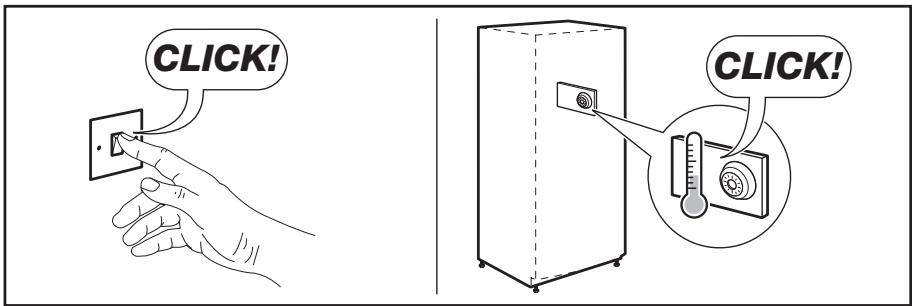
NOISES
There are some sounds during normal running (compressor, refrigerant circulation).
ÍNDICE
natural_image
Two abstract symbols: a solid black circle and a warning symbol with an exclamation mark (no text or labels)Temperatura correcta
Para ajudar a controlar o aparelho correctamente, instalámos um indicador de temperatura no frigorífico.
natural_image
Line drawing of a refrigerator interior showing three shelves with double-headed arrows indicating flow or movement (no text or symbols)natural_image
Line drawing of a hand holding a wooden plank next to a shelf (no text or symbols)natural_image
Diagram of a mechanical assembly with a cylindrical component and wavy lines indicating motion (no text or symbols)natural_image
Line drawing of a hand opening a drawer with arrows indicating direction (no text or symbols)natural_image
Line drawing of a rectangular container with internal compartments and side supports (no text or symbols)natural_image
Illustration of a hand holding a tool inside a rack, with arrows indicating rotation direction (no text or symbols)natural_image
Illustration of a hand using a tool to adjust or install a mechanical component, with an arrow indicating direction (no text or symbols present)natural_image
Technical diagram of a bolt fastening assembly with nut and bolts (no text or labels)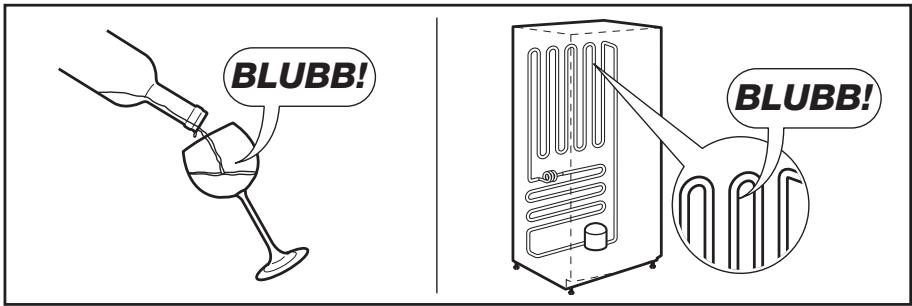
ÍNDICE DE MATERIAS
natural_image
Five icon boxes representing shopping, devices, gear, and tools (no text or symbols)natural_image
Two abstract symbols: a solid black circle and a warning symbol with an exclamation mark (no text or labels)Temperatura correcta
natural_image
Line drawing of a refrigerator interior showing three shelves with double-headed arrows indicating flow or movement (no text or symbols)natural_image
Line drawing of a hand using a tool to lift a wooden plank (no text or symbols)natural_image
Diagram of a mechanical assembly with a cylindrical component and rope, showing motion direction (no text or symbols)natural_image
Line drawing of a hand opening a drawer with arrows indicating direction (no text or symbols)natural_image
Line drawing of a rectangular container with internal compartments and a side arm (no text or symbols)natural_image
Illustration of a hand holding a tool inside a circular frame, with arrows indicating rotation or movement (no text or symbols)natural_image
Illustration of a hand using a tool to adjust or install a mechanical component, with an arrow indicating direction (no text or symbols present)CONEXIÓN ELÉCTRICA
natural_image
Technical line drawing of a bolt and nut assembly with directional arrows indicating movement (no text or symbols)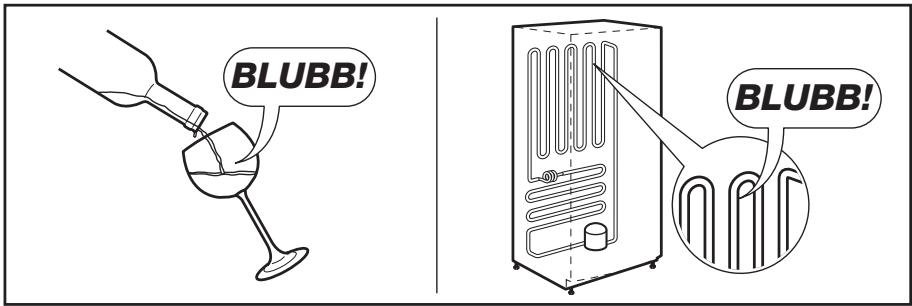

natural_image
Five icon boxes representing shopping and technology-related activities: cart, hand, gear, gear icon, and shopping cart (no text or symbols)CE
- VISIT OUR WEBSITE FOR:
- LEGEND
- FOR PERFECT RESULTS
- ACCESSORIES AND CONSUMABLES
- CUSTOMER CARE AND SERVICE
- SAFETY INFORMATION
- CHILDREN AND VULNERABLE PEOPLE SAFETY
- GENERAL SAFETY
- WARNING!
- DAILY USE
- CARE AND CLEANING
- INSTALLATION
- SERVICE
- ENVIRONMENT PROTECTION
- PRODUCT DESCRIPTION
- CONTROL PANEL
- SWITCHING ON
- SWITCHING OFF
- SWITCHING OFF THE FRIDGE
- SWITCHING ON THE FRIDGE
- TEMPERATURE REGULATION
- MINUTE MINDER FUNCTION
- CHILD LOCK FUNCTION
- HIGH TEMPERATURE ALARM
- DOOR OPEN ALARM
- COOLMATIC FUNCTION
- HOLIDAY FUNCTION
- FROSTMATIC FUNCTION
- STORAGE OF FROZEN FOOD
- FREEZING FRESH FOOD
- THAWING
- TEMPERATURE INDICATOR
- AIR COOLING
- MOVABLE SHELVES
- BOTTLE RACK
- FRESHBOX DRAWER
- POSITIONING THE DOOR SHELVES
- MAXIBOX DRAWER
- REMOVAL OF FREEZING BASKETS FROM THE FREEZER
- HELPFUL HINTS AND TIPS
- HINTS FOR ENERGY SAVING
- HINTS FOR FRESH FOOD REFRIGERATION
- HINTS FOR REFRIGERATION
- HINTS FOR FREEZING
- HINTS FOR STORAGE OF FROZEN FOOD
- CLEANING THE INTERIOR
- CAUTION!
- PERIODIC CLEANING
- DEFROSTING OF THE REFRIGERATOR
- DEFROSTING THE FREEZER
- To remove the frost, follow the instructions below:
- WHAT TO DO IF...
- CLOSING THE DOOR
- REPLACING THE LAMP
- POSITIONING
- LOCATION
- REAR SPACERS
- ELECTRICAL CONNECTION
- LEVELLING
- DOOR REVERSIBILITY
- Do a final check to make sure that:
- NOISES
- ÍNDICE
- ÍNDICE DE MATERIAS
- CONEXIÓN ELÉCTRICA
Brand : AEG-ELECTROLUX
Model : S63600CMM1
Category : Refrigerator