secuENTRY pro 7072 - Electronic lock BURG WACHTER - Free user manual and instructions
Find the device manual for free secuENTRY pro 7072 BURG WACHTER in PDF.


| Product Type | Electronic Lock |
| Model | secuENTRY pro 7072 |
| Brand | Burg Wächter |
| Dimensions (Exterior) | 120 x 45 x 30 mm |
| Dimensions (Interior) | 160 x 70 x 40 mm |
| Weight | 0.3 kg |
| Power Supply | 4 x AA batteries (6V DC) |
| Battery Life | Approximately 10,000 operations |
| Main Functions | Keyless entry via PIN code (4-12 digits), optional RFID card, key override |
| User Slots | Up to 20 user codes |
| Security Features | Anti-tamper alarm, lockout after 4 incorrect attempts, code scramble protection |
| Lock Type | Mortise lock, suitable for wooden and metal doors |
| Door Thickness | 35-55 mm |
| Backset | 60 or 70 mm |
| Indoor/Outdoor Use | Indoor and outdoor (weatherproof) |
| Maintenance | Clean with a soft, dry cloth; avoid chemical cleaners |
| Low Battery Warning | Visual and audible signal when battery is low |
| Spare Parts | Batteries, screw pack, strike plate, RFID cards (optional) |
| Repairability | Replaceable components (batteries, bolt, spring); professional installation recommended for repairs |
| Warranty | 2 years |
Frequently Asked Questions - secuENTRY pro 7072 BURG WACHTER
User questions about secuENTRY pro 7072 BURG WACHTER
0 question about this device. Answer the ones you know or ask your own.
Ask a new question about this device
Download the instructions for your Electronic lock in PDF format for free! Find your manual secuENTRY pro 7072 - BURG WACHTER and take your electronic device back in hand. On this page are published all the documents necessary for the use of your device. secuENTRY pro 7072 by BURG WACHTER.
USER MANUAL secuENTRY pro 7072 BURG WACHTER
Abb.1: Transponder einscannen
Instructions for use
Power supply: Stabilised mains adapter (5V - 12V)
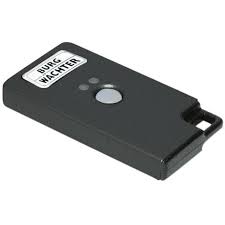
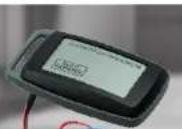
With the secuENTRY pro 7072 REMOTE you have the chance to switch a secuENTRY cylinder and the secuENTRY pro 7071 RELAY. The secuENTRY pro 7072 REMOTE is being initiated by a
potential-free switch contact with an impulse duration of 0.5-1 second. The potential-free contact has to be connected between the blue connecting wire and the positive pole (red connector) to the voltage source.
Please connect the wires according to the diagram.
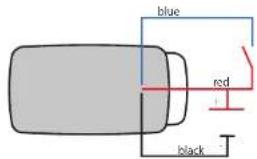
Important: With damage due to wrong installation, the warranty claim expires. The BURG-WÄCHTER KG reserves the right to make changes regarding the product, technical data or the user manual without prior notice.
Please read the instruction manual carefully before commissioning. The installation should only be performed with the necessary knowledge. The secuENTRY pro 7072 REMOTE is not constructed for exterior assembly, it should not be exposed to direct weather. For secure appliance we advise you to conduct the assembly in a weather protected area.
QR code
Enclosed to every secuENTRY pro 7072 REMOTE is a QR code. This QR code is required for setting up the switching possibilities via the secuENTRY software.
Attention! With a loss of the QR code, the secuENTRY pro 7072 REMOTE cannot be introduced to the software and is therefore unusable. Please store the code away safely!
m Download: www.burg.biz
Download: www.burg.biz
Download: www.burg.biz
Download: www.burg.biz
Descarga: www.burg.biz
Download: www.burg.biz
- Download: www.burg.biz
no Download: www.burg.bz
Download: www.burg.biz
n Ladattava tiedosto: www.burg.biz -
-
-
-
-
-
-
-
-
-
-
-
-
-
-
-
-
-
-
-
-
-
-
-
-
-
-
-
-
-
-
-
-
-
-
-
-
-
-
-
-
-
-
-
-
-
-
-
-
-
-
-
-
-
-
-
-
-
-
-
-
-
-
-
-
-
-
-
-
-
-
-
-
-
-
-
-
-
-
-
-
- Indir:www.burg.biz
-
-
-
-
-
-
-
-
-
-
-
-
-
-
-
-
-
-
-
-
-
-
-
-
-
-
-
-
-
-
-
-
-
-
-
-
-
-
-
-
-
-
-
-
-
-
-
-
-
-
-
-
-
-
-
-
-
-
-
-
-
-
-
-
-
-
-
-
-
-
-
-
-
-
-
-
-
-
-
-
m Descarcane: www.burg.hiz
N. Pobiaranie pliku: www.burg.biz
a Stáhnout: www.burg.biz
by Letaltheto: www.burg.biz
Download: www.burg.biz
Download: www.burg.biz
ar Download: www.burg.biz
N загруза: www.burg.biz
63 Download (наредии) www.burg.biz
et Download: www.burg.hiz
BW Remote BA sE 013120
Tip: The QR-code can also be scanned in electronic form as a file or saved as a photo onto a protected data carrier.
Commissioning
The secuENTRY pro 7072 REMOTE functions as an evaluation unit that is integrated into your locking environment via the PC software. This instruction manual demonstrates only the procedure for incorporating the secuENTRY pro 7072 REMOTE, learn more details from the instructions for the PC software.
Instructing the secuENTRY pro 7072 REMOTE
For instruction to the software, the QR code needs to be scanned. - Connect a webcam
- Right-click in the user administrator menu on the field "Serial Number"
- Select "Scan QR-Ident" and afterwards "Scan Key/Switch"
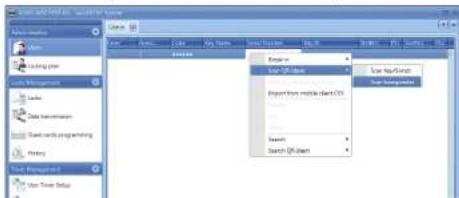
III.1: Scanning of the transponder
- Hold the QR code in front of the camera so that it can be read properly. Please note that the QR code of the Key/Remote includes the following information: (UID, BW and Type)
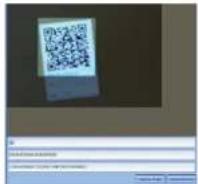
III.2: Scanning QR code
- Click Capture so that the data can be saved
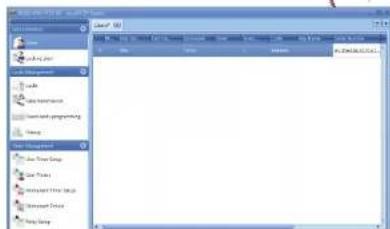
III.3: User administration
- Click Save - the data is transferred
Programming mode
The secUENTRY pro 7072 Remote can be assigned via the PC software as 1:1 or 1:n to the programmed locks. For this setting, the Remote must be in programming mode. This requires the contact between the blue lead wire and the red positive pole for 10 sec. to be closed and the remote switches for 40 sec. to the programming mode. Further details on the allocation options can be found in the manual of the PC software.
Warranty
To provide you with a qualitative impeccable and valuable product and to optimally help you in the case of service or repair, it is necessary that flawed or defective devices are handed back to your retailer together with the QR code and the original proof of purchase.
Disposal of your device
Dear customer,
please help to avoid waste. If you consider to dispose of this device, please note that many components of it consist of valuable materials that can be recycled.

We point to the fact that electric and electronical devices as well as batteries are not to be disposed via household rubbish but need to be collected separately. Please inform yourself at your local competent authority about respective collecting points for batteries and electric waste.

For questions about the EG declaration of conformity please contact info@burg.biz.
Printing and typographical errors as well as technical alterations reserved.