MBP867-3 - Baby monitor MOTOROLA - Free user manual and instructions
Find the device manual for free MBP867-3 MOTOROLA in PDF.


User questions about MBP867-3 MOTOROLA
0 question about this device. Answer the ones you know or ask your own.
Ask a new question about this device
Download the instructions for your Baby monitor in PDF format for free! Find your manual MBP867-3 - MOTOROLA and take your electronic device back in hand. On this page are published all the documents necessary for the use of your device. MBP867-3 by MOTOROLA.
USER MANUAL MBP867-3 MOTOROLA
For a full explanation of all features and instructions, please refer to the User's Guide.
1. Setting up your Digital Video Baby Monitor
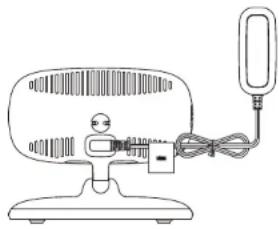
A. Connecting power supply for the Baby Unit
natural_image
Line drawing of a desktop fan with a mounted cable and indicator light (no text or symbols)Connect the small plug of the power adapter to the Baby Unit and the other end to the electrical outlet. Only use the enclosed adapter (5V DC/1000mA). Ensure the ON/OFF switch is at "ON" position.
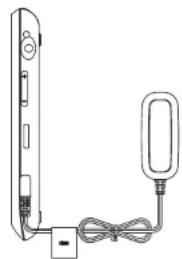
B. Connecting power supply for the Parent Unit
natural_image
Simple line drawing of a vertical device connected to a bulb with cables (no text or symbols)Connect the small plug of the power adapter to the parent unit and the other end to the electrical outlet.
Only use the enclosed adapter (5V DC / 1000mA).
Recommend charging at least 12 hours before first use.
WARNING:
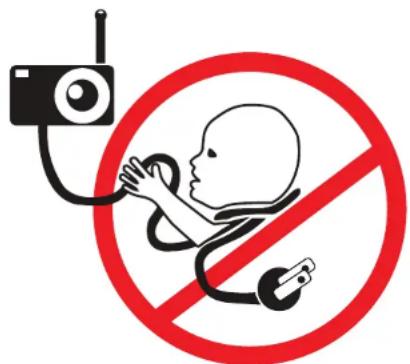
STRANGULATION HAZARD:
Children have STRANGLED in cords.
Keep this cord out of the reach of children (more than 3ft (1m) away) from the crib. Do not use with an extension cord. Only use the AC Adapters provided.
2. Basic operation of the keys
| Parent Unit | ||
| ON/OFF button Press and hold to switch on/off the Unit. | ||
| UP/DOWN buttons Press to adjust the volume level. | ||
| MENU button Press to open menu options or exit. | ||
| OK | OK button Press to confirm a selection. | |
| VIDEO button Press to turn on/off the LCD display. | ||
| TALK button Press and hold to talk to your baby. | ||
| Baby Unit | ||
| ON/OFF switch Slide power switch to the ON position to switch on the Unit. | ||
3. General Information
If your product is not working properly...
- Read this Quick Start Guide or the User's Guide.
- Contact Customer Service:
US and Canada 1-888-331-3383
Email: support@motorolamonitors.com

motorola
Manufactured, distributed or sold by Binatone Electronics International LTD., official licensee for this product. MOTOROLA and the Stylized M Logo, are trademarks or registered trademarks of Motorola Trademark Holdings, LLC. and are used under license. All other trademarks are the property of their respective owners. © 2015 Motorola Mobility LLC. All rights reserved.

Printed in China
EN_US Version 6.0