
FXTHP5NLDSNM006 - Cables for Computers and Peripherals Panduit - Free user manual and instructions
Find the device manual for free FXTHP5NLDSNM006 Panduit in PDF.


| Product Type | Fiber Optic Patch Cord |
| Connector Type | LC Duplex |
| Fiber Mode | Singlemode (OS2) |
| Length | 6 meters (19.7 ft) |
| Jacket Material | LSZH (Low Smoke Zero Halogen) |
| Core/Cladding Diameter | 9/125 μm |
| Insertion Loss | ≤ 0.3 dB (typical) |
| Return Loss | ≥ 50 dB |
| Operating Temperature Range | -20°C to 70°C (-4°F to 158°F) |
| Minimum Bend Radius | 20 mm (dynamic) |
| Weight | Approximately 0.1 kg (0.22 lbs) |
| Compliance Standards | TIA/EIA-568-C.3, ISO/IEC 11801 |
| Application | Data center, LAN, telecommunications |
| Connector Polish | UPC (Ultra Physical Contact) |
| Durability | 500 mating cycles minimum |
| Cleaning | Use lint-free wipes and isopropyl alcohol |
| Storage Temperature | -40°C to 85°C (-40°F to 185°F) |
| Packaging | Individual polybag with label |
| Certifications | RoHS, REACH |
| Warranty | Limited lifetime warranty |
Frequently Asked Questions - FXTHP5NLDSNM006 Panduit
User questions about FXTHP5NLDSNM006 Panduit
0 question about this device. Answer the ones you know or ask your own.
Ask a new question about this device
Download the instructions for your Cables for Computers and Peripherals in PDF format for free! Find your manual FXTHP5NLDSNM006 - Panduit and take your electronic device back in hand. On this page are published all the documents necessary for the use of your device. FXTHP5NLDSNM006 by Panduit.
USER MANUAL FXTHP5NLDSNM006 Panduit
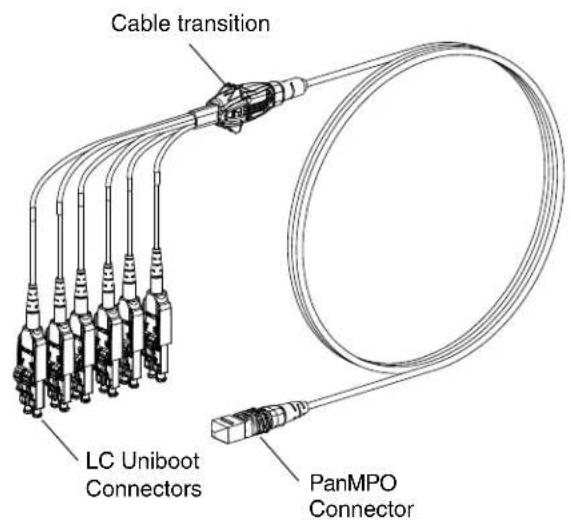
Cable Transition Usage
Tak-Ty Option
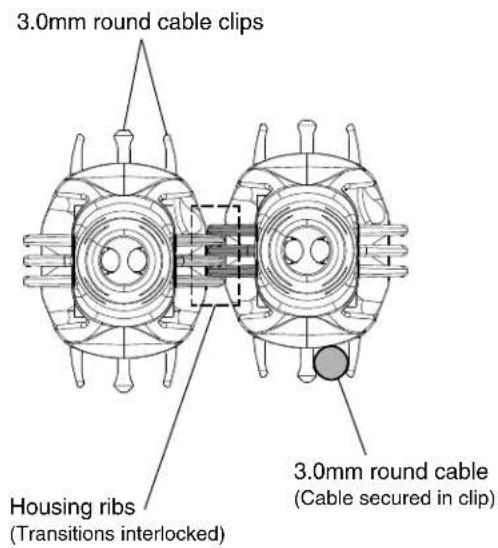
Slot features in the cable transition allows for the use of a Tak-Ty to either secure the cable harness to a rack feature, such as cable management fingers, or to more robustly secure multiple cable transitions that are interlocked together.

Cable Clips & Housing Ribs Option

PanMPO Gender Changeover

Squeeze both sides of the outer housing at the back end evenly until you hear an audible click. Pull off connector to remove.
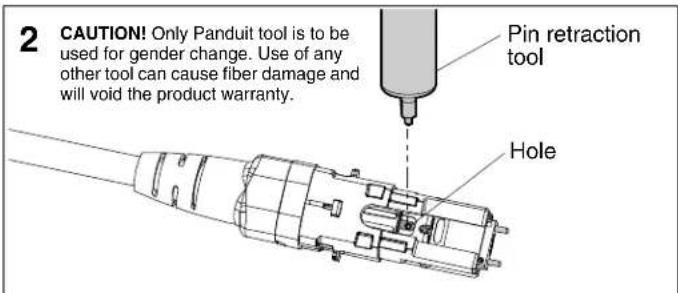
Locate hole in the inner housing on the slotted side and position pin retraction tool over the hole.
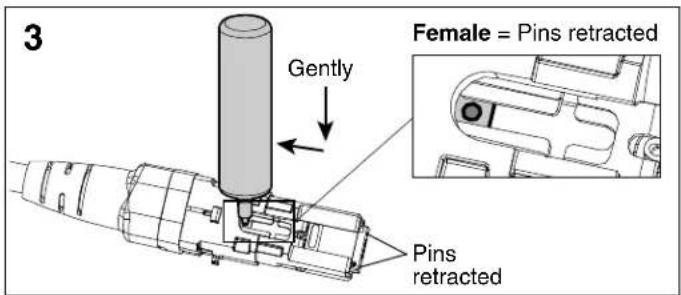
Insert tool into hole, press down gently, and push backward to retract connector pins to the female state. Repeat process in opposite direction to extract pins for male state.
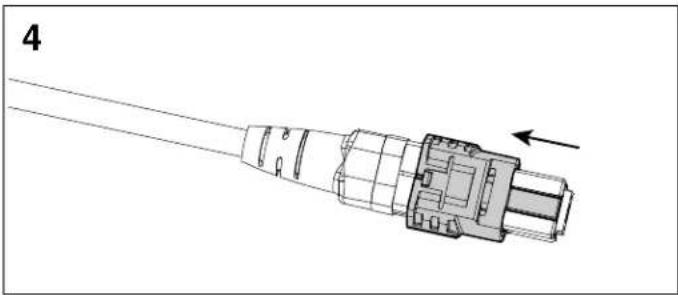
Re-install the outer housing. Ensure the key is in the proper orientation. See PanMPO polarity changeover instructions on page 2 of FS041* for more details.
LC Uniboot Polarity Changeover - Pair Flipping

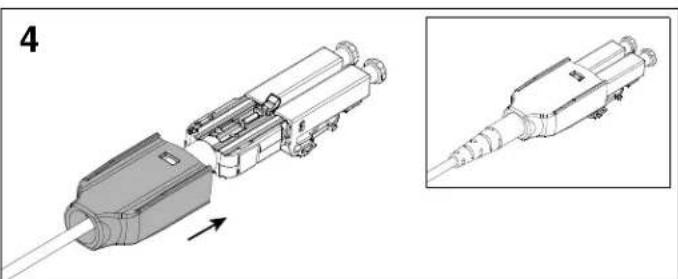
Squeeze both sides of the LC Uniboot cover evenly and pull back to disengage the tab on the opposite side.

Slide the LC Uniboot cover back away from connectors and rotate 180°.

Rotate each LC connector downward 180°. Re-install the LC Uniboot cover until you hear an audible click.
*Denotes instruction sheet revision letter.
For Instructions in Local Languages and Technical Support:
www.panduit.com/resources/install_maintain.asp
PANDUIT
www.panduit.com
E-mail:


Brand : Panduit
Model : FXTHP5NLDSNM006
Category : Cables for Computers and Peripherals