
FXTRL7N7NBNM023 - Cables for Computers and Peripherals Panduit - Free user manual and instructions
Find the device manual for free FXTRL7N7NBNM023 Panduit in PDF.


| Product Type | Cable Assembly for Computer Peripherals |
| Brand | Panduit |
| Model | FXTRL7N7NBNM023 |
| Category | Computer Cable and Peripheral |
| Connector Type | MPO (Multi-fiber Push-On) |
| Gender | Gender Changeable (Male/Female) |
| Polarity | Reversible (Method A, B, C) |
| Outer Housing Material | Thermoplastic |
| Operating Temperature | -20°C to +70°C |
| Cable Type | Multimode Fiber Optic (OM3/OM4) |
| Fiber Count | 12 fibers |
| Insertion Loss | ≤0.5 dB typical |
| Return Loss | ≥30 dB |
| Mating Durability | ≥500 matings |
| Standards | TIA/EIA-568, ISO/IEC 11801 |
| Compliance | RoHS, REACH |
| Maintenance | Clean with lint-free wipes and isopropyl alcohol |
| Safety | Avoid direct eye exposure to laser light |
| Repair | Not user-serviceable; replace entire assembly |
| Warranty | Limited lifetime warranty (typical Panduit) |
Frequently Asked Questions - FXTRL7N7NBNM023 Panduit
User questions about FXTRL7N7NBNM023 Panduit
0 question about this device. Answer the ones you know or ask your own.
Ask a new question about this device
Download the instructions for your Cables for Computers and Peripherals in PDF format for free! Find your manual FXTRL7N7NBNM023 - Panduit and take your electronic device back in hand. On this page are published all the documents necessary for the use of your device. FXTRL7N7NBNM023 by Panduit.
USER MANUAL FXTRL7N7NBNM023 Panduit
Squeeze both sides of outer housing at the back end evenly until you hear an audible click.
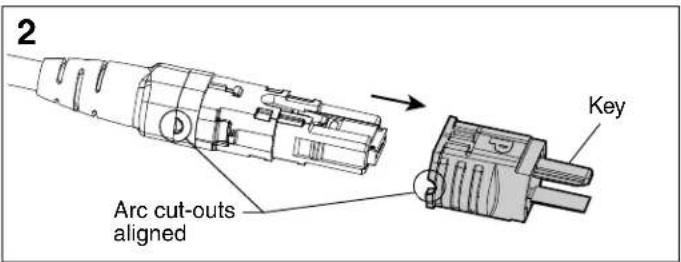
Pull outer housing off connector.

Rotate outer housing 180° so arc cut-out is on the opposite side.

Re-install outer housing until you hear a faint audible click.
For Technical Support: www.panduit.com/resources/install_maintain.asp
E-mail: techsupport@panduit.com
Phone: 866-405-6654
Gender Changeover
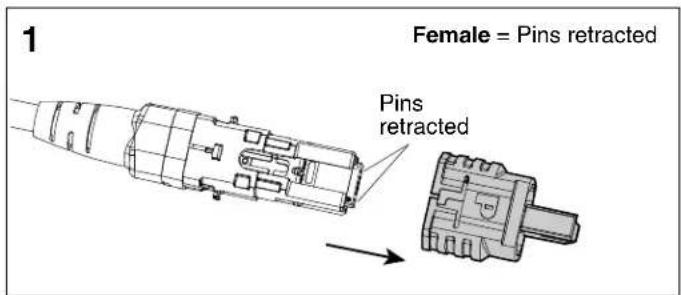
Remove outer housing per polarity changeover instructions.

Locate hole in the inner housing on the slotted side and position pin retraction tool over the hole.

Insert tool into hole, press down gently, and push forward to advance connector pins to the male state. Repeat process in opposite direction to retract pins for female state.

Re-install outer housing in the correct orientation. See polarity changeover instructions on page 1.


Brand : Panduit
Model : FXTRL7N7NBNM023
Category : Cables for Computers and Peripherals