
AT-DP300 - Video Converter Atlona - Free user manual and instructions
Find the device manual for free AT-DP300 Atlona in PDF.


| Product Type | DisplayPort to HDMI Converter / Video Scaler |
| Brand | Atlona |
| Model | AT-DP300 |
| Input Interface | DisplayPort (DP) Male |
| Output Interface | HDMI Female |
| Max Resolution | 3840x2160@30Hz (4K UHD) or 1920x1200@60Hz |
| Audio Support | Pass-through up to 7.1 channel LPCM |
| Power Supply | USB-powered (5V DC from host device) or external adapter (5V/1A, optional) |
| Dimensions (L x W x H) | 4.3 x 2.0 x 0.6 inches (109 x 51 x 15 mm) |
| Weight | 0.12 lbs (55 g) |
| Operating Temperature | 32°F to 104°F (0°C to 40°C) |
| Storage Temperature | -4°F to 140°F (-20°C to 60°C) |
| Certifications | CE, FCC, RoHS |
| Main Functions | Converts DisplayPort signal to HDMI; supports video scaling up to 4K; plug-and-play installation; no external driver required |
| Maintenance & Cleaning | Wipe with a soft, dry cloth; avoid liquid cleaners; disconnect power before cleaning |
| Safety Precautions | Do not expose to moisture or extreme temperatures; use only supplied power adapter; keep away from children |
| Spare Parts & Repairability | No user-serviceable parts; contact Atlona support for repairs |
| General Information | Compatible with Windows, macOS, and Linux systems; ideal for connecting DisplayPort laptops to HDMI monitors or projectors |
Frequently Asked Questions - AT-DP300 Atlona
User questions about AT-DP300 Atlona
0 question about this device. Answer the ones you know or ask your own.
Ask a new question about this device
Download the instructions for your Video Converter in PDF format for free! Find your manual AT-DP300 - Atlona and take your electronic device back in hand. On this page are published all the documents necessary for the use of your device. AT-DP300 by Atlona.
USER MANUAL AT-DP300 Atlona
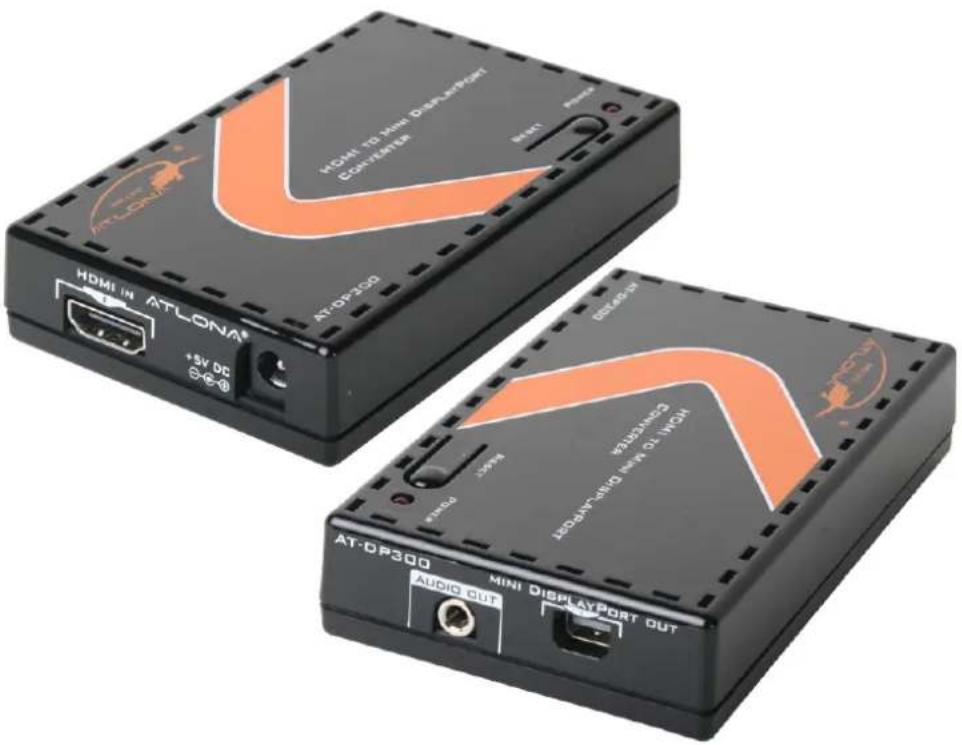
HDMI to Mini-DisplayPort Scaler/converter AT-DP300
User Manual
TABLE OF CONTENTS
- Introduction 2
- Applications 2
- Package Contents 3
- Features 3
- Specifications 3
- Panel Descriptions 4
6.1. Left Panel 4
6.2. Right Panel 4
6.3. Top Panel 4
-
Connection Diagram 5
-
Safety Information 6
- Warranty 7
- Atlona Product Registration 8
INTRODUCTION
The Atlona AT-DP300 is HDMI to Mini DisplayPort Scaler/converter, designed to convert any HDMI sources such as BluRay Player, Cable Box, Video Game Console, Apple TV to Mini DisplayPort which is commonly used by Apple 24" LED, Apple 27" LED and iMac 27".
The AT-DP300 is able to accept high resolution audio/video signals up to 1080p and scale them to either 1920x1200 or 720p
Apple 24" users:
- Video IN: AT-DP300 can take all standard VESA resolutions though HDMI input: 640\~480 to 1920x1200 and 480p\~1080p
• Video OUT: AT-DP300 supports native resolution output 1920x1200
- Audio: Apple 24" LED only support Audio though USB cable (not though Mini DisplayPort, therefore please use 3.5mm audio out on the DP300 or digital audio on the hdmi source to go to separate set of speakers or home theater). If you decide to use Stereo Audio output on the DP300, please select audio output in the source settings to be 2channel PCM.
Apple 27" LED and iMac 27" users:
- Video IN: AT-DP300 can take all standard VESA resolutions though HDMI input: 640\~480 to 1920x1200 and 480p\~1080p
- Video OUT: AT-DP300 is only capable of supporting one output resolution 1280x720 (720p). The reason for it is that iMac 27"/27" LED native resolutions are: 800x600, 1280x720 or 2560x1440 (since our box is limited to single link (1920x1200), and can't work with 2560x1440 it will take the next resolution down the list which is 720p. If you want the full native resolution 2560x1440, please look at our other product AT-HD620
- Audio: Apple 27" LED and iMac 27" both support audio though Mini DisplayPort input, therefore DP300 will also embed audio from HDMI to Mini DisplayPort
Dell/HP/Lenovo/BenQ LCD users:
Note: Mini DisplayPort to DisplayPort adapter is required
- Video IN: AT-DP300 can take all standard VESA resolutions though HDMI input: 640\~480 to 1920x1200 and 480p\~1080p
• Video OUT: AT-DP300 supports native resolution output 1920x1200, 1680x1050 or 1280x800
- Audio: Dell/HP/Lenovo/BenQ support audio though Mini DisplayPort input, therefore DP300 will also embed audio from HDMI to Mini DisplayPort
APPLICATIONS
• Gaming entertainment
• Video entertainment
- Advertisement display
PACKAGE CONTENT
• AT-DP300 HDMI to Mini DisplayPort Converter/Scaler
- 5V/1A DC power adaptor (Universal 110/220v)
- Operation manual
FEATURES
- Compatible with Apple 24-inch LED, Apple 27-inch LED and Apple iMac 27-inch
- The AT-DP300 is designed for video gaming and has almost no latency below 2ms, which is basically no delay at all.
• HDCP1.1 and DisplayPort 1.1a compliant
• Supports High Resolutions Input up to 1080p
• Supports output resolutions up to 1920x1200 - Supports 50/60Hz frame rate conversion with 60Hz output, which would allow users from all over the world to use their HDMI equipment
• Supports 3-D motion video adaptive, 3-D de-interlacing, hue, saturation, sharpness, RGB (color tone) level, and aspect ratio size, those features are designed to increase picture quality of the original HDMI source
• Audio Pass-through HDMI to Mini DisplayPort as well as a separate 1/8-inch audio output for headphones - Compact size with elegant design
SPECIFICATIONS
| TMDS Clock Frequency 225MHz | |
| Input Port 1 x HDMI | |
| Output Ports 1 x Mini DisplayPort, 1 x 3.5∅ stereo audio jack | |
| Power Supply 5V/1A DC (US/EU standards, CE/FCC/UL certified) | |
| Dimensions (inch) 4.489W) x 2.55 (D) x 1.02 (H) | |
| Dimensions (mm) 114 (W) x 65 (D) x 26 (H) | |
| Weight (LB) 0.5 | |
| Power Consumption 3.6W | |
| Operating Temperature 0°C ~ 40°C / 32°F~104°F | |
| Storage Temperature -20°C ~60°C / -4°F~140°F | |
| Relative Humidity 20~90% RH (non-condensing) | |
PANEL DESCRIPTIONS
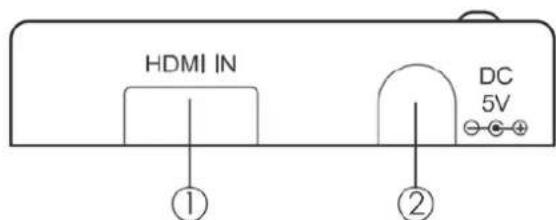
1. Left Panel
-
HDMI IN: This input is to connect input source equipment such as PS3 or BluRay DVD player.
-
DC 5V: This input is to plug 5V DC power supply
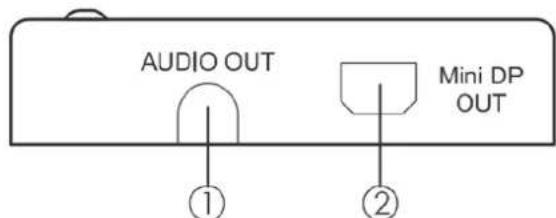
2. Right Panel
-
AUDIO OUT: This input is to connect with display's audio input jack or external speakers (Apple 24" LED only, explanation is above)
-
Mini DP OUT: This output is to connect a display
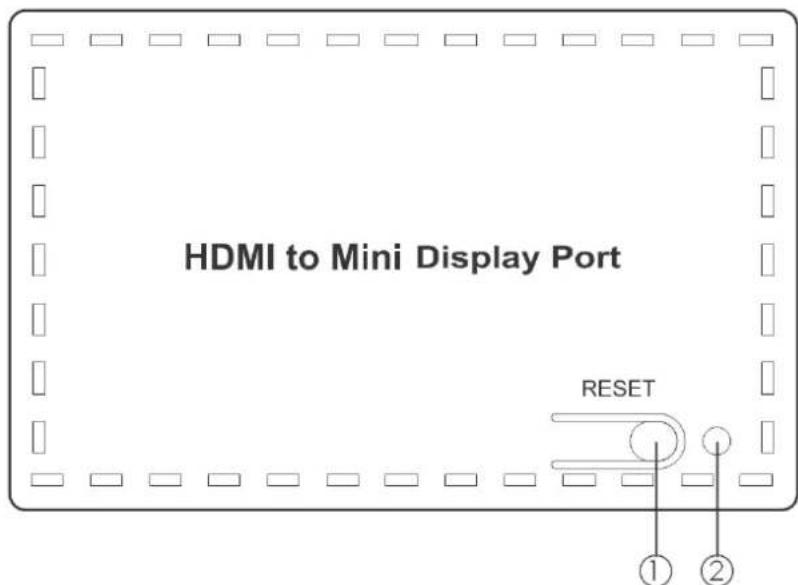
3. Top Panel
-
RESET button: This button is designed to reset the converter to manufactures' default. Only press it if you are not receiving any output signal.
-
Power LED: The Green LED will illuminate when the power is on.
CONNECTION DIAGRAM
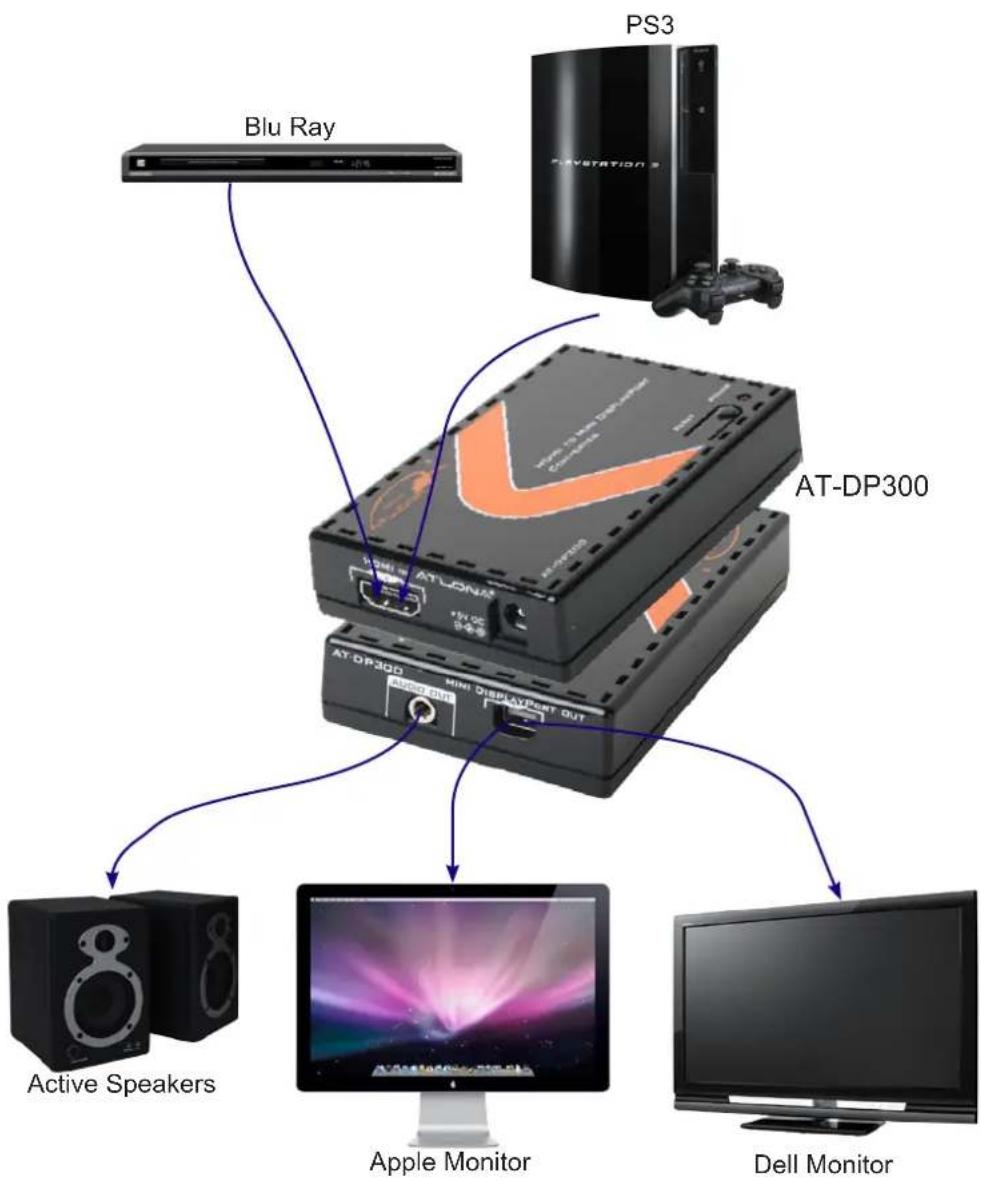
flowchart
graph TD
    A["Blu Ray"] --> B["AT-LONA"]
    C["PS3"] --> D["AT-DP300"]
    E["Active Speakers"] --> F["Dell Monitor"]
    G["Apple Monitor"] --> H["Dell Monitor"]
    I["Playstation 3"] --> J["AT-DP300"]
    K["AT-DP300"] --> L["Multi Display/Out"]
    M["AT-DP300"] --> N["Multi Display/Out"]
SAFETY INFORMATION
Safeguards
To reduce the risk of electric shock, do not expose this product to rain or moisture void the warranty and safety features. Do not modify the wall plug. Doing so will
If the wall plug does not fit into your local power socket, hire an electrician to replace your obsolete socket. be easily accessible in the case it requires This equipment should be installed near the socket outlet and the device should disconnection.
Precautions
FCC regulations state that any unauthorized changes or modifications to this equipment, not expressly approved by the manufacturer, could void the user's authority to operate this equipment.
Operate this product using only the included external power supply. Use of other power supplies could impair performance, damage the product, or cause fires.
In the event of an electrostatic discharge this device may automatically turn off. If this occurs, unplug the device and plug it back in.
Protect and route power cords so they will not be stepped on or pinched by anything placed on or against them. Be especially careful of plug-ins or cord exit points from this product.
Avoid excessive humidity, sudden temperature changes or temperature extremes.
Keep this product away from wet locations such as bathtubs, sinks, laundries, wet basements, fish tanks, and swimming pools.
Use only accessories recommended by Atlona to avoid fire, shock, or other hazards.
Unplug the product before cleaning. Use a damp cloth for cleaning and not cleaning fluid or aerosols.
Such products could enter the unit and cause damage, fire, or electric shock. Some substances may also mar the finish of the product.
Never open, remove unit panels, or make any adjustments not described in this manual. Attempting to do so could expose you to dangerous electrical shock or other hazards. It may also cause damage to your AT-DP300. Opening the product will void the warranty.
Do not attempt to service the unit. Disconnect the product and contact your authorized Atlona reseller or contact Atlona directly.
WARRANTY
Limited Warranty
Atlona Technologies warrants that (a) its products (the AT-DP300) will perform substantially in accordance with the accompanying written materials for a period of 3 years from the date of receipt and (b) that the product will be free from defects in materials and workmanship under normal use and service for a period of 3 years. In the event applicable law imposes any implied warranties, the implied warranty period is limited to 3 years from the date of receipt. Some jurisdictions do not allow such limitations on duration of an implied warranty, so the above limitation may not apply to customers that fall within those areas.
Customer Remedies
Atlona Technologies' and its suppliers' entire liability and Customer's exclusive remedy shall be, at Atlona Technologies' decision, either return of the price paid for the product, repair, or replacement of the product that does not meet this Limited Warranty and which is returned to Atlona Technologies with a copy of the Customer's receipt. This Limited Warranty is void if failure of the product has resulted from accident, abuse, misapplication, or natural occurrence. In example but not limited to: power surges (electrical storms, local power outage), dropping the product (or items on the product), contact with fluids, and physical misconduct (i.e. kicking or punching). Any replacement product will be warranted for the remainder of the original warranty period.
No other warranties
To the maximum extent permitted by applicable law, Atlona Technologies and its suppliers disclaim all other warranties, either expressed or implied, including, but not limited to, implied warranties of merchantability and fitness for a particular purpose, with regard to the product and any related written materials. This Limited Warranty gives customer specific legal rights. Customers may have other rights depending on the jurisdiction.
No liability for damages
To the maximum extent permitted by applicable law, in no event shall Atlona Technologies or its suppliers be liable for any damages arising out of the use of or inability to use this product, even if Atlona Technologies has been advised of the possibility of such damages. Such damages include but are not limited to: special, incidental, consequential, or indirect damages for personal injury, loss of business profits, business interruption, loss of business information, or any other pecuniary loss.
Atlona Technologies' and its suppliers' entire liability under any provision of this agreement shall be limited to the amount actually paid by you for the product. Some Jurisdictions do not allow the exclusion or limitation of liability for consequential or incidental damage. The above limitations may not apply to you in such jurisdictional cases.
ATLONA PRODUCT REGISTRATION
Thank you for purchasing this Atlona product. - We hope you enjoy it and will take an extra few moments to register your new purchase.
Registration creates an ownership record if your product is lost or stolen and helps ensure you'll receive notification of performance issues and firmware updates.
At Atlona, we respect and protect your privacy, assuring you that your registration information is completely secure. Atlona product registration is completely voluntary and failure to register will not diminish your limited warranty rights.
To register go to: http://www.atlona.com/registration


- HDMI to Mini-DisplayPort Scaler/converter AT-DP300
- TABLE OF CONTENTS
- INTRODUCTION
- Apple 24" users:
- Apple 27" LED and iMac 27" users:
- Dell/HP/Lenovo/BenQ LCD users:
- APPLICATIONS
- PACKAGE CONTENT
- FEATURES
- PANEL DESCRIPTIONS
- Left Panel
- Right Panel
- Top Panel
- SAFETY INFORMATION
- Safeguards
- Precautions
- WARRANTY
- Limited Warranty
- Customer Remedies
- No other warranties
- No liability for damages
- ATLONA PRODUCT REGISTRATION
Brand : Atlona
Model : AT-DP300
Category : Video Converter