
AMH 100 - Air purifier Aerial - Free user manual and instructions
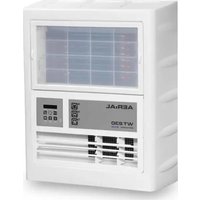
Find the device manual for free AMH 100 Aerial in PDF.


| Product Type | Air Purifier |
| Brand | Aerial |
| Model | AMH 100 |
| Dimensions (H x W x D) | 420 x 390 x 580 mm |
| Weight | 19 kg |
| Power Supply | 230 V / 50 Hz |
| Power Consumption | 0.28 kW |
| Noise Level | 63 dB(A) |
| Air Circulation | 1600 m³/h |
| Protection Type | IP 24 |
| Pre-Filter Class | G4 |
| Main Filter Class (Standard) | F9 |
| Optional Main Filter | H13 |
| Optional Filter | Activated Carbon |
| Intended Use | Filtering and cleaning air in closed interiors |
| Included Components | AMH 100, Pre-Filter G4, Operating Instructions |
| Controls | On/Off switch, Operating hours counter |
| Maintenance | Regular inspection and cleaning of filters |
| Safety | Not for explosive atmospheres, humidity <80%, clearance 0.5 m |
| CE Mark | Yes |
| Manufacturer | Dantherm GmbH (AERIAL) |
| Air Connection | DN 200 both sides |
| Housing Material | Metal and plastic |
| Filter Replacement | Pre-filter and main filter replaceable |
| Operating Hours Counter | Yes |
Frequently Asked Questions - AMH 100 Aerial
User questions about AMH 100 Aerial
0 question about this device. Answer the ones you know or ask your own.
Ask a new question about this device
Download the instructions for your Air purifier in PDF format for free! Find your manual AMH 100 - Aerial and take your electronic device back in hand. On this page are published all the documents necessary for the use of your device. AMH 100 by Aerial.
USER MANUAL AMH 100 Aerial
EN Air Filter
AMH 100
This manual is based on the technical and product-specific parameters. The manufacturer reserves the rights to add additional information to this manual.
Stand: 02_2015
1 Table Of Contents
1 Table Of Contents 18
2 Manual Guide 19
Symbols 19
3 Security 19
Staff Qualifications 19
Conditions Of Use 20
4 Specifications 21
Intended Use 21
Included Components 22
Optional Components 22
Device Description 22
5 Transport And Installation 23
Transport 23
Installation 23
6 Operation Of Use 23
Controls AMH 100 24
7 Maintenance And Care 24
Cleaning And Filter Replacement 25
Spare Parts And Service 27
8 Troubleshooting 27
9 Decommissioning, Storage And Disposal. 28
Decommissioning 28
Storage 29
Disposal 29
10 Technical Data 29
11 CE-Declaration Of Conformity 30
2 Manual Guide
Symbols
Within this manual you will find these symbols and notes to alert you to hazards.
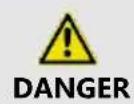
Type and Source
This symbol warns against very severe injury or possible danger to life.
The security measures are described

Type and Source
This symbol warns against serious injury
The security measures are described
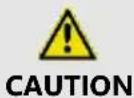
Type and Source
This symbol warns against light and medium injuries and impending dangers.
The security measures are described
3 Security
This manual belongs to this product. It contains all the important information about how to properly and safely transport the appliance by AERIAL including how to set up, operate, store and dispose of this product. Ensure that this manual is kept safe. Give this manual to any third parties when appropriate, which temporarily use the device.
Staff Qualifications
This manual is aimed at all owners/operators of the AERIAL device. These people must read and understand the manual. The operation of this device must only be performed by people who have been commissioned and given through the operator.
Incorrect operation or abuse dangers for:
■ The operator,
■ The device and other assets for the operator,
■ The efficient working of the device.
For all people who operate the device, with waiting or cleaning, you must:
■ Be aware of the dangers that may arise with electrical devices,
■ Follow the operating instructions.
Conditions Of Use
The device is intended for mobile or stationary use indoors. Replacement parts may only be original or approved by manufacturer.
In addition, the following conditions and precautions apply:
■ The device must be stable and in an upright position.
■ The mains voltage must correspond to that indicated on the rating plate.
■ The extension cable must be chosen according to the performance information on the rating plate to prevent overloading.
■ Safety covers and screwed in casing parts of the device must not be removed.
■ The air must circulate freely (A clearance of at least half-a-meter around the device)
For installation of the device within humid rooms such as bathrooms or laundry rooms, you must secure the device of from the customers according to the applicable regulations by a residual protective device.
■ The device must never be covered during operation.
■ The device must only be operating with the built-in pre-filter and main filter.
■ The device must only be operating with intact filters.
■ Malfunctioning devices must be switched off and secured against accidental reactivation.
The device must not be used under the following conditions:
■ In areas with potentially explosive atmospheres.
■ In areas with oil, sulfur, chlorine or saline atmospheres.
■ In areas with ozone treated air.
■ In areas with a high concentration of solvents.
■ In areas with a relative humidity of over 80%.
■ In areas with extremely high amounts of dust pollution.
4 Specifications
Intended Use
It may only be used for filtering and cleaning of the air at atmospheric pressure in closed interiors.
Filter Classes:
| Usage Purpose | Class Pre-filter | Class Main Filter |
| Air Filter | G 4 | F 9 |
| Rehabilitation (After virus, bacteria or mildew) | G 4 | H 13 |
| Elimination of bad odors. | G 4 | Activated Carbon Filter |
Also the filter classes and the specified operating conditions compiled with intended uses of. (See page 3).
Any correspondence with non-intended use or any other considered improper use will lead to warranty claims being void.
Included Components
■ AMH 100
■ Pre-Filter G 4
■ Operating Instructions
Optional Components
■ Main Filter H 13
■ Main Filter F 9
■ Activated Carbon Filter
Device Description
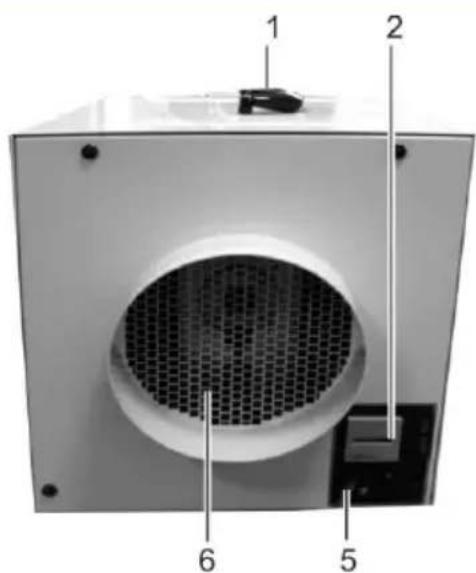
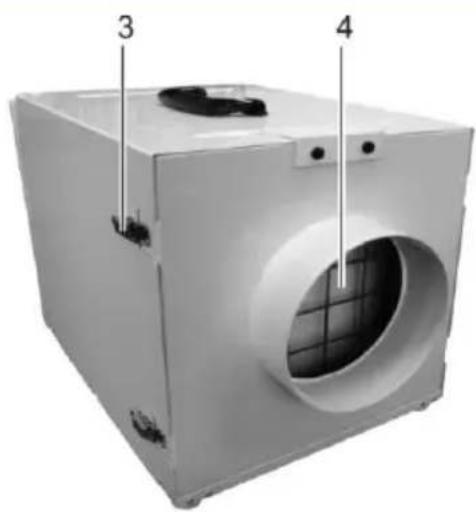
Fig. 5: Air Filter AMH100 (Front and Rear)
| 1 | Carrying Handle | 4 | Air Intake |
| 2 | Operating Panel | 5 | Power Cord |
| 3 | Snap lock, rear panel | 6 | Air Outlet |
5 Transport And Installation
Transport
Danger to life through electric shock
Contact with live parts can lead to death.
With any change of the location of the device, switch off the appliance with the on/off switch and unplug from the mains pri
Never pull on the power cord.
Injury due to construction equipment
→ Upright transportation of the device.
- Check the components for any lost parts (See Page 5)
- If damaged is caused when delivering the device, contact you seller/dealer immediately.
Installation
- Prepare the appliance in accordance with the conditions of use (See Page 3).
- Ensure that the power cable is undamaged.
- Plug the power cord into the plug socket.
6 Operation Of Use
Equipment Damage
During the operation of the device the air must circulate freely.
- Devices only with intact pre and main filters.
Controls AMH 100
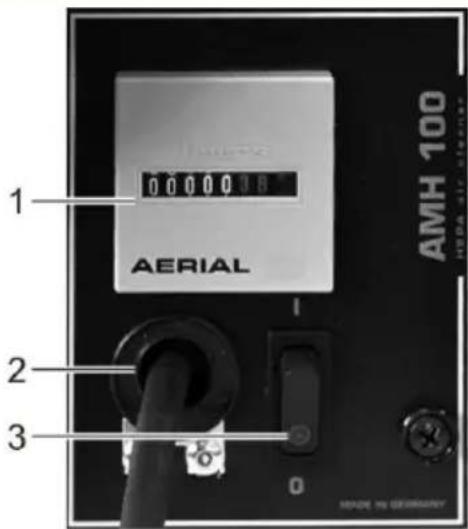
Fig. 6: Operating Panel AMH 100
| 1 | Operated hours counter | 3 | On/Off Switch |
| 2 | Power Cord |
- Ensure that the device is securely positioned and that the air can circulate freely.
- Switch on the device at the on/off switch

When the device is switched on, the on/off switch will light up.
The device is designed for continuous operation. After successful air filtering, turn off the device at the on/off switch.
7 Maintenance And Care
Risk of injury from electrical shock and possible property damage
Keep maintenance and service and follow the safety instructions
Switch the device off and pull out the power cord before inspection and cleaning of the device.
There is a risk of infection from contaminated filters.
When inspecting the filter use protection gloves and a facemask (P2).
Insert over-used filter into a sealable plastic bag, than seal and dispose.
Equipment Damage
Cleaning agents may damage the surfaces of the device.
- Use only mild cleaning agents.
Cleaning And Filter Replacement
The frequency of cleaning the device is dependent on the conditions of it's use. Inspect your device at regular intervals.
The device, especially the air filter, must be checked frequently to ensure a trouble-free operation of the device when in continuous use. The air filter and the device must be checked after each use and cleaned. If necessary, the filter must be replaced.
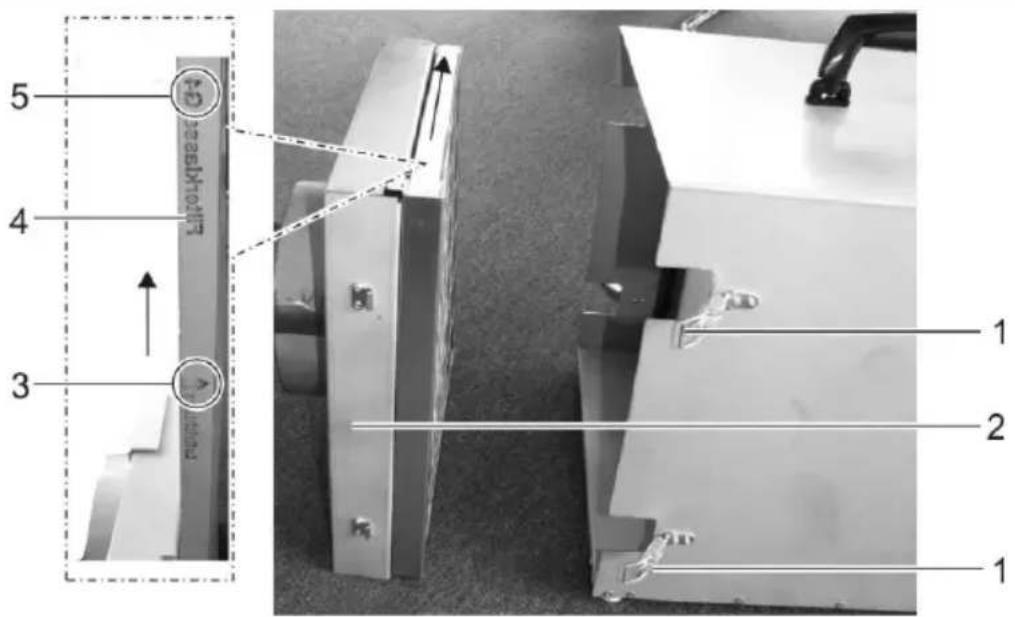
Fig. 7: Changing The Pre-Filter
| 1 | Snap lock | 4 | Pre-Filter |
| 2 | Rear cover with pre-filter | 5 | Filter Class-name |
| 3 | Air Flow Direction |
Proceed as followed:
- Switch off.
- Disconnect the power cord.
- Open the snap locks (Abb. 3, Pos. 1).
-
Pull the pre-filter out of the device (Abb. 3, Pos. 4).
-
Thoroughly clean the rear side of the casing with a mild detergent and give time to dry (Abb. 3, Pos. 2),
-
Visual Inspection: Check the pre-filter for pollution. If necessary use a new filter of the same class (Abb. 3, Pos. 5) and push in rear of the casing in the direction of the air as indicated (Abb. 3, Pos. 3) be cautious when doing so.
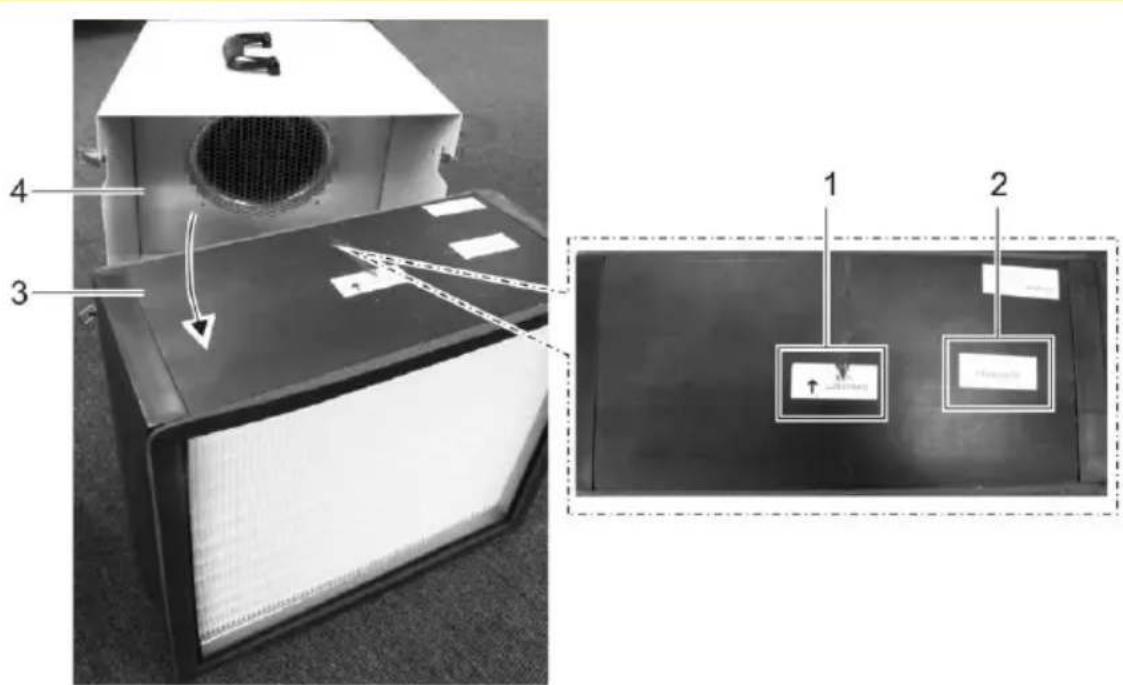
Fig. 8: Changing The Main Filter
| 1 | Air Direction | 3 | Main Filter |
| 2 | Filter Class Name | 4 | Air Filter AMH 100 |
- Pull the Main Filter (Abb. 4, Pos. 3) out of the device (Abb. 4, Pos. 4).
- Clean the Device inside and outside with a mild detergent and allow time to dry.
-
Visual Inspection: Check the main filter for pollution. If necessary use a new filter of the same class (Abb. 4, Pos. 2) and push in rear of the casing in the direction of the air as indicated (Abb. 4, Pos. 1) be cautious when doing so.
-
Mount the rear casing with the pre-filter (Abb. 3, Pos. 2) with the snap locks (Abb. 3, Pos. 1).
- Check the power cord for damage. If the power cord is damaged, do not operate the device and ensure that it is disconnected from the mains.
- Replace the power cord.
The Device is ready to be used again
Spare Parts And Service
If you have any problems with the device, or need spare parts, contact your dealer or the customer services.
8 Troubleshooting
If any malfunctions occur, please first check the following points. Should this not create a solution, consult a specialist.
Risk of electric shock and possible property damage
Only the manufacturer or by the manufacturer authorized companies are allowed to work on the electrical parts of the air filter. Within the warranty claims, interventions may only be carried out by the manufacturer or by people authorized by the manufacturer. Intervention by non-authorized people will void a warranty claim.
| Problem | Possible cause | Solution |
| The device does not start | Faulty power supply or power cord | Check the power connections.Check the plug and power cord for damage.Let and electrical specialist check the performance of the connections. |
| The device creates noises and vibrates | The device is not on a level surface | Place the device on a flat surface |
| The device creates noise, is warm and filters air poorly | The airflow is disturbed | Check that the vents have sufficient distance from any walls and dirt, check the conditions of use and if necessary clean the air vents |
| The air filter is dirty | Check the air filter for dirt. If necessary replace the filter with a new one. |
*If these points do not lead to the solution of the problem, contact your dealer or the manufacturer.
9 Decommissioning, Storage And Disposal.
Decommissioning
There is a risk of infection through contaminated filters!
Insert over-used filter into a sealable plastic bag, than seal and dispose.
Exchange the filter before longer periods of not usage of the device
When disposing the filter use protection gloves and a facemask (P2).
If the device is not functioning for longer periods of time, it may temporarily be out of service. If so, proceed as following:
- Switch off the device at the on/off switch (Abb. 2, Pos. 3).
- Pull out the power cord.
- Make sure there are clean filters within the device.
- Cover the device with a cloth if necessary to protect from any dust.
Storage
When storing a single device, we recommend proceeding as the following:
- Pack the device with cardboard.
- Store the machine according to the previously described operating conditions (See page 3).
Disposal
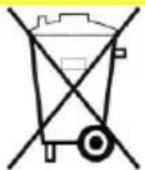
Do not use dispose this device and it's filters in the waste. Dispose of this device in accordance with local regulations.
10 Technical Data
| General | ||
| Power Supply Voltage | 230 V / 50 Hz | |
| Type of protection | IP 24 | |
| Type | Unit | AMH 100 |
| Fan air circulation amount | m3 / h | 1.600 |
| Power consumption | kW | 0,28 |
| Noise level | dB (A) | 63 |
| Dimensions H x W x D | mm | 420 / 390 / 580 |
| Weight | kg | 19 |
| Schlauchanschluss | DN 200 | Both Sides |
11 CE-Declaration Of Conformity
CE-Declaration of conformity
In the sense of the EG-Machinary Directive 2006/42/EG, Anh. II, 1.A
Machine Guidelines 2006/42/EG
EMV-Guideline 2004/108/EG
Low Voltage Guideline 2006/95/EG
The Product is a ready-to-connect air filter.
Applicable Standards:
EN ISO 12100
Safety of machinery
EN 61 000
Electromagnetic compatability (EMV)
EN 60 335-2-40
Safety of household and similar electrical appliances
The declaration of conformity loses it's validity if changes are made to the air filter which are not agreed upon with the manufacturer.
Norderstedt,12.12.2017
Ort, Datum
Unterschrift
Manfred Föhlisch
CE
Retailers Stamp:
AERIAL®
THE DRYING EXPERTS
Dantherm GmbH
Oststrasse 148 - D-22844 Norderstedt
Phone 0049 (0) 40 526 879 0 · Telefax 526 879 20
E-Mail: info.de@dantherm.com · Internet: www.aerial.de
- 1 TABLE OF CONTENTS
- 2 MANUAL GUIDE
- SYMBOLS
- TYPE AND SOURCE
- 3 SECURITY
- STAFF QUALIFICATIONS
- CONDITIONS OF USE
- 4 SPECIFICATIONS
- INTENDED USE
- INCLUDED COMPONENTS
- OPTIONAL COMPONENTS
- DEVICE DESCRIPTION
- 5 TRANSPORT AND INSTALLATION
- TRANSPORT
- DANGER TO LIFE THROUGH ELECTRIC SHOCK
- INJURY DUE TO CONSTRUCTION EQUIPMENT
- INSTALLATION
- 6 OPERATION OF USE
- EQUIPMENT DAMAGE
- CONTROLS AMH 100
- 7 MAINTENANCE AND CARE
- RISK OF INJURY FROM ELECTRICAL SHOCK AND POSSIBLE PROPERTY DAMAGE
- THERE IS A RISK OF INFECTION FROM CONTAMINATED FILTERS
- CLEANING AND FILTER REPLACEMENT
- PROCEED AS FOLLOWED
- SPARE PARTS AND SERVICE
- 8 TROUBLESHOOTING
- RISK OF ELECTRIC SHOCK AND POSSIBLE PROPERTY DAMAGE
- 9 DECOMMISSIONING, STORAGE AND DISPOSAL
- DECOMMISSIONING
- THERE IS A RISK OF INFECTION THROUGH CONTAMINATED FILTERS
- STORAGE
- DISPOSAL
- 10 TECHNICAL DATA
- 11 CE-DECLARATION OF CONFORMITY
- CE-DECLARATION OF CONFORMITY
- IN THE SENSE OF THE EG-MACHINARY DIRECTIVE 2006/42/EG, ANH. II, 1.A
- CE
- AERIAL®
Brand : Aerial
Model : AMH 100
Category : Air purifier