
FDME273-O - Switch BOSCH - Free user manual and instructions
Find the device manual for free FDME273-O BOSCH in PDF.


| Product Type | Radio Manual Call Point (Switch) – part of fire detection system |
| Model | FDME273-O (Switching Unit) for FDM273-O |
| Power Supply | Battery pack BAT3.6-10 (3.6 V, 10 Ah, lithium) |
| Alarm Activation | Type B (indirect activation) – press alarm button after breaking glass insert |
| Communication | Radio frequency: 433.05–434.79 MHz and 868–870 MHz |
| LED Indicator | Internal alarm indicator (IAI) with green/red flashing for status (alarm, fault, normal, test) |
| Operating Temperature | -10 °C to +55 °C |
| Storage Temperature | -30 °C to +75 °C |
| Protection Rating | IP44 (when installed) |
| Housing Material | Polycarbonate (PC), color flame red (RAL 3000) |
| Weight | Housing FDMH273-R: 0.279 kg; Switching unit FDME273-O: 0.098 kg |
| Standards | EN 54-11, EN 54-25, EN 300220-2, EN 301489-3, EN 60950 |
| Installation | Surface mounting on even surface at height 0.9–1.6 m |
| Battery Life | Service life as stated in normal operation; reduced in 'Battery low' mode |
| Test Mode | Set via control panel; alarms not forwarded during test |
| Reset After Alarm | Use locking lever to reset switching unit, replace glass insert |
| Glass Insert | Square, replaceable, fits any orientation |
| Accessories | Key DMZ1195, Protective cover DMZ1197-AC, Window sign, Battery pack BAT3.6-10 |
| Maintenance | Replace battery pack when 'Battery low' message appears; replace glass insert after activation |
| Safety | WARNING: Electrical voltage, battery explosion risk, cutting injuries from glass fragments |
Frequently Asked Questions - FDME273-O BOSCH
User questions about FDME273-O BOSCH
0 question about this device. Answer the ones you know or ask your own.
Ask a new question about this device
Download the instructions for your Switch in PDF format for free! Find your manual FDME273-O - BOSCH and take your electronic device back in hand. On this page are published all the documents necessary for the use of your device. FDME273-O by BOSCH.
USER MANUAL FDME273-O BOSCH
FDM273-O
Radio manual call point
Technical Manual
Legal notice
Technical specifications and availability subject to change without notice.
Transmittal, reproduction, dissemination and/or editing of this document as well as utilization of its contents and communication thereof to others without express authorization are prohibited. Offenders will be held liable for payment of damages. All rights created by patent grant or registration of a utility model or design patent are reserved.
Issued by:
Siemens Switzerland Ltd.
Building Technologies Division
International Headquarters
Gubelstrasse 22
CH-6301 Zug
Tel. +41 41 724-2424
www.siemens.com/buildingtechnologies
Edition: 2016-11-28
Table of contents
1 About this document....5
1.1 Applicable documents 7
1.2 Download center 8
1.3 Technical terms and abbreviations 8
1.4 History of changes 9
2 Safety 10
2.1 Safety instructions ....10
2.2 Safety regulations for the method of operation....12
2.3 Standards and directives complied with....14
2.4 Release Notes....14
3 Structure and function.... 15
3.1 Overview 15
3.1.1 Scope of delivery 16
3.1.2 Details for ordering 17
3.1.3 Product version ES 17
3.1.4 Power supply 18
3.2 Setup 19
3.2.1 Radio manual call point FDM273-O 19
3.3 Function 20
3.3.1 Danger levels 20
3.3.2 Internal alarm indicator 20
3.3.3 Test mode 22
3.3.4 Diagnosis levels 22
3.3.5 Interface to service devices 22
3.4 Accessories 23
3.4.1 Battery pack BAT3.6-10 23
3.4.2 Key DMZ1195 23
3.4.3 Glass insert DMZ1196-AC 23
3.4.4 Protective cover DMZ1197-AC 24
3.4.5 Window sign 24
4 Planning....25
4.1 Fields of application 25
4.2 Mounting site....25
4.3 Environmental influences....25
5 Mounting and installation....26
5.1 Preparation....26
5.2 Installing the housing....27
5.3 Installation....28
5.4 Installing the protective cover ....30
5.5 Inserting the door sign 31
6 Commissioning....32
6.1 Performance check 32
6.2 Localization and device testing 33
7 Maintenance / Repair ....34
7.1 After alarm activation 34
7.2 Establishing factory settings 35
7.3 Replacing the glass insert 36
7.4 Basic principles for replacing the battery pack 37
7.5 Replacing the battery pack in the radio manual call point 38
8 Specifications....40
8.1 Technical data 40
8.2 Dimensions 42
8.3 Master gauge for recesses.... 42
8.4 Environmental compatibility and disposal 43
Glossary 44
Index 45
About this document
Applicable documents
1 About this document
Goal and purpose
This document contains information on the radio manual call point FDM273-O. Following the instructions consistently will ensure that the product can be used safely and without any problems.
Intended use
The radio manual call point FDM273-O may only be used in a fire detection system with a radio gateway approved by the manufacturer. The radio manual call point FDM273-O is compatible with the radio module FDRF272-O.
Target groups
The information in this document is intended for the following target groups:
| Target group | Activity | Qualification |
| Product Manager | Is responsible for information passing between the manufacturer and regional company.Coordinates the flow of information between the individual groups of people involved in a project. | Has obtained suitable specialist training for the function and for the products.Has attended the training courses for Product Managers. |
| Project Manager | Coordinates the deployment of all persons and resources involved in the project according to schedule.Provides the information required to run the project. | Has obtained suitable specialist training for the function and for the products.Has attended the training courses for Project Managers. |
| Project engineer | Sets parameters for product depending on specific national and/or customer requirements.Checks operability and approves the product for commissioning at the place of installation. | Has obtained suitable specialist training for the function and for the products.Has attended the training courses for Product Engineer. |
Document identification
The document ID is structured as follows:
A6Vxxxxxxxx_aaAA_vv
A6Vxxxxxxxxx__--AA_vv
A6Vxxxxxxxxx_aa--_vv
A6Vxxxxxxxxx_----_vv
| ID code1 | Description |
| A6Vxxxxxxx | STEP-ID generated by the STEP system |
| _Separator | |
| aa Language abbreviation in accordance with ISO 639-1 | |
| AA Country abbreviation in accordance with ISO-3166-1 | |
| -- Multilingual or international | |
| vv | Document version, single or double digit: a, b, ...z; aa, ab, ...az; ba, bb, ...bz; etc. |
1 Some documents have different ID codes that are generated by an earlier system. There are also documents with up-to-date ID codes along with additional features in the designation.
| ID code Examples | |
| ID_languageCOUNTRY_version-- = multilingual or international | A6V10215123_deDE_aA6V10215123_en--_aA6V10315123-----_a |
Date format
The date format in the document corresponds to the recommendation of international standard ISO 8601 (format YYYY-MM-DD).
Conventions for text marking
Markups
Special markups are shown in this document as follows:
| ▷ | Requirement for a behavior instruction |
| 1.2. | Behavior instruction with at least two operation sequences |
| - | Version, option, or detailed information for a behavior instruction |
| <> | Intermediate result of a behavior instruction |
| <> | End result of a behavior instruction |
| • | Numbered lists and behavior instructions with an operation sequence |
| [→ X] | Reference to a page number |
| 'Text' | Quotation, reproduced identically |
| Identification of keys | |
| > | Relation sign and for identification between steps in a sequence,e.g., 'Menu bar' > 'Help' > 'Help topics' |
| ↑ Text | Identification of a glossary entry |
Supplementary information and tips
i
The 7 symbol identifies supplementary information and tips for an easier way of working.
1.1 Applicable documents
| Document ID | Title |
1.2 Download center
You can download various types of documents, such as data sheets, installation instructions, and license texts via the following Internet address:
http://siemens.com/bt/download
- Enter the document ID in the 'Find by keyword' input box.

You will also find information about search variants and links to mobile applications (apps) for various systems on the home page.
1.3 Technical terms and abbreviations
| Term Explanation | |
| AI Alarm indicator | |
| Battery empty Fault message in the event of a battery failing completely | |
| Battery low Fault message in the event that the spare battery is activated | |
| IAI Internal alarm indicator | |
| LED Light-emitting diode | |
1.4 History of changes
The version of the reference document applies to all languages into which it is translated.
The first edition of a language version or a country variant may, for example, be version 'd' instead of 'a' if the reference document is already this version.
The table below shows this document's revision history:
| Modification Index | Edition date | Brief description |
| f | 2016-11-28 | Frequencies specified in 'Technical data' chapter |
| e | 2016-09-30 | Editorial changes |
| d | 2015-10-15 | Changes/additions in the following chapters:Graphic changed in 'Radio manual call point FDM273-O' chapterReplacing the battery pack in the radio manual call pointTechnical data |
| c | 2015-07-07 | New door on the manual call point taken into account"Replacing the glass insert" chapter adapted |
| b | 2015-04-01 | Flashing behavior table addedEditorial changes |
| a | 2014-05-01 | First edition |
The language versions and country variants produced by a local company have the same modification index as the corresponding reference document. They are not, however, included in the table below.
The table below shows the published language versions and country variants with the corresponding modification index.
2 Safety
2.1 Safety instructions
The safety notices must be observed in order to protect people and property.
The safety notices in this document contain the following elements:
• Symbol for danger - Signal word • Nature and origin of the danger • Consequences if the danger occurs • Measures or prohibitions for danger avoidance
Symbol for danger

This is the symbol for danger. It warns of risks of injury.
Follow all measures identified by this symbol to avoid injury or death.
Additional danger symbols
These symbols indicate general dangers, the type of danger or possible consequences, measures and prohibitions, examples of which are shown in the following table:

General danger

Voltage/electric shock

Battery

Explosive atmosphere

Laser light

Heat
Signal word
The signal word classifies the danger as defined in the following table:
Safety
Safety instructions
2
How risk of injury is presented
Information about the risk of injury is shown as follows:

WARNING
Nature and origin of the danger
Consequences if the danger occurs
• Measures / prohibitions for danger avoidance
How possible damage to property is presented
Information about possible damage to property is shown as follows:
!
NOTICE
Nature and origin of the danger
Consequences if the danger occurs
• Measures / prohibitions for danger avoidance
2.2 Safety regulations for the method of operation
National standards, regulations and legislation
Siemens products are developed and produced in compliance with the relevant European and international safety standards. Should additional national or local safety standards or legislation concerning the planning, mounting, installation, operation or disposal of the product apply at the place of operation, then these must also be taken into account together with the safety regulations in the product documentation.
Electrical Installations

WARNING
Electrical voltage
Electric shock
- Work on electrical installations may only be carried out by qualified electricians or by instructed persons working under the guidance and supervision of a qualified electrician, in accordance with the electrotechnical regulations.
- Wherever possible, disconnect products from the power supply when carrying out commissioning, maintenance, or repair work on them.
- Lock volt-free areas to prevent them from being switched back on again by mistake.
- Label the connection terminals with external voltage using a 'DANGER External voltage' sign.
- Route mains connections to products separately and fuse them with their own, clearly marked fuse.
- Fit an easily accessible disconnecting device in accordance with IEC 60950-1 outside the installation. • Produce earthing as stated in local safety regulations.
Mounting, installation, commissioning, and maintenance
- If you require tools such as a ladder, these must be safe and must be intended for the work in hand.
- When starting the fire control panel, ensure that unstable conditions cannot arise.
- Ensure that all points listed in the 'Testing the product operability' section below are observed.
- You may only set controls to normal function when the product operability has been completely tested and the system has been handed over to the customer.
Testing the product operability
- Prevent the remote transmission from triggering erroneously.
- If testing building installations or activating devices from third-party companies, you must collaborate with the people appointed.
- The activation of fire control installations for test purposes must not cause injury to anyone or damage to the building installations. The following instructions must be observed:
- Use the correct potential for activation; this is generally the potential of the building installation.
- Only check controls up to the interface (relay with blocking option).
- Make sure that only the controls to be tested are activated.
- Inform people before testing the alarm devices and allow for possible panic responses. Inform people about any noise or mist which may be produced.
- Before testing the remote transmission, inform the corresponding alarm and fault signal receiving stations.
Modifications to the system design and the products
Modifications to the system and to individual products may lead to faults, malfunctioning and safety risks. Written confirmation must be obtained from Siemens and the corresponding safety bodies for modifications or additions.
Modules and spare parts
2.3 Standards and directives complied with
A list of the standards and directives complied with is available from your Siemens contact.
2.4 Release Notes
Limitations to the configuration or use of devices in a fire detection installation with a particular firmware version are possible.

WARNING
Limited or non-existent fire detection
Personal injury and damage to property in the event of a fire.
- Read the 'Release Notes' before you plan and/or configure a fire detection installation.
- Read the 'Release Notes' before you carry out a firmware update to a fire detection installation.

NOTICE
Incorrect planning and/or configuration
Important standards and specifications are not satisfied.
Fire detection installation is not accepted for commissioning.
Additional expense resulting from necessary new planning and/or configuration.
- Read the 'Release Notes' before you plan and/or configure a fire detection installation.
- Read the 'Release Notes' before you carry out a firmware update to a fire detection installation.
3 Structure and function
3.1 Overview
The FDM273-O radio manual call point is intended for use in areas of a house where a fire can be detected by people who can manually trigger an alarm. The FDM273-O radio manual call point consists of a housing, a switching unit, and a battery pack. The radio manual call point FDM273-O has the following features:
• Radio communication with: - Radio gateway - Other radio devices • Individual detector addressing • Alarm indicator with status display (green and red): - Identifies alarm - Confirms contact with the radio network - Confirms detector test - Battery operation - Indirect activation via alarm button - Locking lever for resetting after an alarm - Glass insert • Surface mounting • Door with key and keyhole cover
Radio manual call point FDM273-O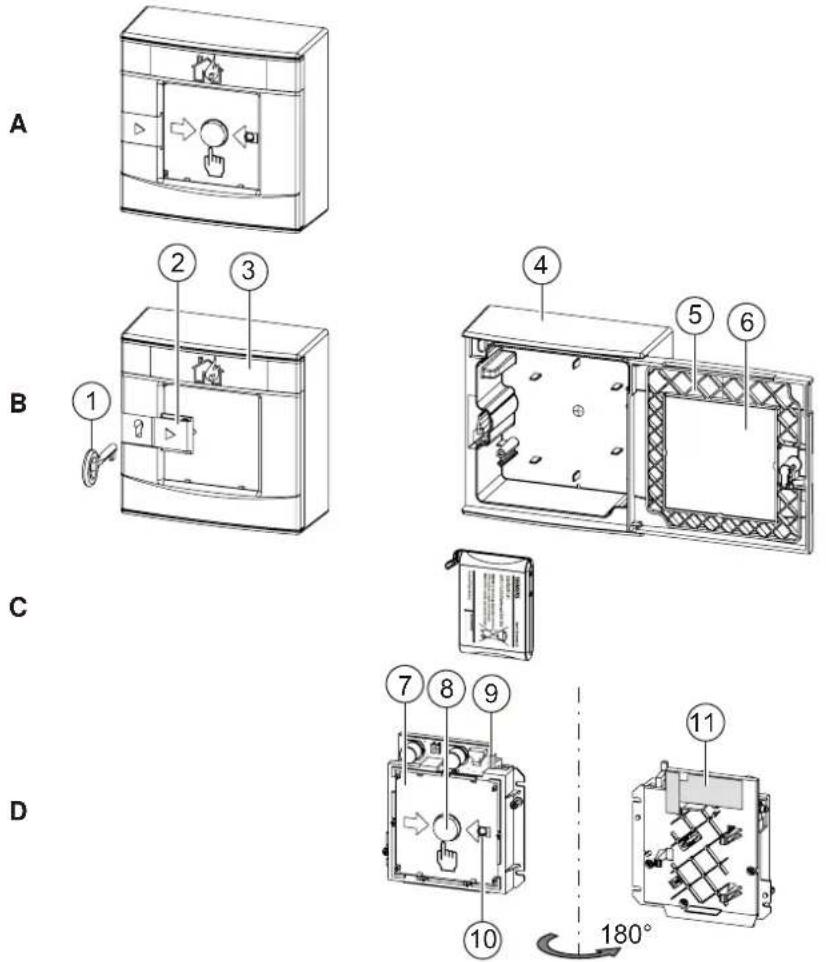
Figure 1: Overview: Radio manual call point FDM273-O
A Ready-to-use radio manual call point
B Housing FDMH273-R
1 Key 4 Back box 2 Keyhole cover 5 Door 3 Door sign and transparent cover 6 Glass insert
C Battery pack BAT3.6-10
D Switching unit FDME273-O
7 Window sign 10 Alarm indicator 8 Alarm button 11 Type plate and adhesive label with serial number 9 Locking lever
3.1.1 Scope of delivery
The radio manual call point FDM273-O is made up of three separate orders:
- Housing FDMH273-R
- Switching unit FDME273-O
- Battery pack BAT3.6-10
3.1.2 Details for ordering
| Type | Order number | Designation |
| FDME273-O | S54323-B311-A1 | Switching unit for FDM273-O for indirect activation |
| FDMH273-R | S54323-B109-A1 | Red housing, with glass insert and key |
| BAT3.6-10 | S54370-Z11-A1 | Battery pack |
3.1.3 Product version ES
The product version ES provides the technical status of a device in terms of software and hardware. The product version is provided as a two-digit number. You will find the details of your device's product version:
• On the packaging label - On the product label or the type plate
Product version on the packaging label
Details of the product version can be found directly on the packaging label in the barcode:
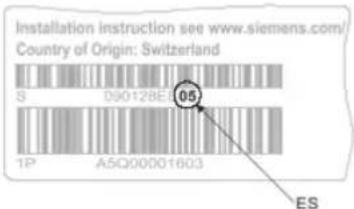
Figure 2: Example of a packaging label with details of the product version
3.1.4 Power supply
The battery pack BAT3.6-10 supplies the radio devices with power. The battery pack consists of lithium batteries plus a battery cable and a battery connector.
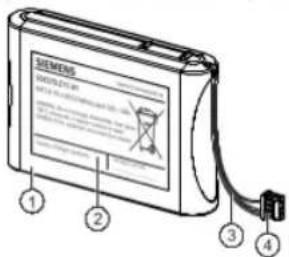
Figure 4: Battery pack BAT3.6-10
1 Battery pack consisting of: • 4 lithium batteries for normal operation • 1 lithium battery as a spare in the case of 'Battery low' operation 2 Label with area for filling in the commissioning date 3 Battery cable 4 Battery connector with protection against polarity reversal
• In normal operation: Can be used for the service life stated • In 'Battery low' operation: subject to reduced operating life - Connections cannot be reversed thanks to battery connector with protection against polarity reversal
3.2 Setup
3.2.1 Radio manual call point FDM273-O
The radio manual call point FDM273-O triggers an alarm when the glass insert is pushed in and the alarm button is pressed. This corresponds to 'Type B - Indirect activation' according to EN 54-11. The alarm is immediately transmitted to the control panel.

To reset the radio manual call point FDM273-O after an alarm, the switching unit must be reset with the locking lever and a new glass insert must be inserted.
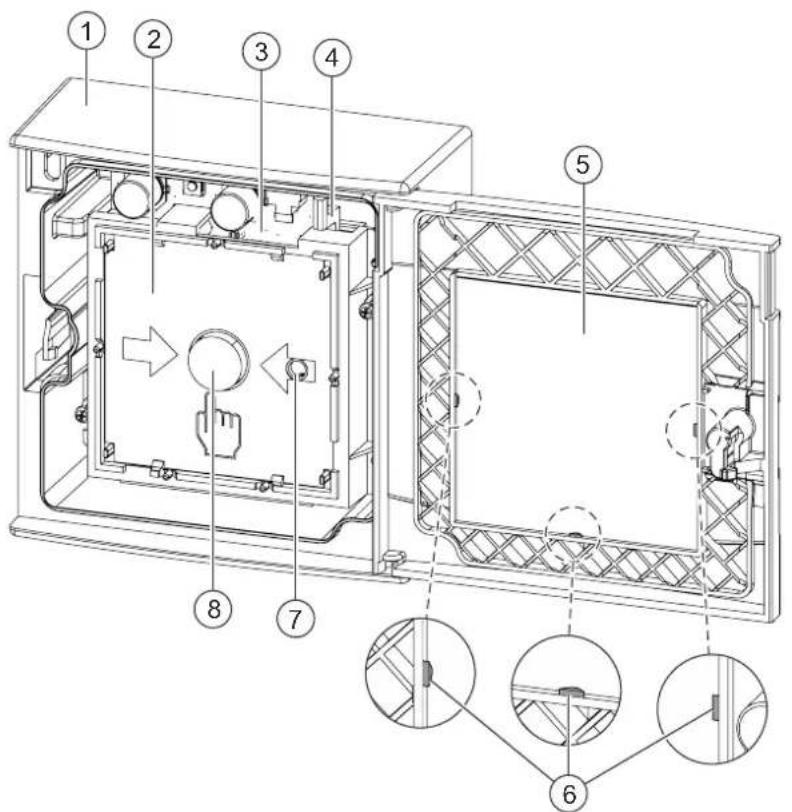
Figure 5: Manual call point FDM273-O with open door
1 Back box 5 Glass insert 2 Switching unit 6 Guides and retainers for glass insert 3 Battery pack 7 Internal alarm indicator 4 Locking lever 8 Alarm button
3.3 Function
3.3.1 Danger levels
The radio manual call point can transmit the following danger levels to the control panel:
| Danger level Meaning | |
| 0 Normal state, no danger | |
| 3 Alarm |
The evaluation of the danger level and the resulting measures (e.g. activation of remote transmission) are configured on the control panel.
3.3.2 Internal alarm indicator
The internal alarm indicator's LED has two colors and shows the operating condition of the radio manual call point.
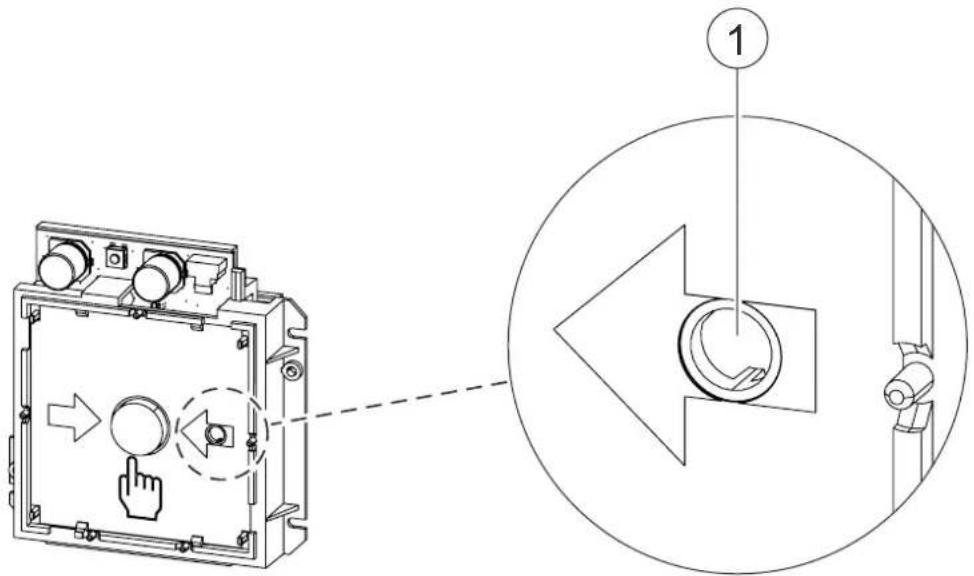
1 Internal alarm indicator
The table below describes the flashing behavior of the internal alarm indicator in the radio manual call point FDM273-O:

Several flashing patterns are available for normal operation. The flashing pattern is selected using the panel configuration program.
| Operating condition Flashing | mode | Graphic | |
| Alarm | IAI flashes red once a second |  | |
| Alarm in test mode | IAI flashes green twice every four seconds and red every second in-between |  | |
| Fault There is an error. | IAI flashes red four times every second |  | |
| Commissioning | The radio manual call point has not yet been logged on to a radio gatewayAndThe switching unit of the radio manual call point is not mounted in the housing.AndThere is no contact with the radio network. | IAI flashes red once every two seconds |  |
| The radio manual call point has already been logged on to a radio gatewayAndThe switching unit of the radio manual call point is not mounted in the housing.AndThere is no contact with the radio network. | IAI flashes green once every two seconds |  | |
| The switching unit of the radio manual call point is mounted in the housing but has not yet been logged on to the radio network. | IAI flashes green twice every two seconds |  | |
| Normal Configuration 1 | IAI flashes green once every 30 s |  | |
 | |||
| Operating condition | Flashing mode | Graphic |
| Test | IAI flashes green twice every four seconds |  |
| New battery | IAI lights up once for five seconds |  |
| Battery is flat | IAI off |  |

Several operating conditions may be indicated at the same time. This may lead to the flashing patterns overlapping one another. The red LED indicator has priority over the green LED indicator.
Flashing patterns with a higher frequency will overlap those with a lower frequency, which means that the latter may no longer be discernible.

Not all fire control panels support the flashing patterns described.
Please also observe the documentation for your fire detection system.
3.3.3 Test mode
A test mode can be set on the control panel to test the radio manual call points. When in test mode, alarms from the radio manual call points are not forwarded by the control panel.
3.3.4 Diagnosis levels
The radio manual call point continuously monitors its own function.
3.4 Accessories
3.4.1 Battery pack BAT3.6-10
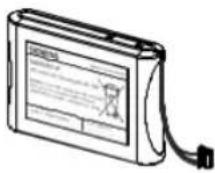
- For supplying radio devices and the radio gateway with power • Lithium batteries
- BAT3.6-10 LI-SOCI2 battery pack 3.6 V, 10 Ah • Batteries with battery cable
- Connector system with protection against polarity reversal • Inscription field for commissioning date
- Compatible with:
- Radio manual call point FDM273-0
- Radio manual call point FDM275-O
- Radio fire detector FDOOT271-0 • Order number: S54370-Z11-A1
3.4.2 Key DMZ1195
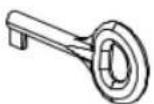
• For opening doors on manual call points
- Compatible with:
– Radio manual call point FDM273-0
• Order number: BPZ:4851910001
3.4.4 Protective cover DMZ1197-AC
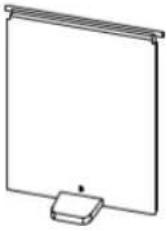
- For protection against unintended alarm activation
- Compatible with:
- Radio manual call point FDM273-0 • Order number: BPZ:5223550001
3.4.5 Window sign

Feuerwehr
Brandmelder
• For inserting in manual call point • Printed on both sides: - Front: 'Fire brigade' - Back: 'Fire detector' • Only for Germany - Compatible with: - Manual call point FDM273-0 • Order number: BPZ:5304150001
4 Planning
4.1 Fields of application
The radio manual call points are intended for use in places where a fire can be detected by people who can manually trigger an alarm.
4.2 Mounting site
The radio manual call points must be mounted in easily accessible places at a height of 0.9...1.6 m on an even surface.
i
Observe the country-specific regulations for the exact mounting height!
4.3 Environmental influences
If the devices are used in industrial applications, consultation with the project manager is required, since plastics do not withstand certain environmental conditions.
The following factors must be taken into consideration:
- Chemicals
- Temperature
- Moisture
5 Mounting and installation
5.1 Preparation

Secure the housing at a height of 0.9...1.6 m on an even surface. Observe the country-specific regulations for the exact mounting height!
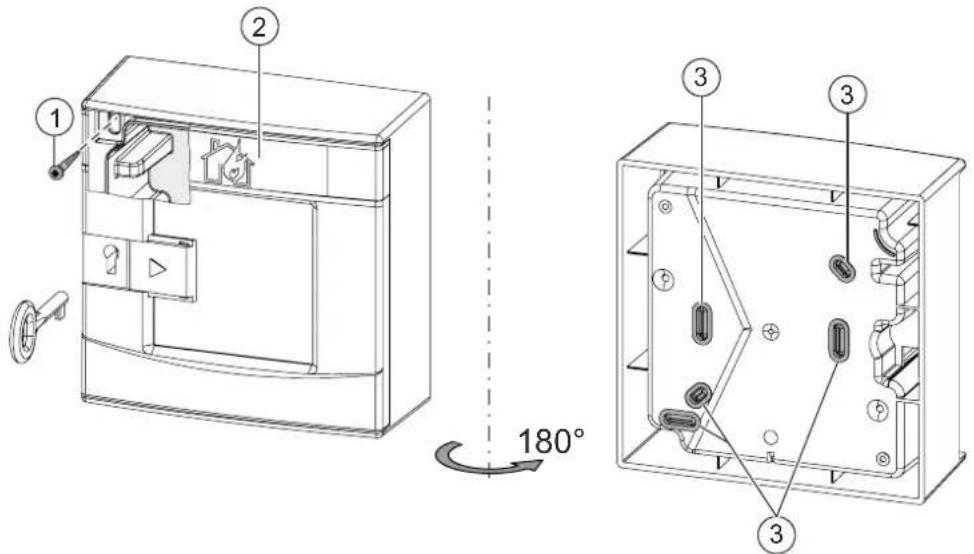
Figure 6: Opening the housing and identifying the screw holes
1 Screw opening 3 Break-out points
2 Door sign
The position of the radio manual call point has been established. ▷ You have the housing, switching unit, and battery pack to hand. ▷ You have a tool and two screws for securing purposes. The screws have a ∅ 2.5...3 mm shaft and a ∅ >8 mm head surface.
- Push the keyhole cover to the right.
- Open the door with the key supplied.
- NOTICE! Keep the key in a safe place.
- Push the keyhole cover back into place.
- For securing purposes, select two screw positions that are spaced far apart from one another. Use screw position (1) if possible. There are additional securing points in the back box.
- Working from the rear of the housing, break out an appropriate screw hole at one of the marked break-out points (3) in the back box.
- Replace the window sign (2) if necessary.
→ The housing is now ready for installation.
5.2 Installing the housing
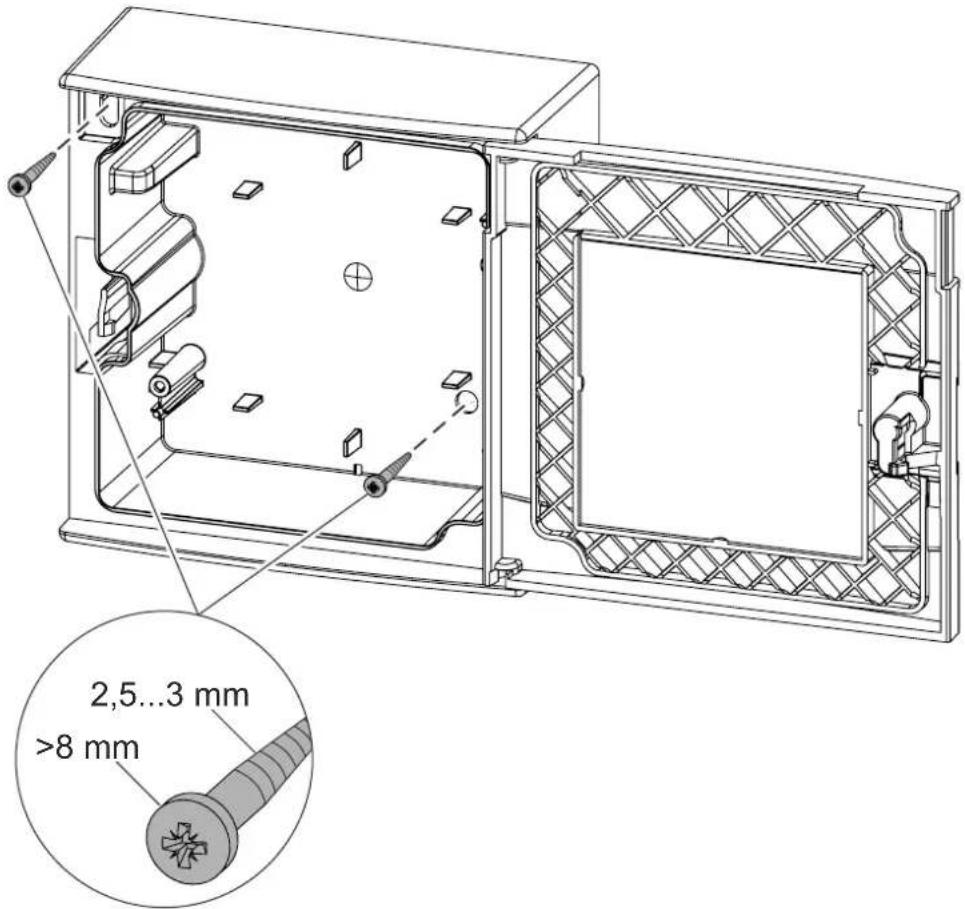
Figure 7: Example of securing onto the substructure using two screws
The housing is ready for mounting. See the chapter 'Preparation'. - Screw the housing securely onto the substructure using two screws. → The housing has been installed.
5.3 Installation
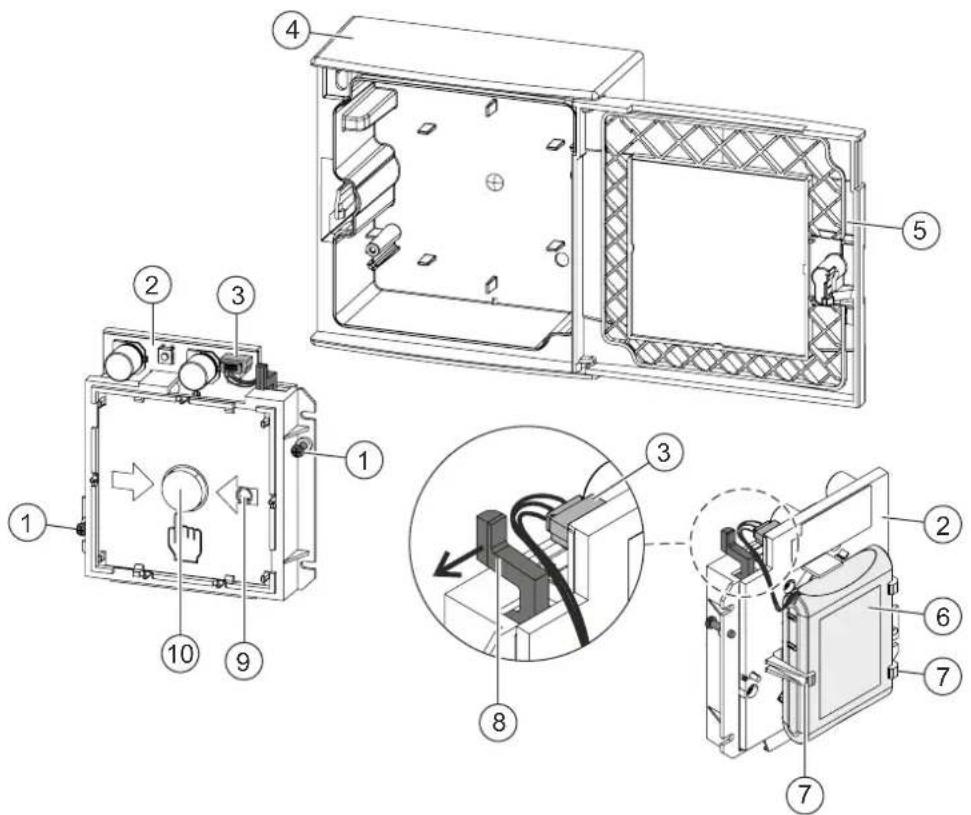
1 Screws 6 Battery pack BAT3.6-10 2 Switching unit FDME273 7 Holders 3 Battery connector 8 Locking lever 4 Housing FDMH273-R 9 Internal alarm indicator 5 Door 10 Alarm button
1 Not included in the scope of delivery

The flashing behavior of the internal alarm indicator is described in document A6V10425645 in the 'Internal alarm indicator' chapter.
The housing has been installed. The radio gateway has been activated and switched to maintenance mode. The battery pack and switching unit are available. The switching unit is set to the factory settings. The door (5) is open. The alarm button (10) on the switching unit (2) has not been pressed and is protruding by about 5 mm.
- If the alarm button has been pressed, push the black locking lever (8) in the direction of the arrow until it clicks.
The alarm button is now protruding by approx. 5 mm.
- Remove the adhesive label with the serial number from the type plate on the switching unit. Use the adhesive label to mark the position of the radio manual call point FDM273-O on the device location plan.
- Turn over the window sign if necessary, or use a different one.
- Label the battery pack (6) with the current date.
- Lay the connection cable and connect the battery connector (3).
When the battery connector is connected, the internal alarm indicator (9) lights up red for five seconds.
After a further 10 seconds, the radio manual call point signals that it is not mounted in the housing, and the internal alarm indicator flashes every two seconds:
- If it flashes red, this indicates the factory settings.
- If it flashes green, this indicates that the radio manual call point has already been logged on to a radio gateway.
If this does not happen, this means the battery pack is defective and must not be used.
- Insert the battery pack into the switching unit FDME273-O so that it snaps into place in the holders (7).
- Insert the switching unit with the battery pack into the housing, paying attention to the position of the battery cable.
- Connect the switching unit securely to the housing using two screws (1).
The internal alarm indicator flashes green and the radio manual call point is logged on to the radio gateway.
If the process of logging on to the radio gateway is successful, the internal alarm indicator stops flashing.
- If the logon process has not been successful after a long period of time, briefly remove the switching unit from the housing and then re-insert it.
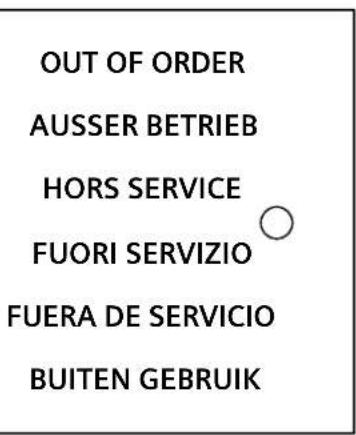
Figure 8: 'NOT IN USE' label
5.4 Installing the protective cover
If a protective cover (accessories) is used, proceed as follows:
A compatible protective cover is available. See the chapter 'Accessories'.
- Open the door of the manual call point.
- Remove the glass insert. See the chapter 'Replacing the glass insert'.
- Guide the protective cover (1) through the opening in the door from the front, as shown in the diagram.
- Insert the pivot pins (2) for the protective cover (1) in the two recesses on the rear side of the door, as shown in the diagram.
- Install the glass insert. See the chapter 'Replacing the glass insert'.
- Close the door of the manual call point. → The protective cover is inserted.
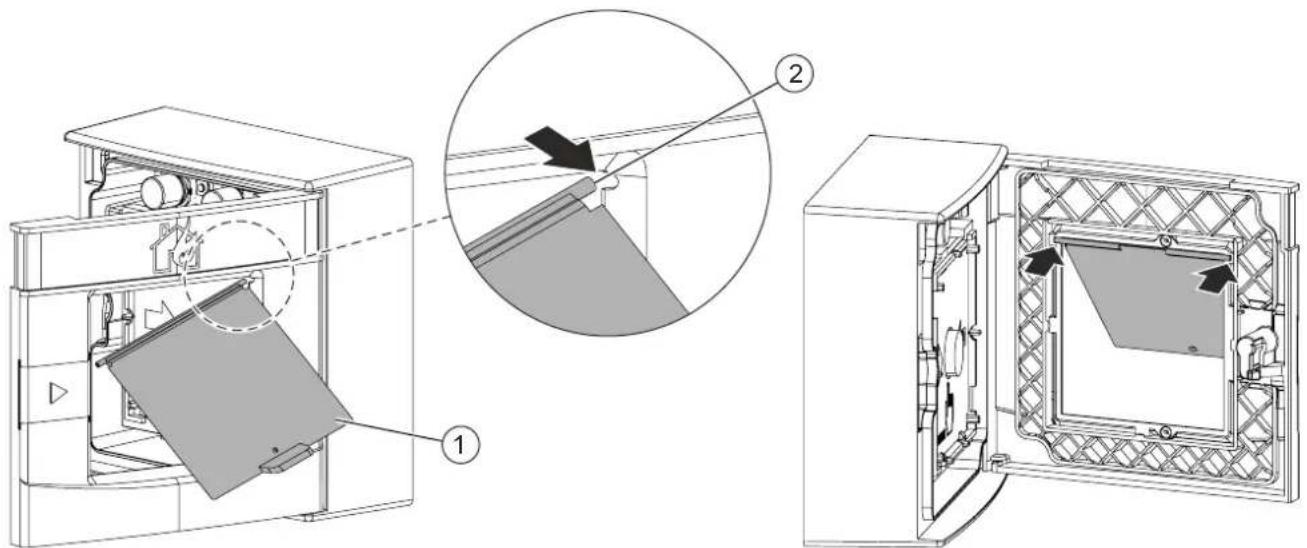
Figure 9: Example of installing protective cover DMZ1197-AC on a manual call point
1 Protective cover DMZ1197-AC 2 Pivot pin
5.5 Inserting the door sign

Only use the door sign if local regulations require the manual call point to be labeled in this way.
The appropriate door sign (printed on both sides) is available.
- Open the door and lift the transparent cover to the side.
- Insert the door sign so the desired side is displayed.
- Attach the transparent cover so that it snaps into place at the side. → The manual call point has a new label.
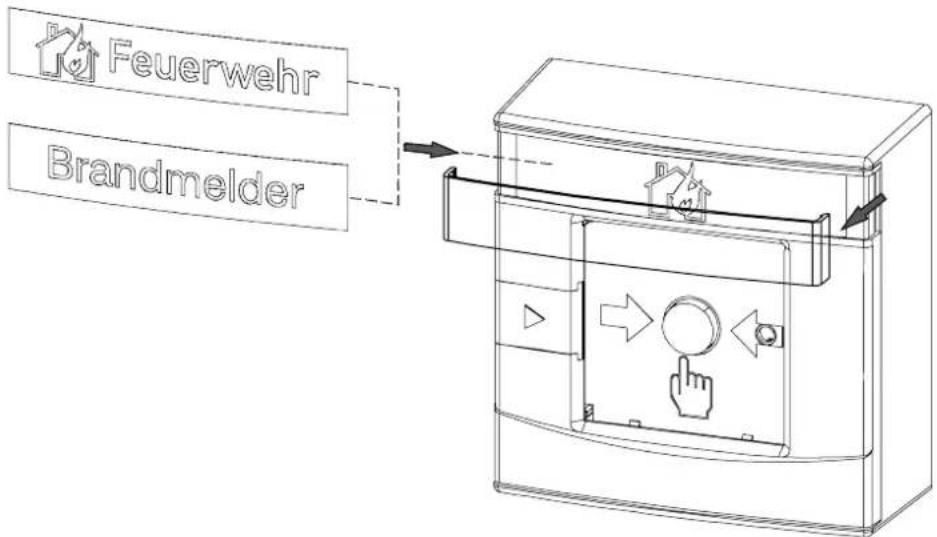
Figure 10: Mounting the door sign
6 Commissioning
When the battery connector is connected, the radio manual call point FDM273-O is activated. Once the switching unit is screwed onto the housing, the radio manual call point automatically looks for radio devices within range in the vicinity and automatically integrates itself into the radio network.
i
Insert the battery packs into the devices at the location where they are going to be used just before commissioning the fire detection installation.
The device is commissioned via the control panel. The exact procedure is described in the control panel documentation.
Conduct a performance check once commissioning is complete.
See also the following documents for more information:
• Document A6V10425603
See also
Applicable documents [→ 7]
6.1 Performance check
The radio manual call point has been installed and electrically connected.
- Set the detector line to 'Test' on the control panel.
The internal alarm indicator flashes green.
- Push the keyhole cover to the right.
- Open the door of the radio manual call point with the key.
- Remove the key and close the keyhole cover.
- Press the alarm button.
The alarm signal is transmitted.
Commissioning
Localization and device testing
6
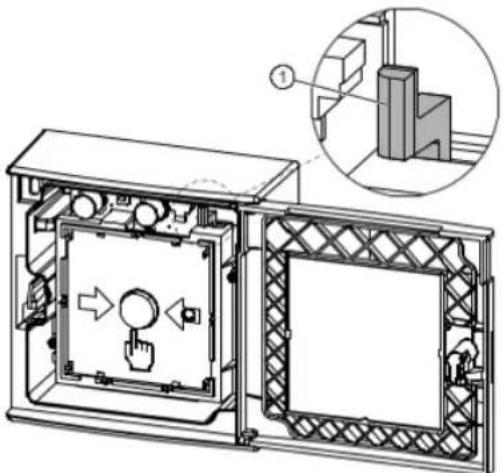
Figure 11: Function test
1 Locking lever
See also
Internal alarm indicator [→ 20]
6.2 Localization and device testing
7 Maintenance / Repair
7.1 After alarm activation

CAUTION
Risk of cutting injuries when removing the glass fragments Remove the glass fragments carefully
The glass insert has been shattered and the alarm button is pressed.
- Set the detector line to 'Test' on the control panel.
- Push the keyhole cover to the right.
- Open the door of the radio manual call point with the key.
- Remove the key and push the keyhole cover back in place.
- Remove any glass fragments that are present.
- Insert a new glass insert.
- Push the locking lever (1) to the right until it clicks.
→ The alarm button is now protruding by approx. 5 mm.
- Close the door.
- Set the detector line to 'Normal operation' on the control panel. → The detector line is ready for operation again.
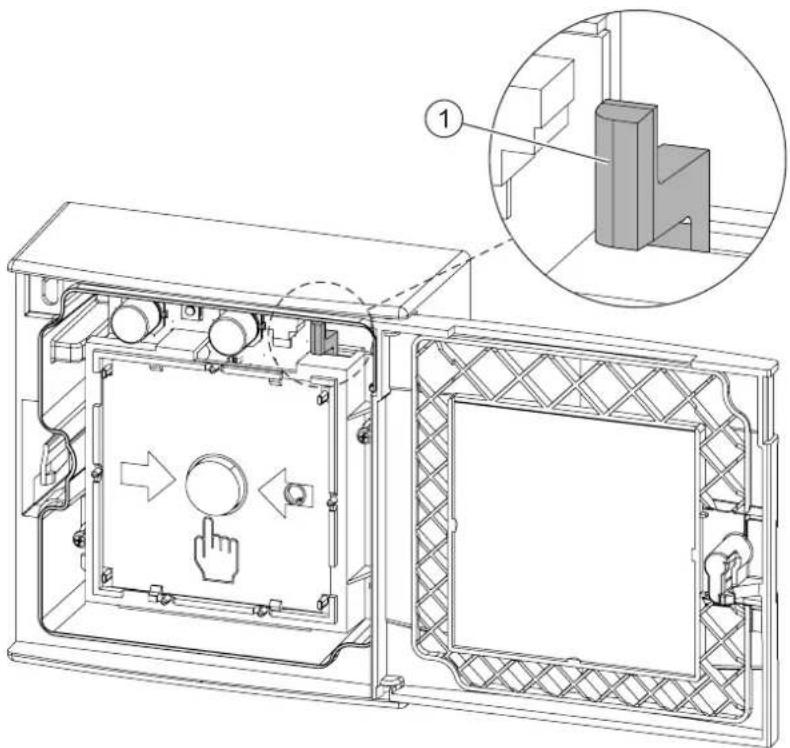
Figure 12: Function test
1 Locking lever
7.2 Establishing factory settings
All existing settings are deleted and reset to the factory settings. The radio manual call point can only be integrated into a radio cell as a new device if it is set to its factory settings.
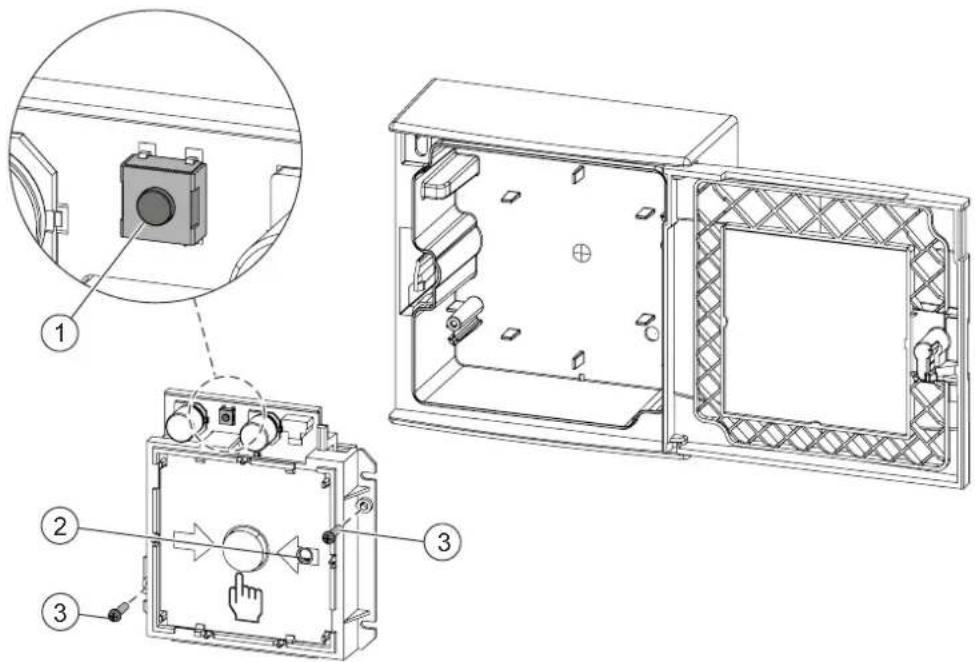
Figure 13: Establishing factory settings
1 'new' button 3 Screws 2 Internal alarm indicator
The battery pack is connected.
- Open the door.
- Loosen the two screws (3).
- Remove the switching unit with the connected battery pack. → The internal alarm indicator (2) flashes green.
- Press and hold the 'new' button (1) for around five seconds until the internal alarm indicator (2) flashes red (interval: 2 seconds).
- Screw the switching unit into the housing.
- Close the door. → The radio manual call point is set to the factory settings.
7.3 Replacing the glass insert
The glass insert is square-shaped and can be inserted in any direction.
 | CAUTION |
| Risk of cutting injuries when removing the glass fragmentsRemove the glass fragments carefully |
To replace the glass insert, proceed as follows:
The door of the radio manual call point is open. See the chapter 'Preparation'.
- Remove all the remains of the old glass insert.
- Insert the new glass insert between the guides (1) and slide it down as far as the stop behind the retainer (2).
- You may need to manipulate the glass insert slightly before it will slide into the retainer (2). ⇒ The glass is fitted in the door.
- Check the function of the manual call point.
- Close the door. → The glass insert has been replaced.
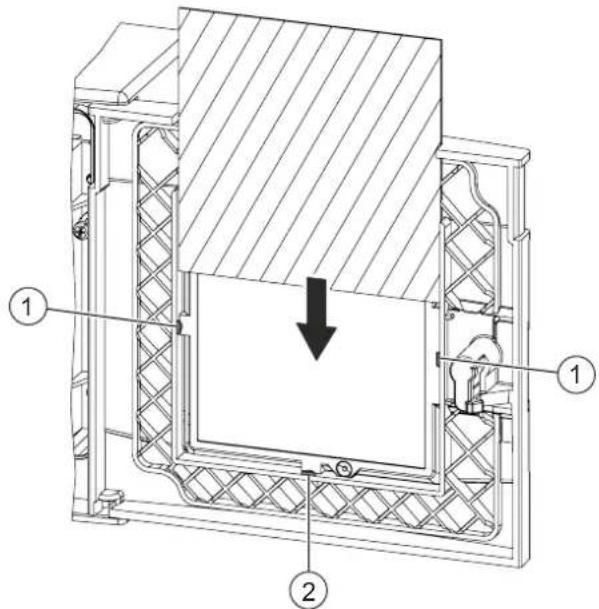
Figure 14: Replacing the glass insert
1 Guides 2 Retainer
7.4 Basic principles for replacing the battery pack

WARNING
Risk of explosion due to fire or short-circuit, even if the battery pack is discharged. Injuries caused by flying parts.
- To prevent the connection wires from short-circuiting, insulate the connections and stick the battery cable to the battery pack.
- Do not allow the battery pack to come into contact with water. Do not extinguish a burning battery pack with water. Do not recharge the battery pack. Do not damage or dismantle the battery pack. Do not heat the battery pack to more than 100 °C.

WARNING
Disposing of damaged or leaky battery packs
Lithium can burn the skin and produce toxic vapors.
- Avoid direct contact with the body. Wear appropriate protective clothing (safety gloves, safety goggles, etc.). Use appropriate means of transportation to move damaged batteries around.
- Do not breathe in vapors. Ensure that there is sufficient ventilation.
Always observe the following information:
- When the control panel issues the message 'Battery low', replace the battery pack. Use the control panel to identify the location of the radio device. Only use battery pack BAT3.6-10.
- The battery pack must be new and free from damage. The battery cable is attached to the battery pack with an additional label.
7.5 Replacing the battery pack in the radio manual call point
- Do not interrupt the power supply for longer than 2 minutes.
- Do not interrupt the power supply to multiple radio devices simultaneously. Replace the battery pack for one radio device as described below before replacing the battery pack for the next radio device. This will prevent mix-ups and will ensure the devices can be reintegrated into the radio cell without any problems.
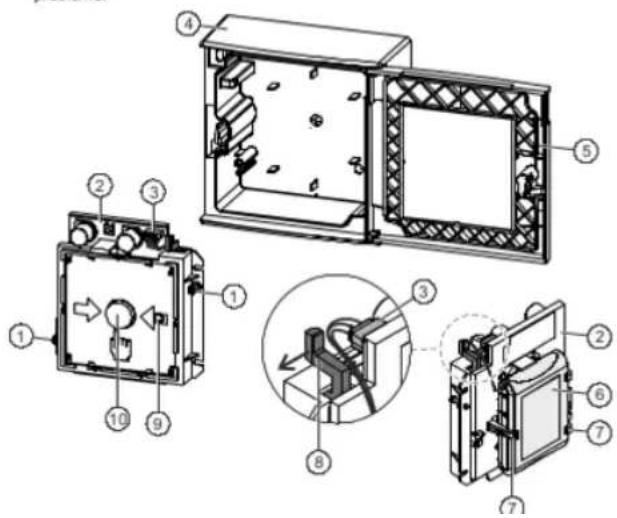
- Remove the old battery pack.
- Release the battery connector (3). – Dispose of the old battery pack.
- Label the new battery pack with the current date.
- Lay the connection cable according to the diagram and connect the battery connector (3).
→ The alarm indicator lights up red for 5 seconds. ⇒ After a further 10 seconds, the radio manual call point signals that it is not mounted in the housing, and the alarm indicator flashes. If this does not happen, this means the battery pack is defective and must not be used.
- Insert the new battery pack into the switching unit FDME273-O so that it snaps into place in the holders (7).
- Insert the switching unit with the battery pack into the housing and screw it tightly in place manually. Make sure that the switching unit is fixed securely in the housing.
- If the alarm button (10) has been pressed accidentally, push the black locking lever (8) in the direction of the arrow until it clicks.
→ The alarm button is now protruding by approx. 5 mm.
- Close the door. The alarm indicator on the radio gateway flashes green and the radio manual call point is logged on to the radio gateway.
- Wait until it has finished being logged on to the radio gateway.
If the process of being logged on to the radio gateway is successful, the alarm indicator stops flashing.
- If necessary, replace the batteries for the next radio device within the radio cell.
- Check whether all the radio devices are logged on.
- Check the status display on the radio gateway or the 'Device localization error' display on the control panel, or ensure that the internal alarm indicator is not flashing on any of the radio devices.
- If there is a 'Device localization error' message on the radio gateway or the fire control panel, the radio manual call point will need to be assigned again. Assign the radio manual call point with Confirming the detector position. → The battery pack has now been replaced.
8 Specifications
8.1 Technical data
You will find information on approvals, CE marking, and the relevant EU directives for this device (these devices) in the following document(s); see 'Applicable documents' chapter:
- Document A6V10431682
Device characteristics
| Detector diagnosis | With Wireless diagnostic tool or connected fire control panel |
| Type of alarm activation | Type B (indirect activation) |
| Sending/receiving aerials | Dual band aerial |
| Frequency range | 433.05...434.79 MHz in band 44b and 45b1868...870 MHz in band 48, 49, 50, 54b, and 56b1 |
| Channel grid | 50 kHz |
| Number of channels | 27 in 868-MHz band20 in 433-MHz band |
| Transmitting power | ≤10 mW ERP in band 44b, 45b, and 491Type 10 (max, ≤25) mW ERP in band 48, 50, 54b, and 56b1 |
| Range | See document A6V10425603 |
2013/752/EU: according Official Journal of the European Union, COMMISSION IMPLEMENTING DECISION of 11 December 2013 amending Decision 2006/771/EC on harmonisation of the radio spectrum for use by short-range devices and repealing Decision 2005/928/EC (notified under document C(2013) 8776) (Text with EEA relevance)
Delivery
Lithium battery pack BATSS 1011000N battery pack 2.5V
Specifications
Technical data
8
Ambient conditions
Place of installation Indoors
Operating temperature -10...+55 °C
Storage temperature -30...+75°C
Air humidity ≤95 % rel.
Protection categories according to EN 60529 / IEC 60529:
• FDM273-O IP44 Housing FDMH273-R
Electromagnetic compatibility:
- 10 kHz...100 kHz 160 V/m - 100 kHz...2.5 GHz 30 V/m
Mechanical data
| Weight: | |
| FDMH273-R | 0.279 kg |
| FDME273-O | 0.098 kg |
| Housing material: | |
| FDMH273-R | Polycarbonate (PC) |
| Colors: | |
| FDMH273-R | ~RAL 3000 flame red |
Standards
| European standards | EN 54-11 |
| EN 54-25 | |
| EN 300220-2 | |
| EN 301489-3 | |
| EN 60950 |
8.2 Dimensions
Radio manual call point FDM273-O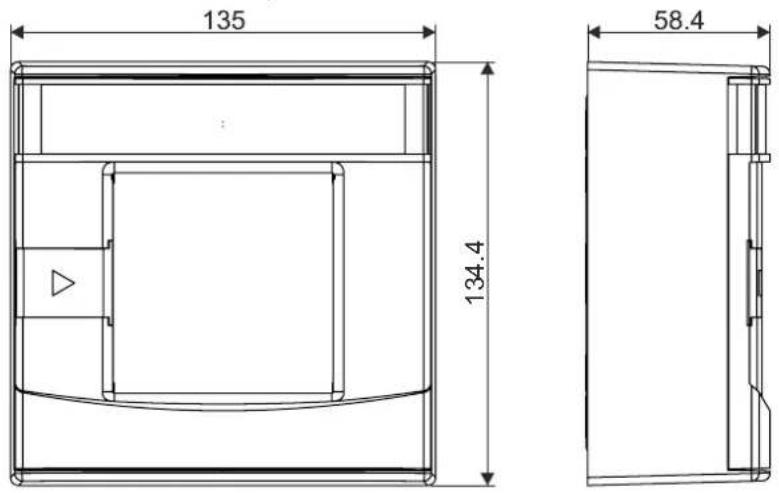
8.3 Master gauge for recesses
Radio manual call point FDM273-O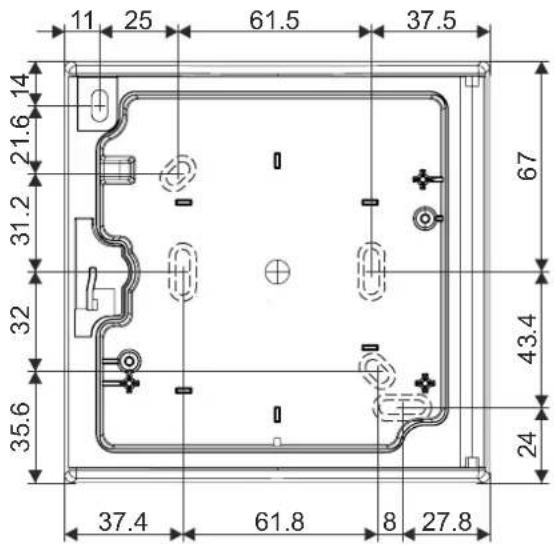
8.4 Environmental compatibility and disposal

This equipment is manufactured using materials and procedures which comply with current environmental protection standards as best as possible. More specifically, the following measures have been undertaken:
• Use of reusable materials • Use of halogen-free plastics • Electronic parts and synthetic materials can be separated. Larger plastic parts are labeled according to ISO 11469 and ISO 1043. The plastics can be separated and recycled on this basis.

Electronic parts and batteries must not be disposed of with domestic waste.
• Take electronic parts and batteries to local collection points or recycling centers. - Contact local authorities for more information. - Observe national requirements for disposing of electronic parts and batteries.
Glossary
Factory setting
Basic settings present at the time of delivery
Radio cell
Unit comprising all radio devices connected to the radio gateway
Radio device
Any device that the radio gateway monitors
Index
A
Application area
Ambient conditions.... 25
Approvals 40
B
Battery pack
Description.... 23
Replacing 38
Replacing the battery pack 37
C
CE marking 40
Control panel 32
D
Danger levels
Signals transmitted to the control panel ..... 20
Disposal 43
Documentation for fire detection system 22
Download center
URL 8
E
Environmental compatibility 43
Environmental influences.... 25
ES
Product version 17
EU directives 40
F
Flashing mode
Internal alarm indicator.... 21
Flashing pattern
Configuration 21
Internal alarm indicator 21
Impact
Chemicals 25
Moisture 25
Temperature 25
Intended use 5
Locking lever
Resetting the locking lever 32, 34
Packaging label
Product version 17
Product label
Product version 17
R
Radio manual call point
Test mode 22
Recycling 43
Signals transmitted to the control panel
Danger levels.... 20
Standards 41
Test mode
Radio manual call point 22
Type plate
Product version 17
Issued by
Siemens Switzerland Ltd
Building Technologies Division
International Headquarters
Gubelstrasse 22
CH-6301 Zug
+41 41-724 24 24
www.siemens.com/buildingtechnologies
© Siemens Switzerland Ltd, 2014
Technical specifications and availability subject to change without notice.


- FDM273-O
- RADIO MANUAL CALL POINT
- TECHNICAL MANUAL
- LEGAL NOTICE
- TABLE OF CONTENTS
- ABOUT THIS DOCUMENT
- GOAL AND PURPOSE
- INTENDED USE
- TARGET GROUPS
- DOCUMENT IDENTIFICATION
- DATE FORMAT
- CONVENTIONS FOR TEXT MARKING
- MARKUPS
- SUPPLEMENTARY INFORMATION AND TIPS
- APPLICABLE DOCUMENTS
- DOWNLOAD CENTER
- TECHNICAL TERMS AND ABBREVIATIONS
- HISTORY OF CHANGES
- SAFETY
- SAFETY INSTRUCTIONS
- SYMBOL FOR DANGER
- ADDITIONAL DANGER SYMBOLS
- SIGNAL WORD
- HOW RISK OF INJURY IS PRESENTED
- WARNING
- NATURE AND ORIGIN OF THE DANGER
- HOW POSSIBLE DAMAGE TO PROPERTY IS PRESENTED
- NOTICE
- SAFETY REGULATIONS FOR THE METHOD OF OPERATION
- NATIONAL STANDARDS, REGULATIONS AND LEGISLATION
- ELECTRICAL INSTALLATIONS
- ELECTRICAL VOLTAGE
- MOUNTING, INSTALLATION, COMMISSIONING, AND MAINTENANCE
- TESTING THE PRODUCT OPERABILITY
- MODIFICATIONS TO THE SYSTEM DESIGN AND THE PRODUCTS
- MODULES AND SPARE PARTS
- STANDARDS AND DIRECTIVES COMPLIED WITH
- RELEASE NOTES
- LIMITED OR NON-EXISTENT FIRE DETECTION
- INCORRECT PLANNING AND/OR CONFIGURATION
- STRUCTURE AND FUNCTION
- OVERVIEW
- SCOPE OF DELIVERY
- DETAILS FOR ORDERING
- PRODUCT VERSION ES
- PRODUCT VERSION ON THE PACKAGING LABEL
- POWER SUPPLY
- SETUP
- RADIO MANUAL CALL POINT FDM273-O
- FUNCTION
- DANGER LEVELS
- INTERNAL ALARM INDICATOR
- TEST MODE
- DIAGNOSIS LEVELS
- ACCESSORIES
- BATTERY PACK BAT
- KEY DMZ
- PROTECTIVE COVER DMZ1197-AC
- WINDOW SIGN
- PLANNING
- FIELDS OF APPLICATION
- MOUNTING SITE
- ENVIRONMENTAL INFLUENCES
- MOUNTING AND INSTALLATION
- PREPARATION
- INSTALLING THE HOUSING
- INSTALLATION
- INSTALLING THE PROTECTIVE COVER
- INSERTING THE DOOR SIGN
- COMMISSIONING
- SEE ALSO
- PERFORMANCE CHECK
- LOCALIZATION AND DEVICE TESTING
- MAINTENANCE / REPAIR
- AFTER ALARM ACTIVATION
- CAUTION
- ESTABLISHING FACTORY SETTINGS
- REPLACING THE GLASS INSERT
- BASIC PRINCIPLES FOR REPLACING THE BATTERY PACK
- REPLACING THE BATTERY PACK IN THE RADIO MANUAL CALL POINT
- SPECIFICATIONS
- TECHNICAL DATA
- DIMENSIONS
- MASTER GAUGE FOR RECESSES
- ENVIRONMENTAL COMPATIBILITY AND DISPOSAL
- GLOSSARY
- FACTORY SETTING
- RADIO CELL
- RADIO DEVICE
- INDEX
- A
- B
- C
- D
- E
- F
- R
Brand : BOSCH
Model : FDME273-O
Category : Switch