M1AA - Lampe flash Goodram - Free user manual and instructions
Find the device manual for free M1AA Goodram in PDF.


User questions about M1AA Goodram
0 question about this device. Answer the ones you know or ask your own.
Ask a new question about this device
Download the instructions for your Lampe flash in PDF format for free! Find your manual M1AA - Goodram and take your electronic device back in hand. On this page are published all the documents necessary for the use of your device. M1AA by Goodram.
USER MANUAL M1AA Goodram
Keep out of reach of children and pets.
Swallowing or other misuse may cause su oca on or other injury. Contact a doctor if you suspect a child has swallowed the Product.
Do not disassemble or modify the Product. The manufacturer is not responsible for the loss, destruc on or damage of integral and integrated part of the product/set.
Keep away from heat sources such as radiators, stove, replace, etc.
Mechanical defects are not subject to the complaint.
If the Product produces an odor, overheats or smokes, immediately turn o the device with which the Product is used, and disconnect the power cord from the outlet. Do not use the Product again.
Only use the Product with general home or o ce electric appliances. Do not use the Product in equipment or systems that requires extraordinarily high levels of quality and/or system reliability (eg. set-top digital / analog recording func on data - on demand) or in equipment the malfunc on or failure of which may cause loss of human life, bodily injury, property damage or serious e ect to the public.
The Product is labeled based on the memory chip(s) it contains, not the amount of memory capacity available for data storage by the end user. Part of the capacity is reserved for Product func onality.
Approximate usable capacity (1GB = 1,073,741,824 bytes):
57.6GB (64GB Flash card)
28.8GB (32GB Flash card)
14.4GB (16 GB Flash card)
7.2 GB (8GB Flash card)
3.6GB (4GB Flash card)
1.8 GB (2GB Flash card)
Read and write speed may vary depending on user-speci c condi ons, such as devices used and le size transferred.
Please read your device manual carefully and en rely before using this memory product
Instruc ons: Insert the card to appropriate device socket.
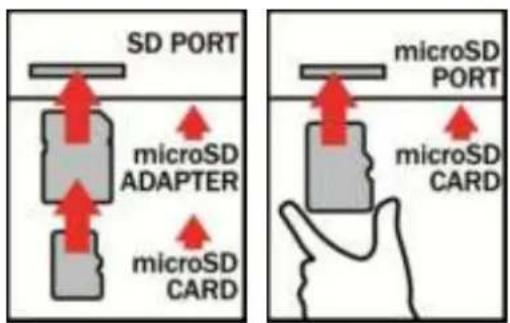
Note!
SDXC cards work with the following opera ng systems:
• Windows Embedded CE 6.0
• Windows Vista with Service Pack 1
- Windows 7
• Windows Server 2008
• Mac OS X Snow Leopard 10.6.5 or later.
- In addition to Windows XP and Windows Server 2003, Microsoft released the relevant update
- Not available for older operating systems than Windows XP
Speed Class and UHS Speed Class* symbols indicate minimum video recording performance. The Speed Classes de ned by the SD Associa on are Class 2, 4, 6 and 10.
| Full SD | miniSD | microSD | SD Card Capacity | |
| SD |  |  |  | up to 2GB |
| SDHC |  |  |  | High Capacity4GB to 32GB |
| SDXC |  |  | Extended Capacity | |
| Over 32GB up to 2TB |
| Marks | Operable Under | Applica ons | SD Memory Card | |
| Speed Class |  | High Speed Bus I/F | Full HD video recordingHD s ll consecu ve recording | SD, miniSD, microSDSDHC, miniSDHC, microSDHC |
 | Normal Bus I/F | HD ~ Full HD video recording | SDXC, microSDXC | |
 | SD video recording | |||
| UHS Speed Class |  | UHS-I Bus I/F | Full higher poten al of recording real- me broadcasts and capturing large-size HD videos | SDHC UHS-I and SDXC UHS-I |
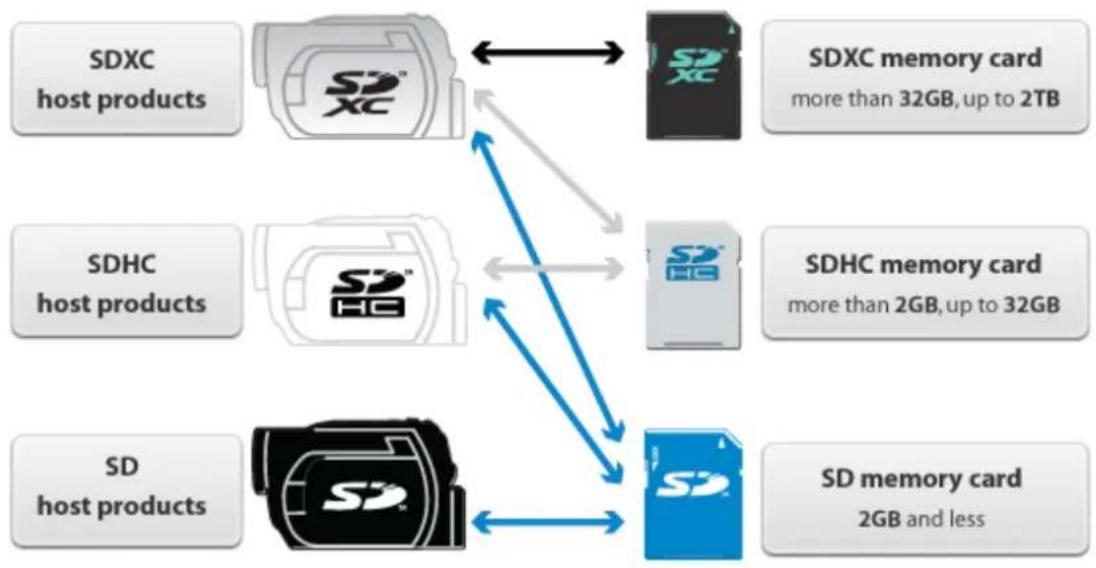
flowchart
graph TD
    A["SDXC host products"] --> B["SDXC"]
    C["SDHC host products"] --> D["SDHC"]
    E["SD host products"] --> F["SD memory card 2GB and less"]
    B <--> G["SDXC memory card more than 32GB, up to 2TB"]
    D <--> H["SDHC memory card more than 2GB, up to 32GB"]
    F <--> I["SD memory card 2GB and less"]
    B <--> J["SDXC XC"]
    D <--> K["SDHC HG"]
    F <--> L["SD host products"]