PTS2095 - Supports pour panneaux résidentiels Chief - Free user manual and instructions
Find the device manual for free PTS2095 Chief in PDF.


User questions about PTS2095 Chief
0 question about this device. Answer the ones you know or ask your own.
Ask a new question about this device
Download the instructions for your Supports pour panneaux résidentiels in PDF format for free! Find your manual PTS2095 - Chief and take your electronic device back in hand. On this page are published all the documents necessary for the use of your device. PTS2095 by Chief.
USER MANUAL PTS2095 Chief
INSTALLATION INSTRUCTIONS

natural_image
Technical line drawing of a mechanical housing component with mounting base and curved base (no text or symbols)Large Flat Panel Display Table Stand
DISCLAIMER
CSAV, Inc., and its affiliated corporations and subsidiaries (collectively, "CSAV"), intend to make this manual accurate and complete. However, CSAV makes no claim that the information contained herein covers all details, conditions or variations, nor does it provide for every possible contingency in connection with the installation or use of this product. The information contained in this document is subject to change without notice or obligation of any kind. CSAV makes no representation of warranty, expressed or implied, regarding the information contained herein. CSAV assumes no responsibility for accuracy, completeness or sufficiency of the information contained in this document.

IMPORTANT WARNINGS AND TIONS!

WARNING: A WARNING alerts you to the possibility of serious injury or death if you do not follow the instructions.

CAUTION: A CAUTION alerts you to the possibility of damage or destruction of equipment if you do not follow the corresponding instructions.

WARNING: Failure to read, thoroughly understand, and follow all instructions can result in serious personal injury, damage to equipment, or voiding of factory warranty! It is the installer's responsibility to make sure all components are properly assembled and installed using the instructions provided.

WARNING: Failure to provide adequate structural strength for this component can result in serious personal injury or damage to equipment! It is the installer's responsibility to make sure the structure to which this component is attached can support five times the combined weight of all equipment. Reinforce the structure as required before installing the component.

WARNING: Exceeding the weight capacity can result in serious personal injury or damage to equipment! It is the installer's responsibility to make sure the combined weight of all components located between the supporting structure and mount up to (and including) the display does not exceed 100 lbs (45.36 kg).
DIMENSIONS
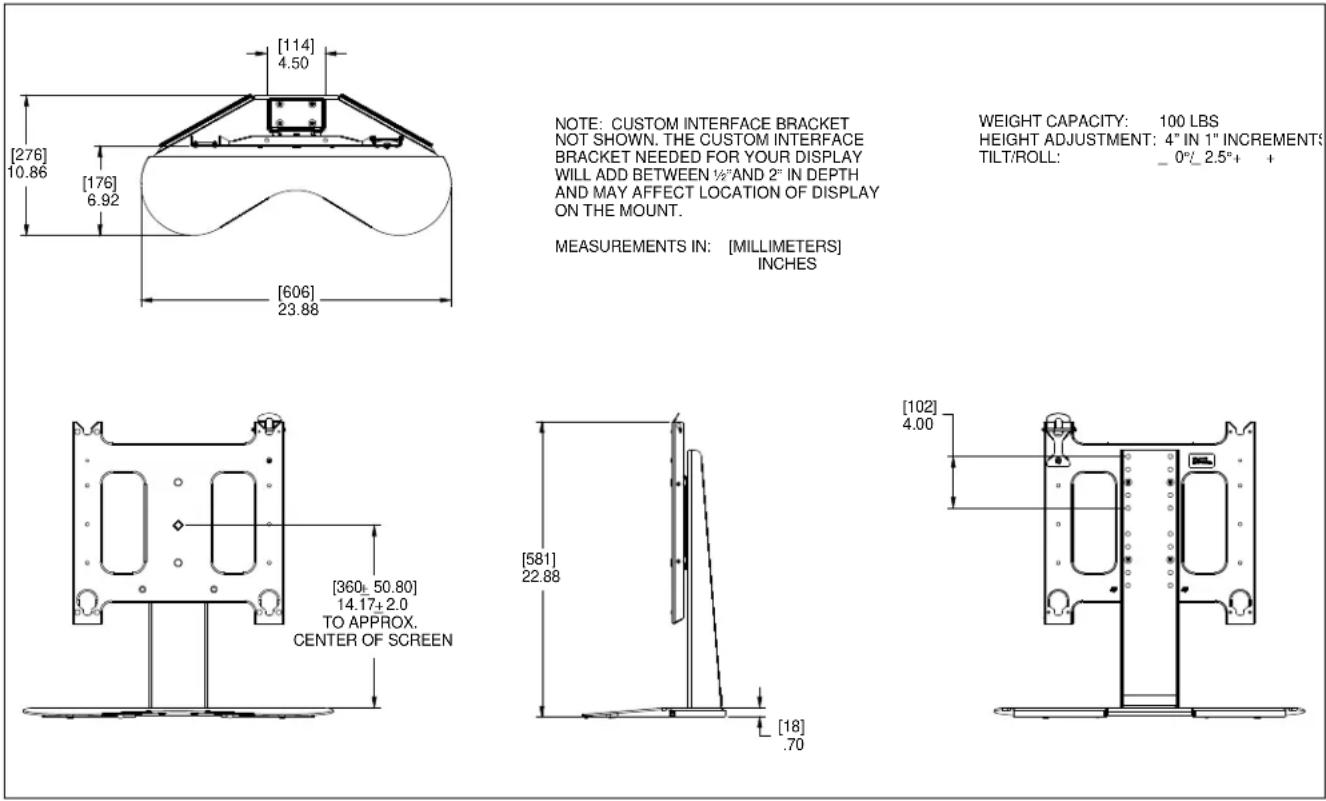
NOTE: CUSTOM INTERFACE BRACKET NOT SHOWN. THE CUSTOM INTERFACE BRACKET NEEDED FOR YOUR DISPLAY WILL ADD BETWEEN 12 " AND 2" IN DEPTH AND MAY AFFECT LOCATION OF DISPLAY ON THE MOUNT.
MEASUREMENTS IN: [MILLIMETERS] INCHES
WEIGHT CAPACITY: 100 LBS
HEIGHT ADJUSTMENT: 4" IN 1" INCREMENTS
TILT/ROLL: _ 0°/_ 2.5°+ +
LEGEND
 | Tighten Fastener |
| Apretar elemento de fijación | |
| Befestigungsteil festziehen | |
| Apertar fixador | |
| Serrare il fissaggio | |
| Bevestiging vastdraaien | |
| Serrez les fixations | |
 | Loosen Fastener |
| Aflojar elemento de fijación | |
| Befestigungsteil lösen | |
| Desapertar fixador | |
| Allentare il fissaggio | |
| Bevestiging losdraaien | |
| Desserrez les fixations | |
 | Phillips Screwdriver |
| Destornillador Phillips | |
| Kreuzschlitzschraubendreher | |
| Chave de fendas Phillips | |
| Cacciavite a stella | |
| Kruiskopschroevendraaier | |
| Tournevis à pointe cruciforme | |
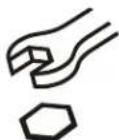 | Open-Ended Wrench |
| Llave de boca | |
| Gabelschlüssel | |
| Chave de bocas | |
| Chiave a punte aperte | |
| Steeksleutel | |
| Clé à fourche | |
 | By Hand |
| A mano | |
| Von Hand | |
| Com a mão | |
| A mano | |
| Met de hand | |
| À la main | |
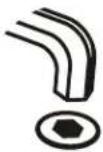 | Hex-Head Wrench |
| Llave de cabeza hexagonal | |
| Sechskantschlüssel | |
| Chave de cabeça sextavada | |
| Chiave esagonale | |
| Zeskantsleutel | |
| Clé à tête hexagonale |



TOOLS REQUIRED FOR INSTALLATION
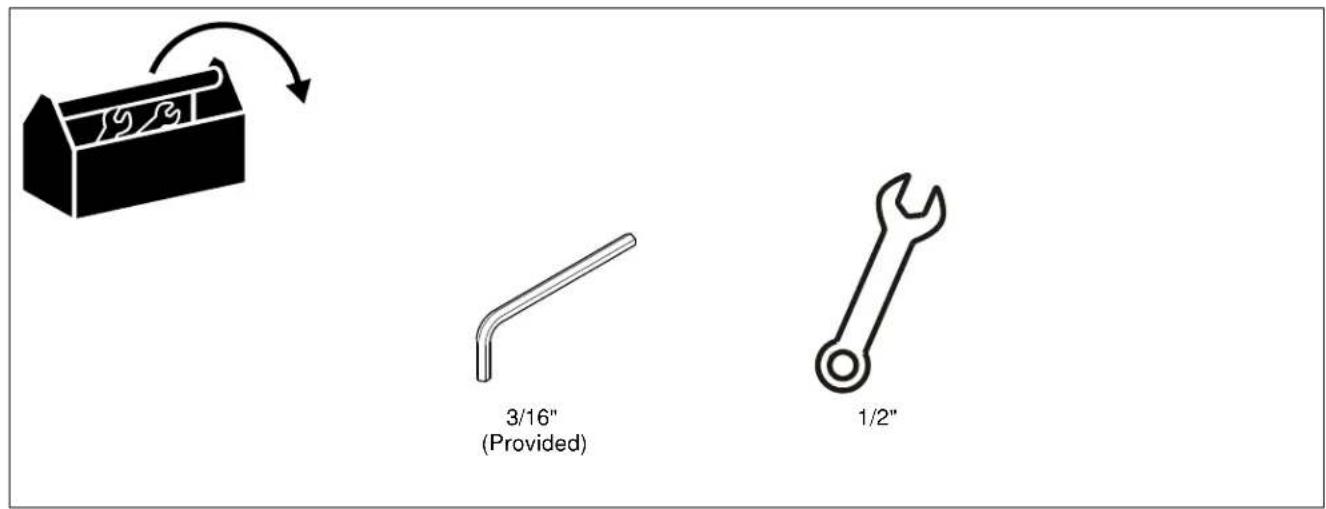
text_image
3/16" (Provided) 1/2"PARTS

text_image
A (1) B (1) C (2) D (1) E (1) 3/16" F (8) 5/16-18 x 5/8" G (4) 5/16-18"ASSEMBLY AND INSTALLATION

WARNING: FAILURE TO PROVIDE ADEQUATE STRUCTURAL STRENGTH FOR THIS COMPONENT CAN RESULT IN SERIOUS PERSONAL INJURY OR DAMAGE TO EQUIPMENT! It is the installer's responsibility to make sure the structure to which this component is attached can support five times the combined weight of all equipment. Reinforce the structure as required before installing the component.
Attaching Post Assembly to Base Assembly
- Using four 5/16-18 x 5/8" button head cap screws (F) and four 5/16-18 Nylock nuts (G), secure post assembly (B) to base assembly (D). (See Figure 1)

text_image
(B) (F) x 4 (D) (G) x 4Figure 1
- Attach edge trim pieces (C) to the base assembly (D). See Figure 2.

text_image
(C) x 2Figure 2
Attaching Faceplate Assembly
- Align mounting holes in faceplate assembly (A) with holes in post assembly (B). (See Figure 3)
NOTE: The faceplate assembly can be placed within a four inch range on the post assembly, dependent on size of display. - Attach faceplate assembly to post assembly using four 5/16-18 x 5/8" button head cap screws (F). (See Figure 3)

text_image
(A) ② (F) x 4 (B)Figure 3
Attaching Interface Bracket to Display
- Attach interface bracket to display following instructions included with interface bracket kit.
Attaching Display to Mount
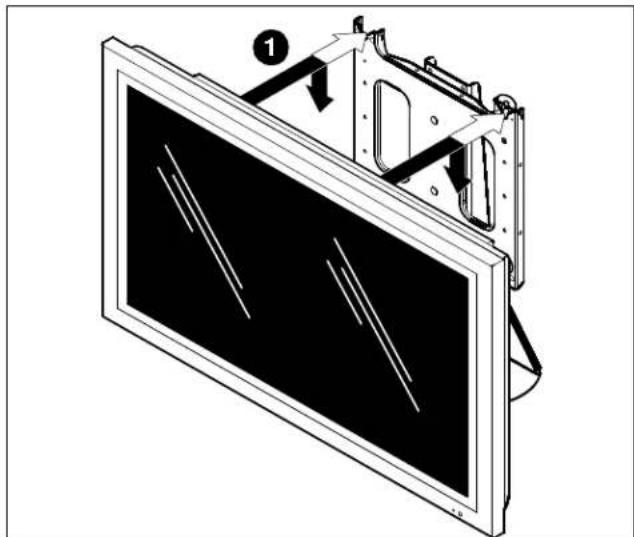
- While supporting both sides of display, align four mounting buttons on display or interface bracket with four mounting holes in mount. (See Figures 4 and 5)
natural_image
Diagram of a computer monitor with an open screen and internal components, showing no text or symbols.Figure 4

WARNING: DISPLAY MAY WEIGH IN EXCESS OF 40 LBS! Always use two people and proper lifting techniques when installing or positioning display on mount.
- Lower display into place listening for audible "click" to ensure recessed area of mounting buttons are properly seated in lower area of mounting holes. (See Fig. 4 and 5)

WARNING: IMPROPER INSTALLATION CAN LEAD TO DISPLAY FALLING CAUSING SERIOUS PERSONAL INJURY OR DAMAGE TO EQUIPMENT! Ensure mounting buttons are completely engaged in mounting holes.
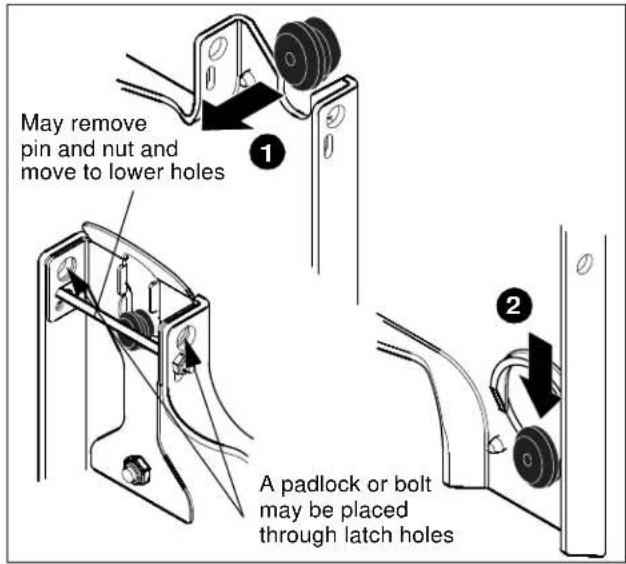
NOTE: Holes are provided in the faceplate for use with a padlock or similar locking device, if desired. In addition, the pin and nut may be removed from the upper holes and moved to the lower holes for use as a more permanent locking device. (See Figure 5).
text_image
May remove pin and nut and move to lower holes 1 A padlock or bolt may be placed through latch holes 2Figure 5
Removing Display
- Disconnect all power/audio/video cables.
- Remove bolt or padlock from faceplate (if used). (See Figure 6)
NOTE: The pin may have been used as a more permanent locking device. If so, remove nut and pin and move from the lower holes to the upper holes.
- Pull back on flag on upper mounting hole and press pin down into "Open" position. (See Figure 6)

WARNING: THE DISPLAY MAY WEIGH IN EXCESS OF 40 LBS EACH! Always use two people and proper lifting techniques when installing or positioning display.
- Carefully lift display from mount.
- Lift up on pin and place flag back against faceplate to return it to "Closed" position. (See Figure 6)

text_image
2 Remove bolt or padlock if used 3 Pin in "Closed" position - move to "Open" position to remove display 5 Pin in "Open" position - move to "Closed" position after display is removed.Figure 6
Adjusting Roll Tension
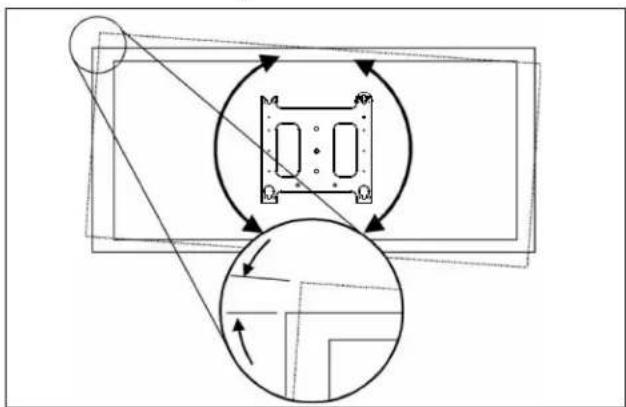
The faceplate provides 2^ roll adjustment. (See Figure 7) Roll adjustment is accomplished by shifting the faceplate right or left as needed until the faceplate is level.
flowchart
graph TD
    A["Top Section"] --> B["Central Component"]
    B --> C["Bottom Section"]
    C --> D["Arrow Up"]
    C --> E["Arrow Down"]
    style A fill:#f9f,stroke:#333
    style B fill:#ccf,stroke:#333
    style C fill:#cfc,stroke:#333
    style D fill:#fcc,stroke:#333
    style E fill:#cff,stroke:#333
Figure 7
NOTE: Roll tension is preset. If the display does not remain in the desired position, perform the following roll tension adjustment procedure.
- Remove display following the Removing Display section.
- Remove four 5/16-18 x 5/8" button head cap screws from back of post assembly (inserted in Step 2 of Attaching Faceplate Assembly section).
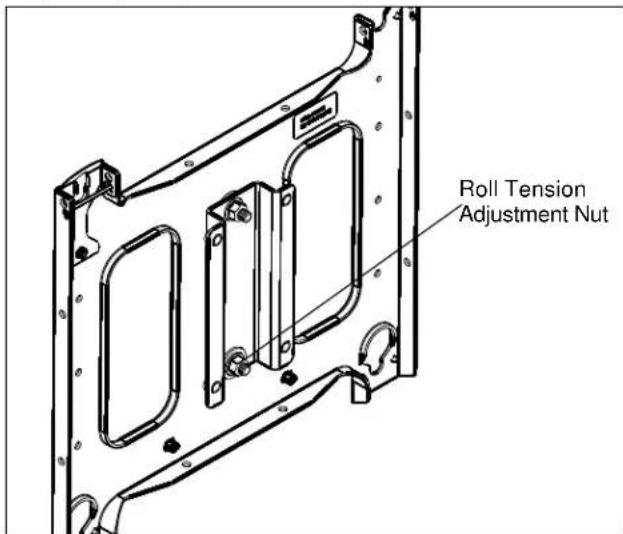
- Locate roll tension adjustment nut on back of faceplate. (See Figure 8)
text_image
Roll Tension Adjustment NutFigure 8
- Partially loosen or tighten the roll tension adjustment nut as needed.
- Re-install the faceplate assembly onto the post assembly following instructions in Attaching Faceplate Assembly section.
- Re-mount the display following instructions in Attaching Display to Mount section.
PTS SERIES
Installation Instructions