
PSH2000 - Supports for residential panels Chief - Free user manual and instructions
Find the device manual for free PSH2000 Chief in PDF.


| Product Type | Heavy Duty Fixed Wall Mount |
| Brand | Chief |
| Model | PSH2000 |
| Category | Residential Panel Mounts |
| Weight Capacity | 300 lbs (137 kg) |
| Display Compatibility | Akira 84", Orion 84", Modular 84", and other large flat panel displays |
| Mounting Studs | Two or three wood studs, 16" or 24" on center |
| Lateral Shift Range | ±2 inches |
| Mounting Button Configuration | Six mounting buttons with M8x25mm button head cap screws |
| Vertical Brackets | Adjustable to three horizontal dimensions: 14", 24", or 33" |
| Latch Mechanism | Two latches with Phillips screw for securing display |
| Side Supports | Four side supports attach to wall plate |
| Included Hardware | Mounting buttons (E), button head cap screws (D, J), washers (F, G), nuts (H), hex keys (K, L) |
| Required Tools (not included) | M5 hex key, 3/16" hex key, 1/2" wrench, Phillips screwdriver, 13mm wrench, drill, 7/32" drill bit |
| Wall Drywall Thickness | Maximum 5/8" (1.6 cm) |
| Safety Factor | Must support five times the combined weight of equipment |
| Installation Type | Fixed, non-tilting wall mount |
| Optional Interface Bracket | Available for displays requiring adapter |
| Warranty | Refer to manufacturer |
Frequently Asked Questions - PSH2000 Chief
User questions about PSH2000 Chief
0 question about this device. Answer the ones you know or ask your own.
Ask a new question about this device
Download the instructions for your Supports for residential panels in PDF format for free! Find your manual PSH2000 - Chief and take your electronic device back in hand. On this page are published all the documents necessary for the use of your device. PSH2000 by Chief.
USER MANUAL PSH2000 Chief
INSTALLATION INSTRUCTIONS
natural_image
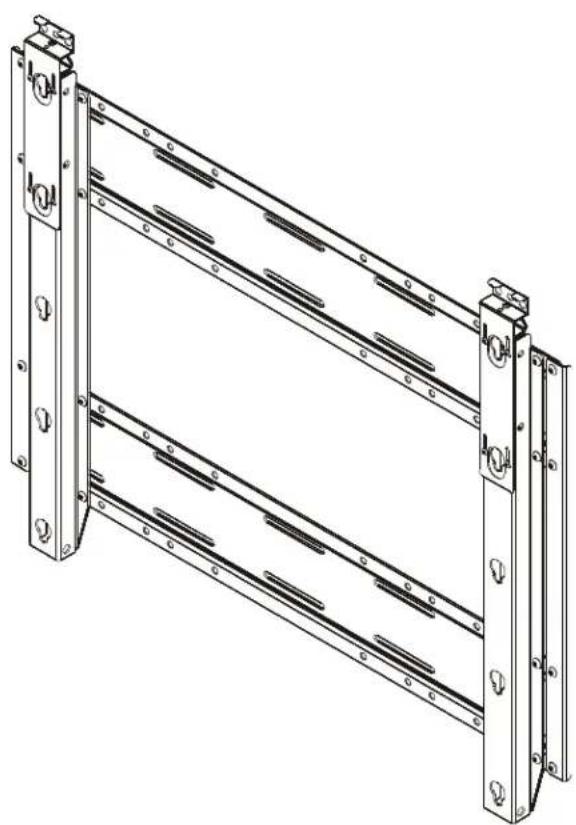
Technical line drawing of a multi-tiered metal frame structure with mounting holes and bolt holes (no text or symbols)Heavy Duty Fixed Wall Mount
DISCLAIMER
Milestone AV Technologies and its affiliated corporations and subsidiaries (collectively "Milestone"), intend to make this manual accurate and complete. However, Milestone makes no claim that the information contained herein covers all details, conditions or variations, nor does it provide for every possible contingency in connection with the installation or use of this product. The information contained in this document is subject to change without notice or obligation of any kind. Milestone makes no representation of warranty, expressed or implied, regarding the information contained herein. Milestone assumes no responsibility for accuracy, completeness or sufficiency of the information contained in this document.
Chief® is a registered trademark of Milestone AV Technologies. All rights reserved.

IMPORTANT WARNINGS AND TIONS!

WARNING: A WARNING alerts you to the possibility of serious injury or death if you do not follow the instructions.

CAUTION: A CAUTION alerts you to the possibility of damage or destruction of equipment if you do not follow the corresponding instructions.

WARNING: Failure to read, thoroughly understand, and
follow all instructions can result in serious personal injury, damage to equipment, or voiding of factory warranty! It is the installer's responsibility to make sure all components are properly assembled and installed using the instructions provided.

WARNING: Failure to provide adequate structural strength for this component can result in serious personal injury or damage to equipment! It is the installer's responsibility to make sure the structure to which this component is attached can support five times the combined weight of all equipment. Reinforce the structure as required before installing the component. The wall to which the mount is being attached may have a maximum drywall thickness of 5/8" (1.6cm).

WARNING: Exceeding the weight capacity can result in serious personal injury or damage to equipment! It is the installer's responsibility to make sure the combined weight of all components located between the PSH2000 up to (and including) the display does not exceed 300 lbs (137 kg). Use with products heavier than the maximum weight indicated may result in collapse of the mount and its accessories causing possible injury.

WARNING: Make sure the latches securing the display are fully closed at all times except when removing or installing the display. The latches must be fully closed when installing or removing cables from the display.
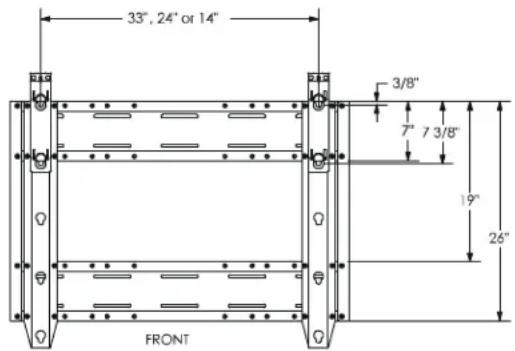
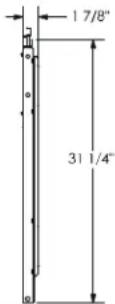
DIMENSIONS


LEGEND
 | Tighten Fastener |
| Apretar elemento de fijación | |
| Befestigungsteil festziehen | |
| Apertar fixador | |
| Serrare il fissaggio | |
| Bevestiging vastdraaien | |
| Serrez les fixations | |
 | Loosen Fastener |
| Aflojar elemento de fijación | |
| Befestigungsteil lösen | |
| Desapertar fixador | |
| Allentare il fissaggio | |
| Bevestiging losdraaien | |
| Desserrez les fixations | |
 | Phillips Screwdriver |
| Destornillador Phillips | |
| Kreuzschlitzschraubendreher | |
| Chave de fendas Phillips | |
| Cacciavite a stella | |
| Kruiskopschroevendraaier | |
| Tournevis à pointe cruciforme | |
 | Open-Ended Wrench |
| Llave de boca | |
| Gabelschlüssel | |
| Chave de bocas | |
| Chiave a punte aperte | |
| Steeksleutel | |
| Clé à fourche | |
 | By Hand |
| A mano | |
| Von Hand | |
| Com a mão | |
| A mano | |
| Met de hand | |
| À la main | |
 | Hex-Head Wrench |
| Llave de cabeza hexagonal | |
| Sechskantschlüssel | |
| Chave de cabeça sextavada | |
| Chiave esagonale | |
| Zeskantsleutel | |
| Clé à tête hexagonale |




Pencil Mark
Marcar con lápiz
Stiftmarkierung
Marcar com lápis
Segno a matita
Potloodmerkteken
Marquage au crayon
Drill Hole
Perforar
Bohrloch
Fazer furo
Praticare un foro
Gat boren
Percez un trou
Adjust
Ajustar
Einstellen
Ajustar
Regolare
Afstellen
Ajuster
Remove
Quitar
Entfernen
Remover
Rimuovere
Verwijderen
Retirez
Optional
Opcional
Optional
Opcional
Opzionale
Optie
En option
Security Wrench
Llave de seguridad
Sicherheitsschlüssel
Chave de segurança
Chiave di sicurezza
Veiligheidssleutel
Clé de sécurité
TOOLS REQUIRED FOR INSTALLATION

PARTS
![A (2) [wall plate] B (2) [vertical bracket] C (2) [side support] D (6) M8x25mm E (6) [mounting button] F (6) M8 G (6) M8 H (6) M8 J (24) 5/16-18 x 1/2" K (1) M5 L (1) 3/16" M (1) 1/8"](/content/2026/06/1167889/images/39af6d255d69c691ea387f661b112d7ff984b785bc8b3c7d977206a315c0165c.jpg)
Assembly And Installation
ASSEMBLY AND INSTALLATION
NOTE: Read the Warnings and Cautions on page 2.
INSTALL MOUNTING BUTTONS
Installation of the mounting buttons is dependent on your specific display. Three options are provided:
- Akira 84" and Orion 84" displays
- Modular 84" displays
- Other large flat panel displays
AKIRA 84" AND ORION 84" DISPLAYS
-
Using M5 hex key (K), insert M8x25mm button head cap screw (D) through mounting button (E) and install into threaded mounting hole on back of display (See Figure 1). Tighten securely.
-
Repeat for remaining five buttons.
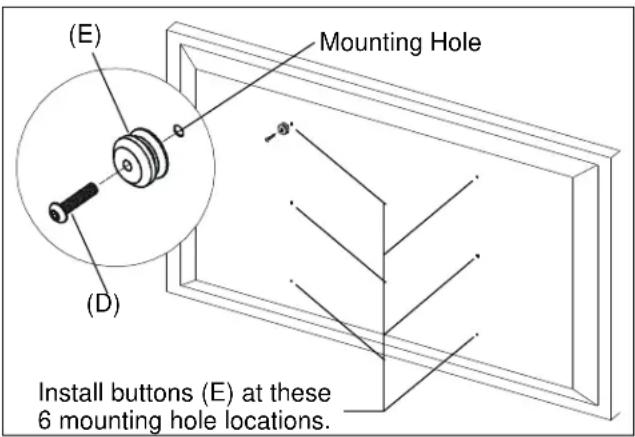
Figure 1
MODULAR 84" DISPLAYS
NOTE: Modular displays are four independent displays attached together within a single frame. The assembly performs as a single display.
-
Insert M8x25mm button head cap screw (D) through mounting button (E) and frame on back of modular display (See Figure 2)(See Figure 3). Using M5 hex key (K) and 13mm wrench, install M8 washer (F), M8 lock washer (G), and M8 nut (H). Tighten securely.
-
Repeat for remaining five buttons.
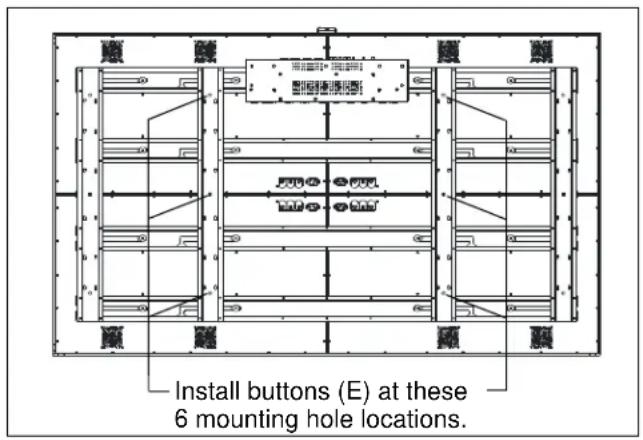
Figure 2

Figure 3
OTHER LARGE FLAT PANEL DISPLAYS
- Install the optional interface bracket to display according to the instructions provided with the interface bracket.
NOTE: Mounting buttons are pre-installed on optional interface bracket. PSH-2000 items (D) through (H), and key (K)(See Figure 1), will not be used with optional interface bracket.
ASSEMBLE SIDE SUPPORTS
- Using 3/16" hex key (L), loosely install side support (C) to wall plate (A) with 5/16-18 x 1/2" button head cap screws (J) (See Figure 4). Ensure lip of support (C) covers edge of plate (A).
- Repeat for other 3 corners.
- Once all screws (J) are installed, tighten securely.
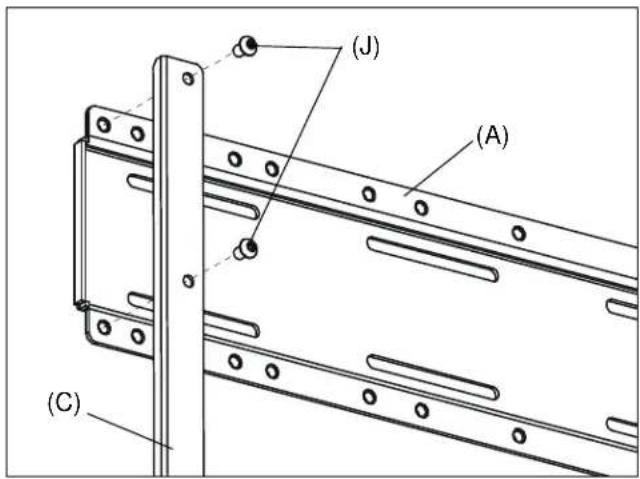
Figure 4
INSTALL MOUNT TO WALL
- Determine approximate mounting location, keeping in mind the display size.

WARNING: The mount must be installed on two or three wood studs (or other equivalent vertical or horizontal supporting framework). Do not mount to single wood studs. Failure to properly install unit can result in serious personal injury or damage to equipment!
- Use a stud sensor to locate applicable wood studs. Mark locations with a pencil.
- Level mount at desired height per one of the configurations below:
NOTE: Either configuration below provides ± 2" of lateral shift.
- 16" on center studs: The mount is approximately centered between two or three studs as shown. (See Figure 5)
-
24" on center studs: The mount is offset to the left or right of center between two studs as shown. (See Figure 6)
-
Using mount as a template, mark the location of the pilot holes. Ensure the following:
-
Marks are in the center of wood studs.
- 8 pilot holes are marked (one in each slot).
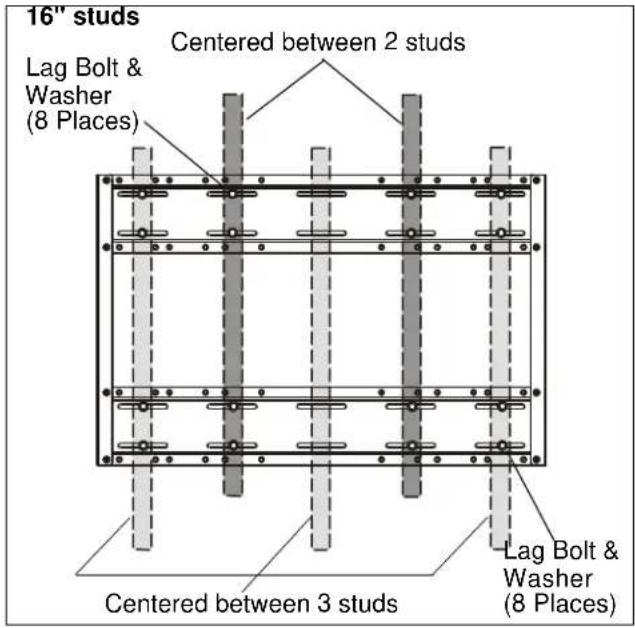
Figure 5

Figure 6
NOTE: For 16" on center, 3 stud installation: Lag bolts and washers on center stud are optional.
- Drill pilot holes using a 7/32" drill bit. Ensure pilot holes are straight.
- Using 1/2" wrench, install eight 5/16" x 2 ½" lag bolts and eight 5/16" washers through mounting holes and into pilot holes. Tighten all lag bolts.
NOTE: Lag bolts and washers are not supplied.
INSTALL STATIC BRACKETS
AKIRA 84", ORION 84", AND MODULAR 84" DISPLAYS
-
Using 3/16" hex key (L), loosely install vertical brackets (B) to wall plates (A) with 5/16-18 x 1/2" button head cap screws (J) (See Figure 7). Ensure the following:
-
Brackets (B) are installed to outside set of mounting holes, closest to supports (C).
-
Brackets (B) are installed so that latches are towards top of mount.
-
Tighten all 16 screws (J) securely.
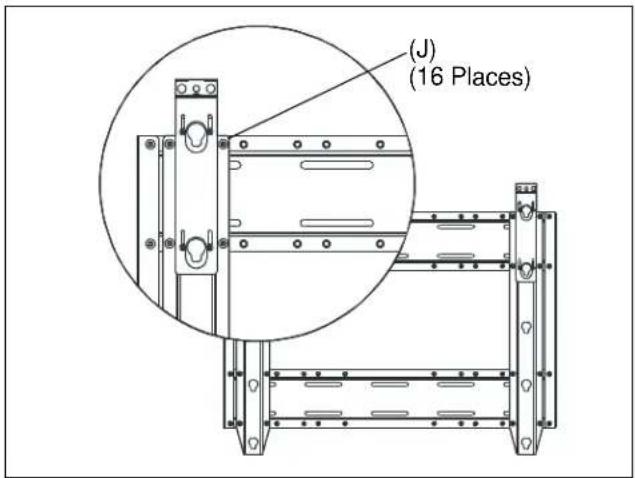
Figure 7
OTHER LARGE FLAT PANEL DISPLAYS
- Determine horizontal dimension between mounting buttons on back of display (or interface bracket, if required). (See Figure 8)

Figure 8
-
Using 3/16" hex key (L), loosely install vertical brackets (B) to wall plates (A) with 5/16-18 x 1/2" screws (J) according to dimension noted in previous step. Ensure that brackets (B) are installed so that the latches are towards the top of the mount.
-
14" horizontal dimension: Install brackets (B) to inside set of mounting holes, closest to center of mount. (See Figure 9)
- 24" horizontal dimension: Install brackets (B) to middle set of mounting holes. (See Figure 10)
-
33" horizontal dimension: Install brackets (B) to outside set of mounting holes, closest to supports (C). (See Figure 7)
-
Tighten all 16 screws (J) securely.
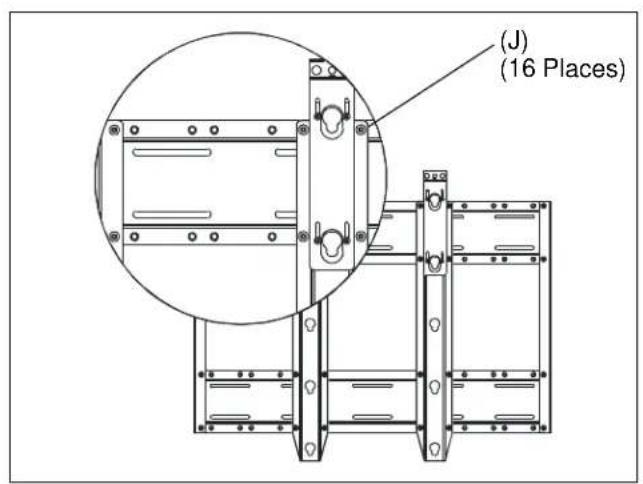
Figure 9
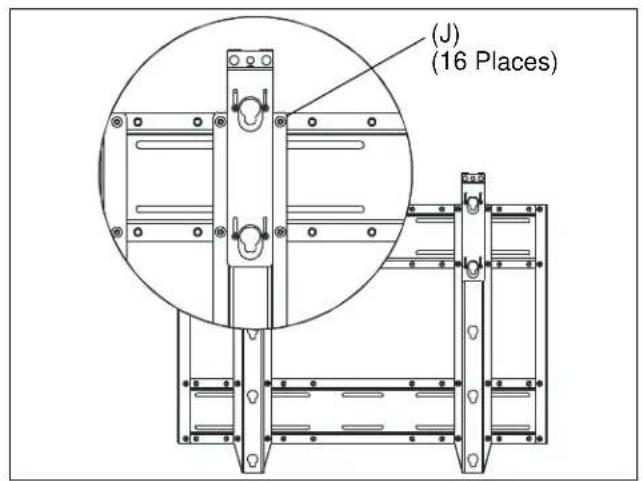
Figure 10
INSTALL DISPLAY

WARNING: Exceeding the weight capacity can result in serious personal injury or damage to equipment! It is the installer's responsibility to make sure the combined weight of all components located between the PSH2000 up to (and including) the display does not exceed 300 lbs (137 kg). Use with products heavier than the maximum weight indicated may result in collapse of the mount and its accessories causing possible injury.

WARNING: Display is very heavy! Ensure display can be safely lifted and maneuvered as required to install on mount. Failure to take adequate precautions can result in serious personal injury or damage to equipment!
- Ensure latches are in fully open (raised) positions by loosening Phillips screw on top of latch. (See Figure 11)

Figure 11
- Note button openings to be used on each bracket (B) when installing display. (See Figure 12)
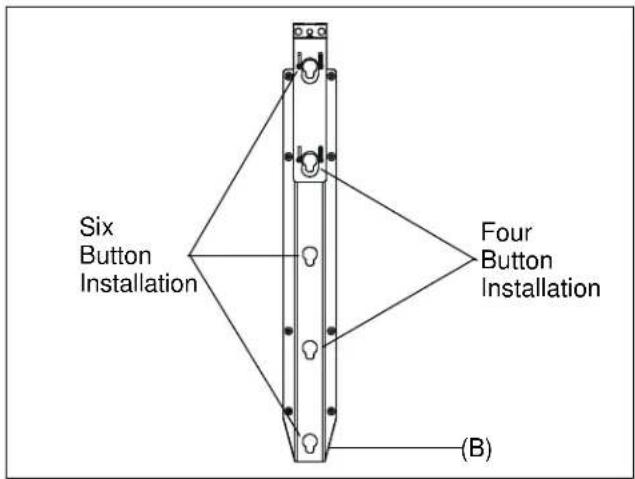
Figure 12
-
Lift and maneuver display such that all mounting buttons (E) fit into button openings on brackets (B). Lower display firmly into place. Ensure each button (E) has fully seated in its button opening.
-
Using Phillips screwdriver, tighten Phillips screw until latch slides into closed position. (See Figure 13)
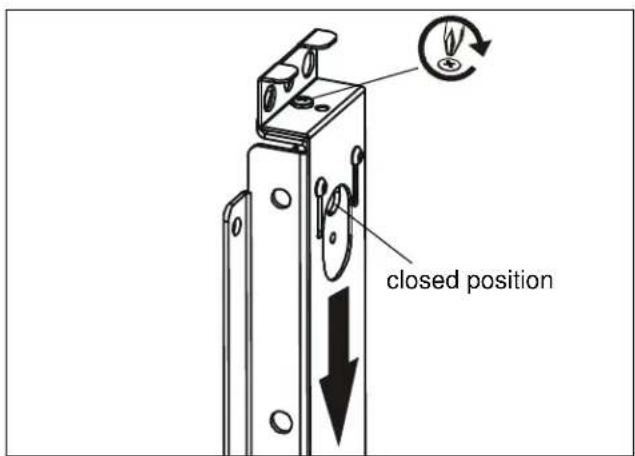
Figure 13
-
Repeat for second latch.
-
Connect cables to display as required.
REMOVE DISPLAY

WARNING: Display is very heavy! Ensure display can be safely lifted and maneuvered as required to remove from mount. Failure to take adequate precautions can result in serious personal injury or damage to equipment!
- Disconnect all cables from display.
- Using Phillips screwdriver, fully remove top Phillips screw from threaded hole in bracket (B). (See Figure 14)
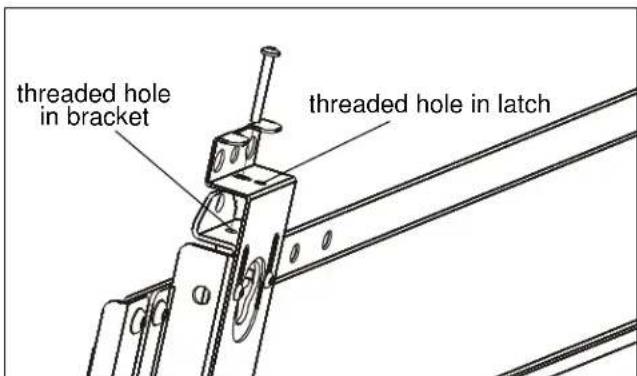
Figure 14
- Re-install screw into threaded hole in latch. Turn screw until latch slides into fully open position.
- Repeat for second latch.
- Lift and maneuver display mounting buttons (E) out of button openings.

- INSTALLATION INSTRUCTIONS
- DISCLAIMER
- IMPORTANT WARNINGS AND TIONS!
- DIMENSIONS
- LEGEND
- Assembly And Installation
- INSTALL MOUNTING BUTTONS
- AKIRA 84" AND ORION 84" DISPLAYS
- MODULAR 84" DISPLAYS
- OTHER LARGE FLAT PANEL DISPLAYS
- ASSEMBLE SIDE SUPPORTS
- INSTALL MOUNT TO WALL
- INSTALL STATIC BRACKETS
- AKIRA 84", ORION 84", AND MODULAR 84" DISPLAYS
- INSTALL DISPLAY
- REMOVE DISPLAY
Brand : Chief
Model : PSH2000
Category : Supports for residential panels