TILD1X1US - Support pour écran plat Chief - Free user manual and instructions
Find the device manual for free TILD1X1US Chief in PDF.


User questions about TILD1X1US Chief
0 question about this device. Answer the ones you know or ask your own.
Ask a new question about this device
Download the instructions for your Support pour écran plat in PDF format for free! Find your manual TILD1X1US - Chief and take your electronic device back in hand. On this page are published all the documents necessary for the use of your device. TILD1X1US by Chief.
USER MANUAL TILD1X1US Chief
INSTALLATION INSTRUCTIONS
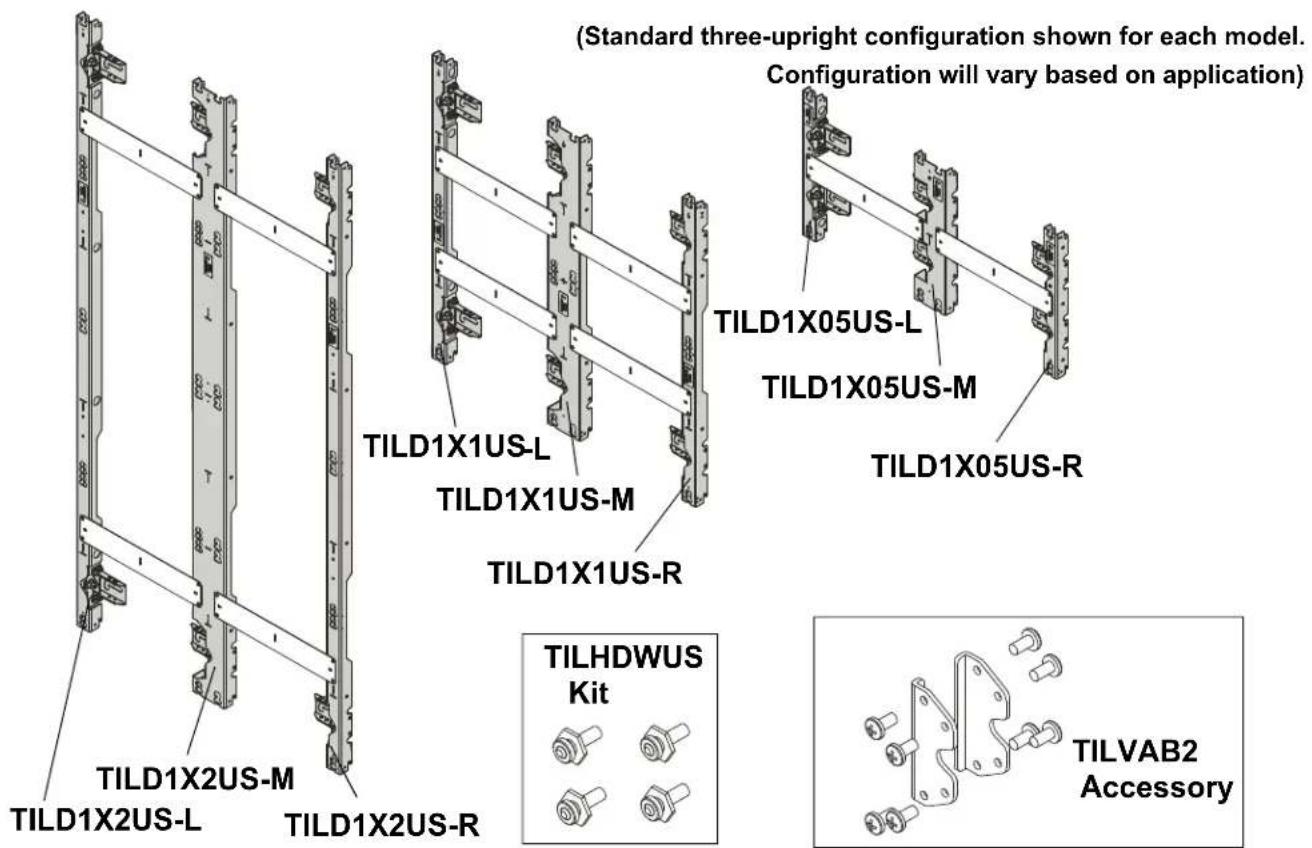
U-Slim Series LED Wall Mounts / Accessory
DISCLAIMER
Legrand | AV and its affiliated corporations and subsidiaries (collectively "Legrand | AV"), intend to make this manual accurate and complete. However, Legrand | AV makes no claim that the information contained herein covers all details, conditions or variations, nor does it provide for every possible contingency in connection with the installation or use of this product. The information contained in this document is subject to change without notice or obligation of any kind. Legrand | AV makes no representation of warranty, expressed or implied, regarding the information contained herein. Legrand | AV assumes no responsibility for accuracy, completeness or sufficiency of the information contained in this document.
Chief® is a registered trademark of Legrand AV Inc.
DEFINITIONS
MOUNTING SYSTEM: A MOUNTING SYSTEM is the primary Chief product to which an accessory and/or component is attached.
ACCESSORY: AN ACCESSORY is the secondary Chief product which is attached to a primary Chief product, and may have a component attached or setting on it.
COMPONENT: A COMPONENT is an audiovisual item designed to be attached or resting on an accessory or mounting system such as a video camera, CPU, screen, display, projector, etc.

WARNING: A WARNING alerts you to the possibility of serious injury or death if you do not follow the instructions.

CAUTION: A CAUTION alerts you to the possibility of damage or destruction of equipment if you do not follow the corresponding instructions.

IMPORTANT SAFETY INSTRUCTIONS

WARNING: Failure to read, thoroughly understand, and follow all instructions can result in serious personal injury, damage to equipment, or voiding of factory warranty! It is the installer's responsibility to make sure all mounting systems are properly assembled and installed using the instructions provided.

WARNING: Failure to provide adequate structural strength for this mounting system can result in serious personal injury or damage to equipment! It is the installer's responsibility to make sure the structure to which this mounting system is attached can support five times the combined weight of all equipment. Reinforce the structure as required before installing the mounting system. The wall to which the mounting system is being attached may have a maximum drywall thickness of 5/8" (1.6cm). Do not install drywall anchors into the seam between drywall pieces.

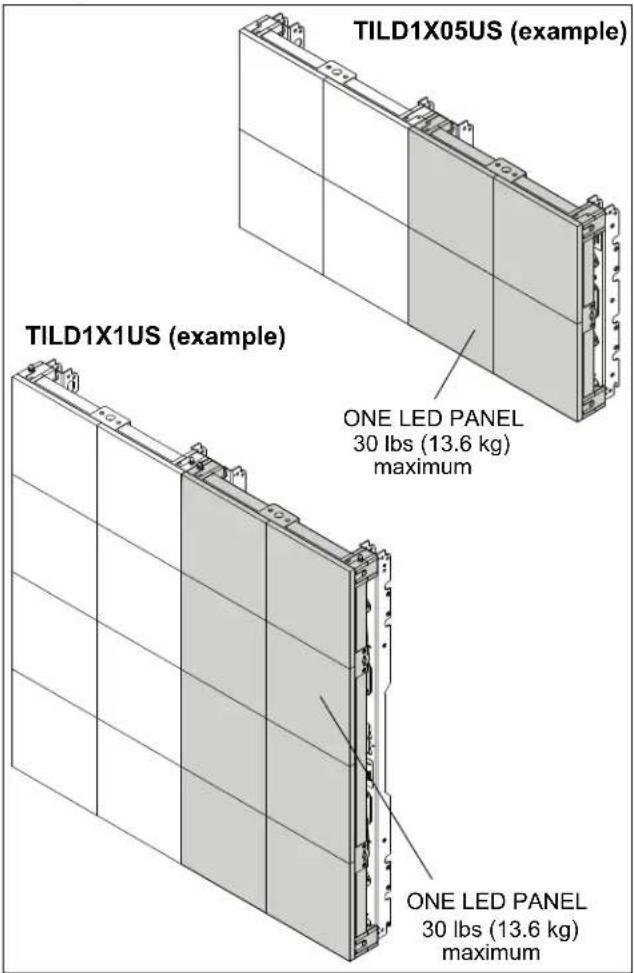
WARNING: The TILD1X05US / TILD1X1US / TILD1X2US LED wall mounts are designed for use with LED panels only. Exceeding the weight capacity (listed) can result in serious personal injury or damage to equipment! Do NOT attach LED panels to TILD1X05US / TILD1X1US / TILD1X2US LED video wall mounts that exceed 30 lbs (13.6 kg) regardless of the size or design of the configuration. See figure below for examples.

WARNING: Use this mounting system only for its intended use as described in these instructions. Do not use attachments not recommended by the manufacturer.

WARNING: Never operate this mounting system if it is damaged. Return the mounting system to a service center for examination and repair.

WARNING: Do not use this mounting system outdoors.
IMPORTANT ! : The TILD1X05US / TILD1X2US / TILD1X2US LED wall mounts are designed to be mounted to a bare 8" concrete or 8"x8"x16" concrete block wall.
--SAVE THESE INSTRUCTIONS--
LEGEND
 | Tighten Fastener |  | Pencil Mark |
| Apretar elemento de fijación | Marcar con lápiz | ||
| Befestigungsteil festziehen | Stiftmarkierung | ||
| Apertar fixador | Marcar com lápis | ||
| Serrare il fissaggio | Segno a matita | ||
| Bevestiging vastdraaien | Potloodmerkteken | ||
| Serrez les fixations | Marquage au crayon | ||
 | Loosen Fastener |  | Drill Hole |
| Aflojar elemento de fijación | Perforar | ||
| Befestigungsteil lösen | Bohrloch | ||
| Desapertar fixador | Fazer furo | ||
| Allentare il fissaggio | Praticare un foro | ||
| Bevestiging losdraaien | Gat boren | ||
| Desserrez les fixations | Percez un trou | ||
 | Phillips Screwdriver |  | Adjust |
| Destornillador Phillips | Ajustar | ||
| Kreuzschlitzschraubendreher | Einstellen | ||
| Chave de fendas Phillips | Ajustar | ||
| Cacciavite a stella | Regolare | ||
| Kruiskopschroevendraaier | Afstellen | ||
| Tournevis à pointe cruciforme | Ajuster | ||
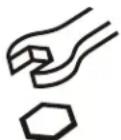 | Open-Ended Wrench |  | Remove |
| Llave de boca | Quitar | ||
| Gabelschlüssel | Entfernen | ||
| Chave de bocas | Remover | ||
| Chiave a punte aperte | Rimuovere | ||
| Steeksleutel | Verwijderen | ||
| Clé à fourche | Retirez | ||
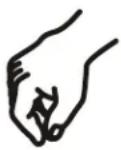 | By Hand |  | Optional |
| A mano | Opcional | ||
| Von Hand | Optional | ||
| Com a mão | Opcional | ||
| A mano | Opzionale | ||
| Met de hand | Optie | ||
| À la main | En option | ||
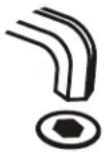 | Hex-Head Wrench | 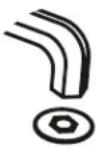 | Security Wrench |
| Llave de cabeza hexagonal | Llave de seguridad | ||
| Sechskantschlüssel | Sicherheitsschlüssel | ||
| Chave de cabeça sextavada | Chave de segurança | ||
| Chiave esagonale | Chiave di sicurezza | ||
| Zeskantsleutel | Veiligheidssleutel | ||
| Clé à tête hexagonale | Clé de sécurité |
TOOLS REQUIRED FOR INSTALLATION
![[Small level] [7/32" 3/8" 1/2" [Laser level] String M5 Level [4+ ft. long] #2 1" deep well socket Ratchet with 1/2" drive](/content/2026/06/1167668/images/b7257670ae5630ee34e4c63355c5b63a04d6112620488099a4fd1d68d996a691.jpg)
PARTS
![Mounting Hardware Kit (Qty per bag) TiLDUS Hardware Kit (Qty per bag) A - Left (1) B (2) [UX10x60R anchor] C (2) 5/16 x 2-1/2" D (2) 5/16" F (2) #10 x 1/2" G (4) #10-24 x 1" H (1) #10 x 2 1/2" TILVABPT Vertical Connector Kit [Sold separately] Mounting Button Kit (Qty per bag) [Sold separately] One Kit per Display J (8) 1/4-20 x 1/2" K (2) [Vertical connector] E (4) [M10 Mounting button] Spacer Plate Kit (Qty per bag) L (1) [Left upright - TILD1X05US-L-shown] M (1) [Middle upright - TILD1X05US-M shown] N (1) [Right upright - TILD1X05US-R-shown] P (1) [Spacer plate] Q (4) #10-24 x 1/2"](/content/2026/06/1167668/images/31f0f4590a06651e9fa69684045b833d9b09fcf20b44e0b6b4891dfa3fee6568.jpg)
INSTALLATION
Preinstallation
IMPORTANT ! : Reference the LED screen installation manual for specific instructions regarding care, handling, cabling and installation of the LED screens.

CAUTION: Handle the LED screens with care, being careful to not impact or drop the LED screen.

CAUTION: There is a magnetic surface on the front of the LED screen. To prevent damage ensure that no metallic object is pulled onto the LED screen.
NOTE: When planning the installation, remember the requirement to run power and signal to the video wall.
Site Assessment
Before beginning any installation the site should be assessed in several areas to help avoid any issues during the actual installation.
- Wall Structure - It is recommended that a 3/4" furniture-grade plywood-backed wall be used in most LED video walls. The use of a wood stud wall is not appropriate since the studs won't be in the proper location for an LED video wall.
- Wall High/Low Points - Locate any high or low points on the wall that may cause problems, and try to set up install so that these points can be avoided, if possible.
- Flatness/Plumb of Wall - Learn how much depth adjustment will be needed across the LED video wall mounting area.
- Power/Cable - Locate all power outlets and cable access holes that need to be cleared by the installation. Plan appropriately for those holes.
- Installing in a Recess - Verify the level and squareness of the recessed area. Since these areas are rarely perfect you may need to decide what to use as a reference point.
- The recess top or bottom may not be level so the video wall may need to be installed to align with the recess, rather than being level with the wall.
- If the recess is not square the sides may make the recess look crooked. If possible, the recess should be fixed. If repairing the recess isn't an option it may be best to "split the difference" between the recess sides to make the video wa appear level.
- Where to Begin the Video Wall - The installer should make the decision whether the video wall will be started at the top, bottom, left, right or center.
- If a lower bottom reference is given in the specifications, it may make sense to start at the bottom of the video wall to ensure that this specification is met from the start of installation.
- If building inside of a recess, it may be easier to start in the center of the space since the video wall will most likely need to be centered within the recess.
- Vertical Connector Brackets - If creating a video wall with more than a single row, you will be using the vertical connectors which are sold separately.
• Vertical Connector Brackets [sold separately] If the video wall requires multiple rows, decide on whether the installation will start with the top or
bottom row. This determines to which end (top or bottom) the vertical connector brackets are attached.

Just a tip - For larger LED walls it is helpful to check placement and alignment of the mounts by putting a few cabinets without the LED's in place in the bottom row of the installed mounts (referencing the LED screen installation manual for specific instructions) during the mount installation, verifying that everything is staying aligned and level, and then continuing the mount installation.

Just a tip - The horizontal slots located along the vertical mount pieces (and vertical slots located along the horizontal mount pieces) are the center-of-screen indicators to illustrate where the center of each LED screen will be located, and can be used to hold a tape measure tab while measuring. (See Figure 1)
[TILD1X2US shown as example]
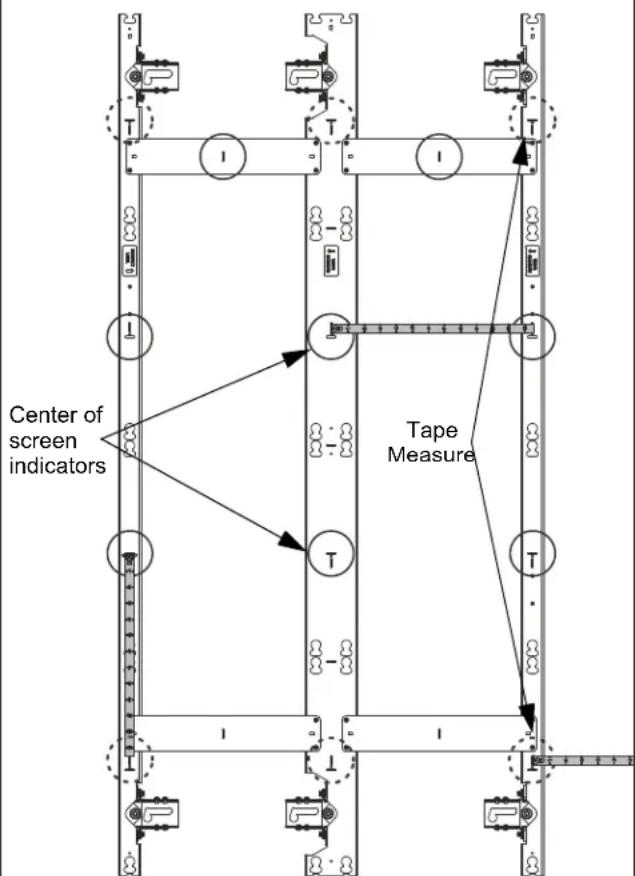

= Center-of-screen indicators

= Slots to hold tape measure blade
Figure 1
Connecting Mounting Uprights
- Use four 10-24 x 1/2" flathead Phillips screws (Q) to secure spacer plates (P) to mounting uprights (L and M or M and M). (See Figure 2) or (See Figure 3)
IMPORTANT ! : If installing from left to right, first attach left upright (L) to middle upright (M). If installing from the middle out, first attach two middle uprights (M) to each other.
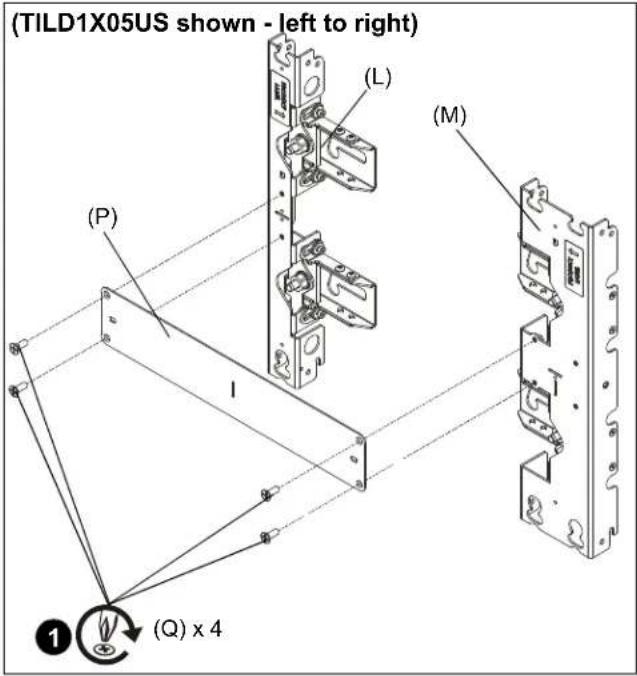
Figure 2
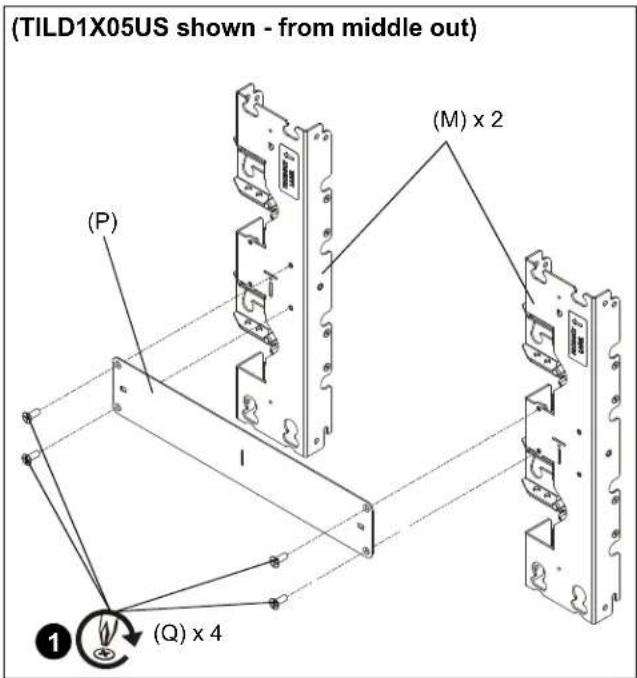
Figure 3
Preparing LED Screens
- Attach four mounting buttons (L) per LED screen, one to each corner of LED screen, with four M5 x 20mm Phillips flat head screws (K). (See Figure 4)
![[TILD1X05 shown as example] LED screen ① (K)](/content/2026/06/1167668/images/8b208213626cb43ee99decdf6b3a4f0d75f9eac7e8f633215d1ec4873cdf36ac.jpg)
Figure 4
Determining Installation Site
IMPORTANT ! : The top of the LED screen is 5.25" above the center line of the mounting lags in the upper mounting slots. (See Figure 5)
IMPORTANT ! : The bottom of the LED screen is 6.5" below the center line of the mounting lags in the lowest mounting slots.
NOTE: Refer to dimensions drawings on pages 16-19 for further details on installation locations
NOTE: If desired, the mount installation may be started in the middle of the video wall, attaching mounts out from the center to the left and right ends. Installation on smaller walls may be easier if started at the left side of the video wall using the following instructions.
- Determine location for the top left corner of the LED wall. (See Figure 5)
- Make a mark 5.25" below the planned top left corner of the LED wall. (See Figure 5)
- Using a level, mark a horizontal line across width of LED wall from the mark made in Step 2.
NOTE: This line will indicate the center line for the location of the mounting lags in the mounting slots for the top mount(s) in the video wall. The oversize mounting slots will allow some upward adjustment as needed. (See Figure 5) and (See Figure 6)
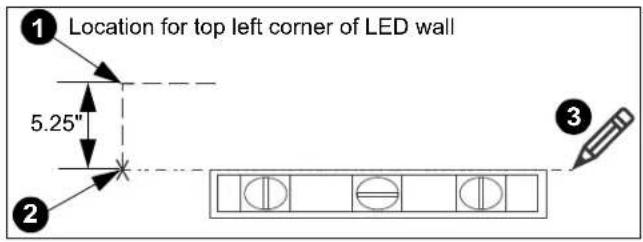
Figure 5
![[TILD1X05US shown as example] Mounting slot center line 5.25" 5.25"](/content/2026/06/1167668/images/ef584d534b2408f51fcad2f927b72e70073fcb994a79803b346d0c079e99cce5.jpg)
Figure 6
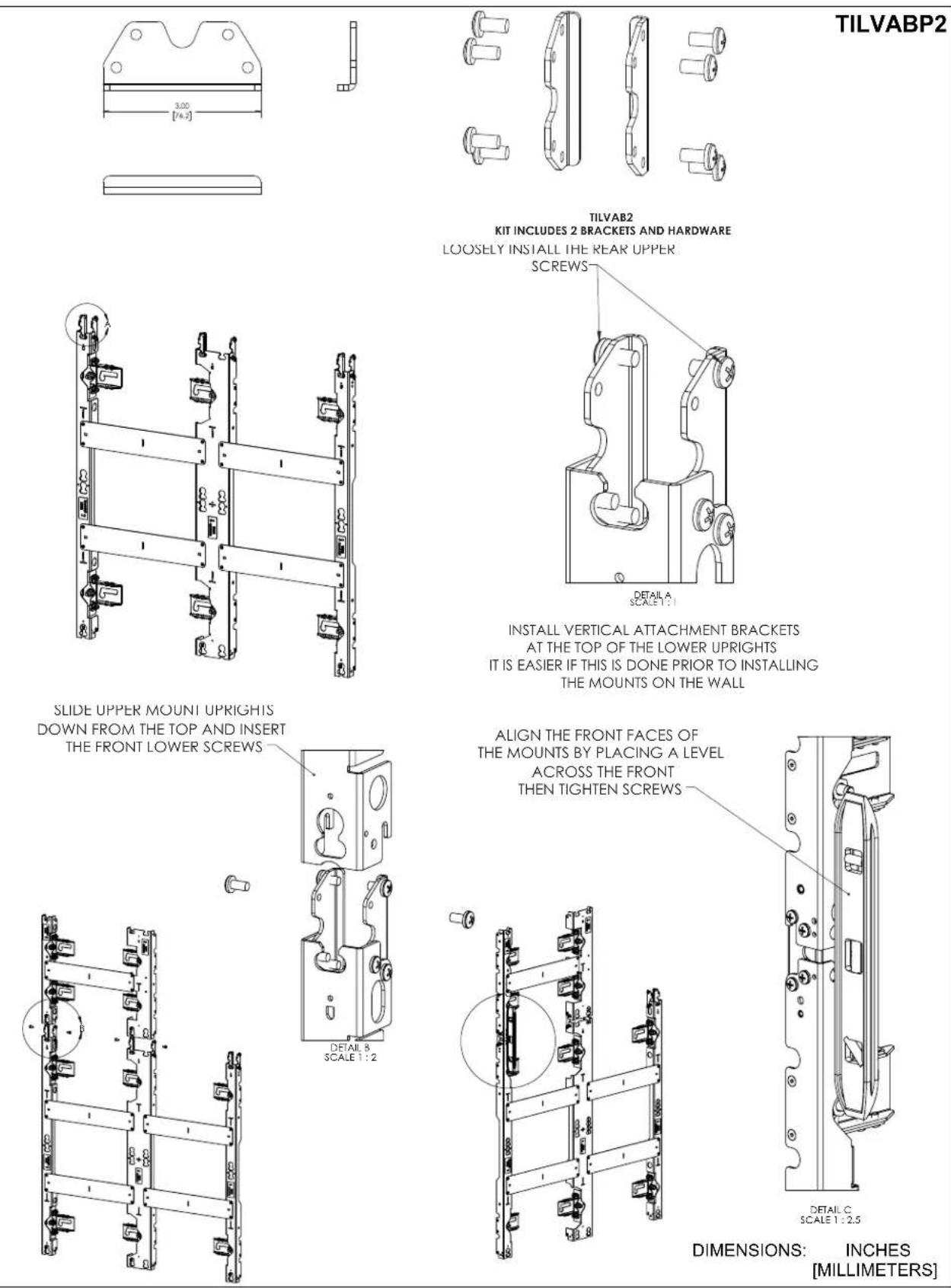
(OPTIONAL) Adding Vertical Connector Kit (Sold Separately)
NOTE: If more LED screens will need to be added to the top or bottom of the screen configuration, add TILVABPT vertical connector kit to top or bottom of wall mount using the following instructions. If you are NOT adding the TILVABPT connector kit, proceed to Installing First Mount section.
IMPORTANT ! : It is easier to install the vertical connector kit BEFORE the mounts are attached to the wall. However, it can also be installed after the mounts are attached to the wall.
- Add the vertical connector (K) to the top or bottom of the mount, and fasten with four 1/4-20 x 1/2" Phillips pan head screws (J) per vertical connector (K). (See Figure 7)
- Partially install two 1/4-20 x 1/2" Phillips pan head screws (J) into top or bottom screw holes on connectors (K). (See Figure 7)
- Connect another wall mount to the other end of the vertical connector (K) by placing open slot over partially installed screws (J). (See Figure 7) and (See Figure 8)
-
Install two 1/4-20 x 1/2" Phillips pan head machine screws (J) into inside holes on connectors (K). (See Figure 8)
-
Tighten screws partially installed in Step 2 to secure mount to connectors (K). (See Figure 8)
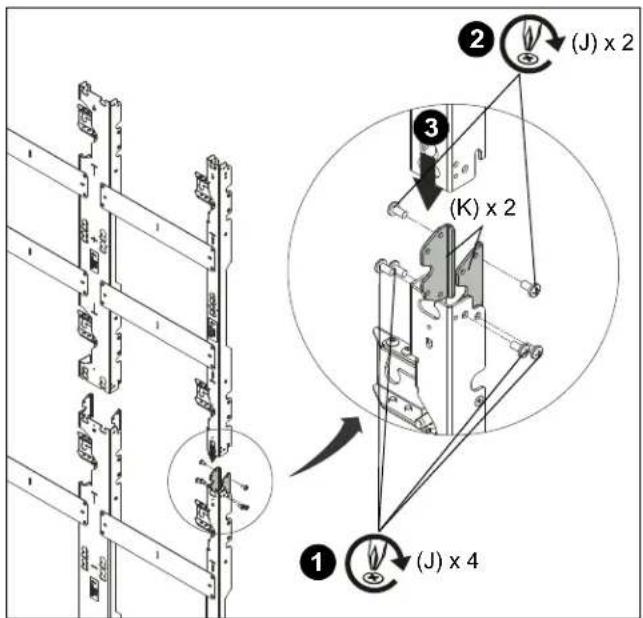
Figure 7
NOTE: When connecting a mount to the bottom of an installed mount, the lower mount may be hung by its open slot on the partially installed Phillips head screw (J) before tightening the connection. (See Figure 8)
NOTE: When connecting a mount above an already installed mount, the upper mount may be slid down and attached to the connector in the top of the already installed mount.
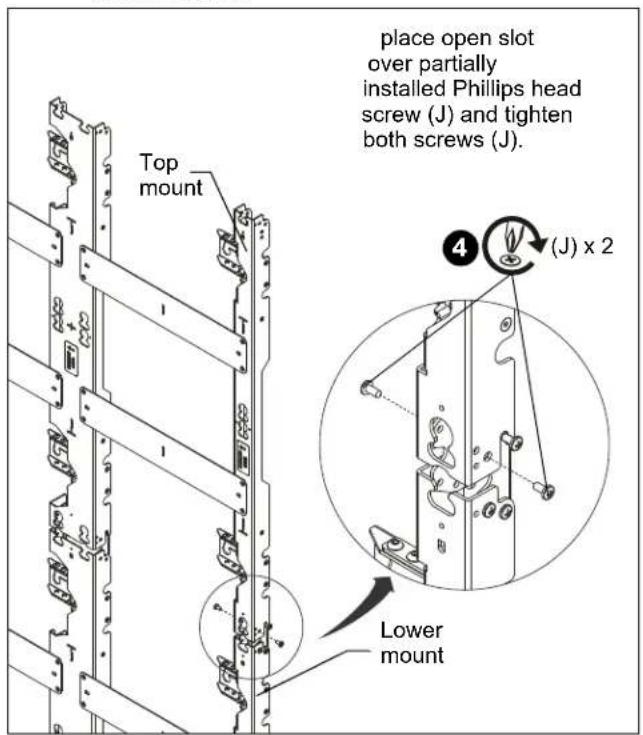
Figure 8
Installing First Mount
The TILD1X05US / TILD1X1US /TILD1X2US (U-Slim Series) LED wall mounts are designed to be mounted to a bare 8" concrete wall or 8"x 8"x 16" concrete block wall
Table 1: Fastener Information
| WALL TYPE | PILOT HOLE | FASTENERS (see PARTS drawing) |
| Concrete or concrete block | 3/8" x 3" - 5/16 x 2-1/2" flanged hex head lag (C)- 5/16" washer (D)- Adjustment washer (A)- Fischer Anchor UX10x60R (B) | |
- Hold furthest left, top wall mount against wall ensuring that mounting slot is lined up with center line marked on the wall in Determining Installation Site section. Double-check with a level. (See Figure 9)
- Mark mounting holes in two top mounting slots along the horizontal line marked in Step 3. (See Figure 9)
NOTE: The mounting holes are 13.34" apart on-center for left and center. (See Figure 9)
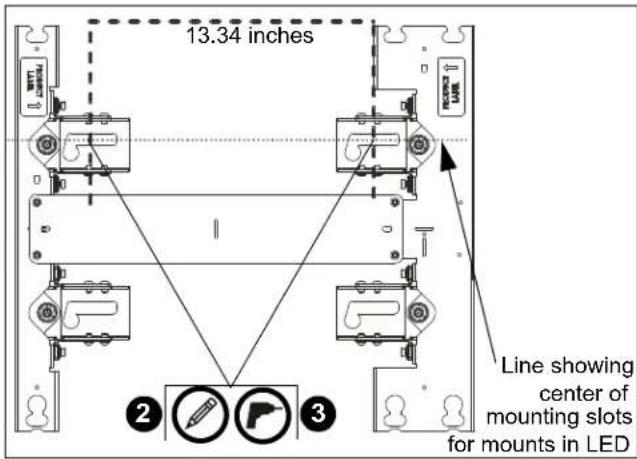
Figure 9
- Drill two pilot holes (see Table 1 for size) at each location marked in Step 2 (See Figure 9) and follow fastener information located in Table 1.
IMPORTANT ! : Refer to Fastener Installation Methods (located in Appendix at end of Installation Instructions) for details on installing product into various wall types.
- Partially install two lag screws into wall, but do NOT completely tighten to wall. (See Figure 10)
NOTE: (OPTIONAL) If more LED screens need to be added to the top or bottom of the screen configuration, add TILVABPT vertical connector kit (not included) to top or bottom of wall mount following instructions in the (OPTIONAL) Adding Vertical Connector Kit. If you are NOT adding the TILVABPT connector kit, proceed to Step 5.
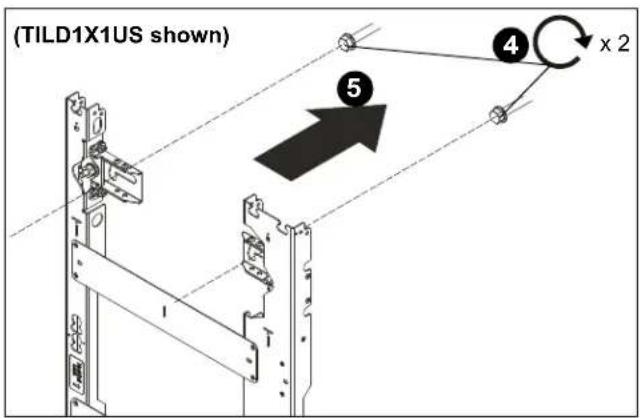
Figure 10
- Hang wall mount, aligning upper mounting slots over fasteners, and adjust side-to-side for proper location, but do NOT completely tighten to wall. (See Figure 10)
- Place a level across front of the mount at bottom of teardrop slots. (See Figure 11)
- Check the level of the mount at the bottom of the teardrop slots. (See Figure 11)
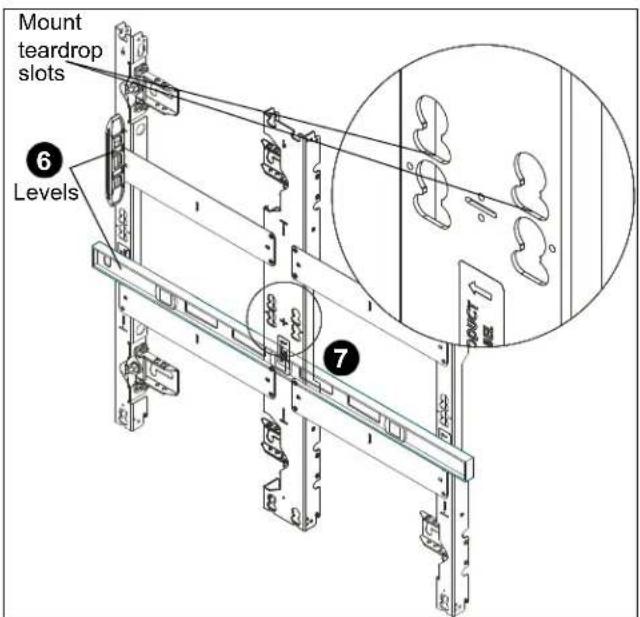
Figure 11
- Slide the left (A-Left) and right (A-Right) adjustment washers into place behind the partially installed lag screws. (See Figure 12)
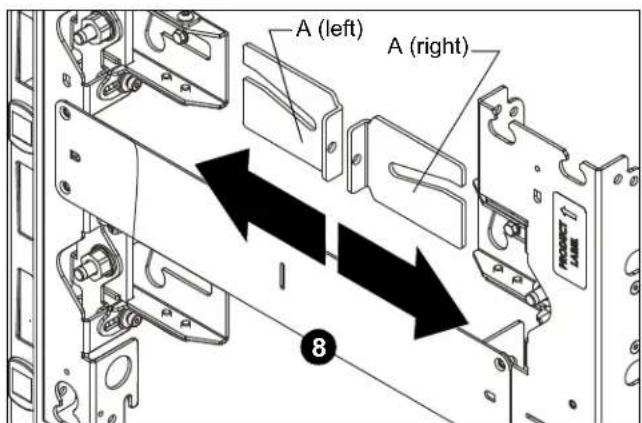
Figure 12
- Check the level of the mount at the bottom of the teardrop slots. (See Figure 13)
- If the mount is not level, slide or use a dead blow hammer to lightly tap the spacer into place. This will lift the mount up as the lag screw rides in the washer's angled slot. (See Figure 13)

Just a tip - Tighten down the lag screw on the side that does NOT need to be raised. This creates a pivot point for when the opposite adjustment washer is tapped into place, and allows that correct side of the mount to move up.
- When the mount is leveled, tighten the lag screws (C). (See Figure 13)
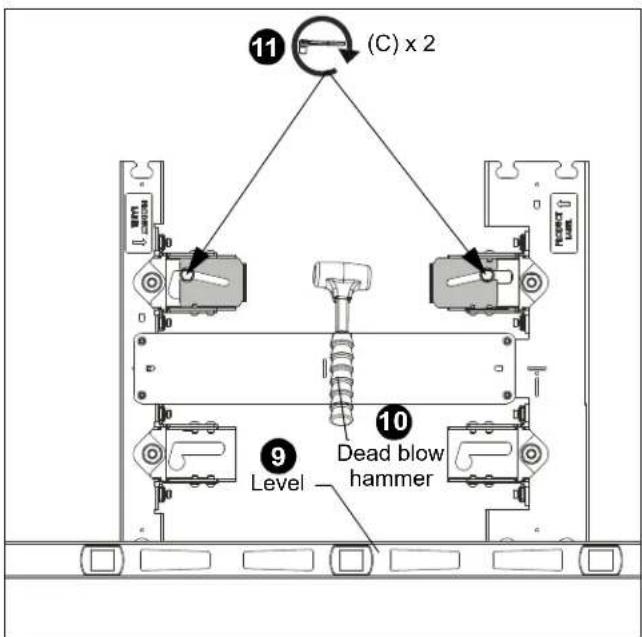
Figure 13
- Drill pilot holes in centerline of lower slots (see Table 1 for size) and follow fastener information (appropriate for wall type) located in Table 1. (See Figure 14)
- Double check the level of the mount along the side of the mount. (See Figure 14)
- Fully tighten the 5/16 x 2-1/2" lag screws (C) through the 5/16" fender washers (D). (See Figure 14)
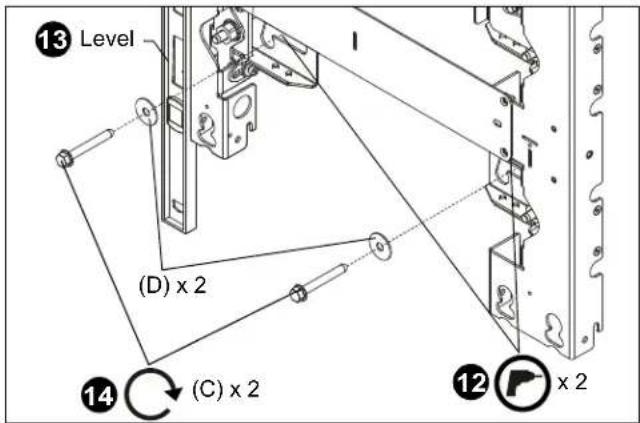
Figure 14
Adding Additional Uprights
- Use four 10-24 x 1/2" flathead Phillips screws (Q) to secure spacer plates (P) to mounting uprights (M and M or N). (See Figure 15)
NOTE: Add uprights (M or N) one by one from left to right as the mounting system is being built on the wall.
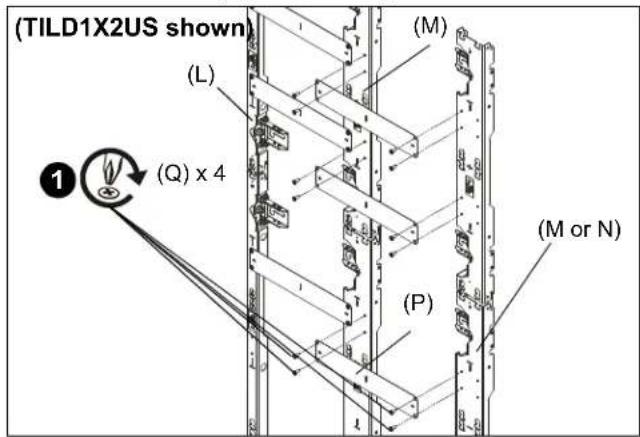
Figure 15
- Lay levels across flat of the mounting holes and center-of-screen indicators, and vertically along side of mount to ensure wall mount is square and level.
NOTE: Lift up slightly on the far side of the second mount to help level the mount.
- Mark mounting hole in top mounting slot along the horizontal line marked in Step 3 of Installing First Mount Section. (See Figure 16)
NOTE: The mounting holes are 18.06" apart on-center for center (M) and center (M) or center (M) and right (N) uprights. (See Figure 16)
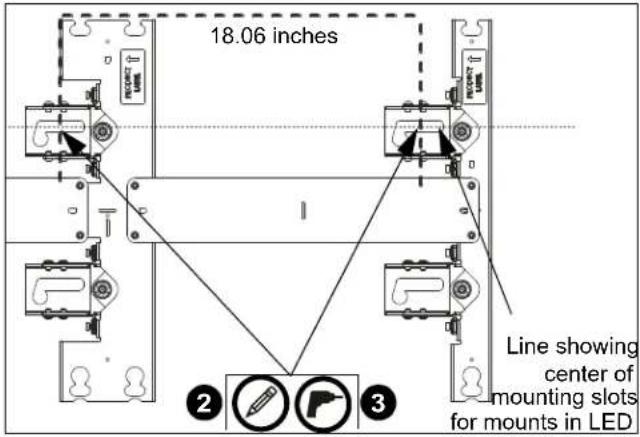
Figure 16
NOTE: Drill two pilot holes (see Table 1 for size) at each location marked in Step 3 (See Figure 16) and follow fastener information (appropriate for wall type) located in Table 1.
- Hold the adjustment washers in place by hand and tighten the fasteners at the top of the mount.
- Drill lower pilot holes at attachment locations and use same fasteners used at top of mount.
- Install two fasteners through lower part of mount and tighten.
IMPORTANT ! : For larger LED walls it is helpful to check placement and alignment of the mounts by putting a few LED housings in place in the bottom row of the installed mounts (referencing the LED screen installation manual for specific instructions) during the mount installation, checking alignment before removing the housings, and then continuing the installation.
IMPORTANT ! : Continually recheck the alignment and overall flatness of the wall mounts during the installation process.
- Continue the installation process until all wall mounts are attached.
- Install one #10 x 1/2" Phillips tapping screw (G) into left upper LED mounting button hole for each LED screen space. Install the tapping screws ONLY on the furthest left column of mounts. (See Figure 17)
![[TILD1X1US shown as example] Model Fastener TILD1X2US TILD1X1US TILD1X05US](/content/2026/06/1167668/images/41cffea26d10e081c6b386ab5e8b96de4dfaf29755d04fcc17211d3a7b087173.jpg)
Figure 17
IMPORTANT ! : The tapping screws keep the LED screens from moving side to side, and are ONLY installed on the furthest left column of mounts.
- Using a drill driver makes installation of the tapping screws (C) easier.
- Install the remaining #10 x 1/2" self-tapping screws (G) on the mount, as necessary, to assist in centering the LED housings. (See Figure 18)
- Run a string between the self-tapping screws installed in Step 7 to assist with alignment across long sections of mounts. (See Figure 18)
![[TILD1X2US shown as example] Circles indicate tapping screw hole locations for attaching string to assist with alignment of mounts. Use locations nearest depth adjustment points for best results. Use locations nearest (G) depth adjustment points for best results. [TILD1X1US with multiple middle columns shown as example for using string to assist with alignment.]](/content/2026/06/1167668/images/ec0ee87c5b036e5f3f5ba8b1b32f758e63c460f596a0b79e5e2c1935f4a8da8e.jpg)
Figure 18
Installing Housings and LED Screens
IMPORTANT ! : Reference the LED screen installation manual for specific instructions regarding care, handling, cabling and installation of the LED housings and screens.
NOTE: Begin the installation of the housings in the lower left corner of the video wall.
NOTE: One complete column of housings should be installed before proceeding to the next column.
![LED Panels Begin LED housing install in the lowest left corner of the video wall [TILD1X05US wall shown as example]](/content/2026/06/1167668/images/1d827716d2f78b3283854b6447d6437ced840c444c9b01fa86273652e52e223f.jpg)
Figure 19
- Install the first LED housing in the lowest left-hand corner of the video wall by aligning mounting buttons on the housing with the mounting holes on the wall mount. (See Figure 19)
- Move LED housing forward until all four mounting buttons are through mounting holes in wall mount.
- Continue with the next housing (directly above installed housing).
NOTE: Be sure to check the level and plumb of the housings often during the housing installation.
-
AFTER the entire first column of housings are installed, slide the column to the left side so that the mounting buttons are against the tapping screws, and to allow clearance for installation of the second column.
-
After the second column of housings is installed, push to the left until the first and second columns of housings are touching.
-
Repeat until all housings are installed.
-
Using levels, check the level and plumb of the housings installed on the mounts and adjust as necessary following information in the Adjustments section.
-
Connect housings following instructions included with LED screens.
-
Install LED screens following instructions included with screens.
Adjustments
Depth Adjust (Macroadjust)
- Remove LED housings from mounting system.
- Turn 3/4" hex nuts near feet of mounting system to adjust depth as needed. (See Figure 20)
- Replace LED housings onto mounting system.
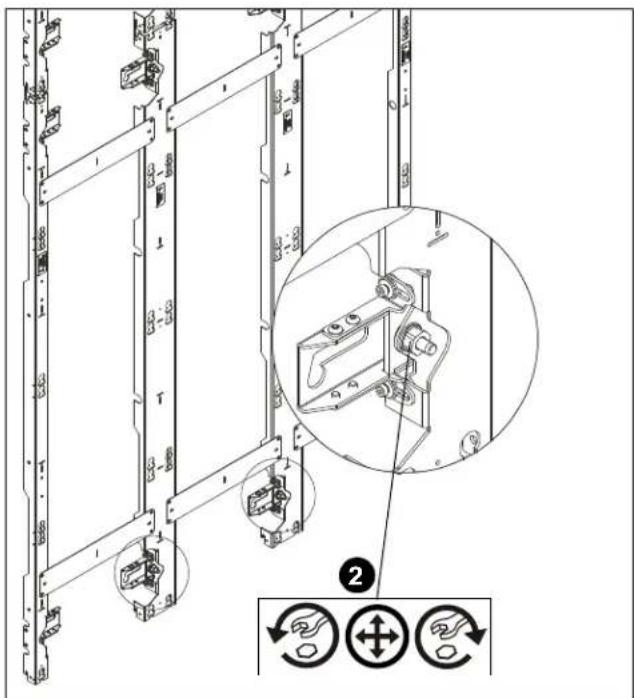
Figure 20
Depth Adjust (Microadjust)
The depth of each wall mount section is controlled by a screw accessible only after removing LED display from LED housing.
- Remove LED display from LED housing. (See Figure 21)
- Adjust depth adjustment screw until LED housing is adjusted to desired depth using T-handle M5 hex key (not included). (See Figure 21)
- Replace LED display into LED housing.
IMPORTANT ! : It is best to make adjustments in small increments to prevent any binding or torquing of the mounts. Be sure to adjust the depth evenly for both sides of the mounts.

CAUTION: Over-torquing may cause damage. Do NOT use a drill to make the depth adjustment.
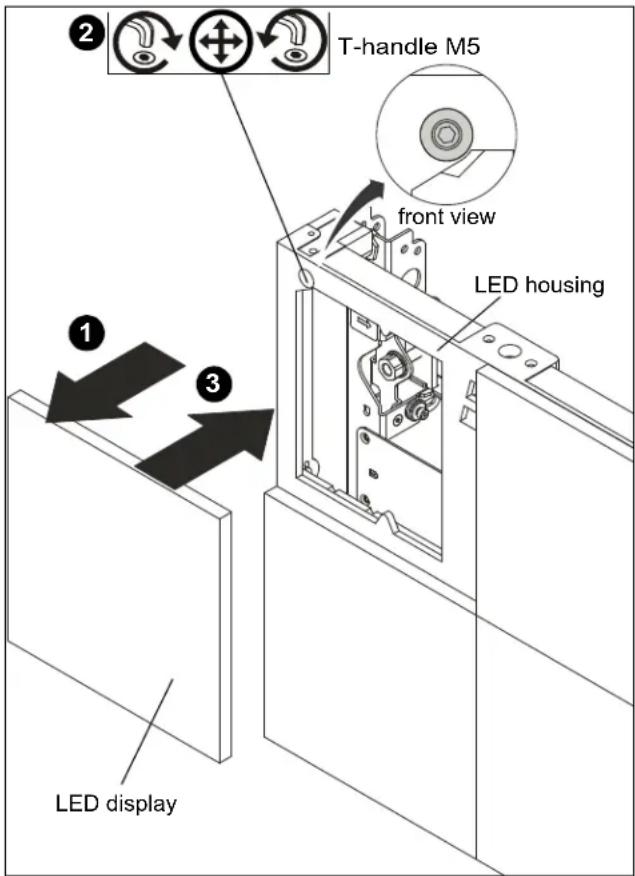
Figure 21
Fastener Installation Methods
IMPORTANT ! : See Table 1 for appropriate hardware and pilot hole sizes for various wall types.
IMPORTANT ! : The expanse of the LED wall will most likely mean that attachment of the wall mounts will not all be in studs. The attachment method will most likely vary throughout the installation, and more than one of the various methods outlined here will most likely be used.
Concrete or Concrete Block
- Install one UX10X60R anchor (B) into each pilot hole using a hammer, making sure that the anchor is flush with the wall. (See Figure 22)
- Use one 5/16" x 2-1/2" hex flange head lag bolt (C) and one 5/16" washer (D) through product into each anchor in wall. (See Figure 22)
NOTE: 5/16" washers (D) may not be necessary if using adjustment washers (A) to install to wall.
- Repeat for remaining pilot holes.
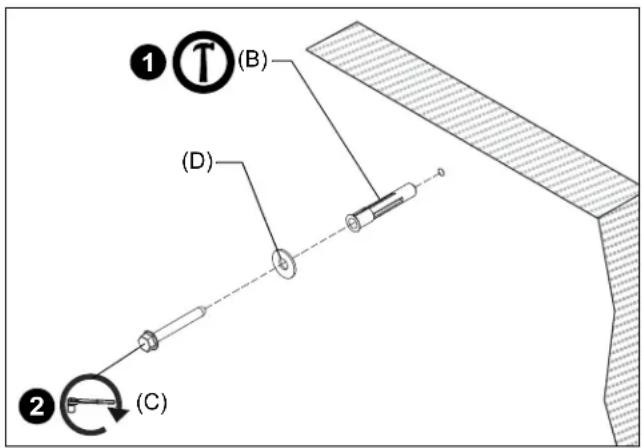
Figure 22
Configuration Examples
The following are just two examples of the many configurations which are possible with the US Series wall mounts.
![51.08 32.99 [1297.3] 13.31 [338.0] 19.69 [500.0] 18.08 [459.3] 3.62 [92.0] 5.25 [133.4] 27.62 [701.6] 11.75 [298.5] 117.61 [2987.3] 66.99 [1701.5] 6.00 [152.4] 1.94 [49.2] MINIMUM DEPTH 2.69 [68.3] MAXIMUM DEPTH](/content/2026/06/1167668/images/14514fd6ee6b4f8274219e0b27a21471171c7af84e5868f5cfea9a51dc12acc1.jpg)
TILD1X1 3 x 3 CONFIGURATION
BILL OF MATERIALS FOR
THIS CONFIGURATION
1-TILD1X1US-L
2-TILD1X1US-M
1-TILD1X1US-R
1-TILD1X2US-L
2-TILD1X2US-M
1-TILD1X2US-R
4-TILVAB2

![37 [9.3] 118.11 [3000.0] 59.06 [1500.0]](/content/2026/06/1167668/images/a7df9493201142cfe30d2b5454ff7b7357944623033df2444f914ac19a76a72c.jpg)
![4.0 [101.3] 5.50 [139.7] .37 [9.3] DETAIL A SCALE 1:4](/content/2026/06/1167668/images/ab077fbc0a264e1ae7797c3c89ca2a1af30d4c77edc4fd157c428d86acc41165.jpg)
![37 [9.3] 6.25 [158.8] 4.0 [101.3]](/content/2026/06/1167668/images/6a4fe649af6ea90fd57737b32a6ce09348fc90f85adf628cca48bd3d4f0131c1.jpg)
DETAIL 8 SCALE 1:4
![5.31 [134.8] MINIMUM DEPTH .25 [6.4] 6.06 [153.9] MAXIMUM DEPTH .25 [6.4] 25 [6.4]](/content/2026/06/1167668/images/31d9d663e18a8e0f408cfd25e766ff1b13dc90f983513c24d792d7a14c4bb895.jpg)

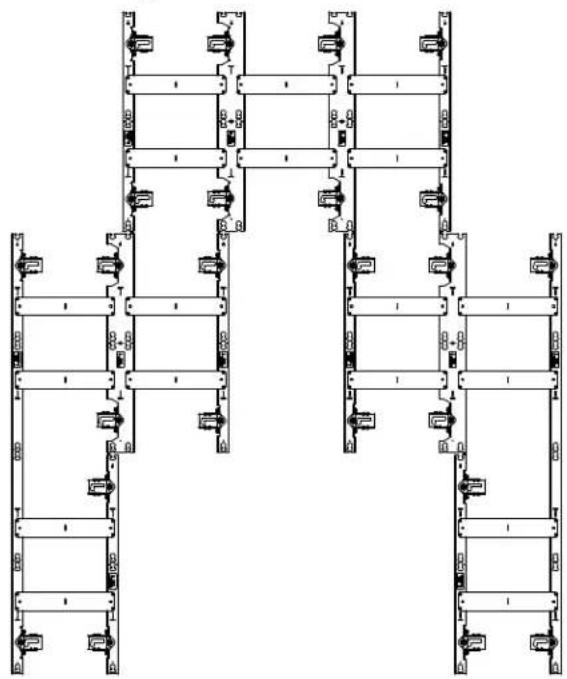
Pyramid configuration
natural_image
Architectural floor plan showing structural layout with beams and fixtures (no text or labels)![2.01 [51.1] MINIMUM DEPTH 2.74 [70.2] MAXIMUM DEPTH](/content/2026/06/1167668/images/5be119912b32a16ddd8ef998177b1e35bba11c337237f7fef3c50c8b00e91bb3.jpg)
PARTS LIST FOR THIS CONFIGURATION
1-TILD1X2US-L
1-TILD1X2US-R
4-TILD1X1US-M
3-TILD1X1US-L
3-TILD1X1US-R
3-TILVAB2
![59.06 [1500.0] 3.98 [101.1] 5.50 [139.7] 3.98 [101.1] 18.08 [459.3] 19.69 [500.0] 13.31 [338.0] 3.98 [101.1] 27.45 [697.2] 5.5 [139.4] 19.69 [500.0] 11.75 [298.5] 18.08 [459.3] 13.31 [338.0] 3.99 [101.3] 19.69 [500.0] 66.99 [1701.5] 118.11 [3000.0] 6.25 [158.8] 3.99 [101.3] 3.99 [101.3] 11.71 [297.3] 98.43 [2500.0]](/content/2026/06/1167668/images/5334bd946848ed6a1b780bd1664185a90d14995b2a0d01f83d70b83c3f4ad554.jpg)
![25 [6.4] 5.31 [134.8] MINIMUM DEPTH 25 [6.4]](/content/2026/06/1167668/images/b2ca4f96e31b4499f3c8d1e8899e88a105efdc579f690f5723ec43b912dedcc0.jpg)
![6.06 [153.9] MAXIMUM DEPTH](/content/2026/06/1167668/images/f5dd57b0f885a00fbac6e46f6d72f4b5fe8fe48fb4acd26478667889373dc4b4.jpg)
DIMENSIONS
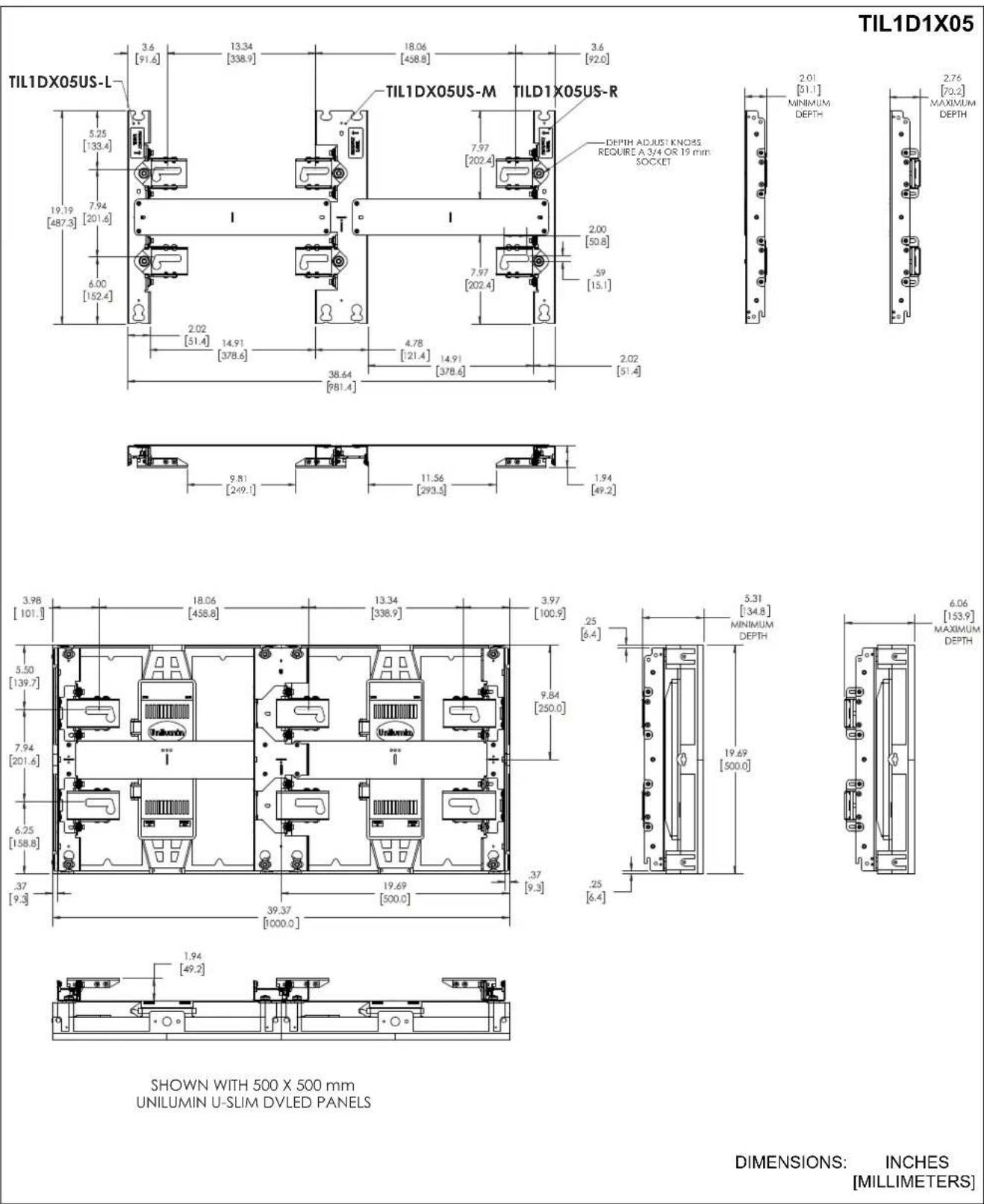
DIMENSIONS: INCHES [MILLIMETERS]
DIMENSIONS...cont'd
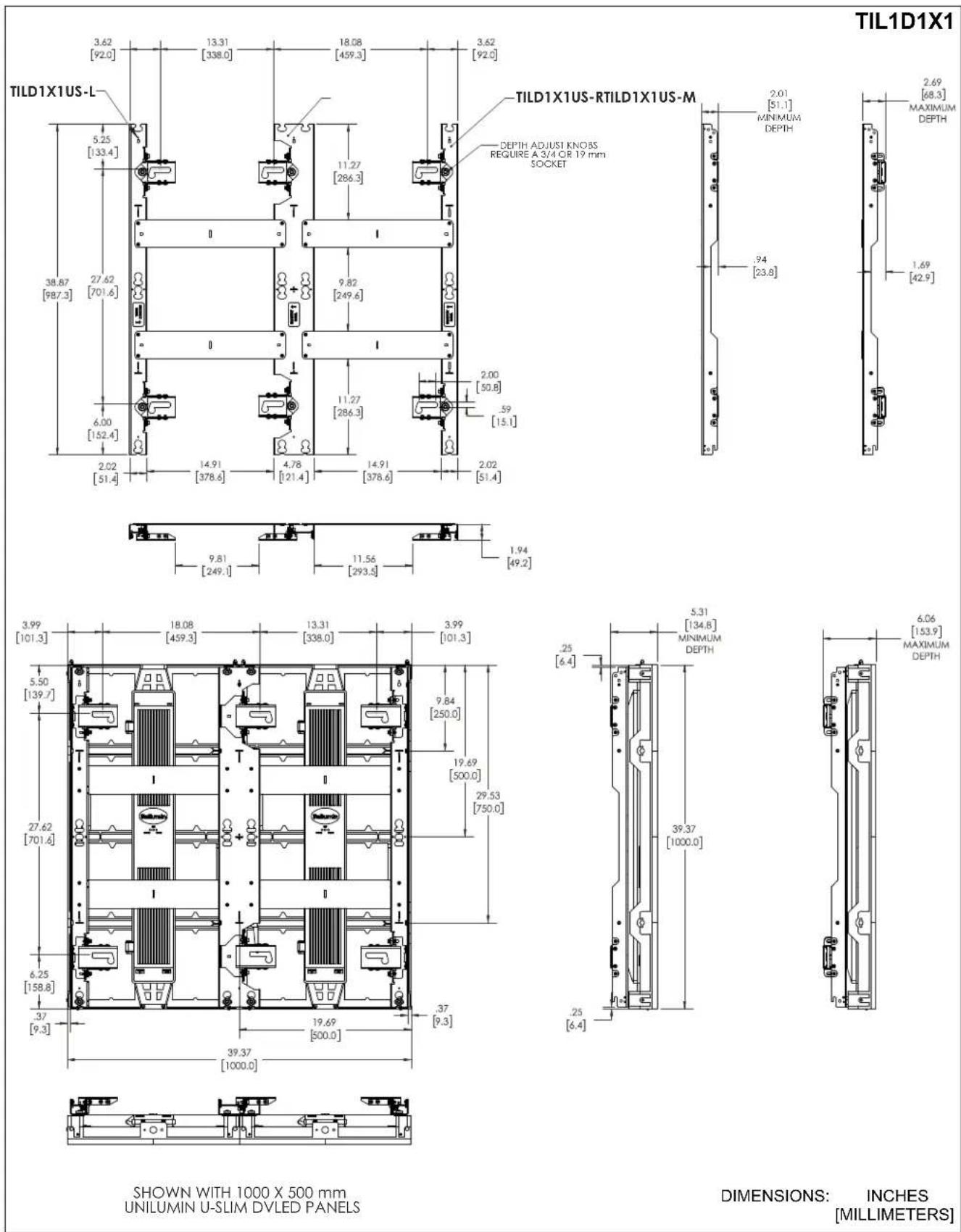
DIMENSIONS...cont'd
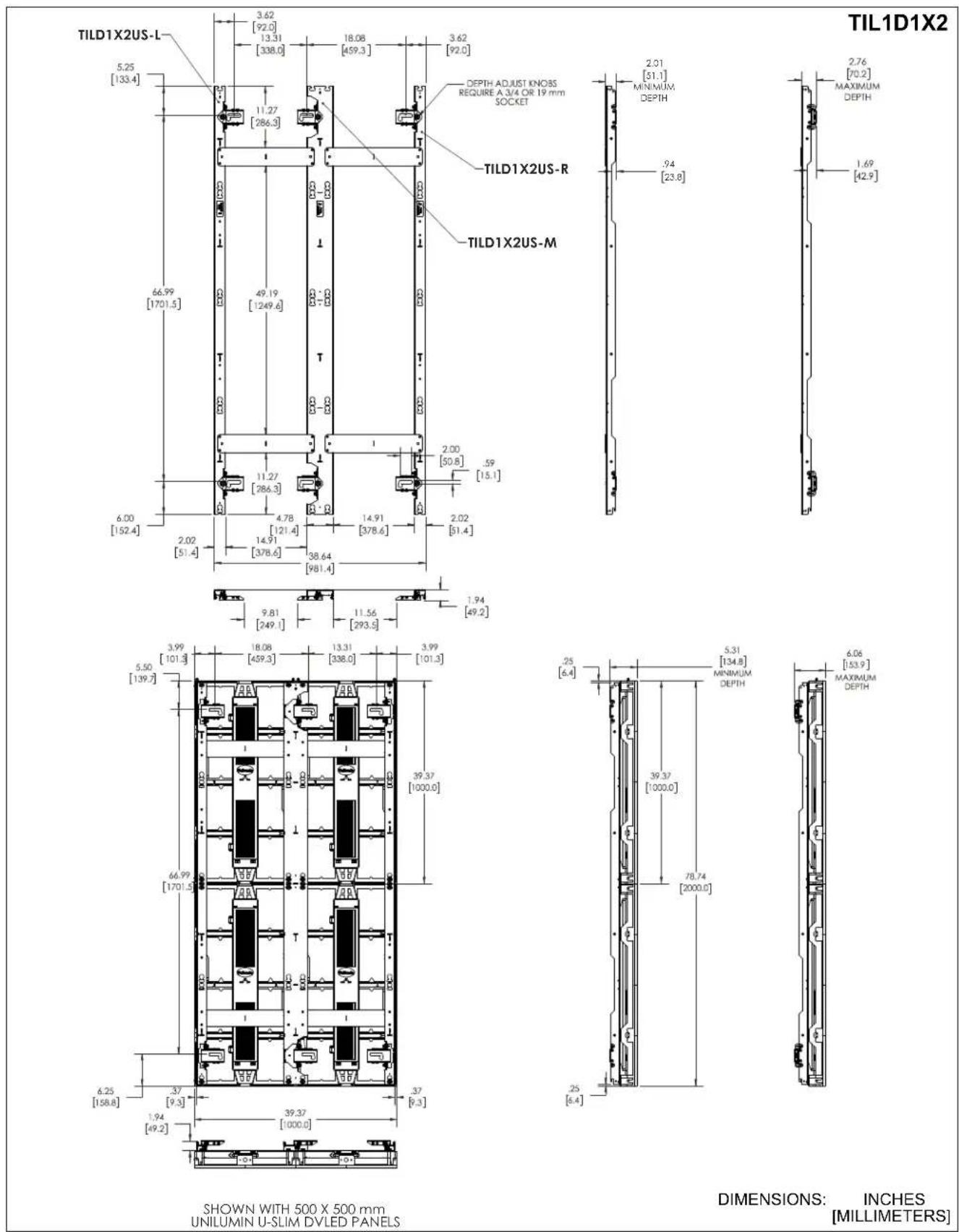
DIMENSIONS...cont'd

CHIEF®
A brand of □ legrand®
8800-003319 Rev00
©2021 Legrand | AV
www.legrandav.com
10/2021
USA/International A 6436 City West Parkway, Eden Prairie, MN 55344
P 800.582.6480 / 952.225.6000
F 877.894.6918 / 952.894.6918
Europe A Franklinstraat 14, 6003 DK Weert, Netherlands
P +31 (0) 495 580 852
F +31 (0) 495 580 845
Asia Pacific A Office No. 918 on 9/F, Shatin Galleria
18-24 Shan Mei Street
Fotan, Shatin, Hong Kong
P 852 2145 4099
F 852 2145 4477