
AS40GVGL2 - Air purifier LG - Free user manual and instructions
Find the device manual for free AS40GVGL2 LG in PDF.


User questions about AS40GVGL2 LG
0 question about this device. Answer the ones you know or ask your own.
Ask a new question about this device
Download the instructions for your Air purifier in PDF format for free! Find your manual AS40GVGL2 - LG and take your electronic device back in hand. On this page are published all the documents necessary for the use of your device. AS40GVGL2 by LG.
USER MANUAL AS40GVGL2 LG
Please read this manual carefully before operating your set and retain it for future reference.
Model name : AS40GVGL2
AS40GVSL2
SAFETY PRECAUTIONS
The precautions related with the safety shown below are to prevent unexpected hazard and damage through safe and accurate operation of the product.

WARNING
If not followed, It may cause death or major injury to the user.

CAUTION
If not followed, it may cause injury to the user or property damage.

This symbol is to alerts you to hazardous practice and operation. Check carefully and follow instructions to avoid hazard.

This symbol displays how to use avoiding hazard.

WARNING
Installation
- Do not arbitrarily change or extend the power line.
- It may cause fire and electric shock.
- When the socket is damaged or loosened, do not use it.
- It may cause fire and electric shock.
- Do not arbitrarily disassemble, repair, or modify the product.
- It may cause fire and electric shock.
- Do not use the product at the location where moisture or oil are prevailed such as toilet or bathroom, laundry, etc.
- It may cause fire and electric shock.
- When using the multi-socket, do not use several appliances at the same time.
- Excessive use of electric power may cause fire and electric shock.
- When gas is leaked, perform the ventilation by opening the window before operating the air purifier.
- Otherwise, it may cause the explosion, fire, and burn.
- Do not store or use combustible gas or flammable material near the product.
- It may cause fire or product failure.
- If abnormal noise, odor or smoke is coming out from the product, pull out the power plug and contact the customer care center.
- It may cause fire and electric shock.
- Do not place heavy object on the power cord or have power cord squashed under equipment.
- It may cause fire and electric shock.
- Carry out the installation by avoiding direct sunlight, heating appliance, and dampness.
- It may cause the electric shock, fire, and failure.
- Do not place fire source near to the product.
- It may cause fire.
Operation
- Insert securely the power plug up to the end of its plug so that it will not be shaken.
- If connection is unstable, it may cause fire.
- Do not arbitrarily change or extend the power line.
- It may cause fire and electric shock.
- Do not allow water to be infiltrated into the product.
- It may cause fire and electric shock.
- Do not place rug etc. on the power cord.
- If heavy object is placed on the rug because the cord is invisible, it may cause fire and electric shock.
- Do not touch the power plug with wet hand.
- It may cause electric shock and injury.
- Do not remove the plug by pulling its power cord section.
- It may cause fire and electric shock.
- Do not place obstacles at the air suction port or discharge port of the product.
- It may cause the product failure.
- Do not use the product where water can be easily splashed.
- It may cause fire or electric shock.
- Do not allow children to climb up the product or arbitrarily touch it.
- It may cause failure, injury.
- Do not move the product while it is under operation.
- It may cause fire and electric shock or partial damage of the product may occur.
- Do not put hands, glue or metal at the air suction port or discharge port of the product.
- It may cause product damage, injury, or electric shock.
- Do not install the product at the location where excessive industrial oil smoke or metallic dust is prevailed.
- It may cause fire and product failure.
- Do not move the product by grabbing any other parts other than the handle of the product.
- The product may partially be damaged.
- If product repair is required, contact the service center.
- Arbitrary disassemble or repair may cause electric shock or fire.
- If the product is flooded, make sure to contact the service center.
- There is a risk of electric shock or fire.
- Do not apply any impact on the front panel.
- It may cause injury, product damage or electric shock.
- Do not let children or people that are difficult to operate the device safely alone operate the product.
- It may cause injury or electric shock.
- If the power cord is damaged, request for repair to the service technician to prevent any risk.
- If not, It may cause fire, electric shock or product failure.

CAUTION
Installation
- When installing near to TV or audio, provide more than 1 m of distance with them. - TV or audio may have malfunction.
- When pulling out the power plug, pull out by grabbing the head of the plug. - It may cause injury or electric shock.
- In kitchen, do not use the product as ventilation fan or hood for range. - The life will be shortened.
- During the cleaning, make sure to stop the product and pull out the power plug. - The fan is rotating at a high speed, and it may cause injury.
- Avoid places near fire, heating appliances, or under direct sunlight. - It may cause fire.
- Do not use the product to remove toxic gas such as carbon monoxide. - It may cause product failure.
- Install the product at the flat location and do not throw it down or give impact. - It may cause product failure.
- Provide distance of more than 1.5m from lighting appliance and more than around 10cm from the wall.
- It may cause the product discoloration and the cleaning capability may be deteriorated.
- Use only 220 V\~.
- It may cause fire and electric shock.
- Do not install in transportations (vehicle/vessel, etc.). - It may cause failure.
Operation
- Do not use the product for special usages/places such as preservations of animal/plant, precision equipment, art pieces, etc.
- It may cause property damage.
- Do not clean with strong detergents such as solvents, but use soft cloth. - It may cause fire and product deformation.
- If it is not used for a long period of time, pull out the power plug. - It may cause product failure or fire.
- Do not operate with wet hand.
- It may cause electric shock.
- Do not climb up or place object on Air Purifier. - It may cause injury by falling or flip over.
- Make sure to insert the Dual Protection Filter, and clean the filter every month. - It may cause shortening of the filter life.
- Be sure to insert all the filters before the use and perform regular cleaning of the filter. - Otherwise, It may cause product failure.
-
Install the product at the flat location and do not throw it down or give impact. - It may cause fire or product failure.
-
Do not use the power cord as tied.
- Heat generation may cause fire.
- Start cleaning and mending after pulling out the power plug and when the fan stops rotating.
- You may get electric shock or injury.
- Do not use it as a ventilator.
- The product life may be shortened.
- Completely dry the Dual Protection Filter in a shadow until there is no moisture after washing.
- Otherwise, It may cause failure.
- Do not insert inflammables inside the product.
- It may cause fire or product failure.
- Do not let the moisture emitted from the humidifier directly touch the product.
- It may cause electric shock, fire, or product failure.
- Do not open the backside panel while product is in operation.
- Fan is rotating, and it has a risk of injury.
TABLE OF CONTENTS
2 SAFETY PRECAUTIONS
7 HOW TO INSTALL
7 Selecting installation place
7 Use the air purifier as this.
8 NAME OF THE PARTS
8 Front side
8 Rear side
9 Operation display and control part
10 Filter system
11 HOW TO USE
11 Air Cleaning Operation
12 The Jet Clean function
12 Ionizer Operation
13 Indicator display
14 Off Timer operation
15 Lock function
16 Filter Check lamp
17 HOW TO INSTALL
17 How to install the filter before using it
18 HOW TO CLEAN
20 How to clean the filters
20 How to clean exterior
21 How to clean the sensor
22 HOW TO STORE THE PRODUCT
22 How to store the product
23 TROUBLESHOOTING BEFORE CALLING FOR SERVICE
25 PRODUCT SPECIFICATION
HOW TO INSTALL
Selecting installation place
Main Unit
- Place with handy power connections
- Place with no obstacle to clog air inlet
- Place with horizontal surface and rich air circulation

WARNING
There can be product failure if the air purifier is installed on a moving vehicle such as cars, boats and others.

WARNING
This appliance is not intended for use by persons (including children) with reduced physical, sensory or mental capabilities, or lack of experience and knowledge, unless they have been given supervision or instruction concerning use of the appliance by person responsible for their safety.
Children should be supervised to ensure that they do not play with the appliance.
Use the air purifier as this.
- Reduce the use of air purifier if possible when you cook smelly food such as fish grill.
- The vaporized oil from the cooking may affect to the performance and lifetime of the filters, and the smell may stick on the filter as well.
- Maintain a minimum distance of 1 meter from the air purifier when you sleep.
- The fan speed of the air purifier is not that high. However you may feel a chill.
- Do not place in a corner edge.
- Avoid a place surrounded with furniture and electronic equipment, or in a corner edge. The air purifier will not function well if it is installed in a corner edge.
NAME OF THE PARTS
Front side
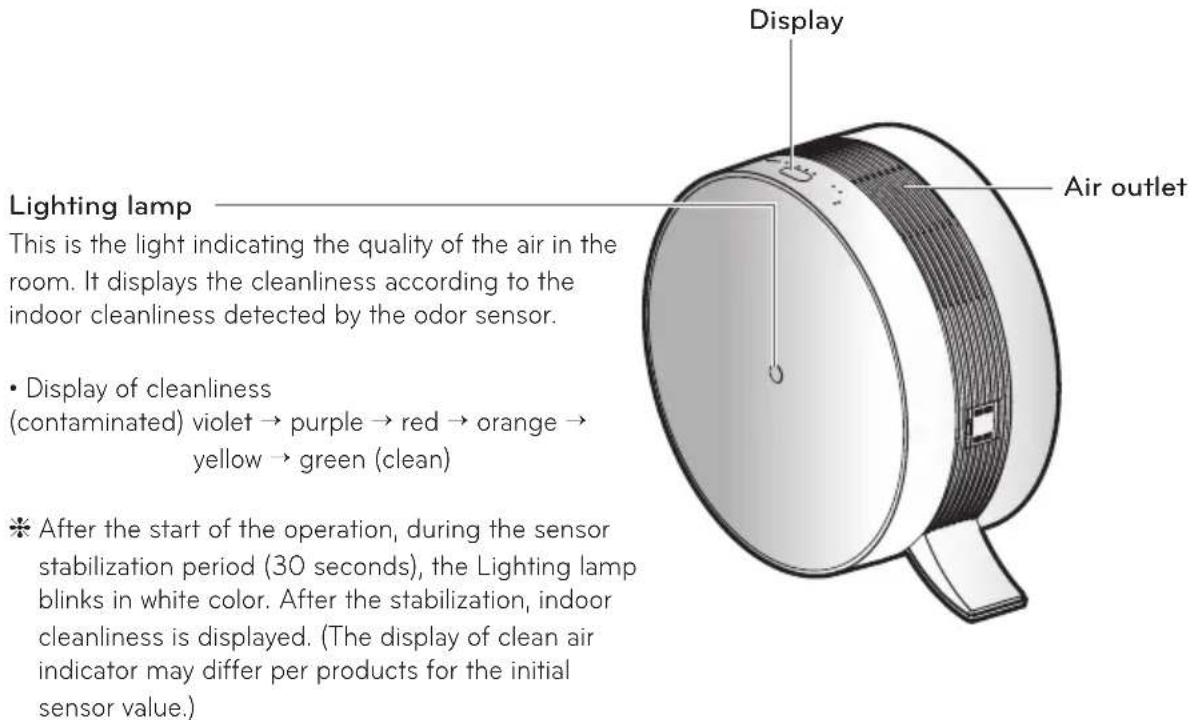
Rear side
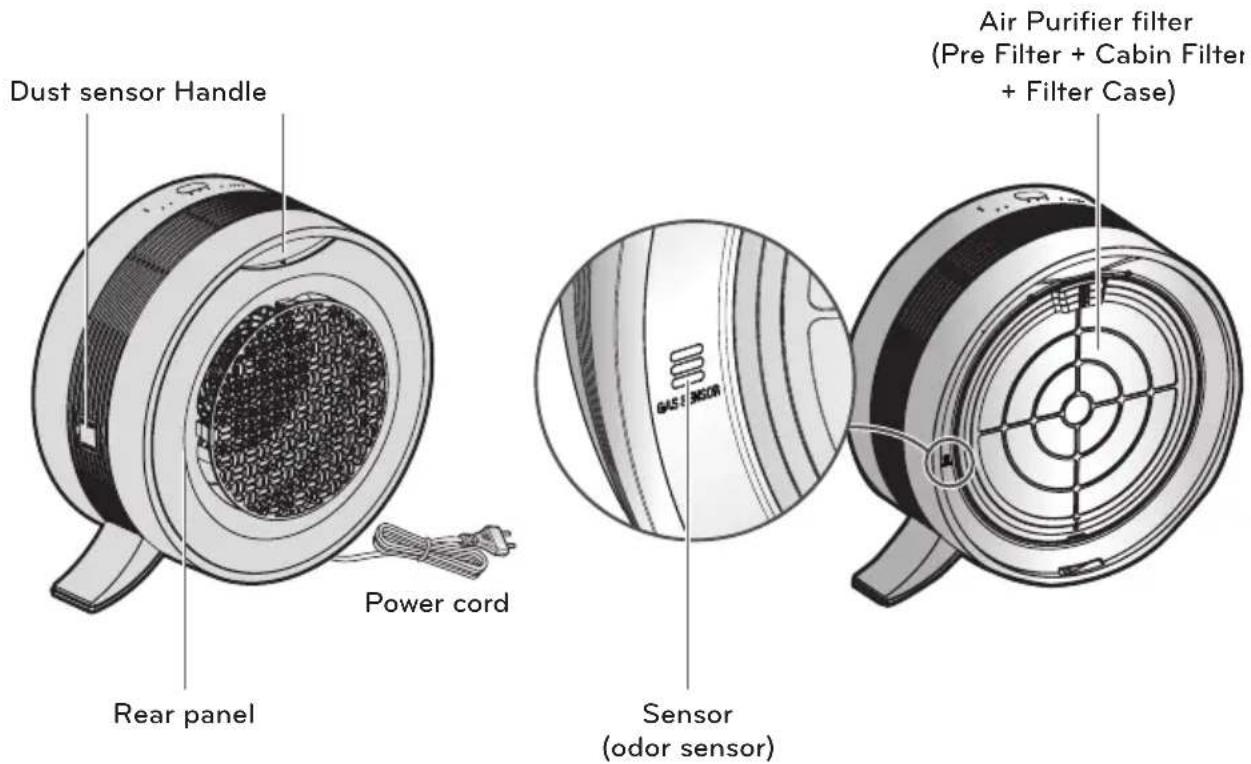
* Shape of the power cord can be different by country.
* The shape of the sensor could differ by the model.
* The odor sensor measures odors.
Operation display and control part
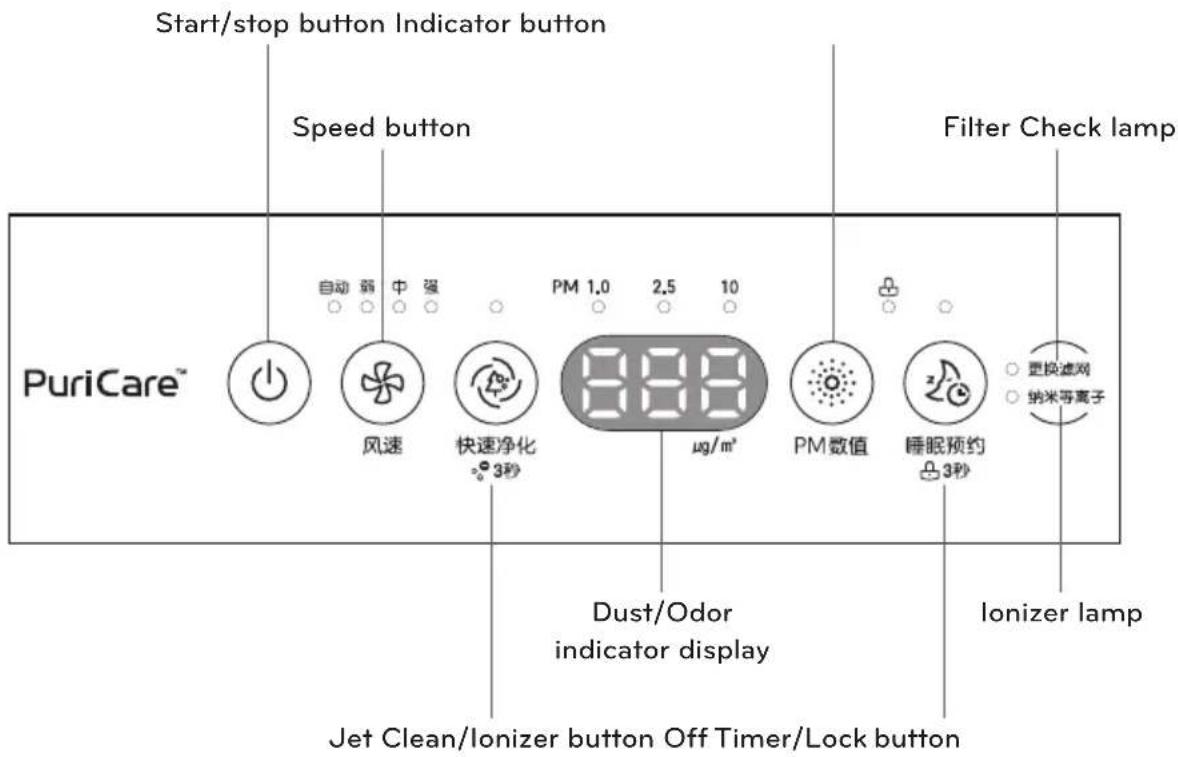
Start/stop button Use to start and stop the product.
Speed button It adjusts wind volume.
Jet Clean/lonizer butto It cleans the indoor air faster for certain period of time. If you press the button for 3 seconds, you can lock/unlock the lonizer function.
Indicator button Choose the size of Micro dust particles.
Off Timer/Lock button It adjusts wind volume for sound sleep and can set the time when the product is turned off. If you press the button for 3 seconds, you can enter/reset Lock function.
Filter Check lamp If the filter Check lamp is on, check if the filter is contaminated, and if it is seriously contaminated, clean or replace the filter.
Ionizer lamp If the Ionizer lamp is on, the ions are generated to remove various bacteria in the indoor air.
Dust/Odor indicator Show the size of dust or odor particles and its density. display
\* Guide to the size of dust particles
PM10: dust particle size is equal or below 10 m (occurs in the combustion at the site, automobile exhaust, etc.)
PM2.5: dust particle size is equal or below 2.5 m (icon components, carbon compounds, and metal compounds)
PM1.0: dust particle size is equal or below 1.0 μm (cigarette smoke, etc.)
Filter system
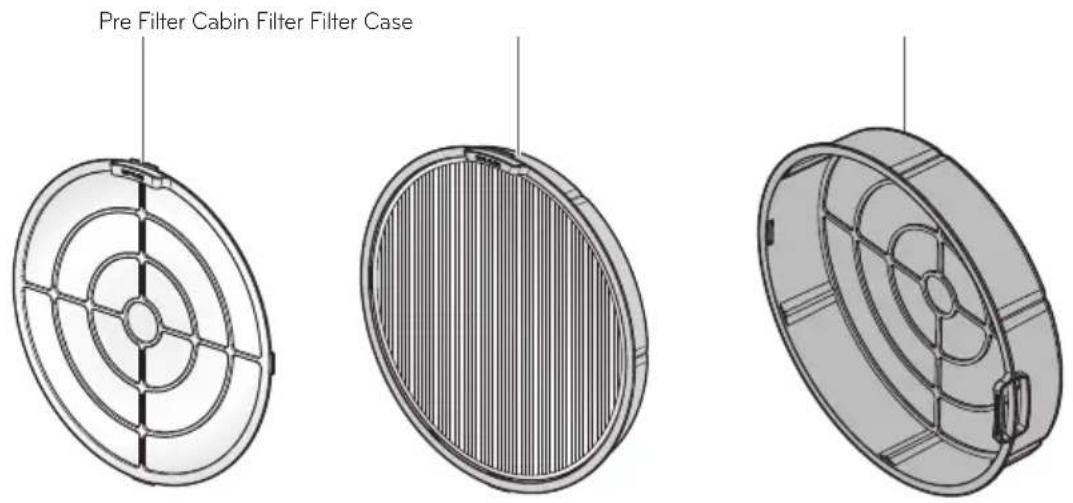
| Filter name Function | |
| Pre Filter It removes big dusts to prolong the lifespan of the Cabin Filter. | |
| Cabin Filter | It removes the fine particles such as dead tick, pollen, cigarette smoke (particle), micro dust, mote, animal fur, etc. and performs strong sterilization against the bacteria in the indoor air.It removes cigarette smoke (odor), residential waste odor, animal fur odor, NO_2 rest room odor, alkali & acidic odor, and volatile organic compound (VOCs). |
| * The replacement cycle of the Cabin Filter may be different according to the usage environment.* During the replacement, filter case is not enclosed. Do not discard. | |

NOTE
- If you request filter cleaning to the service center, we will clean it with a charge for actual cost.
- The filter replacement frequency can vary depending on the operational environment.
- The filter composition can vary depending on a model in use.
- In case you want to have your filter replaced, you can purchase one from either a nearby service center or on an online consumables shop.
- Nothing but an operation with the filter equipped guarantees a normal air purification process.
HOW TO USE
Air Cleaning Operation
It cleans the indoor with clean and fresh air.
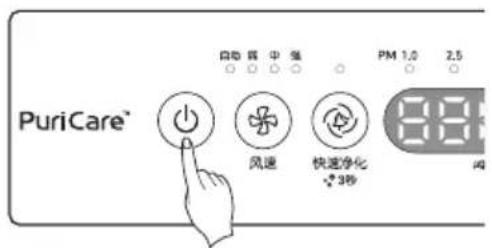
- Press the ⏻ button in order to start operation of the air purifier.
- With the buzzer sound, it starts the operation with the operation mode indicator LED and the Lighting lamp turned on.
- Press the Speed button to select the desired wind volume.
- Each time you press the Speed button, a serial setting can be made in the order of Automatic → Low → Medium → High → Automatic.
- When first turned on, it runs AUTO mode. (AUTO mode controls air volume depending on the air quality.)
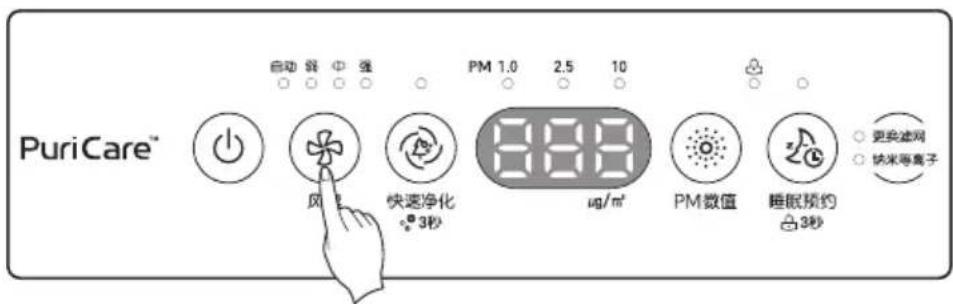
- During a sensor stabilization period (30 seconds) after operation starts, the dust status indicator prepares display of a cleanliness level.
30 seconds later, an indoor cleanliness level and dust density are displayed. Since the odor sensor is stabilized after 2 minutes after operation start, contamination level of PM10/PM2.5/PM1.0 is displayed for cleanliness.

Color for the air cleanliness
(contaminated) violet → purple → red → orange → yellow → green (clean)
The Jet Clean function
It operates strongly during the predetermined time and purifies the indoor air.
- Press the ⏻ button.
-
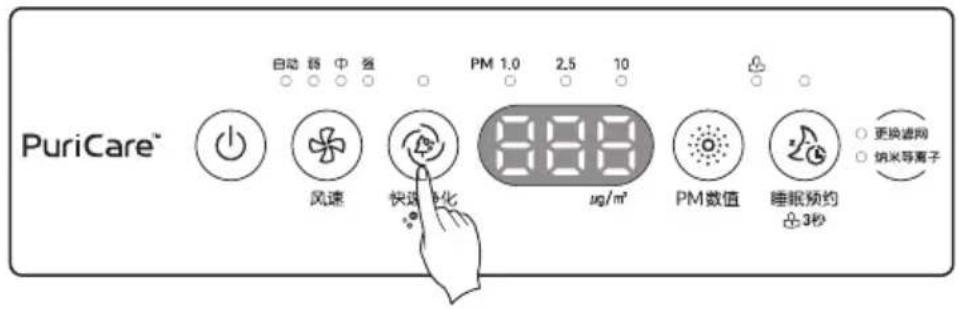
Press the Ⓞ Jet Clean button.
-
It operates strongly for 30 minutes when the Jet clean function is selected.
- If you select the Jet Clean function while sleeping mode, the dust density display turns off after 3 seconds, and the Jet Clean operates for 30 minutes before returning to the sleeping mode.
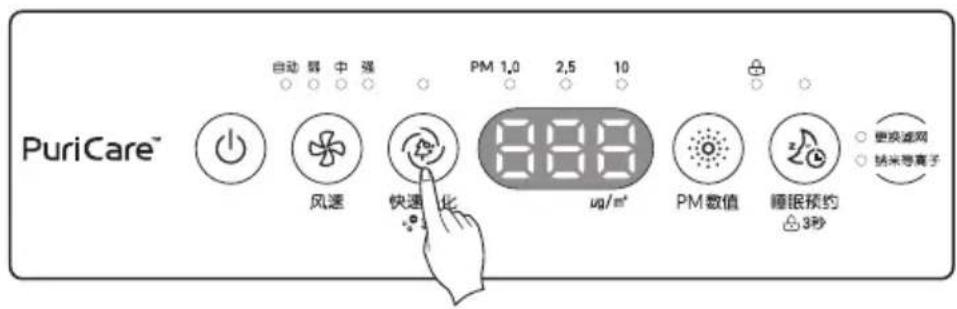
Remove various viruses by generating ions.
- Press the ⏻ button.
- Press the Ⓞ Jet Clean button for three seconds.
chemical
Chemical reaction sequence showing hydrogenation of a protonated nanoparticle into water molecules and hydrogen peroxide①lon Cluster generation by the polar linkage of water particle in the air
②Sterilization ion encircles various hazardous substances.
③Generation of OH(hydroxyl) that is weak to different chemical reactions
④Reaction between hydroxyl (OH) and hazardous substances
⑤Clean air removed hazardous substances
Indicator display
- Press the 📄 Indicator button and check the density of PM10/PM2.5/PM1.0.
- Pressing the button each time checks the density of PM10 → PM2.5 → PM1.0 in turn. Pressing the Indicator button during operation displays the density of PM10/PM2.5/PM1.0 at the display for 10 seconds.
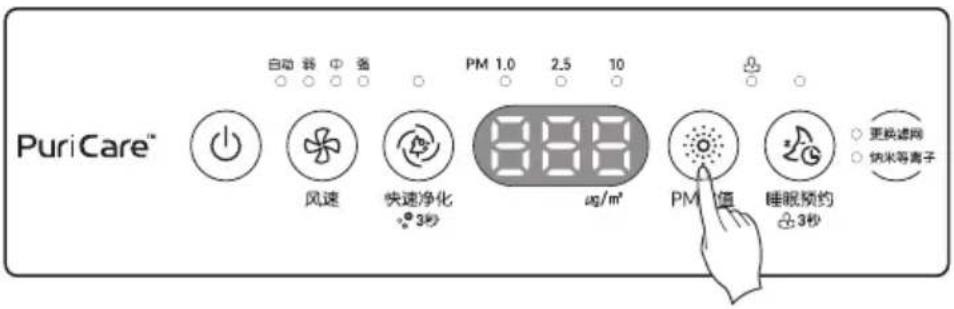
- Check the dust particle size display window.
- Dust density is displayed based on the dust density window with the highest contamination level.
Example) When PM10 density is 79(normal), and PM2.5 is 95(bad), and PM1.0 is 50(normal), PM2.5 value is displayed for dust density.
Cleanliness is displayed in 4-level color depending on the contamination level of PM10/PM2.5/PM1.0 and odor.
(contaminated) violet → purple → red → orange → yellow → green (clean)
- The Lighting lamp color is displayed based on the worst level among PM10/PM2.5/PM1.0 and odor.
Checking method of overall cleanliness
| Overall cleanliness | Status | Dust density (unit μg/m3) | Status | Odor density | ||
| PM 10 PM 2.5 PM 1.0 | Level | |||||
| Violet | Baddest 4 | 21~251~ | Strongest 6 | |||
| Purple | Badder 3 | 51~420 151~250 | Stronger 5 | |||
| Red | Bad 251 | ~350 116~150 | Strong 4 | |||
| Orange | Little Bad | 151~250 | 76~115 | Little Strong 3 | ||
| Yellow | Normal | 51~150 | 36~75 | Normal 2 | ||
| Green | Good | 0~50 0~35 | Weak 1 | |||
* Dust density is displayed in the unit of one from 8 to 999. When it comes to the dust density values, we referred to the data sheets provided by the sensor supplier.
Ex)
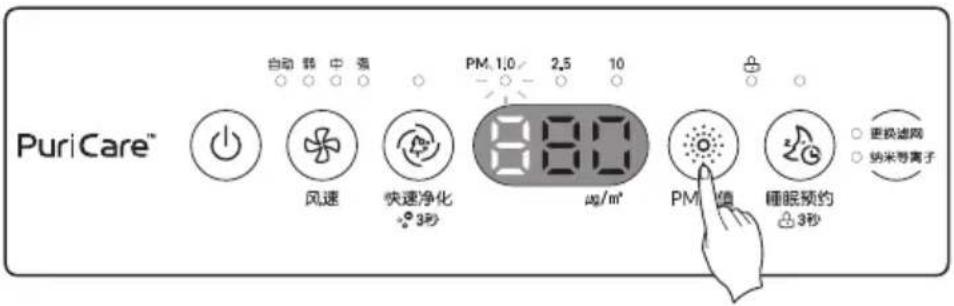
- Explanation on the Display: PM1.0 density stays at 80 g / m^3 , representing a bad(orange) level and the dust particle size display shows PM1.0. Therefore, it is understood to be a higher level than PM10 or PM2.5 density. In case the Lighting lamp is orange/red even the dust density display is good/normal, the odor is strong/very strong.
Reference
- PM10 and PM2.5 cleanliness follows the provided by the MEP. (2016)
- The overall cleanliness level displayed on the product may be different from a level announced by MEP.
- The dust density level for PM1.0 has been displayed in the same manner as the dust density level for PM2.5. (LG Electronics standards)
- The displayed density of PM10 / PM2.5 could differ from the forecast of the MEP and from other measurement devices or products.
- Indicated dust concentration values can differ from each other depending on the differences in dust measuring methods and also from real dust concentration levels.
- The assessment of dust density was made against dust used for LG Electronics standards tests.
- In case you use the product which generates steam and micro particles (humidifier, cooling device, spray, etc.), micro dust density could change.
- Since the cleanliness display shows overall dust and odor, it could differ from the density value of PM10, PM2.5, and PM1.0.
- Even in the same space, the PM10 density value could differ from other products due to air circulation.
- The overall cleanliness display could change in response to the chemicals contained in air freshener, perfume, deodorizer, and cosmetics.
- The displayed dust density value could change depending on the installation environment (affected by sofa, bed, carpet, vacuum cleaner, humidity, smoke, bugs, fats, etc.)
- The displayed density value of PM10/PM2.5/PM1.0 could change depending on the surrounding environment (construction site, road side, plant, etc.)
- The density of micro dust could be measured high near exit doors, windows, and ventilation holes or under the environment where outside air flows in.
- Do not clean the sensor with other materials other than alcohol or water. It may cause product failure. ※MEP : Ministry of Environmental Protection the People's Republic of China
Off Timer operation
It provides quiet room atmosphere while sleeping.
- Press the ⏻ button to start Air Purifier operation
- Press the Ⓜ Off Timer button to select turn off reservation time.
- The reservation time can be set in the order of 2 hours 4 hours 8 hours 12 hour Disable.
Example) When setting 2 hours turn off: the product turns off after operating 2 hours in sleep mode. Once the Off Timer has been set, only the LED lamp above the Off Timer button gets lit while the other LED lamps and cleanliness display lamp get turned off. For sound sleep, air speed is controlled low, and operates automatically after certain time depending on cleanliness.
If you press the Off Timer button once more when the Off Timer is set, you can check the setting time and additional functions.
- How to disable sleep reservation: After setting 12 hour sleep reservation, press the ☑ Off Timer button once more.
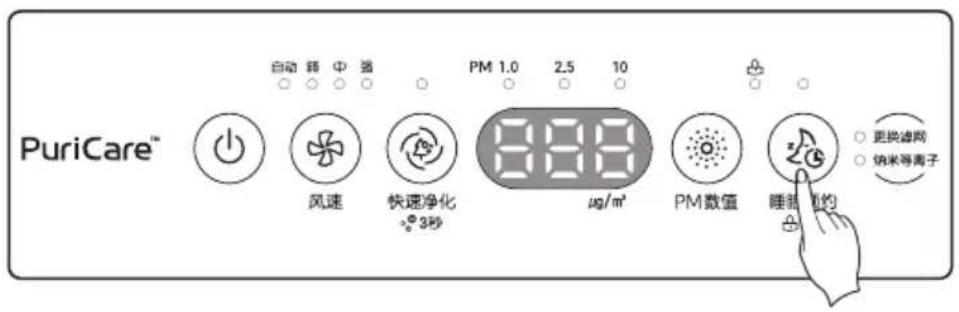
- Press the ⏻ button.
-
Press down the 20 Off Timer button 3 seconds or longer.
-
You can set the Lock function (💡) with a "Ting" sound.
- It may protect the product from unwanted operation by children or others.
- When you reset the function, press the ⏻ Off Timer button for 3 seconds or longer once again.
- If any button does not work, check for the Lock display of the control panel and disable the Lock.
- If power cord is unplugged while the lock is set, the lock function is disabled.
* In a stopped state, you can set lock/unlock function by pressing the ☑ Off Timer button 3 seconds.
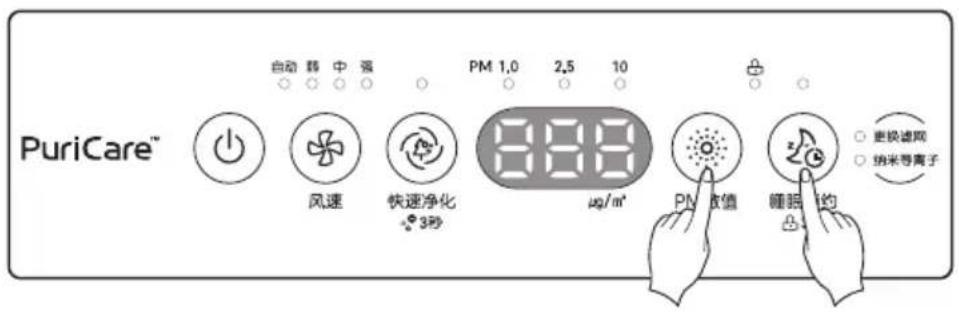
- If the Filter Check lamp gets lit, turn off the product in operation by pressing the ⏻ button and then pull the power plug out of the socket.
- Open rear panel of the product and check the filter. If the filters are contaminated, clean or replace.
Refer to "HOW TO CLEAN" for filter cleaning and replacing method.
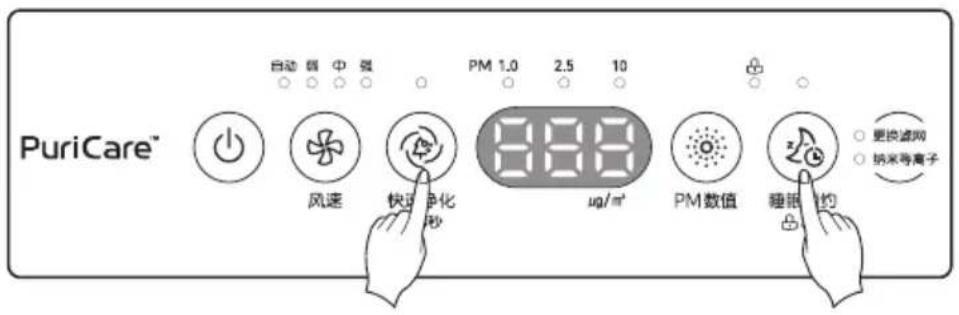
< Two methods of Initialization of Filter change (Two methods of light off of Filter change display light) > Method 1. Press down the ⚙ Jet Clean button and the ⚙ Off Timer button together for 3 seconds or longer.
Method 2. Unplug the power cord from power outlet.
* If it passes 24 hours, Filter Check lamp is automatically turned off, so replace the filter in time.
HOW TO INSTALL
How to install the filter before using it
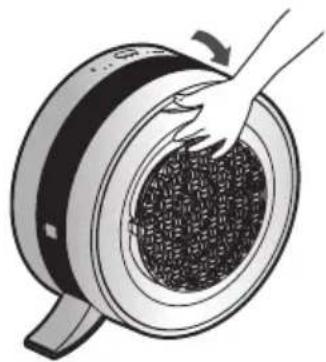
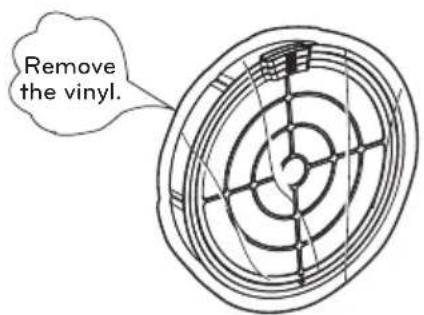
Use the filter after removing the vinyl cover.
- Pull and open the rear panel.
natural_image
Illustration of a hand pressing down on a circular mechanical component with granular texture (no text or symbols)- Remove the vinyl cover of the filter.
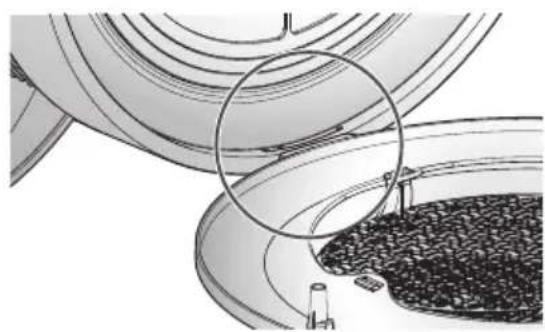
- Mount the filter by matching the rear panel to the bottom part.
natural_image
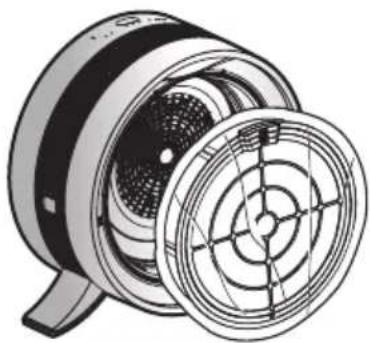
Diagram of a mechanical component with a magnified inset showing internal structure (no text or symbols)- Remove the filter from the body.
natural_image
Technical illustration of a mechanical fan or impeller assembly (no text or symbols visible)- Install the filter that vinyl over is removed.
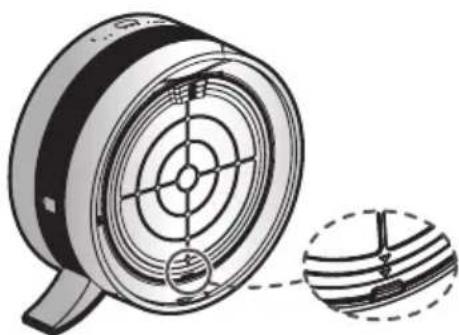
natural_image
Technical illustration of a mechanical component with concentric circles and a magnified inset showing internal structure (no text or symbols)- Use the product on a flat surface with no obstacles are around.
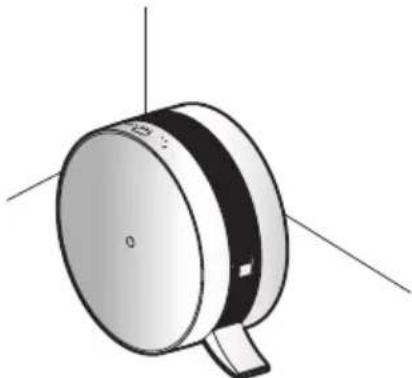
natural_image
3D rendering of a cylindrical mechanical component with mounting base and three axis lines (no text or symbols)
CAUTION
If the vinyl cover is not removed, the product would not blow wind.
HOW TO CLEAN
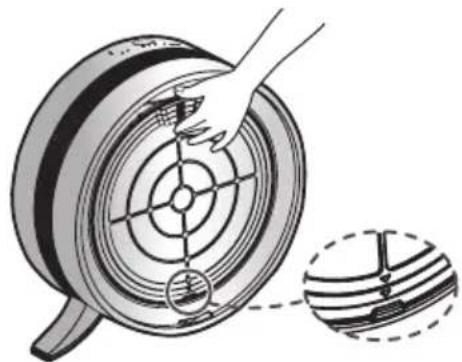
- If the product is in operation, press ⏻ button to turn off the power. After you pull the power plug out of the socket, pull and then open the panel in the rear.
natural_image
Illustration of a hand pressing down on a circular mechanical component with granular material (no text or symbols)-
Pull the filter handle and remove from the body.
-
There can be dust accumulation on the filter net.
- Before disassembling filter set, move the filters where cleaning is easy.
natural_image
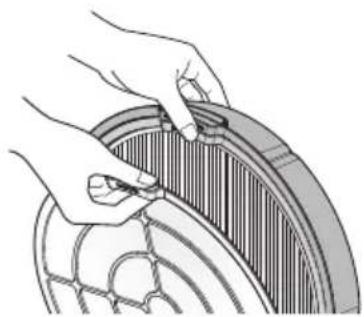
Diagram showing a hand turning a wheel with a magnified inset of the wheel (no text or symbols)- Hold the filter case, and pull and press the holder of Pre Filter downwards to separate it.
* The dust on the Pre Filter may fall, so place newspaper, etc. underneath it.
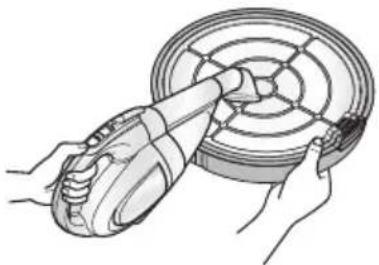
Clean the Pre Filter with a vacuum cleaner or brush, etc., and if the contamination is severe, wash with running water.
Do not force to separate the Pre Filter with a lot of sticking dust, but wash it after removing the big dust with home vacuum cleaner first.
natural_image
Illustration of hands adjusting a circular component with a tab (no text or symbols visible)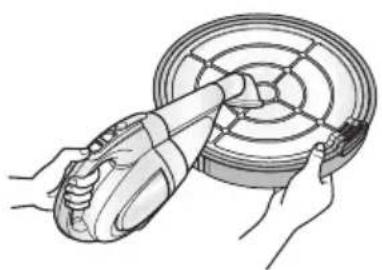
natural_image
Illustration of hands using a handheld device to clean or inspect a circular component (no text or symbols visible)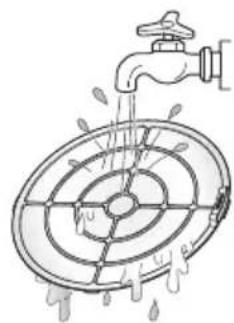
natural_image
Diagram of a faucet spraying water into a circular tank with liquid, no text or symbols present! CAUTION
- Completely dry the washed Pre Filter in a shadow.
- If it is used without completely drying it, it may cause odor.
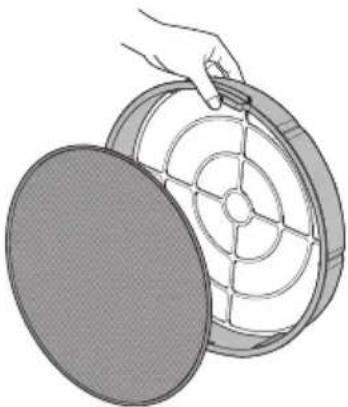
Do not wash the Cabin Filter with water, and they should be replaced if they are heavily contaminated. Be careful of filters not to have water during operation.
* The filter replacement cycle may be different according to the usage environment.
- Disassemble the Cabin Filter (When replacing the filter)
natural_image
Illustration of a hand holding a circular component with internal grid pattern (no text or symbols)- Assemble the filters as reverse way after cleaning and filter replacement, and insert the filters as the filter handles are located at the top of the product.
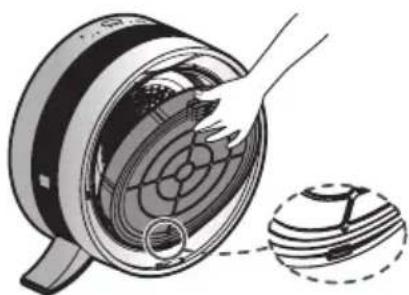
natural_image
Diagram of a hand cleaning a circular component with a magnified inset showing internal structure (no text or symbols)- Mount the backside cover by matching to the bottom part.
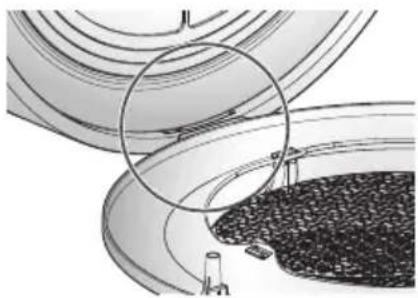
natural_image
Diagram of a curved road with a circular highlight and a textured base, no visible text or symbolsHow to clean the filters
| Filter types Classification Cleaning cycle Cleaning Method | ||||
| Pre Filter For washing | About 1 monthcycle cleaning | Clean the Pre Filter with a vacuum cleaner or brush, etc.,and if the contamination is severe, wash with water. | Refer to Figure 1 | |
| Cabin Filter | For replacement | About 9months cycle replacement | * The replacement cycle for Allergy HEPA Filter Powered by 3M^TM Tech and Triple Care Filter may be different according to the usage environment. | |
* If you need more filters, please contact the LG service center
natural_image
Illustration of hands using a power tool to lift a circular component (no text or symbols visible)How to clean exterior
Wipe the Air Purifier with a soft cloth wrung out in warm water. Especially, the air inlet around can accumulate dust. Clean periodically. CAUTION
- Do not wipe the body operation part and display part with alkali detergent. - Do not clean the surface of the Air Purifier using sulfuric acid, hydrochloric acid or organic solvent (thinner, kerosene and others). Do not put stickers on the surface. It may damage surface of the product. - Wipe with soft cloth when cleaning. There may be exterior damage by scratching. - When cleaning the product, do not let water get into the product. Turn off power and unplug the power cord before cleaning. (Always check whether fan is moving.)How to clean the sensor
Open the dust sensor cover. Clean the dust sensor lens with cotton swab. (Clean once every six months.) natural_image
Illustration showing two-step installation of a wall-mounted electrical socket, with no text or symbols present.CAUTION
\- Do not use nothing other than alcohol or water to clean the sensor. Otherwise, it can cause a product failure.HOW TO STORE THE PRODUCT
How to store the product
If you do not use the product for extended periods of time, store it at dried and shaded place. 1. Press the ⏻ button to start Air Purifier operation \- If you operate for one hour or longer on a fine day, you can remove mist and mold located inside the product.  2. Press the ⏻ button to stop operation of the air purifier and then pull the power plug out.  \* Shape of the power cord can be different by country. 3. Filters have to be removed from the product. Enclose them tightly in a vinyl bag and store in a shaded place without direct light. \- If the filters are stored in a humid place during rainy season, it may cause bad odor. natural_image
Technical line drawing of a circular mechanical component with radial grooves and central hub (no text or symbols)natural_image
Cartoon illustration of a smiling character holding a circular object with sparkles (no text or symbols)TROUBLESHOOTING BEFORE CALLING FOR SERVICE
If there is a problem with the product, check the following cases first before requesting service to the service center.| Symptom Check Actions | ||
| It does not start at all. | · Isn't the power plug pulled out? · Isn't the voltage too low? | · Insert correctly into the socket. · Check if it is 220 V~. |
| Wind amount is small and there is a noise. | · Is the pre Filter clogged? · Is dust accumulated on the pre Filter? | · Clean the pre Filter. · Replace the pre Filter. |
| Air purification does not work well | · Is the indoor contamination severe? · Is dust accumulated on the pre Filter? · Isn't the usage place too wide? · Are there obstacles nearby? · Is the product installed in a corner? | · Ventilate first before usage. · Replace the pre Filter. · Use the product appropriate for the usage area. (Avoid places with fluent ventilation such as entrance, window, etc.) · Please remove obstacles. · Please change the installation location. |
| There is a strange odor coming out of air outlet. | · Is it used at a place with a lot of smoke or odor? | · The air cleaning function may be degraded where there are a lot of smoke or odor. Please use the Air Purifier after ventilation. |
| There is an odor, but the Indicator lamp does not change. | · Isn't violet light turned on in the Indicator lamp? | · Indicator lamp indicates the cleanliness through the odor sensor. Odor sensor may not respond to food odor since it is a sensor detecting contamination gas. But the odor is removed by the deodorization filter. |
| The Indicator lamp is continuously on with red color. | · Doesn't the color change even if it is moved to a clean room? · Did you use spray near the Air Purifier? | · If the quantity of odor is greater than the ability that can be processed by the Air Purifier, the display may not change. · Do not use sprays near the Air Purifier. |
| Button does not work well. | · Is the lock lamp on the operation part turned on? | · Press Off Timer button for 3 sec. to reset the lock setting. |
| There has been no change in micro dust concentration. | · Isn't there foreign substance at the sensor? · Are you using in an enclosed area? | · Refer to how to clean the sensor and then clean the dust cleaner. · In an enclosed area, the cleanliness indication levels can stay unchanged. |
| The fine dust concentration value keeps showing high. | · Is the place of installation located where the inflow of air is made constantly? | · In an environment where the inflow of air is made, the concentration value can keep showing high. |
| There is difference between the lighting lamp and dust concentration value. | · Does the cleanliness indication light turn violet or purple while the dust concentration is low? | · The cleanliness indication light evaluates odor and dust comprehensively and then displays in colors. If an odor is strong although the dust concentration is low, the cleanliness indication light may display a different color. |
| There is difference between the MEP guide and comprehensive cleanliness level. | · Is there difference between the MEP guide and dust concentration value of the air cleaner? | · There can be difference between the MEP guide which indicates an average value during a given period time and comprehensive cleanliness level indicated on the air cleaner which is measured and then displayed on a real time basis. |
| The filter produces odors. | · Doesn't the cabin filter produce any odor? · Is it an environment which is full of odors? | · The filter replacement frequency can differ depending on the user environment. · The life of the filter can get sharply reduced if it is used for long when you cook food or grill fish / meat. Open the window and ventilate the room as much as possible when you cook food. After ventilation, use the air cleaner in order to accomplish the purpose of eliminating remaining odors. |
PRODUCT SPECIFICATION
 The external dimension, design and product standard can change to improve the quality of the product.| Model name AS40GV Series | |
| Power supply 220 V~ / 50 Hz | |
| Product size (width x height x depth) 470 | mm x 450 mm x 230 mm |
LG
Life's Good- SAFETY PRECAUTIONS
- WARNING
- CAUTION
- Installation
- Operation
- TABLE OF CONTENTS
- SAFETY PRECAUTIONS
- HOW TO INSTALL
- NAME OF THE PARTS
- HOW TO USE
- HOW TO INSTALL
- HOW TO CLEAN
- HOW TO STORE THE PRODUCT
- TROUBLESHOOTING BEFORE CALLING FOR SERVICE
- PRODUCT SPECIFICATION
- HOW TO INSTALL
- Selecting installation place
- Main Unit
- Use the air purifier as this.
- NAME OF THE PARTS
- Front side
- Rear side
- Operation display and control part
- \* Guide to the size of dust particles
- Filter system
- NOTE
- HOW TO USE
- Air Cleaning Operation
- The Jet Clean function
- Indicator display
- Reference
- Off Timer operation
- How to install the filter before using it
- HOW TO CLEAN
- ! CAUTION
- How to clean the filters
- How to clean exterior
- How to clean the sensor
- HOW TO STORE THE PRODUCT
- TROUBLESHOOTING BEFORE CALLING FOR SERVICE
- PRODUCT SPECIFICATION
- LG
Brand : LG
Model : AS40GVGL2
Category : Air purifier