
PH-U451WN - Air purifier LG - Free user manual and instructions
Find the device manual for free PH-U451WN LG in PDF.


| Product Type | Air Purifier |
| Model | PH-U451WN |
| Brand | LG |
| Coverage Area | Up to 30 m² |
| Clean Air Delivery Rate (CADR) | Smoke: 220 m³/h, Dust: 230 m³/h, Pollen: 250 m³/h |
| Filtration System | Pre-filter, HEPA H13, Activated Carbon, Ionizer (optional) |
| Fan Speeds | 4 speeds (Low, Medium, High, Turbo) |
| Noise Level | 28 dB (Low) to 52 dB (Turbo) |
| Power Consumption | 45 W (max) |
| Power Supply | 220-240 V, 50/60 Hz |
| Dimensions (W x H x D) | 300 x 450 x 200 mm |
| Weight | 6.5 kg |
| Timer | 1 to 8 hours |
| Auto Mode | Yes, with air quality sensor |
| Sleep Mode | Yes, reduces fan speed and dims lights |
| Filter Replacement Indicator | Yes, visual and audible alert |
| Filter Life | HEPA: ~1 year, Carbon: ~6 months (depending on usage) |
| Ionizer | Separate control, can be turned off |
| Maintenance | Clean pre-filter every 2 weeks; vacuum HEPA every 3 months |
| Safety | Overheat protection, child lock |
| Repair / Spare Parts | Filters can be replaced individually; contact LG service center |
Frequently Asked Questions - PH-U451WN LG
User questions about PH-U451WN LG
0 question about this device. Answer the ones you know or ask your own.
Ask a new question about this device
Download the instructions for your Air purifier in PDF format for free! Find your manual PH-U451WN - LG and take your electronic device back in hand. On this page are published all the documents necessary for the use of your device. PH-U451WN by LG.
USER MANUAL PH-U451WN LG
Read before using product (safety instruction), use properly.
About ensuring users safety and property.
Product warranty card is enclosed with the user manual.
After careful read through the user manual, do keep it in a handy place.
The equipment complies with requirements of the Technical Regulation, in terms of restrictions for the use of certain dangerous substances in electrical and electronic equipment.
PH-U451WN

MFL67987706


www.lg.com
The advantages are
Congratulations on your purchase and welcome to the LG Family.
By following the use and care instructions in this manual, your air purifier will provide you with many years of reliable service.
3-dimensional sterilization system
- Bio-enzyme deodorization filter completely removes those factors which could cause the sick
house syndrome such as VOCs, harmful chemical element and its smell. - Sterilized by Washable HEPA filter Inside, once again sterilized by NPI(Nano Plasma Ion) outside.
Only LG air purifier can sterilize perfectly both inside and outside.
Easy to use HEPA filter system.
- Filter cleaning is easy with LG's convenient filter separation system.
Filters can be washed over and over again.
Powerful allergy filter
- The allergy filter could absorbs and decomposes allergic ingredients, having the allergy preventive effect also removing the odor and anti-bacteria effect.
Natural humidifier filter system
- Allergy and various types of diseases can be prevented by maintain appropriate level of humidity in the dry indoor air.
Content
Getting Started
☐ The advantages are....2
□ Safety Precautions....4-12
□ Installation....13
Air Purifier Start Guide....14
Name of Each Part 15-20
- Mainframe
- Humidifier function
- Display and control panel
- Front LED lighting
- Filter System
- Humidifier filter system
How to Use
Operation 21-23
- Air Purifying Operation
- Manual Mode
- Auto Mode
- Sandstorm Mode
- Sleeping Mode
☐ Additional functions....24-27
- Off timer function
- NPI sterilization function
- Filter checking function
- Lock function
- Power save setting
□ Humidifier function 28-30
Care and Cleaning
□ Cleaning....31
☐ Exterior and dust sensor cleaning method 32-33
☐ Filter cleaning and exchange....34-36
□ Storage 37
☐ Troubleshooting before calling for service .....38-40
☐ Product standard 41
Safety Precautions
The precautions related with the safety shown below are to prevent unexpected hazard and damage through safe and accurate operation of the product.
Warning / Caution

This symbol will alert you to any product detail or operation that could lead to a safety hazard if the instructions in the manual are not followed properly.

WARNING
If not followed, it can cause death or major injury to the user.
This appliance is not intended for use by persons (including children) with reduced physical, sensory or mental capabilities, or lack of experience and knowledge, unless they have been given supervision or instruction concerning use of the appliance by a person responsible for their safety.
Children should be supervised to ensure that they do not play with the appliance. When the power cord is to be replaced, replacement work shall ve performed by authorized personnel only using only genuine replacement parts.

CAUTIONS
This symbol will alert you to the possibility of improper use that may result in damage. Read instructions to avoid damage or injury.
Safety Precautions

Warning
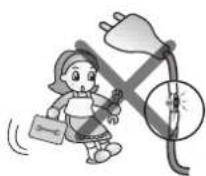
Do not arbitrarily change or extend the power line. This will be the cause of fire and electric shock.
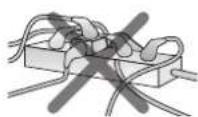
When using the multi- outlet, do not use several appliances at the same time.
Excessive use of electric power will be the cause of fire and electric shock.
When the outlet is damaged or loosened, do not use it.
It will be the cause of fire and electric shock.
When gas is leaked, perform the ventilation by opening the window before operating the air purifier or remote controller.
Otherwise, it will be the cause of the explosion, fire, and burn.
Do not use the product at the location where moisture or floating particles are prevailed such as toilet or bathroom, laundry, etc.
This will be the cause of fire and electric shock.


Carry out the installation by avoiding direct sunlight, heating appliance, and dampness. These will be the cause of the electric shock, fire, and failure.
Do not apply any impact on the front panel.
It can cause injury, product damage or electric shock.
Do not turn off the product by unplugging the power.
It can cause electric shock or problem to the product.
Do not place fire source near to the product.
This will be the cause of fire.


Safety Precautions

Warning
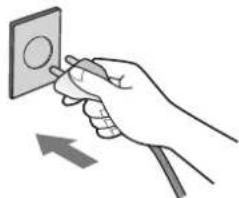
Insert securely the power plug up to the end of its plug so that it will not be shaken.
If connection is unstable, it will be the cause of fire.
Do not touch the power plug with wet hand.
This will be the cause of electric shock and injury.

Do not remove the plug by pulling its power cord section.
This will be the cause of fire and electric shock.

Do not place rug etc. on the power cord.
If heavy object is placed on the rug because the cord is invisible, it will be the cause of fire and electric shock.

Do not touch the product and filter with wet hands.
It can cause electric shock or problem to the product.

When cleaning the product, start only when the power is unplugged and the rotating fan stops.
It can cause electric shock or injury.
Do not let the moisture generated from the humidifier directly contact the product.
It can cause electric shock, fire and problem to the product.
Do not install the product at the location where excessive industrial oil smoke or metallic dust is prevailed.
This will be the cause of fire and product failure.
If the product is flooded, always entrust it to the customer care center.
There is the hazard of electric shock or fire.
Do not use power outlet except for AC 220-240 V.
It can cause fire or electric shock.


Safety Precautions

Warning
Do not sprinkle insecticide or spray to the product.
This will be the cause of fire and product failure.

When closing the front panel, be careful not to insert any part of the body such as hand etc.
This will be the hazard of product damage or injury.
Do not move the product while it is under operation. This can be the cause of fire and electric shock or partial damage of the product can be occurred.

When the product falls over during humidifier function, the water can cause an electric shock.
After unplugging the power cord, remove any moisture inside the product and dry sufficiently before using the product.
Do not allow water to be infiltrated into the product.
This will be the cause of fire and electric shock.
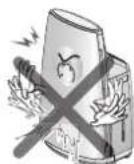
Do not move the product during or immediately after the use.
Water can overflow to cause electric shock.
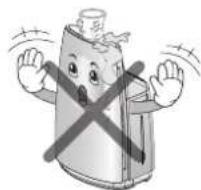
Do not put coffee, flower vase, or various drinks on the top section of the product.
This will be the cause of fire and electric shock.
Do not let the cap of the water tank be assembled without the packing.
Water can easily overflow to cause electric shock or product damage.
If abnormal noise, odor or smoke is coming out from the product, pull out the power plug and contact the customer care center.
This will be the cause of fire and electric shock.

If the product is not used for a long period of time, always unplug the power from the outlet and remove any residual water inside the main unit (Water tank, tray).
It can cause electric shock or fire. Fungus or bacteria can grow inside the product.


Owner's Manual
Safety Precautions

Warning
Do not fill water directly on to the tray.
Water can overflow to cause damage to the product and electric shock.
Do not use the damaged water tank as is.
Water can flow or overflow from the tray to cause electric shock or problem to product, and it can also damage other appliances.
If there is water in the water tank and tray, move the product after removing the water tank and tray.
Water inside the product can overflow to cause electric shock and product damage.
When cleaning or when separating the tray to remove the water, always unplug the power from the outlet before proceeding. It can cause electric shock, burn or problem to product.
Do not let children climb on top of the product or touch the product without permission.
It can cause injury or problem to product.


Caution
Do not install the product on transportation devices (Vehicle/Ship/Airplane etc.)
It can cause problem to the product.
When using combustion devices along with the air purifier in closed indoor setting, frequently ventilate the room.
Some hazardous substances, such as carbon dioxide may not be fully removed.
When installing the product close to TV or audio, leave 1m of clearance.
TV or audio may malfunction.
Install the product on a firm location and do not push over or apply impact to the product.
It can cause fire and problem to product.
Install the product at least 1.5m away from lighting device and 10cm between the walls.
It can cause discoloration and the purifying capacity may deteriorate.


Safety Precautions

Caution
Do not use the product as ventilation fan or hood for the range in the kitchen.
It can shorten the product life.
Do not use the product to remove toxic gas such as carbon monoxide.
It can cause product failure.
Do not use the product near the curtain.
Humidity sensor may not work properly.
Do not let the child open the front panel.
The product can fall on top of the child to cause injury.
Do not move the product by grabbing the front panel of the product.
The product may partially be damaged.


Do not place any obstacles around the air inlet or outlet of the product.
This can cause product failure.
Do not use the product for special application/location such as preservation of animal/plant, precision machinery, artifact etc.
This can cause property damage.
Do not clean the product with strong detergent such as solvent but use smooth cloth.
It can cause fire and product deformation.
Do not store or use combustible gas or flammable material near the product.
It can cause fire or product failure.
When not using the product for an extended period of time, pull out the power plug.
It can cause product failure or fire.


Safety Precautions

Caution
Be sure to insert all the filters before the use and perform regular cleaning of the pre-filter.
Otherwise, it will be the cause of product failure.
Do not damage, process, excessively bend, twist, pull, insert into gap or heat the power cord.
Damaged cord can cause fire or electric shock.
If the power cord is damaged, request for repair to the service technician to prevent any risk.
If not, it can cause fire, electric shock or product failure.
Do not use the product for ventilation etc.
It can reduce the life of the product.
Do not insert any obstacles or metallic objects into the air inlet or outlet.
It can cause product damage, injury or electric shock.

When operating the product, do not open the front panel.
If opening the front panel, the operation will be stopped.

Do not input inflammables into the product.
This will be the cause of fire and product failure.

Always install the product on leveled surface.
If the installation surface is not leveled, the water can overflow from the vibration of the product.

When not used, empty the water in the water tank and tray to avoid from freezing.
If the product is used while the water is frozen, it can cause product failure.

When supplying water to the water tank or carrying the product, always hold the product with both hands.
The water tank can fall over to hit your feet.


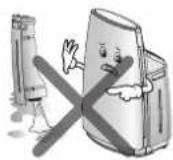

Safety Precautions

Caution
Do not use the product near the wall, furniture or ceiling.
It can cause scaling, growth of fungus or deformation.

Always keep the product leveled with both hands to avoid vibration when carrying the product.
Water tank or tray can fall out to cause damage.
Do not drink the water used in the humidifier.
It can have negative effect on your body such as stomachache or diarrhea.
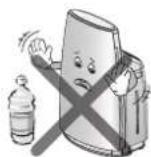
When throwing away the water on the tray, unplug the power and pull out the tray from the main unit, and then pour out the water.
Water penetrating inside the product can cause product failure.
Exchange the water in the tank with fresh water on a daily basis.
Throw away the water in the tray and clean the tray frequently.
Contaminated water can deteriorate the performance, cause bad smell or send the scaling from the water through the blowing air.

When the product is not used, do not store the product with the water on the tray.
It can cause growth of fungus and bacteria.
Do not use the product sideways.
Water can overflow to cause product failure.

When pouring out the water within the tray, do not lift up the main unit but pull out the tray to pour out the water.
Water penetrated inside the product can cause product failure.
Do not use the product in unstable locations such as table susceptible to heat or on a rug with long tassels.
The product can fall over to spill the water or cause discoloration/deformation to the table and rug.

When moving the product for a long distance, pour out the water inside the main unit (Water tank and tray).
When the product is transported with the water inside the product, it can overflow to cause risk.


Safety Precautions

Caution
Use clean tap water at temperature of 40° C or less.
Using water warmer than 40° C can cause product deformation.
Do not use the humidifier filter for other usage.
It can deteriorate the performance of the humidifier filter.
Do not use hot water above 40°C, air freshener, chemical or detergent in the water tank and tray.
Deformation can cause leakage.
Do not apply any impact on the water tank.
Damage can cause leakage.
Do not carry the product by holding the tray cover.
Damage can cause leakage.


Do not carry the product by holding the water tank handle.
The product can fall over to cause an injury.
Do not drink or feed the water left inside the product (Water tank and tray) to animal or plant.
It could be have a negative effect on your body or cause an unexpected accident.
Do not put any magnet or metallic object on top of the main unit.
It can cause a malfunction.
Do not leave the product where air conditioner or heat air reaches the product or near the window.
It can cause the humidity sensor to be inaccurate.
Do not use the product with the tray, humidifier filter and water tank removed.
The performance can be degraded and it can cause water overflow or product failure.


Installation
Places to Install
Mainframe
- Places with handy power connections
- Places with no obstacle to clog air inlet
- Places with horizontal surface and rich air circulation


Warning
Install the air purifier on moving objects (car or ship etc) may cause the product defect, therefore do not install on those places.

Warning
This appliance is not intended for use by persons (including children) with reduced physical, sensory or mental capabilities, or lack of experience and knowledge, unless they have been given supervision or instruction concerning use of the appliance by person responsible for their safety.
Children should be supervised to ensure that they do not play with the appliance.
Air Purifier Start Guide
Turn off air purifier when cleaning.
- Cleaning the air purifier with opened windows would disturb the natural air circulation to cause intake too much particles, it may shorten the filter life. After complete cleaning process with enough air circulation, close the windows, turn on the air purifier is the appropriate way to purify air.
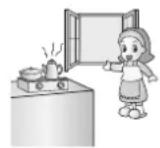
Use after enough air circulation when cooking
- When roast meat or fishes, remove the smell by air purifier is not appropriate. The oil particle will block cells on filter, it may cause filter life shorten or filter polluting etc. negative effects. Under this circumstance enough air circulation is necessary. Remove leftover odors by air purifier after no oil particle is the correct and effective way to use product in long-term scale.
Do not stay too closed when sleeping.
- Air purifier fan speed is not strong, before fallen asleep feel cool, after fallen asleep would feel cold. The appropriate way is to keep at least 1 meter distance with air purifier.

Do not place in the corner edge.
- Avoid to install at places surrounded by furniture, appliances etc. or in the edge corner. Install in the edge corner may cause difficulty to purify indoor air from the rest space.

Ensure air circulate 30 minutes at least everyday.
- For those families use the air purifier, air circulation is the prerequisite to ensure enough oxygen supply. Ensure air circulation 30 minutes at least everyday could brings fresh air inflow. Keep opposite windows open may gain a better result for air circulation. In case of being lazy may weaken air refreshing function, therefore it is necessary to ensure clean and maintenance.

Name of Each Part
Mainframe

※ Shape of the power cord can be different by country.
Name of Each Part
Humidifier function

Name of Each Part
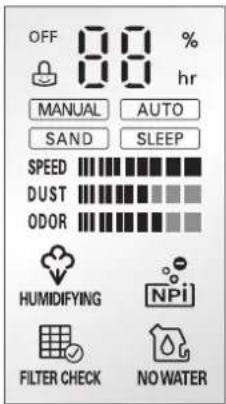
Display and Control Panel


Owner's Manual
Name of Each Part
Front LED lighting
The operation and cleanness indicator lamp can be turned on/off through the power save function.
* Power save function operates when the user presses the operation mode button and fan speed button on the main unit simultaneously.

Clean Air Indicator Light / Mood Light
• Under general mode, clean air indicator light will show the quality the air in the surrounding area.
- When the air is at clean, contaminated, and intermediated stage, blue, red and violet color will be indicated respectively.
Name of Each Part
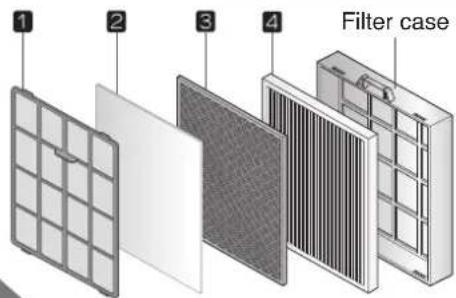
Filter system (Only the filter section is described.)
| Filter name Function | ||
| 1 Pre-filter Remove | big particlesAnti-bacteria functionAnti-mildew function | This filter has anti-bacteria, anti- mildew, big particles filtering functions.These 3 functions may extend the filter replacement frequency. |
| 2 Allergy filter | Adsorb and decompose allergic ingredients. | |
| 3 Deodorization filter | Washable deodorization filter | This is the integrated deodorization filter and it removes cigarette smoke (odor), odor of living food waste, odor of animal's fur, NO2, odor of toilet, alkaline & acidic odor, and volatile organic compound (VOCs). |
| Bio-enzyme treatment | This filter specially removes harmful chemical material such as VOCs which is the causing material of new house syndrome that induces atmospheric contamination. | |
| 4 Washable HEPA filter | This filter removes fine particles such as the carcass of tick, pollen sac, cigarette smoke (particle), fine dust, mote, fur of animal, etc., and effectively removes virus, mold, bacteria, etc. in the air of the room. | |
※ For washable filter, please dry it completely in a shade without any dampness.
(If it is not completely dried, it may cause failure or bad odor.)
※ The exchange cycle of allergen, HEPA, and deodorization filter will be altered in accordance with the application environment.
※ Filter case are not enclosed. Do not throw them away.
Name of Each Part

Humidifier filter system
| Filter name Function | on Cleaning and replacement cycle | |
| 1 Humidifier filter | The indoor air evaporates the water and removes the alien particles included in the water. | Cleaning cycle: More than 1 time weekly Replacement cycle: 6-12 months |
※ Life of the humidifier filter may vary based on the water quality.
※ Replace the filter in the following cases even when it is within 6 months.
- When the scaling or odor does not disappear even after cleaning.
- When discoloration (Black/Yellow) or dirtiness is severe.
- When the white chunk attached to the humidifier filter cannot be removed even after cleaned.
- When damage or deformation is severe. (Replace the part based on the manual included in the separately sold part.)

Caution
- Dispose the old humidifier filter according to the recycling direction.
• Material of humidifier filter: PET

Operation


Air Purifying Operation Purify Indoor Air.
1 Press On/Off Button.
A confirmation tone will sound to indicate that the unit is powering on.
The unit will also produce a tone when the unit is first plugged in.
(Refer to the "start-up operation".) Fresh air will come out from the air outlet.
- Press On/Off button again to turn off.
- When restart air purifier, system will retrieve to the previous operating condition.

What is "Start-up Operation"?
When first turned on, the unit will go through a Start-up function which prepares the unit for operation. During this two minutes period, the display will fluctuate to indicate that the unit is sensing the air quality in the room.
Use of power
• 220-240V is exclusively used for this product.
- For power supply, use exclusive 220-240V outlet.
Power plug for 220-240
Exclusive outlet for 220-240V
Operation

Manual Mode User may manually adjust fan speed.
1 Press the On/Off button.
2 Select Manual Mode by pressing the Operation Mode Button.
3 Select the desired fan speed by pressing the Fan Speed Button.
- Default fan speed is weak speed.
- Fan speed can be operated in 4 levels.


Automatic mode The air purifier will automatically set the most appropriate fan speed.
1 Press On/Off button.
2 Select Auto Mode by pressing the Operation Mode Button.
- The fan speed will automatically adjust to the air quality of the room.
- During the Auto Mode, if the Fan Speed Button is pressed, it will be converted into the Manual Mode and fan speed will increase by one level.
- Those functions other than fan speed will be activated when setting up by the user.

Operation

Sandstorm Mode Purify indoor air effectively when the sandstorm occurs.
1 Press the On/Off button.
2 Select Sand Mode by pressing the Operation Mode Button.
- During the Sand Mode, if the Fan Speed Button is pressed, it will be converted into the Manual Mode and fan speed will increase by one level.
- Fan speed will automatically be adjusted with the pre-inputted program.
- Those functions other than fan speed will be activated when setting up by the user.


Sleeping Mode Provide quiet indoor atmosphere while sleeping.
1 Press the On/Off button.
2 Select Sleep Mode by pressing the Operation Mode Button.
- During the Sleep Mode, fan speed will switch to weak level, and only the sleeping light on LED indicator will be lighted shortly.
- During the sleep mode, if the Fan Speed Button is pressed, it will be converted into the Manual Mode and the fan speed will increase by one level.

Additional function

Off Timer function Automatically shut down after several hours.
Example) shut down automatically after 3 hours
1 Press the On/Off button.
2 Press Off Timer Button to set 3 hours.
• Each time pressing the button, operation time will increase 1 more hour.

• Each time pressing the button, operation time will increase 1 more hour.
- Up to 9 hours can be selected. After operating till the presetting time, the product will be stopped automatically.
- When selecting 3 hours, the product will be stopped after 3 hours of operation.

Additional function


NPI Sterilization function Purify indoor air effectively when the sandstorm occurs.
During the NPI sterilization operation, many kind of bacteria in the room will be eliminated by discharging the sterilization ion which is harmless to the human body.
1 Press the On/Off Button.
2 Press the ION button to choose expected function.
- Whenever pressing the button once, it will be changed in the sequence of NPI → Function release → NPI → Function release ....

NPI → Function release → NPI → Function release

Additional function

Filter Checking Function May remind users to clean or replace the filter after use for a certain period.
1 During the operation, if the filter checking indicator light is on, open the front panel and check the filter under the operation state of the air purifier.
2 Detailed information for the filter cleaning, refer to the page 34-35.
- Filter maintenance may vary depending on the environment.


Lock Function This is the function so that the button of the product will not be acted in unintended condition.
1 During the operation, if pressing the Lighting Button and Off timer Button for 3 seconds simultaneously, the locking setup or release will be realized.
- If buttons are not acted during the product operation, check the locking indicator of the display and release the locking setup.
- When the power cord is pulled out under the locking setup state, the locking setup will be released.

Additional function
Power save setting This function sets the operation and cleanness indicator lamp off.
1 When the user presses the operation mode and fan speed button simultaneously while the product is operating, the power save function will be set or canceled.
- When the operation and cleanness indicator lamps are not turned while the product is operating, cancel the power save function.

Humidifier function This maintains the optimal level of humidity when the indoor air is dry.
Check the assembly condition of humidifier filter
1 Pull out the water tank.

2 Pull out the tray.
* Carefully lift the tray up to pull it out without spilling the water.

3 After assembling both ends of the humidifier filter case to the tray hook accurately as shown in the picture, assemble the tray to the main unit.
* If the humidifier is not accurately assembled, it can cause abnormal noise and the humidifier may not work.


Humidifier function
Supplying water to water tank
1 Open the cap of the water tank and fill tap water to the water tank.

Caution
- Do not use anything other than tap water. It is difficult for bacteria to grow in tap water because it is treated with chlorine. But it is easy for fungus or bacteria to grow in other types of water (Well water, purified water, mineral water etc.).
- Do not use boiled water above 40°C, aroma oil, chemical, contaminant and air freshener. (It can cause malfunction or failure.)
- Because the water tank can fall over, always hold the water tank with two hands.

2 Close the water tank cap.
* Check whether the water is leaking.
* Always wipe out any moisture around the water tank.
* When the water tank is assembled without the packing on the cap, water can easily spill over to cause electric shock and product damage.


Caution
- When inserting the water tank, check whether the tray humidifier filter and float are assembled correctly. If not, it can limit the performance of the humidifier or cause product failure.
3 Assemble the water tank to the main unit.
* If the water tank is not assembled correctly, "dr" will be shown on the front display. Check whether the water tank is correctly assembled.
* "dr" stands for door and is displayed when the front panel is open.

Caution
- When loosening or tightening the water tank cap or when filling water to the water tank, hold the water tank with hand while loosening the part.

Humidifier function
Humidifier operation
1 Press the ON/OFF button.
2 Press the HUMIDIFYING button.
* The user cannot set to the specific level of humidity the user wants. When the humidifier operates, the mist may not be visible as it is humidified in fine particles.
3 Press the Fan speed button.
* The fan speed can be set in 3 levels for the humidifier function.

Caution
- If the water tank is empty, the no water lamp will be turned on and the buzzer will go off, but the operation will not stop.
- If the no water lamp is turned on during the operation, always turn off the power, separate the water tank, fill up the water tank and then assemble the water again for operation.
- Depending on the size and condition of the room where the air purifier is installed, the humidity may not be controlled at the appropriate level and kept higher.
Humidity level is not appropriate - Operate at higher fan speed.
Humidity level is higher than appropriate - Turn off the humidifier operation.
| Room temperature Appropriate humidity level | |
| ~18°C 65% | |
| 18°C~24°C 60% | |
| 24°C~ 55% | |


Cleaning
Tray, humidifier filter
1 Pull out the water tank.
2 Pull out the tray.
* Carefully lift the tray up to pull it out without spilling the water.
3 Separate the humidifier filter and tray lid.
4 Clean the tray and humidifier filter.
* After cleaning, always close the tray lid.
* If the humidifier function is not used for a long period of time, frequently dry the humidifier filter and wipe the water of the tray.
5 Assemble the humidifier filter.
* Assemble the humidifier filter by aligning the hook part and assembly part.
6 Assemble the tray and tank to the main unit.
* Assemble the tray and main unit so that there is no gap.


Exterior and dust sensor cleaning method
Exterior and dust sensor cleaning method
Wipe the exterior of the unit with a soft cloth using warm water and a mild detergent.

Caution
- Do not use harsh cleaners or very hot water. Do not wash in the dishwasher.
- Never pour water onto the unit; it could damage the internal components and create a shock and fire hazard.

Dust sensor cleaning method
The dust sensor is a device that senses the minute and large dust particles. The lens part must be periodically cleaned to maintain the performance.
1 In case of under operation, be sure to OFF the power supply.
* Open the front panel by pulling it forward.
2 Open the dust sensor cover. Wash the sensor filter and dry the filter properly.
3 Wipe the lens of the dust sensor with a cotton stick.
* After cleaning the lens, close the cover of the dust sensor in the reverse order.
- Clean the lens of the dust sensor once every 2 months. But the cleaning frequency can differ according to the using environment and time. So in an environment where it is dusty, clean more frequently.


Exterior and dust sensor cleaning method
Air outlet cleaning method
1 Separate the air outlet cover by grabbing its protruded section and lifting it up.

2 Clean the safety grille with the soft brush and the suction inlet of vacuum cleaner.

3 Wash the air outlet cover with soft brush in the running water.

4 When assembling after the cleaning, settle the front section of the air outlet cover after inserting the cover rear section to suit to the product as shown in the right side figure.

- Clean the air outlet once every 1\~2 months. But the cleaning frequency can differ according to the using environment and time. So in an environment where it is dusty, clean more frequently.
Filter cleaning and exchange
1 In case of under operation, be sure to OFF the power supply. Open the front panel by pulling it forward.
2 Remove the filter case by pulling it up.
3 Separate the pre filter from the filter case by pulling it forward.
4 Clean the disassembled filter in accordance with the filter cleaning method in the next page.


Caution
- For washable filter, please dry it completely in a shade without any dampness. (If it is not completely dried, it may cause failure or bad odor.)
- Replace filters when unable to remove all dirt on the filter. (After cleaning the filter, close the front panel. If not closed completely, the product will not work.)
Clean the inside of the product with the suction inlet of vacuum cleaner.

Filter cleaning and exchange
Cleaning method of various filters
| Type of filter | Classification | Washing & replacement cycle | Cleaning method | |
| Pre filter | For washing | About a month washing Cycle | Clean the Pre-filter with a vacuum cleaner or a soft brush, and when the contamination is severe, use a neutral detergent and water to clean it off. | Refer to the Fig. 1. |
| Allergy filter | For washing | About a month Washing Cycle | Using a natural detergent and water to clean it off. | Refer to the Fig. 2. |
| Deodorization filter | For washing | About 6 months washing cycle | To clean both the HEPA filter and the Deodorizing filter, soak the filter in warm water with a mild detergent for 1 hour.Remove particles from the filter by shaking the water from the filter.Rinse the filter with warm water. Let air dry before placing filters back in the unit. | Refer to the Fig. 3. |
| HEPA filter | About 6 months washing cycle | |||


Filter cleaning and exchange
Cleaning method of tray and humidifier filter
| Classification | Replacement cycle | Cleaning cycle | Cleaning method | |||
| Water tank | - | Daily | When filling the water tank, fill up to 1/3 and rinse it 4-5 times to wash it out.Dissolve 10g of neutral detergent or citric acid in 1L of warm water for 1-2 hours, and then use the cleaning brush to clean the parts. After cleaning, make sure to rinse sufficiently. (After cleaning the filter, close the front panel. If not closed completely, the product will not work.)Make sure to clean with a soft brush any white powder contents, around the filter or the case, which may cause a smell or noise. | |||
| Tray,tray lid | - | Daily | Rinse the water tank by shaking 4-5 times. | Wipe softly the humidifier filter with a brush, by holding the case. | When washing the humidifier filter case, be careful as it can be damaged. | After cleaning with neutral detergent or citric acid, rinse the filter with clean water. |
| Humidifierfilter | 6-12 months | More than 1 time weekly | ||||
• Frequently wash the tray and humidifier filter. This will remove the scaling and you can use the product better sanitary condition.
- Do not disassemble the float of the tray. It can cause product failure.
If the product is disassembled by impact, assemble in the order show in the right picture.
• DO NOT take the humidifier filter case apart. This may result in deformation or damage in the filter or the case.
- In cleaning, wipe the filter GENTLY with a brush, or the fiber can be degraded.

Caution
- If the part is not rinsed sufficiently it can carry the odor of the detergent or citric acid, and can cause discoloration or deformation of the product.
- White chunk can be attached on the humidifier filter or the filter can be discolored to red or yellow during use. This is due to the impurity such as calcium included the tap water and is a normal phenomenon.

Insert the
float under
this hook.


Insert the hook on the other
side of the float to the hole.
2. Insert the float
hook into the
r hole.
Air Purifier
Storage
1 Operate the air cleaner for more than 1 hour on a clear day and then press the On/Off button to stop the operation.

2 Unplug the power plug.

3 Clean and protect the unit's mainframe. Cover the unit while storing for an extended period of time. When cleaning, wipe the main body with smooth cloth.

Otherwise, there is the worry of external damage due to the scratch etc.
Troubleshooting before calling for service
If abnormality is occurred, confirm the following items in advance before requesting to the customer care center.
| serudecorPn | ||
| Air Purifier will not start. | • Is the power plug unplugged? | • Plug the power properly. |
| • Whether a power cut occur? | • Retrieve working when power cut finish. | |
| • Whether the front panel open or not? | • When the front panel opened, operation cannot be performed. Close it completely. | |
| Turning off presetting cannot be performed. | • Turning off presetting cannot be performed. | • Perform the presetting once again by referring to the instruction manual. |
| Air Purifier function is not working well. | • Is the indoor contamination severe? | • Ventilate the area to use the product. |
| • Are there many particles on the Pre-filter? | • Clean the Pre-filter. | |
| • Is the using location too wide? | • Use the product that fits the room size.(Avoid using it where it is ventilated well such as entrance, window etc.) | |
| • Are there any obstacles near the product? | • Remove any obstacles. | |
| • Is the unit installed at a location where air rows freely? | • Move and install at a different location. | |
| Action of buttons is not functioning well. | • Isn't there any foreign material like gloves in the hand? | • Isn't there any foreign material like gloves in the hand? |
| There is a weird sound from the product. | • Are the humidifi er fi liter and tray assembled correctly? | • Assemble the humidifi er fi liter hook and tray assembly part by aligning them. |
| • Are there scaling built on the humidifi er fi liter and tray? | • Clean the humidifi er fi liter and tray with citric acid. | |
| • Are the humidifier filter case and cover correctly locked? | • Firmly lock the humidifi er fi liter case and cover. | |
| There is a “gulp” sound from the product. | • This is the sound of the water being supplied from the water tank to the tray. (This is not a problem.) |
Troubleshooting before calling for service
| Symptom Confirmation Procedures | ||
| The rate of water decreasing in the water tank is slowing or not decreasing at all. | • Is the humidifier filter correctly inserted in the tray? | • Assemble the humidifier filter hook and tray assembly part by aligning them. |
| • Is there a high level of alien particles in the humidifier filter? | • Clean the humidifier filter.If the filter is too dirty, replace the filter. | |
| • Is it raining or is the indoor temperature too low? • The water in the water tank is decreasing slowly because the humidifi er amount is small. | ||
| Humidity level does not increase. | • Is the room too wide? • Use the product by referring to the applied area. | |
| • Is there water in the water tank? • Fill up water in the water tank. | ||
| • Is there a high level of alien particles in the humidifier filter? | • Clean the humidifier filter.If the filter is too dirty, replace the filter. | |
| Current humidity level displayed the product and that displayed on another hygrometer are different. | • Even within the same space, the level of humidity can vary based on the location of the product. | |
| There is water in the water tank but [No water] lamp is displayed. | • Is the float hanging within the tray? | • Pull out and clean the tray and remove any scaling or alien particles around the fl oat. |
| [dr] is displayed on the front panel. | • Is the front panel open? • Close the front panel. | |
| • Is the water tank or tray assembled correctly in the main unit? | • Assemble the water tank or tray correctly in the main unit. | |
Troubleshooting before calling for service
| Symptom Confirmation Procedures | ||
| Air outlet has an abnormal odor | Are you using the product where there is smoke or odor? | The air cleaning function can deteriorate in locations where there is a lot of smoke or odor. Ventilate the space and then use the air purifi er. |
| Are you using the product where there is a food smell? | For the food smell, it can be penetrated to the fi liter, therefore ventilate the space and then use the air purifi er. | |
| Did you completely dry the washable HEPA filter? | If you use the washable filter without completely drying it, it can generate a weird smell. Therefore dry the fi liter completely before using it again. | |
| Is the water in the humidifier tray contaminated? | Clean the tray and water tank, and then refill the water. | |
| Sensor indicator has problem. | Dust sensor keeps high level always. | Clean the dust sensor or the filter. Due to the vapor particles generated during the cooking or boiling, the numerical value of the dust sensor can be raised. |
| Odor sensor level goes up? | LG air purifier is designed to detect polluted air, therefore odor sensor may not react to food odors. But deodorization fi liter will remove odor. | |
| Aren't the numerical values of the dust sensor, odor sensor and cleanness level continuously moving from side to side? | It is the Start-up function which prepares the unit for operation. During this two minutes period, the display will fluctuate to indicate that the unit is sensing the air quality in ther room. | |
Product Specification
The external dimension, design and product standard can change to improve the quality of the product.
| Model Name PH-U451WN | |
| Power Supply 220-240 V~ 50 Hz | |
| Weight of Product 12 kg | |
| Appearance Size(mm) 425 (Width) x 635 (Height) x 305 (Depth) | |
| Power consumption 45 W | |
※ The rating on the manual displays a range for possible usage, so it could be different from the rating on the label, which displays the rating of the using region on the product.
MEMO



- THE ADVANTAGES ARE
- 3-DIMENSIONAL STERILIZATION SYSTEM
- EASY TO USE HEPA FILTER SYSTEM
- POWERFUL ALLERGY FILTER
- NATURAL HUMIDIFIER FILTER SYSTEM
- CONTENT
- GETTING STARTED
- HOW TO USE
- CARE AND CLEANING
- SAFETY PRECAUTIONS
- WARNING / CAUTION
- WARNING
- CAUTIONS
- CAUTION
- INSTALLATION
- PLACES TO INSTALL
- MAINFRAME
- AIR PURIFIER START GUIDE
- TURN OFF AIR PURIFIER WHEN CLEANING
- USE AFTER ENOUGH AIR CIRCULATION WHEN COOKING
- DO NOT STAY TOO CLOSED WHEN SLEEPING
- DO NOT PLACE IN THE CORNER EDGE
- ENSURE AIR CIRCULATE 30 MINUTES AT LEAST EVERYDAY
- NAME OF EACH PART
- DISPLAY AND CONTROL PANEL
- FRONT LED LIGHTING
- CLEAN AIR INDICATOR LIGHT / MOOD LIGHT
- OPERATION
- AIR PURIFYING OPERATION PURIFY INDOOR AIR
- 1 PRESS ON/OFF BUTTON
- WHAT IS "START-UP OPERATION
- USE OF POWER
- MANUAL MODE USER MAY MANUALLY ADJUST FAN SPEED
- AUTOMATIC MODE THE AIR PURIFIER WILL AUTOMATICALLY SET THE MOST APPROPRIATE FAN SPEED
- SANDSTORM MODE PURIFY INDOOR AIR EFFECTIVELY WHEN THE SANDSTORM OCCURS
- 1 PRESS THE ON/OFF BUTTON
- 2 SELECT SAND MODE BY PRESSING THE OPERATION MODE BUTTON
- SLEEPING MODE PROVIDE QUIET INDOOR ATMOSPHERE WHILE SLEEPING
- 2 SELECT SLEEP MODE BY PRESSING THE OPERATION MODE BUTTON
- ADDITIONAL FUNCTION
- NPI STERILIZATION FUNCTION PURIFY INDOOR AIR EFFECTIVELY WHEN THE SANDSTORM OCCURS
- 2 PRESS THE ION BUTTON TO CHOOSE EXPECTED FUNCTION
- FILTER CHECKING FUNCTION MAY REMIND USERS TO CLEAN OR REPLACE THE FILTER AFTER USE FOR A CERTAIN PERIOD
- LOCK FUNCTION THIS IS THE FUNCTION SO THAT THE BUTTON OF THE PRODUCT WILL NOT BE ACTED IN UNINTENDED CONDITION
- POWER SAVE SETTING THIS FUNCTION SETS THE OPERATION AND CLEANNESS INDICATOR LAMP OFF
- HUMIDIFIER FUNCTION THIS MAINTAINS THE OPTIMAL LEVEL OF HUMIDITY WHEN THE INDOOR AIR IS DRY
- CHECK THE ASSEMBLY CONDITION OF HUMIDIFIER FILTER
- 1 PULL OUT THE WATER TANK
- 2 PULL OUT THE TRAY
- 3 AFTER ASSEMBLING BOTH ENDS OF THE HUMIDIFIER FILTER CASE TO THE TRAY HOOK ACCURATELY AS SHOWN IN THE PICTURE, ASSEMBLE THE TRAY TO THE MAIN UNIT
- HUMIDIFIER FUNCTION
- SUPPLYING WATER TO WATER TANK
- 1 OPEN THE CAP OF THE WATER TANK AND FILL TAP WATER TO THE WATER TANK
- 2 CLOSE THE WATER TANK CAP
- 3 ASSEMBLE THE WATER TANK TO THE MAIN UNIT
- HUMIDIFIER OPERATION
- 2 PRESS THE HUMIDIFYING BUTTON
- 3 PRESS THE FAN SPEED BUTTON
- CLEANING
- TRAY, HUMIDIFIER FILTER
- EXTERIOR AND DUST SENSOR CLEANING METHOD
- DUST SENSOR CLEANING METHOD
- AIR OUTLET CLEANING METHOD
- FILTER CLEANING AND EXCHANGE
- STORAGE
- TROUBLESHOOTING BEFORE CALLING FOR SERVICE
- PRODUCT SPECIFICATION
- MEMO
Brand : LG
Model : PH-U451WN
Category : Air purifier