GZ-995 - Air purifier Guzzanti - Free user manual and instructions
Find the device manual for free GZ-995 Guzzanti in PDF.


| Product Type | Air Purifier |
| Brand | Guzzanti |
| Model | GZ-995 |
| Dimensions (approx.) | 30 x 30 x 50 cm |
| Weight (approx.) | 5 kg |
| Power Supply | AC 220-240V, 50/60 Hz |
| Power Consumption | 30 W (max) |
| Fan Speeds | 3 (Low, Medium, High) |
| Timer | 2/4/8 hours |
| Filter Type | Pre-filter, HEPA H13, Activated Carbon |
| CADR (approx.) | 200 m³/h |
| Noise Level | 25 – 50 dB(A) |
| Coverage Area (approx.) | Up to 30 m² |
| Air Quality Sensor | Yes (particulate matter) |
| Auto Mode | Yes (adjusts fan speed based on air quality) |
| Night Mode | Yes (reduced noise and lights) |
| Display | LED touch panel |
| Filter Replacement Indicator | Yes |
| Maintenance | Clean pre-filter every 2 weeks; replace HEPA and carbon filter every 6-12 months |
| Safety Features | Overheating protection, tip-over auto shut-off, child lock |
| Spare Parts / Filters | Available from manufacturer or authorized resellers |
| Warranty | 2 years |
Frequently Asked Questions - GZ-995 Guzzanti
User questions about GZ-995 Guzzanti
0 question about this device. Answer the ones you know or ask your own.
Ask a new question about this device
Download the instructions for your Air purifier in PDF format for free! Find your manual GZ-995 - Guzzanti and take your electronic device back in hand. On this page are published all the documents necessary for the use of your device. GZ-995 by Guzzanti.
USER MANUAL GZ-995 Guzzanti
natural_image
Illustration of a device with two hands and circular buttons, no text or symbols present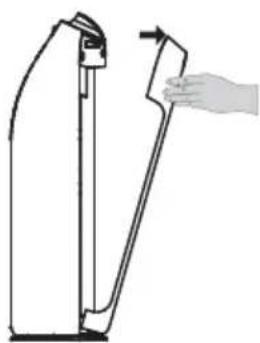
natural_image
Line drawing of a hand holding a lever against a vertical support structure (no text or symbols)- Vyjměte filtry.

natural_image
Diagram of a device with a hand pointing to a control panel, no text or symbols presentnatural_image
Simple 3D diagram of a mechanical component with an arrow indicating upward motion (no text or symbols)natural_image
Technical diagram of a device with internal fan and ventilation slots, alongside a schematic view of a grid-patterned panel (no text or symbols)natural_image
Diagram of a battery pack with a magnified inset showing internal structure (no text or symbols)natural_image
Diagram of a device with mesh panel and side panel, no text or symbols presentnatural_image
Diagram of a door handle mechanism with a hand holding a blade (no text or symbols)PŘEHLED OVLÁDACÍCH PRVKŮ
Accumulated the working
natural_image
Simple line drawing of a battery with sun, cross symbol, and battery cover (no text or labels)natural_image
Simple line drawing of a battery with a cross symbol above it (no text or labels)natural_image
Silhouette of a welding worker and plug icon (no text or symbols)natural_image
Simple line drawing of a portable air conditioner connected to a plug and a hand holding a prohibition symbol (no text or labels)natural_image
Hand placing a hand on a grid-patterned object with no visible text or symbolsnatural_image
Simple line drawing of a battery with a watering can and a cross symbol (no text or labels)natural_image
Illustration of a kitchen scene with a pot, hanging kitchen utensils, and a gas stove (no text or symbols)natural_image
Illustration of a fire and a trash can with a cross symbol (no text or labels)natural_image
Illustration of various bathroom fixtures including a bathtub, toilet, shower, and sink (no text or symbols)natural_image
Illustration of a remote control with a child symbol crossed out (no text or symbols present)natural_image
Simple line drawing of a rectangular panel with a diamond pattern and a small square top (no text or symbols)natural_image
Isometric view of a honeycomb panel with hexagonal lattice pattern (no text or symbols)natural_image
Isometric line drawing of a rectangular panel with horizontal slats and a small protrusion (no text or symbols)natural_image
Illustration of a portable air conditioner with two hands and circular buttons, no text or symbols presentA

natural_image
Line drawing of a door handle with a hand holding the blade (no text or symbols)B

natural_image
Line drawing of a portable electronic device with a mesh panel and handle (no text or symbols)C

natural_image
Diagram of a device with a grid-patterned panel and mechanical components (no text or symbols)D
natural_image
Three rectangular blocks with different textures and patterns, no text or symbols presentnatural_image
Symbol of a trash bin crossed with two diagonal lines, no text or numbers presentnatural_image
Illustration of a device with two hands and circular buttons, no text or symbols present
natural_image
Line drawing of a hand holding a lever against a vertical support structure (no text or symbols)- Vyberte filtre.

natural_image
Diagram of a device with a hand pointing to a control panel, no text or symbols presentnatural_image
Simple 3D diagram of a mechanical component with an arrow indicating upward motion (no text or symbols)natural_image
Technical diagram of a device with internal fan and ventilation slots, shown alongside a schematic view (no text or symbols)natural_image
Diagram of a battery pack with a magnified inset showing internal structure (no text or symbols)natural_image
Diagram of a device with mesh panel and side panel, no text or symbols presentnatural_image
Diagram of a door handle mechanism with hand gesture (no text or symbols)PREHL'AD OVLÁDACÍCH PRVKOV

Accumulated the working
natural_image
Simple line drawing of a battery with sun, cross symbol, and battery cover (no text or labels)natural_image
Simple line drawing of a battery with a cross symbol above it (no text or labels)natural_image
Silhouette of a welding worker and plug icon (no text or symbols)natural_image
Simple line drawing of a battery connected to an electrical outlet with a hand holding a switch (no text or symbols)natural_image
Hand placing a grid pattern into a container with a handle (no text or symbols visible)natural_image
Simple line drawing of a battery with a watering can and a cross symbol (no text or labels)natural_image
Illustration of a cooking pot and a trash can with a crossed-out symbol (no text or labels)natural_image
Illustration of a fire and a trash can with a crossed-out symbol (no text or labels)natural_image
Illustration of bathroom fixtures including a bathtub, toilet, showerhead, and trash bin (no text or symbols)natural_image
Illustration of a remote control with a crossed-out 'X' symbol and a gray silhouette of a child (no text or symbols present)natural_image
Simple line drawing of a rectangular panel with a diamond pattern and a small square top (no text or symbols)natural_image
Isometric view of a honeycomb panel with hexagonal lattice pattern (no text or symbols)natural_image
Isometric line drawing of a rectangular panel with horizontal slats and a small protrusion (no text or symbols)natural_image
Illustration of a portable air conditioner with two hands and circular buttons, no text or symbols presentA
natural_image
Line drawing of a door handle with a hand holding the blade (no text or symbols)B
natural_image
Line drawing of a portable electronic device with a mesh panel and handle (no text or symbols)C
natural_image
Diagram of a rectangular electronic device with a grid-patterned panel and an arrow indicating force or movement (no text or symbols present)D
natural_image
Three rectangular blocks with different textures and patterns, no text or symbols presentnatural_image
Symbol of a trash bin crossed with two diagonal lines, no text or numbers presentnatural_image
Illustration of a device with two hands and circular buttons, no text or symbols present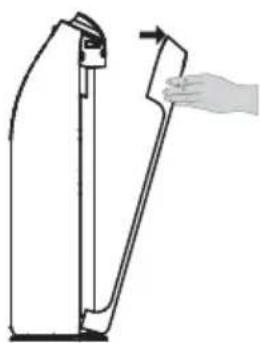
natural_image
Line drawing of a hand holding a tool interacting with a vertical object (no text or symbols)- Wyjmij filtr.

natural_image
Diagram of a device with a hand pointing to a control panel, no text or symbols presentnatural_image
Simple 3D diagram of a mechanical component with an arrow indicating upward motion (no text or symbols)natural_image
Technical line drawing of a mechanical device with a fan and internal components, alongside a side-view view of a grid-patterned panel (no text or symbols)natural_image
Diagram of a battery cell with internal structure and side view showing mesh pattern (no text or symbols)natural_image
Diagram of a device with mesh panel and adjacent close-up view (no text or symbols)natural_image
Diagram of a hand holding a tool against a vertical support structure (no text or symbols)PRZEGLĄD ELEMENTÓW STEROWANIA
Accumulated the working
natural_image
Simple line drawing of a battery with sun, cross symbol, and battery cover (no text or labels)natural_image
Simple line drawing of a battery with a cross symbol above it (no text or labels)natural_image
Silhouette of a welding worker and a plug symbol (no text or labels)natural_image
Simple line drawing of a battery connected to an electrical outlet with a hand holding a cross symbol (no text or labels)natural_image
Hand placing a finger into a grid-patterned container with 'H' and 'W' labels (no readable text or symbols)natural_image
Illustration of a battery with a watering can and a cross symbol (no text or labels)natural_image
Illustration of a cooking pot and a trash can with a crossed-out symbol (no text or labels)natural_image
Illustration of a fire and a trash can with a crossed-out symbol (no text or labels)natural_image
Illustration of bathroom fixtures including a bathtub, toilet, showerhead, and trash bin (no text or symbols)natural_image
Illustration of a remote control with a crossed-out 'X' symbol and a gray silhouette of a child (no text or symbols present)natural_image
Simple line drawing of a rectangular panel with a diamond pattern and a small square top (no text or symbols)natural_image
Isometric view of a honeycomb panel with hexagonal lattice pattern (no text or symbols)natural_image
Isometric line drawing of a rectangular panel with horizontal slats and a small protrusion (no text or symbols)natural_image
Illustration of a portable air conditioner with two hands and circular buttons, no text or symbols presentA

natural_image
Line drawing of a door handle with a hand holding the blade (no text or symbols)B

natural_image
Line drawing of a portable electronic device with a mesh panel and handle (no text or symbols)C
natural_image
Diagram of a device with a grid-patterned panel and mechanical components (no text or symbols)D
natural_image
Three rectangular blocks with different textures and patterns, no text or symbols presentnatural_image
Symbol of a trash bin crossed with two diagonal lines, representing no waste or discharge (no text or labels)
natural_image
Illustration of a device with two hands and circular buttons, no text or symbols present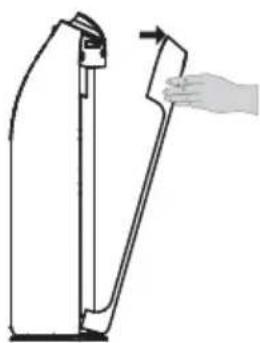
natural_image
Line drawing of a hand holding a lever against a vertical support structure (no text or symbols)natural_image
Diagram of a device with a hand pointing to a control panel, no text or symbols presentnatural_image
Simple 3D diagram of a mechanical component with an arrow indicating upward motion (no text or symbols)natural_image
Technical diagram of a device with internal fan and ventilation slots, alongside a schematic view of a grid-patterned panel (no text or symbols)natural_image
Diagram of a battery pack with a magnified inset showing internal structure (no text or symbols)natural_image
Technical diagram of a device with mesh panel and side view showing internal structure (no text or symbols)natural_image
Diagram of a door handle mechanism with hand holding blade (no text or symbols)VEZÉRLŐELEMEK

Accumulated the working
natural_image
Simple line drawing of a battery with sun, cross symbol, and battery cover (no text or labels)natural_image
Simple line drawing of a battery with a cross symbol above it (no text or labels)natural_image
Silhouette of a welding worker with protective gear and plug symbol (no text or labels)natural_image
Simple line drawing of a battery connected to an electrical plug with a prohibition symbol (no text or labels)natural_image
Simple line drawing of a container with a handle and grid pattern, no text or symbols presentnatural_image
Simple line drawing of a battery with a watering can and a cross symbol (no text or labels)natural_image
Illustration of a kitchen scene with a pot, hanging kitchen utensils, and a trash can (no text or symbols)natural_image
Illustration of a fire and a trash can with a cross symbol (no text or labels)natural_image
Illustration of various bathroom fixtures including a bathtub, toilet, showerhead, and sink (no text or symbols)natural_image
Illustration of a remote control with a cross symbol and a child silhouette (no text or symbols present)natural_image
Simple line drawing of a rectangular panel with a diamond pattern and a small square top (no text or symbols)natural_image
Isometric view of a honeycomb panel with hexagonal lattice pattern (no text or symbols)natural_image
Isometric line drawing of a rectangular panel with horizontal slats and a small protrusion (no text or symbols)natural_image
Illustration of a portable air conditioner with two hands and circular buttons, no text or symbols presentA

natural_image
Line drawing of a door handle with a hand holding the blade (no text or symbols)B

natural_image
Line drawing of a portable electronic device with a mesh panel and handle (no text or symbols)C

natural_image
Diagram of a device with a grid-patterned panel and mechanical components (no text or symbols)D
natural_image
Three rectangular blocks with different textures and patterns, no text or symbols presentnatural_image
Symbol of a trash bin crossed with two diagonal lines, representing no waste or discharge (no text or labels)
natural_image
Illustration of a device with two hands and circular buttons, no text or symbols present
natural_image
Line drawing of a hand holding a lever against a vertical support structure (no text or symbols)- Odstranite filtre.
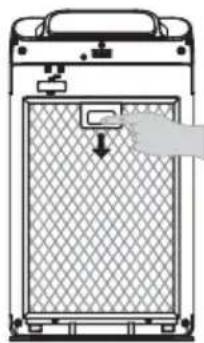
natural_image
Diagram of a device with a hand pointing to a control panel, no text or symbols present- Odstranite vso embalažo.

natural_image
Simple 3D diagram of a mechanical component with an arrow indicating upward motion (no text or symbols)natural_image
Technical diagram of a device with internal fan and ventilation slots, alongside a schematic view of a grid-patterned panel (no text or symbols)- Namestite filter 2 (aktivni ogljikov + filtri za odstranjevanje formaldehida) Opomba: Prepričajte se, da je stran z nalepko obrnjena proti vam.
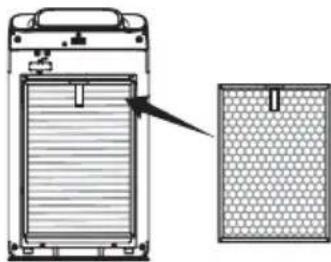
natural_image
Diagram of a battery pack with a magnified inset showing internal structure (no text or symbols)- Namestite filter 1 (Predfilter) Opomba: Prepričajte se, da je stran z nalepko obrnjena proti vam.

natural_image
Diagram of a device with mesh panel and side panel, no text or symbols presentnatural_image
Diagram of a door handle mechanism with a hand holding a blade (no text or symbols)PREGLED UPRAVLJALNIH ELEMENTOV

Accumulated the working
natural_image
Simple line drawing of a battery with sun, cross symbol, and battery cover (no text or labels)natural_image
Simple line drawing of a battery with a cross symbol above it (no text or labels)natural_image
Silhouette of a welding worker and plug icon (no text or symbols)natural_image
Simple line drawing of a battery connected to an electrical outlet with a hand holding a cross symbol (no text or labels)natural_image
Hand placing a grid pattern into a container with a handle (no text or symbols visible)natural_image
Simple line drawing of a battery with a watering can and a cross symbol (no text or labels)natural_image
Illustration of a cooking pot and a trash can with a crossed-out symbol (no text or labels)natural_image
Simple line drawing of a fire and a trash can with a crossed-out symbol (no text or labels)natural_image
Illustration of bathroom fixtures including a bathtub, toilet, showerhead, and trash bin (no text or symbols)natural_image
Illustration of a remote control with a crossed-out 'X' symbol and a gray silhouette of a child (no text or symbols present)natural_image
Simple line drawing of a rectangular panel with a diamond pattern and a small square top (no text or symbols)- Prah s površine filtra odstranite s sesalnikom ali pa ga sperite z vodo in temeljito posušite.
natural_image
Isometric view of a honeycomb panel with hexagonal lattice pattern (no text or symbols)natural_image
Isometric line drawing of a rectangular panel with horizontal slats and a small protrusion (no text or symbols)natural_image
Illustration of a portable air conditioner with two hands and circular buttons, no text or symbols presentA
natural_image
Line drawing of a door handle with a hand holding the blade (no text or symbols)B

natural_image
Line drawing of a portable electronic device with a mesh panel and handle (no text or symbols)C

natural_image
Diagram of a device with a grid-patterned panel and mechanical components (no text or symbols)D
natural_image
Three rectangular blocks with different textures and patterns, no text or symbols presentnatural_image
Symbol of a trash bin crossed with two diagonal lines, representing no waste or discharge (no text or labels)
natural_image
Simple line drawing of a device with two hands and circular buttons, no text or symbols present.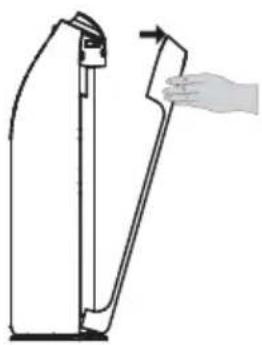
natural_image
Line drawing of a hand holding a device against a vertical panel, showing no text or symbolsnatural_image
Diagram of a device with a hand pointing to a control panel, no text or symbols presentnatural_image
Diagram of a mechanical component with an upward arrow, no text or symbols presentnatural_image
Technical line drawing of a device with fan and ventilation slots, alongside a schematic view of a grid-patterned panel (no text or symbols)natural_image
Diagram of a device with a grid-patterned panel and an arrow pointing to a component (no text or symbols)natural_image
Diagram of a device with mesh panel and adjacent close-up view (no text or symbols)natural_image
Diagram of a hand holding a tool next to a vertical support structure (no text or symbols)ÜBERSICHT DER BEDIENELEMENTE

Accumulated the working
natural_image
Simple line drawing of a battery with sun, cross symbol, and battery cover (no text or labels)natural_image
Simple line drawing of a battery with a cross symbol above it (no text or labels)natural_image
Silhouette of a welding worker with protective gear and plug symbol (no text or labels)natural_image
Simple line drawing of a battery connected to an electrical plug with a prohibition symbol (no text or labels)natural_image
Simple line drawing of a container with a handle and grid pattern, no text or symbols presentnatural_image
Simple line drawing of a battery with a watering can and a cross symbol (no text or labels)natural_image
Illustration of a cooking pot and a trash can with a crossed-out symbol (no text or labels)natural_image
Illustration of a fire and a trash can with a crossed-out symbol (no text or labels)natural_image
Illustration of bathroom fixtures including a bathtub, toilet, showerhead, and trash bin (no text or symbols)natural_image
Illustration of a remote control with a crossed-out 'X' symbol and a gray silhouette of a child (no text or symbols present)natural_image
Front view of a rectangular metal panel with a diamond grid pattern and a small square clip on top (no text or symbols)natural_image
Isometric line drawing of a honeycomb panel (no text or symbols)natural_image
Isometric line drawing of a rectangular panel with horizontal slats and a small protrusion (no text or symbols)natural_image
Illustration of a portable air conditioner with two hands and circular buttons, no text or symbols presentA

natural_image
Line drawing of a door handle with a hand holding the blade (no text or symbols)B

natural_image
Line drawing of a portable electronic device with a mesh panel and handle (no text or symbols)C
natural_image
Diagram of a rectangular electronic device with a grid-patterned panel and an arrow indicating force or movement (no text or symbols present)D
natural_image
Three rectangular blocks with different textures and patterns, no text or symbols presentnatural_image
Symbol of a trash bin crossed with two diagonal lines, no text or numbers presentThank you for purchasing.
Please read this user manual carefully before you use the appliance.
After reading this manual, keep it in a convenient location for further reference.
CONTENTS
PACKING LIST 3
PURIFIER FEATURES....3
PRODUCT OVERVIEW 5
CIRCUIT DIAGRAM 5
INSTALL FILTER....6
CONTROL OVERVIEW 7
FUNCTION DESCRIPTIONS 9
INSTALLATION NOTICE.... 10
SAFETY PRECAUTIONS....11
MANDATORY ITEMS....13
CLEANING AND MAINTAINANCE 14
REPLACING THE FILTERS.... 16
TROUBLESHOOTING 17
PERFORMANCE INDICATORS....18
PACKING LIST
| Machine 1 Piece | |
| Remote Control 1 Piece | |
| Filters 3 PCS | |
| User Manual 1 Piece |
PURIFIER FEATURES
Aluminum Pre Filter
Aluminum Pre Filter, Remove Large Granule Dust, Dander, Pollen, Floating Compound And Other Pollutants. Washable And Reusable.
Cold Catalyst Filter
The Cold Catalyst Will Play a Catalyst Effect In Normal Living Environment Without Any External Assistance Like UV light, Sunlight, High Temperature Or Pressure.
The Cold Catalyst Can Be Used To Deal With Formaldehyde, Ammonia, Benezene, TVOC, Hydrogen Sulfide And Other Harmful Gases Released By Plywood, Furniture, Wallpapers, Carpets, Curtains And Bedspreads.
Formaldehyde removal filter
This is a removal filter, designed to quickly adsorb and decompose formaldehyde. It is made of top-quality material for enhanced durability. This removal filter is an ideal choice for household and office use.
Filled the honeycomb with unique formaldehyde removal catalyst and material.
Tested by the Shanghai Academy of Public Measurement(APM), the product can quickly adsorb and decompose formaldehyde.
Antibacterial Filter
The 5 Microns Filter with Antimicrobial Agents Can Efficiently Kill Bacteria In The Air.
High Efficiency HEPA Filter
The Precision Of The HEPA Filter Is 0.01 Micron, And It is Able To Eliminate Particles Which Are Larger Than 0.01 Micron With The Filtration Rate Of 99% Or More. Dust, Bacteria, Fungi, Viruses, Allergens And Other Small And Tiny Particles Are Not Able To Get Through The HEPA Filter.
UV Sterilize Light
A Variety Of Bacteria Can be Killed by the 365nm UV Light. The UV Germicidal Lamp is used to purify the air and it is able to eliminate odor caused by smoke and mold.
Anion Release
The Ionizer Release Large Amount Of Anions And Make the Oxygen Negatively-Charged, Thus Gathering The Positively-Charged Particles Like Floating Dust, Bacteria, Viruses And Smoke. The Particles Become Denser And Sink To the Ground. The Smaller The Particle Size, The Higher The Capture Rate.
PRODUCT OVERVIEW

Front Side Side View Rear Side
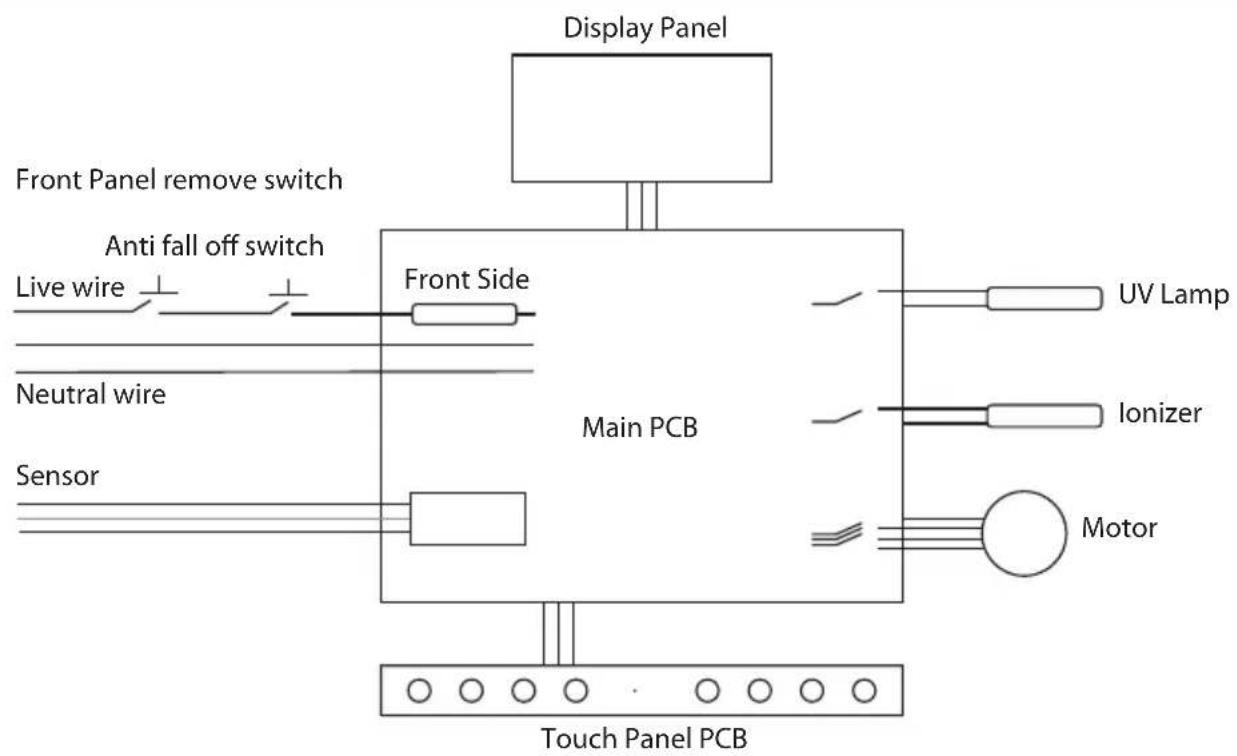
CIRCUIT DIAGRAM
INSTALL FILTER
1. Take Out filter from Machine
- Open the cover

natural_image
Illustration of a device with two hands and circular buttons, no text or symbols present
natural_image
Line drawing of a hand holding a lever against a vertical support structure (no text or symbols)• Take out the filters

natural_image
Diagram of a device with a hand pointing to a control panel, no text or symbols present- Remove all packaging material

natural_image
Simple 3D diagram of a mechanical component with an arrow indicating upward motion (no text or symbols)2. Install filter and Front panel
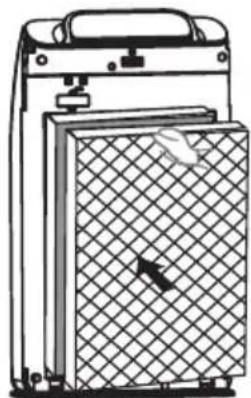
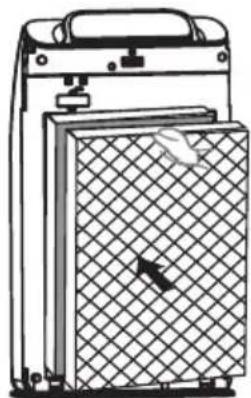
• Install filter 3 (Antibacterial + HEPA compound filters) Note: Please ensure the tab side is facing you.

natural_image
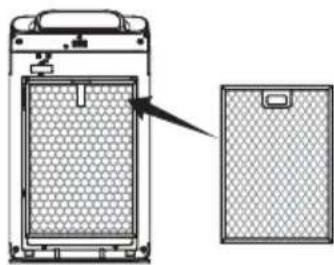
Technical diagram of a device with internal fan and ventilation slots, shown alongside a schematic view (no text or symbols)• Install filter 2 (Activated carbon + Formaldehyde removal compound filters) Note: Please ensure the tab side is facing you.

natural_image
Diagram of a battery pack with a magnified inset showing internal structure (no text or symbols)• Install filter 1 (Pre-filter) Note: Please ensure the handle side is facing you.
natural_image
Diagram of a device with mesh panel and side panel, no text or symbols present• Install front plate
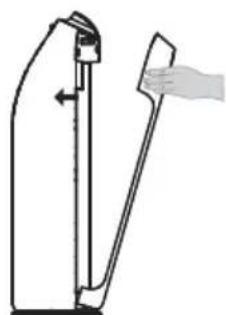
natural_image
Diagram of a door handle mechanism with a hand holding a blade (no text or symbols)CONTROL OVERVIEW
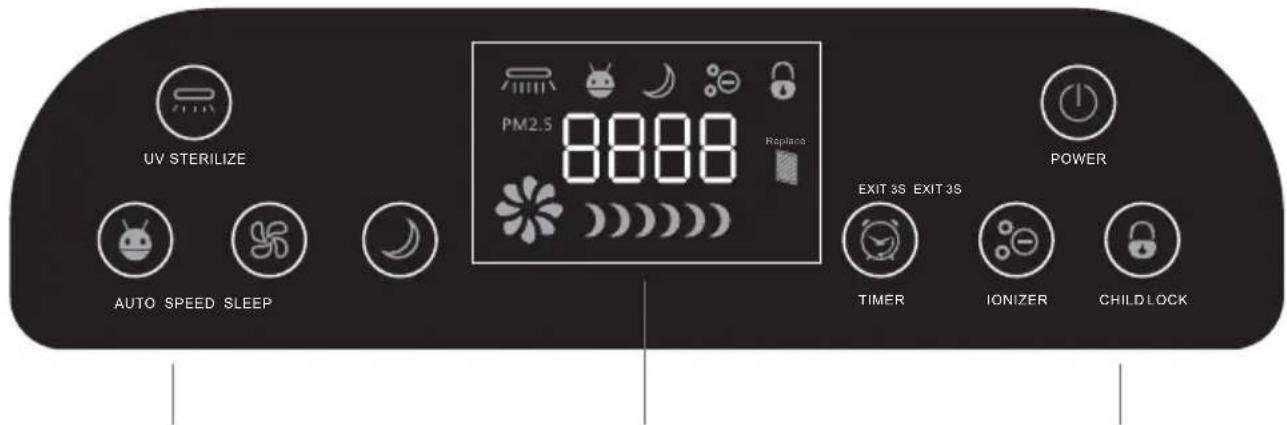
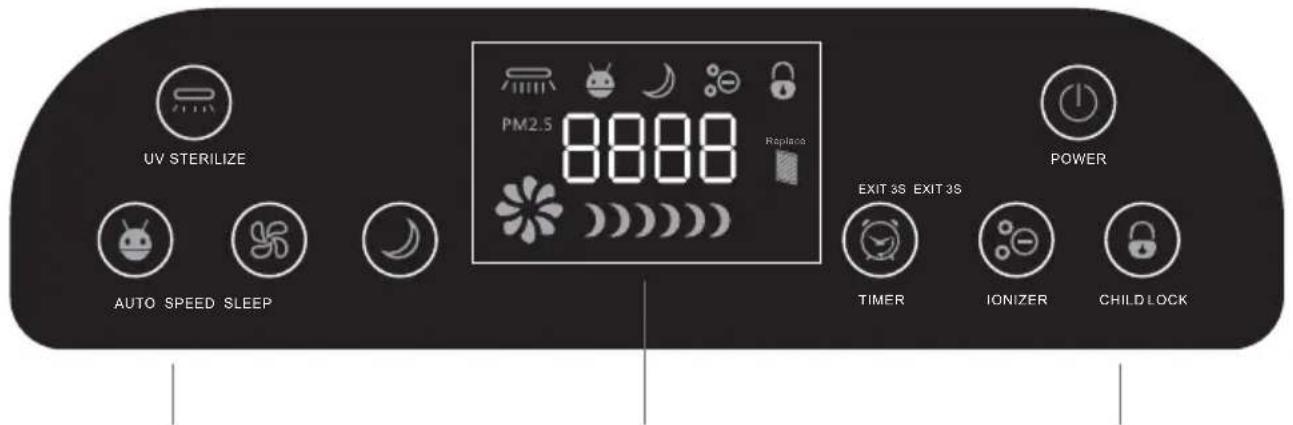
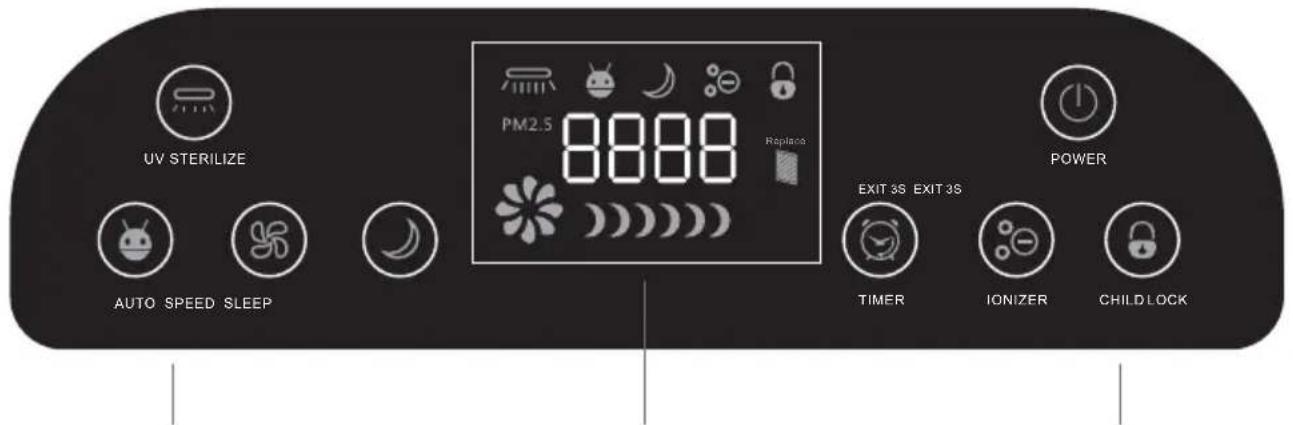
Control Panel Display Panel Control Panel
1. Switch on

POWER
Touch the power button at standby mode. Machine will on last time running mode. (Not including timer and sleep mode.)
Machine will go into standby mode after press the power button when it on running mode.
It will record the current operation mode at the same time.
Remark: The machine include panel switch and anti fall switch. Machine won't turn on when remove panel and machine fall down.
2. Select the operating mode

CHILD LOCK
All button will disable when press child lock. Icon will light up and keep running. Press this button for 3 seconds to exit this mode.

IONIZER
Ionizer will on/off when press this button. The icon will light up and down accordingly. Motor will turn on and stay low speed mode if you press this button at standby mode.

TIMER
Press this button to set the working time. Every time increase 30 minutes. It will recycle after 12 hours. You can press 3 seconds to exit this mode. The machine will go into standby mode and exit timer mode if you press this button but machine not at purifying mode.
(Display panel will show 00:30 1:00 1:30 2:00 2:30.....)
UV sterilize on/off after press this button when machine running. Icon will light up or down at the same time. Motor will turn on and stay low speed mode if you press this button at standby mode.

Press auto button on the control panel, machine into auto mode, "Auto" indicator on the panel. Under this mode, according to the degree of air pollution, automatic to start work, air volume automatically adjust. PM2.5<60 (Low speed), 60≤PM2.5<150 (Medium speed), PM2.5≥150 (High speed)
The display panel and light will turn off when sleep mode start. Motor only work at low speed. Timer is available at this mode. Machine will at standby mode after the time setting finish. Press any button to exit sleep mode.

Press this button can adjust the motor speed at Low(500RPM), Medium(700RPM), High (900 RPM) and let the machine exit auto mode. The motor speed won't control by sensor if it's modify without permission.
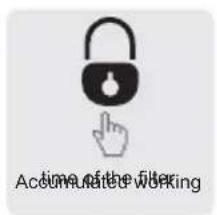
Press child lock for 5 seconds when at normal working mode(child lock mode not start), it will show accumulated working time of the filter. It will disappear after 3 seconds.
3. Power Off

When machine running, it will turn into standby mode when press this button.
FUNCTION DESCRIPTIONS
1. Remote Control
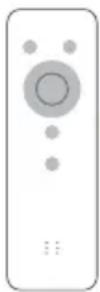
The product is equipped with remote control, use the button cell (If don't use the remote control for a long time, please take out the battery)
Note: The buttons on the remote control, the corresponding buttons on the operation panel, function and operation method are exactly the same, otherwise no introduction.
2. Product use
- Intelligent operation, the machine under the status of the power supply is connected, press the power button, and the smart key, the machine can run under the sensor intelligent induction. The operation of the motor gear will follow sensors adjusted value. This operation can use the vast majority of applications.
- Enforce running, the machine under the status of the power supply is connected, press the power button, key selection according to wind speed motor gear, to select on or off negative ions and UV germicidal lamp. Complete the purification function, suitable for the operating manual intervention force purification applications.
In this mode cannot be automatically shift machine.
- The above two kinds of operating modes when it runs at night, as long as the sleep button is automatically in the purification of a machine, to ensure that no noise, will not effect your rest.
- Regular operation, the above three kinds of operation mode, simply press time, the setting of the machine running time, it will run the countdown, will stop running automatically after the times out. (If needs to cancel the timing, long press time 3 seconds to cancel this function.)
- Childlock mode, as long as you press the Childlock button, the control panel and buttons on the remote control can not work.(Long press 3 seconds locked to lift,or press the unlock button on the remote control)
3. Time setting
- Setting method, long press the smart key for 5 seconds, time display: Hour"digits flashing, press the speed key to add 1, press the sleep button to subtract 1, set "Hour" and then click the smart key again, "Minutes" digits in flashing, press the speed button to add 1. press sleep mode to subtract 1. (Press smart key back and forth for hours and wind speed. Press the wind speed and the sleep button to add or subtract set.)
Note:
- The clock function of this machine is completely independent, time display function accuracy or not does not affect the purification.
- The battery powered by the circuit board of the machine, it will consumption in the case of the machine is not plugged in. The battery is designed for the latest 10 days standby, it runs out of battery for more than 10 days, the clock function automatically reset. We need to set the clock again. (Refer to the back of the clock setting process)
INSTALLATION NOTICE
1. Do not place on the following places
- Direct sunlight or facing outlet of air condition, Heated place. (May cause deformation, deterioration, discoloration and malfunction.)

natural_image
Simple line drawing of a battery with sun, crossed-out circle, and no text or symbols- Televisions and radios and other equipment nearby. (Images may cause disorder and noise, remote control machine, disruption to television and radio, please put more than 1 meter away.)

- In view of the pollen and other indoor dust, this product should be placed on the ground.
- Pollen, dust and other easily fall near the floor, it is recommended that the product be placed on a flat ground in the room.
- In order to make effective air circulation in the room.
- There should be a gap of at least 20cm at both sides and back of the product, while 30cm from the top surface.

- Do not place anything on the product.
(Otherwise may cause malfunction)
- Special Notice: Do not place magnets and metal object.
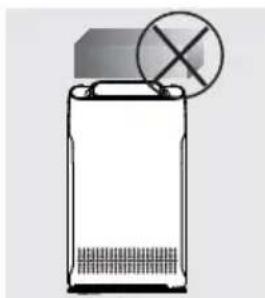
natural_image
Simple line drawing of a battery with a cross symbol above it (no text or labels)- Do not block the air inlet and outlet.
- For example, do not place anything on the outlet or front air inlet.
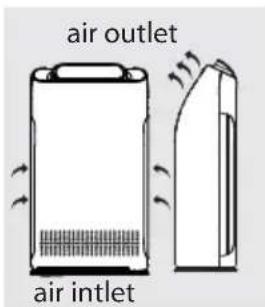
SAFETY PRECAUTIONS
- Do not lift or move the machine when it working
Never pull the cord when moving or storing, may cause a short circuit or the power cord damage, fire or get an electric shock accident.
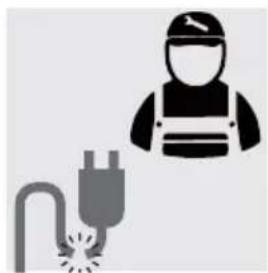
- Do not damage the power cord or plug, do not cutting, excessive twisting, pulling, reverse power line. If the power cord is damaged, to avoid the danger, must be replaced by the manufacturer, the maintenance department or professional staff.
natural_image
Silhouette of a welding worker with a welding plug and sparks symbol (no text or labels)- Do not use beyond the rated power, universal socket or connected devices, May cause the cord to overheat and cause fire accidents.

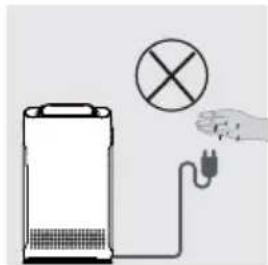
- Do not touch the power plug with wet hands, may cause electric shock.
natural_image
Illustration of a portable energy heater connected to a plug with a hand holding a prohibition symbol (no text or labels)- Prohibit the use of fingers or metal objects into the air outlet gap, may cause electric shock or injury.

natural_image
Hand placing a grid-patterned object into a rectangular frame (no text or symbols visible)- Do not let water, flammable detergent or other liquid into the product, may cause electric shock or fire.

natural_image
Illustration of a battery with a watering can and a cross symbol (no text or labels)- This product is not supposed to be used as daily ventilator, dust cleaner or cooker hood.

natural_image
Illustration of a cooking pot and a trash can with a crossed-out symbol (no text or labels)- Do not use this product near as gas appliances, heating devices no near stove.

natural_image
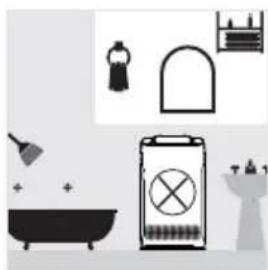
Illustration of a fire and a trash can with a crossed-out symbol (no text or labels)- Do not use this product in a humid or high-temperature environment (e.g. bathroom, toilet or kitchen)
natural_image
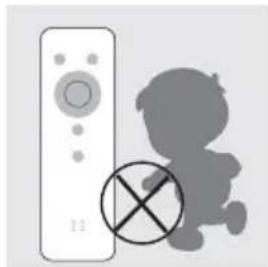
Illustration of bathroom fixtures including a bathtub, toilet, showerhead, and trash bin (no text or symbols)- Do not allow children to have access to the remote control.
natural_image
Illustration of a remote control with a crossed-out 'X' symbol and a gray silhouette of a child (no text or symbols present)-
Do not place in such a place
-
Unstable places(Products may drop, overturned, resulting in injury, cause leakage1, electric shock or fire accident)
• High temperature, high humidity or place of wet machine, e.g. the bathroom.
• Kitchen and other places of soot emission -
Do not use air purifier in Aromatherapy scent insecticide environment
• Chemical residues may accumulate in the machine, then released from the outlet and harm to health
• After using insecticide, should thoroughly ventilate the room before using air purifier.
MANDATORY ITEMS
- When the following occurs, please immediately turn off the power of the machine. (May cause electric shock, sparks, or smoke)
• Abnormal sound or vibration during operation
• Product odor, burnt smell
- Please regularly clean the power plug
• Pullout the power plug, wipe with a dry cloth
- If do not use electrical appliances for a long time, please pull out the power plug
- Before maintenance, make sure to disconnect the power
- Products may suddenly start, causing electric shock and injury
- Please safely insert the plug into the socket
- Do not use damaged plug or loose power socket
- Please hold the plug insulation parts to pull out power plug
- Use the power cord to pull off the plug from the power cord, may cause power cord damaged, electric shock, short circuit, fire disaster

- When any of the following occurs, please immediately turn off the machine and find the maintenance department
• A switch does not work
• The power cord or plug abnormal heat
• Abnormal sound or vibration
• Any anomalies or malfunctions
- Unprofessional people is not allowed to install or uninstall the machine.
CLEANING AND MAINTAINANCE
1. Pre-Filter(Every 15 days)

natural_image
Simple line drawing of a rectangular panel with a diamond grid pattern and a small square top (no text or symbols)- Please use the vacuum cleaner to clean the dust on the surface of the screen, or wash with water, dry thoroughly.
2. Cold-catalyst filter / High effect on formaldehyde removing filter (Every 2 months)
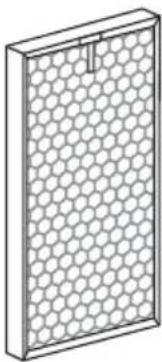
natural_image
Isometric view of a honeycomb panel with hexagonal lattice structure (no text or symbols)- Use the vacuum cleaner to clear the dust on the surface of the screen.
- Place the filter into the ventilated place. Don't expose under the strong sunshine.
- Do not force of hold on the filter.
- Do not use water to clean the filter.
3. Antibacterial / HEPA filter(Every 2 months)
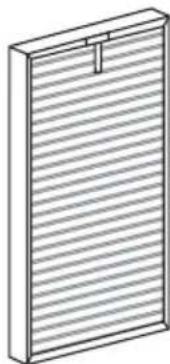
natural_image
Isometric line drawing of a rectangular panel with horizontal slats and a small protrusion (no text or symbols)- Place the filter into the ventilated place. Do not expose under the strong sunshine.
- Do not use water to clean the filter.
4. Negative Ion Generator
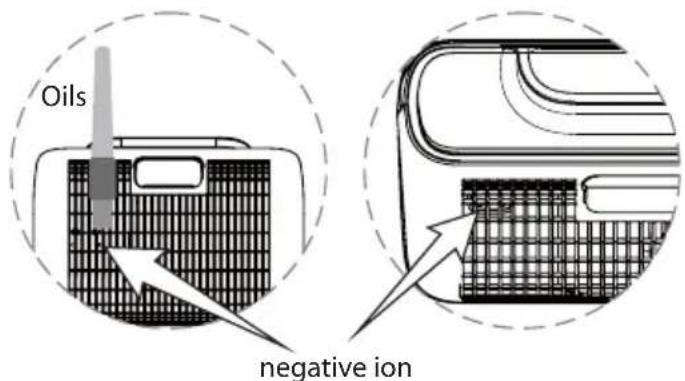
- When you hear the machine with a creak sound, use the brush pen as cleaning tool, regularly clean the dust around the negative ion.
5. Particle Sensor (Every 2 months)

- With a dry cotton swab and regular cleaning the lens to remove the moisture and smoke, remove the outer cover of particle sensor (fig 1), use the dry cotton swab to clean the lens (fig 2).
- Please ensure to disconnect the power before cleaning.
- Irradiated with light when it can't see clearly.
Tips
- Ensure to disconnect the power before cleaning and maintenance
- Do not open the machine when it removes the filter
- Please unplug power if the machine is not in use in long time
- According to the use of places and methods (e.g. The family with many of smokers or the place with serious pollution), the filter life will be shortened. Please replace the filter in time.
REPLACING THE FILTERS
Snap Joints

natural_image
Illustration of a portable air conditioner with two hands and circular buttons, no text or symbols presentA

natural_image
Line drawing of a door handle with a hand holding the blade (no text or symbols)B

natural_image
Line drawing of a portable electronic device with a mesh panel and handle (no text or symbols)C

natural_image
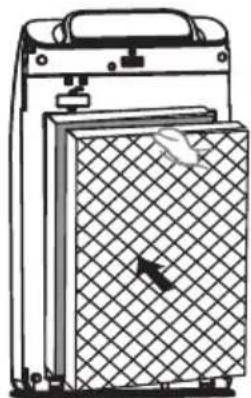
Diagram of a device with a grid-patterned panel and mechanical components (no text or symbols)D
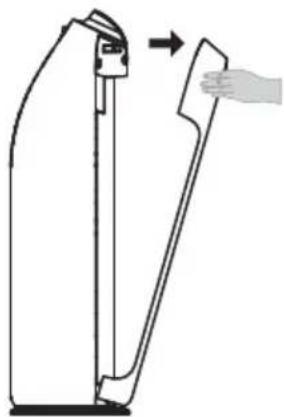
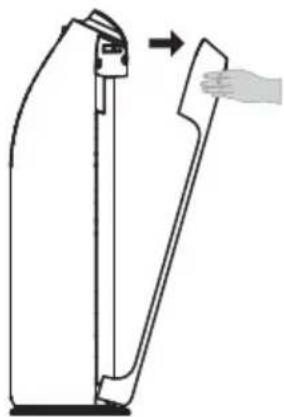
A. Press the middle of front panel, to make the upper button out of its position.
B. Pull out the front panel
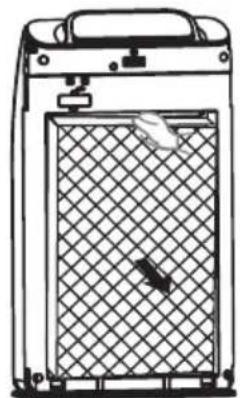
C. Take out the filters one by one
D. Fill in new filters one by one in a correct consequence
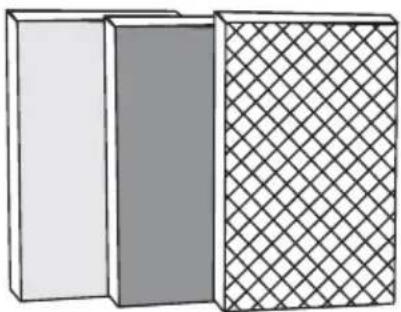
natural_image
Three rectangular blocks with different textures and patterns, no text or symbols present- Pre-Filter
- Highly effect on formaldehyde removing filter /Cold Catalyst Filter
-
Antibacterial / HEPA Filter
-
Suggest to maintain No.1 filter in every 15 days
- Suggest to maintain No.2 and No.3 filters in every 60 days
- Suggest to replace No.1 filter in every 2 years
- Suggest to replace No.2 & No.3 filter in every 6 moths
Filter change reminding reset
The machine has filter change reminding function. It's set at 1500 hours. Please replace No.2 and No.3 filter when "change" icon light up. Also please press the child lock button for 5 seconds to reset this function.
TROUBLESHOOTING
Usually problem and way of control and protect.
| Problem Solution | |
| Can not turn on or key has no response | 1. The power cord is plugged in?- Plug in the power.2. The machine front plate is covered?- Cover the front plate3. The machine is in the Child-lock mode?- When the display showed “child-lock” lights up, press the “child-lock/ reset” 5 seconds until the light off.4. ?The machine is put on the flat place?- ?Put it on a flat place. |
| The air is dirty, but the indicator still show green color, even continuous operation, the indicator is always displayed in red. | 1. If the machine is put in the place of not easy to adsorbed the dirty air? --Change the place.2. Particle sensor is dirty?- Clean the sensor. |
| Sound during operation The negative ion generator is too much dust?- Clean the negative ion generator. | |
| The smell of the outlet to let a person feel uncomfortable. | 1. Filter is dirty?- Clean the filter .2. Filter for a long time did not change?- Replace a new one. |
| Not into sleep mode automatically in the night. | Purifier in manual mode?- Press “Auto” button on the control panel, make sure enter the Auto mode. |
| Purifier work time is long , but the air purifier quality not improved obviously. | 1. Have remove the filter bag?- Please remove filter bag in use of the first time.2. Installation order filter is wrong?- Installation sequence . |
| Display is showed “F1” or “F2” Please turn off the power immediately and find maintenance department. | |
PERFORMANCE INDICATORS
| Product Name Air Purifier | |
| Rated Total Power | AC 110V~120V or AC 220V~240V, 50/60HZPlease refer to the nameplate on the back of machine |
| Power 80W | |
| Noise (Low) ≤29.4dB | |
| Ionizer 20million/cm | 3 |
| CADR(PM2.5) 320 m | ^3/h |
| CCM(PM2.5) P4 | |
| CADR (Formaldehyde) 80 m | ^3/h |
| CCM (Formaldehyde) F4 | |
| Application Area 22~38 m | 2 |
| Filter Replace Time Filter #1 2 years, #2 & #3 6 months | |
| Net Weight 8.5KG | |
| Gross Weight 11.0KG | |
| Product Size | 370x195x665mm |
| Packing Size | 420x253x720mm |
| Purification | Pre-filter, Cold-catalyst, Formaldehyde removal filter(Honeycomb activated carbon filter Optional),Antibacterial filter, UV Sterilization, HEPA filter,Anion release. |
DISPOSAL OF USED ELECTRICAL AND ELECTRONIC EQUIPMENT

natural_image
Symbol of a trash bin crossed with no text or numbers, representing waste sorting or restriction (no text present)
This symbol on products or original documents means that used electric or electronic products must not be added to ordinary municipal waste. For proper disposal, renewal and recycling hand over these appliances to determined collection points. Alternatively, in some European Union states or other European countries you may return your appliances to the local retailer when buying an equivalent new appliance. Correct disposal of this product helps save valuable natural resources and prevents potential negative effects on the environment and human health, which could result from improper waste disposal. Ask your local authorities or collection facility for more details. In accordance with national regulations penalties may be imposed for the incorrect disposal of this type of waste.
For business entities in European Union states
If you want to dispose of electric or electronic appliances, ask your retailer or supplier for the necessary information.
Disposal in other countries outside the European Union.
This symbol is valid in the European Union. If you wish to dispose of this product, request the necessary information about the correct disposal method from the local council or from your retailer.
- PŘEHLED OVLÁDACÍCH PRVKŮ
- PREHL'AD OVLÁDACÍCH PRVKOV
- PRZEGLĄD ELEMENTÓW STEROWANIA
- VEZÉRLŐELEMEK
- PREGLED UPRAVLJALNIH ELEMENTOV
- ÜBERSICHT DER BEDIENELEMENTE
- CONTENTS
- PACKING LIST
- PURIFIER FEATURES
- Antibacterial Filter
- High Efficiency HEPA Filter
- UV Sterilize Light
- Anion Release
- PRODUCT OVERVIEW
- CIRCUIT DIAGRAM
- INSTALL FILTER
- Take Out filter from Machine
- Install filter and Front panel
- CONTROL OVERVIEW
- Switch on
- Select the operating mode
- Power Off
- FUNCTION DESCRIPTIONS
- Remote Control
- Product use
- Time setting
- Note:
- INSTALLATION NOTICE
- Do not place on the following places
- SAFETY PRECAUTIONS
- MANDATORY ITEMS
- CLEANING AND MAINTAINANCE
- Pre-Filter(Every 15 days)
- Cold-catalyst filter / High effect on formaldehyde removing filter (Every 2 months)
- Antibacterial / HEPA filter(Every 2 months)
- Negative Ion Generator
- Particle Sensor (Every 2 months)
- Tips
- REPLACING THE FILTERS
- Filter change reminding reset
- TROUBLESHOOTING
- DISPOSAL OF USED ELECTRICAL AND ELECTRONIC EQUIPMENT
- For business entities in European Union states
- Disposal in other countries outside the European Union.
Brand : Guzzanti
Model : GZ-995
Category : Air purifier