EXT-CAT5-7000 - Video extender Gefen - Free user manual and instructions
Find the device manual for free EXT-CAT5-7000 Gefen in PDF.


| Product Type | Video Extender |
| Brand | Gefen |
| Model | EXT-CAT5-7000 |
| Connector Type | CAT5/6 (RJ-45) |
| Video Resolution | Up to 1920x1200 (WUXGA) or 1080p |
| Maximum Transmission Distance | Up to 300 meters (1000 feet) |
| Power Supply | External AC adapter (5V DC) |
| Dimensions (approx.) | 4.5 x 2.5 x 1.0 inches (each unit) |
| Weight (approx.) | 0.3 lbs (0.14 kg) per unit |
| Supported Signals | VGA, YUV, component video (via included cable) |
| Audio Support | Analog stereo audio (via included cable) |
| Mounting | Desktop or wall-mountable (with optional bracket) |
| LED Indicators | Power and link status |
| Operating Temperature | 32°F to 104°F (0°C to 40°C) |
| Cleaning Instructions | Wipe with a dry, soft cloth. Do not use liquids or solvents. |
| Safety Precautions | Keep away from water and heat sources. Do not disassemble. |
| Spare Parts Availability | Contact Gefen support for power adapters and cables. |
| Repairability | No user-serviceable parts. Contact qualified technician. |
| General Information | Use Cat5e or higher cable for best performance. |
Frequently Asked Questions - EXT-CAT5-7000 Gefen
User questions about EXT-CAT5-7000 Gefen
0 question about this device. Answer the ones you know or ask your own.
Ask a new question about this device
Download the instructions for your Video extender in PDF format for free! Find your manual EXT-CAT5-7000 - Gefen and take your electronic device back in hand. On this page are published all the documents necessary for the use of your device. EXT-CAT5-7000 by Gefen.
USER MANUAL EXT-CAT5-7000 Gefen
Technical Support Hours:
8:00 AM to 5:00 PM Monday thru Friday.
Write To:
Gefen, Inc.
c/o Customer Service
20600 Nordhoff Street
Chatsworth, CA 91311
www.gefen.com
support@gefen.com
Notice
Gefen Inc. reserves the right to make changes in the hard ware, packaging and any accompanying doc u men ta tion without prior written notice.
CAT5·7000 is a trademark of Gefen Inc.
Macintosh is a trademark of Apple Computer Inc.
TABLE OF CONTENTS
| 1 | Introduction and Operation Notes |
| 2 | How it Works |
| 3 | CAT5•7000S Front Panel Layout |
| 4 | CAT5•7000R Front Panel Layout |
| 5 | CAT5•7000S Back Panel Layout |
| 6 | CAT5•7000S Back Panel Function Descriptions |
| 7 | CAT5•7000R Back Panel Layout |
| 8 | CAT5•7000R Back Panel Function Descriptions |
| 9 | CAT5 Cable Length Setup |
| 10 | Link Cable Wiring Diagrams |
| 11 | CAT5•7000 - Wiring Diagram |
| 12 | CAT5•7000 Rack Mount |
| 13 | System Specifications |
| 14 | Warranty |
Thank you for purchasing the new ex-tend-it CAT5·7000 series by Gefen, Inc.
The ex-tend-it CAT5-7000 by Gefen allows users the benefits of extending USB, audio in, audio out, PS/2, RS232, and video signals beyond the desktop. In a growing number of applications, broadcast stations and production facilities there is a need to locate a computer remotely, from the keyboard, mouse, and video monitor. A CPU may need to be shared between several users or moved to another room because of annoying fan noise.
The CAT5•7000 series can be used to extend computers with noisy fans, printers, hard drives, scanners, cameras, keyboards, mouse, and any other USB-type peripherals. The CAT5•7000 has the potential to cover the distance of 330 feet over industry standard Category 5 (CAT-5) cables. One can connect additional CAT5•7000 series to the same computer, allowing access to the same computer from other locations up to 330 feet apart.
OPERATION NOTES
READ THESE NOTES BEFORE IN STALL ING OR OPERATING THE CAT5·7000 SYSTEM
- Industry standard Category-5 (CAT-5) cables are used to operate CAT5•7000 systems.
- One CAT-5 cable extends video 1 and USB. A second CAT-5 cable extends video 2. A third CAT-5 cable is used to extend PS/2 and RS232. A forth CAT5 cable is used to extend audio in and audio out.
- When two monitors are used in the local and remote locations, the video monitors must be a multi-resolution type. This pertains to monitors placed remotely, and those divided between local and remote locations. The video monitors will not initialize correctly at start-up if they are different types.
- The CAT5•7000 units are housed in a metal box for better RF shielding.
CONTENTS
The CAT5•7000 system consists of:
(1) CAT5·7000S (sender unit)
(1) CAT5•7000R (receiver unit)
(2) 5 VDC power supply
(2) Video cables (6FT)
(1) USB cable (6FT)
(2) PS/2 cables (6FT)
(1) Audio cable (6FT)
(1) Rack Ears
(1) User Manual
HOW IT WORKS
In its most basic application, the CAT5•7000S sender unit resides next to the computer. Supplied with the system, VGA cables, PS/2 keyboard, PS/2 mouse, audio, and USB cables, they connect the computer to the CAT5•7000S sender unit.
The CAT5•7000R receiver unit is placed next to the monitors, keyboard, mouse, and USB peripherals at the remote location. The monitor and keyboard are connected to the CAT5•7000R, similar to the way they are connected to the back of the computer (PC or Macintosh).
Industry standard Category 5 (CAT-5) cables are used to link CAT5•7500S send er and CAT5•7500R receiver units together. Monitor 1 and USB are extended by one CAT-5 cable, monitor 2 is extended with a second CAT5 cable. PS/2 and RS232 are extended with a third CAT-5 cable and audio with a fourth CAT-5 cable.

text_image
CAT5-7000S 2x Video USB PS/2 RS232 Audio Sender Power ex tend itFront Panel Function Descriptions
Power On Indication - Indicates that the unit is on and plugged in.1

text_image
Professional Series extend it DEFEN Inc. CAT5 7000 R 2x Video USB PS/2 AS232 Audio Receiver 1 Brightness Power 1 2 3Front Panel Function Descriptions
1 BRIGHTNESS 1 - Trim pot settings adjust video brightness for monitor 2
2 BRIGHTNESS 2 - Trim pot settings adjust video brightness for monitor 1
3 POWER ON INDICATOR - Indicates that the unit is on and plugged in.
10 11 12 13 14 15 16

text_image
SY DC Keyboard Mouse Audio Serial PS/2 RS-232 Audio Out 2 Audio In Monitor 1 Video In 1 Monitor 2 Video In 2 Audio In CAT-5 Video 2 CAT-5 Video 1 USB/Audio CAT-5 7000S Made in the U.S.A. Gafen Inc. USB In
text_image
1 2 3 4 5 6 7 8 91 POWER - 5 VDC external power supply
2 MONITOR 1 - HD15 output connects to the monitor 1 for local video
3 VIDEO IN 1 - HD15 input from computer
4 MONITOR 2 - HD15 output connects to the monitor 2 for local video
5 VIDEO IN 2 - HD15 input from computer
6 AUDIO IN 1 - Audio mini jack input connects to computers audio output
7 CAT5 VIDEO 2 - RJ-45 input extends video input 2 with CAT-5 cable
8 CAT5 1 VIDEO1/USB/AUDIO1 - RJ-45 input extends video, audio 1, and USB signals with CAT-5 cable
9 USB IN - USB input from computer
10 KEYBOARD - PS/2 keyboard input from computer
11 MOUSE - PS/2 mouse input from computer
12 AUDIO - RJ-45 input extends audio in and audio out 2
13 SERIAL PS/2 - RJ-45 input extends RS-232 and PS/2 signals
14 RS232 IN - RS232 input from computer
15 AUDIO OUT - Audio mini jack input connects to computers microphone input
16 AUDIO IN 2 - Audio mini jack input connects to computers audio output (Audio 2 offers improved signal to noise ratio by using differential signal technics)
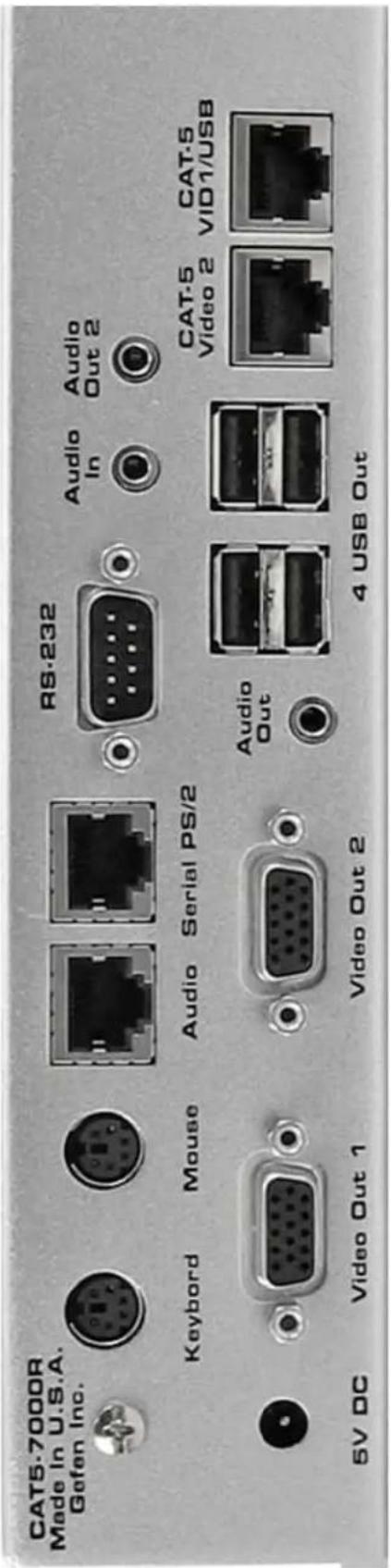
text_image
CAT5-7000R Made in U.S.A. Gofen Inc. RS-232 Keyboard Mouse Audio Serial PS/2 Audio In Audio Out 2 5V DC Video Out 1 Video Out 2 Audio Out 4 USB Out CAT-5 Video 2 CAT-5 VID1/USB
text_image
1 2 3 4 51 POWER - 5 VDC external power supply
2 VIDEO OUT 1 - HD15 output connecting to the video monitor 1
3 VIDEO OUT 2 - HD15 output connecting to the video monitor 2
4 AUDIO 1 - Audio mini jack connects to speakers
5 USB OUT - 4 port power USB hub, connects to USB devices
6 CAT-5 VIDEO 2 - RJ-45 input connects CAT-5 cable to receive extended video signals
7 CAT-5 VIDEO/USB/AUDIO - RJ-45 input connects CAT-5 cable to receive extended video, audio 1, and USB signals
8 KEYBOARD - PS/2 mini din connects to PS/2 keyboard
9 MOUSE - PS/2 mini din connects to PS/2 mouse
10 AUDIO - RJ-45 input connects CAT-5 cable to receive extended audio in and audio out 2 signals
11 SERIAL PS/2 - RJ-45 input connects CAT-5 cable to receive extended RS-232 and PS/2 signals
12 RS232 - DB-9 connector connects to RS-232 devices
13 AUDIO IN - Audio mini jack connector connects to microphone
14 AUDIO OUT 2 - Audio mini jack connects to speakers
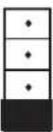
Jumper settings are used to set the focus of the picture and characters to the best possible sharpness. The jumpers in the CAT5•7000R are set at the factory as shown in the diagram below. The first step to adjusting the video is to have the CAT5•7000S and CAT5•7000R connected together with the CAT-5 cable that is going to be used in the installation. Then set your computer to the resolution and refresh rate that you will be using most frequently be using. Then open up the CAT5•7000R by unscrewing the bottom three screws on back end of the box. Then two screws on each side of the box and the top. That is 9 screws in total that need to be removed. Lastly the 4 hex bolts around the Monitor Out port and the Video In port need to also be removed. After that look at some text on the monitor and set the jumpers to the recommended jumper setting based on the length of your CAT-5 cable. If you still see some smearing try moving all the jumpers up or down one from the recommended setting. If you see smearing of just one color adjust an individual jumper for the color that is smearing (it can be two colors). Repeat the same steps for monitor 2
Recommended Jumper Settings
Cable length
0-132 feet

*As shown in picture
133-198 feet

199-264 feet

265-330 feet

Jumper Settings
Video 1 on the
left
Position 4321

Red

Green
Blue
Video 2 on the
right

Red

Green

Blue

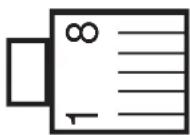
text_image
SCR # Gelen S.N. 63306 D103846RJ-45 Jack RJ-45 Jack
| 1 | White/Orange | 1 |
| 2 | Orange | 2 |
| 3 | White/Green | 3 |
| 4 | Blue | 4 |
| 5 | White/Blue | 5 |
| 6 | Green | 6 |
| 7 | White/Brown | 7 |
| 8 | Brown | 8 |

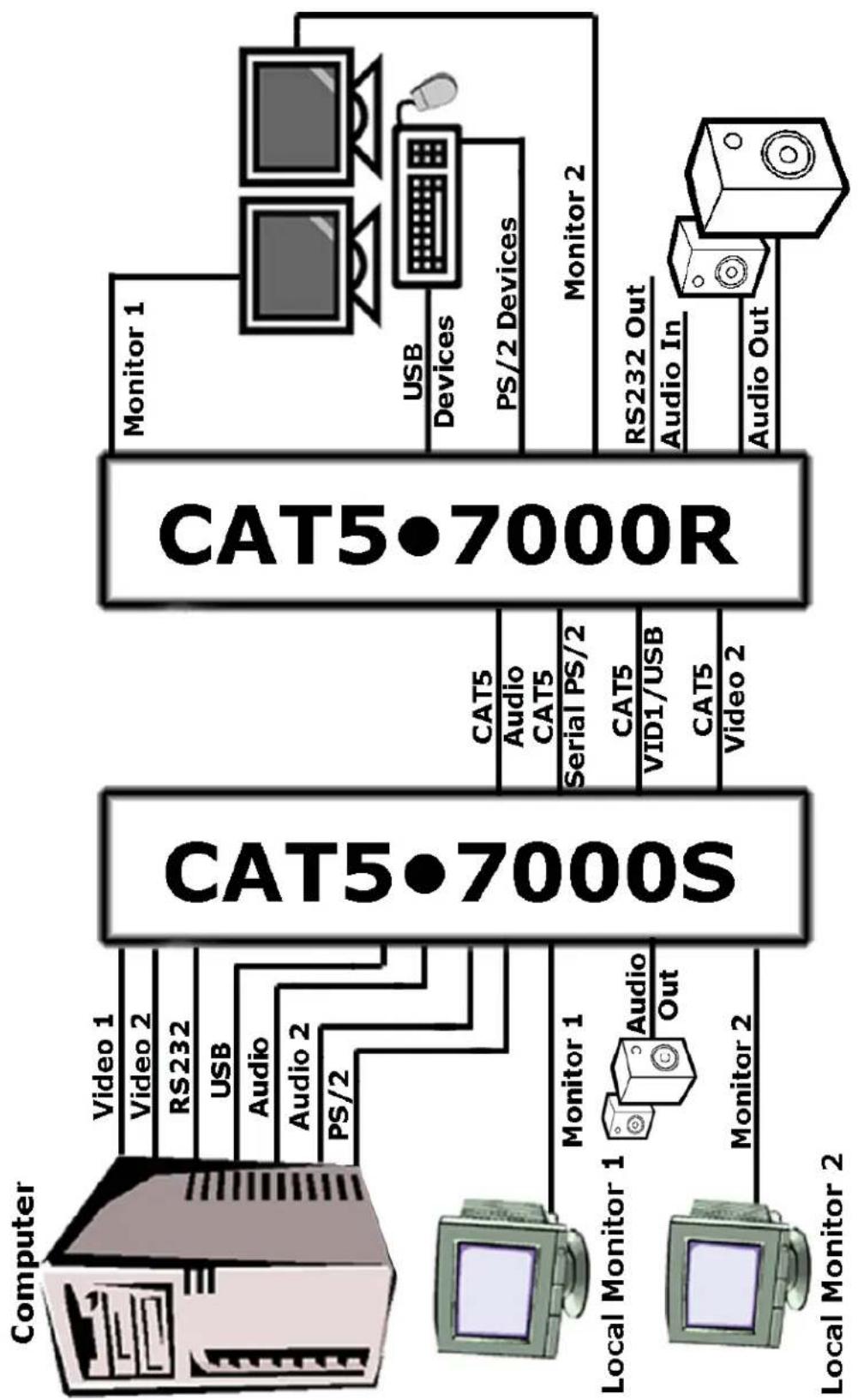
flowchart
graph LR
    A["Computer"] -->|Video 1| B["CAT5-700S"]
    A -->|Video 2| B
    A -->|RS232| B
    A -->|USB| B
    A -->|Audio| B
    A -->|Audio 2| B
    A -->|PS/2| B
    C["Local Monitor 1"] -->|Monitor 1| B
    D["Local Monitor 2"] -->|Monitor 2| B
    B --> E["CAT5 Audio CAT5 Serial PS/2"]
    B --> F["CAT5 VID1/USB"]
    B --> G["CAT5 Video 2"]
    H["Monitor 1"] --> I["CAT5-700R"]
    I --> J["Monitor 1"]
    I --> K["Monitor 2"]
    I --> L["USB Devices"]
    I --> M["PS/2 Devices"]
    I --> N["RS232 Out Audio In"]
    I --> O["Audio Out"]

natural_image
Simple line drawing of a rectangular electronic device with two mounting holes and a base plate (no text or symbols)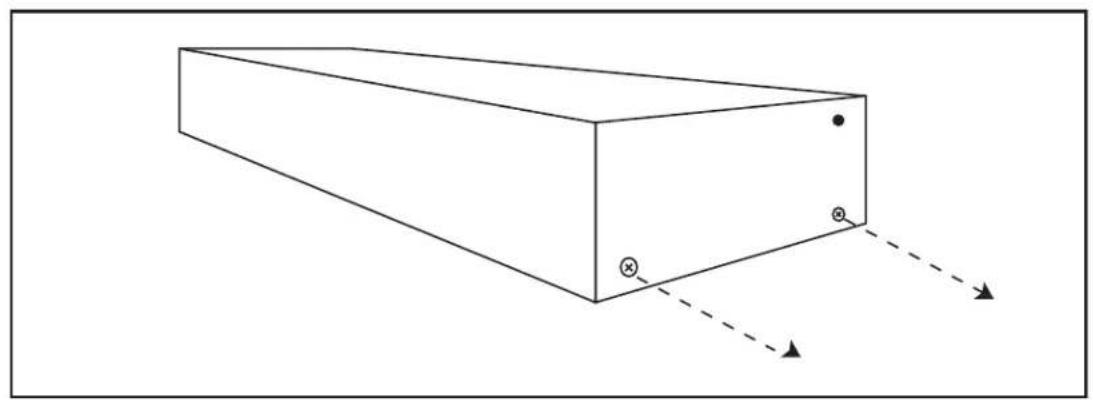
natural_image
Simple line drawing of a rectangular prism with two marked points and dashed arrows indicating direction (no text or symbols)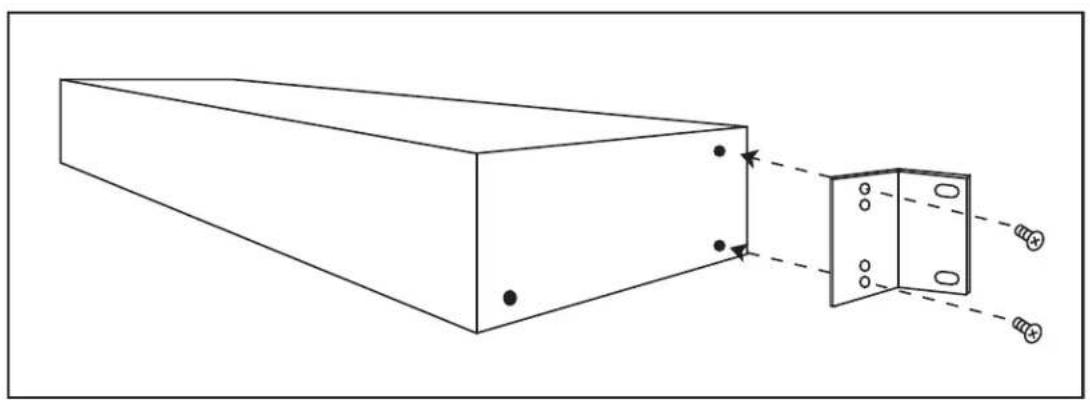
natural_image
Diagram of a rectangular beam with two inset views showing internal components and alignment arrows (no text or symbols)
natural_image
Line drawing of a rectangular metal enclosure with two side panels and mounting holes (no text or symbols)Video Amplifier Bandwidth 350 MHz
Actual Bandwidth 120 MHz
Input Video Signal 1.2 Volts p-p
Input Sync Signal 5 Volts p-p (TTL)
Horizontal Frequency Range 15-70 KHz
Vertical Frequency Range 30-170 Hz
Video In.... HD-15
Focus/Brightness Control 25 to 450 FT
Video out HD-15
Link Connector RJ-45
Power Consumption 15 Watts (max.)
Power Supply 5 VDC (External)
Dimensions Send Unit 16"W x 1 3/4"H x 4"D
Dimensions Receive Unit .. 8"W x 1 3/4"H x 4"D
Rack Mountable 2 Rack Spaces
Shipping Weight 9 Lbs
Gefen Inc. warrants the equipment it manufactures to be free from defects in material and workmanship.
If equipment fails because of such defects and Gefen Inc. is notified within two (2) year from the date of shipment, Gefen Inc. will, at its option, repair or replace the equipment, provided that the equipment has not been subjected to mechanical, electrical, or other abuse or modifications.
Equipment that fails under conditions other than those covered will be repaired at the current price of parts and labor in effect at the time of repair. Such repairs are warranted for ninety (90) days from the day of reshipment to the Buyer.
This warranty is in lieu of all other warranties expressed or implied, including without limitation, any implied warranty or merchantability or fitness for any particular purpose, all of which are expressly disclaimed.
- Proof of sale may be required in order to claim warranty.
- Customers outside the US are responsible for shipping charges to and from Gefen.
- Copper cables are limited to a 30 day warranty and cable must be free from any scratches, markings, and neatly coiled.
The information in this manual has been carefully checked and is believed to be accurate. However, Gefen Inc. assumes no responsibility for any inaccuracies that may be contained in this manual. In no event will Gefen Inc., be liable for direct, indirect, special, incidental, or consequential damages resulting from any defect or omission in this manual, even if advised of the possibility of such damages. The technical information contained herein regarding CAT5•7000 features and specifications is subject to change without notice.