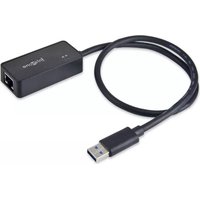
SY-ADA24029 - Network card / adapter Syba - Free user manual and instructions
Find the device manual for free SY-ADA24029 Syba in PDF.


| Product Type | Network Adapter / Network Card |
| Brand | Syba |
| Model | SY-ADA24029 |
| Interface | PCIe (x1) |
| Network Standard | IEEE 802.3, 802.3u, 802.3ab |
| Data Transfer Rate | 10/100/1000 Mbps |
| Connector Type | RJ45 |
| Dimensions (approx.) | 12 cm x 6 cm x 2 cm |
| Weight (approx.) | 50 g |
| Power Supply | PCIe bus-powered |
| Supported Features | Auto-negotiation, Auto MDI/MDIX, Wake-on-LAN (WoL) |
| Driver Support | Windows, Linux, macOS |
| Maintenance | Keep in dry environment; avoid dust accumulation |
| Cleaning | Gently clean gold contacts with a soft, dry cloth |
| Safety Precautions | Ground yourself before handling; avoid static discharge |
| Spare Parts & Repairability | No user-serviceable parts; replace card if defective |
| Package Contents | Network card, low-profile bracket, driver CD (optional) |
| General Information | Syba SY-ADA24029 is a reliable gigabit Ethernet network adapter for desktop PCs |
Frequently Asked Questions - SY-ADA24029 Syba
User questions about SY-ADA24029 Syba
0 question about this device. Answer the ones you know or ask your own.
Ask a new question about this device
Download the instructions for your Network card / adapter in PDF format for free! Find your manual SY-ADA24029 - Syba and take your electronic device back in hand. On this page are published all the documents necessary for the use of your device. SY-ADA24029 by Syba.
USER MANUAL SY-ADA24029 Syba
USB 3.0 to Gigabit Ethernet Adapter
User Manual
Ver. 1.00
All brand names and trademarks are properties of their respective owners.
Contents:
Chapter 1: Introduction....3
1.1 Product Introduction ....3
1.2 Features .... 3
1.3 System Requirements .... 4
1.4 Package Contents......4
Chapter 2: Getting Started ....5
2.1 Hardware Installation ....5
2.2 Driver Installation....5
2.2.1 Installation for Windows 6
2.2.2 Installation for Mac OS X 8
2.3 Hardware Verify....10
2.3.1 Verifying for Windows....10
2.3.2 Verifying for Mac OS X....11
Chapter 1: Introduction
1.1 Product Introduction
This USB 3.0 to Gigabit Ethernet Adapter add a single RJ-45 Ethernet networking port to a USB enabled (USB 3.0) computer system with link speeds up to 1000 Mbps. Backwards compatible with USB 2.0 computer system and 10/100 Mbps Ethernet networks, this compact and portable adapter is ideal as a desktop replacement network adapter or laptop accessory.
1.2 Features
● Compliant with Universal Serial Bus 3.0 Specification, Revision 1.0
● Compatible with USB Specification, Revision 2.0
● Supports full duplex operation with IEEE 802.3x flow control and half duplex operation with back-pressure flow control
● Compatible with IEEE 802.3, IEEE 802.3u, IEEE 802.3ab
● Supports IEEE 802.3az (Energy Efficient Ethernet)
● Supports crossover detection and auto-correction
● Supports advanced link down power saving when Ethernet cable is unplugged
● Supports Wake-on-LAN
● Upstream port: USB 3.0 type A
- Downstream port: RJ45
● LEDs indicate the status of Power status and Ethernet connection
1.3 System Requirements
- Windows® XP/Vista/7/8 (32/64 bit); Mac OS X 10.6/10.7/10.8
● Available USB 2.0 port (Recommend USB 3.0 port)
1.4 Package Contents
● 1 x USB 3.0 to Gigabit Ethernet Adapter
- 1 x Driver CD
● 1 x User Manual
Note: Contents may vary depending on country/market.
Chapter 2: Getting Started
2.1 Hardware Installation
- Plug the USB 3.0 to Gigabit Ethernet Adapter directly into an available USB 2.0 port (Recommend USB 3.0 port) on your computer.
- Connect one end of your network cable into the RJ45 port of USB 3.0 to Gigabit Ethernet Adapter.
- Connect the other end of the network cable into an available Ethernet port on your router, switch, or any other networking device.
2.2 Driver Installation
The following section shows you how to install the USB 3.0 to Gigabit Ethernet Adapter driver on different operating systems.
Important! Do not connect the USB 3.0 to Fast Ethernet to your PC before the install.
2.2.1 Installation for Windows
- Insert the provided CD into your disk drive. The CD-ROM will start automatically. The following screen will show up and please click “Install Driver”.

*Note: Actual image may vary
Note: If the install program doesn't run automatically, please locate and double-click on the Autorun.exe file in the CD to launch the install program.
- Please click "USB 1000M".

flowchart
graph TD
    A["Install Driver"] --> B["USB 100M"]
    A --> C["PCIe 100M"]
    A --> D["ExpressCard 100M"]
    A --> E["USB 1000M"]
    E --> F["PCIe 1000M"]
    E --> G["ExpressCard 1000M"]
    H["Main Menu"] --> I["Next Page"]
*Note: Actual image may vary
- Please click "USB 3.0 1000M" to start the installation.
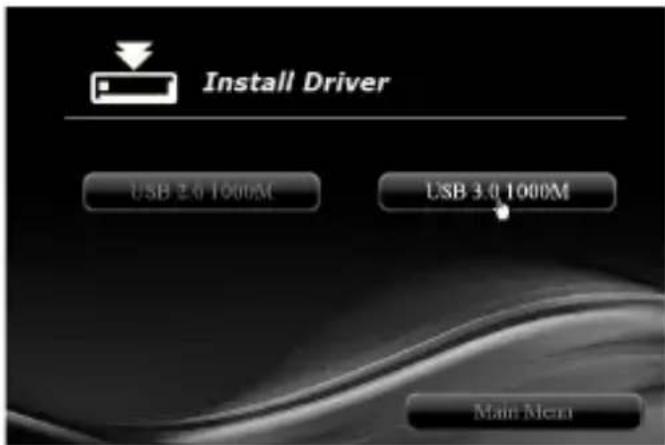
*Note: Actual image may vary
- Follow the instructions on screen to install the driver.
2.2.2 Installation for Mac OS X
- Insert the provided CD into your CD-ROM drive.
- Double-click the “Ethernet Adapter” disc icon, double-click “Drivers” folder.

*Note: Actual image may vary
- Double-click “USB 1000M” folder, and then double click the “USB 3.0 1000M” folder, then click “For Mac OS X 10.6/10.7/10.8” file to launch the installer.


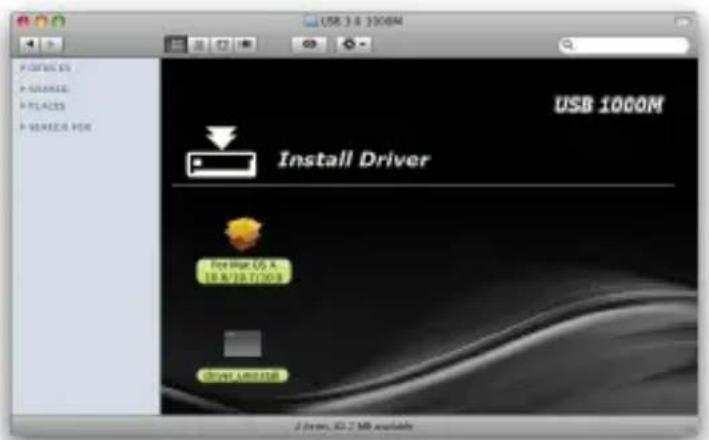
*Note: Actual image may vary
- Follow the instructions on screen to install the driver. After driver installation is complete, you must restart your computer.
2.3 Hardware Verify
2.3.1 Verifying for Windows
- Click on the “Device Manager” tab in the Windows Control Panel.
Start > Control Panel > Device Manager

- Entry “Network adapters” item, and you can read “ASIX AX88179 USB 3.0 to Gigabit Ethernet Adapter” in the Device Manager.

2.3.2 Verifying for Mac OS X
- Choose About this Mac from the Apple menu.
- Click on More Info...
- In the Contents sidebar select USB from the Hardware section.
- Scroll the list to reveal the USB 3.0 to Gigabit Ethernet Adapter information
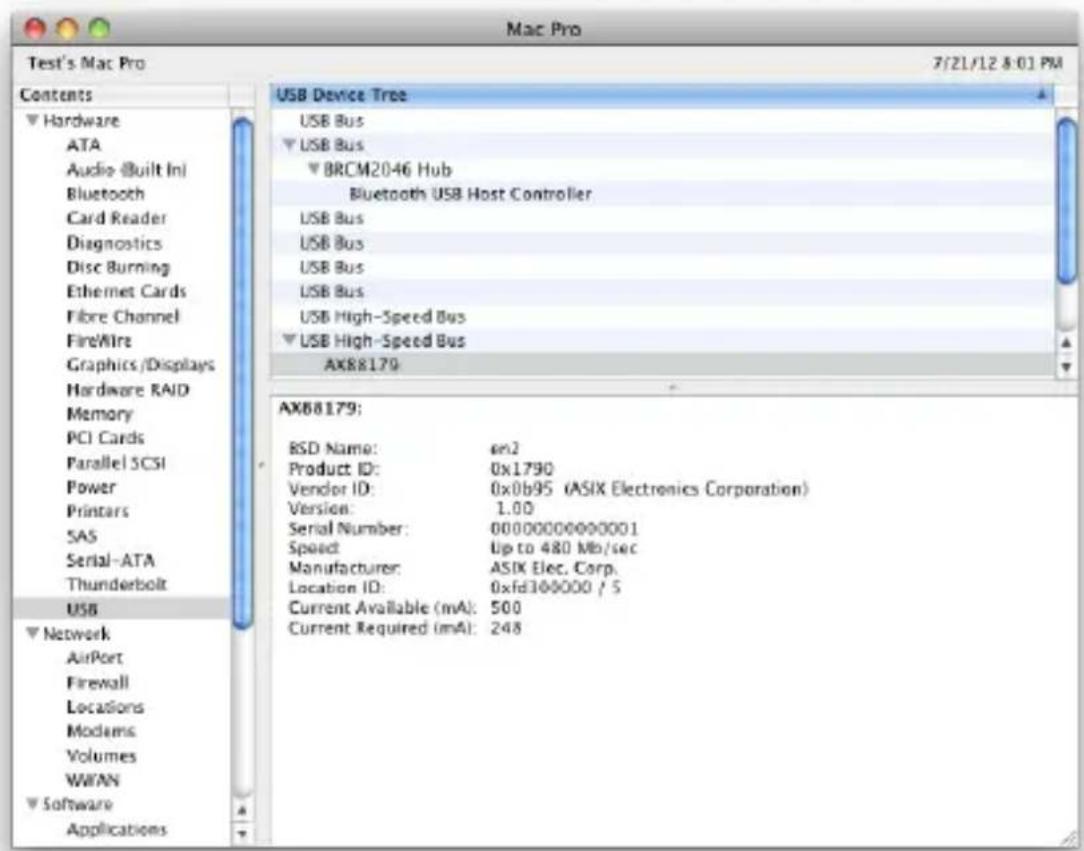

- USB 3.0 to Gigabit Ethernet Adapter
- User Manual
- Ver. 1.00
- Contents:
- Chapter 1: Introduction....3
- Chapter 2: Getting Started ....5
- Chapter 1: Introduction
- Product Introduction
- Features
- System Requirements
- Package Contents
- Chapter 2: Getting Started
- Hardware Installation
- Driver Installation
- Installation for Windows
- Installation for Mac OS X
- Hardware Verify
- Verifying for Windows
- Verifying for Mac OS X
Brand : Syba
Model : SY-ADA24029
Category : Network card / adapter