PCE Instruments

432 - Measuring device PCE Instruments - Free user manual and instructions

Find the device manual for free 432 PCE Instruments in PDF.

📄 111 pages English EN Download 💬 AI Question
Notice PCE Instruments 432 - page 8
Pick your language and provide your email: we'll send you a specifically translated version.

User questions about 432 PCE Instruments

0 question about this device. Answer the ones you know or ask your own.

Ask a new question about this device

The email remains private: it is only used to notify you if someone responds to your question.

No questions yet. Be the first to ask one.

Download the instructions for your Measuring device in PDF format for free! Find your manual 432 - PCE Instruments and take your electronic device back in hand. On this page are published all the documents necessary for the use of your device. 432 by PCE Instruments.

USER MANUAL 432 PCE Instruments

Southpoint Business Park

Ensign way

Hampshire / Southampton

United Kingdom, SO31 4RF

From outside UK: +44

Tel: (0) 2380 98703 0

Fax: (0) 2380 98703 9

info@industrial-needs.com

www.pce-instruments.com/english

www.pce-instruments.com

User Manual

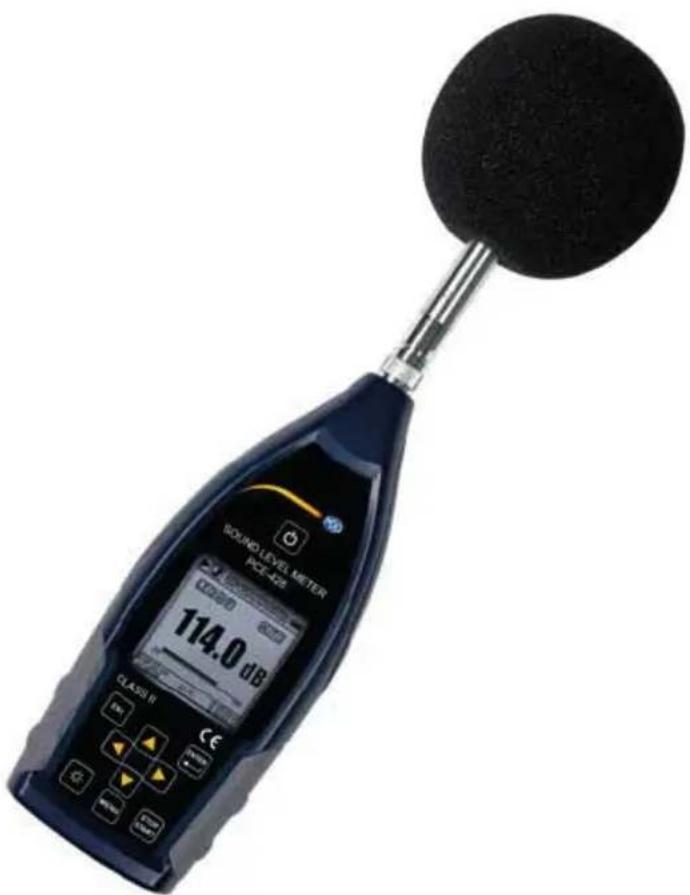
Sound Meter

PCE-428

PCE-430

PCE-432
PCE Instruments 432 - Sound Meter - 1

text_image SOUND LEVEL METER PCE-42 114.0 dB CLASS II

Contents

Contents....2

Appearance 6

Buttons of Operation....7

  1. Introduction......8

1.1 General Description....8
1.2 Applications....8
1.3 Features....8
1.4 Function Upgrades....9
1.5 Specification....9
1.6 Information for Periodic Tests .... 12
1.7 Key Component ...... 13
1.8 Packing List.... 13
1.9 Packing Drawing 14
2. The Appearance and Operation....19

2.1 Keypad....19
2.2 Microphone Connector 20
2.3 Windscreen....21
2.4 Data and Power Supply Connector....22
2.5 Battery 23
2.6 GPS....24
3. Measurement Screen....26
3.1 Icons and Meaning of Screen Display....26
3.2 Screen of Level Meter Mode....28
3.3 Screen of 1/1 Octave Mode....30

3.4 Screen of 1/3 Octave Mode....30

  1. Operation and Setting of the Menu....32

4.1 Function....32

4.2 Calibration....33

4.2.1 Calibration by Measurement 33
4.2.2 Calibration by Cal.Factor 33
4.2.3 Conversion of Cal.Factor and Sensitivity....33
4.2.4 Process of Calibration by Measurement....34

4.3 Measurement....36

4.3.1 MEAS.Setup....36
4.3.2 MEAS.Range....38
4.3.3 ICCP Power....39
4.3.4 Profile 1\~3....39
4.3.5 Alarm Threshold 40
4.3.6 Extended Function....40
4.3.7 Statistical....40
4.3.8 Time History .... 41
4.3.9 Octave....41
4.3.10 Custom Measure 41
4.3.11 Timer 42
4.3.12 24h Measurement by Timer ....43

4.4 Setup....44

4.4.1 Contrast....44
4.4.2 Backlight.... 44
4.4.3 Battery....44
4.4.4 Trigger 45
4.4.5 Date & Time....45
4.4.6 Auto PWR Off 47
4.4.7 RS-232....47
4.4.8 File Manager 48

4.4.9 Boot Mode....49
4.4.10 USB Mode....50
4.4.11 GPS....51
4.4.12 Setup Template....51
4.4.13 About....52

4.5 Language....52
4.6 Output....52
4.6.1 AC OUT....52
4.6.2 DC OUT 53
4.6.3 Printer 53
4.7 Factory Settings....54

  1. RS-232 Communication Protocol .... 55

5.1 Hardware Configuration and Settings of Interface 55
5.2 Transfer Protocol....55

5.2.1 Start/Stop of the Block Transfer 56
5.2.2 Device ID....56
5.2.3 ATTR Attribute Character....56
5.2.4 BCC (Block Check Character)....57
5.2.5 Block Transfer Format....57
5.2.6 Recovery from Transmission Errors 58
5.2.7 Flow Control 59
5.2.8 Multi-Machine Operation....59
5.2.9 Rated Parameters ...... 60

5.3 Instruction 60

5.3.1 Instruction List....62
5.3.2 Instruction Format....65
5.3.3 Instruction Describe 66

  1. Operation Notes.... 100

6.1 Operation.... 100
6.2 Common Issue And Solutions.... 100

6.3 Calibration....101
6.4 Firmware Update....101
6.4.1 Install USB Driver 101
6.4.2 Firmware Update Procedure 102
6.5 Warranty 103
6.6 Customer Service Phone Number 104

Annex 1 Glossary .... 105

Annex 2 Adjustments at the Calibration Check Frequency....107

Annex 3 Corrections for the Typical Effects of Reflections from the Case of Sound Level Meter and Diffraction of Sound around the Microphone .... 108

Annex 4 Corrections of Windscreen in Free Field....109

Annex 5 Corrections of Electrostatic Actuator....110

Annex 6 Typical Frequency Response and Corresponding Upper Limit ....111

Annex 7 Specification of 1/1 Octave Band Filter.... 112

Annex 8 Specification of 1/3 Octave Band Filter.... 113

Annex 9 Mid-band Frequencies for 1/1 Octave Band and 1/3 Octave Band Filters..... 116

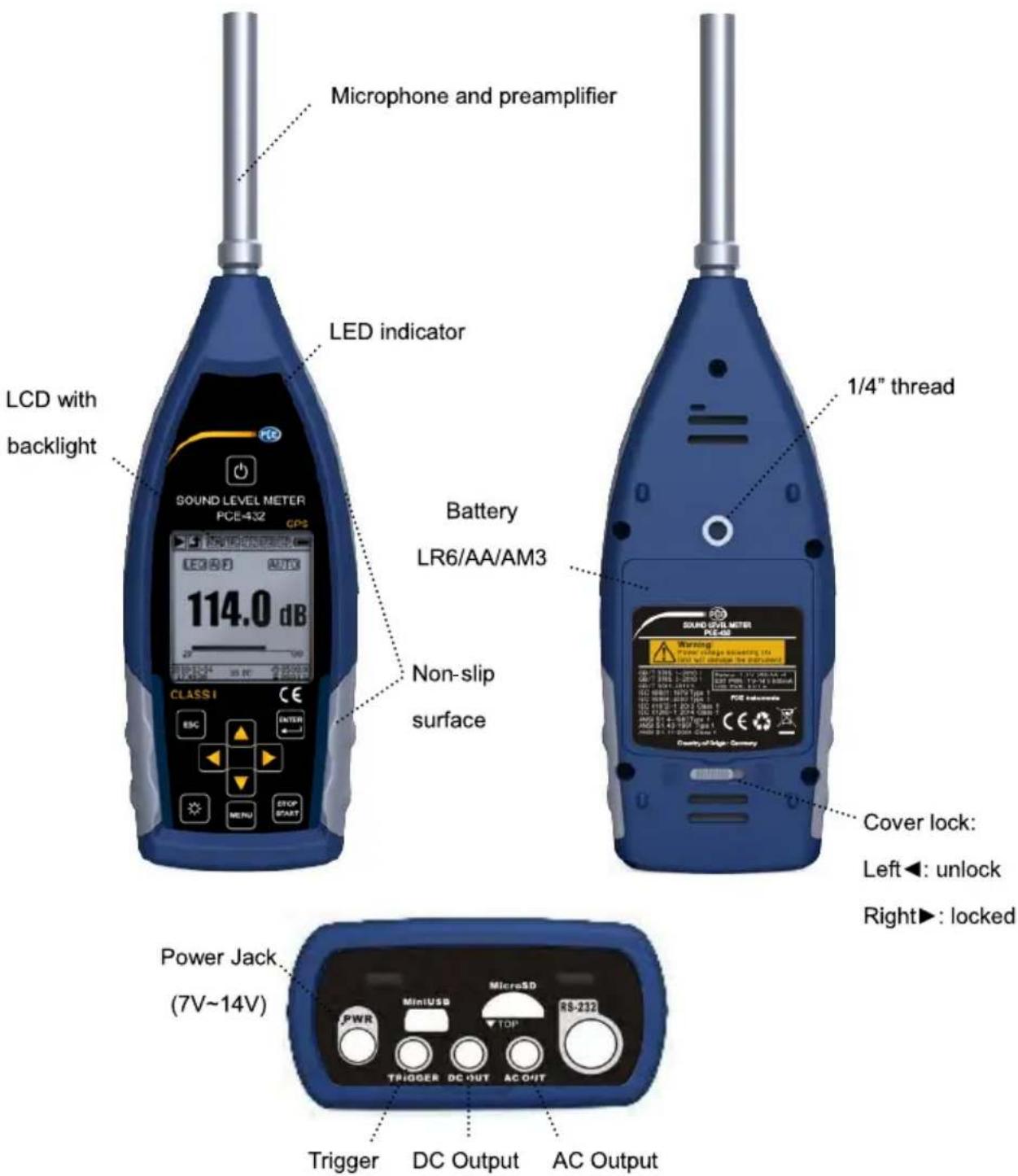
Appearance
PCE Instruments 432 - Appearance - 1

text_image Microphone and preamplifier LED indicator LCD with backlight 114.0 dB CLASSI ESC ENTER MENU STOP START Battery LR6/AA/AM3 Non-slip surface 1/4" thread SURFACE METER PE-432 C COUNTRY OF LIME - GERRY Power Jack (7V~14V) Trigger DC Output AC Output Micro3D MiniUSB TDP TRIGGER DC OUT AC OUT Cover lock: Left◀: unlock Right▶: locked

Buttons of Operation
PCE Instruments 432 - Appearance - 2

text_image LED indicator SOUND LEVEL METER PCE-432 GPS LCD Screen CLASS I ENTER Arrow keys <▲><▼> <<><►> MENU STOP START

1. Introduction

1.1 General Description

The new PCE-428/430/432 are new generation octave sound level meter upgrade from base PCE-428/430/432 to meet the market demand. It fulfill the 1/1 octave requirement of IEC standard and China GB/T standard.

The PCE-428/430/432 is a digital sound level meter which design and manufacture by PCE. The use of high precision 24 Bits AD converter makes the instruments to be an ideal choice for performing many kinds of measurement, for example, environmental noise, vehicle noise and industrial application.

The new types upgrade the dual-core (DSP+ARM) architecture to single chip ARM with float point unit, and update all fix-point calculation to float-point which significantly improves the accuracy and stability. Re-design analog front end circuit also lower the noise floor and linear range of product. The new developed algorithm brings a single measurement range which can cover more than 120dB dynamic range while still meets the standard.

PCE-430/432 is Class 1 and PCE-428 is Class 2. Both instruments have certificated by the China CPA (Certification of Pattern Approval) and CMC (China Metrology Certification).

1.2 Applications

● Basic noise measurement
● Environmental noise assessment
● Product quality check
● Evaluation of noise reduction engineering

1.3 Features

● Class 1 (PCE-430/432) and Class 2 (PCE-428) sound level meter
PCE Instruments 432 - Features - 1

natural_image Open laboratory optical bench with black case, blue modules, and a grid-patterned cover (no visible text or symbols)

● Comply with IEC 61672-1:2013, ANSI S1.4-1983 and ANSI S1.43-1997
● Real-time 1/1 and 1/3 Octave in accordance with IEC 61260-1:2014 and ANSI S1.11-2004

● Linearity range: 22dBA\~136dBA (PCE-430/432), 25dBA\~136dBA (PCE-428)

● Single range to cover 123dB (PCE-430/432) / 122dB (PCE-428) dynamic range

● Frequency weighting: A/B/C/Z. Time weighting: Fast/Slow/Impulse

● 3-Profile and 14 custom define measurement are calculate in parallel with different

frequency/time weighting

● Calculate SPL, LEQ, Max, Min, Peak, SD, SEL, E
● LN statistical and time history curve display
- User define integral period measurement, integral period up to 24h
● High speed ARM core with FPU (Float Point Unit) to achieve wide frequency response, large dynamic range and low noise floor
● 4G MicroSD card (TF card) mass storage
● RS-232 remote control port
● Mini thermal printer for measurement data print
● Internal GPS module (option), support GPS timing

1.4 Function Upgrades

Single chip high speed ARM with FPUUSB port function implemented
White backlight LCDUpdate firmware via USB (also power supply)
Integral period from 1s~24hTimer feature support auto measurement
0.1s, 0.2s, 0.5s logger step addedInternal GPS (option) with GPS timing
5 templates to save user settingSingle range to cover 123dB dynamic range
B-weighting added to for ANSI standardReduce the noise floor (only for Class 1)
Automatic power on with external supply, ease of integrationUpper limit of measurement:136dBrms/139dBpeak (40mV/Pa)

1.5 Specification

Specifications
TypePCE-430/432 PCE-428
AccuracyClass 1 (Group X)Class 2 (Group X)
StandardGB/T 3785.1-2010, IEC 60651:1979, IEC 60804:2000IEC 61672-1:2013, ANSI S1.4-1983, ANSI S1.43-1997
Octave^1 Real-time 1/1 Octave: 8Hz~16kHzReal-time 1/3 Octave (Option): 6.3Hz~20kHzGB/T 3241-2010, IEC 61260-1:2014ANSI S1.11-2004. Base 10 system.Real-time 1/1 Octave: 20Hz~8kHzReal-time 1/3 Octave (Option): 20Hz~12.5GB/T 3241-2010, IEC 61260-1:2014ANSI S1.11-2004. Base 10 system.
Supplied MicrophoneMPA231T: 1/2" prepolarized measurement microphone, Class 1. Sensitivity: 40mV/Pa. Frequency Range: 3Hz~20kHz.MPA309T: 1/2" prepolarized measurement microphone, Class 2. Sensitivity: 40mV/Pa. Frequency Range: 20Hz~12.5kHz.
Mic InterfaceTNC connector with ICCP power supply (4mA)
Detector / FilterFully float-point digital signal processing (digital detector and filter)
Integral PeriodInfinite or 1s~24h user define integral period.Repeat time: Infinite or 1~9999
Logger Step0.1s, 0.2s, 0.5s, 1s~24h
Measurement Functions L_XY(SPL), L_Xeq, L_XYSD, L_XSEL, L_XE, L_XYmax, L_XYmin, L_XPeak, L_XYN . Where X is the frequency weighting: A, B, C, Z; Y is time weighting: F, S, I; N is the statistical percentage: 1~99. 3-Profile and 14 custom define measurement are calculate in parallel with different frequency/time weighting
24h MeasurementAutomatic measurement based on user define date/time and save the history data
Frequency WeightingParallel A, B, C, Z (It can also be applied to 1/1 and 1/3 Octave)
Time WeightingParallel F, S, I and Peak detection
Self-Noise ^2 Sound: 19dB(A), 25dB(C), 31dB(Z)Electrical: 13dB(A), 17dB(C), 24dB(Z)Sound: 20dB(A), 26dB(C), 31dB(Z)Electrical: 14dB(A), 19dB(C), 24dB(Z)
Upper Limit ^2 136dB(A)Increase to 154dB(A) with 5mV/Pa Microphone136dB(A)Increase to 154dB(A) with 5mV/Pa Microphone
Frequency Response ^1 10Hz~20kHz20Hz~12.5kHz
Level Linearity Range ^2,3,4 22dB(A)~136dB(A)Octave: 30dB~136dB25dB(A)~136dB(A)Octave: 33dB~136dB
Dynamic Range ^2 123dB (13dB(A)~136dB(A))122dB (14dB(A)~136dB(A))
Peak C Range ^2,3 47dB~139dB50dB~139dB
Electrical InputMaximum input voltage: 5Vrms (7.07Vpeak). Input impedance of preamplifier: >6GΩ
Range SettingSingle range to cover whole dynamic range
Resolution24Bits
Sampling Rate48kHz (Sampling interval for LN: 20ms)
Time HistoryTime domain noise curve display. Duration time: 1min, 2min, 10min
LCD Display160x160 LCD with white backlight, 14 step contrast level, 1s display update rate
Mass Storage4G MicroSD card (TF card)
Post-ProcessingPost-processing software VA-SLM can read, analyze and generate reports of store data.
Export DataDirectly connect to the computer to read the memory card (USB disk)
OutputAC Output (max 5V_RMS , ±15mA), DC Output (10mV/dB, max 15mA), RS-232 serial interface and USB (USB disk mode or modem mode)
AlarmUser define alarm threshold. LED indicate the alarm status
Setup Template5 templates to save user setup for different application, template can be save in MicroSD card
Auto Power OnAutomatic power on and start measurement when power supply available, ease of integration
Power Supply4x1.5V alkaline batteries (LR6/AA/AM3), sustainable use of approx.10 hours (depends on battery). It also can be supply by external DC power (7V~14V 500mA) and USB power (5V 1A)
RTCBuilt-in backup battery has been calibrated at factory to the error <26s in 30days (<10ppm, (25±16) °C). It can keep RTC running when replacing the main batteries.GPS timing function available (option with GPS module)
LanguageEnglish, Chinese, Portuguese, Spanish, German, French
Firmware UpdateUpdate firmware via USB port
ConditionsTemperature: -10°C~50°C. Humidity: 20%~90%RH
RT TemperatureReal-time temperature display on the main screen
Size (mm)W70 x H300 x D36
WeightApprox. 620g, including 4 alkaline batteries
Option
GPSReceiver Type: 50 Channels; Time-To-First-Fix: Cold Start 27s, Warm Start 27s, Hot Start 1s; Sensitivity: Tracking -161dBm, Reacquisition -160dBm, Cold Start -147dBm, Hot Start -156dBm; Horizontal position accuracy: 2.5m, Timing accuracy: 30ns, Velocity accuracy: 0.1m/s; Update Rate: 1Hz, Operation Limits: Dynamic≤4g, Altitude<50000m, Velocity<500m/s
CalibratorCA111, Class 1, 94dB/114dB, 1kHz
PrinterMini thermal or dot-matrix printer, RS-232 port

Note 1: Ignore the result outside 20Hz\~12.5kHz for type PCE-428 alone due to microphone frequency response of Class 2.
Note 2: The data was measured with 40mV/Pa microphone for PCE-430/432 and PCE-428.
Note 3: Measurement according to GB/T 3785 and IEC 61672.
Note 4: Measurement according to GB/T 3241 and IEC 61260.

1.6 Information for Periodic Tests

● Reference sound level: 94.0dB.
- Reference incidence direction: parallel to the incident direction of the microphone.
● Reference point of microphone: the central point of microphone diaphragm.
- Reference incidence direction: direction perpendicular to the microphone diaphragm.
● Reference attenuation of octave spectra: 0dB.
● Reference input signal level of octave spectra: 40mV (94dB for sensitivity of 40mV/Pa).

1.7 Key Component

Component NameManufacturerTypeDescription
MicrophonePCE InstrumentsMP231Class 1 microphone
MP309Class 2 microphone

1.8 Packing List

No.TypeDescription
Standard
1PCE-428/430/432Sound level meter without microphone
2CC308 CaseCarrying case
3MA231TICCP preamplifier with TNC connector
4MP231/MP309Class 1 (308) or class 2 (309) microphone
5WS002-9 Windscreen90mm diameter windscreen for 1/2" microphone
6MicroSD Card4G memory card to store data
7BatteryAlkaline battery (LR6 / AA / AM3) x 4
8Power AdapterPower adapter with 9V/500mA
9MiniUSB CableUse to connect computer
10Quick Start GuideQuick start guide
11Certificate of CalibrationCertificate of factory calibration
12CDInclude post-process software, user manual (pdf), driver, firmware and other utility
13Certificate of ConformityCertificate of conformity
Option
14GPSGPS module and antenna
15Sound CalibratorCA111: class 1 calibrator, 94dB/114dBCA114: class 2 calibrator, 94dBCA115: class 2 calibrator, 114dB
16Thermal PrinterMini thermal printer without ribbons, RS232 connector
17TripodStand for sound level meter
18Printed User ManualPrinted user manual
19Test ReportTest report from metrology institute

1.9 Packing Drawing

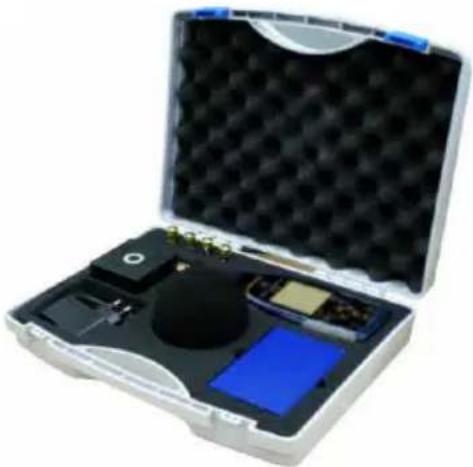
PCE Instruments 432 - Packing Drawing - 1

text_image Technical diagram of a medical or industrial device with labeled components including a handheld device, control panel, and circular sample.

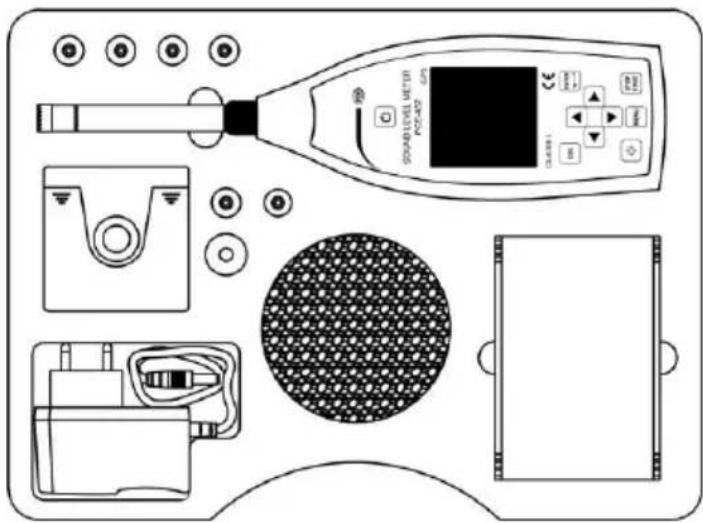
☆Note: The detail of packing items may vary to follow orders.

2. The Appearance and Operation

PCE-428/430/432 uses the same body and the keypad layout. LCD screen, keypad and LED indicators lay on the front of instrument.

2.1 Keypad

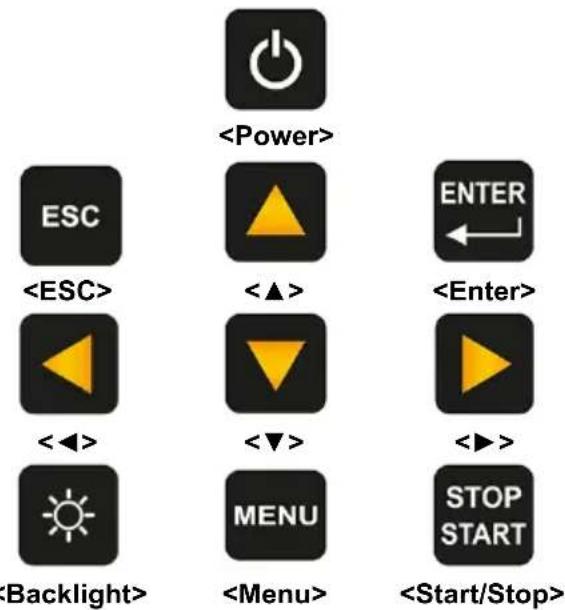
Sound level meter has 10 keys, namely:
PCE Instruments 432 - Keypad - 1

flowchart
graph TD
    A["<Power>"] --> B["ESC"]
    A --> C["ENTER"]
    A --> D["<ESC>"]
    A --> E["<Enter>"]
    A --> F["<◀>"]
    A --> G["<◀>"]
    A --> H["Backlight>"]
    A --> I["Menu"]
    A --> J["STOP START"]
    A --> K["Start/Stop>"]

:

Long press 2 seconds of this key will power on the sound level meter. When sound level meter keep in stop state, long press 2 seconds will trigger the shut-down-dialog-box, and then press to power off sound level meter.

☆Note: is invalid when the sound level meter is running measurement.

:

Exit the menu or return to previous menu. Press also can clear the history curve at the time history screen.

:

Enter the menu of next level, or confirm the changes of the parameters, or save current data as CSD format in stop state.

:

Press to open or close the LCD backlights. Backlight delay can be set in the menu. Refer to 4.4.2 Backlight to earn more details.

:

Start or stop the measurement.

<▲>:

Up arrow used to select the menu item or adjust the parameters.

<▼>:

Down arrow used to select the menu item or adjust the parameters.

<◀>:

Left arrow used to select the menu item, or adjust the parameters, or switch measure screens.

<▶>:

Right arrow used to select the menu item, or adjust the parameters, or switch measure screens.

Press to enter the main menu list.

2.2 Microphone Connector

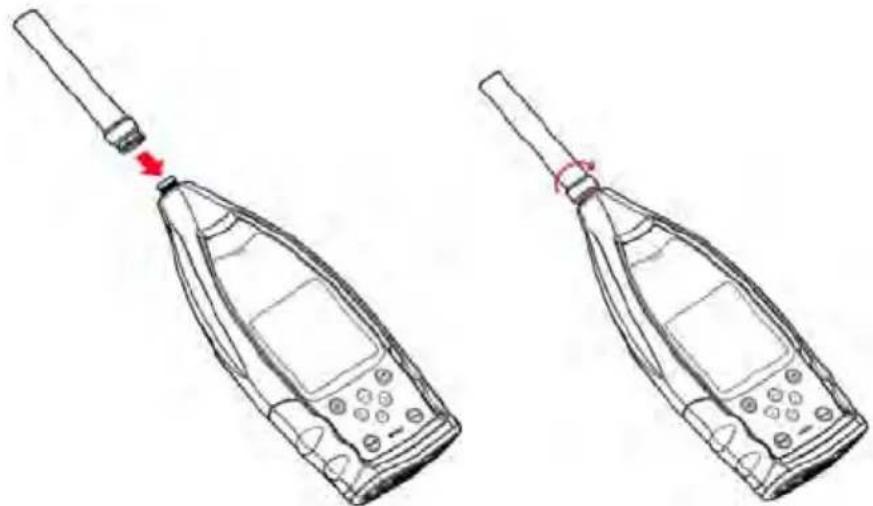
The TNC connector on the top of the sound level meter is used to connect to microphone and preamplifier (microphone and preamplifier are usually mounted together). The TNC is threaded coaxial connector.

PCE Instruments 432 - Microphone Connector - 1

text_image TNC

PCE-430/432 is equipped with Class 1 microphone, while PCE-428 is equipped with Class 2:

MPA231T:

1/2" pre-polarized measurement microphone, class 1. Sensitivity: 40mV/Pa. Frequency range: 3Hz\~20kHz. Mounted with ICCP preamplifier and powered by 4mA/24V.

MPA309T:

1/2" pre-polarized measurement microphone, class 2. Sensitivity: 40mV / Pa . Frequency range: 20Hz 12.5kHz . Mounted with ICCP preamplifier and powered by 4mA / 24V .

Microphone and preamplifier are mounted together by thread. Unless special situation, please do not separate each other. The microphone is a precision measurement sensor, long-term exposure to high humidity or dust environment would impact microphone. Microphone that is not in use should be placed in a attached box.

The microphone is ICCP power supply. The supply current specifications are 4mA, voltage 24V. It will damage the microphone if voltage over 30V. PCE-428/430/432 sound level meter has internal ICCP power which can connect to microphone directly.
PCE Instruments 432 - MPA309T: - 1

natural_image Line drawing of two mobile phone devices with a handle and a red arrow indicating a tip or adjustment (no text or symbols present)

Insert microphone to TNC connector. Then rotate the thread until the connection is tight.

2.3 Windscreen

Sound level meter equipped with WS002-9 windscreen for use in windy outdoor environments. No need to use windscreen when used in a windless environment (such as indoor measurement).

PCE Instruments 432 - Windscreen - 1

natural_image Diagram showing a circular object being processed by a tool, with no visible text or symbols.

Insert the windscreen onto the microphone until stop according to above diagram. Refer to Annex 4 Corrections of Windscreen in Free Filed to earn more detail.

2.4 Data and Power Supply Connector

There are 7 interfaces at the bottom of the sound level meter. Open the rubber cover to see these interfaces.

PCE Instruments 432 - Data and Power Supply Connector - 1

text_image PWR MiniUSB MicroSD ▼TOP RS-232 TRIGGER DC OUT AC OUT

PWR:

Power connector, using the standard DC socket (2.1mm core diameter), can connect to the 7\~14V 500mA external power supply.

☆Note: Exceed 14V could damage the sound level meter!

MiniUSB:

MiniUSB port which connects to a computer can be select as USB Disk Mode or

Modem Mode, refer to 4.4.10 USB Mode to earn more detail. Additional, MiniUSB can be used as another external power, but the power supply must meet the requirement of 5V/1A.

USB Disk Mode: The files inside the MicroSD card can be access directly at this mode, no need to install driver.

Computer can recognize the MiniUSB as serial port (virtual serial port, need to install driver) and communicate with sound level meter by RS-232 protocol, refer to 5. RS-232 Communication Protocol to earn more detail.

☆Note: At least 1A power current capacity must be meet for power supply and cable (cable with ferrite core is not recommend for power supply). Please select the working mode in time after connected to the computer. Otherwise, the computer can't recognize the USB. The MiniUSB and RS-232 port cannot working at the same time when select

Modem Mode.

MicroSD:

MicroSD socket, standard MicroSD card can be used to store SWN, OCT and CSD files. Recommend to use card-reader to format the MicroSD card, rather than format it at the U

Disk Mode. Note that the MicroSD card provides with the sound level meter has already formatted before sale.

☆Note: Keep front side (with silk screen) of MicroSD card down to insert without hot-plug.

RS-232:

It can be use as standard RS-232 port at Remote mode, and also can be used to connect thermal printer as Printer mode. Refer to 4.6.3 Printer and 5. RS-232

Communication Protocol to earn more detail.

TRIGGER:

Trigger input interface using a standard 3.5mm headphone jack. Refer to 4.4.4 Trigger to earn more detail.

DC OUT:

DC output interface using a standard 3.5mm headphone jack. Refer to 4.6.2 DC OUT to earn more detail.

AC OUT:

AC output interface using a standard 3.5mm headphone jack. Refer to 4.6.1 AC OUT to earn more detail.

2.5 Battery

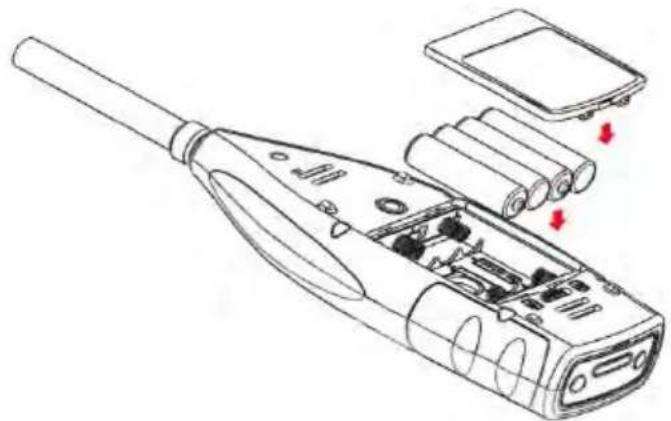
Recommend to use 4 cell of alkaline battery (LR6/AA/AM3), paying attention to the battery polarity (+/-) marked in the battery compartment. Do not mix using of old and new batteries at the same time. Remove batteries when the device is not in use. The total voltage of 4 cell battery cannot exceed 14V, otherwise it will damage the sound level meter.

The real test shows that the 4 cell of alkaline battery can support sustainable use of approx.10 hours (depends on battery) for sound level meter. When use rechargeable battery Eneloop BK-3HCCA/4BC (Rated capacity 2450mAh), sound level meter can work about 12 hours continuously. When the battery voltage is lower than the minimum voltage requirement of the sound level meter, it will shut down automatically.

We recommend using external power supply or USB-power-bank rather than batteries for long time running.

Follow the figure below to install or replace the battery:

PCE Instruments 432 - Battery - 1

natural_image Line drawings of two mobile phone holders with red directional arrows indicating left-hand positions (no text or symbols present)

Turn the button to the left side to unlock the battery compartment cover. Then lift the cover to open it.
PCE Instruments 432 - Battery - 2

natural_image Technical line drawing of a handheld electronic device with internal components and red arrows indicating parts (no text or symbols)

Close and lock the battery compartment after change the battery.

2.6 GPS

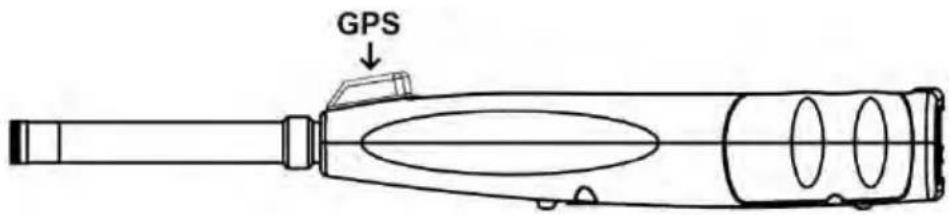
GPS antenna cover located on the top surface of sound level meter which select GPS function as option module.

☆Note: GPS function must be select before delivery to user due to install GPS module should return the sound level meter to factory.
PCE Instruments 432 - GPS - 1

text_image GPS

GPS performance is mainly affected by two factors: the satellite ephemeris and the satellite signal noise ratio.

  • Satellite Ephemeris: GPS satellites orbit information. According to ephemeris, satellite positioning signal and time, the current location can be determined. Ephemeris need to download from the GPS satellites, but the download speed is very low (approx. 50bps), and vulnerable to the impact of satellite signal strength. The high bit error rate may lead to a longer time of download ephemeris, and even download fail. The sound level meter can keep the ephemeris data in memory for approx. 30 minute after turn off GPS module. The ephemeris data is only valid within 2 hours.
  • Satellite Signal Noise Ratio: Satellite positioning signal intensity. In rainy days or indoor, signal strength will be affected.

GPS have 3 boot modes: Cold start, warm start and hot start

● Cold Start: First location, need to download the latest ephemeris and longer time.
- Warm Start: GPS module has the last saved location information, but need to re-download the ephemeris due to expired. Warm start needs almost same time as cold start.
● Hot Start: GPS module has valid ephemeris and can reposition in a very short time.

3. Measurement Screen

Sound level meter has three measurement modes: Level Meter, 1/1 Octave, 1/3 Octave. User can select it in the menu of Function.

Level Meter has 8 screens which can be switch through <◀>, <▶>. The 8 screens are: Main, 3-Profiles, LN Statistical, Time History, Custom Measurement Page 1, Custom Measurement Page 2, GPS Page 1 and GPS Page 2.

1/1 Octave has 6 screens: Octave Histogram, Octave Table Page 1\~3, GPS Page 1 and GPS Page 2.
1/1 Octave has 7 screens: Octave Histogram, Octave Table Page 1\~4, GPS Page 1 and GPS Page 2.

3.1 Icons and Meaning of Screen Display
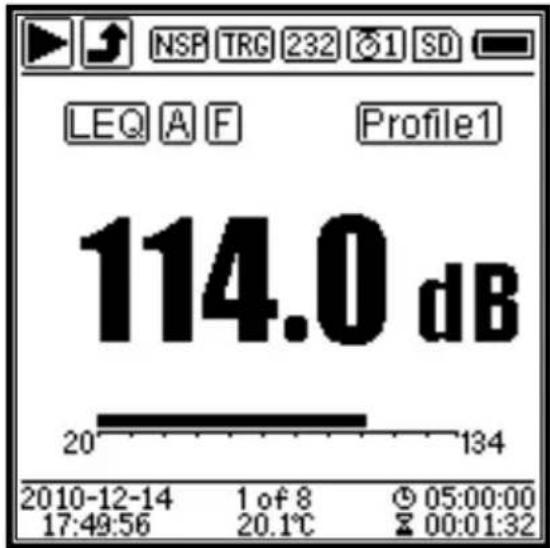
PCE Instruments 432 - Icons and Meaning of Screen Display - 1

text_image NSP TRG 232 1 SD LEQ A F Profile1 114.0 dB 20 134 2010-12-14 1 of 8 05:00:00 17:49:56 20.1℃ 00:01:32

All icons of Main screen is enable, the meaning of each icons are describe as following:

Start/Stop. Describe the measurement state.
Overload indicator and under-range indicator. Solid arrow indicates that the current state is overload / under-range. Hollow arrow indicates that overload / under-range event have occurred within the integral period. At the beginning of the new integral period, overload and under-range indicator icon will be clear.
ICCP power state. Displayed when ICCP is turn off.
Trigger state. Displayed when trigger is enable.
PCE Instruments 432 - Icons and Meaning of Screen Display - 2RS-232 state. Icon will be displayed at the Remote mode, and icon PRT will be displayed at Printer mode.
PCE Instruments 432 - Icons and Meaning of Screen Display - 3Timer state. Icon means the timer is enabled and only run once. Icon means the timer is enabled and run in loop.
PCE Instruments 432 - Icons and Meaning of Screen Display - 4MicroSD state. Displayed when enable the MicroSD storage.
PCE Instruments 432 - Icons and Meaning of Screen Display - 5Power state. The icons form left to right: external power supply, battery supply (with voltage display) and USB power supply.
PCE Instruments 432 - Icons and Meaning of Screen Display - 6Calculation mode of measurement.
PCE Instruments 432 - Icons and Meaning of Screen Display - 7
PCE Instruments 432 - Icons and Meaning of Screen Display - 8Filter state.
PCE Instruments 432 - Icons and Meaning of Screen Display - 9Detector state.
PCE Instruments 432 - Icons and Meaning of Screen Display - 10Icon of Profile. Indicate the profile number of current display.
PCE Instruments 432 - Icons and Meaning of Screen Display - 11Measurement value.
PCE Instruments 432 - Icons and Meaning of Screen Display - 12Visualize and dynamic bar graph display of measurement values within the current range.
PCE Instruments 432 - Icons and Meaning of Screen Display - 13Date and time.
PCE Instruments 432 - Icons and Meaning of Screen Display - 14Current page number and total page number.
PCE Instruments 432 - Icons and Meaning of Screen Display - 15Internal temperature display.
PCE Instruments 432 - Icons and Meaning of Screen Display - 16Icon means the integral period, icon means the elapsed time. The measurement stop when elapsed time equal to total measurement time (Itg.Period * Repeat).

Icons in the same row will display one at the same time. All icons can be displayed on each screen and keep the same meaning.

3.2 Screen of Level Meter Mode
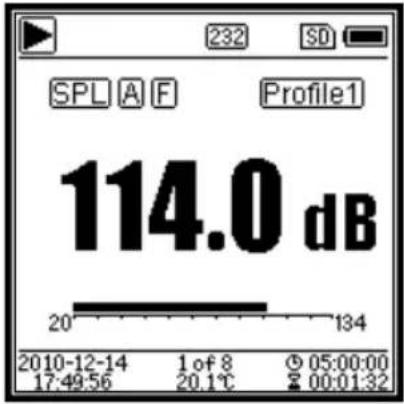
PCE Instruments 432 - Screen of Level Meter Mode - 1

text_image SPL A F Profile1 114.0 dB 20° 134 2010-12-14 1 of 8 05:00:00 17:49:56 20.1°C 00:01:32

PCE Instruments 432 - Screen of Level Meter Mode - 2

bar | Frequency | Value | |---|---| | SPL A F | 76.0dB | | SPL C S | 84.2dB | | SPL Z I | 108.9dB | | 20 | 134 | | 20 | 134 | | 20 | 134 | 2010-12-14 2 of 8 05:00:00 17:49:56 20.1°C 00:01:32
PCE Instruments 432 - Screen of Level Meter Mode - 3

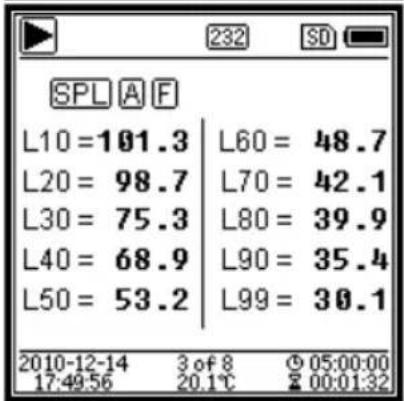
text_image SPL A F L10=101.3 | L60 = 48.7 L20 = 98.7 | L70 = 42.1 L30 = 75.3 | L80 = 39.9 L40 = 68.9 | L90 = 35.4 L50 = 53.2 | L99 = 30.1 2010-12-14 3 of 8 05:00:00 17:49:56 20.1℃ 00:01:32

PCE Instruments 432 - Screen of Level Meter Mode - 4

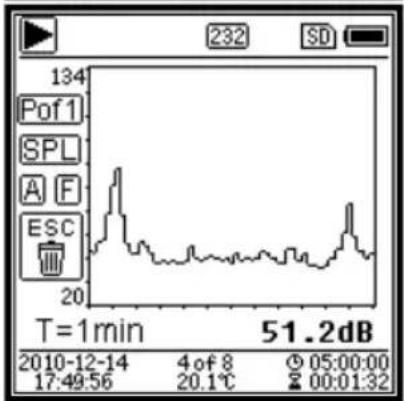
line | Time | Value | | ---------- | ------ | | 1 min | 134 | | 3 min | 20 | | 5 min | 51.2 |

Main screen. Display the measurement data, filter, detector, mode and Profile number. Main screen only displays one group data of 3-Profile. Press <▲>, <▼> to switch within 3-Profile.

3-Profile. Display the data and corresponding mode, filter and detector of 3-Profile measurement at the same time. 3-Profile data can be saved into SWN file.

LN Statistical. Display 10 groups of statistical results. Each group of data sources (fix mode to SPL, filter and detector can be customize) and the percentage value can be set through the menu.

Time History. Display the current noise value and time domain curve. The data sources (one of 3-Profile) and the time-line length (1min, 2min and 10min) can be customize.

Press to clear the screen and re-display the curve.
PCE Instruments 432 - Screen of Level Meter Mode - 5

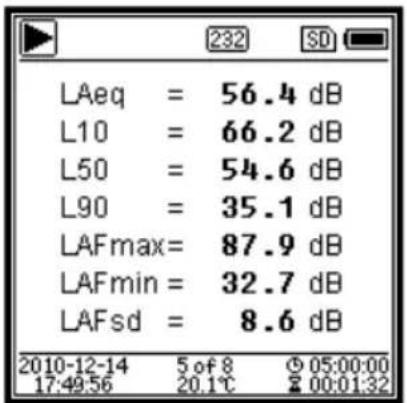
text_image LAeq = 56.4 dB L10 = 66.2 dB L50 = 54.6 dB L90 = 35.1 dB LAFmax= 87.9 dB LAFmin = 32.7 dB LAFsd = 8.6 dB 2010-12-14 5 of 8 05:00:00 17:49:56 20.1℃ 00:01:32

Custom Measurement Page 1. User can set the parameters of the 14 sets of measurement. This screen can display the first 7 sets.

PCE Instruments 432 - Screen of Level Meter Mode - 6

text_image LAF = 53.8 dB LBF = 54.2 dB LCF = 54.0 dB LZF = 65.4 dB LAseI = 71.8 dB LAe = 7.12 e-10 LCpeak = 82.6 dB 2010-12-14 6 of 8 05:00:00 17:49:56 20.1℃ 00:01:32

Custom Measurement Page 2. User can set the parameters of the 14 sets of measurement. This screen can display the last 7 sets.
PCE Instruments 432 - Screen of Level Meter Mode - 7

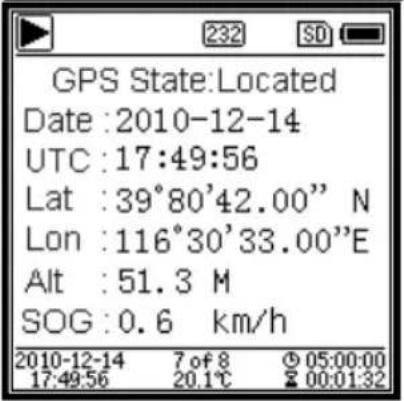
text_image GPS State:Located Date :2010-12-14 UTC :17:49:56 Lat :39°80'42.00" N Lon :116°30'33.00"E Alt :51.3 M SOG :0.6 km/h 2010-12-14 7 of 8 05:00:00 17:49:56 20.1℃ 00:01:32

GPS Page 1. Display GPS information: GPS state, GPS date, GPS time, latitude, longitude, altitude and speed.
PCE Instruments 432 - Screen of Level Meter Mode - 8

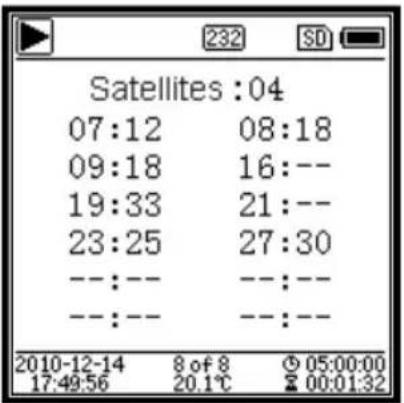
text_image Satellites :04 07:12 08:18 09:18 16:-- 19:33 21:-- 23:25 27:30 --:-- --:-- --:-- 2010-12-14 8 of 8 05:00:00 17:49:56 20.1℃ 00:01:32

GPS Page 2. Display number of satellite which contribute to positioning, and signal noise ratio of all visible satellites (0dB\~99dB).

Note: Number of visible satellites may be greater than the number of positioning satellites due to some satellites is unavailable for positioning.

3.3 Screen of 1/1 Octave Mode
PCE Instruments 432 - Screen of 1/1 Octave Mode - 1

bar | Time | Frequency (1000Hz) | | :--- | :--- | | 2010-12-14 17:49:56 | 1.0 | | 1 of 4 20.1℃ | 72.3 dB | | 05:00:00 00:01:32 | 232 |

PCE Instruments 432 - Screen of 1/1 Octave Mode - 2

text_image Hz 8 31.5 125 500 2k 8k 2010-12-14 17:49:56 dBZ 78.4 78.4 78.4 78.4 63 64.2 38.6 42.5 69.1 16 16 16 16 16 16 16 16 16 16 16 16 16 16 16 16 16 16 16 16 16 16 16 16 16 16 16 16 16 16 16 16 16 16

PCE Instruments 432 - Screen of 1/1 Octave Mode - 3

text_image Leq dB Lim. LeqA 48.6 80.0 LeqB 50.1 80.0 LeqC 68.4 80.0 LeqZ 81.4 80.0 2010-12-14 3 of 4 05:00:00 17:49:56 20.1°C 00:01:32

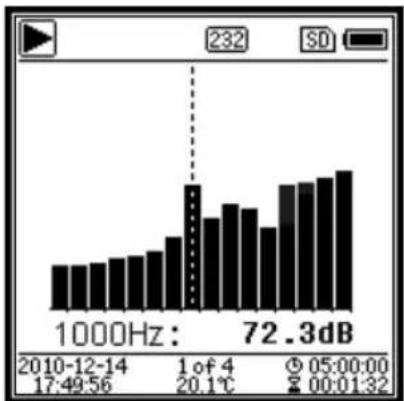
1/1 Octave Spectra. Display 12 bands of 8Hz\~16kHz and L_Aeq , L_Beq , L_Ceq , L_Zeq as bar graph. Press <> , <> to display the detail value of each band. A threshold can be set for each band. The LED indicator will turn red when the data exceed the threshold.

Octave Table Page 1. Display the measurement data of 8Hz\~16kHz. The LED indicator will turn red and dB value will display as invert color when the data exceed the threshold.

Octave Table Page 2. Display the measurement data of L_Aeq 、 L_Beq 、 L_Ceq 、 L_Zeq . The LED indicator will turn red and will be displayed when the data exceed the threshold.

3.4 Screen of 1/3 Octave Mode
PCE Instruments 432 - Screen of 1/3 Octave Mode - 1

bar | Frequency | Value | |---|---| | 1000Hz | 72.3dB | | 2010-12-14 17:49:56 | 17:49:56 | | 1 of 7 20.1℃ | 20.1℃ | | 05:00:00 00:01:32 | 00:01:32 |

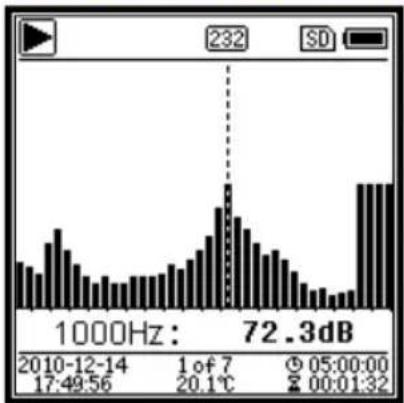
1/3 Octave Spectra. Display 36 bands of 6.3Hz\~20kHz and L_Aeq , L_Beq , L_Ceq , L_Zeq as bar graph. Press < > , < > to display the detail value of each band. A threshold can be set for each band. The LED indicator will turn red when the data exceed the threshold.

PCE Instruments 432 - Screen of 1/3 Octave Mode - 2

text_image Hz dBZ Hz dBZ 6.3 78.4 8 78.4 10 78.4 12.5 45.6 16 64.2 20 43.1 25 38.6 31.5 23.8 40 42.5 50 18.9 63 69.1 80 11.5 2010-12-14 2 of 7 05:00:00 17:49:56 20.1℃ 00:01:32

PCE Instruments 432 - Screen of 1/3 Octave Mode - 3

text_image Hz dBZ Hz dBZ 100 78.4 125 78.4 160 78.4 200 45.6 250 64.2 315 43.1 400 38.6 500 23.8 630 42.5 800 18.9 1k 69.1 1.25k 11.5 2010-12-14 3 of 7 © 05:00:00 17:49:56 20.1℃ ☎ 00:01:32

PCE Instruments 432 - Screen of 1/3 Octave Mode - 4

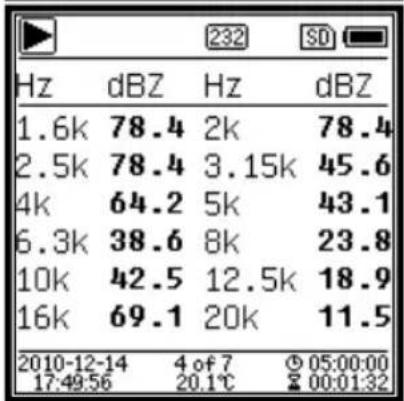
text_image Hz dBZ Hz dBZ 1.6k 78.4 2k 78.4 2.5k 78.4 3.15k 45.6 4k 64.2 5k 43.1 6.3k 38.6 8k 23.8 10k 42.5 12.5k 18.9 16k 69.1 20k 11.5 2010-12-14 4 of 7 05:00:00 17:49:56 20.1℃ 00:01:32

PCE Instruments 432 - Screen of 1/3 Octave Mode - 5

text_image Leq dB Lim. LeqA 48.6 80.0 LeqB 50.1 80.0 LeqC 68.4 80.0 LeqZ 81.4 80.0 2010-12-14 5 of 7 05:00:00 17:49:56 20.1℃ 20:00:32

Octave Table Page 1. Display the measurement data of 6.3Hz\~80Hz. The LED indicator will turn red and dB value will display as invert color when the data exceed the threshold.

Octave Table Page 2. Display the measurement data of 100Hz\~1.25kHz. The LED indicator will turn red and dB value will display as invert color when the data exceed the threshold.

Octave Table Page 3. Display the measurement data of 1.6kHz\~20kHz. The LED indicator will turn red and dB value will display as invert color when the data exceed the threshold.

Octave Table Page 4. Display the measurement data of L_Aeq 、 L_Beq 、 L_Ceq 、 L_Zeq . The LED indicator will turn red and will be displayed when the data exceed the threshold.
4. Operation and Setting of the Menu

PCE Instruments 432 - Operation and Setting of the Menu - 1

text_image Menu Function Calibration Measurement Setup Language Output Factory Settings

Press

to access the next level menu. All parameters related to measurement can be set in the menu.

Menu Tree

PCE Instruments 432 - Operation and Setting of the Menu - 2

flowchart
graph TD
    A["Menu"] --> B["Functions"]
    A --> C["Calibration"]
    A --> D["Measurement"]
    A --> E["Setup"]
    A --> F["Language"]
    A --> G["Output"]
    A --> H["Factory Settings"]

    B --> I["Level Meter"]
    B --> J["1/1 Octave"]
    B --> K["1/3 Octave"]
    I --> L["By Measurement"]
    J --> M["By Cal.Factor"]
    L --> N["MEAS.Setup"]
    M --> O["MEAS.Range"]
    N --> P["ICCP Power"]
    O --> Q["Profile 1"]
    P --> R["Profile 2"]
    Q --> S["Profile 3"]
    R --> T["Custom Measurement"]
    S --> U["Timer"]

    E --> V["Contrast"]
    E --> W["Backlight"]
    E --> X["Battery"]
    E --> Y["Trigger"]
    E --> Z["Date & Time"]
    E --> AA["Auto PWR Off"]

    F --> AB["RS-232"]
    F --> AC["File Manager"]
    F --> AD["Boot Mode"]
    F --> AE["USB Mode"]
    F --> AF["GPS"]
    F --> AG["Setup Template"]
    F --> AH["About"]

    G --> AI["Level Meter DC Out"]
    G --> AJ["1/1 Octave DC Out"]
    G --> AK["Printer"]

4.1 Function

PCE Instruments 432 - Function - 1

text_image Function Level Meter 1/1 Octave 1/3 Octave

Select Function and press to enter this menu. 3 kind of measurement can be select: Level Meter, 1/1 Octave and 1/3 Octave. Press <▲>, <▼> can select mode of measurement. Press to save setting and return to previous menu. Press to return to previous menu.

4.2 Calibration

PCE Instruments 432 - Calibration - 1

text_image Calibration By Measurement By Cal.Factor

Select Calibration and press to enter this menu.

Many factors include temperature, humidity and air pressure will impact the microphone's sensitivity. Therefore, user must run calibration at least once before measurement.

There are two calibration methods: By Measurement and By Cal.Factor. Method of By Measurement is recommend for

calibration with sound calibrator. Method of By Cal.Factor can manually adjust the calibration factor by user.

4.2.1 Calibration by Measurement

PCE Instruments 432 - Calibration by Measurement - 1

text_image By Measurement Cal.Level : 93.8dB Cal.Factor:- 6.10 Press▶to Start Cal.History 2015-05-11:- 6.10F 2015-05-11:- 6.00M 2015-05-11:- 6.00M 2015-05-11:- 6.00M

Select By Measurement and press to enter this menu. Refer to Annex 2 Adjustments at the Calibration Check

Frequency to earn more detail of the stated calibrator and corresponding adjustment value.

Cal.Level can be adjusted between 0dB\~199.9dB. Press <◀>, <▶> and <▲>, <▼> can change the Cal.Level and press

to start calibration. After calibration finished, the new Cal.Factor will be update as the result and user can press or to save or ignore this result. This menu also displays the calibration history. Ending with symbol M indicate the record was calibrate by the method of By Measurement.

4.2.2 Calibration by Cal.Factor

PCE Instruments 432 - Calibration by Cal.Factor - 1

text_image By Cal.Factor Cal.Factor: +007.90dB Cal.History 2015-05-11:- 6.10F 2015-05-11:- 6.00M 2015-05-11:- 6.00M 2015-05-11:- 6.00M

Select By Cal.Factor and press to enter this menu. Users can adjust the calibration factor manually. Press <◀>, <▶> can select the digit of factor, press <▲>, <▼> can adjust the value, press to save and press to return to previous menu. Ending with symbol F indicate the record was calibrate by the method of By Cal.Factor.

4.2.3 Conversion of Cal.Factor and Sensitivity

The sensitivity can be calculated by the following formulas, and the calibration factor also can be calculated from sensitivity and type into sound level meter directly.

$$ \text { Cal.F } = 2 0 * \log (\text { Sens } / 4 0) + \text { offset } $$

$$ S e n s = 4 0 * 1 0 ((C a l. F - o f f s e t) / 2 0) $$

Where:

Cal.Fis the calibration factor, expressed in decibels (dB);

Sens is sensitivity of microphone, expressed in mV/Pa;

offset is the calibration factor, expressed in decibels (dB). This value is the calibration result by the method of By Measurement with 40mV signal. This offset is inherent deviation which is different for each sound level meter.

4.2.4 Process of Calibration by Measurement

Calibration by measurement is the recommend method of calibration with sound calibrator.

PCE-428/430/432 can provide class 1 and class 2 sound calibrator comply with the GB/T 15173-2010, IEC60942: 2003 standard.

The process of calibration by measurement is shown as following:

(1) Insert the microphone into the cavity of the calibrator until stop without loosening.

PCE Instruments 432 - Process of Calibration by Measurement - 1

natural_image Line drawing showing a device connected to a handheld device via a transformation arrow (no text or symbols present)

(2) Then open the power of the calibrator and set to a constant sound pressure level (for example 94dB).

PCE Instruments 432 - Process of Calibration by Measurement - 2

text_image 94dB

(3) Select Calibration in the menu and then press to enter By Measurement.

PCE Instruments 432 - Process of Calibration by Measurement - 3

text_image Menu Function Calibration Measurement Setup Language Output Factory Settings

PCE Instruments 432 - Process of Calibration by Measurement - 4

text_image Calibration By Measurement By Cal.Factor

(4) Adjust Cal.Level in the menu, for example adjust to 93.8dB. There is 5s delay after press to run calibration.

PCE Instruments 432 - Process of Calibration by Measurement - 5

text_image Calibrating Cal.Level : 93.8dB Cal.Factor: - 6.10 DELAY:5 S

PCE Instruments 432 - Process of Calibration by Measurement - 6

text_image Calibrating Cal.Level : 93.8dB Cal.Factor : 93.45

(5) After the end of calibration, sound level meter will update the calibration factor. Press to apply the results.

PCE Instruments 432 - Process of Calibration by Measurement - 7

text_image Calibrating Cal.Level : 93.8dB Cal.Factor: 0.35 Done Cancel OK

PCE Instruments 432 - Process of Calibration by Measurement - 8

text_image 232 SD SPL A F Profile1 93.8 dB 20 134 2010-12-14 1 of 8 05:00:00 17:49:56 20.1℃ 00:01:32

(6) Return to Main screen and press to start the measurement. The current measurement result will be 93.8dB in this example if calibrator is still working.

4.3 Measurement

PCE Instruments 432 - Measurement - 1

text_image Measurement MEAS.Setup MEAS.Range ICCP Power Profile 1 Profile 2 Profile 3 Alarm Threshold

PCE Instruments 432 - Measurement - 2

text_image Measurement Alarm Threshold Extended Function Statistical Time History Octave Threshold Custom Measure Timer

There are 13 items in the menu of Measurement. Press <▲>, <▼> can choose and select, press to access next level of menu.

4.3.1 MEAS.Setup

PCE Instruments 432 - MEAS.Setup - 1

text_image MEAS.Setup Delay : 1s Itg.Period : Inf Repeat : Inf SWN Logger : [*] SWN Log.Step: 1s CSD Logger : [*] CSD Log.Step: 1m

Menu of MEAS.Setup is the most important menu related to measurement. It can set the parameter of Delay, Itg.Period, Repeat, SWN Logger, SWN Log.Step, CSD Logger and CSD Log.Step. Press <▲>, <▼> can choose and select.

▷Delay:

Delay time between press and the beginning of the measurement. Press <◀>, <▶> can select the delay time: Sync 1m, Sync 15m, Sync 30m, Sync 1h, 1s\~60s.

The delay time can skip the impact come from the key pressing or vibration before the measurement.

Itg.Period:

Itg.Period is the integral period of each single measurement. At the beginning of each integral period, all of the integral data and time-hold data will be reset, and the overload and under-range indicator will be clear. Integral data and time-hold data include LEQ, Max, Min, Peak, SD, SEL, E and LN. Press <◀>, <▶> can select the option: Inf, 1s\~59s, 1m\~59m, 1h\~24h.

▷Repeat:

Repeat is the number of repeat time of measurement. Total measurement period =Itg.Period x Repeat. Press <◀>, <▶> can select the option: Inf, 1\~9999.

▷SWN Logger:

Press <◀>,<▶> to switch. If selected, sound level meter will save the SWN/OCT files.

SWN/OCT saves the time history data into file. The data source in Level Meter mode is Profile 1\~3 (select in SWN Save of Profile 1\~3 menu) and store as SWN file; in 1/1 Octave mode save all bands of octave and LAeq, LBeq, LCeq, LZeq, store as OCT file.

▷SWN Log.Step:

SWN Log.Step is the logger step (interval time) to save data as SWN/OCT file. Press

<◀>, <▶> can select the option: 0.1s, 0.2s, 0.5s, 1s\~59s, 1m\~59m, 1h\~24h.

☆Note: The SWN Log.Step of 1/3 Octave starts from 0.5s (0.1s and 0.2s are disable).

▷CSD Logger:

Press <◀>,<▶> to switch. If selected, sound level meter will save the CSD files.

CSD save the instantaneous data into file. The data source in Level Meter mode is 14 group results of Custom Measure and store as CSD file; in 1/1 Octave mode save all bands of octave and LAeq, LBeq, LCeq, LZeq, store as CSD file.

☆Note: If selected, press at the main screen can save the data into CSD file manually when measurement is stop.

▷CSD Log.Step:

CSD Log.Step is the logger step (interval time) to save data as CSD file. Press <◀>, <▶> can select the option: 1s\~59s, 1m\~59m, 1h\~24h.

PCE Instruments 432 - ▷CSD Log.Step: - 1

flowchart
graph TD
    A["Profile1\nProfile2\nProfile3"] --> B["SWN File"]
    C["Octave Data"] --> D["OCT File"]
    B --> D
    D --> E["SWN/OCT\nLog.Step: 0.1s~24h"]
    E --> F["CSD File"]
    G["14 sets of Custom Measure"] --> H["CSD\nLog.Step: 1s~24h"]
    H --> I["CSD File"]

☆Note: SWN/OCT file only store integral data. The logger step can be considered as the integral period. All the data within logger step (integral period) will be store as one line into SWN/OCT file. CSD file only store instantaneous data without integration. Once the CSD logger step is reached, 14 group data of custom measure will be store as one line into CSD file, just as a screenshot.

PCE Instruments 432 - ▷CSD Log.Step: - 2

line | Time | SPL | |------|-----| | 0 | Low | | T | High |

4.3.2 MEAS.Range

MEAS.Range
Linearity Range:20.0dBA - 134.0dBADynamic Range:11.0dBA - 134.0dBAPeak C Range:45.0dBA - 137.0dBA

Menu of MEAS.Range display the Linearity Range, Dynamic Range and Peak C Range.

The new developed algorithm brings a single measurement range that no needs to change the range anymore. The algorithm can meet the requirement of toneburst response down to 0.25ms with only 0.1dB error at 4kHz. And the error is

0.4dB for 0.125ms toneburst test at 4kHz.

▷Linearity Range: The measurement result can be considered to be correct only when the result located in the linearity range. Otherwise, the error of measurement result is over the acceptance limits. Sometimes linearity range also can be called measurement range.
▷Dynamic Range: Dynamic range is the range between the self-generated noise level and the maximum input signal level. Dynamic range is the maximum range which can be displayed on the sound level meter. Note the measurement result near the self-generated noise level can be considered is non-linear.
▷Peak C Range: Peak C range is the linearity range of Peak C measurement. The Peak C measurement result located in this range can be considered to be correct.

4.3.3 ICCP Power

PCE Instruments 432 - ICCP Power - 1

text_image ICCP Power ICCP Power : ON

Menu of ICCP power control the 4mA/24V constant current source which can supply all kind of ICCP sensor. Please disable ICCP power before connect to other kind of sensor or directly connect to signal source. Press <◀>, <▶> can choose and select.

4.3.4 Profile 1\~3

PCE Instruments 432 - Profile 1\~3 - 1

text_image Profile 1 Filter : Detector : Fast Mode : SPL SWN Save : LEQ

Menu of Profile 1\~3 can set the Filter, Detector, Mode and SWN Save. Press <▲>, <▼> can choose and select.

▷Filter:

Set the filter of Profile 1\~3. Press <◀>, <▶> can select the option: A, B, C and Z (Z-weighting means no weighting and sometimes it is called Flat or Linear).

▷Detector:

Set the detector of Profile 1\~3. Press <◀>, <▶> can select the option: Fast, Slow, and Imp..

Mode:

Set the integral mode of Profile 1\~3. Press <◀>, <▶> can select the option: SPL, PEAK, LEQ, MAX and MIN.

▷SWN Save:

This option is used to set which data should be stored in the SWN file, since the data source of SWN file is Profile 1\~3. So this option is no relationship with screen display.

Press <◀>, <▶> can select the option: LEQ, PEAK, MAX or MIN.

4.3.5 Alarm Threshold

PCE Instruments 432 - Alarm Threshold - 1

text_image Alarm Threshold Set Alarm Threshold:(dB) 100 Up Down to +-1 Left Right to +-10

If measurement result of Profile 1\~3 exceeds the Alarm Threshold, the LED indicator above will turn red. Alarm threshold can be set to 20dB\~200dB. Press <▲>, <▼> can increase and reduce 1dB. Press <◀>, <▶> can add and reduce 10dB.

4.3.6 Extended Function

PCE Instruments 432 - Extended Function - 1

text_image Extended Function [*]Main [*]3 Profile [*]Statistical [*]Time History [*]Custom [*]GPS

Extended Function can set which screen can be display. If the screen is not selected, it will not be displayed. Note that Main screen is designed to be displayed all the time.

4.3.7 Statistical

PCE Instruments 432 - Statistical - 1

text_image Statistical LN4 : 40 LN5 : 50 LN6 : 60 LN7 : 70 LN8 : 80 LN9 : 90 LN10 : 99

PCE Instruments 432 - Statistical - 2

text_image Statistical Mode : SPL Filter : A Detector : Fast LN1 : 10 LN2 : 20 LN3 : 30 LN4 : 40

The data source of statistical is SPL which is fixed. User can't change it. But user can set the filter and detector of SPL and the statistical percentage value through this menu.

Mode:

It's fixed to SPL and cannot be changed.

▷Filter:

Press <> , <> can set the filter of statistical analysis: A, B, C and Z (Flat).

▷Detector:

Press <◀>, <▶> can set the detector of statistical analysis: Fast, Slow and Imp..

▷LN1\~LN10:

Press <◀>, <▶> can set the percentage of 10 group of LN to 1%\~99%.

For example: LN1:10=80dB means that in integral period, 10% of measurement data is

greater than 80dB. The LN result related to integral period. It will be reset when a new integral period start.

4.3.8 Time History

PCE Instruments 432 - Time History - 1

text_image Time History Profile : 1 Duration : 1min

Press <> , <> can set the data source and duration time of Time History.

Profile:

Press <◀>, <▶> can set the data source of time history: Profile1, Profile 2, Profile 3.

Duration:

Press <◀>, <▶> can set the timeline of time history: 1min, 2min, 10min.

4.3.9 Octave

PCE Instruments 432 - Octave - 1

text_image Octave Filter: Z Detector: Fast Octave Threshold

PCE Instruments 432 - Octave - 2

text_image Octave Threshold LA: 038.0 LB: 038.0 LC: 038.0 LZ: 079.0 31.5Hz: 063.0 63Hz: 052.0 125Hz: 044.0

Menu of Octave can set filter and detector before octave calculation and the alarm threshold of each octave band, LA, LB, LC, LZ. If the measurement result exceeds the threshold, the LED indicator

will turn red. Press <◀>, <▶> can set the option to 0.1dB\~199.9dB.

4.3.10 Custom Measure

PCE Instruments 432 - Custom Measure - 1

text_image Custom Measure Custom 8 Custom 9 Custom 10 Custom 11 Custom 12 Custom 13 Custom 14

PCE Instruments 432 - Custom Measure - 2

text_image Custom Measure Custom 1 Custom 2 Custom 3 Custom 4 Custom 5 Custom 6 Custom 7

There are 14 items in menu of Custom Measure which can set the parameters of group 1\~14 custom measurement. Press <▲>, <▼> can choose and select, press to access next

level of menu.

PCE Instruments 432 - Custom Measure - 3

text_image Custom 1 Filter : A Detector : Fast Mode : SPL

Press <▲>, <▼> can set the option of each group of custom measurement: Filter, Detector and Mode.

▷Filter:

Press <> , <> can set the filter of custom measurement: A, B, C and Z (Flat).

▷Detector:

Press <◀>, <▶> can set the detector of custom measurement: Fast, Slow and Imp..

Mode:

Press <◀>, <▶> can set the integral mode of custom measurement: SPL, SD, SEL, E, Max, Min, Peak, LEQ, LN1\~LN10.

4.3.11 Timer

PCE Instruments 432 - Timer - 1

text_image Timer Timer Start Day Start Time Repeat Interval

Menu of Timer can set the Timer, Start Day, Start Time and Repeat Interval. Press <> , <> can choose and select. A new function named Timer was introduced to start measurement by program. User can set the measurement start from 00:00 of next day, measure several minutes and repeat each hour, in order to achieve 24h auto measurement.

▷Timer:

Press <▲>, <▼> can set Timer working mode: OFF, Once and Loop.

▷Start Day:

Press <> , <> can set Timer trigger date: Ignore and the certain day in the future 30 days. If select Ignore, the Timer will ignore the date and only use Start Time to trigger.

▷Start Time:

Press <▲>, <▼> can set Timer trigger time: 00:00\~23:59.

▷Repeat Period:

If Timer is triggered, it will be trigger all the time by the Repeat Period. Press <◀>, <▶> can set the option: 1m\~59m, 1h\~24h.

Note: Repeat Period must greater than total integral time (Itg.Period x Repeat) +5s, since there is fixed 3s delay for Timer triggered measurement and another 2s is needed before the delay. It is forbidden to change the settings when the Timer is working. Otherwise, there will be something wrong with the Timer.

4.3.12 24h Measurement by Timer

User can use the Timer to implement 24-hour-measurement. Following description show an example of how to implement the 24-hour -measurement.

PCE Instruments 432 - 24h Measurement by Timer - 1

text_image MEAS.Setup Delay : 1s Itg.Period : 5m Repeat : 1 SWN Logger : [*] SWN Log.Step: 1s CSD Logger : [*] CSD Log.Step: 5m

Purpose: The measurement will be first start at 2015/3/14 00:00, measure first 5m of each hour. It will store CSD file when the stop measurement and store SWN file every second. Delay setting in the MEAS.Setup will be ignored if the measurement is triggered by Timer. Set Itg.Period as 5m and set Repeat as 1. Enable the SWN Logger and CSD Logger.

Set the SWN Log.Step to 1s and set the CSD Log.Step to 5min.

PCE Instruments 432 - 24h Measurement by Timer - 2

text_image Timer Timer : Loop

PCE Instruments 432 - 24h Measurement by Timer - 3

text_image Start Day Start Day: 2015-3-14

Set the Timer work at Loop mode, so that the measurement will be triggering all the time.

Set the Start Day as the wanted date.

PCE Instruments 432 - 24h Measurement by Timer - 4

text_image Start Time Start Time: 00:00

PCE Instruments 432 - 24h Measurement by Timer - 5

text_image Repeat Interval Repeat Interval: 1h

Set the Start Time to 00:00 which means the first time of measurement to be triggered.

Set the Repeat Interval to 1h, so that the measurement will be triggering each hour.

4.4 Setup

PCE Instruments 432 - Setup - 1

text_image Setup Contrast Backlight Battery Trigger Date & Time Auto PWR OFF RS-232

PCE Instruments 432 - Setup - 2

text_image Setup RS-232 File Manager Boot Mode USB Mode GPS Setup Template About

Menu of Setup include the basic function setup and condition display. Press <▲>, <▼> can choose and select, press to access next level menu.

4.4.1 Contrast

PCE Instruments 432 - Contrast - 1

text_image Contrast Min Max

Menu of Contrast can set the contrast of LCD display for 14 levels adjustable. Press <▲>, <▼> can choose and select.

4.4.2 Backlight

PCE Instruments 432 - Backlight - 1

text_image Backlight TimeOut : OFF Delay : 20s

Sound level meter provide the auto turn off function of backlight to reduce the power consume and extend battery life. Menu of Backlight can set the backlight timeout on-off and delay time. Press <▲>, <▼> can choose and select.

4.4.3 Battery

PCE Instruments 432 - Battery - 1

text_image Battery Battery Voltage 6.00V

PCE Instruments 432 - Battery - 2

text_image Battery External Power: 9.00V

Menu of Battery display the power state and power voltage. The discharge cut-off voltage of single cell LR6/AA/AM3 alkaline battery is approx. 0.9V, therefore sound level meter will power off

automatically when the total voltage of 4 cell alkaline battery falls below 3.6V.

4.4.4 Trigger

PCE Instruments 432 - Trigger - 1

text_image Trigger Trigger: OFF

Menu of Trigger can set the function of trigger on-off. Trigger is an analog input which remote control the sound level meter to start or stop the measurement. The trigger input located on the bottom of sound level meter as a 3.5mm connector.

PCE Instruments 432 - Trigger - 2

text_image Ground Short the signal lines and ground to trigger Signal line, connect together

Short the signal lines and ground to trigger measurement to start, otherwise to stop the measurement. Notice that when enable the Trigger function, the button is unavailable.

4.4.5 Date & Time

PCE Instruments 432 - Date &amp; Time - 1

text_image Date & Time Setup Date Setup Time

Menu of Date & Time can set the RTC time of sound level meter. Press <▲>, <▼> can choose and select.

PCE Instruments 432 - Date &amp; Time - 2

text_image Setup Date Date Format: 1 yyyy/mm/dd 2 mm/dd/yyyy 3 dd/mm/yyyy

PCE Instruments 432 - Date &amp; Time - 3

text_image Setup Date 2014/10/10 yyyy/mm/dd

Press <▲>, <▼> can select date format and turn to date setting. Press <◀>, <▶> can choose year, month and day, press <▲>, <▼> can modify the value. Press to save the setting.

The operation of time setting is almost the same. Press <◀>,

<▶> can select hour, minute and second, press <▲>, <▼>

can modify the value. Press to save the setting.

The power supply for RTC comes from an internal battery.

Please replace the RTC battery when sound level meter

cannot keep the date and time due to voltage of RTC battery is

too low. How to replace RTC battery: remove the 5 screws on the backside of sound level meter to open the cover. The RTC battery is located on the surface of PCB as the following figure. The model of battery is CR-1220.

☆Note: The RTC of sound level meter has calibrated to a reference clock with average error

2ppm (maximum error 3ppm). The time accuracy keep <10ppm (<26s within 30 days) at room temperature. The maximum time error is approx. 5s\~8s at 25°C in internal test.

The RTC accuracy may vary by the temperature due to no temperature compensation. As the figure show the typical temperature curve, the RTC keep its basic frequency at 25^ C When the temperature increase or decrease, RTC frequency change according to -0.04ppm/°C ^2 . Therefore, when the temperature is 0^ C, the change value of RTC is -0.04 × (0-25)^2

= -25ppm, equal to slow 2.16s daily. when the temperature is 40°C, the change value of RTC is -0.04 x (40-25)² = -9ppm, equal to slow 0.78s daily.

The maximum error (<10ppm) given by user manual can be calculated as approx. 16°C difference to reference temperature (25°C). Therefore, the RTC can keep every 30 day the error <26s at 9°C\~41°C which can be recognized as room temperature. Notice that the real RTC error may beyond the value shown in user manual if exceed the temperature range.

4.4.6 Auto PWR Off

PCE Instruments 432 - Auto PWR Off - 1

text_image Auto PWR Off Auto PWR Off: OFF

4.4.7 RS-232

PCE Instruments 432 - RS-232 - 1

Sound level meter provide the auto power off function to reduce the power consume. When sound level meter keep stop state and no key press for a while, it will power off base on the setting. The Auto PWR Off option: 1min, 5min, 10min, 30min, Off. Press <◀>, ▶> can choose and select, press to save the setting.

Menu of RS-232 can set the option of serial port, refer to 5. RS-232 Communication Protocol to earn more detail.

detail) can set the communication baud rate of RS-232, the option is: 4800bps, 9600bps, 19200bps. Press <◀>, <▶> can choose and select.

▷Flow Control:

Flow Control (refer to 5.2.7 Flow Control to earn more detail) can set the flow control mode under remote control, the option is: Software, Hardware. Press <◀>, ◀> can choose and select.

▷Response:

Response (refer to 5.3 Instruction to earn more detail) can enable or disable the response signal (ACK/NAK), the option is: ON, OFF. Press <◀>, ◀▶> can choose and select.

4.4.8 File Manager

PCE Instruments 432 - File Manager - 1

text_image File Manager SWN File : 22 OCT File : 7 CSD F1e : 32

File Manager can manage the stored SWN, OCT and CSD file. The numbers display at the right side of each line is the file count for each kind of file type. Press <▲>, <▼> can choose and select, press to access next level of menu.

PCE Instruments 432 - File Manager - 2

text_image SWN File Select : 001 /006 Option : Delete File: DATA0001.SWN Cancel Ok

PCE Instruments 432 - File Manager - 3

text_image SWN File Select : 000 /006 Option : Delete File: All Files Cancel OK

Menu of SWN File can delete SWN files, press <▲>, <▼> to select the file number which want to be delete. The whole file name will be displayed on the bottom of the screen. Select 0000 as the file

number can delete the entire existing SWN file.

PCE Instruments 432 - File Manager - 4

text_image OCT File Select : 0001/0006 Option : Delete File: DATA0001.OCT Cancel Ok

PCE Instruments 432 - File Manager - 5

text_image OCT File Select : 0000/0006 Option : Delete File: All Files Cancel OK

Menu of OCT File can delete the OCT file. The operation is same to menu of SWN File.

PCE Instruments 432 - File Manager - 6

text_image CSD File Select : 0001/0006 Option : Delete File: DATA0001.CSD Cancel Ok

PCE Instruments 432 - File Manager - 7

text_image CSD File Select : 0000/0006 Option : Delete File: All Files Cancel OK

PCE Instruments 432 - File Manager - 8

text_image CSD File Select : 0001/0006 Option : View File: DATA0001.CSD Cancel Ok

PCE Instruments 432 - File Manager - 9

text_image CSD File Select : 0001/0006 Option : Print File: DATA0001.CSD Cancel Ok

PCE Instruments 432 - File Manager - 10

text_image DATA0002.CSD [ST]2014-10-13 11:31:37 [DT]0000:00:20 [DATA] LAFmin 040.7 LApeak 104.7 LASel 074.8 LAF 049.7

PCE Instruments 432 - File Manager - 11

text_image DATA0002.CSD [ST]2014-10-13 11:31:37 [DT]0000:00:20 [DATA] LBF 054.4 LAFsd 008.6 LBFsd 008.2 LAe 3.422e-06

Menu of CSD File can view, print and delete the CSD file. Press <▲>, <▼> can change the cursor between Select and Option. Delete operation is same to menu of SWN File.

Select Option in menu of CSD File, and then press <◀>、<▶> can View or Print the CSD file. After select file number and action, press to view or print the content of file.

Press <▲>, <▼>, <◀>, <▶> can brown file contents at View mode. The Print mode is almost same to View mode. Press can print the current displayed content of CSD file.

4.4.9 Boot Mode

PCE Instruments 432 - Boot Mode - 1

text_image Boot Mode Normal Power & Boot Boot & Auto Meas.

In menu of Boot Mode, press<▲>, <▼> can select Normal, Power & Boot, Boot & Auto Meas. mode.

Note: The hardware mode switch located in the battery compartment need to be set to fit to different boot mode.

Normal:

Need to change hardware mode switch to Normal. This is the normal working mode of sound level meter.

▷Power & Boot:

Need to change hardware mode switch to Boot. After select this mode, sound level

meter will power on when proper power supply available. It's suitable for integrate into other system, especially in those cases where power failure, sound level meter can power on automatically from power shutdown.

▶Boot & Auto Meas.:

Need to change hardware mode switch to Boot. After select this mode, sound level meter will not only power on when proper power supply available, but also start measurement. When sound level meter was integrated into other system, it will power on and start measurement automatically from power failure.

▷Hardware Mode Switch:

The hardware mode switch located in the battery compartment. It's easily to be found after remove the batteries. Please select the switch to Boot or Normal by nib or tweezers.

PCE Instruments 432 - ▷Hardware Mode Switch: - 1

text_image 15V LRS AA 15A Normal Boot Normal Boot Normal

PCE Instruments 432 - ▷Hardware Mode Switch: - 2

Note: Static electricity sensitive area. Eliminate static electricity before operation.

4.4.10 USB Mode

PCE Instruments 432 - USB Mode - 1

text_image USB Mode Always Ask USB Disk Mode Modem Mode

Menu of USB Mode can set the working mode when connect sound level meter to computer by USB cable. Always Ask, USB Disk Mode and Modem Mode can be select.

▷Always Ask:

It always ask which mode should apply when connect to computer by USB. Please make choose in time, otherwise computer could not recognize the sound level meter due to

timeout.

▷USB Disk Mode:

It always working at USB Disk Mode without ask when connect to computer by USB. Sound level meter can be recognized as removable USB disk by computer without driver install, and the files stored in MicroSD card can be access by explorer directly.

Modem Mode:

It always working at Modem Mode without ask when connect to computer by USB. Sound level meter can be recognized as serial port (virtual serial port) by computer and follow the same protocol as RS-232 (refer to 5. RS-232 Communication Protocol to earn more detail of protocol).

4.4.11 GPS

PCE Instruments 432 - GPS - 1

text_image GPS GPS :OFF Auto Time Sync.:OFF

Menu of GPS can set the GPS and Auto Time Sync on-off. When GPS is turn off, the internal GPS module is shutdown. If enable Auto Time Sync, the RTC of sound level meter will be synchronized when get GPS time and then keep synchronization once per hour.

4.4.12 Setup Template

PCE Instruments 432 - Setup Template - 1

text_image Setup Template SETUP 2014-10-14 SETUP 2014-10-20 Empty Empty Empty

The Setup Template is used to store 5 group user setting parameter of sound level meter for different application.

☆Note: Template will not touch the Cal.Factor. Please do not try to load the old version template in new version firmware due to some modification could be apply in template format.

PCE Instruments 432 - Setup Template - 2

text_image Setup Template A A A A 2014-10-20

PCE Instruments 432 - Setup Template - 3

text_image Setup Template Option : Load Settings: AAAAA 2014-10-20

Press on blank template can save 1 group setting which user can define the name by 5 letter or number.

Press on one existing template can load or delete it.

4.4.13 About

PCE Instruments 432 - About - 1

text_image About Type :308S Class:1 S/N :490001 Ver. :3.00.141011 HWID :P0274.03.B11 Copyright (C) 2014 BSWA TECH

About menu shows the Type, Class, S/N (serial number), Ver., and HWID (hardware ID) of sound level meter.

4.5 Language

PCE Instruments 432 - Language - 1

text_image Language English Chinese Portuguese Spanish German French

Sound level meter support 6 language: English, Chinese, Portuguese, Spanish, German and French. Press <▲>, <▼> can select appropriate language and press to save the setting.

4.6 Output

PCE Instruments 432 - Output - 1

text_image Output Level Meter DC Out Octave DC Out Printer

Menu of Output can select which measurement data should be output at DC OUT. There are Level Meter DC Out and Octave DC Out option for level meter mode and 1/1 octave mode. The Printer option also be include in this menu. Press <▲>, <▼> can choose and select.

4.6.1 AC OUT

There are two analog output ports on sound level meter: DC OUT and AC OUT. Please use coaxial cable to connect DC OUT, AC OUT to other device or system. Recommend input resistance of terminal device or system should above 5kΩ.

AC OUT port is located on the bottom of sound level meter. It output the signal of microphone directly without and setting can be apply. The maximum output voltage is 5Vrms (±7Vpeak), and maximum output current is ±15mA.

☆Note: Please add impedance transformation circuit when input resistance of terminal device or system is not so high enough. AC OUT is only can be used for noise recording or

monitor due to noise floor is higher than the lower limit of linear range of sound level meter.

4.6.2 DC OUT

DC OUT is used to output the analog DC signal which is proportional to measurement result with 10mV/dB ratio. For example, it output 938mV for 93.8dB. Recommend to filter or average the output signal to remove noise.

PCE Instruments 432 - DC OUT - 1

text_image Level Meter DC Out Filter : A Detector : Fast Mode : SPL

Level Meter DC Out can set the signal output of level meter mode. Press <▲>, <▼>, <◀>, <▶> can choose and select.

Filter: A, B, C, Z (Flat)

Detector: Fast, Slow, Imp.

Mode: SPL, LEQ, Peak

PCE Instruments 432 - DC OUT - 2

text_image Octave DC Out Output Mode : LNeq

Octave DC Out can set the signal output of octave mode. The option is: LAeq, LBeq, LCeq, LZeq and 6.3Hz\~20kHz. Press

<◀>, <▶> can choose and select. If select unavailable band for current function, it will display "Invalid Octave Band!".

4.6.3 Printer

PCE Instruments 432 - Printer - 1

text_image Printer Print Option Print Now!

PCE Instruments 432 - Printer - 2

text_image Print Option Print Option:Manual

Print Option can set the printer option to Auto or Manual. Select Auto will print measurement result automatically after stopped measurement.

PCE Instruments 432 - Printer - 3

text_image Printer Print Option Print Now!

PCE Instruments 432 - Printer - 4

text_image Print Now Print Now ↓ Finish!

If user selects Manual option, select Print Now and press to print measurement data.

Note: Please set to Printer mode in RS-232 menu before print operation.

4.7 Factory Settings

PCE Instruments 432 - Factory Settings - 1

text_image Factory Settings Reset: Y

Factory Settings provides the function for reset all the parameters which has been modify by users. The parameters will be initialized to the default value. Press <◀>, <▶> can select Y (Yes) or N (No). Choose Y and pressing will initialize the parameter. Choose N or press will cancel the reset.

5. RS-232 Communication Protocol

The Sound Level Meter 3 & ( ) has an RS-232 serial interface. User can modify the configuration of the sound level meter via a serial interface and control the sound level meter to run and to stop, and get the current measurement parameters and results for further processing. Operation via serial interface does not affect keyboard operation.

5.1 Hardware Configuration and Settings of Interface

3&( ) uses three-wire serial interface, the physical socket is PS/2-6 pins. Below is the definition of RS-232 interface:

PCE Instruments 432 - Hardware Configuration and Settings of Interface - 1

text_image PWR MiniUSB MicroSD TRIGGER DC OUT ACOUT ES-232 1. NC 2. GND 3. NC 4. TXD 5. NC 6. RXD

RS-232 transfer settings:

Transfer ModeFull-duplex
Synchronous / Asynchronous ModeAsynchronous transfer
Baudrate4800 bps, 9600 bps, 19200 bps
Data Bits8 bit
Stop Bits1 bit
ParityNone
Flow ControlFollow the time data in the rated parameters table

☆Note: RS-232 connector housing should be grounded and recommended to use ground shield wire. Please be sure to use quality and reliable RS-232 to RS-485 adaptor.

5.2 Transfer Protocol

3&( RS-232 interface protocol is based on a block transfer, as shown below:

PCE Instruments 432 - Transfer Protocol - 1

flowchart
graph LR
    A["Send command block"] --> B["Send response block"]
    B --> C["Computer with CPU"]
    style A fill:#FFD700,stroke:#333
    style B fill:#66B2FF,stroke:#333
    style C fill:#E6F5FF,stroke:#333

A typical command block or response block consists of "starting character, ID, attribute character, command or data, end character, block check character, carriage returns, line feeds", as shown below:

IDATTRCommand or DataBCC

5.2.1 Start/Stop of the Block Transfer

A command block or response block contains start characters, end characters and other control character as shown below:

NameHexMeaning
02HStart Character
03HStop Character
0DHCarriage Returns
0AHLine Feeds

5.2.2 Device ID

Each command block contains an ID. It is used to distinguish among a network of more than one sound level meter. When the sound level meter receives a command block, it will match the ID contained in the command block and its own ID. If matched, the corresponding operation will be performed. If not, then ignore this command. The response block returned from the sound level meter also contains the ID which is used to indicate that the block is sent by which one.

☆Note: Please ensure that the ID of sound level meter in the same network are different from each other, otherwise the error will occur during operation!

ID is one byte of binary. It ranges from 1\~255. The corresponding hex value is 01H\~FFH. It means that the command is a broadcast command if the ID contained in command block is 00H. The sound level meter will execute the instruction without any return data, regardless of its own ID when the command is a broadcast command.

NameHexMeaning
ID01H~FFHDevice ID
00HBroadcast Command

5.2.3 ATTR Attribute Character

ATTR attribute characters indicate the type of command or response.

NameHexMeaning
‘C’43HCommand Block
‘A’41HResponse Block
06HNormal Response
15HError Response

5.2.4 BCC (Block Check Character)

BCC check bit which include in block is calculated by the sender. The receiver can calculate the block's BCC value and will compare with the BCC value contained in the send block. If same, it indicates that the received block is correct. BCC value is calculated by using bytes between and with XOR operation. Sound level meter will not verify operation and directly authorized instruction if BCC is 00H. This way you can simplify the sending of the instruction block, but do not recommend this way for long-distance applications, because the BCC is the only way to guarantee reliability of data transmission.

NameHexMeaning
BCC01H~FFHXOR Checksum
00HIgnore the Checksum

5.2.5 Block Transfer Format

Block transfer of data have four types: command block, response block, normal response block and error response block. The following were to describe the four types of instruction format.

(1) Command Block: sent by the computer.

IDATTRInstructionParameterBCC
1113N1111 Byte

Where: ATTR='C'.

All instructions occupy 3 bytes. If more than one parameter included, all parameters should be separated by spaces.

(2) Response Block: sent by the sound level meter.

IDATTRResponseBCC
111N1111 Byte

Where: ATTR='A'.

If more than one response data, each data should be separated by a comma ‘,’

(3) Normal Response: sent by the sound level meter.

IDATTRBCC
1111111 Byte

Where: ATTR=

(4) Error Response: sent by the sound level meter

IDATTRError codeBCC
11141111 Byte

Where: ATTR=.

The error code occupies 4 bytes. All possible error code is listed in the following table. The meaning of error code is described in section 5.2.6.

Error CodeMeaning
0001HInstruction Error
0002HParameter Error
0003HUnavailable on the Current State

5.2.6 Recovery from Transmission Errors

Various errors may occur when transfer the command block or response block. The following describe how the sound level meter will deal with and restore to the initial state when an error occurs.

(1) Block Transfer Not Complete

Section 5.2.5 describes the 4 kinds of block transmission format. When the sound level meter receives the beginning of a block of characters , it will continue to receive the remaining data until the end of the block , . When the data reception is complete and correct parity, the sound level meter will conduct follow-up actions. If received the character again before , , the sound level meter will ignore all the information previously received and re-start the reception of a block.

(2) Validation Failure

After receiving the data block, sound level meter will verify it (except when BCC=00H). When validation fails, the sound level meter will ignore this instruction.

(3) Instruction Error

The sound level meter may not recognize the instruction received due to the computer sends an undefined instruction, or unexpected error has occurred during transmission. When the above errors occur, the sound level meter will return a NAK block, which contains the error code 0001H.

(4) Parameter Error

Parameters include in command block also could be wrong due to the parameters not separate by a space, over the available range, or an incorrect number of arguments. When the above error occurs, the sound level meter will return NAK block, which contains the error-code 0002H.

(5) Unavailable on the Current State

The current state cannot make the appropriate operating when the following happens:

1Be request to return octave data in level meter mode, or be request to return level meter data in octave mode.
2Be request to perform the calibration operation when running the measurement.
3Be request to change the measurement parameters or system parameters when running the measurement.

When the above error occurs, the sound level meter will return NAK block, which contains the error-code 0003H.

5.2.7 Flow Control

The sound level meter uses three-wire serial interface by P/S2-6 pin socket, which doesn't contain the hardware flow control pins. Sound level meter doesn't support software flow control. Operation along to the requirements of the rated section 5.2.9 Rated Parameters can guarantee the correctness of the send data and receive data.

5.2.8 Multi-Machine Operation

More than one sound level meter can be connected to the RS-232 bus, to form a measurement network. Users can change the setting of all sound level meter in same network through broadcast instruction, or access to data and parameters of an each sound level meter by ordinary instruction.

Need to pay attention:

(1) Ensure that no same ID of sound level meter in each network.
(2) User cannot broadcast command which can return any data.

5.2.9 Rated Parameters

NameMin.RatedMax.Description
Response time of sound level meter2sTime-out processing should be operating when the value exceeds.
Time interval of instruction sending to sound level meter100ms
Waiting time after receivedfor sound level meterUnlimitedMeans that the sound level meter will waiting for the remaining data forever.
Time interval between each byte for sound level meter to receiveUnlimitedMeans that the sending speed of the computer could be very slow.

5.3 Instruction

The instruction has two types: set instructions and query instructions.

Set Instructions: Set the measurement parameters and system parameters of sound level meter.

Query Instructions: Query the parameters and data of the sound level meter.

There are 3 kind of situation for sending instruction to sound level meter: set instruction (no response), set instructions (with response), query instructions.

(1) Set Instruction (no response):

PCE Instruments 432 - Instruction - 1

flowchart
graph LR
    A["Computer"] -->|Set Instruction| B["Sound Level Meter"]

(2) Set instructions (with response):

Normal response:

PCE Instruments 432 - Instruction - 2

flowchart
graph LR
    A["Computer"] --> B["Set Instruction"]
    B --> C["Sound Level Meter"]
    C -->|Return ACK| B

Error response:

PCE Instruments 432 - Instruction - 3

flowchart
graph LR
    A["Computer"] -->|Set Instruction| B["Sound Level Meter"]
    B -->|Return NAK| A

(3) Query command:

Normal response:

PCE Instruments 432 - Query command: - 1

flowchart
graph LR
    A["Computer"] -->|Query Instruction| B["Sound Level Meter"]
    B -->|Return Data| A

Error response:

PCE Instruments 432 - Query command: - 2

flowchart
graph LR
    A["Computer"] -->|Query Instruction| B["Sound Level Meter"]
    B -->|Return NAK| A

5.3.1 Instruction List

IDXp1: Setup ID....66

IDX?: Query ID 66

BRTp1: Set the RS-232 Baud Rate....67

BRT?: Query The RS-232 Baud Rate Setting....67

XONp1: Set the Flow Control 68

XON?: Query Flow Control Setting....68

RETp1: Set Response Mode....68

RET?: Query Response Mode Setting....69

MEMp1: Set the Measurement Mode....69

MEM?: Query Measurement Mode Setting....70

CALp1: Set Calibration Level and Calibrate by Measurement....70

CAL?: Query Calibration Level and Calibration Factor....71

CAFp1: Calibrate by Calibration Factor 71

CAF?: Query Calibration History 71

BSEp1_p2_p3_p4_p5_p6_p7: Measurement Setup....72

BSE?: Query Measurement Setup 73

RNS?: Query Measurement Range....73

ICPp1: Set ICCP Power 74

ICP?: Query ICCP Power State....74

PR1p1_p2_p3_p4: Set Profile1 74

PR1?: Query Profile1 Setting 75

PR2p1_p2_p3_p4: Set Profile2....75

PR2?: Query Profile2 Setting 75

PR3p1_p2_p3_p4: Set Profile3....75

PR3?: Query Profile3 Setting 75

ALMp1: Set Alarm Threshold 76

ALM?: Query the Alarm Threshold Setting....76

ETFp1_p2_p3_p4_p5: Set Extended Function....76

ETF?: Query Extended Function Setting 77

STSp1_p2_p3.....p11_p12: Set Statistical .....77

STS?: Query Statistical....78

HISp1_p2: Set Time History....78

HIS?: Query Time History Setting....79

OCSp1_p2.....p13_p14: Set Octave Threshold....79

OCS?: Query Octave Threshold Setting....80

CUSp1_p2_p3_p4: Set Custom Measure....81

CUSp1_?: Query Custom Measure Setting 82

TISp1_p2_p3_p4_p5: Set Timer....82

TIS?: Query Timer Setting....83

CONp1: Set Contrast 83

CON?: Query Contrast Setting....83

BLTp1_p2: Set Backlight 84

BLT?: Query Backlight Setting....84

BAT?: Query Battery State 84

TRGp1: Set Trigger 85

TRG?: Query Trigger Setting....85

DATp1_p2_p3_p4: Set Date....86

DAT?: Query Date Setting 86

HORp1_p2_p3: Set Time 86

HOR?: Query Time Setting....87

PWOp1: Set Auto Power Off....87

PWO?: Query Auto Power Off Setting....87

OPMp1: Set Boot Mode....88

OPM?: Query Boot Mode Setting....88

UMDp1: Set USB Mode 89

UMD?: Query USB Mode Setting 89

GPDp1_p2: Set GPS 89

GPD?: Query GPS Setting 90

VER?: Query About Information....90

LNGp1: Set Language....90

LNG?: Query Language Setting....91

OUTp1_p2_p3_p4: Set Output....91

OUT?: Query Output Setting 92

RES: Apply Factory Settings 92

STAp1: Start / Stop Measurement 92

STA?: Query Measurement State 93

DMAp1_?: Query the Main Screen Data....93

TPRp1_?: Query 3-Profile Screen Data....94

DLNp1_?: Query Statistical Analysis Data (LN)....94

DCU?: Query Custom Measure Data....95

DSLp1_p2_?: Query All the Data of the Sound Level Meter....96

DOT?: Query Octave Data 97

CSD: Save Custom Data into MicroSD 98

5.3.2 Instruction Format

In this section, “☐☐☐” on behalf of the 3 characters of the instruction, “p1, p2 .....” on behalf of the parameter “d1, d2 ...” means the data, “_” means a space.

(1) Separate The Parameters By Space For Multiple Parameters In One Instruction:

□□□ Instruction without parameters
□□□p1 Instruction with 1 parameter
□□□p1_p2 Instruction with 2 parameters
□□□? Instruction with query parameter

□□□p1_? Instruction with 1 parameter and a query parameter

□□□p1_p2_? Instruction with 2 parameters and a query parameter

The parameters can be a wide range, for example from 1 to 255. These parameters are sending by the format of ASCII. Therefore, you may need to send 1\~3 bytes.

□□□93 Parameter is 93

□□□124 Parameter is 124

Note that both of 93 and 124 are single parameter. So the individual numbers don't need to be separated by spaces.

□□□1_64 2 individual parameters, 1 and 64

Note that 1 and 64 are two parameters in one instruction. So those parameters need to be separated by space.

The parameter is possible to be decimal or integer type. However, if the actual value is integer type, decimal point and decimal bits can be omitted.

(2) Separate The Data By Comma For Multiple Data In One Response

d1,d2,d3 Return 3 data

Response block, the data bits actually returned is less than its maximum possible number of digits, leading zeros. For example, return 2 data with the maximum possible value 255 (3 digits), and the actually data is 76 and 9, the response is:

076,009 Return data 76 and 9

If the returned data contains date and time, use the slash "/” to separate data and use the colon “:” to separate the time:

2011/08/05, 12:13:55

5.3.3 Instruction Describe

Note in This Section:

- In the following description, the value, range and default value of parameter are shown as ASCII code.

- The default value means the sound level meter just delivery to user or restore to the factory settings.

IDXp1: Setup ID

ID of sound level meters in one network must be different. Otherwise, there will be a communication error.

☆Note: When the IDX instruction is correctly received by sound level meter, ACK signal will be returned with the new ID.

InstructionParameters
ExplanationIDXp1: ID number;Range: 1~255;Default: 1
ASCIIIDX1
Hex49H44H58H31H
Byte1111~3
ReturnACK / NAK

Example 1: set the ID as 3.

02 01 43 49 44 58 33 03 25 0D 0A

Return: ACK. Note where ID has been changed to 3 (03H).

02 03 06 03 040D 0A

Example 2: set the ID as 255.

02 01 43 49 44 58 32 35 35 03 24 0D 0A

Return: ACK. Note where ID has been changed to 255 (FFH).

02 FF 06 03 F8 0D 0A

IDX?: Query ID

InstructionParameters
ExplanationIDXQuery parameter: ?
ASCIIIDX?
Hex49H44H58H3FH
Byte1111
ReturnReturn the current ID number

Example: query ID.

02 01 43 49 44 58 3F 03 29 0D 0A

Return: the current ID 001.

02 01 41 30 30 31 03 70 0D 0A

BRTp1: Set the RS-232 Baud Rate

☆Note: When the BRT instruction is correctly received by the sound level meter, it will return the ACK by previous baud rate, and then update the baud rate.

InstructionParameters
ExplanationBRTp1: RS-232 baud rate;2=4800bps;3=9600bps;4=19200bps;Default: 3
ASCIIBRT3
Hex42H52H54H33H
Byte1111
ReturnACK / NAK

Example: set the baud rate to 9600bps.

02 01 43 42 52 54 33 03 34 0D 0A

Return: ACK.

02 01 06 03 06 0D 0A

BRT?: Query The RS-232 Baud Rate Setting

InstructionParameters
ExplanationBRTQuery parameter: ?
ASCIIBRT?
Hex42H52H54H3FH
Byte1111
ReturnReturn the current baud rate

Example: query the current baud rate.

02 01 43 42 52 54 3F 03 38 0D 0A

Return: the current baud rate is 9600bps.

02 01 41 33 03 72 0D 0A

XONp1: Set the Flow Control

InstructionParameters
ExplanationXONp1: Flow control mode;0=Hardware flow control;1=Software flow control;Default: 1
ASCIIXON1
Hex58H4FH4EH31H
Byte1111
ReturnACK / NAK

Example: set to software flow control mode.

02 01 43 58 4F 4E 31 03 2B 0D 0A

Return: ACK.

02 01 06 03 06 0D 0A

XON?: Query Flow Control Setting

InstructionParameters
ExplanationXONQuery parameter: ?
ASCIIXON?
Hex58H4FH4EH3FH
Byte1111
ReturnReturn flow control mode

Example: query flow control mode.

02 01 43 58 4F 4E 3F 03 25 0D 0A

Return: the current flow control mode is software flow control.

02 01 41 31 03 70 0D 0A

RETp1: Set Response Mode

Response means the ACK / NAK signal returned from the sound level meter (HIS and OCS instruction returns MicroSD card state or NAK). User can enable or disable such a response.

☆Note: RET instruction itself is not affected by response mode. When the sound level meter receive the RET instruction, it will return ACK/NAK whether the current state is enabled or disabled. RET? Query command is also not subject to the influence of response mode.

InstructionParameters
ExplanationRETp1: Response mode;0=Disabled;1=Enabled;
Default: 1
ASCIIRET1
Hex52H45H54H31H
Byte1111
ReturnACK / NAK

Example: set to enable response.

02 01 43 52 45 54 31 03 31 0D 0A

Return: ACK.

02 01 06 03 06 0D 0A

RET?: Query Response Mode Setting

InstructionParameters
ExplanationRETQuery parameter: ?
ASCIIRET?
Hex52H45H54H3FH
Byte1111
ReturnReturn response mode

Example: query response mode.

02 01 43 52 45 54 3F 03 3F 0D 0A

Return: the current response mode is to enable the response.

02 01 41 31 03 70 0D 0A

MEMp1: Set the Measurement Mode

When MEM instruction is correctly received by the sound level meter, it will switch to the main screen of the octave mode or the main screen of level meter mode according to the corresponding parameter in instruction.

☆Note: The 1/3 octave band is optional function.

InstructionParameters
ExplanationMEMp1: Measurement mode;0=1/1Octave;1=Level meter mode;2=1/3 Octave (Optional);Default: 1
ASCIIMEM1
Hex4DH45H4DH31H
Byte1111
ReturnACK / NAK

Example: set the sound level meter mode.

02 01 43 4D 45 4D 31 03 37 0D 0A

Return: ACK.

02 01 06 03 06 0D 0A

MEM?: Query Measurement Mode Setting

InstructionParameters
ExplanationMEMQuery parameter: ?
ASCIIMEM?
Hex4DH45H4DH3FH
Byte1111
ReturnReturn the measurement mode

Example: query the measurement mode.

02 01 43 4D 45 4D 3F 03 39 0D 0A

Returns: the current measurement mode is level meter mode.

02 01 41 31 03 70 0D 0A

CALp1: Set Calibration Level and Calibrate by Measurement

Note: When CAL instruction is correctly received by the sound level meter, two ACK will be returned at the beginning and the end of the calibration (several seconds will be spent by the calibration). In the calibration history, ending with symbol M indicate the record was calibrate by the method of by Measurement.

InstructionParameters
ExplanationCALp1: Calibration level;Range: 0~199.9;Default: 93.8
ASCIICAL93.8
Hex43H41H4CH39H, 33H, 2EH, 38H
Byte1111~5
ReturnACK / NAK

Example 1: set the calibration level as 94dB and calibrate by measurement.

02 01 43 43 41 4C 39 34 03 00 0D 0A

Return: ACK.

02 01 06 03 06 0D 0A

Return again after calibration finished: ACK

02 01 06 03 06 0D 0A

Example 2: set the calibration level as 113.8dB and calibrate by measurement.

02 01 43 43 41 4C 31 31 33 2E 38 03 28 0D 0A

Return: ACK.

02 01 06 03 06 0D 0A

Return again after calibration finished: ACK

02 01 06 03 06 0D 0A

CAL?: Query Calibration Level and Calibration Factor

InstructionParameters
ExplanationMEMQuery parameter: ?
ASCIICAL?
Hex43H41H4CH3FH
Byte1111
ReturnReturn the value of the calibration level and calibration factor

Example: query the calibration level and calibration factor.

02 01 43 43 41 4C 3F 03 32 0D 0A

Return: the current calibration level is 094.0dB, the calibration factor is 000.00dB.

02 01 41 30 39 34 2E 30 2C 2B 30 30 30 2E 30 30 03 7B 0D 0A

CAFp1: Calibrate by Calibration Factor

This instruction can modify the calibration factor. In the calibration history, code "F" at the end of each line means by calibration factor.

InstructionParameters
ExplanationCAFp1: Calibration factor;Range: -199.99~+199.99 (“+” sign can be omitted);Default: 0
ASCIICAF0
Hex43H41H46H30H
Byte1111~7
ReturnACK / NAK

Example: set the calibration factor value as 0.74dB ("+" sign is omitted).

02 01 43 43 41 46 30 2E 37 34 03 1A 0D 0A

Return: ACK.

02 01 06 03 06 0D 0A

CAF?: Query Calibration History

Query the most recent 4 group history of calibration.

InstructionParameters
ExplanationCAFQuery parameter: ?
ASCIICAF?
Hex43H41H46H3FH
Byte1111
ReturnReturns the most recent 4 group history of calibration.Format “Year/Month/day, hour:minute:second, calibration factor, code”.Code: M=By Measurement, F=By Calibration Factor.

Example: query the calibration history.
02 01 43 43 41 46 3F 03 38 0D 0A

Return: the data returned by this instruction use a slash "/” split date, use a colon “,” split time. Calibration history is 2011/08/04, 17:03:28, +001.29, F, 2011/08/04, 17:03:02, +001.25, F, 2011/08/04, 17:02:20, +000.71, F, 2011/08/04, 17:02:00, +001.27, M.

02 01 41 32 30 31 31 2F 30 38 2F 30 34 2C 31 37 3A 30 33 3A 32 38 2C 2B
30 30 31 2E 32 39 2C 46 2C 32 30 31 31 2F 30 38 2F 30 34 2C 31 37 3A 30
33 3A 30 32 2C 2B 30 30 31 2E 32 35 2C 46 2C 32 30 31 31 2F 30 38 2F 30
34 2C 31 37 3A 30 32 3A 32 30 2C 2B 30 30 30 2E 37 31 2C 46 2C 32 30 31
31 2F 30 38 2F 30 34 2C 31 37 3A 30 32 3A 30 30 2C 2B 30 30 31 2E 32 37
2C 4D 03 62 0D 0A

BSEp1\_p2\_p3\_p4\_p5\_p6\_p7: Measurement Setup

Set the delay, integral period, repeat, and logger setup.

InstructionP1P2P3P4P5P6P7
ExplanationBSEp1: delay;1~60=1~60s;61=Sync.1m;62=Sync.15m;63=Sync.30m;64=Sync.1h;Default: 1p2:integralperiod;0=Inf;1~59=1~59s;60~118=1~59m;119~142=1h~24h;Default: 0p3:repeat;0=Inf;1~9999=1~9999times;Default: 0p4: SWNlogger;0=disable;1=enable;Default: 0p5:SWNlogger ;step0=0.1s;1=0.2s;2=0.5s;3~61=1~59s;62~120=1~59m;121~144=1h~24h;Default: 3p6:CSDlogger;0=disable;1=enable;Default: 0p7:CSDloggerstep;0~58=1~59s;59~117=1~59m;118~141=1~24h;Default:59
ASCIIBSE10003059
Hex42H53H45H31H30H30H30H33H30H35H, 39H
Byte1111~21~31~411~311~2
ReturnReturns:0=setting succeed, MicroSD card is OK; 1=setting succeed, but the MicroSD card abnormal; 2=setting succeed, but no MicroSD card detected.

Example: set delay as 2s, integral period as 5m, repeat as infinite, SWN logger enable, SWN logger step as 0.2s, CSD logger enable, CSD logger step as 2s.

02 01 43 42 53 45 32 20 36 34 20 30 20 31 20 31 20 31 20 31 03 17 0D 0A

Returns: setting succeeds, MicroSD card is OK.

02 01 41 30 03 71 0D 0A

BSE?: Query Measurement Setup

InstructionParameters
ExplanationBSEQuery parameter: ?
ASCIIBSE?
Hex42H53H45H3FH
Byte1111
ReturnReturn parameter of measurement setup: delay, integral period, repeat, SWN logger, SWN logger step, CSD Logger, CSD Logger step.

Example: query the measurement setup.

02 01 43 42 53 45 3F 03 28 0D 0A

Returns: the current measurement setup: delay=2s, integral period=5min, repeat=infinite, SWN logger=enable, SWN logger step=0.2s, CSD logger=enable, CSD logger step=2s.

02 01 41 30 32 2C 30 36 34 2C 30 30 30 30 2C 31 2C 30 30 31 2C 31 2C 30 30 31 03 71 0D 0A

RNS?: Query Measurement Range

InstructionParameters
ExplanationRNGQuery parameter: ?
ASCIIRNS?
Hex52H4EH53H3FH
Byte1111
ReturnReturn measurement range

Example: query measurement range.

02 01 43 52 4E 53 3F 03 33 0D 0A

Return: linearity, dynamic and peak C range is 22.8-133.8, 12.8-133.8, 44.8-136.8.

02 01 41 30 32 32 2E 38 7E 31 33 33 2E 38 2C 30 31 32 2E 38 7E 31 33 33

2E 38 2C 30 34 34 2E 38 7E 31 33 36 2E 38 03 38 0D 0A

ICPp1: Set ICCP Power

InstructionParameters
ExplanationICPp1: ICCP power state;0=Enable;1=Disable;Default: 0
ASCIIICP0
Hex49H43H50H30H
Byte1111
ReturnACK / NAK

Example: enable ICCP power:

02 01 43 49 43 50 30 03 29 0D 0A

Return: ACK.

02 01 06 03 06 0D 0A

ICP?: Query ICCP Power State

InstructionParameters
ExplanationICPQuery parameter: ?
ASCIIICP?
Hex49H43H50H3FH
Byte1111
ReturnReturn ICCP power state

Example: query ICCP power state

02 01 43 49 43 50 3F 03 26 0D 0A

Return: ICCP power is enable

02 01 41 30 03 71 0D 0A

PR1p1_p2_p3_p4: Set Profile1

InstructionP1P2P3P4
ExplanationPR1p1:Filter;0=A;1=B;2=C;p2:Detector;0=Fast;1=Slow;2=Imp;p3:Integrationmode;0=SPL;1=PEAK;p4:SWNLogger;0=LEQ;1=PEAK;
3=Z;Default: 0Default: 02=LEQ;3=MAX;4=MIN;Default: 02=MAX;3=MIN;Default: 0
ASCIIPR10000
Hex50H52H31H30H30H30H30H
Byte1111111
ReturnACK / NAK

Example: set Profile1 as A, Fast, SPL and save LEQ.

02 01 43 50 52 31 30 20 30 20 30 20 30 03 50 0D 0A

Return: ACK.

02 01 06 03 06 0D 0A

PR1?: Query Profile1 Setting

InstructionParameters
ExplanationPR1Query parameter: ?
ASCIIPR1?
Hex50H52H31H3FH
Byte1111
ReturnReturn Profile1 setting

Example: query Profile1 setting.

02 01 43 50 52 31 3F 03 4F 0D 0A

Return: current Profile1 setting is A, Fast, SPL, save LEQ.

02 01 41 30 2C 30 2C 30 2C 30 03 6D 0D 0A

PR2p1\_p2\_p3\_p4: Set Profile2

Except the instruction is "PR2" and the default filter is 2 (C-weighting), all others are same to the "PR1".

PR2?: Query Profile2 Setting

Except the instruction is "PR2", all others are same to the "PR1?".

PR3p1\_p2\_p3\_p4: Set Profile3

Except the instruction is "PR3" and the default filter is 3 (Z-weighting), all others are same to the "PR1".

PR3?: Query Profile3 Setting

Except the instruction is "PR3", all others are same to the "PR1?".

ALMp1: Set Alarm Threshold

InstructionParameters
ExplanationALMp1: Alarm threshold;Range: 20~200;Default: 100
ASCIIALM100
Hex41H4CH4DH31H, 30H, 30H
Byte1111~3
ReturnACK / NAK

Example: setting alarm threshold as 100dB.

02 01 43 41 4C 4D 31 30 30 03 32 0D 0A

Return: ACK.

02 01 06 03 06 0D 0A

ALM?: Query the Alarm Threshold Setting

InstructionParameters
ExplanationALMQuery parameter: ?
ASCIIALM?
Hex41H4CH4DH3FH
Byte1111
ReturnReturn alarm threshold

Example: query alarm threshold.

02 01 43 41 4C 4D 3F 03 3C 0D 0A

Return: the current alarm threshold is 100dB.

02 01 41 31 30 30 03 70 0D 0A

ETFp1_p2_p3_p4_p5: Set Extended Function

InstructionP1P2P3P4P5
ExplanationETFp1:3ProfileScreen;0=Disable;1=Enablep2:StatisticalScreen;0=Disable;1=Enablep3: TimeHistoryScreen;0=Disable;1=Enablep4:CustomScreen;0=Disable;1=Enablep5: GPSScreen;0=Disable;1=Enable
ASCIIETF11111
Hex45H54H46H31H31H31H31H31H
Byte11111111
ReturnACK / NAK

Example: enable 3Profile, statistical, time history, custom, GPS.

02 01 43 45 54 46 31 20 31 20 31 20 31 20 31 03 25 0D 0A

Return: ACK

02 01 06 03 06 0D 0A

ETF?: Query Extended Function Setting

InstructionParameters
ExplanationETFQuery parameter: ?
ASCIIETF?
Hex45H54H46H3FH
Byte1111
ReturnReturn the extended function setting

Example: query the extended function setting

02 01 43 45 54 46 3F 03 2B 0D 0A

Return: 3Profile, statistical, time history, custom and GPS are all enable

02 01 41 31 2C 31 2C 31 2C 31 2C 31 03 70 0D 0A

STSp1_p2_p3……p11_p12: Set Statistical

InstructionP1P2P3~P12
ExplanationSTSp1: Filter0=A;1=B;2=C;3=Z;Default: 0p2: Detector0=F;1=S;2=I;Default: 0p3~p12: statistical percentage;Range: 1~99;Default: 10, 20, 30, 40, 50, 60,70, 80, 90, 99
ASCIISTS0010_20_30_40_50_60_70_80_90_99
Hex53H54H53H30H30H31H, 30H, 20H, 32H, 30H, 20H,33H, 30H, 20H, 34H, 30H, 20H,35H, 30H, 20H, 35H, 30H, 20H,36H, 30H, 20H, 37H, 30H, 20H,38H, 30H, 20H, 39H, 30H, 20H,39H, 39H
Byte1111110~20+9 (spaces)
ReturnACK / NAK

Example: set filter as B, detector as I, percentage as 10, 20, 30, 40, 50, 60, 70, 80, 90 and 99.

02 01 43 53 54 53 31 20 32 20 31 30 20 32 30 20 33 30 20 34 30 20 35 30 20 36 30
20 37 30 20 38 30 20 39 30 20 39 39 03 35 0D 0A

Return: ACK.

02 01 06 03 06 0D 0A

STS?: Query Statistical

InstructionParameters
ExplanationSTSQuery parameter: ?
ASCIISTS?
Hex53H54H53H3FH
Byte1111
ReturnReturn filter, detector and 10 percentage of statistical

Example: query statistical

02 01 43 53 54 53 3F 03 28 0D 0A

Return: filter=B, detector=1, percentage=10, 20, 30, 40, 50, 60, 70, 80, 90, 99.

02 01 41 31 2C 32 2C 31 30 2C 32 30 2C 33 30 2C 34 30 2C 35 30 2C 36 30 2C 37 30 2C 38 30 2C 39 30 2C 39 39 03 6F 0D 0A

HISp1_p2: Set Time History

InstructionParameters 1Parameters 2
ExplanationHISp1: Profile;0=Profile1;1=Profile2;2=Profile3;Default: 1p2: Duration;0=1min;1=2min;2=10min;Default: 1
ASCIIHIS11
Hex48H49H53H31H31H
Byte11111
ReturnACK / NAK

Example: set Profile2 as data sources and duration as 2min.

02 01 43 48 49 53 31 20 31 03 31 0D 0A

Return: ACK.

02 01 06 03 06 0D 0A

HIS?: Query Time History Setting

InstructionParameters
ExplanationHISQuery parameter: ?
ASCIIHIS?
Hex48H49H53H3FH
Byte1111
ReturnReturn time history setting

Example: query time history setting.
02 01 43 48 49 53 3F 03 2E 0D 0A
Returns: the current data sources=Profile2, duration=2min.
02 01 41 31 2C 31 03 6D 0D 0A

OCSp1_p2……p13_p14: Set Octave Setting

InstructionParameter 1Parameter 2~41
ExplanationOCSp1: Filter0=Z;1=C;2=B;3=A;Default: 0p2~p41: The threshold of LeqA, LeqB,LeqC, LeqZ, 6.3Hz~20kHz;Range: 0-199.9;Default: 31.5Hz=79, 63Hz=63, 125Hz=52,250Hz=44, others=38
ASCIIOCS138_38_38_38_38_38_38_38_38_38_79_38_38_63_38_38_52_38_38_44_38_38_38_38_38_38_38_38_38_38_38_38_38_38_38_38_38_38_38_38_38_38_38_38_38_38_38_38_38_38_38_38_38_38
Hex4FH43H53H31H33H, 38H, 20H, 33H, 38H, 20H, 33H,38H, 20H, 33H, 38H, 20H, 33H, 38H,20H, 33H, 38H, 20H, 33H, 38H, 20H,33H, 38H, 20H, 33H, 38H, 20H, 33H,38H, 20H, 33H, 38H, 20H, 37H, 39H,20H, 33H, 38H, 20H, 33H, 38H, 20H,36H, 33H, 20H, 33H, 38H, 20H, 33H,38H, 20H, 35H, 32H, 20H, 33H, 38H,20H, 33H, 38H, 20H, 34H, 34H, 20H,33H, 38H, 20H, 33H, 38H, 20H, 33H,38H, 20H, 33H, 38H, 20H, 33H, 38H,20H, 33H, 38H, 20H, 33H, 38H, 210H, 33H,38H, 20H, 33H, 38H, 20H, 33H,38H, 20H, 33H, 38H, 20H, 33H,38H, 20H, 33H, 38H, 20H,33H, 38H, 20H, 33H, 38H, 20H, 33H,
38H, 20H, 33H, 38H, 20H, 33H, 38H, 20H, 33H, 38H, 20H, 33H, 38H, 20H, 33H, 38H, 20H, 33H, 38H, 20H, 33H, 38H
Byte111180+39 (space)
ReturnACK / NAK

Example: set Filter as C-weighting; all the threshold values are 38.

0201434F4353312033382033382033382033382033
382033382033382033382033382033382033382033
382033382033382033382033382033382033203338
382033382033382033382033382033382033382033
382033382033382033382138203338203338203338
382033382033382033382033382033382033382033
382033382033382138203338203338203338203300

Return: ACK

02 01 06 03 06 0D 0A

OCS?: Query Octave Setting

InstructionParameters
ExplanationOCSQuery parameter: ?
ASCIIOCS?
Hex4FH43H53H3FH
Byte1111
ReturnReturn octave setting

Example: query octave setting.
02 01 43 4F 43 53 3F 03 23 0D 0A

Returns: return Filter and threshold of LeqA, LeqB, LeqC, LeqZ, 6.3Hz\~20kHz. For example: Filter is C-weighting, threshold are LeqA=038.1; LeqB=038.2; LeqC=038.3; LeqZ=038.4; 6.3Hz=038.1; 8Hz=038.2; 10Hz=038.3; 12.5Hz=038.4; 16Hz=038.5; 20Hz=038.6; 25Hz=038.7; 31.5Hz=038.8; 40Hz=038.9; 50Hz=038.1; 63Hz=063.2; 80Hz=038.3; 100Hz=038.4; 125Hz=052.5; 160Hz=038.6; 200Hz=038.7; 250Hz=044.8; 315Hz=038.9; 400Hz=038.1; 500Hz=038.2; 630Hz=038.3; 800Hz=038.4; 1kHz=038.5; 1.25kHz=038.6; 1.6kHz=038.7; 2kHz=038.8; 2.5kHz=038.9; 3.15kHz=038.1; 4kHz=038.2; 5kHz=038.3; 6.3kHz=038.4; 8kHz=038.5; 10kHz=038.6; 12.5kHz=038.7; 16kHz=038.8; 20kHz=038.9

020141312C3033382E312C3033382E322C3033382E332C30
33382E342C3033382E312C3033382E322C3033382E332C30
33382E342C3033382E352C3033382E362C3033382E372C30
33382E382C3033382E392C3033382E312C3036332E322C30
33382E332C3033382E342C3035322E352C3033382E362C30
33382E372C3034342E382C3033382E392C3033382E312C30
33382E322C3033382E332C3033382E342C3033382E352C30
33382E362C3033382E372C3033382E382C3033382E392C30
33382E312C3033382E322C3033382E332C3033382E342C30
33382E352C3033382E362C3033382E372C3033382E382C30
33382E39037D0D0A

CUSp1_p2_p3_p4: Set Custom Measure

InstructionP1P2P3P4
ExplanationCUSp1: Group;Range: 1~14p2: Filter;0=A;1=B;2=C;3=Zp3: Detector;0=Fast;1=Slow;2=Imp.p4: Mode;0=SPL;1=SD;2=SEL;3=E;4=Max;5=Min;6=Peak;7=LEQ;8=LN1;......17=LN10
ASCIICUS1000
Hex43H55H53H31H30H30H30H
Byte1111~2111~2
ReturnACK / NAK

Example: set custom measurement of group 1 to B-weighting, Fast, Peak.
02 01 43 43 55 53 31 20 31 20 30 20 36 03 20 0D 0A
Return: ACK
02 01 06 03 06 0D 0A
Default value of each group in custom measurement (parameter with * is actually useless):

FilterDetectorModeMeaning
Custom 1007A, Fast*, LEQ
Custom 2008A*, Fast*, LN1
Custom 30012A*, Fast*, LN5
Custom 40016A*, Fast*, LN 9
Custom 5004A, Fast, Max
Custom 6005A, Fast, Min
Custom 7001A, Fast, SD
Custom 8000A, Fast, SPL
Custom 9100B, Fast, SPL
Custom 10200C, Fast, SPL
Custom 11300Z, Fast, SPL
Custom 12002A, Fast*, SEL
Custom 13003A, Fast*, E
Custom 14206C, Fast*, Peak

CUSp1_?: Query Custom Measure Setting

InstructionP1P2
ExplanationCUSp1: Group1~14Query parameter: ?
ASCIICUS1?
Hex43H55H53H31H3FH
Byte1111~21
ReturnReturn custom measure setting

Example: query custom measure settings of group 12.
02 01 43 43 55 53 31 32 20 3F 03 1A 0D 0A
Return: the setting of group 12 is A-weighting, Fast, E.
02 01 41 31 32 2C 30 2C 30 2C 30 33 03 6D 0D 0A

TISp1_p2_p3_p4_p5: Set Timer

InstructionP1P2P3P4P5
ExplanationTISP1:Switch;0=OFF;1=ON;Default: 0p2: StartDay;0=Ignore;1~31=1~31 day formtoday;Default: 0p3: Starthour;0~23=0~23h;Default: 12p4: Startminute;0~59=0~59m;Default: 0P5:Repeatperiod;1~59=1~59m;60~83=1~24h;Default: 1
ASCIITIS001201
Hex54H49H53H30H30H31H, 32H30H31H
Byte111111~21~21~2
ReturnACK / NAK

Example: set the Timer as switch: ON, start day: Ignore, start hour: 12:00, repeat period: 1m.

02 01 43 54 49 53 31 20 30 20 31 32 20 30 20 31 03 0E 0D 0A

Return: ACK

02 01 06 03 06 0D 0A

TIS?: Query Timer Setting

InstructionParameters
ExplanationTISQuery parameter: ?
ASCII54H49H53H?
Hex1113FH
Byte54H49H53H1
ReturnReturn Timer setting

Example: query Timer setting.

02 01 43 54 49 53 3F 03 32 0D 0A

Return: Timer setting is switch=OFF, start day=Ignore, Start Time=12:00, Repeat period=1m.

02 01 41 30 2C 30 30 2C 31 32 3A 30 30 2C 30 31 03 65 0D 0A

CONp1: Set Contrast

InstructionParameters
ExplanationCONp1: Contrast;Range:0~14;Default: 7
ASCIICON7
Hex43H4FH4EH37H
Byte1111
ReturnACK / NAK

Example: set the contrast as 9.

02 01 43 43 4F 4E 39 03 38 0D 0A

Return: ACK

02 01 06 03 06 0D 0A

CON?: Query Contrast Setting

InstructionParameters
ExplanationCONQuery parameter: ?
ASCIICON?
Hex43H4FH4EH3FH
Byte1111
ReturnReturn contrast setting

Example: query contrast setting

02 01 43 43 4F 4E 3F 03 3E 0D 0A

Returns: the current contrast is 7

02 01 41 30 37 03 46 0D 0A

BLTp1_p2: Set Backlight

InstructionParameter 1Parameter 2
ExplanationBLTp1: TimeOut;0=ON, Auto shut down;1=OFF, Never turn off;Default: 0p2: Delay;0=10s; 1=20s; 2=30s;3=40s; 4=50s; 5=60s;Default: 0
ASCIIBLT00
Hex42H4CH54H30H30H
Byte11111
ReturnACK / NAK

Example: set backlight as timeout: ON, delay: 20s

02 01 43 42 4C 54 30 20 31 03 38 0D 0A

Return: ACK

02 01 06 03 06 0D 0A

BLT?: Query Backlight Setting

InstructionParameters
ExplanationBLTQuery parameter: ?
ASCIIBLT?
Hex42H4CH54H3FH
Byte1111
ReturnReturn backlight settings

Example: query the backlight settings

02 01 43 42 4C 54 3F 03 26 0D 0A

Return: the current backlight setting is timeout=OFF, delay=20s (delay is useless when backlight timeout is OFF)

02 01 41 31 2C 31 03 6D 0D 0A

BAT?: Query Battery State

InstructionParameters
ExplanationBATQuery parameter: ?
ASCIIBAT?
Hex42H41H54H3FH
Byte1111
ReturnReturns the power state and supply voltagePower state: 0=Battery; 1=External power; 2=USB powerSupply voltage: xx.xx V

Example: query battery state

02 01 43 42 41 54 3F 03 2B 0D 0A

Returns: the current battery state is external power supply, supply voltage is 9.24V

02 01 41 31 2C 30 39 2E 32 34 03 7D 0D 0A

TRGp1: Set Trigger

InstructionParameters
ExplanationTRGp1: Trigger switch;0=OFF;1=ON;Default: 0
ASCIITRG0
Hex54H52H47H30H
Byte1111
ReturnACK / NAK

Example: set trigger as OFF

02 01 43 54 52 47 30 03 32 0D 0A

Return: ACK

02 01 06 03 06 0D 0A

TRG?: Query Trigger Setting

InstructionParameters
ExplanationTRGQuery parameter: ?
ASCIITRG?
Hex54H52H47H3FH
Byte1111
ReturnReturn Trigger settings

Example: query trigger setting

02 01 43 54 52 47 3F 03 3D 0D 0A

Returns: the current trigger setting is OFF

02 01 41 30 03 71 0D 0A

DATp1_p2_p3_p4: Set Date

InstructionP1P2P3P4
ExplanationDATp1: Date format;0=Year/Month/Day;1=Month/Day/Year;2=Day/Year/Month;Default: 0p2: Year;Range:2000~2999p3: Month;Range:1~12p4: Day;Range:1~31
ASCIIDAT0201111
Hex44H41H54H30H32H, 30H31H, 31H31H31H
Byte111141~21~2
ReturnACK / NAK

Example: set the date format as year/month/day, date: 5th August 2011
02 01 43 44 41 54 30 20 32 30 31 31 20 38 20 35 03 0D 0D 0A
Return: ACK
02 01 06 03 06 0D 0A

DAT?: Query Date Setting

InstructionParameters
ExplanationDATQuery parameter: ?
ASCIIDAT?
Hex44H41H54H3FH
Byte1111
ReturnReturn date setting

Example: query date
02 01 43 44 41 54 3F 03 2D 0D 0A
Return: the current date format=year/month/day, date=5th August 2011
02 01 41 30 2C 32 30 31 31 2F 30 38 2F 30 35 03 52 0D 0A

HORp1_p2_p3: Set Time

InstructionP1P2P3
ExplanationHORp1: Hour;Range: 0~23hp2: Minute;Range: 0~59mp3: Second;Range: 0~59s
ASCIIHOR111
Hex48H4FH52H31H31H31H
Byte1111~21~21~2
ReturnACK / NAK

Example: set the time as 18:37:30

02 01 43 48 4F 52 31 38 20 33 37 20 33 30 03 18 0D 0A

Return: ACK

02 01 06 03 06 0D 0A

HOR?: Query Time Setting

InstructionParameters
ExplanationHORQuery parameter: ?
ASCIIHOR?
Hex48H4FH52H3FH
Byte1111
ReturnReturn time settings

Example: query time setting

02 01 43 48 4F 52 3F 03 29 0D 0A

Returns: the current time is 18:37:48

02 01 41 31 38 3A 33 37 3A 34 38 03 40 0D 0A

PWOp1: Set Auto Power Off

InstructionParameters
ExplanationPWOp1: Auto power off time;0=1min; 1=5min; 2=10min;3=30min; 4=OFF;Default: 4
ASCIIPWO4
Hex50H57H4FH34H
Byte1111
ReturnACK / NAK

Example: set auto power off as OFF

02 01 43 50 57 4F 34 03 3F 0D 0A

Return: ACK

02 01 06 03 06 0D 0A

PWO?: Query Auto Power Off Setting

InstructionParameters
ExplanationPWOQuery parameter: ?
ASCIIPWO?
Hex50H57H4FH3FH
Byte1111
ReturnReturn auto power off settings

Example: query auto power off settings

02 01 43 50 57 4F 3F 03 34 0D 0A

Returns: the current auto power off setting is OFF

02 01 41 34 03 75 0D 0A

OPMp1: Set Boot Mode

InstructionParameters
ExplanationOPMp1: Boot mode;0=Normal;1=Power & Boot;2=Boot & Auto Measure;Default: 0
ASCIIOPM0
Hex4FH50H4DH30H
Byte1111
ReturnACK / NAK

Example: set bott mode as normal

02 01 43 4F 50 4D 30 03 21 0D 0A

Return: ACK

02 01 06 03 06 0D 0A

OPM?: Query Boot Mode Setting

InstructionParameters
ExplanationOPMQuery parameter: ?
ASCIIOPM?
Hex4FH50H4DH3FH
Byte1111
ReturnReturn boot mode setting

Example: query boot mode

02 01 43 4F 50 4D 3F 03 2E 0D 0A

Return: the current boot mode is normal

02 01 41 30 03 71 0D 0A

UMDp1: Set USB Mode

InstructionParameters
ExplanationUMDp1: USB Mode;0=Always Ask;1=U Disk Mode;2=Modem Mode;Default: 0
ASCIIUMD0
Hex55H4DH44H30H
Byte1111
ReturnACK / NAK

Example: set to modem mode

02 01 43 55 4D 44 32 03 2D 0D 0A

Return: ACK

02 01 06 03 06 0D 0A

UMD?: Query USB Mode Setting

InstructionParameters
ExplanationUMDQuery parameter: ?
ASCIIUMD?
Hex55H4DH44H3FH
Byte1111
ReturnReturn USB mode setting

Example: query USB mode setting

02 01 43 55 4D 44 3F 03 20 0D 0A

Return: the current USB mode is modem mode

02 01 41 32 03 73 0D 0A

GPDp1_p2: Set GPS

InstructionP1P2
ExplanationGPDp1: GPS switch;0=OFF;1=ON;Default: 0p2: Auto time sync;0=OFF;1=ON;Default: 0
ASCIIGPD00
Hex47H50H44H30H30H
Byte11111
ReturnACK / NAK

Example: set GPS as switch: ON, auto time sync: ON

02 01 43 47 50 44 31 20 31 03 30 0D 0A

Return: ACK

02 01 06 03 06 0D 0A

GPD?: Query GPS Setting

InstructionParameters
ExplanationGPDQuery parameter: ?
ASCIIGPD?
Hex47H50H44H3FH
Byte1111
ReturnReturn GPS setting

Example: query GPS setting

02 01 43 47 50 44 3F 03 2D 0D 0A

Returns: the current GPS setting is switch=ON, auto time sync=ON

02 01 41 31 2C 31 03 6F 0D 0A

VER?: Query About Information

InstructionParameters
ExplanationVERQuery parameter: ?
ASCIIVER?
Hex56H45H52H3FH
Byte1111
ReturnReturn the about information

Example: query about information

02 01 43 56 45 52 3F 03 3D 0D 0A

Returns: type=309S, class=2, S/N=490001, version=3.00.141020, HWID=P0274.03.B11

02 01 41 33 30 39 53 2C 32 2C 34 39 30 30 30 31 2C 33 2E 30 30 2E 31 34 31 30 32 30 2C 50 30 32 37 34 2E 30 33 2E 42 31 31 03 33 0D 0A 03 70 0D 0A

LNGp1: Set Language

InstructionParameters
ExplanationLNGp1: Language selection;
0=English; 1=Chinese;2=Portuguese; 3=Spanish;4=German; 5=French;Default: 0
ASCIILNG0
Hex4CH4EH47H30H
Byte1111
ReturnACK / NAK

Example: set the language as Chinese

02 01 43 4C 4E 47 31 03 37 0D 0A

Return: ACK

02 01 06 03 06 0D 0A

LNG?: Query Language Setting

InstructionParameters
ExplanationLNGQuery parameter: ?
ASCIILNG?
Hex4CH4EH47H3FH
Byte1111
ReturnReturn the language setting

Example: query language setting

02 01 43 4C 4E 47 3F 03 39 0D 0A

Returns: the current language is Chinese

02 01 41 31 03 70 0D 0A

OUTp1_p2_p3_p4: Set Output

InstructionP1P2P3P4
ExplanationOUTp1: Filter of SLM;0=A;1=B;2=C;3=Z;Default: 0p2: Detector of SLM;0=Fast;1=Slow;2=Imp.;Default: 0p3: Mode of SLM;0=SPL;1=LEQ;2=Peak;Default: 0p4: Output of Octave;0=LAeq;1=LBeq;2=LCeq;3=LZeq;4~39=6.3Hz~20kHz;Default: 0
ASCIIOUT0000
Hex4FH55H54H30H30H30H30H
Byte1111111~2
ReturnACK / NAK

Example: set the output to A-weighting, Fast, SPL for SLM. Set the output to LAeq for Octave

02 01 43 4F 55 54 30 20 30 20 30 20 30 03 2D 0D 0A

Return: ACK

02 01 06 03 06 0D 0A

OUT?: Query Output Setting

InstructionParameters
ExplanationOUTQuery parameter: ?
ASCIIOUT?
Hex4FH55H54H3FH
Byte1111
ReturnReturn output setting

Example: query output setting

02 01 43 4F 55 54 3F 03 32 0D 0A

Return: the output for SLM=A-weighting, Fast, SPL. For Octave=LAeq

02 01 41 30 2C 30 2C 30 2C 30 03 6D 0D 0A

RES: Apply Factory Settings

☆Note: After receipt of the ACK, user must wait at least 6 seconds to finish the operation.

InstructionParameters
ExplanationRESNone
ASCIIRESNone
Hex52H45H53HNone
Byte111None
ReturnACK / NAK

Example: apply the factory settings

02 01 43 52 45 53 03 07 0D 0A

Return: ACK. Wait at least 6 seconds after receipt of ACK

02 01 06 03 06 0D 0A

STAp1: Start / Stop Measurement

InstructionParameters
ExplanationSTAp1: Start / Stop measurement;0=Stop;1=Start
ASCIISTA1
Hex53H54H41H31H
Byte1111
ReturnACK / NAK

Example: start measurement

02 01 43 53 54 41 31 03 34 0D 0A

Return: ACK

02 01 06 03 06 0D 0A

STA?: Query Measurement State

InstructionParameters
ExplanationSTAQuery parameter: ?
ASCIISTA?
Hex53H54H41H3FH
Byte1111
ReturnReturn measurement state

Example: query the measurement state

02 01 43 53 54 41 3F 03 3A 0D 0A

Returns: the measurement state is start (running)

02 01 41 31 03 70 0D 0A

☆Note: The following instructions are to query the sound level meter measurements data.
They contain the "return manner" parameter, it means:
Stop return: The sound level meter no longer to return measurements data every second after received this instruction.
Single return: The sound level meter will return the measurements data on time after received the instruction.
Continuous return: Automatically return the measurements data every second after received the instruction.
Therefore, the "return manner" parameter in the instruction can be set to 2 and send to the sound level meter, sound level meter will return the latest measurements data every second.

DMAp1\_?: Query the Main Screen Data

InstructionP1P2
ExplanationDMAp1:Return manner0=Stop return1=Single return2=Continuous returnQuery parameter: ?
ASCIIDMA1?
Hex44H4DH41H31H3FH
Byte11111
ReturnReturn the main screen dataFilter: 0=A, 1=B, 2=C, 3=ZDetector: 0=Fast, 1=Slow, 2=Imp.Mode: 0=SPL, 1=PEAK, 2=LEQ, 3=MAX, 4=MINMeasurement data: The value of the main screen

Example: query the data of the main screen, and return only once

02 01 43 44 4D 41 31 20 3F 03 25 0D 0A

Returns: the current main screen is: B-weighting, Slow, measurement data 066.1dB

02 01 41 31 2C 31 2C 32 2C 30 36 36 2E 31 03 70 0D 0A

TPRp1_?: Query 3-Profile Screen Data

InstructionP1P2
ExplanationTPRp1: Return manner;0=Stop return;1=Single return;2=Continuous returnQuery parameter: ?
ASCIITPR1?
Hex54H50H52H31H3FH
Byte11111
ReturnReturn 3-Profile screen dataProfile 1: Filter, Detector, Mode, DataProfile 2: Filter, Detector, Mode, DataProfile 3: Filter, Detector, Mode, Data

Example: query 3-Profile screen data

02 01 43 54 50 52 31 20 3F 03 3B 0D 0A

Returns: the current 3-Profile screen data: profile 1: B-weighting, LEQ, 066.1dB; profile 2:

C-weighting, Fast, SPL, 067.1dB; profile 3: Z-weighting, Fast, SPL, 067.4dB

02 01 41 31 2C 31 2C 32 2C 30 36 36 2E 31 2C 32 2C 30 2C 30 2C 30 36 37

2E 31 2C 33 2C 30 2C 30 2C 30 36 37 2E 34 03 74 0D 0A

DLNp1_?: Query Statistical Analysis Data (LN)

InstructionP1P2
ExplanationDLNp1: Return manner;0=Stop return;Query parameter: ?
1=Single return;2=Continuous return
ASCIIDLN1?
Hex44H4CH4EH31H3FH
Byte11111
ReturnReturn statistical analysis (LN) dataFilter: 0=A, 1=B, 2=C, 3=ZDetector: 0=Fast, 1=Slow, 2=Imp.Mode: 0=SPLGroup 1 LN percentages and LN statistics......Group 10 LN percentages and LN statistics

Example: query statistical analysis (LN) data

02 01 43 44 4C 4E 31 20 3F 03 2B 0D 0A

Returns: the current statistical analysis data is: A-weighting, Fast, SPL, LN10=065.4dB, LN20=065.4dB, LN30=065.4dB, LN40=065.3dB, LN50=065.3dB, LN60=065.3dB, LN70=035.2dB, LN80=065.2dB, LN 90=065.2dB, LN99=065.1dB

02 01 41 30 2C 30 2C 30 2C 31 30 2C 30 36 35 2E 34 2C 32 30 2C 30 36 35
2E 34 2C 33 30 2C 30 36 35 2E 34 2C 34 30 2C 30 36 35 2E 33 2C 35 30 2C
30 36 35 2E 33 2C 36 30 2C 30 36 35 2E 33 2C 37 30 2C 30 36 35 2E 32 2C
38 30 2C 30 36 35 2E 32 2C 39 30 2C 30 36 35 2E 32 2C 39 39 2C 30 36 35
2E 31 2C 03 58 0D 0A

DCU?: Query Custom Measure Data

InstructionP1P2
ExplanationDCUp1: Return manner;0=Stop return;1=Single return;2=Continuous returnQuery parameter: ?
ASCIIDCU1?
Hex44H43H55H31H3FH
Byte11111
ReturnReturn custom measure data:Group 1Filter, Detector, Mode, Data......Group 14Filter, Detector, Mode, Data

Example: query custom measure data

02 01 43 44 43 55 31 20 3F 03 3F 0D 0A

Returns: the current custom measure data: Group 0: A-weighting, Fast*, L10, 065.4dB; Group 1: A-weighting, Fast*, L20, 065.4dB; Group 2: A-weighting, Fast*, L60, 065.3dB; Group 3: A-weighting, Fast*, L99, 065.1dB; Group 4: A-weighting, Fast, Min, 064.4dB; Group 5: A-weighting, Fast*, Peak, 081.9dB; Group 6: A-weighting, Fast, Sel, 083.8dB; Group7: A-weighting, Fast, SPL, 065.3dB; Group 8: B-weighting, Fast, SPL, 066.4dB; Group 9: A-weighting, Fast, SD, 005.6dB; Group10: B-weighting, Fast, SD, 007.2dB; Group 11: A-weighting, Fast*, E, 2.696E-05dB; Group 12: A-weighting, Fast, Max, 65.5dB; Group 13: B-weighting, Fast*, Leq, 066.2dB. ☆Note: Parameters with * are useless

02 01 41 30 2C 30 2C 30 38 2C 30 36 35 2E 34 2C 30 2C 30 2C 30 39 2C 30
36 35 2E 34 2C 30 2C 30 2C 31 33 2C 30 36 35 2E 33 2C 30 2C 30 2C 31 37
2C 30 36 35 2E 31 2C 30 2C 30 2C 30 35 2C 30 36 34 2E 34 2C 30 2C 30 2C
30 36 2C 30 38 31 2E 39 2C 30 2C 30 2C 30 32 2C 30 38 33 2E 38 2C 30 2C
30 2C 30 30 2C 30 36 35 2E 33 2C 31 2C 30 2C 30 30 2C 30 36 36 2E 34 2C
30 2C 30 2C 30 31 2C 30 30 35 2E 36 2C 31 2C 30 2C 30 31 2C 30 30 37 2E
32 2C 30 2C 30 2C 30 33 2C 32 2E 36 39 36 65 2D 30 35 2C 30 2C 30 2C 30
34 2C 30 36 35 2E 35 2C 31 2C 30 2C 30 37 2C 30 36 36 2E 32 03 2F 0D 0A

DSLp1_p2_?: Query All the Data of the Sound Level Meter

InstructionP1P2P3
ExplanationDSLp1: Data group;0=SPL;1=SD;2=SEL;3=E;4=Max;5=Min;6=Peak;7=Leq;8=LNp2: Return manner;0=Stop return;1=Single return;2=Continuous returnQuery parameter: ?
ASCIIDSL01?
Hex44H53H4CH30H31H3FH
Byte111111
ReturnReturn the corresponding group data:Group 0: LAF, LAS, LAI, LBF, LBS, LBI, LCF, LCS, LCI, LZF, LZS, LZIGroup 1: LAFsd, LASsd, LAIsd, LBFsd, LBSsd, LBIsd, LCFsd, LCSsd, LCIsd, LZFsd, LZSsd, LZIsdGroup 2: LAsel, LBsel, LCsel, LZsel
Group 3: LAe, LBe, LCe, LZeGroup4: LAFmax, LASmax, LAImax, LBFmax, LBSmax, LBImax, LCFmax, LCSmax, LCImax, LZFmax, LZSmax, LZImaxGroup 5: LAFmin, LASmin, LAImin, LBFmin, LBSmin, LBImin, LCFmin, LCSmin, LCImin, LZFmin, LZSmin, LZIminGroup 6: LApeak, LBpeak, LCpeak, LZpeakGroup 7: LAeq, LBeq, LCeq, LZeqGroup 8: Percentage values and statistics of ten LN

Example: query group 7 (LEQ)

02 01 43 44 53 4C 37 20 31 20 3F 03 21 0D 0A

Returns: the LEQ data: LAeq=065.0dB, LBeq=066.2dB; LCeq=067.0dB; LZeq=067.2dB

02 01 41 30 36 35 2E 30 2C 30 36 36 2E 32 2C 30 36 37 2E 30 2C 30 36 37 2E 32 03 6E 0D 0A

DOT?: Query 1/1 Octave Band Data

InstructionP1P2
ExplanationDOTp1: Return manner;0=Stop return;1=Single return;2=Continuous return;Query parameter: ?
ASCIIDOT1?
Hex44H4FH54H31H3FH
Byte11111
ReturnReturn 1/1 octave band data: Filter, LAeq, LBeq, LCeq, LZeq, 8Hz, 16Hz, 31.5Hz, 63Hz, 125Hz, 250Hz, 500Hz, 1kHz, 2kHz, 4kHz, 8kHz, 16kHz

Example: query 1/1 octave data

02 01 43 44 4F 54 31 20 3F 03 32 0D 0A

Returns: the current 1/1 octave band filter is C-weighting, and data are: LAeq=064.7dB, LBeq=066.0dB, LCeq=066.8dB, LZeq=067.1dB, 8Hz=030.7dB, 16Hz=041.6dB, 31.5Hz=048.4dB, 63Hz=053.9dB, 125Hz=056.8dB, 250Hz=059.5dB, 500Hz=060.8dB, 1kHz=060.3dB, 2kHz=057.8dB, 4kHz=053.6dB, 8kHz=047.0dB, 16kHz=035.4dB

02 01 41 31 2C 30 36 34 2E 37 2C 30 36 36 2E 30 2C 30 36 36 2E 38 2C 30 36 37 2E 31 2C 30 33 30 2E 37 2C 30 34 31 2E 36 2C 30 34 38 2E 34 2C 30 35 33 2E 39 2C 30 35 36 2E 38 2C 30 35 39 2E 35 2C 30 36 30 2E 38 2C 30 36 30 2E 33 2C 30 35 37 2E 38 2C 30 35 33 2E 36 2C 30 34 37 2E 30 2C 30 33 35 2E 34 03 7F 0D 0A

DTT?: Query 1/3 Octave Band Data

InstructionP1P2
ExplanationDTTp1: Return manner;0=Stop return;1=Single return;2=Continuous return;Query parameter: ?
ASCIIDTT1?
Hex44H54H54H31H3FH
Byte11111
ReturnReturn 1/3 octave band data: Filter, LAeq, LBeq, LCeq, LZeq, 6.3Hz, 8Hz, 10Hz, 12.5Hz, 16Hz, 20Hz, 25Hz, 31.5Hz, 40Hz, 50Hz, 63Hz, 80Hz, 100Hz, 125Hz, 160Hz, 200Hz, 250Hz, 315Hz, 400Hz, 500Hz, 630Hz, 800Hz, 1kHz, 1.25kHz, 1.6kHz, 2kHz, 2.5kHz, 3.15kHz, 4kHz, 5kHz, 6.3kHz, 8kHz, 10kHz, 12.5kHz, 16kHz, 20kHz

Example: query 1/3 octave band data.
02 01 43 44 54 54 31 20 3F 03 00 0D 0A
Return: current Filter is C-weighting, LAeq=064.8dB, LBeq=066.0dB, LCeq=066.9dB, LZeq=067.1dB, 6.3Hz=017.8dB, 8Hz=023.5dB, 10Hz=028.0dB, 12.5Hz=032.2dB, 16Hz=035.4dB, 20Hz=038.4dB, 25Hz=041.0dB, 31.5Hz=043.6dB, 40Hz=045.9dB, 0Hz=047.0dB, 63Hz=048.5dB, 80Hz=049.8dB, 100Hz=050.9dB, 125Hz=052.1dB, 160Hz=053.0dB, 200Hz=054.1dB, 250Hz=054.7dB, 315Hz=055.5dB, 400Hz=055.9dB, 500Hz=056.2dB, 630Hz=056.3dB, 800Hz=056.1dB, 1kHz=055.6dB, 1.25kHz=054.9dB, 1.6kHz=054.2dB, 2kHz=053.0dB, 2.5kHz=051.8dB, 3.15kHz=050.4dB, 4kHz=048.8dB, 5kHz=046.9dB, 6.3kHz=044.6dB, 8kHz=041.8dB, 10kHz=038.1dB, 12.5kHz=033.3dB, 16kHz=026.2dB, 20kHz=015.0dB

02 01 41 31 2C 30 36 34 2E 38 2C 30 36 36 2E 30 2C 30 36 36 2E 39 2C 30
36 37 2E 31 2C 30 31 37 2E 38 2C 30 32 33 2E 35 2C 30 32 38 2E 30 2C 30
33 32 2E 32 2C 30 33 35 2E 34 2C 30 33 38 2E 34 2C 30 34 31 2E 30 2C 30
34 33 2E 36 2C 30 34 35 2E 39 2C 30 34 37 2E 30 2C 30 34 38 2E 35 2C 30
34 39 2E 38 2C 30 35 30 2E 39 2C 30 35 32 2E 31 2C 30 35 33 2E 30 2C 30
35 34 2E 31 2C 30 35 34 2E 37 2C 30 35 35 2E 35 2C 30 35 35 2E 39 2C 30
35 36 2E 32 2C 30 35 36 2E 33 2C 30 35 36 2E 31 2C 30 35 35 2E 36 2C 30
35 34 2E 39 2C 30 35 34 2E 32 2C 30 35 33 2E 30 2C 30 35 31 2E 38 2C 30
35 30 2E 34 2C 30 34 38 2E 38 2C 30 34 36 2E 39 2C 30 34 34 2E 36 2C 30
34 31 2E 38 2C 30 33 38 2E 31 2C 30 33 33 2E 33 2C 30 32 36 2E 32 2C 30
31 35 2E 30 03 72 0D 0A

CSD: Save Custom Data into MicroSD

InstructionParameters
ExplanationCSDNone
ASCIICSDNone
Hex43H53H44HNone
Byte111None
ReturnReturn state:0= Stored successfully, MicroSD OK;1= Failure to store, MicroSD error;2=No MicroSD.

Example: Save CSD

02 01 43 43 53 44 03 17 0D 0A

Return: save successfully, MicroSD OK

02 01 41 30 03 71 0D 0A

6. Operation Notes

6.1 Operation

  • Please minimize the influence of vibration when using sound level meter, mechanical vibration could affect indicated levels at the lower boundary of the measurement range at frequencies within the range of the sound level meter (10Hz\~20kHz).
  • Sound level meter need at least 6 hours to reach equilibrium with the ambient environment before switching on the power. After the equilibrium process and switching on the power, no initial time need before sound level meter measure the level of sound.
    ● The measurement microphone is a sensitive component, please use it careful. Store the microphone in the attached box which can protect it against damage from outside.
  • Please follow the introduction and using step in the user manual. Do not drop, knock or shake the product. Any operation over the limit could damage the product.
  • Keep out the water and any other liquid due to no waterproof design on this product.
  • Using qualified alkaline battery can extend your operation time and bring benefit to device. Do not mix using of old and new batteries at the same time. Remove batteries when the device is not in use. Long-term place the battery inside the product could cause battery leakage and damage to the product.

6.2 Common Issue And Solutions

IssuePossible Root Cause And Solution
Boot up failure.● Low battery: replace battery;● Power adapter failure: replace power adapter;● Power button failure: please return to factory.
Inaccurate measurements.Please try to calibrate again.
Measurement data don’t have observable changes when sound source changed a lot.● Damaged microphone: return microphone to factory.● Bad contact between microphone and main body: please return the main body to factory.
Button failure.Button was damaged: please return to factory.
Slow response when operation.Too much files in the MicroSD card: please delete the trashy files.
Can't save the measurement data.Check logger settings.Format SD to FAT32.Replace new MicroSD card with maximum capacity 4G.
The Printer can't print the measurement data.Check the settings related to printer.Make sure the print-paper is installed correctly.

6.3 Calibration

Sound level meter has been calibrated before sales. Keep regular calibration can ensure the accuracy of the measurement. PCE Instruments provide the calibration service for acoustic products.

6.4 Firmware Update

3 &( firmware can be update via USB port. Following items need to be prepared:

● PCE-428/430/432 sound level meter (HWID: P0274 or above) and keep power off;
● MiniUSB cable (include in sales package);
● External power supply (include in sales package);
● Firmware for update (download from PCE Instruments website);
- USB driver (Silicon Labs CP210x driver), can be find in CD-ROM or PCE Instruments website;
● Firmware update tool: FlashTool Wizard, can be find in CD-ROM or PCE Instruments website.

6.4.1 Install USB Driver
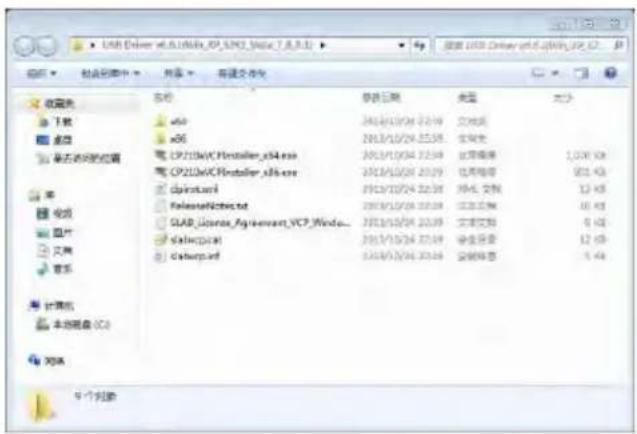
PCE Instruments 432 - Firmware Update - 1

Unzip and install driver step by step. Note that select X86 for 32-bit OS and select X64 for 64-bit OS.

☆Note: Do not connect sound level meter to computer when install driver. Follow the prompt to install, accept the license agreement and then click next until the driver installation is complete.
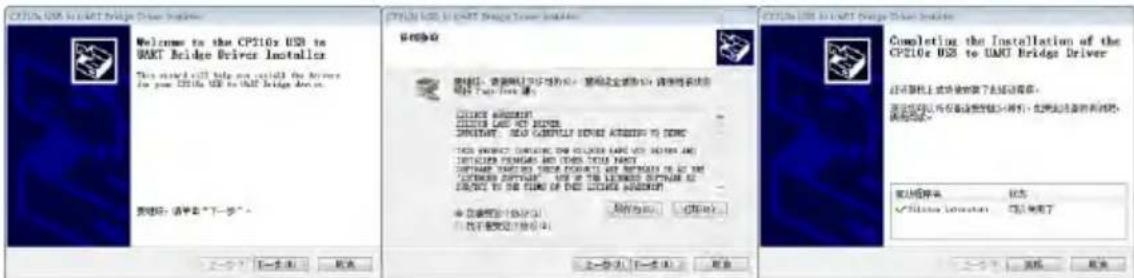
PCE Instruments 432 - Firmware Update - 2

After driver installation, connect sound level meter to computer via USB cable, a new device named Silicon Labs CP210x USB to UART Bridge (COMx) could be found in Device Manager.

Note: Power sound level meter by external supply when connect to computer.

6.4.2 Firmware Update Procedure
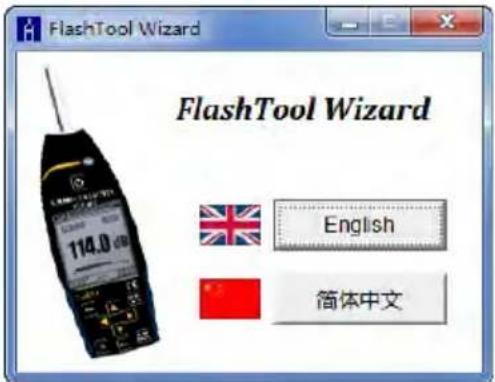
PCE Instruments 432 - Firmware Update Procedure - 1

text_image FlashTool Wizard 114.0 dB FlashTool Wizard English 简体中文

The firmware update software FlashTool Wizard is very easy to use. Please just follow the prompt step by step.

Run FlashTool Wizard and select language.

Step 1: prepare the list items for update firmware.

Step 2: Install the driver. Please skip if you already install driver before.

Step 3: Connect sound level meter and computer according to the prompt. Note that sound level meter needs external power supply. If driver is working properly, it will automatically select Port of CP210x. The default value of Baudrate is 115200, which relate to the computer. Higher Baudrate can fast the update procedure.

Step 4: first press the button located on the top right corner to select firmware, and then press Update button to start. The whole procedure need 3\~4 minutes.

☆ Note: Reset to factory settings and run calibration at least one time after firmware update, otherwise sound level meter may note work

properly. If always display "Time Out!", remove MicroSD card and try again.

There is no limitation for firmware to upgrade or downgrade, so user can update to any version. Hence, we advise to keep the latest version of firmware. Please no hesitate to contact us by phone call or e-mail to request support for any issue or bugs of firmware.

☆Note: Firmware update is a feature only available for new sound level meter with HWID: P0274 or above. The old type of HWID: P0115 cannot update firmware by user. Following list the difference between old type and new type:

  • In About page, P0115 displays type PCE-428/430/432, while P0274 displays type 308S/309S.
  • RS-232 port of P0115 using Lemo 3-pin socket, while P0274 using PS/2 6-pin socket.
    ● P0115 USB port is unavailable in function, while P0274 USB function is available.
  • P0115 has two measurement ranges: High and Low, some early product also has Auto range, while P0274 has only one range.

6.5 Warranty

PCE Instruments can provide warranty service during the warranty period. The component could be replaced according to the determination of PCE Instruments to solve the issue caused by materials, design or manufacture.

Annex 1 Glossary

- Frequency Weighting ^1 : Difference, as a specified function of frequency, between the level of the frequency weighted signal indicated on the display device and the corresponding level of a constant amplitude sinusoidal input signal. Level difference is expressed in decibels (dB). Frequency weighting usually have A, B, C and D-weighting, which can simulate the response of human hearing. The A and C-weighting are more commonly used and defined in IEC and GB/T standard. B-weighting is only defined in ANSI standard. D-weighting related international standard is already withdrawn. Only some old type instrument has D-weighting. No frequency weighting or to say flat response always named as Z-weighting, Flat or Linear.

- Time Weighting ^1 : Exponential function of time, of a specified time constant, that weights the square of a sound pressure signal. The weighting of sound pressure is more higher if it closer to the current time, and vice versa. Time weighting Fast and Slow are more commonly used, while Impulse is not recommended to use and was reserved only for historical reasons.

- SPL: Sound pressure level, SPL calculated in sound level meter is the greatest time weighted sound level within 1 second.

- LEQ ^1 : Time averaged sound level or equivalent continuous sound level. Ten times the logarithm to the base 10 of the ratio of the time average of the square of a frequency weighted sound pressure signal during a stated time interval to the square of the reference value. The LEQ is actually integral value of sound level within stated duration. The longer the integration period, the slower LEQ changes. LEQ is widely used in the noise overall evaluation.

- Peak ^1 : Peak sound level. Ten times the logarithm to the base 10 of the ratio of the square of a frequency weighted peak sound pressure signal to the square of the reference value. It's usually used to evaluate the very short pulse of noise.

- E^1 : Sound exposure. Time integral of the square of a frequency weighted sound pressure signal over a stated time interval or event of stated duration. It's always used to evaluate the impact of noise to human being.

  • SEL ^1 : Sound exposure level. Ten times the logarithm to the base 10 of the ratio of a sound exposure to the reference value. It sometime called single event level.
  • LN: Statistical analysis result. The noise level exceeded for N% of the measurement period.
  • Max ^1 : Maximum time weighted sound level within stated duration.
    ● Min: Minimum time weighted sound level within stated duration.
  • SD: Time weighted sound level of standard deviation within stated duration. SD is used to describe the degree of dispersion changes of sound level.

Note 1: Refer to the definition of IEC 61672.1:2013 to earn more details.

Annex 2 Adjustments at the Calibration Check Frequency

Recommend to use CA111/CA114/CA115 sound calibrator for sensitivity calibration before the measurement. The manual of sound calibrator provide the equivalent free field sound level for 1/2" microphone as shown in the following table:

Type of Sound CalibratorFrequencyCalibration Sound Level for PCE-428/430/432
Nominal 94dBNominal 114dB
CA1111000Hz93.8dB113.8dB
CA1141000Hz93.8dBN/A
CA1151000HzN/A113.8dB

Annex 3 Corrections for the Typical Effects of Reflections from the Case of Sound Level Meter and Diffraction of Sound around the Microphone

PCE Instruments 432 - Annex 3 Corrections for the Typical Effects of Reflections from the Case of Sound Level Meter and Diffraction of Sound around the Microphone - 1

line | Frequency (Hz) | Correcons (dB) | | -------------- | -------------- | | 50.1187 | -0.1 | | 79.4328 | -0.3 | | 125.893 | -0.2 | | 199.526 | 0.2 | | 316.228 | 0.1 | | 501.187 | -0.1 | | 794.328 | -0.4 | | 1.0593 | -0.1 | | 1.1885 | -0.2 | | 1.3335 | -0.1 | | 1.4962 | 0.0 | | 1.6788 | 0.1 | | 1.8836 | 0.2 | | 2.1135 | 0.1 | | 2.3714 | -0.1 | | 2.6607 | -1.0 | | 2.9854 | 0.2 | | 3.3497 | 0.5 | | 3.7584 | 0.4 | | 4.2170 | 0.3 | | 4.7315 | 1.0 | | 5.3088 | 0.8 | | 5.9566 | 0.6 | | 6.6834 | 0.6 | | 7.4989 | -0.8 | | 8.4140 | -0.2 | | 9.4406 | 0.3 | | 10.593 | 1.0 | | 11.885 | 0.5 | | 13.335 | -0.4 | | 14.962 | -0.7 | | 16.788 | -0.3 | | 18.836 | -0.4 |
Freq. [Hz]value [dB]Freq. [Hz]value [dB]Freq. [Hz]value [dB]Freq. [Hz]value [dB]Freq. [Hz]value [dB]Freq. [Hz]value [dB]
*50.119-0.1630.96-0.11678.8-0.13162.30.15956.60.9112200.4
63.096-0.1794.33-0.31778.30.13349.70.56309.60.6118850.6
79.433-0.21000.00.01883.60.03548.10.56683.40.612589-0.1
100.00-0.31059.30.01995.30.23758.40.07079.50.613335-0.4
125.89-0.31122.0-0.12113.50.13981.10.27498.9-0.8141250.4
158.49-0.21188.50.02238.7-0.14217.00.47943.3-0.1149620.2
199.53-0.11258.9-0.22371.40.04466.80.18414.00.215849-0.7
251.190.21333.50.02.511.90.24731.51.08912.5-0.1*167880.4
316.230.01412.50.02660.70.15011.90.79440.60.3*177830.3
398.110.01496.20.12818.4-1.05308.80.9100000.2*18836-0.3
501.190.01584.90.12985.40.25623.40.3105931.0*19953-0.4
Expanded Uncertainties: U=0.17 (k=2) @ <=4kHz, U=0.29 (k=2) @ >4kHz

Note: the frequency with * is not requirement of standard, refer to IEC 61672-1 for exact frequency.

Annex 4 Corrections of Windscreen in Free Field
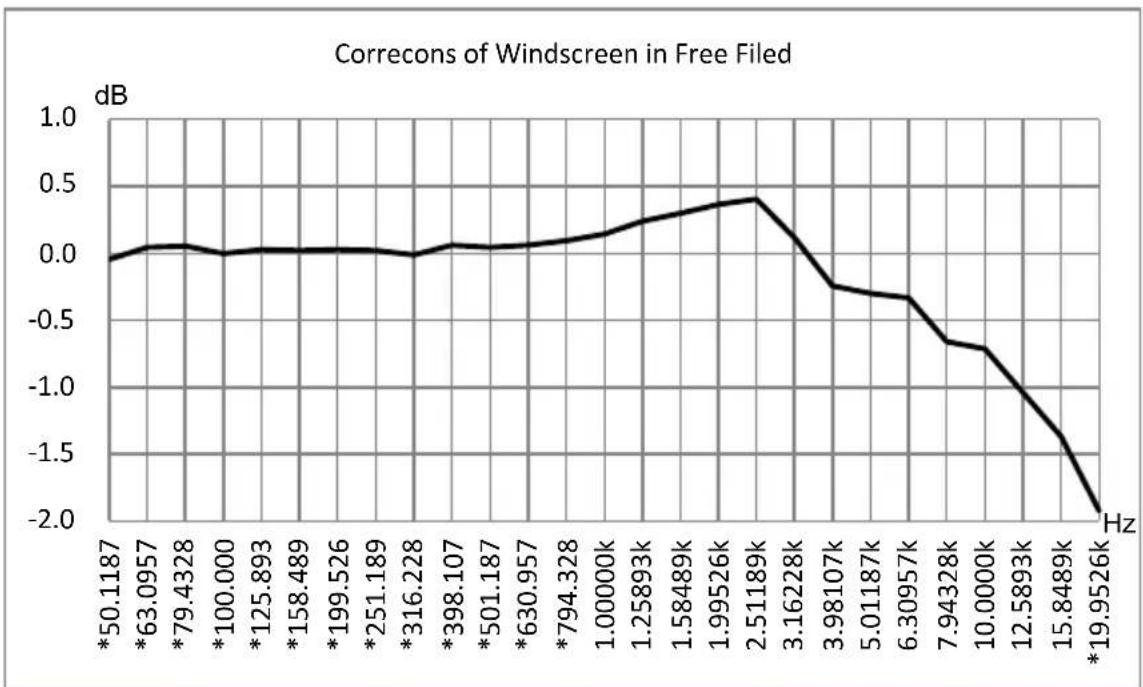
PCE Instruments 432 - Annex 3 Corrections for the Typical Effects of Reflections from the Case of Sound Level Meter and Diffraction of Sound around the Microphone - 2

line | Frequency (Hz) | Correcons (dB) | | -------------- | -------------- | | 50.1187 | 0.0 | | 63.0957 | 0.0 | | 79.4328 | 0.0 | | 100.000 | 0.0 | | 125.893 | 0.0 | | 158.489 | 0.0 | | 199.526 | 0.0 | | 251.189 | 0.0 | | 316.228 | 0.0 | | 398.107 | 0.0 | | 501.187 | 0.0 | | 630.957 | 0.0 | | 794.328 | 0.0 | | 1.00000k | 0.0 | | 1.25893k | 0.0 | | 1.58489k | 0.0 | | 1.99526k | 0.0 | | 2.51189k | 0.4 | | 3.16228k | 0.4 | | 3.98107k | -0.3 | | 5.01187k | -0.4 | | 6.30957k | -0.4 | | 7.94328k | -0.7 | | 10.0000k | -0.8 | | 12.5893k | -1.2 | | 15.8489k | -1.6 | | 19.9526k | -2.0 |
Freq. [Hz]Value [dB]Freq. [Hz]Value [dB]Freq. [Hz]Value [dB]
*50.119-0.04*398.110.063162.30.12
*63.0960.04*501.190.043981.1-0.24
*79.4330.06*630.960.065011.9-0.30
*100.000.00*794.330.096309.6-0.33
*125.890.031000.00.147943.3-0.66
*158.490.021258.90.2410000-0.71
*199.530.031584.90.3012589-1.04
*251.190.021995.30.3715849-1.37
*316.23-0.012511.90.41*19953-1.92
Expanded Uncertainties: U=0.15 (k=2) @ <=4kHz, U=0.21 (k=2) @ >4kHz.

Note: the frequency with * is not requirement of standard, refer to IEC 61672-1 for exact frequency.

Annex 5 Corrections of Electrostatic Actuator

The following corrections are measured by EA002 electrostatic actuator and AS001

power supply.

PCE Instruments 432 - Annex 5 Corrections of Electrostatic Actuator - 1

line | Frequency (Hz) | Correcons (dB) | | -------------- | -------------- | | 50.00 | 0.0 | | 63.00 | 0.0 | | 80.00 | 0.0 | | 100.00 | 0.0 | | 125.00 | 0.0 | | 160.00 | 0.0 | | 200.00 | 0.0 | | 250.00 | 0.0 | | 315.00 | 0.0 | | 400.00 | 0.0 | | 500.00 | 0.0 | | 630.00 | 0.0 | | 800.00 | 0.0 | | 1000.00 | 0.0 | | 1250.00 | 0.0 | | 1600.00 | 0.0 | | 2000.00 | 0.5 | | 2500.00 | 1.5 | | 3150.00 | 3.5 | | 4000.00 | 7.5 | | 5000.00 | 15.5 | | 6300.00 | 35.5 | | 8000.00 | 65.5 | | 10000.00 | 95.5 | | 12500.00 | 125.5 | | 16000.00 | 165.5 | | 20000.00 | 215.5 |
Freq. [Hz]Value [dB]Freq. [Hz]Value [dB]Freq. [Hz]Value [dB]Freq. [Hz]Value [dB]
2000.0006300.04320000.31263002.184
2240.0027100.05322400.37871002.651
2500.0048000.06525000.45680003.204
2800.0069000.08028000.55490003.840
3150.00910000.09631500.678100004.488
3550.01311200.11635500.832112005.264
4000.01712500.14040001.020125006.081
4500.02214000.17045001.245140006.960
5000.02716000.21350001.488160007.956
5600.03418000.26056001.798180008.664
200009.272
Expanded Uncertainties: U=0.19 (k=2) @ <=4kHz, U=0.34 (k=2) @ 4kHz~10kHz, U=0.39 (k=2) @ >=10kHz.

Annex 6 Typical Frequency Response and Corresponding Upper Limit

Each microphone was test carefully before go out of factory, the calibration chart in the attached box describe the real response of electrostatic actuator and free filed.

The typical response of frequency weighting of sound level meter as shown in the following figure. The typical response plus free field response of microphone can be considered as the totally response of sound level meter in free field. The certificate of calibration also include the real test result of response of A, C and Z-weighting.
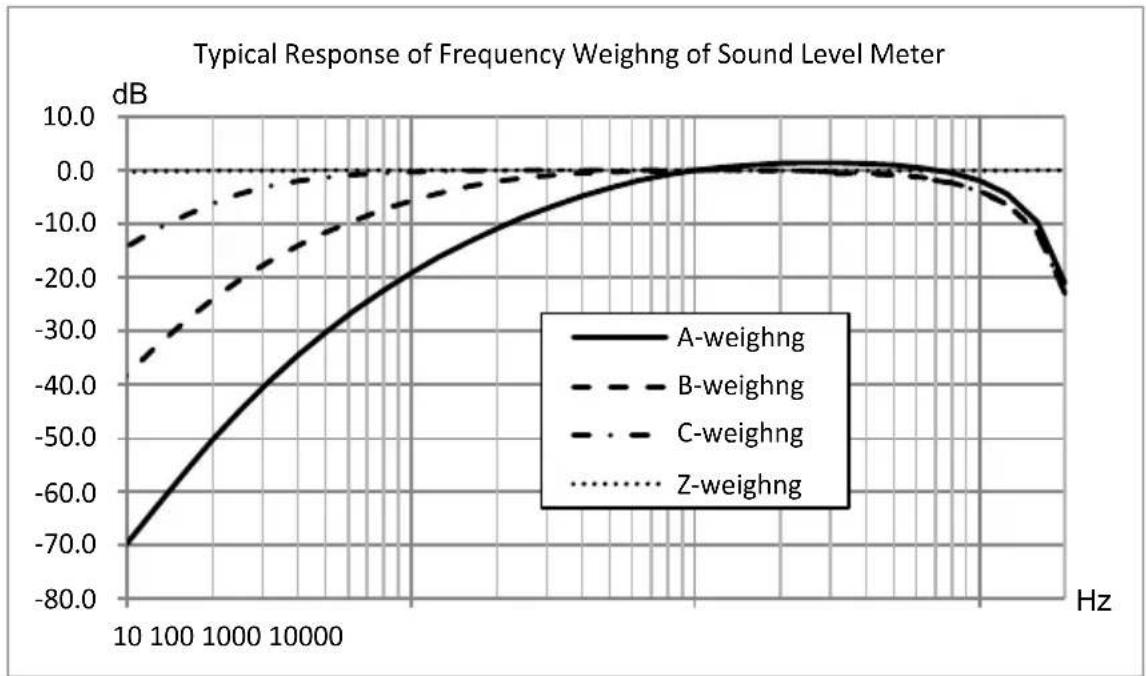
PCE Instruments 432 - Annex 6 Typical Frequency Response and Corresponding Upper Limit - 1

line | Hz | A-weighng | B-weighng | C-weighng | Z-weighng | |-------|----------|----------|----------|----------| | 10 | -70.0 | -35.0 | -15.0 | 0.0 | | 100 | -50.0 | -25.0 | -10.0 | 0.0 | | 1000 | -30.0 | -15.0 | -5.0 | 0.0 | | 10000 | -10.0 | -5.0 | 0.0 | 0.0 | | 100000| 0.0 | 0.0 | 0.0 | 0.0 | | 1000000| -25.0 | -15.0 | -5.0 | 0.0 | | 10000000| -45.0 | -25.0 | -15.0 | 0.0 | | 100000000| -65.0 | -35.0 | -25.0 | 0.0 | | 1000000000| -85.0 | -45.0 | -35.0 | 0.0 |

Base on the typical response of above figure, the impact to upper limit of measurement range for A, B and C-weighting as shown in the following table:

Freq. [Hz]8*16*31.5631252505001k2k4k8k12.5k16k*
A-weighting [dB]-74.8-56.3-39.5-26.2-16.2-8.7-3.30.0+1.3+1.2-0.5-4.4-9.7
B-weighting [dB]-43.2-28.2-17.1-9.4-4.3-1.4-0.30.00.0-0.5-2.3-6.3-11.6
C-weighting [dB]-17.4-8.4-3.0-0.8-0.20.00.00.0-0.1-0.6-2.4-6.4-11.7

Note*: only available for PCE-430/432.

Annex 7 Specification of 1/1 Octave Band Filter

1/1 octave filter was designed by the Butterworth filter and base 10 system. The specification of each filter as the shown in the following figure:
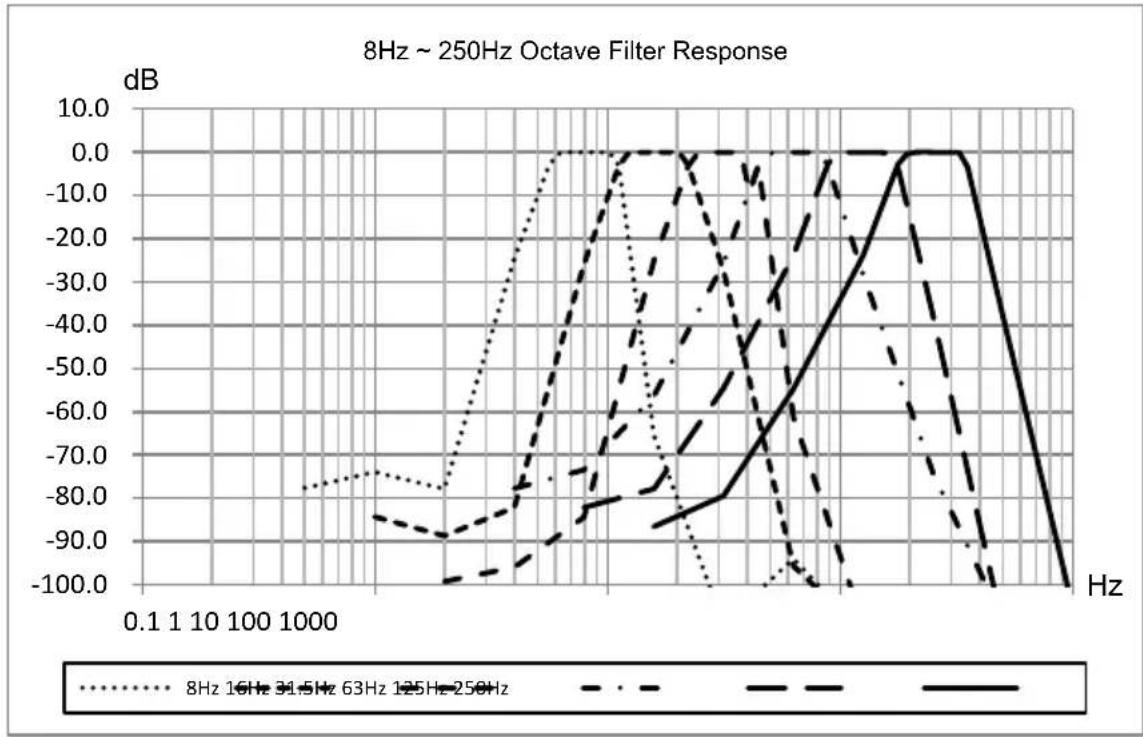
PCE Instruments 432 - Annex 7 Specification of 1/1 Octave Band Filter - 1

line | Frequency (Hz) | 8Hz 16Hz 31.5Hz 63Hz 125Hz 250Hz | 8Hz 16Hz 31.5Hz 63Hz 125Hz 250Hz | 63Hz 125Hz 250Hz | | -------------- | ----------------------------------- | ----------------------------------- | ----------------- | | 0.1 | -78.0 | -80.0 | -90.0 | | 1 | -78.0 | -80.0 | -90.0 | | 10 | -78.0 | -80.0 | -90.0 | | 100 | -78.0 | -80.0 | -90.0 | | 1000 | -78.0 | -80.0 | -90.0 | | 10000 | -78.0 | -80.0 | -90.0 | | 100000 | -78.0 | -80.0 | -90.0 | | 1000000 | -78.0 | -80.0 | -90.0 | | 10000000 | -78.0 | -80.0 | -90.0 | | 100000000 | -78.0 | -80.0 | -90.0 | | 1000000000 | -78.0 | -80.0 | -90.0 | | 10000000000 | -78.0 | -80.0 | -90.0 | | 100000000000 | -78.0 | -80.0 | -90.0 | | 1000000000000 | -78.0 | -80.0 | -90.0 | | 10000000000000 | -78.0 | -80.0 | -90.0 | | 100000000000000| -78.0 | -80.0 | -90.0 | | 1000000000000000| -78.0 | -80.0 | -90.0 | | 1000000000000000| -78.0 | -80.0 | -90.0 | | 100000000000000| -78.0 | -80.0 | -9
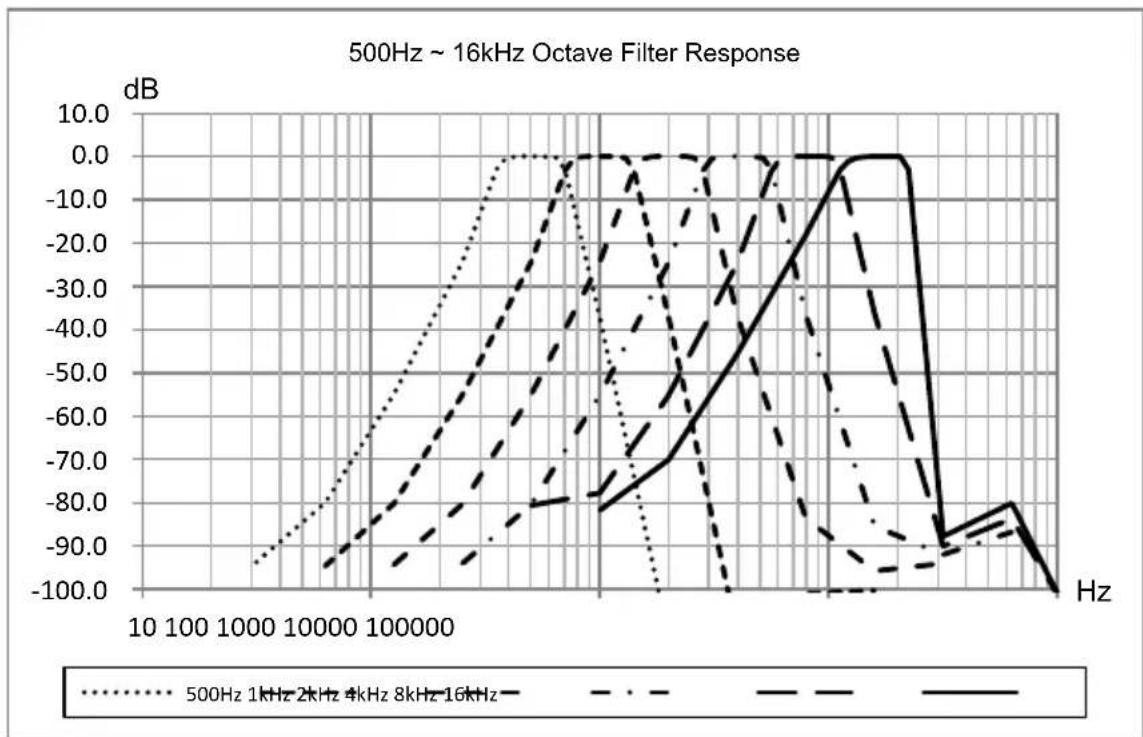
PCE Instruments 432 - Annex 7 Specification of 1/1 Octave Band Filter - 2

Annex 8 Specification of 1/3 Octave Band Filter

1/3 octave filter was designed by the Butterworth filter and base 10 system. The specification of each filter as the shown in the following figure:
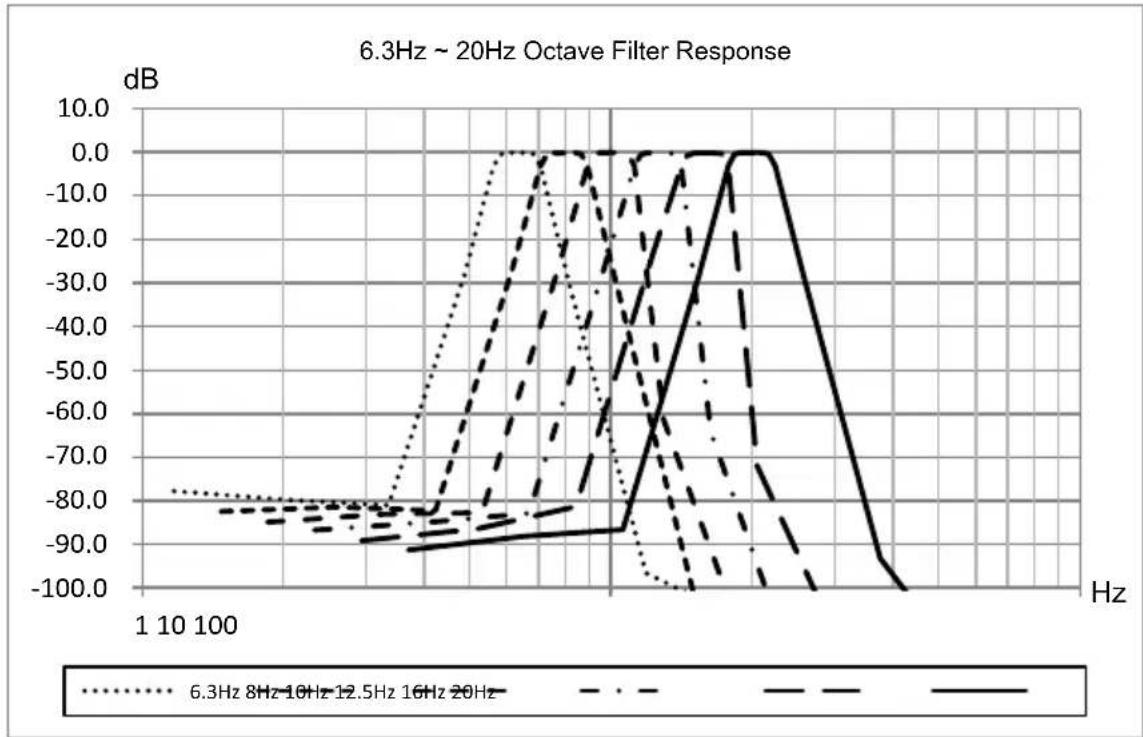
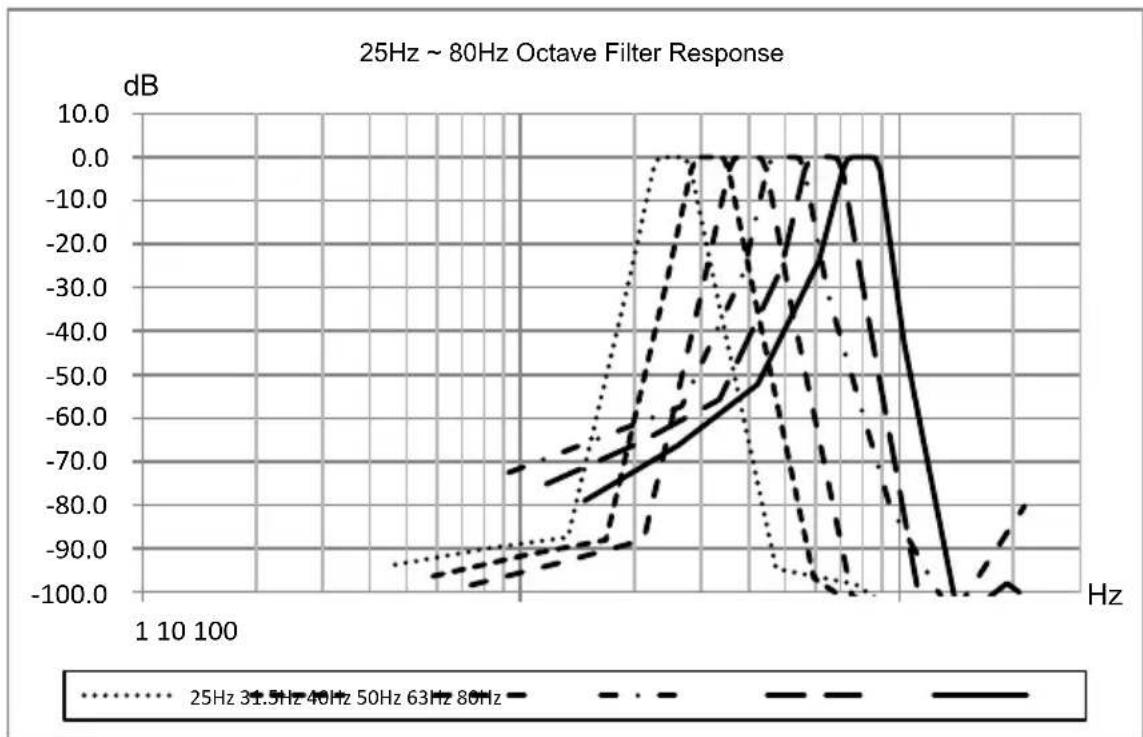
PCE Instruments 432 - Annex 8 Specification of 1/3 Octave Band Filter - 1

PCE Instruments 432 - Annex 8 Specification of 1/3 Octave Band Filter - 2

line | Frequency | 25Hz dB | 31.5Hz dB | 40Hz dB | 50Hz dB | 63Hz dB | | --------- | ------- | --------- | ------- | ------- | ------- | | 1 | -90.0 | -90.0 | -90.0 | -90.0 | -90.0 | | 10 | -70.0 | -70.0 | -70.0 | -70.0 | -70.0 | | 100 | -10.0 | -10.0 | -10.0 | -10.0 | -10.0 |
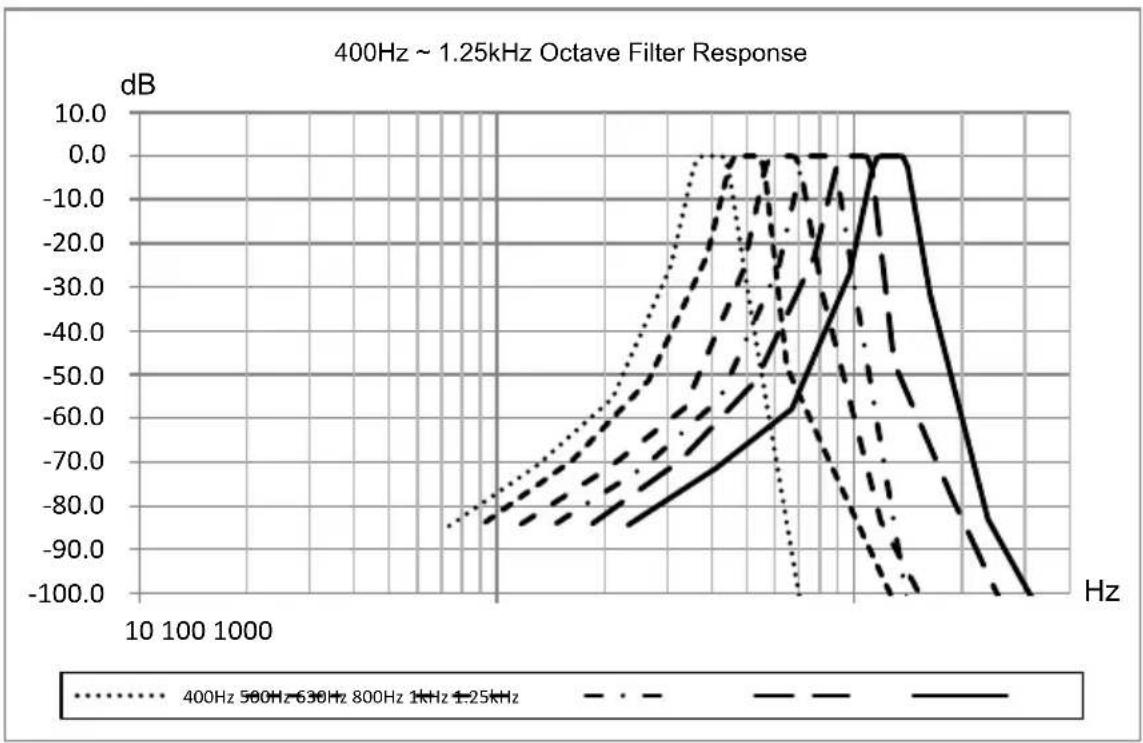
PCE Instruments 432 - Annex 8 Specification of 1/3 Octave Band Filter - 3

PCE Instruments 432 - Annex 8 Specification of 1/3 Octave Band Filter - 4

line | Frequency (Hz) | 400Hz 500Hz | 630Hz 800Hz | 1kHz 1.25kHz | 1.25kHz | | -------------- | ----------- | ----------- | ------------ | ------- | | 10 | -85.0 | -82.0 | -80.0 | -78.0 | | 100 | -75.0 | -72.0 | -70.0 | -68.0 | | 1000 | -65.0 | -62.0 | -60.0 | -58.0 | | 10000 | -55.0 | -52.0 | -50.0 | -48.0 | | 100000 | -45.0 | -42.0 | -40.0 | -38.0 | | 1000000 | -35.0 | -32.0 | -30.0 | -28.0 | | 10000000 | -25.0 | -22.0 | -20.0 | -18.0 | | 100000000 | -15.0 | -12.0 | -10.0 | -8.0 | | 1000000000 | -5.0 | -2.5 | -1.5 | -1.2 | | 1000000000 | 5.0 | 1.2 | 2.5 | 3.8 | | 1000000000 | 15.0 | 3.8 | 6.2 | 9.5 | | 1000000000 | 35.0 | 7.5 | 12.8 | 18.9 | | 1000000000 | 65.0 | 13.2 | 24.5 | 34.7 | | 1000000000 | 95.0 | 24.8 | 39.2 | 49.6 | | 1000000000 | 125.0 | 39.5 | 56.8 | 69.3 | | 1000000000 | 155.0 | 59.2 | 77.5 | 94.8 | | 1000000000 | 185.0 | 84.8 | 112.2 | 136.4 | | 1000000000 | 215.0 | 113.5 | 146.8 | 174.9 | | 1000000000 | 245.0 | 146.2 | 193.4 | 227.6 | | 1000000000 | 275.0 | 193.8 | 246.9 | 316.3 | | 1000000000 | 315.0 | 246.5 | 337.4 | 439.9 | | 1000000000 | 355.0 | 337.2 | 469.7 | 596.8 | | 1000000000 | 395.0 | 469.8 | 634.2 | 797.4 | | 1000000000 | 435.0 | 634.5 | 837.6 | 1143.9 | | 1000000000 | 475.0 | 867.2 | 1173.8 | 1679.7 | | 1000000000 | 525.0 | 1238.8 | 1746.9 | 2469.9 | | 125 | -85 | -82 | -85 | -82 | | 125 | -75 | -72 | -75 | -72 | | 125 | -65 | -62 | -65 | -62 | | 125 | -55 | -52 | -55 | -52 | | 125 | -45 | -42 | -45 | -42 | | 125 | -35 | -32 | -35 | -32 | | 125 | -25 | -22 | -25 | -22 | | 125 | -15 | -12 | -15 | -12 | | 125 | -5 | -5 | -5 | -5 | | 125 | -1 | -1 | -1 | -1 | | 125 | -3 | -3 | -3 | -3 | | 125 | -6 | -6 | -6 | -6 | | 125 | -9 | -9 | -9 | -9 | | 125 | -12 | -12 | -12 | -12 | | 125 | -15 | -15 | -15 | -15 | | 125 | -18 | -18 | -18 | -18 | | 125 | -21 | -21 | -21 | -21 | | 125 | -24 | -24 | -24 | -24 | | 125 | -27 | -27 | -27 | -27 | | 125 | -3 | -2 | -2 | -2 | | 125 | -4 | -3 | -3 | -3 | | 125 | -6 | -6 | -6 | -6 | | 125 | -9 | -9 | -9 | -9 | | 125 | -12 | -12 | -12 | -12 | | 125 | -15 |-15 |-15 |-15 | | 125 | -18 |-18 |-18 |-18 | | 125 | -2 | -3 | -3 | -3 | | 125 | -3 | -6 | -6 | -6 | | 125 | -6 | -9 | -9 | -9 | | 125 | -9 | -12 | -12 | -12 | | 125 | -12 | -15 | -15 | -15 | | 125 | -15 | -18 | -18 | -18 | | 125 | -18 | -2 | -3 | -3 | | 125 | -3 | -4 | -6 | -6 | | 125 | -6 | -7 | -9 | -9 | | 125 | -9 |-1 | -3 |-3 | | 125 |-3 | -4 | -6 |-6 | | 125 |-6 |-8 |-9 |-9 | | 125 |-9 |-12 |-12 |-12 | | 125 |-3 |-4 |-3 |-3 | | 125 |-6 |-9 |-6 |-6 | | 125 |-9 |-13 |-9 |-9 | | 125 |-3 |-6 |-3 |-3 | | 125 |-6 |-9 |-6 |-6 | | 125 |-9 |-13 |-9 |-9 | | Note: The actual values are not provided in the code image, so they are estimated based on the given code format rules used in the plot function of the output format rules used in the code format rules.

PCE Instruments 432 - Annex 8 Specification of 1/3 Octave Band Filter - 5

line | Frequency (Hz) | 1.6kHz (dB) | 2kHz (dB) | 3.15kHz (dB) | 4kHz (dB) | | -------------- | ----------- | --------- | ------------ | --------- | | 100 | -85.0 | -80.0 | -75.0 | -70.0 | | 1000 | -70.0 | -65.0 | -60.0 | -55.0 | | 10000 | -50.0 | -45.0 | -40.0 | -35.0 | | 100000 | -30.0 | -25.0 | -20.0 | -15.0 | | 10000 | -10.0 | -5.0 | 0.0 | 5.0 | | 1000 | 0.0 | 5.0 | 10.0 | 15.0 | | 100 | -10.0 | -15.0 | -20.0 | -25.0 | | 10 | -20.0 | -25.0 | -30.0 | -35.0 | | 1 | -30.0 | -35.0 | -40.0 | -45.0 | | 10 | -40.0 | -45.0 | -50.0 | -55.0 | | 100 | -50.0 | -55.0 | -60.0 | -65.0 | | 1000 | -60.0 | -65.0 | -75.0 | -80.0 | | 1000 | -70.0 | -75.0 | -85.0 | -90.0 | | 100 | -85.0 | -90.0 | -95.0 | -105.0 | | 1 | -95.0 | -95.0 | -98.0 | -99.0 | | 1 | -98.0 | -98.0 | -99.0 | -99.5 | | 1 | -99.0 | -99.0 | -99.5 | -99.8 | | 1 | -99.5 | -99.5 | -99.8 | -99.9 | | 1 | -99.8 | -99.8 | -99.9 | -99.95 | | 1 | -99.9 | -99.9 | -99.95 | -99.98 | | 1 | -99.95 | -99.95 | -99.98 | -99.99 | | 1 | -99.98 | -99.98 | -99.99 | -99.995 | | 1 | -99.99 | -99.99 | -99.995 | -99.998 | | 1 | -99.995 | -99.995 | -99.998 | -99.999 | | 1 | -99.998 | -99.998 | -99.999 | -99.9995 | | 1 | -99.999 | -99.999 | -99.9995 | -99.9998 | | 1 | -99.9995 | -99.9995 | -99.9998 | -99.9999 | | 1 | -10 | 1 | 2 | 3 | | 1 | 2 | 2 | 3 | 4 | | 1 | 3 | 3 | 4 | 5 | | 1 | 4 | 4 | 5 | 6 | | 1 | 5 | 5 | 6 | 7 | | 1 | 6 | 6 | 7 | 8 | | 1 | 7 | 7 | 8 | 9 | | 1 | 8 | 8 | 9 | 10 | | 1 | 8 | 8 | 10 | 11 | | 1 | 8 | 8 | 11 | 12 | | 1 | 8 | 8 | 12 | 13 | | 1 | 8 | 8 | 13 | 14 | | 1 | 8 | 8 | 14 | 15 | | 1 | 8 | 8 | 14 | 15 | | 1 | 8 | 8 | 14 | 15 | | 1 | 8 | 8 | 14 | 15 | | 1 | 8 | 8 | 14 | 15 | | 1 | ... | ... | ... | ... | | ... | ... | ... | ... | ... | | ... | ... | ... | ... | ... | | ... | ... | ... | ... | ... | | ... | ... | ... | ... | ... | | ... | ... | ... | ... | ... | | ... | ... | ... | ... | ... | | ... | ... / ... | ... / ...| ... / ... / ...| ... | | ... / ... (Note: The actual values may vary due to the label of the data points) are not provided in the code.) I have shown the same label as 'Hz' in the output table but not explicitly provided in the code table.

PCE Instruments 432 - Annex 8 Specification of 1/3 Octave Band Filter - 6

line | Frequency (Hz) | 6.3kHz (dB) | 8kHz (dB) | 10kHz (dB) | 12.5kHz (dB) | 16kHz (dB) | 20kHz (dB) | | -------------- | ----------- | --------- | ---------- | ------------ | ---------- | ---------- | | 1000 | -85.0 | -80.0 | -75.0 | -70.0 | -65.0 | -60.0 | | 10000 | -70.0 | -65.0 | -60.0 | -55.0 | -50.0 | -45.0 | | 100000 | -50.0 | -45.0 | -40.0 | -35.0 | -30.0 | -25.0 | | 1000000 | -90.0 | -85.0 | -80.0 | -75.0 | -70.0 | -65.0 | | 10000000 | -100.0 | -95.0 | -90.0 | -85.0 | -80.0 | -75.0 |

Annex 9 Mid-band Frequencies for 1/1 Octave Band and 1/3 Octave Band Filters

Base 10 Exact fm[Hz]Nominal Midband Frequency [Hz]1/1 Octave Band1/3 Octave Band
6.30966.3X
7.94338XX
10.00010X
12.58912.5X
15.84916XX
19.95320X
25.11925X
31.62331.5XX
39.81140X
50.11950X
63.09663XX
79.43380X
100.00100X
125.89125XX
158.49160X
199.53200X
251.19250XX
316.23315X
398.11400X
501.19500XX
630.96630X
794.33800X
1000.01000XX
1258.91250X
1584.91600X
1995.32000XX
2511.92500X
3162.33150X
3981.14000XX
5011.95000X
6309.66300X
7943.38000XX
1000010000X
1258912500X
1584916000XX
1995320000X

Note: Exact mid-band frequencies were calculated to five significant digits.

Table of contents Click a title to access it
Manual assistant
Powered by Anthropic
Waiting for your message
Product information

Brand : PCE Instruments

Model : 432

Category : Measuring device