
T 240 - Measuring device PCE Instruments - Free user manual and instructions
Find the device manual for free T 240 PCE Instruments in PDF.


| Product Type | Handheld Tachometer, Stroboscope, Thermometer |
| Dimensions | 207 x 67 x 39 mm (8.15 x 2.63 x 15.3 in) |
| Weight | 230 g (0.5 lb) without batteries |
| Power Supply | 4 x 1.5 V AA batteries or 9 V DC mains adaptor (100 mA) |
| Display | LC display, 43 x 33 mm, 5 digits |
| Optical RPM Range | 5 ... 99,999 RPM |
| Contact RPM Range | 0.5 ... 19,999 RPM |
| Contact Speed Range | 0.05 ... 1,999.9 m/min (0.2 ... 6,561.4 ft/min) |
| Stroboscope Range | 100 ... 99,990 RPM/FPM |
| Temperature Range (Type K) | -50.0 ... 1300.0 °C (-58.0 ... 2372.0 °F) |
| Temperature Range (PT1000) | -10.0 ... 70.0 °C (14.0 ... 158.0 °F) |
| Accuracy (RPM) | ±(0.05 % of rdg. + 1 digit) |
| Interface | RS232 (3.5 mm output) |
| Memory | Highest and lowest measured value |
| Auto Power Off | After 10 minutes of inactivity (configurable) |
| Environmental Conditions | 0 ... 50 °C, <80 % RH, non-condensing |
| Delivery Scope | Device, measuring tips (outer/inner cone), measuring wheel, reflective tape, carrying case, 4 AA batteries, user manual |
| Maintenance | Clean with damp cloth and pH-neutral cleaner; do not use abrasives or solvents |
| Safety | Read manual; use only as described; avoid extreme temperatures, shocks, and moisture; do not open case; use only qualified personnel |
| Spare Parts & Reparability | Contact PCE Instruments for spare parts and repairs; only qualified personnel should perform repairs |
| General Information | Manufacturer: PCE Instruments; Model: T 240; User manual available in multiple languages on www.pce-instruments.com |
Frequently Asked Questions - T 240 PCE Instruments
User questions about T 240 PCE Instruments
0 question about this device. Answer the ones you know or ask your own.
Ask a new question about this device
Download the instructions for your Measuring device in PDF format for free! Find your manual T 240 - PCE Instruments and take your electronic device back in hand. On this page are published all the documents necessary for the use of your device. T 240 by PCE Instruments.
USER MANUAL T 240 PCE Instruments
User manuals in various languages (français, italiano, español, português, nederlands, türk, polski, русский, 中文) can be found by using our product search on: www.pce-instruments.com
Last change: 10 August 2022
v1.0
Contents
1 Safety notes....1
2 Specifications.... 2
3 Delivery scope.... 3
4 Device description .... 4
5 Making a measurement .... 5
5.1 Stroboscope.... 5
5.2 Optical speed measurement.... 5
5.3 Contact revolution measurement.... 5
5.4 Contacting speed measurement.... 5
5.5 Temperature measurement with a thermocouple.... 5
5.6 Temperature measurement with a PT 1000 temperature sensor .... 5
5.7 Freezing measured value (HOLD) 6
5.8 Highest and lowest measured value (REC) 6
6 Settings....6
6.1 Automatic power-off 6
6.2 Changing the temperature unit.... 6
7 Replacing the batteries .... 6
8 RS232 interface 7
9 Contact....8
10 Disposal 8
1 Safety notes
Please read this manual carefully and completely before you use the device for the first time. The device may only be used by qualified personnel and repaired by PCE Instruments personnel.
Damage or injuries caused by non-observance of the manual are excluded from our liability and not covered by our warranty.
- The device must only be used as described in this instruction manual. If used otherwise, this can cause dangerous situations for the user and damage to the meter.
- The instrument may only be used if the environmental conditions (temperature, relative humidity, ...) are within the ranges stated in the technical specifications. Do not expose the device to extreme temperatures, direct sunlight, extreme humidity or moisture.
- Do not expose the device to shocks or strong vibrations.
- The case should only be opened by qualified PCE Instruments personnel.
- Never use the instrument when your hands are wet.
- You must not make any technical changes to the device.
- The appliance should only be cleaned with a damp cloth. Use only pH-neutral cleaner, no abrasives or solvents.
- The device must only be used with accessories from PCE Instruments or equivalent.
- Before each use, inspect the case for visible damage. If any damage is visible, do not use the device.
- Do not use the instrument in explosive atmospheres.
- The measurement range as stated in the specifications must not be exceeded under any circumstances.
- Non-observance of the safety notes can cause damage to the device and injuries to the user.
We do not assume liability for printing errors or any other mistakes in this manual.
We expressly point to our general guarantee terms which can be found in our general terms of business.
2 Specifications
| Optical measurement | |
| Measurement range | 5 ... 99,999 RPM |
| Resolution | 0.5 RPM (<1,000 RPM)1 RPM (>1,000 RPM) |
| Accuracy | ±(0.05 % of rdg. + 1 digit) |
| Detection distance | 50 ... 150 mm, 2 ... 6 inch (typical)maximum 300 mm, 12 inch(depending on the ambient lighting) |
| Contact measurement | |
| Measurement range | 0.5 ... 19,999 RPM |
| Resolution | 0.5 RPM (<1,000 RPM)1 RPM (≥1,000 RPM) |
| Accuracy | ±(0.05 % of rdg. + 1 digit) |
| Measurement range | 0.05 ... 1,999.9 m/min |
| Resolution | 0.05 m/min (<100 m/min)0.1 m/min (≥100 m/min) |
| Accuracy | ±(0.5 % of rdg. + 1 digit) |
| Measurement range | 0.2 ... 6,561.4 ft/min |
| Resolution | 0.1 ft/min (<1,000 ft/min)1 ft/min (≥1,000 ft/min) |
| Accuracy | ±(0.5 % of rdg. + 1 digit) |
| Measurement range | 2.0 ... 78736.2 inch/min |
| Resolution | 0.1 inch/min (<1,000 inch/min)1 inch/min (≥1,000 inch/min) |
| Accuracy | ±(0.5 % of rdg. + 1 digit) |
| Stroboscope | |
| Measurement range | 100 ... 99,990 RPM/FPM |
| Resolution | 0.1 RPM (<1,000 PRM)1 RPM (1,000 ... 30,000 RPM)5 RPM (30,000 ... 50,000 RPM)10 RPM (50,000 ... 99,999 RPM) |
| Accuracy | ±(0.1 % of rdg. + 2 digits) |
| LED | three red LEDs |
| Temperature (type K) | |
| Measurement range | -50.0 ... 1300.0 °C |
| Resolution | 0.1 °C |
| Accuracy | ±(0.4 % of rdg. +0.5 °C) |
| Measurement range | -100.0 ... -50.1 °C |
| Resolution | 0.1 °C |
| Accuracy | ±(0.4 % of rdg. +0.5 °C) |
| Measurement range | -58.0 ... 2372.0 °F |
| Resolution | 0.1 °F |
| Accuracy | ±(0.4 % of rdg. +1 °F) |
| Measurement range | -148.0 ... -58.1 ... °F |
| Resolution | 0.1 °F |
| Accuracy | ±(0.4 % of rdg. +1.8 °F) |
| Temperature (PT1000) | |
| Measurement range | -10.0 ... 70.0 °C, 414.0 ... 158.0 °F |
| Resolution | 0.1 °C, 0.1 °F |
| Accuracy | ±1.2 °C, ±2.2 °F |
| Further specifications | |
| Display | LC display, 43 x 33 mm, 5 digits |
| Memory | highest and lowest measured value |
| Power supply (mains adaptor) | 9 V DC, 100 mA |
| Power supply (battery) | 4 x 1.5 V AA batteries |
| Power consumption | ∅42 mA |
| Automatic power off | after 10 minutes of inactivity |
| Interface | RS232 |
| Environmental conditions | 0 ... 50 °C, 32 ... 122 °F,<80 % RH, (non-condensing); magnetic field<3 V/M, <30 MHz |
| Dimensions | 207 x 67 x 39 mm, 8.15 x 2.63 x 15.3 in |
| Weight | 230 g, 0.5 lb (without batteries) |
3 Delivery scope
1 x PCE-T 240 handheld tachometer
1 x measuring tip (outer cone)
1 x hollow measuring tip (inner cone)
1 x measuring wheel
1 x reflective tape
1 x carrying case
4 x 1.5 V AA battery
1 x user manual
4 Device description

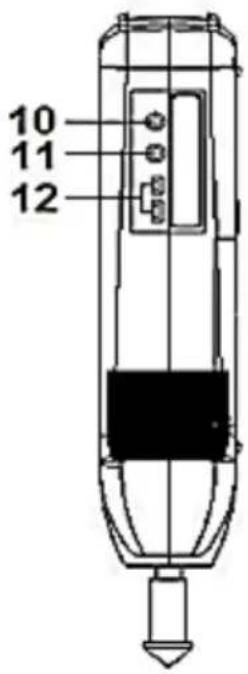
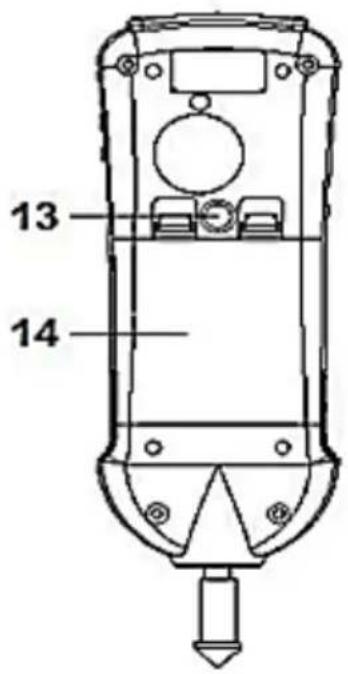

natural_image
Two simple line drawings of laboratory glassware or apparatus, no text or symbols present| No. | Description |
| 1 | Display |
| 2 | On and off key |
| 3 | Hold key, arrow up key |
| 4 | REC key, double key |
| 5 | UNIT key, arrow down key |
| 6 | Function key |
| 7 | Measuring tip (outer cone) |
| 8 | Surface speed adaptor |
| 9 | Hollow measuring tip (inner cone) |
| 10 | RS232 interface |
| 11 | PT1000 temperature sensor connection |
| 12 | Thermocouple connection K-type |
| 13 | Photo tripod connection |
| 14 | Battery compartment cover |
| 15 | Reflective tape |
| 16 | White LED for optical speed measurement |
| 17 | Strobe light with red LEDs |
| 18 | Indicator for one revolution |
| 19 | Power supply connection |
5 Making a measurement
First switch on the meter by pressing and holding the on/off key. To switch off the meter, you must also keep this key pressed. As soon as the meter is switched on, the measurement starts directly with the last measurement function used.
To select between the individual measuring functions, press the function key repeatedly.
The following functions are available:
| Display when switching | Function |
| Scope | Stroboscope |
| type | Temperature measurement with K-type thermocouple |
| Pt | Temperature measurement with a PT 1000 temperature sensor |
| Photo | Optical speed measurement |
| touch | Contact speed and velocity measurement |
5.1 Stroboscope
To make a measurement with the stroboscope function, select the "Scope" function. Align the LEDs in the direction of the test object. Now set the speed using the arrow keys. To double or halve the rotation speed, hold down the double button and then use the arrow keys.
5.2 Optical speed measurement
To make an optical speed measurement, select the "Photo" function. Stick a 1 x 1 cm piece of reflective tape onto the test object. Now switch on the test object and direct the light cone so that it shines on the reflective tape. The speed of rotation is measured. Next to the measured value, an indicator flashes once briefly as soon as the reflective tape has been recognised.
5.3 Contact revolution measurement
To make a contact revolution measurement, select the "touch" function. Plug the desired adaptor onto the meter. Select the unit "RPM" with the UNIT key. Now carry out the measurement on the test object.
Note:
The wheel attachment is only intended for speed measurement.
5.4 Contacting speed measurement
To make a contact speed measurement, select the "touch" function. Place the wheel attachment on the meter. Press the UNIT key repeatedly until the desired unit is displayed. You can then carry out the speed measurement.
5.5 Temperature measurement with a thermocouple
To perform a temperature measurement, select the "type" function. Insert a K-type thermocouple into the meter. The measured value appears on the display.
5.6 Temperature measurement with a PT 1000 temperature sensor
To carry out a temperature measurement, select the "pt" function. Insert a PT 1000 resistance temperature probe into the meter. The measured value is displayed directly.
5.7 Freezing measured value (HOLD)
To freeze the displayed reading, press the Hold key. "HOLD" appears on the display. To resume the measurement, press the Hold key again.
5.8 Highest and lowest measured value (REC)
Press the REC key. "REC" is displayed on the screen. To view the highest and lowest readings, press the REC key repeatedly. Press and hold the REC key to disable this function. As soon as this function has been switched off, the values are reset.
6 Settings
6.1 Automatic power-off
To enable or disable the automatic power off function, press and hold the function key for at least 5 seconds. The arrow keys can now be used to enable or disable automatic power off. Press the REC key to accept the setting. Use the on/off key to return to measurement mode.
Note: The "HOLD" and "REC" functions must be switched off.
6.2 Changing the temperature unit
Press and hold the function key for about 5 seconds. Then press the function key again to change the temperature unit. The temperature unit can now be changed with the arrow keys. Press the REC key to accept the setting. Press the ON/OFF key to return to measurement mode.
Note:
The "HOLD" and "REC" functions must be switched off. When the function is switched off, the values are reset.
7 Replacing the batteries
To insert or replace the batteries, first switch off the meter. Then open the battery compartment and replace the batteries. Ensure correct polarity of the batteries. Use four 1.5 V AA batteries.
8 RS232 interface
The unit has a serial RS232 interface with a 3.5 mm output. The data output is via a 16-digit stream which can be used for your specific applications.
An RS232 guide with the following connection is required to connect the meter to a serial PC output.
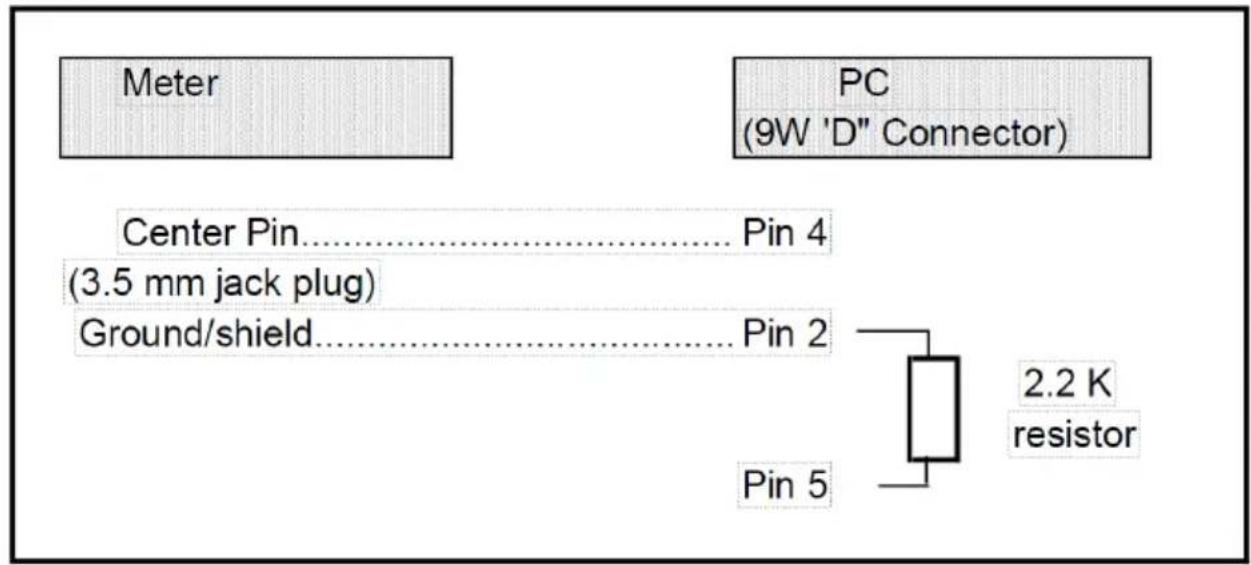
The 16-digit streams are displayed as follows:
Each digit indicates the following status:
| D15 | Start Word | ||
| D14 | 4 | ||
| D13 | 1 | ||
| D12, D11 | Annunciator for Display | ||
| ft/min = 11 | inch/min = 28 | m/min = 60 | |
| RPM = 27 | °C = 01 | °F = 02 | |
| D10 | Polarity0 = Positive 1 = Negative | ||
| D9 | Decimal Point(DP), position from right to the left0 = No DP, 1= 1 DP, 2 = 2 DP, 3 = 3 DP |
| D8 to D1 | Display reading, D1 = LSD, D8 = MSDFor example :If the display reading is 1234, then D8 to D1 is : 00001234 |
| D0 | End Word |
RS232 format: 9600, N, 8, 1
9 Contact
If you have any questions, suggestions or technical problems, please do not hesitate to contact us. You will find the relevant contact information at the end of this user manual.
10 Disposal
For the disposal of batteries in the EU, the 2006/66/EC directive of the European Parliament applies. Due to the contained pollutants, batteries must not be disposed of as household waste. They must be given to collection points designed for that purpose.
In order to comply with the EU directive 2012/19/EU we take our devices back. We either re-use them or give them to a recycling company which disposes of the devices in line with law.
For countries outside the EU, batteries and devices should be disposed of in accordance with your local waste regulations.
If you have any questions, please contact PCE Instruments.


PCE Instruments contact information
Germany France Spain
PCE Deutschland GmbH PCE Instruments France EURL PCE Ibérica S.L.
Im Langel 26 23, rue de Strasbourg Calle Mayor, 53
D-59872 Meschede 67250 Soultz-Sous-Forets 02500 Tobarra (Albacete)
Unit 11 Southpoint Business Park
Ensign Way, Southampton
Hampshire
United Kingdom, SO31 4RF
Tel: +44 (0) 2380 98703 0
Fax: +44 (0) 2380 98703 9
info@pce-instruments.co.uk
www.pce-instruments.com/english
Italy
PCE Italia s.r.l.
Via Pesciatina 878 / B-Interno 6
55010 Loc. Gragnano Pehlivan Sok. No.6/C
Capannori (Lucca)
Italia
www.pce-instruments.com/dutch Fax: +1 (561) 320-9176
info@pce-americas.com
www.pce-instruments.com/us
United States of America
PCE Americas Inc.
1201 Jupiter Park Drive, Suite 8
Jupiter / Palm Beach
33458 FL
USA
Tel: +1 (561) 320-9162
info@pce-iberica.es
www.pce-instruments.com/espanol
Turkey
www.pce-instruments.com/turkish
Denmark
PCE Instruments Denmark ApS
Birk Centerpark 40
7400 Herning
Denmark


- Contents
- Safety notes
- Delivery scope
- Making a measurement
- Stroboscope
- Optical speed measurement
- Contact revolution measurement
- Note:
- Contacting speed measurement
- Temperature measurement with a thermocouple
- Temperature measurement with a PT 1000 temperature sensor
- Freezing measured value (HOLD)
- Highest and lowest measured value (REC)
- Settings
- Automatic power-off
- Changing the temperature unit
- Replacing the batteries
- RS232 interface
- Contact
- Disposal
- PCE Instruments contact information
- Germany France Spain
- Italy
- United States of America
- Turkey
- Denmark
Brand : PCE Instruments
Model : T 240
Category : Measuring device