KW-TB001 - Hi-Fi Acoustic Solutions - Free user manual and instructions
Find the device manual for free KW-TB001 Acoustic Solutions in PDF.


| Product Type | Tower Speaker with FM Radio |
| Brand | Acoustic Solutions |
| Model | KW-TB001 |
| Power Supply | 110V-240V AC / 50-60Hz |
| Standby Power Consumption | <0.5W |
| Audio Output (RMS) | 12W+12W+25W |
| Frequency Response | 20Hz-20KHz |
| Bluetooth Version | Bluetooth 2.1 |
| Bluetooth Profiles | HFPV 1.5, A2DPV 1.2, AVRCPV 1.4 |
| Bluetooth Range | Approx. 10 metres (33 feet) line of sight |
| FM Frequency Range | 87.5-108MHz |
| FM Presets | Up to 25 stations |
| Input Modes | Bluetooth, FM Radio, AUX (3.5mm), LINE In (RCA) |
| Controls | Touch ring controls on speaker; remote control included |
| Display | Digital display showing mode, frequency, volume, etc. |
| Remote Control Battery | Included (plastic strip must be removed) |
| Package Contents | Tower speaker, power cable, FM wire aerial, remote control, instruction manual |
| Placement | Flat stable surface, within 1.4m of power socket, away from heat/moisture |
| Cleaning | Wipe with damp soft cloth; no harsh chemicals |
| Safety | Keep dry, avoid extreme temperatures, unplug during storms, no user serviceable parts |
| Warranty | 12 months from date of purchase |
Frequently Asked Questions - KW-TB001 Acoustic Solutions
User questions about KW-TB001 Acoustic Solutions
0 question about this device. Answer the ones you know or ask your own.
Ask a new question about this device
Download the instructions for your Hi-Fi in PDF format for free! Find your manual KW-TB001 - Acoustic Solutions and take your electronic device back in hand. On this page are published all the documents necessary for the use of your device. KW-TB001 by Acoustic Solutions.
USER MANUAL KW-TB001 Acoustic Solutions
Instruction Manual
KW-TB001
natural_image
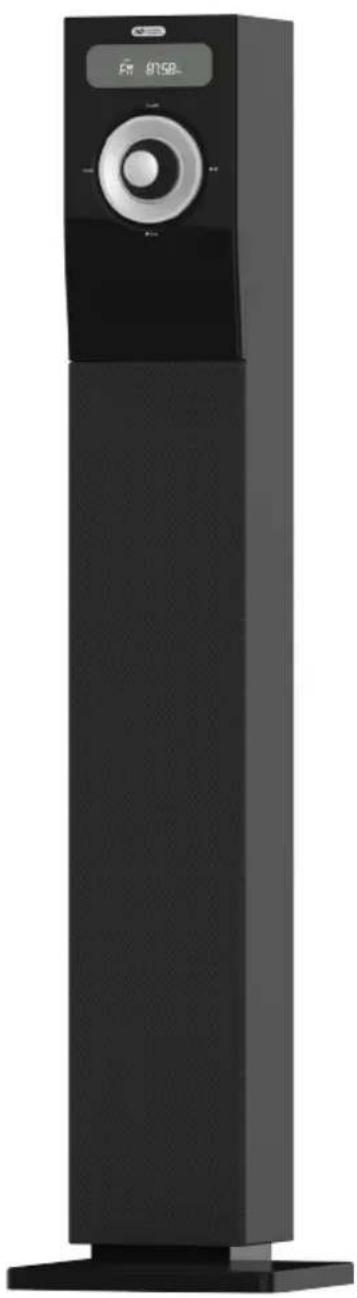
Black vertical electronic device with a digital display showing '875B' and 'F' (no visible text or symbols on the device body)Important: Please read these instructions fully before using your product
Acoustic Solutions Tower speaker
Contents
Important safety information....3
Instructions for use 5
Check the package contents 5
Where to put your Acoustic Solutions Tower speaker 5
Remote control 6
Setting up....6
Your Acoustic Solutions Tower speaker....7
Front panel....7
Back panel 7
Using your Acoustic Solutions Tower speaker....8
Switch on....8
Switch off 8
Change the mode 8
Adjusting the volume....9
Using the remote control: 9
Mute 9
Adjusting the treble setting....9
Adjusting the bass setting....9
Bluetooth mode 10
Connecting or 'Pairing' with your Tower speaker 10
Listening to Music/Audio using Bluetooth....10
Using the FM radio....12
Wire FM aerial 12
FM Radio mode 12
Tuning to an FM station 12
Aux in mode....13
LINE in mode 14
Technical Information....15
Troubleshooting....16
General information....18
Product guarantee 19
If you require any technical guidance or find that your product is not operating as intended, a simple solution can often be found in the Troubleshooting
⚠️ Important safety information
Your Acoustic Solutions Tower speaker should be treated with care. The information below has been provided in the interest of safety and will help you to enjoy this product and the benefits it brings for many years.
- Keep the product and all its parts out of reach of small children.
- This product is not intended for use by persons (including children) with reduced physical, sensory or mental capabilities, or lack of experience and knowledge, unless they have been given supervision or instruction concerning the use of the appliance by a person responsible for their safety.
- Keep it dry. Avoid exposure to precipitation, humidity and liquids which could all affect the product circuitry.
- Do NOT leave it in high temperatures as electronic devices and plastic parts may warp in heat.
- Do NOT leave it in low temperatures as moisture can form inside the product, which may damage the circuit board.
- Do NOT store in dusty or dirty areas.
- Do NOT block or cover slots, holes or openings on the product by placing on soft furnishings such as carpets, rugs or beds as these are provided for functionality and/or ventilation to ensure safe operation of the product
- Disconnect your Tower speaker from the mains power supply during thunderstorms.
- Always check that you have completely switched off your Tower speaker, before you change or disconnect the power supply.
- Only use the power supply that came with the product. Using an unauthorised power supply will invalidate your guarantee and may irrecoverably damage the product.
- Where the mains power plug or an appliance coupler is used as the disconnect device, the disconnect device shall remain readily operable.
- Do NOT attempt to open the product. This product does not contain any user serviceable parts. Unauthorised handling of the device may damage it and will void your warranty.
- Do NOT use your Tower speaker near emergency/intensive care medical equipment; if you have a pacemaker fitted or during an electrical storm.
- Do NOT use harsh chemicals, cleaning solvents or detergents to clean the product. Wipe with a damp (not wet) soft cloth to clean.
- If the remote control will not be used for a long period of time, make sure that the battery is removed from the battery compartment.
- Only use recommended batteries or those of the same equivalent type.
- Do not mix old and new batteries or batteries of different types.
sales on of these instructions, or online at www.argos-support.co.uk (you still require further assistance, call one of our experts on 0345 600 3021
- Batteries are to be inserted with the correct polarity.
- The supply terminals are not to be short-circuited.
- Do not attempt to recharge non-rechargeable batteries
- Dispose of old batteries carefully.
- Never throw batteries in a fire or attempt to open the outer casing.
- Batteries are harmful if swallowed, so keep away from young children.

Instructions for use
Check the package contents
The package contains:
• 1 x Acoustic Solutions Tower speaker with FM Radio
- 1 x attached Power cable with BS plug
- 1 x Wire FM aerial
- 1 x Remote control
- 1 x Instruction manual
Where to put your Acoustic Solutions Tower speaker
It is important that you consider carefully in advance where your Tower speaker will be situated and make sure that it is:
• on a flat and stable surface
Note: Never place your Tower speaker directly onto antique or polished surfaces.
- within 1.4 metres of a power socket. Please ensure that the mains power cable is not a trip hazard.
- at least 1 metre away from other electrical appliances to avoid interference.
- where it will be in range of the connected or 'paired' bluetooth device (e.g. iPod/iPhone/iPad/Android/other phone/Computer), which is about 10 metres or less (33 feet or less) in line of sight.
• where you can fully extend the wire radio aerial
- where you can easily access the controls on the Tower speaker, if you choose not to use the remote control.
- away from bright sunlight or heat sources, such as a radiator.
• not in a humid or very damp place such as a bathroom.
If you require any technical guidance or find that your product is not operating as intended, a simple solution can often be found in the Troubleshooting
4
sales on of these manufacturers, or online at www.argos-support.co.uk (you still require further assistance, call one of our experts on 0345 600 3021
5
Setting up
- Pull out the plastic safety strip on the remote control to activate the battery.
- Plug the FM wire aerial into the 'FM Antenna' socket on the back of the Tower speaker.
- Plug the power cable into the mains power wall socket and switch on.
- Switch the power switch on the back of your Tower speaker to 'On'. The white LED ring on the front of the Tower speaker will now light up.
- The Tower speaker is now in standby mode and ready to use.
Remote control
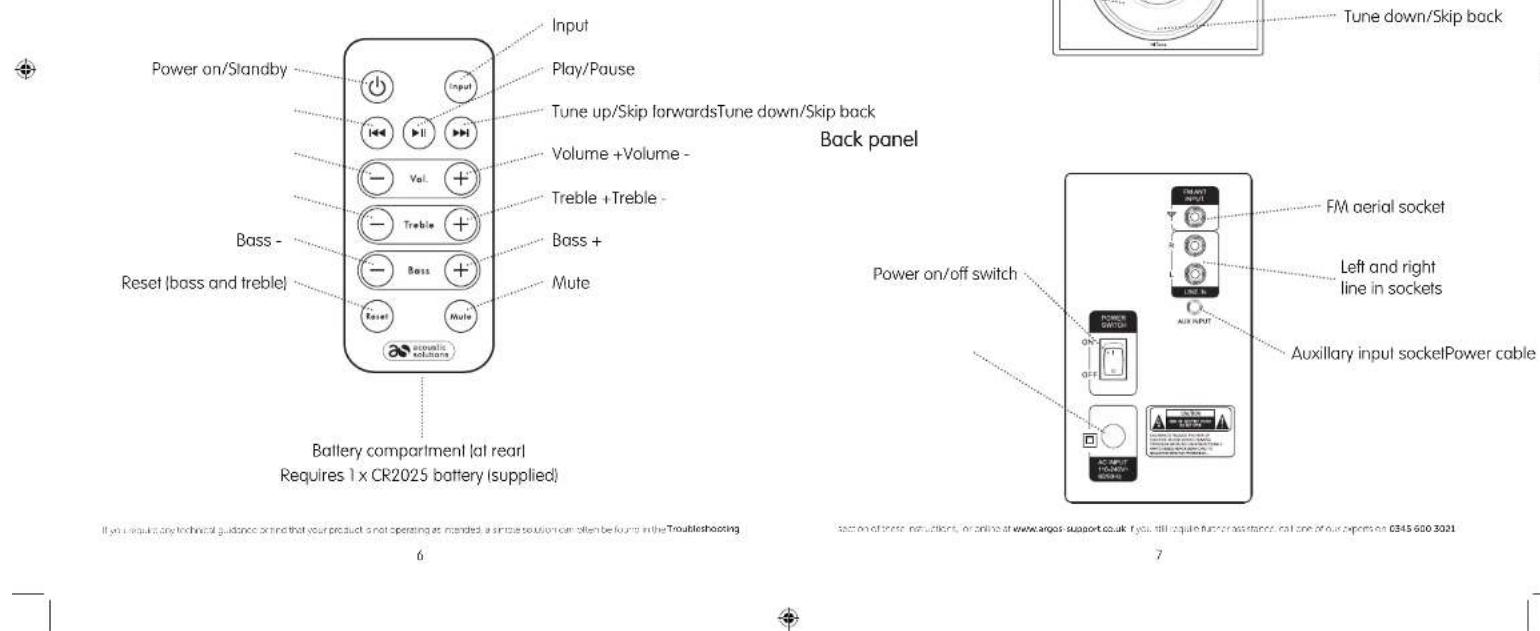
If you require any technical guidance and that your product is not operating as intended, a simple solution can often be found in the Troubleshooting
Your Acoustic Solutions Tower speaker
Front panel
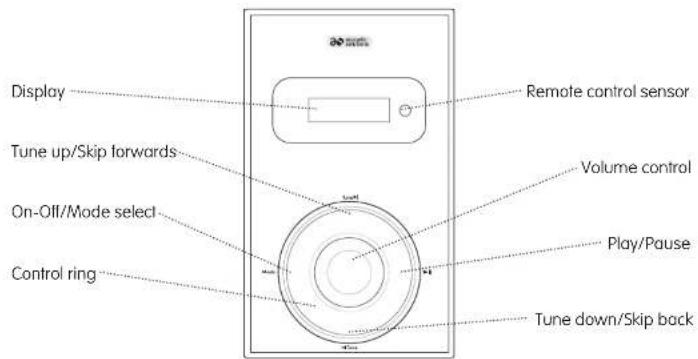
section of these institutions, or online at www.argos-support.co.uk. If you still require further assistance, call one of our experts on 0345 600 3021
Using your Acoustic Solutions Tower speaker
Switch on
Press and release the silver control ring on the left hand side (Model), or the red ⏻ button on the remote control to power on the product.
The first time that you use your product it will power on in Bluetooth mode. 'HI', followed by 'BT' will be displayed.
The white LED ring will flash as the product searches for Bluetooth devices.
Note: After first use, your product will always power on in the mode it was last used in (BT, FM Radio, AUX or Line in).
Switch off
Press and hold the silver control ring on the left hand side (Mode) for 3 seconds and then release, or press and release the red ⏻ button on the remote control to power off the product.
The Tower speaker will go into Standby mode, the white LED ring on the front of the Tower speaker will remain on but the display will switch off.
Note: If you do not use your Tower speaker for 10 minutes and no audio signal is received, the product will automatically go into standby mode.
To completely switch off the Tower speaker, switch the power switch on the back of your Tower speaker to 'Off' and switch off the mains power at the wall socket.
Change the mode
On the Tower speaker:
Briefly press and release the silver control ring on the left hand side (Mode) to switch between Bluetooth (BT), FM Radio (FM), Auxiliary (AUX), and Line in (LINE IN) modes.
Using the remote control:
Press and release the 'Input' button to switch between Bluetooth (BT), FM Radio (FM), Auxiliary (AUX), and Line in (LINE IN) modes.
Note: To use either AUX or LINE IN modes you need to connect your Tower speaker to your audio output device using a suitable 3.5mm audio lead or television using a suitable twin RCA lead.
Adjusting the volume
On the Tower speaker:
Turn the volume control clockwise to increase the volume and anti clockwise to decrease the volume. The volume control ranges from 0 (no sound) to 30 (maximum volume)
Using the remote control:
Press and release the 'Vol.+' or 'Vol.-' buttons to increase or decrease the volume in steps.
Press and hold the 'Volume-' or 'Volume+' buttons to progressively increase or decrease the volume.
Mute
Press and release the 'Mute' button on the remote control to turn the sound off. 'MUTE' will be displayed
Press and release the 'Mute' button to turn the sound on again.
Adjusting the treble setting
Use the 'Treble +' or 'Treble -' buttons on the remote control to adjust the treble setting. When you adjust the treble, please check the display, which will confirm the setting. The treble control ranges from -4 to +4.
Adjusting the bass setting
Use the 'Bass +' or 'Bass -' buttons on the remote control to adjust the bass setting. When you adjust the bass, please check the display, which will confirm the setting. The bass control ranges from -4 to +4.
If you require any technical guidance or find that your product is not operating as intended, a simple solution can often be found in the Troubleshooting
ass on of these manufacturers, or online at www.argos-support.co.uk (you still require further assistance, call one of our experts on 0345 600 3021
Bluetooth mode
Bluetooth (BT) mode
Check that your Tower speaker is in Bluetooth mode. 'BT' will be displayed.
If you are not already in Bluetooth mode, press and release the silver control ring on the left hand side (Mode) until 'BT' is displayed. Alternatively, press and release the 'Input' button on the remote control until 'BT' is displayed on the Tower speaker.
Connecting or 'Pairing' with your Tower speaker
In Bluetooth (BT) Mode:
The first time that you use your Tower speaker it will power on in Bluetooth mode. 'HI', followed by 'BT' will be displayed.
- The white LED ring on the front of the product will flash as the product searches for Bluetooth devices.
-
On the device that you would like to connect to your Tower speaker via Bluetooth (e.g. iPod/iPhone/iPad/Android/other phone/Computer), turn on Bluetooth connectivity and ensure that it is 'discoverable'. Note: If necessary, refer to the instructions for your device to add or set up Bluetooth.
-
Select to 'Add new device', if necessary. Note: Some products will automatically search for a new device and so the 'Add new device' option is not available.
-
When found, your Tower speaker will be displayed as 'AS Tower'. Select the device name to begin pairing.
-
When your Tower speaker has successfully connected or 'paired' with another bluetooth device, the white LED ring will remain steady on. 'BT' will continue to be displayed.
-
Now that you have paired your device with the Tower speaker, it will connect to it when it is within range, which is about 10 metres or less (33 feet or less), line of sight. Note: If your device requests a password, please enter '0000' or '1234' to complete the device pairing.
Listening to Music/Audio using Bluetooth
In Bluetooth (BT) mode:
- Select and start the music or audio that you wish to listen to on your paired Bluetooth device. When music is playing the ▶ symbol will be displayed on the Tower speaker, when music is paused or not playing the ▶ symbol will be displayed.
Notes:
If your previously paired device is within range but does not automatically connect, go to the Bluetooth connectivity settings on your device and select 'AS Tower' to reconnect.
- You can use the controls on your paired Bluetooth device as well as those on those on the Tower speaker or on the remote control when listening to music via Bluetooth.
Controls available on your Tower speaker are:
Play pause: Press and release the silver control ring on the right hand side( )▶
Skip back: Press and release the silver control ring at the bottom ( )
Skip forward: Press and release the silver control ring at the top |
Volume -: Rotate the volume control anti clockwise.
Volume + Rotate the volume control clockwise.
Controls available on the remote control are:
Play/Pause: Press and release to play/pause.
Skip back: Press and release to skip back to the previous track.
Skip forward: Press and release to skip forward to the next track.
Volume - Press and release to decrease the volume in steps
Press and hold to progressively decrease the volume.
Volume + Press and release to increase the volume in steps
Press and hold to progressively increase the volume.
Bass- Press and release to decrease the Bass in steps
Press and hold to progressively decrease the Bass.
Bass+ Press and release to increase the Bass in steps
Press and hold to progressively increase the Bass.
Treble- Press and release to decrease the Treble in steps.
Press and hold to progressively decrease the Treble.
Treble+ Press and release to increase the Treble in steps
Press and hold to progressively increase the Treble.
Mute: Press and release to switch between Mute on (sound off) and Mute off (sound on).
Note: When the Tower speaker is muted 'MUTE' is displayed.
Reset: Press and release to reset the Bass and Treble
If you require any technical guidance or find that your product is not operating as intended, a simple solution can often be found in the Troubleshooting
sales on of these manufacturers, or online at www.argos-support.co.uk (you still require further assistance, call one of our experts on 0345 600 3021
Using the FM radio
Wire FM aerial
Please make sure that the wire FM aerial supplied is plugged into the socket on the back of the Tower speaker and is fully extended before you attempt to tune to an FM station. This will ensure that the maximum signal strength is available when the Tower speaker begins to scan. Extending the aerial also ensures the best possible sound quality.
FM Radio mode
If you are not already in FM mode, briefly press and release the silver control ring on the left hand side (Mode) of the Tower speaker or the 'Input' button on the remote control until you are in FM mode, (check the display, an FM frequency such as 93.30 will be displayed). If you were listening to an FM station when you switched the Tower speaker off then this station will be automatically selected when you switch the Tower speaker back on.
Tuning to an FM station
In FM mode:
Press and release the silver control ring on the right hand side ▶th your Tower speaker or the ▶button on the remote control. Your Tower speaker will automatically scan and store those stations with the strongest signal, up to a total of 25, to its preset memories.
Briefly press and release the silver control ring at the bottom (or top ( ) on your Tower speaker or the <buttons on the remote control to move through the stored preset stations (CH01-CH25), until you locate your favourite station.
Note: If FM reception is poor check that the wire aerial is fully extended or try moving the Tower speaker to another location.

Aux in mode
AUX in mode
Using a 3.5mm audio input connection cable, AUX in allows for a quick and easy connection to an external sound source.
If you are not already in Aux in mode, briefly press and release the silver control ring on the left hand side (Model) on the Tower speaker or 'Input' on the remote control, until you are in Aux in mode. 'AUX' will be displayed.
Connect one end of a 3.5mm audio connection cable to the headphone (or auxiliary out) socket of your secondary device, connect the other end to the AUX in socket on the back of your Tower speaker.
Press the 'Play' button on your external device to start playback through the Tower speaker.
To gain optimal volume levels, adjust the output volume level on both the secondary device and on the Tower speaker.
Volume (Tower speaker)
Turn the volume control clockwise to increase the volume and anti clockwise to decrease the volume.
Volume (Remote control)
Volume + Press and release to increase the volume in steps
Press and hold to progressively increase the volume.
Volume - Press and release to decrease the volume in steps
Press and hold to progressively decrease the volume.
If you require any technical guidance or find that your product is not operating as intended, a simple solution can often be found in the Troubleshooting
section of these instructions, or online at www.argos-support.co.uk. If you still require further assistance, call one of our experts on 0345 600 3021
LINE in mode
LINE in mode
If you are not already in Line in mode, briefly press and release the control ring on the left hand side (Mode) on the Tower speaker or 'Input' on the remote control, until you are in Line in mode. 'LINE in' will be displayed.
- Connect an audio cable (not supplied) to the Audio Output Jacks (White = Left / Red = Right) on the external device (DVD player, TV ect) to the rear of the Tower speaker.
- Turn on your external device and begin playback of your selected media.
To gain optimal volume levels, adjust the output volume level on both the secondary device and on the Tower speaker.
Volume (Tower speaker)
Turn the volume control clockwise to increase the volume and anti clockwise to decrease the volume.
Volume (Remote control)
Volume + Press and release to increase the volume in steps
Press and hold to progressively increase the volume.
Volume - Press and release to decrease the volume in steps
Press and hold to progressively decrease the volume.

Technical Information
Specification
Power Working voltage 110V-240V AC / 50\~60Hz
Standby power consumption <0.5W
Audio Output 12W+12W+25W (RMS)
Frequency response 20Hz\~20KHz
Bluetooth Version Bluetooth 2.1
Profiles HFPV 1.5, A2DPV 1.2, AVRCPV 1.4
Frequency range 2.4GHz-2.480GHz
FM radio Frequency range 87.5-108MHz
If you require any technical guidance or find that your product is not operating as intended, a simple solution can often be found in the Troubleshooting
section of these manufacturers, or online at www.argos-support.co.uk. If you still require further assistance, call one of our experts on 0345 600 3021
Troubleshooting
If you are experiencing problems with your Tower speaker, there are some quick and easy checks that you can do, which may help to solve the problem.
Problem Solution
No sound / power: • Check that the mains power cable is plugged in to the wall socket and the power is switched on.
- Check that you have switched the power switch on the back of the Tower speaker to on.
- Check that you are not in Standby mode. Press and release the silver control ring on the left hand side (Mode), or the red ⏻ button on the remote control, to power on the product.
- Check that you have not muted the volume. Press and release the 'Mute' button on the remote control.
- Increase the volume.
- Check that the connected device is in playback mode.
- Check that you are in the correct mode for the music that you wish to listen to.
Sound distortion: • The volume level is too high. Please reduce the volume level.
- The volume level of the connected device is too high. Please reduce the volume of the connected device.
Unable to pair with a Bluetooth device:
- Check that you are in Bluetooth mode. Press and release the silver control ring on the left hand side (Mode) until 'BT' is displayed. Alternatively press and release the 'Input' button on the remote control until 'BT' is displayed on the Tower speaker.
- Ensure that you are within range of the Tower speaker for Bluetooth functionality, 10 metres or less (33 feet or less).
- Move the Tower speaker and Bluetooth device away from other Bluetooth devices/electrical equipment.
- If possible, turn off other nearby Bluetooth devices or disable their Bluetooth functionality.
Aux in function failure • You must first connect a 3.5mm audio input cable to the AUX in socket on the back of the Tower speaker.
Problem Solution
Radio reception is poor: • Fully extend the wire aerial to get the best reception and sound quality.
- Rescan for radio stations, see page 12.
- Try moving your Tower speaker to another location to see if reception improves.
- Check that you do not have other electrical equipment too close to your Tower speaker, causing interference.
If you require any technical guidance or find that your product is not operating as intended, a simple solution can often be found in the Troubleshooting
ass on of these manufacturers, or online at www.argos-support.co.uk (you still require further assistance, call one of our experts on 0345 600 3021
General information

This symbol indicates that this product should not be treated as normal household waste and it should be recycled. Please take it to your nearest collection facility or for further details contact your local council or visit www.recycle-more.co.uk
Batteries contain substances that may be harmful to the environment and human health. Keep out of the reach of children and seek immediate medical help if swallowed.
This symbol indicates that batteries should not be disposed of in the normal household waste but taken to appropriate local recycling facilities, where and when these are available. Never throw batteries in a fire or attempt to open the outer casing
This product is intended for use within the UK. This equipment complies with the essential requirements for the Radio Equipment and Telecommunications Terminal Equipment Directive 1999/5/EC.
Declaration of Conformance
Hereby, Argos Ltd, declares that this Band II LPD device is in compliance with the essential requirements and other relevant provisions of Directive 1999/5/EC. The complete declaration of conformity can be obtained by contacting http://www.argos-support.co.uk/

acoustic solutions
PRODUCT GUARANTEE
This product is guaranteed against manufacturing defects for a period of

Year
This product is guaranteed for twelve months from the date of original purchase.
Any defect that arises due to faulty materials or workmanship will either be replaced, refunded or repaired free of charge where possible during this period by the dealer from whom you purchased the unit.
The guarantee is subject to the following provisions:
- The guarantee does not cover accidental damage, misuse, cabinet parts, knobs or consumable items.
- The product must be correctly installed and operated in accordance with the instructions contained in this manual.
- It must be solely for domestic purpose.
- The guarantee will be rendered invalid if the product is re-sold or has been damaged by inexpert repair.
- Specifications are subject to change without notice.
- The manufacturer disclaims any liability for the incidental or consequential damages.
The guarantee is in addition to and does not diminish your statutory or legal rights.
Guarantor: Argos Ltd.,
489-499 Avebury Boulevard
Central Milton Keynes
MK9 2NW
If you require any technical guidance or find that your product is not operating as intended, a simple solution can often be found in the Troubleshooting
18
ass on of these manufacturers, or online at www.argos-support.co.uk (you still require further assistance, call one of our experts on 0345 600 3021
19
- Instruction Manual
- Acoustic Solutions Tower speaker
- Contents
- ⚠️ Important safety information
- Instructions for use
- Check the package contents
- Where to put your Acoustic Solutions Tower speaker
- Setting up
- Using your Acoustic Solutions Tower speaker
- Switch on
- Switch off
- Change the mode
- Adjusting the volume
- Using the remote control:
- Mute
- Adjusting the treble setting
- Adjusting the bass setting
- Bluetooth mode
- Bluetooth (BT) mode
- Connecting or 'Pairing' with your Tower speaker
- Listening to Music/Audio using Bluetooth
- Using the FM radio
- Wire FM aerial
- FM Radio mode
- Tuning to an FM station
- Aux in mode
- LINE in mode
- Technical Information
- Troubleshooting
- General information
- PRODUCT GUARANTEE
Brand : Acoustic Solutions
Model : KW-TB001
Category : Hi-Fi