DCES24B - Air-conditioner DIMPLEX - Free user manual and instructions
Find the device manual for free DCES24B DIMPLEX in PDF.


User questions about DCES24B DIMPLEX
0 question about this device. Answer the ones you know or ask your own.
Ask a new question about this device
Download the instructions for your Air-conditioner in PDF format for free! Find your manual DCES24B - DIMPLEX and take your electronic device back in hand. On this page are published all the documents necessary for the use of your device. DCES24B by DIMPLEX.
USER MANUAL DCES24B DIMPLEX
DCES18B(5.25kW Cooling / 5.4kW Heating)
DCES24B(7.15kW Cooling / 7.4kW Heating)
natural_image
Line drawing of a rectangular air conditioner unit (no text or symbols)IMPORTANT INFORMATION
Carefully read this instruction manual before installation of your air conditioner. Please retain this manual for product warranty and for future reference.
CONTENTS
SAFETY PRECAUTIONS ....1
NAMES OF PARTS 4
INDOOR UNIT DISPLAY....5
EMERGENCY FUNCTION & AUTO-RESTART FUNCTION....6
REMOTE CONTROLLER....7
OPERATING INSTRUCTIONS ....10
PROTECTION ....15
INSTALLATION MANUAL....16
MAINTENANCE 25
TROUBLESHOOTING 26
SAFETY RULES AND RECOMMENDATIONS FOR THE INSTALLER
Read this guide before installing and using the appliance.
During the installation of the indoor and outdoor units the access to the working area should be forbidden to children.
Unforeseeable accidents could happen.
⚠️ Make sure that the base of the outdoor unit is firmly fixed.
⚠️ Check that air cannot enter the refrigerant system and check for refrigerant leaks when moving the air conditioner.
⚠️ Carry out a test cycle after installing the air conditioner and record the operating data.
The ratings of the fuse installed in the built in-control unit are T 5A / 250V.
The user must protect the indoor unit with a fuse of suitable capacity for the maximum input current or with another overload protection device.
⚠️ Check that the socket is suitable for the plug, otherwise have the socket changed.
The appliance must be fitted with means for disconnection from the supply mains having a contact separation in all poles that provide full disconnection under overvoltage category III conditions, and these means must be incorporated in the fixed wiring in accordance with the wiring rules.
The air conditioner must be installed by professional or qualified persons.
Do not install the appliance at a distance of less than 50 cm from inflammable substances (alcohol, etc.) Or from pressurised containers (e.g. spray cans).
⚠️ If the appliance is used in areas without the possibility of ventilation, precautions must be taken to prevent any leaks of refrigerant gas from remaining in the environment and creating a danger of fire
This appliance is not intended for use by persons (including children) with reduced physical, sensory or mental capabilities, or lack of experience and knowledge, unless they have been given supervision or instruction concerning use of the appliance by a person responsible for their safety.
Children should be supervised to ensure that they do not play with the appliance.
⚠️ The appliance must be installed in accordance with national wiring regulations.
Do not try to install the conditioner alone; always contact specialized technical personnel.
Cleaning and maintenance must be carried out by specialised technical personnel. In any case disconnect the appliance from the mains electricity supply before carrying out any cleaning or maintenance.
Ensure that the mains voltage corresponds to that stamped on the rating plate. Keep the switch or power plug clean. Insert the power plug correctly and firmly into the socket, thereby avoiding the risk of electric shock or fire due to insufficient contact.
Do not pull out the plug to switch off the appliance when it is in operation, since this could create a spark and cause a fire, etc.
This appliance has been made for air conditioning domestic environments and must not be used for any other purpose, such as for drying clothes, cooling food, etc.
The packaging materials are recyclable and should be disposed of in the separate waste bins. Take the air conditioner at the end of its useful life to a special waste collection centre for disposal.
Always use the appliance with the air filter mounted. The use of the conditioner without air filter could cause an excessive accumulation of dust or waste on the inner parts of the device with possible subsequent failures.
The user is responsible for having the appliance installed by a qualified technician, who must check that it is earthed in accordance with current legislation and insert a thermomagnetic circuit breaker.
The batteries in remote controller must be recycled or disposed of properly.
Disposal of Scrap Batteries --- Please discard the batteries as sorted municipal waste at the accessible collection point.
Never remain directly exposed to the flow of cold air for a long time. The direct and prolonged exposition to cold air could be dangerous for your health .Particular care should be taken in the rooms where there are children , old or sick people.
If the appliance gives off smoke or there is a smell of burning, immediately cut off the power supply and contact the Service Centre.
The prolonged use of the device in such conditions could cause fire or electrocution.
Have repairs carried out only by an authorised Service Centre of the manufacturer. Incorrect repair could expose the user to the risk of electric shock, etc.
Unhook the automatic switch if you foresee not to use the device for a long time.
The airflow direction must be properly adjusted.
The flaps must be directed downwards in the heating mode and upwards in the cooling mode.
Only use the air conditioner as instructed in this booklet. These instructions are not intended to cover every possible condition and situation. As with any electrical household appliance, common sense and caution are therefore always recommended for installation, operation and maintenance.
Ensure that the appliance is disconnected from the power supply when it will remain inoperative for a long period or before carrying out any cleaning or maintenance.
Selecting the most suitable temperature can prevent damage to the appliance.
SAFETY RULES AND PROHIBITIONS
Do not bend, tug or compress the power cord since this could damage it. Electrical shocks or fire are probably due to a damaged power cord. Specialised technical personnel only must replace a damaged power cord.
Do not use extensions or power board.
Do not touch the appliance when barefoot or parts of the body are wet or damp.
Do not obstruct the air inlet or outlet of the indoor or the outdoor unit.
The obstruction of these openings causes a reduction in the operative efficiency of the conditioner with possible consequent failures or damages.
In no way alter the characteristics of the appliance.
Do not install the appliance in environments where the air could contain gas, oil or sulphur or near sources of heat.
Do not climb onto or place any heavy or hot objects on top of the appliance.
Do not leave windows or doors open for long when the air conditioner is operating.
Do not direct the airflow onto plants or animals.
A long direct exposition to the flow of cold air of the conditioner could have negative effects on plants and animals.
Do not put the conditioner in contact with water.
The electrical insulation could be damaged and thus causing electrocution.
Do not climb onto or place any objects on the outdoor unit
Never insert a stick or similar object into the appliance. It could cause injury.
Children should be supervised to ensure that they do not play with the appliance. If the supply cord is damaged, it must be replaced by the manufacturer, its service agent or similarly qualified persons in order to avoid a hazard.
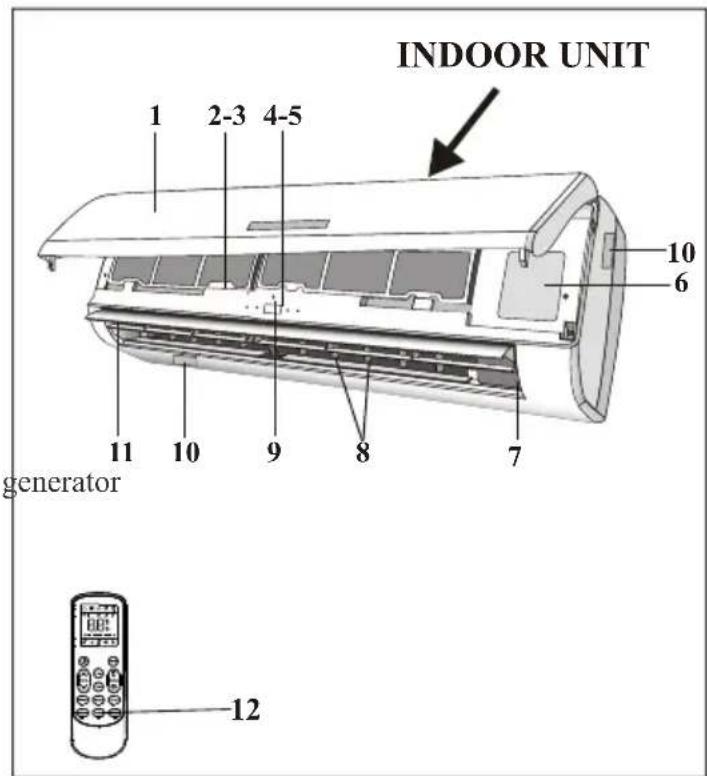
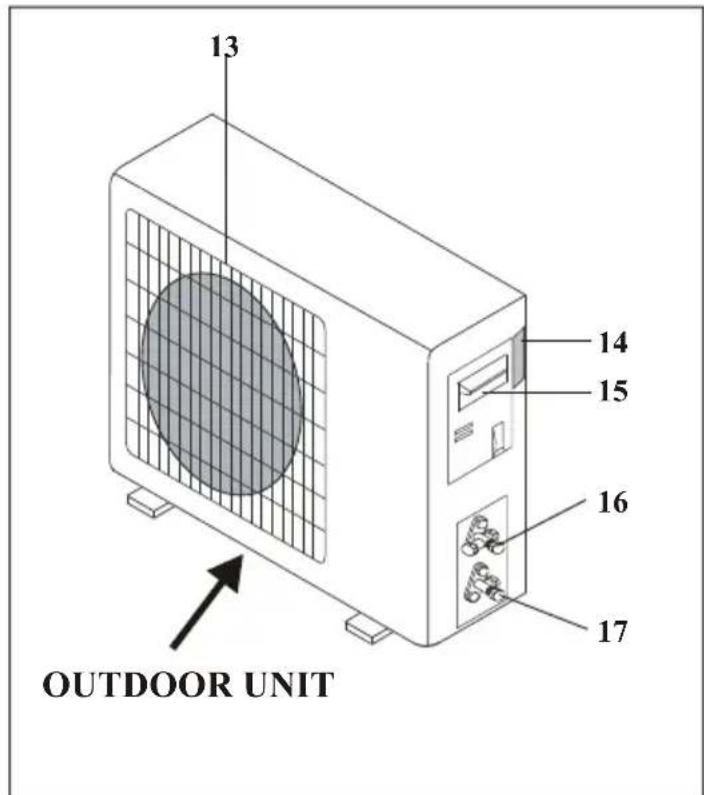
NAMES OF PARTS
| INDOOR UNIT | |
| No. | Description |
| 1 | Front panel |
| 2 | Air filter |
| 3 | Optional filter (if installed) |
| 4 | LED Display |
| 5 | Signal receiver |
| 6 | Terminal block cover |
| 7 | Ionizer (if installed) |
| 8 | Deflectors |
| 9 | Emergency button |
| 10 | Indoor unit rating label ( )Stick position optional |
| 11 | Airflow direction louver |
| 12 | Remote controller |
text_image
INDOOR UNIT 1 2-3 4-5 10 6 11 10 9 8 7 generator 12| OUTDOOR UNIT | |
| No. | Description |
| 13 | Air outlet grille |
| 14 | Outdoor unit rating label |
| 15 | Terminal block cover |
| 16 | gas valve |
| 17 | liquid valve |
text_image
13 14 15 16 17 OUTDOOR UNITNote: the above figures are only intended to be a simple diagram of the appliance and may not correspond to the appearance of the units that have been purchased.
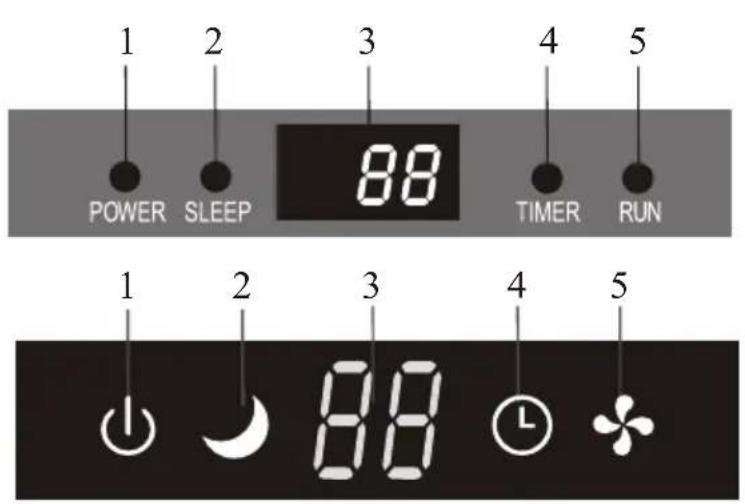
INDOOR UNIT DISPLAY
text_image
1 2 3 4 5 POWER SLEEP 88 TIMER RUN 1 2 3 4 5 88
text_image
3—88.5°C ①—4 2—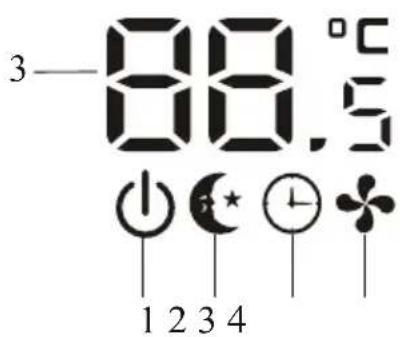
text_image
3—88.5°C 1 2 3 4
text_image
1 2 3 4 5 88
text_image
88 1 2 3 4 5 ON/OFF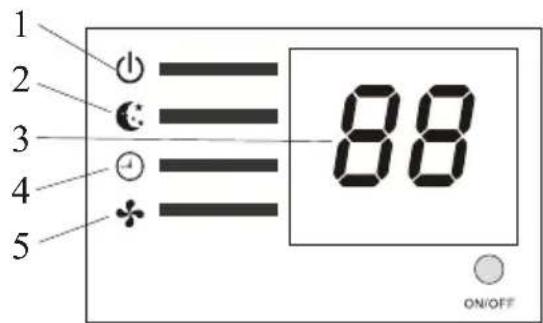
text_image
1 2 3 4 5 88 ON/OFF| No. | Led | Function | |
| 1 | POWER | ➊ | This symbol appears when the unit is power on |
| 2 | SLEEP | ➊ | SLEEP mode |
| 3 | Temperature display (if present)/Error code | 88 | (1) Lights up during Timer operation when the air conditioner is operational(2)Displays the malfunction code when fault occurs. |
| 4 | TIMER | ➊ | Lights up during Timer operation. |
| 5 | RUN | ➊ | The symbol appears when the unit is turned on, and disappear when the unit is turned off. |

The shape and position of switches and indicators may be different according to the model, but their function is the same.
EMERGENCY FUNCTION & AUTO-RESTART FUNCTION
AUTO-RESTART FUNCTION
The appliance is preset auto - restart function by manufacturer. In case of a sudden power failure, the module memorizes the setting conditions before the power failure. when the power restores, the unit restarts automatically with all the previous settings preserved by the memory function.
To deactivate the AUTO-RESTART function, proceed as follows:
- Switch the air conditioner off and remove the plug.
- Press the emergency button meanwhile plug it in.
- Keep pressing the emergency button for more than 10 seconds until you hear four short beeps from the unit. The AUTO-RESTART function is deactivate.
- To activate the AUTO - RESTART function, follow the same procedure until you hear three short beeps from the unit.

text_image
ON / OFF POWER SLEEP TIME R RUN Emergency button Emergency button ON/OFF 88 88 88 ON/OFFEMERGENCY FUNCTION
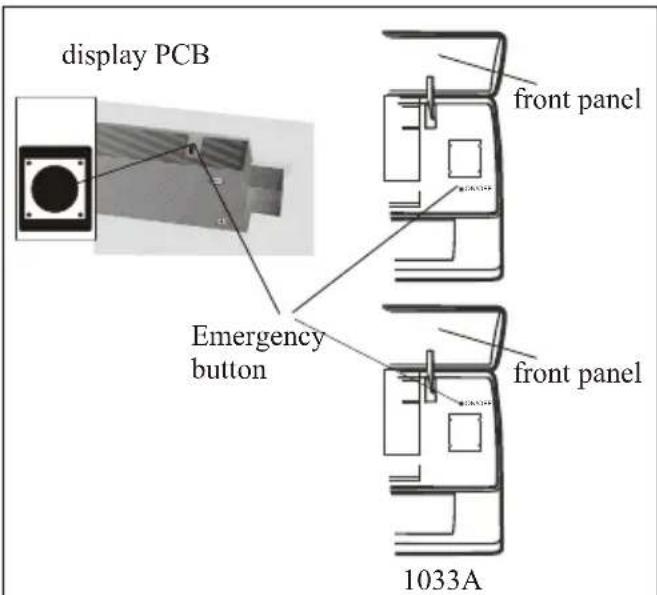
If the remote controller fails to work or maintenance necessary, proceed as follows:
Open and lift the front panel up to an angle to reach the emergency button.
- One press of the emergency button(one beep) will lead to the forced COOLING operation
- Two press of the emergency button within 3 sec (two beeps) will lead to the forced HEATING operation.
- To switch off the unit, you just need to press the button again (a single long beep).
- After 30 minutes in forced operation, the air conditioner will automatically start working in 23°C cooling mode, auto fan speed.
* The FEEL function is described in page 13.
text_image
display PCB Emergency button front panel front panel 1033AThe emergency button in some models could be on the right part of the unit under the front panel.
The shape and position of the emergency button may be different according to the model, but their function is the same.
Remark: the external static pressure of heat pumps is 0 Pa for all models.
The indoor fan speed during capacity and or efficiency test should be "quick cool" or "quick heat" which can be activated by pressing "TURBO" or "SUPER" button of remote controller; Please contact with the seller in case of failing in activating it.
REMOTE CONTROLLER
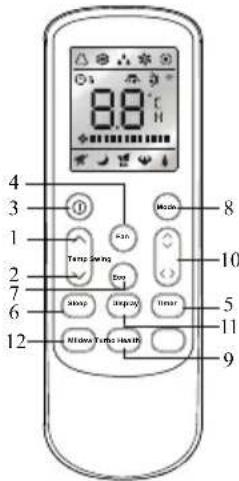
| No. | Button | Function |
| 1 | ▲ (TEMP UP) | Press it to increase temperature / time setting. |
| 2 | ▼ (TEMP DN) | Press it to decrease temperature/ time setting. |
| 3 | ON/OFF | Press it to start or stop operation. |
| 4 | FAN | To select the fan speed of auto/low/mid/high |
| 5 | TIMER | Press it to set auto-off timer. |
| 6 | SLEEP | To activate the function SLEEP ” |
| 7 | ECO | In cooling mode, press this button ,the temperature will increase 2°on the base of setting temperatureIn heating mode, press this button, the temperature will decrease 2°on the base of setting temperature |
| 8 | MODE | To select the mode of operation |
| 9 | TURBO | Press this button to activate / deactivate the Super function which enables the unit to reach the preset temperature in the shortest time.In COOL mode, the unit will give the maximum cooling temperature with 16°high fan speed.In HEAT mode, the unit will give the maximum heating temperature with 31°high fan speed. |
| 10 | SWING | To activate or deactivate of the movement of the deflectors. |
| 11 | DISPLAY | To LED displayswitch on/off the |
| 12 | Mildew | To activate the function of Mildew |
text_image
8.8°C 4 3 1 2 7 6 12 Mode 8 Temp Swing 10 Box 5 Upbox 11 Inner Turbo Shifts 9The outlooking and some function of remote control may vary according to the model.
The shape and position of buttons and indicators may vary according to the model, but their function is the same.
The unit confirms the correct reception of each press button with a beep.
REMOTE CONTROLLER
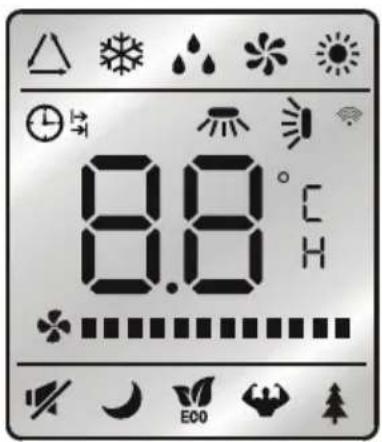
Remote controller DISPLAY Meaning of symbols on the liquid crystal display
| No. | Symbols | Meaning |
| 1 | FEEL mode indicator | |
| 2 | COOLING indicator | |
| 3 | DEHUMIDIFYING indicator | |
| 4 | FAN ONLY OPERATION indicator | |
| 5 | HEATING indicator | |
| 6 | SIGNAL RECEPTION indicator | |
| 7 | TIMER OFF indicator | |
| 8 | TIMER ON indicator | |
| 9 | AUTO FAN indicator | |
| 10 | LOW FAN SPEED indicator | |
| 11 | MIDDLE FAN SPEED indicator | |
| 12 | HIGH FAN SPEED indicator | |
| 13 | SLEEP indicator | |
| 14 | FLAP SWING indicator | |
| 15 | TUBRO indicator | |
| 16 | HEALTHY indicator | |
| 17 | ECO indicator | |
| 18 | CLOCK indicator |
text_image
8.8°C E00REMOTE CONTROLLER
Replacement of Batteries
Remove the battery cover plate from the rear of the remote controller, by sliding it in the direction of the arrow.
Install the batteries according the direction (+and -) shown on the Remote Controller.
Reinstall the battery cover by sliding it into place.
Use 2 LRO 3 AAA (1.5V) batteries. Do not use rechargeable batteries. Replace the old batteries with new ones of the same type when the display is no longer legible.
Do not dispose batteries as unsorted municipal waste. Collection of such waste separately for special treatment is necessary.
Refer to picture 1:
i. When you open the battery cover, you can see a DIP switch on the cover back.
| DIP switch on position | Function |
| °C | The remote controller is adjusted in degree celsius |
| °F | The remote controller is adjusted in degree fahrenheit. |
| Cool | The remote controller is adjusted in only cooling mode |
| Heat | The remote controller is adjusted in cooling and heating mode |
II. NOTE: After adjusting the function, you need to take out the batteries and repeat the procedure described above.
Refer to picture 2:
When you insert/change the batteries for the first time in the remote control, you will need to program the remote to cooling or heating function.
When you insert the batteries, the symbols ✪ (COOL ■) and ⚙ (HEAT ■) start fashing. If you push whatever button when the symbol ✪ (COOL ■) is displayed, the remote controller is adjusted in only cooling mode. If you push whatever button when the symbol ⚙ (HEAT ■) is displayed, the remote controller is adjusted in Cooling and heating mode.
NOTE:if you adjust the remote controller in cooling mode, it will not be possible to activate the heating function in units with heating pump. you need to take out the batteries and repeat the procedure described above.
-
Direct the remote controller toward the Air conditioner.
-
Check that there are no objects between the remote control and the Signal receptor in the indoor unit.
-
Never leave the remote controller exposed to the rays of the sun
-
Keep the remote controller at a distance of at least 1m from the television or other electrical appliances.
Recommendations for locating and using the remote controller holder (if present)
The remote controller be kept in a wall-mounted holder

natural_image
Diagram showing two connected devices with cable and connector components, no text or symbols present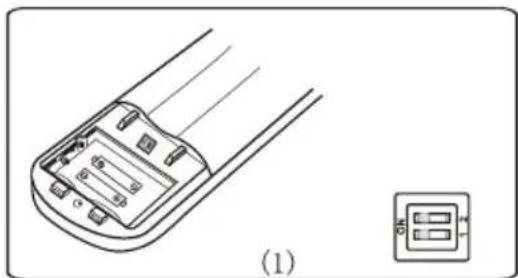
natural_image
Technical line drawing of a remote control device with cable routing and a separate inset showing a three-pin connector (no text or symbols)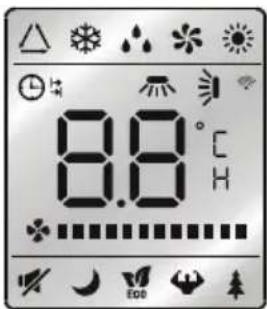
text_image
8.8°C H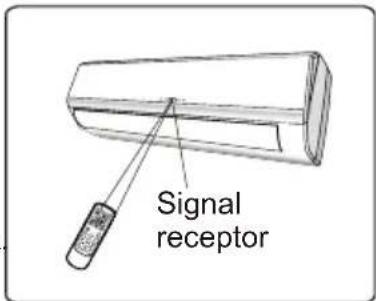
text_image
Signal receptor
text_image
Remote controller holderOPERATING INSTRUCTIONS
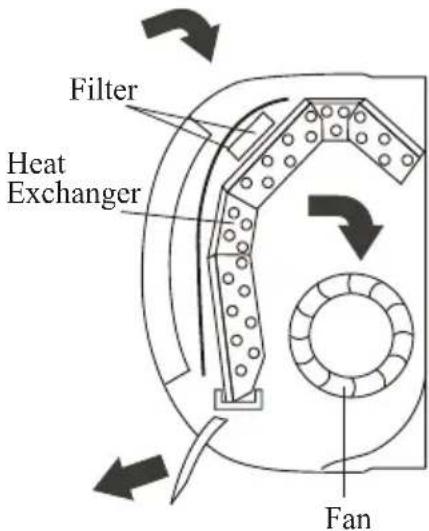
The air sucked by the fan enters from the grill and passes through the filter, then it is cooled/dehumidified or heated through the heat exchanger.
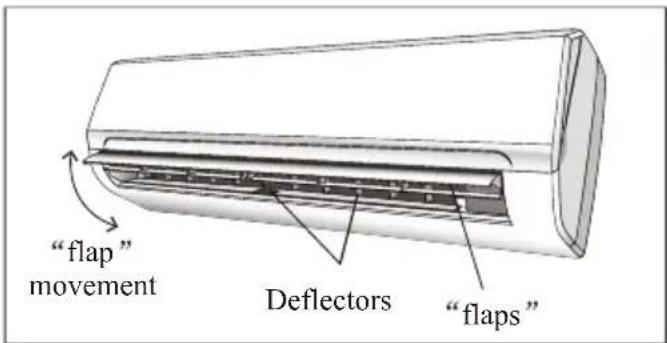
The direction of the air outlet is motorized up and down by flaps, and manually moved right and left by the vertical deflectors, for some models, the vertical deflectors could be controlled by motor as well.
text_image
Filter Heat Exchanger Fan"SWING" CONTROL OF THE AIR FLOW
SWING
- The air outlet flow is uniformly distributed in the room.
- It is possible to position the direction of the air in the optimal.
The key SWING activates the FLAP, "the air flow is directed alternatively from up to down. In order to guarantee an even diffusion of the air in the room.
The key SWING activates the motorized deflectors, "the air flow is directed alternatively from left to right. (Optional function, depends on the models)
- In cooling mode, orient the flaps in horizontal direction;
- In heating mode, orient the flaps downward as the warm air tends to rise.
The deflectors are positioned manually and placed under the flaps. They allow to direct the air flow rightward or leftward.

This adjustment must be done while the appliance is switched off.

text_image
AIR SWING 8.0°C H
text_image
Mode Fan Temp Eco Swing < > Sleep Display Timer Mildew Turbo Health
Never position Flaps manually, the delicate mechanism might be seriously damaged!

Never poke fingers, sticks or other objects in the air inlet or outlet vents. Such accidental contact with live parts might cause unforeseeable damage or hurt.
text_image
"flap" movement Deflectors "flaps"OPERATING INSTRUCTIONS
COOLING MODE
The cooling function allows the air conditioner to cool the room and at the same time reduces Air humidity.
To activate the cooling function (COOL), press the MODE button until the symbol ✪ (COOL ■) appears on the display.
The cooling function is activated by setting the button ▲ or ▼ at a temperature lower than that of the room.
To optimize the function of the Air conditioner, adjust the temperature (1), the speed (2) and the direction of the air flow (3) by pressing the button indicated.

text_image
COOL 8.0°C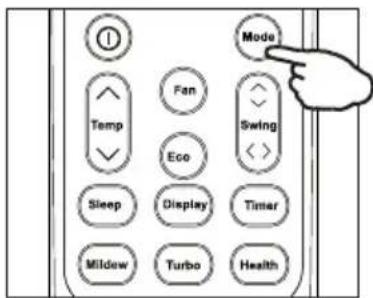
text_image
Mode Fan Temp Eco Swing Sleep Display Timer Mildew Turbo HealthHEATING MODE
HEAT
The heating function allows the air conditioner to heat the room.
To activate the heating function (HEAT), press the MODE button until the symbol ⚙ (HEAT ■) appears on the display.
With the button ▲ or set a temperature higher than that of the room..
To optimize the function of the Air conditioner adjust the temperature (1), the speed (2) and the direction of the air flow (3) by pressing the button indicated

If the appliance is fitted with a electrical heater, which delays appliance to startup in a few seconds to ensure an immediate output of hot air (Optional, depends on the model).

In HEATING operation, the appliance can automatically activate a defrost cycle, which is essential to clean the frost on the condenser so as to recover its heat exchange function. This procedure usually lasts for 2-10 minutes during defrosting, indoor unit fan stop operation. After defrosting, it resumes to HEATING mode automatically.

text_image
HEAT 8.0°C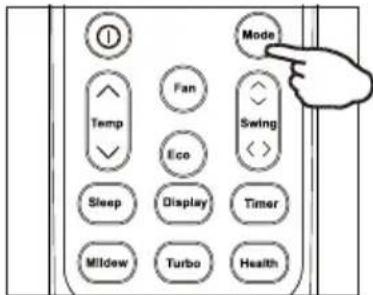
text_image
Mode Fan Temp Eco Swing Sleep Display Timer Mildew Turbo HealthOPERATING INSTRUCTIONS
TIMER MODE----TIMER ON
TIMER
To set the time of the air conditioner
To program the automatic switching-on time, the appliance should be power off.
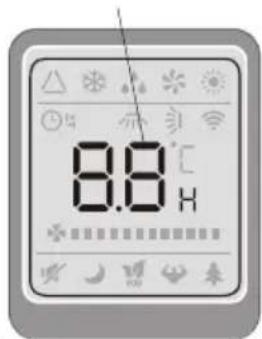
Press TIMER at the fist time, set the temperature with pressing the button ▲ or ; ▼
Press TIMER at the second time, set the rest time with pressing the button ▲ or ; ▼
Press TIMER at the third time, confirm the setting, then the rest time to next automatic switching-on could be read on the display.
NOTE!
Before proceeding with the time: program the working mode with the button MODE (2) and the fan speed with the button FAN (3). Switch the conditioner off (with the key ON/OFF).
Note: To cancel the set function, press the TIMER button again.
Note: In case of power off, it is necessary to set TIMER ON again
To set the automatic switching-off of the air conditioner
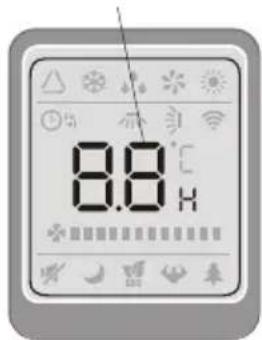
The timed stop is programmed by pressing TIMER, Set the rest time by pressing the button ▲ or ▼, until the rest time displayed is to your demand then press TIMER again.
Note: To cancel the set function, press the TIMER button again.
Note: In case of power off, it is necessary to set TIMER OFF again

Note: When the time is set correctly on the remote, the timer function can be used and set in half hour increments.
TIMER ON
text_image
8.8℃
text_image
Mode Fan Swing Temp Eco Sleep Display Timer Mildew Turbo Health

Indoor display
TIMER OFF
text_image
8.8℃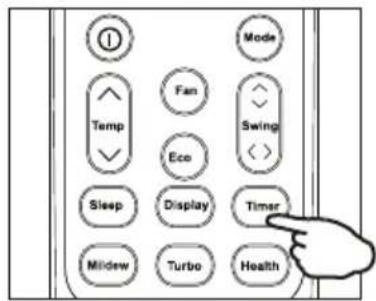
text_image
Mode Fan Temp Eco Swing Sleep Display Timer Mildew Turbo HealthPOWER SLEEP


Indoor display
OPERATING INSTRUCTIONS
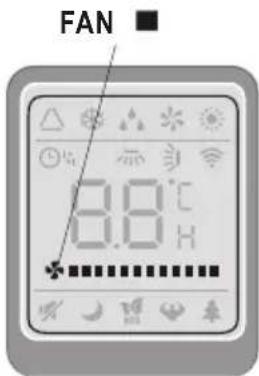
FAN MODE
FAN
The conditioner works in only ventilation.
To set the FAN mode, Press MODE until (FAN ■) appears in the display.
While pressing FAN button the speed changes in the following sequence: LOW/ MEDIUM/HIGH /AUTO in FAN mode.
The remote control also stores the speed that was set in the previous mode of operation.
In FEEL mode (automatic) the air conditioner automatically chooses the fan speed and the mode of operation (COOLING or HEATING).
text_image
FAN 8.0°C
text_image
Mode Fan Temp Eco Sleep Display Timer Mildew Turbo HealthDRY MODE
DRY
This function reduces the humidity of the air to make the room more comfortable.
To set the DRY mode, Press MODE until (DRY ■) appears in the display. An automatic function of alternating cooling cycles and air fan is activated.

text_image
DRY 8.0°C
text_image
Mode Fan Swing Eco Sleep Display Timer Mildew Turbo HealthOPERATING INSTRUCTIONS
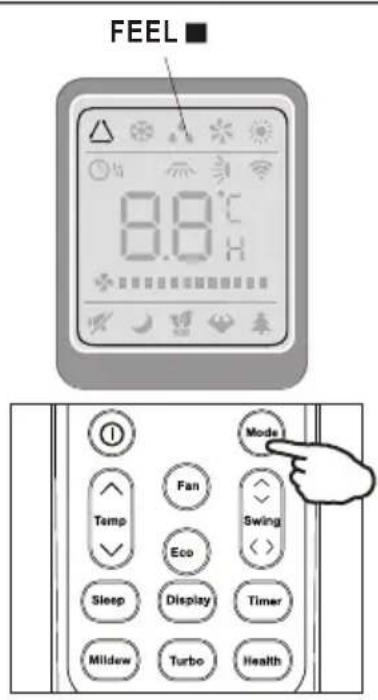
I FEEL MODE
FEEL
Automatic mode.
To activate the I FEEL (automatic) mode of operation, press the MODE button on the remote controller until the symbol △ (FEEL■) appears on the display.
In I FEEL mode the fan speed and the temperature are set automatically according to the room temperature (tested by the temperature sensor which is incorporated in the indoor unit).
| Ambient temp | Operation mode | Auto temp. |
| < 20°C | HEATING (FOR HEAT PUMP TYPE)FAN (FOR COOL ONLY TYPE) | 23°C |
| 20°C26 °C | DRY | 18°C |
| >26°C | COOL | 23°C |
To optimize the function of the air conditioner, adjust the temperature(only 2) (1), the speed (2) and the direction of the air flow (3) by pressing the buttons indicated
text_image
FEEL 8.8°C Mode Fan Swing Eco Sleep Display Timer Mildew Turbo HealthSLEEP MODE
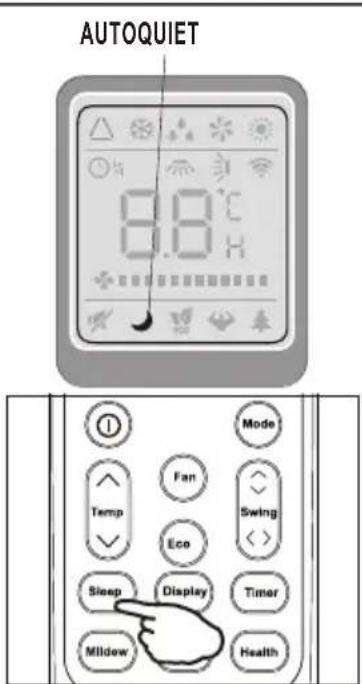
AUTO QUIET
To activate the SLEEP mode of operation, press the SLEEP button on the remote controller until the symbol (AUTOQUIET) appears on the display.
The function SLEEP automatically adjusts the temperature to make the room more comfortable during the night. In cooling or dry mode, the set temperature will automatically raise by 1 every 60 minutes, to achieve a total rise of 2 during the first 2 hours of operation.
In heating mode the set temperature is gradually decreased by 2 during the first 2 hours of operation.
After 10 hours running in sleep mode the air conditioner is swicthed off automatically.
text_image
AUTOQUIET 8.8°C Mode Fan Temp Eco Sleep Display Timer Mildew Health
text_image
POWER SLEEP 26 TIMER RUNIndoor display
PROTECTION
The air conditioner is programmed for comfortable and suitable living conditions, if it is used in abnormal conditioner as below, certain safety protection features might come into effect.
For T1 Climate condition models:
| No. | MODE | Ambient temperature |
| 1 | Heating | Outdoor temperature is -15°C28 °C |
| Room temperature is 30 °C | ||
| 2 | Cooling | Outdoor temperature is -15°C52 °C |
| Room temperature is 7 °C | ||
| 3 | Dry | Outdoor temperature is -15°C52 °C |
| Room temperature is 6°C |

The unit does not operate immediately if it is turned on after being turned off or after changing the mode during operation. this is a normal self-protection action, you need wait for about 3 minutes.
INSTALLATION MANUAL---Selecting the Installation Place
INDOOR UNIT
• Install the indoor unit on a strong wall that is not subject to vibrations.
- The inlet and outlet ports should not be obstructed: the air should be able to blow all over the room.
- Do not install the unit near a source of heat, steam, or flammable gas.
• Install the unit near an electric socket or private circuit.
- Do not install the unit where it will be exposed to direct sunlight.
- Select a site where the condensed water can be easily drained out, and where it is easily connected to outdoor unit.
- Check the machine operation regularly and reserve the necessary spaces as shown in the picture.
- Select a place where the filter can be easily taken out.
OUTDOOR UNIT
- Do not install the outdoor unit near sources of heat, steam or flammable gas.
- Do not install the unit in too windy or dusty places.
- Do not install the unit where people often pass. Select a place where the air discharge and operating sound will not disturb the neighbours.
- Avoid installing the unit where it will be exposed to direct sunlight (other wise use a protection, if necessary, that should not interfere with the air flow).
- Reserve the spaces as shown in the picture for the air to circulate freely.
• Install the outdoor unit in a safe and solid place. - If the outdoor unit is subject to vibration, place rubber gaskets onto the feet of the unit..
Installation Diagram

text_image
Outdoor unit Indoor unit
text_image
Mounting plate 150 condensed water drain pipe Sleeve insulating covering electrical cable water drain pipeminimum space to be reserved (mm) showing in the picture

text_image
500 300 2000 500 300 Indoor unit
flowchart
graph TD
    A["Indoor unit"] --> B["Outdoor unit"]
    B --> A
The purchaser must ensure that the person and/or company who is to install, maintain or repair this air conditioner has qualifications and experience in refrigerant products.
INSTALLATION MANUAL---Installation of the Indoor unit
Before starting installation, decide on the position of the indoor and outdoor units, taking into account the minimum space reserved around the units

Do not install your air conditioner in a wet room such as a bathroom or laundry etc

The installation site should be 250cm or more above the floor.
To install, proceed as follows:
Installation of the mounting plate
1 Always mount the rear panel horizontally and vertically
2. Drill 32 mm deep holes in the wall to fix the plate;
3. Insert the plastic anchors into the hole;
4 .Fix the rear panel on the wall with provided tapping screws
5. Be sure that the rear panel has been fixed firmly enough to withstand the weight
Note : The shape of the mounting plate may be different from the one above, but installation method is similar.
Drilling a hole in the wall for the piping
- Make the piping hole (\$5) in the wall at a slight downward slant to the outdoor side.
- Insert the piping-hole sleeve into the hole to prevent the connection piping and wiring from being damaged when passing through the hole.

The hole must slope downwards towards the exterior
Note : Keep the drain pipe down towards the direction of the wall hole, otherwise leakage may occur.
Electrical connections---Indoor unit
- Open the front panel.
- Take off the cover as indicated in the picture (by removing a screw or breaking the hooks).
- For the electrical connections, see the circuit diagram on the right part of the unit under the front panel.
- Connect the cable wires to the screw terminals by following the numbering, Use wire size suitable to the electric power input (see name plate on the unit) and according to all current national safety code requirements.

The cable connecting the outdoor and indoor units must be suitable for outdoor use.

The plug must be accessible also after the appliance has been installed so that it can be pulled out if necessary.

An efficient earth connection must be ensured.

If the power cable is damaged, it must be replaced by an authorised Service Centre.
Note: Optional the wires can be connected to the main PCB of indoor unit by manufacturer according to the model without terminal block.

text_image
Technical diagram showing structural components with dimension annotation and directional arrows, likely from an engineering or mechanical drawing.
text_image
Indoors Outdoors 5mm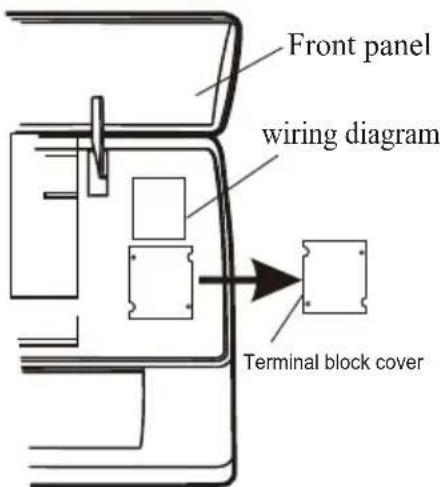
text_image
Front panel wiring diagram Terminal block coverINSTALLATION MANUAL---Installation of the Indoor unit
Refrigerant piping connection
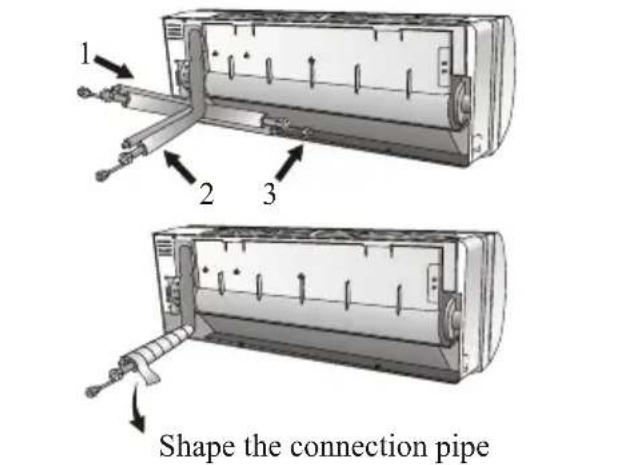
The piping can be run in the 3 directions indicated by numbers in the picture. When the piping is run in direction 1 or 3, cut a notch along the groove on the side of the indoor unit with a cutter.
Run the piping in the direction of the wall hole and bind the copper pipes, the drain pipe and the power cables together with the tape with the drain pipe at the bottom, so that water can flow freely.
- Do not remove the cap from the pipe until connecting it, to avoid dampness or dirt from entering.
- If the pipe is bent or pulled too often, it will become stiff. Do not bend the pipe more than three times at one point.
- When extending the rolled pipe, straighten the pipe by unwinding it gently as shown in the picture.
Connections to the indoor unit
- Remove the indoor unit pipe cap (check that there is no debris inside).
- Insert the flare nut and create a flange at the extreme end of the connection pipe.
- Tighten the connections by using two wrenches working in opposite directions
Indoor unit condensed water drainage
The indoor unit condensed water drainage is fundamental for the success of the installation.
- Place the drain hose below the piping, taking care not to create siphons.
- The drain hose must slant downwards to aid drainage.
- Do not bend the drain hose or leave it protruding or twisted and do not put the end of it in water. If an extension is connected to the drain hose, ensure that it is lagged when it passes into the indoor unit.
- If the piping is installed to the right, the pipes, power cable and drain hose must be lagged and secured onto the rear of the unit with a pipe connection.
1) Insert the pipe connection into the relative slot.
2) Press to join the pipe connection to the base.
text_image
1 2 3 Shape the connection pipe
text_image
YES NO Extending the rolled pipe
text_image
torque wrench YES
text_image
NO NOINSTALLATION MANUAL---Installation of the Indoor unit
INSTALLATION OF THE INDOOR UNIT
After having connected the pipe according to the instructions, install the connection cables. Now install the drain pipe. After connection, lag the pipe, cables and drain pipe with the insulating material.
- Arrange the pipes, cables and drain hose well.
- Lag the pipe joints with insulating material, securing it with vinyl tape.
- Run the bound pipe, Cables and drain pipe through the wall hole and mount the indoor unit onto the upper part of the mounting plate securely.
- Press and push the lower part of the indoor unit tightly against the mounting plate

text_image
Covered by vinyl tape refrigerant pipe insulation sleeve connection cable connection cable 1 (for heat-pump) probe cable(for heat-pump) refrigerant pipe Condensed water drain pipe mounting plateINSTALLATION MANUAL---Installation of the indoor unit
- The indoor unit should be installed on a solid wall and fastened securely.
- The following procedure must be observed before connecting the pipes and connecting cables: decide which is the best position on the wall and leave enough space to be able to carry out maintenance easily.
- Fasten the support to the wall using screw anchors which are particularly suited to the type of wall;
- Use a larger quantity of screw anchors than normally required for the weight they have to bear to aviod vibration during operation and remain fastened in the same position for years without the screws becoming loose.
- The unit must be installed following the national regulations.
Outdoor unit condensed water drainage (only for heat pump models)
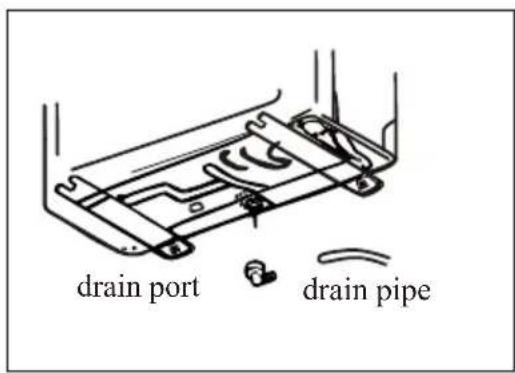
The condensed water and the ice formed in the outdoor unit during heating operation can be drained away through the drain pipe
- Fasten the drain port in the 25mm hole placed in the part of the unit as shown in the picture.
- Connect the drain port and the drain pipe. Pay attention that water is drained in a suitable place.
text_image
drain port drain pipeINSTALLATION MANUAL---Installation of the outdoor unit
ELECTRICAL CONNECTIONS
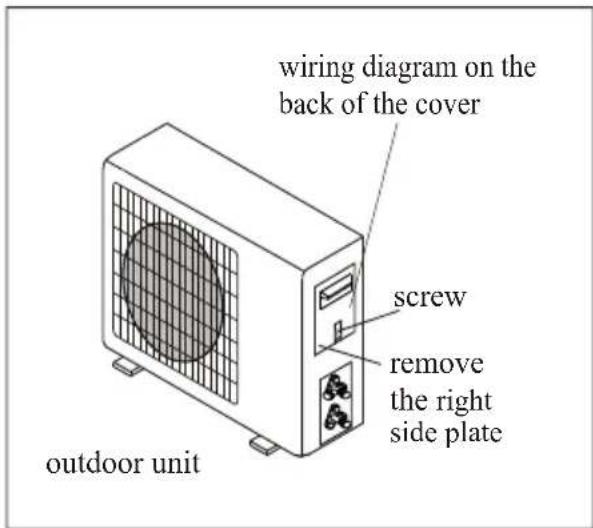
- Remove the handle on the right side plate of outdoor unit.
- Connect the power connection cord to the terminal board. Wiring should fit that of indoor unit.
- Fix the power connection cord with wire clamp.
- Confirm if the wire has been fixed properly.
- An efficient earth connection must be ensured.
- Recover the handle.
CONNECTING THE PIPES
Screw the flare nuts to the outdoor unit coupling with the same tightening procedures described for the indoor unit.
To avoid leakage, pay attention to the following points:
- Tighten the flare nuts using two wrenches. Pay attention not to damage the pipes.
- If the tightening torque is not sufficient, there will probably be some leakage. With excessive tightening torque there will also be some leakage, as the flange could be damaged.
- The surest system consists in tightening the connection by using a fix wrench and a torque wrench:in this case use the table on page 22.
text_image
wiring diagram on the back of the cover screw remove the right side plate outdoor unit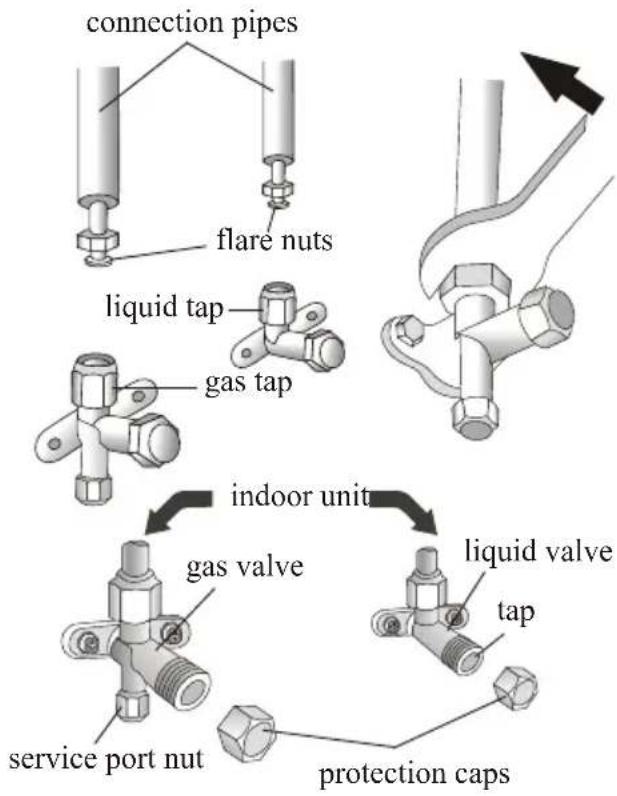
text_image
connection pipes flare nuts liquid tap gas tap indoor unit gas valve service port nut liquid valve tap protection caps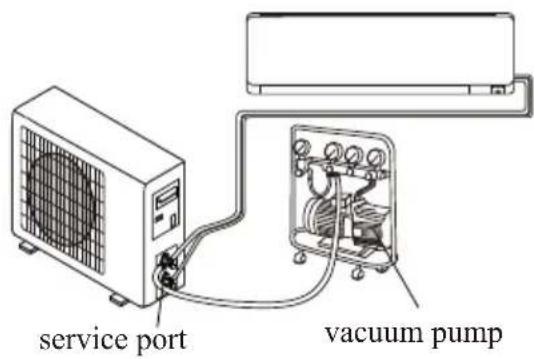
text_image
service port vacuum pumpINSTALLATION MANUAL---Installation of the outdoor unit
BLEEDING
The air and humidity left inside the refrigerant circulation can cause compressor malfunction. After having connected the indoor and outdoor units, bleed the air and humidity from the refrigerant circulation using a vacuum pump.
(1) Unscrew and remove the caps from the 2 - way and 3-way valves.
(2) Unscrew and remove the cap from the service port.
(3) Connect the vacuum pump hose to the service port.
(4) Operate the vacuum pump for 10 - 15 minutes until an absolute vacuum of 10mmHg has been reached.
(5) With the vacuum pump still in operation, close the low - pressure knob on the vacuum pump coupling. Stop the vacuum pump.
(6) Open the 2 - way valve by 1/4 turn and then close it after 10 seconds. Check all the joints for leaks using liquid soap or an electronic leak device.
(7) Turn the body of the 2-way and 3-way valves. Disconnect the vacuum pump hose.
(8) Replace and tighten all the caps on the valves.
3-way valve diagram

text_image
connect to indoor unit open position spindle needle Connect to outdoor unit Valve core service port cap
flowchart
graph TD
    A["Indoor unit"] --> B["3-way valve"]
    B --> C["Service port nut"]
    C --> D["(2) Turn"]
    D --> E["(8) Tighten"]
    E --> F["Valve cap"]
    F --> G["(7) Turn to fully open the valve"]
    G --> H["Valve cap"]
    H --> I["(1) Turn"]
    I --> J["(8) Tighten"]
    J --> K["Valve cap"]
    K --> L["(6) Open 1/4 turn"]
    L --> M["(7) Turn to fully open the valve"]
    M --> N["valve cap"]
    N --> O["(1) Turn"]
    O --> P["(8) Tighten"]
    P --> Q["Valve cap"]
    Q --> R["(1) Turn"]
    R --> S["(8) Tighten"]
    S --> T["Valve cap"]
    T --> U["(7) Turn to fully open the valve"]
    U --> V["(6) Open 1/4 turn"]
INSTALLATION MANUAL--- operation test
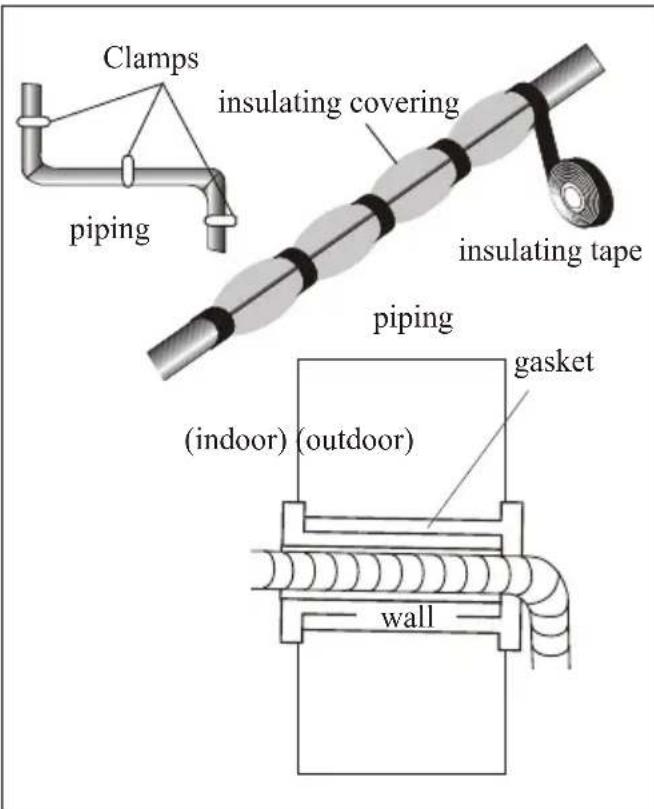
- Wind insulating covering around the joints of the indoor unit and fix it with insulating tape.
- Fix the exceeding part of the signal cable to the piping or to the outdoor unit.
- Fix the piping to the wall (after having coated it with insulating tape) using clamps or insert them into plastic slots.
- Seal the hole in the wall through which the piping is passed so that no air or water can enter.
Indoor unit test
- Do the ON/OFF and FAN operate normally?
- Does the MODE operate normally?
- Do the set point and TIMER function properly?
- Does each lamp light normally?
- Do the flap for air flow direction operate normally?
• Is the condensed water drained regularly?
Outdoor unit test
- Is there any abnormal noise or vibration during operation?
• Could the noise, the air flow or the condensed water drainage disturb the neighbours?
• Is there any coolant leakage?
Note: the electronic controller allows the compressor to start only three minutes after voltage has reached the system.
text_image
Clamps insulating covering piping insulating tape piping (gasket (indoor) (outdoor) wallINSTALLATION MANUAL---Information for the installer
| FIXED-SPEED TYPEMODEL capacity (Btu/h) | 9k | 12k | 18k | 24k |
| Liquid pipe diameter | 1/4"(Φ6) | 1/4"(Φ6) | 1/4"(Φ6) | 3/8"(Φ5.52) |
| Gas pipe diameter | 3/8"(Φ5.52) | 1/2"(Φ2) | 1/2"(Φ2) | 5/8"(Φ5.88) |
| Lenght of pipe with standard charge | 5m | 5m 5m | 5m | |
| Type of refrigerant(1) | R410A R410A | R410A R410A |
| INVERTER TYPEMODEL capacity (Btu/h) | 9k | 12k | 18k | 24k | 28k |
| Liquid pipe diameter | 1/4"(Φ6) | 1/4"(Φ6) | 1/4"(Φ6) | 3/8"(Φ.52) | 3/8"(Φ.52) |
| Gas pipe diameter | 3/8"(Φ.52) | 3/8"(Φ.52) | 1/2"(Φ2) | 5/8"(Φ5.88) | 5/8"(Φ5.88) |
| Lenght of pipe with standard charge | 5m | 5m 5m | 5m | 5m | |
| Type of refrigerant(1) | R410A R410A R410A R410A | R410A | |||
(1) Refer to the data rating label sticked on the outdoor unit.
TIGHTENING TORQUE FOR PROTECTION CAPS AND FLANGE CONNECTION
| PIPE | TIGHTENING TORQUE [N x m] | CORRESPONDING STRESS (using a 20 cm wrench) | TIGHTENING TORQUE [N x m] | |
| 1/4"(Φ6) | 15 - 20 | wrist strength | Service port nut | 7 - 9 |
| 3/8"(Φ.52) | 31 - 35 | arm strength | Protection caps | 25 - 30 |
| 1/2"(Φ2) | 35 - 45 | arm strength | ||
| 5/8"(Φ5.88) | 75 - 80 | arm strength |
INSTALLATION MANUAL---Information for the installer
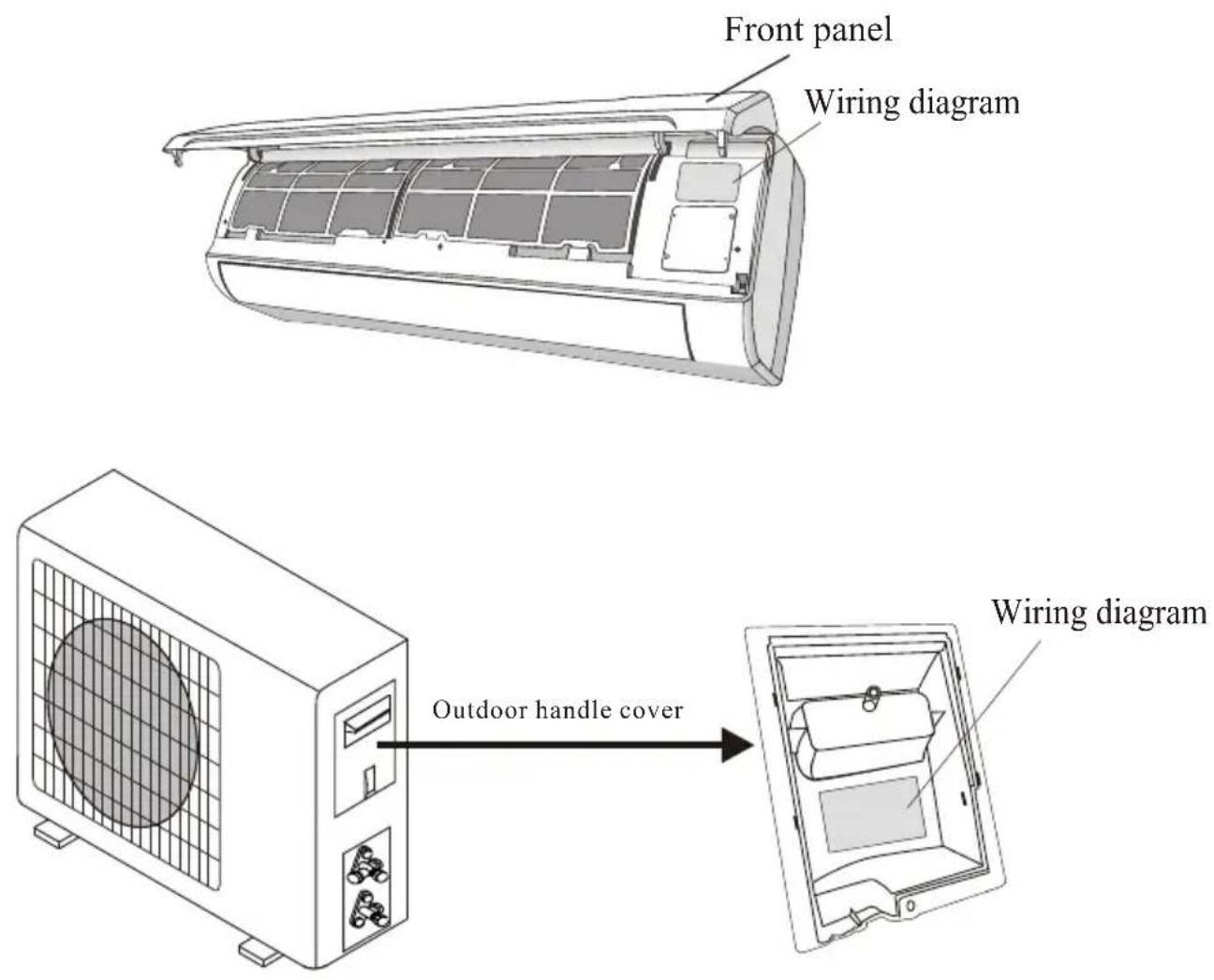
WIRING DIAGRAM
For different models, the wiring diagram may be different. Please refer to the wiring diagrams pasted on the indoor unit and outdoor unit respectively.
On indoor unit, the wiring diagram is pasted under the front panel;
On outdoor unit, the wiring diagram is pasted on the backside of the outdoor handle cover.
text_image
Front panel Wiring diagram Outdoor handle cover Wiring diagramNote: For some models the wires has been connected to the main PCB of indoor unit by manufacturer without terminal block.
INSTALLATION MANUAL---Information for the installer
CABLE WIRES SPECIFICATION
| FIXED-SPEED TYPEMODEL capacity (Btu/h) | 9k | 12k | 18k | 24k | |
| sectional area | |||||
| Power supply cable | N | 1.5mm^2 AWG16 | 1.5mm^2 AWG16 | 1.5mm^2 AWG16 | 2.5mm^2 AWG14H05RN-F |
| L | 1.5mm^2 AWG16 | 1.5mm^2 AWG16 | 1.5mm^2 AWG16 | 2.5mm^2 AWG14H05RN-F | |
| E | 1.5mm^2 AWG16 | 1.5mm^2 AWG16 | 1.5mm^2 AWG16 | 2.5mm^2 AWG14H05RN-F | |
| Connection supply cable | N | 1.5mm^2 | 1.5mm^2 | 1.5mm^2 | 0.75mm^2 |
| L | / | / | / | 0.75mm^2 | |
| 1 | 1.5mm^2 | 1.5mm^2 | 1.5mm^2 | 0.75mm^2 | |
| 2 | 0.75mm^2 | 0.75mm^2 | 0.75mm^2 | 0.75mm^2 | |
| 3 | 0.75mm^2 | 0.75mm^2 | 0.75mm^2 | 0.75mm^2 | |
| 1.5mm^2 | 1.5mm^2 | 1.5mm^2 | 0.75mm^2 | ||
| INVERTER TYPEMODEL capacity (Btu/h) | 9k | 12k | 18k | 24k | 28k | |
| sectional area | ||||||
| Power supply cable | N | 1.5mm^2 AWG16 | 1.5mm^2 AWG16 | 1.5mm^2 AWG16 | 2.5mm^2 AWG14 | 2.5mm^2 AWG14 |
| L | 1.5mm^2 AWG16 | 1.5mm^2 AWG16 | 1.5mm^2 AWG16 | 2.5mm^2 AWG14 | 2.5mm^2 AWG14 | |
| E | 1.5mm^2 AWG16 | 1.5mm^2 AWG16 | 1.5mm^2 AWG16 | 2.5mm^2 AWG14 | 2.5mm^2 AWG14 | |
| Connection supply cable | N | 1.5mm^2 | 1.5mm^2 | 1.5mm^2 | 0.75mm^2 | 0.75mm^2 |
| L | 1.5mm^2 | 1.5mm^2 | 1.5mm^2 | 0.75mm^2 | 0.75mm^2 | |
| 1 | 1.5mm^2 | 1.5mm^2 | 1.5mm^2 | 0.75mm^2 | 0.75mm^2 | |
| 1.5mm^2 | 1.5mm^2 | 1.5mm^2 | 0.75mm^2 | 0.75mm^2 | ||
220V 9K, 12K, 18K, 24K, air conditioner indoor unit fuse parameter is 50T, 3.15A
MAINTENANCE
Periodic maintenance is essential for keeping your air conditioner efficient.
Before carrying out any maintenance, disconnect the power supply by taking the plug out from the socket.
INDOOR UNIT
ANTIDUST FILTERS
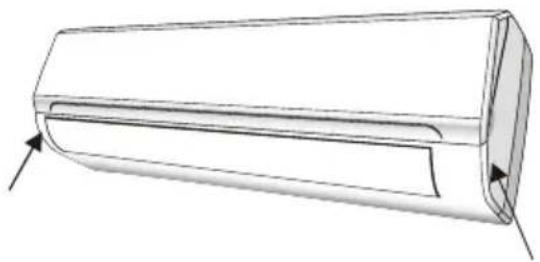
- Open the front panel following the direction of the arrow
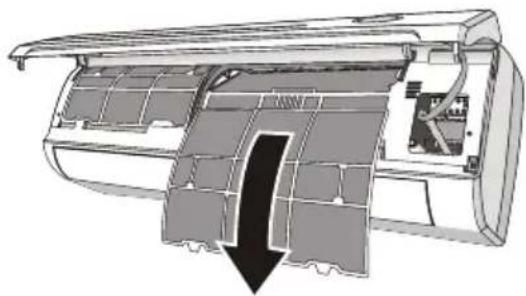
- Keeping the front panel raised with one hand, take out the air filter with the other hand
- Clean the filter with water; if the filter is soiled with oil, it can be washed with warm water (not exceeding 45°C).
Leave to dry in a cool and dry place. - Keeping the front panel raised with one hand, insert the air filter with the other hand
- Close
The electrostatic and the deodorant filter (if installed) cannot be washed or regenerated and must be replaced with new filters after every 6 months.
CLEANING THE HEAT EXCHANGER
- Open the front panel of the unit and lift it till its greatest stroke and then unhooking it from the hinges to make the cleaning easier.
- Clean the indoor unit using a cloth with the water (not higher than 40°C and neutral soap. Never use aggressive solvents or detergents.
- If the outdoor unit is clogged, remove the leaves and the waste and remove the dust with air jet or a bit of water.
natural_image
Technical line drawing of a cylindrical mechanical component with directional arrows indicating force or movement (no text or symbols)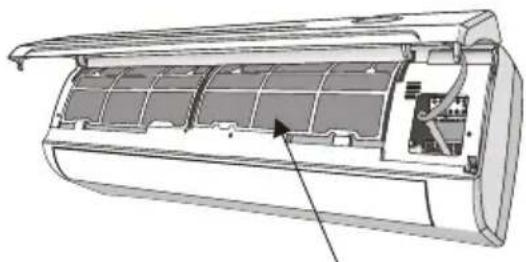
natural_image
Technical line drawing of an air conditioner unit showing internal compartments and housing (no text or symbols)antidust filter
natural_image
Cross-sectional diagram of an air conditioner unit showing internal airflow path and ventilation duct (no text or labels)END OF SEASON MAINTENANCE
-
Disconnect the automatic switch or the plug.
-
Clean and replace the filters
-
On a sunny day let the conditioner work in ventilation for some hours, so that the inside of the unit can dry completely..
REPLACING THE BATTERIES
When: • There is no confirmation beep heard from the indoor unit.
• The LCD doesn't act.
How: • Take off the cover at back.
- Place the new batteries respecting the symbols + and - .
N.B: Use only new batteries. Remove the batteries from the remote controller when the conditioner is not in operation
WARNING! Do not throw batteries into common rubbish, they should be disposed of in the special containers situated in the collection points.
TROUBLESHOOTING
| MALFUNCTION | POSSIBLE CAUSES | |
| The appliance does not operate | Power failure/plug pulled out | |
| Damaged indoor/outdoor unit fan motor | ||
| Faulty compressor thermomagnetic circuit breaker | ||
| Faulty protective device or fuses. | ||
| Loose connections or plug pulled out | ||
| It sometimes stops operating to protect the appliance. | ||
| Voltage higher or lower than the voltage range | ||
| Active TIMER-ON function | ||
| Damaged electronic control board | ||
| Strange odour | Air filter dirty | |
| Noise of running water | Back flow of liquid in the refrigerant circulation | |
| A fine mist comes from the air outlet | This occurs when the air in the room becomes very cold, for example in the “COOLING”or DEHUMIDIFYING/DRY mo’des. | |
| A strange noise can be heard | This noise is made by the expansion or contraction of the front panel due to variations in temperature and does not indicate a problem. | |
| Insufficient airflow, either hot or cold | Inappropriate temperature setting.. | |
| Air inlet or outlet of indoor or outdoor unit has been blocked. | ||
| Air filter is blocked. | ||
| Fan speed set at minimum. | ||
| Other sources of heat in the room. | ||
| No refrigerant. | ||
| The appliance does not respond to commands | Remote control is not near enough to indoor unit. | |
| Battery in Remote controller may have been exhausted.. | ||
| Obstacles between remote control and signal receiver in indoor unit. | ||
| The display is off | Active LED function | |
| Power failure | ||
| Switch off the air conditioner immediately and cut off the power supply in the event of: | ||
| Strange noises during operation. | ||
| Faulty electronic control board | ||
| Faulty fuses or switches. | ||
| Spraying water or objects inside the appliance. | ||
| Overheated cables or plugs. | ||
| Very strong smells coming from the appliance. | ||
| ERROR SIGNALS ON THE DISPLAY | ||
| In case of error, the display on the indoor unit shown the following error codes: | ||
| RUN lamp | Description of the trouble | |
| E1 | flashes once | The fault of indoor temperature sensor |
| E2 | flashes twice | The fault of indoor pipe temperature sensor |
| E6 | flashes 6 times | Malfunction of indoor fan motor. |
CONTACT DETAILS
* OHQ□' LP SOH[ □\$XVWUDOLD□3W\ □/ WG
8 Lakeview Drive, Scoresby
Victoria 3179
Australia
Ph: 1300 556 816
Web: www.dimplex.com.au
Glen Dimplex New Zealand Ltd
38 Harris Road
East Tamaki, Auckland
New Zealand
Ph: 09 274 8265
Web: www.dimplex.co.nz