Charm Nano RITE - Hearing aid Sonic - Free user manual and instructions
Find the device manual for free Charm Nano RITE Sonic in PDF.


User questions about Charm Nano RITE Sonic
0 question about this device. Answer the ones you know or ask your own.
Ask a new question about this device
Download the instructions for your Hearing aid in PDF format for free! Find your manual Charm Nano RITE - Sonic and take your electronic device back in hand. On this page are published all the documents necessary for the use of your device. Charm Nano RITE by Sonic.
USER MANUAL Charm Nano RITE Sonic
natural_image
Exterior view of a modern electronic device with a purple earplifier and gray body (no text or symbols visible)charm™
Table of Contents
General Warnings and Safety Information 7
Safety Information 10
Hearing Expectations 12
Hearing Instrument Description 14
Earpiece Overview 16
Step-by-Step Instructions for Using Your Hearing Instrument 17
Step 1: Inserting the Battery 17
Step 2: Turning the Hearing Instrument ON 18
Step 3: Inserting Your Hearing Instrument 19
Step 4: Changing the Volume 22
Step 5: Changing the Programs 23
Step 6: Muting Your Hearing Instrument 24
Step 7: Removing Your Hearing Instrument 25
Step 8: Turning the Hearing Instrument OFF 26
Step 9: Changing the Battery 26
Features of Your Hearing Instrument 28
Caring for Your Hearing Instrument 29
Common Problems and Solutions 38
Accessories 42
Product Approval, Markings and Compliance 43
Cell Phone and Hearing Instrument Compatibility 45
Compliance with Requirements for Europe 47
Compliance with Radio Communications Requirements for the USA 49
International Warranty 52
Information and Explanation of Symbols 53
Service 58
The following Sonic hearing instrument models are covered within these instructions for use:
Bliss
☐ BL100 NR, with wireless functionality
☐ BL80 NR, with wireless functionality
Charm
☐ CH60 NR, with wireless functionality
□ CH40 NR
Congratulations on your purchase! With a little practice, you will soon be on your way to better hearing. The amplification of sound provided by your hearing instruments was adjusted by your hearing care provider to the needs of your individual hearing loss.

Please read the entire contents of this booklet before using your hearing instruments. It contains instructions and important information about the use and handling of your hearing instruments and batteries. With proper use and care, your hearing instruments will improve your connection with the world around you.
General Warnings and Safety Information
Hearing instruments and batteries can be dangerous if swallowed or improperly used. Such actions can result in severe injury, permanent hearing loss or even fatality.
Familiarize yourself completely with the following general warnings and safety guidelines before using your hearing instruments.
Hazard Warnings
Warnings for Hearing Instrument Users
Never allow others to wear your hearing instrument. It could permanently damage another person's hearing.
Avoid wearing your hearing instrument while playing contact sports (e.g., rugby, football, etc.). A slap to your ear while wearing a hearing instrument could be harmful.
Keep your hearing instrument, parts, and batteries out of the reach of infants, children, and anyone who might swallow these items.
Discard batteries safely. Keep discarded batteries out of sight of infants, small children, vulnerable persons, and pets.
Clean your hearing instrument (including parts) on a regular basis, as recommended by your hearing care provider. Microorganisms from an unclean hearing instrument may cause skin irritations.
Be careful of leaking battery liquid. Battery liquid is a hazardous substance.
⚠️ Never try to recharge non-rechargeable batteries.
Never change the battery, or adjust the controls of the hearing instrument, in front of infants, small children, and vulnerable persons.
Be aware of the possibility that your hearing instrument may stop working without notice. Keep this in mind when you depend on warning sounds (e.g., when you are in traffic).
Be aware of the possibility that the directional microphone in your hearing instrument may reduce the volume of some warning sounds coming from behind you.
Remove your hearing instrument before applying aftershave, hairspray, oils, perfume, mosquito repellent, lotions, etc. If your hearing instrument is exposed to such a product, allow the product to dry before you put your hearing instrument on.
Warnings to Hearing Care Provider and patient
Special care should be taken when fitting and using a hearing instrument with maximum sound pressure capability in excess of 132 dB SPL (IEC 60318-4) since there may be a risk of impairing the remaining hearing of the patient.
Safety Information
- Only use hearing instruments as directed.
- Hearing instruments should be adjusted by a trained hearing care provider.
- Misuse or improper adjustments can result in sudden and permanent hearing loss.
- Hearing instruments will not restore normal hearing or prevent hearing loss resulting from organic conditions.
- Never put your hearing instrument or batteries in your mouth.
- Keep batteries away from medications. Batteries can easily be mistaken for pills.
- See a doctor immediately if a battery or hearing instrument is swallowed.
- Be aware that hearing instrument use may cause excess earwax to build up in the ear canal.
- Excess earwax may require removal by a trained medical professional.
- See a doctor immediately if your hearing instrument or earmold causes a discharge from the ear or allergic reaction.
- See your hearing care provider if you experience discomfort or irritation of your ear.
-
Never insert cleaning tools into the sound outlet or microphone inlet. This could damage the hearing instrument.
-
Do not expose your hearing instrument to extreme heat by leaving it in the car, near a radiator, etc.
- Do not wear your hearing instrument while swimming, snorkeling, or diving. Your hearing instrument is not designed for such activities.
- Do not immerse your hearing instrument in water or other liquids.
- Remove your hearing instrument before sleeping.
- Keep your hearing instrument in the case for protection when you are not wearing it.
- Manipulate the speaker unit with caution.
- Do not pull the speaker unit off the hearing instrument by yourself.
- Do not twist the cable connected to the speaker.
- Should the speaker detach from the hearing instrument, ask your hearing care provider for support.
- In some cases, the speaker unit has to be changed. Your hearing care provider will make the change.
Hearing Expectations
Set appropriate expectations
It is important that you have the right expectations regarding your hearing instruments. Hearing instruments can help you hear and understand better, but they are not a cure for hearing loss.
People whose expectations are too high (“I thought they would make my hearing normal”) are likely to be disappointed and may give up.
Hearing instruments can:
- Help you hear and understand better in most situations
- Allow you to participate more in group situations and meetings
Hearing instruments cannot:
- Give you normal hearing
Hearing instruments may not:
- Let you hear very soft sounds
- Block ALL background noises – especially in noisy situations. Even people without hearing loss may have difficulty hearing in the presence of background noise.
Be patient
Unlike with eyeglasses which correct your vision as soon as you first put them on, with hearing instruments you will need some time to adjust.
It may take several weeks or months to completely adjust to your hearing instruments, so try to be patient. Initially, try different listening situations, such as one-on-one conversations with family and friends, and conversations with two or three people at home or in quiet settings. Also, try having conversations in noisier places like parties, restaurants, meetings, and outdoors.
Do not forget that some situations are simply too noisy in general – even for people without hearing loss. So, do not get discouraged.
Hearing Instrument Description
Nano RITE Model
Option A: with speaker unit and dome
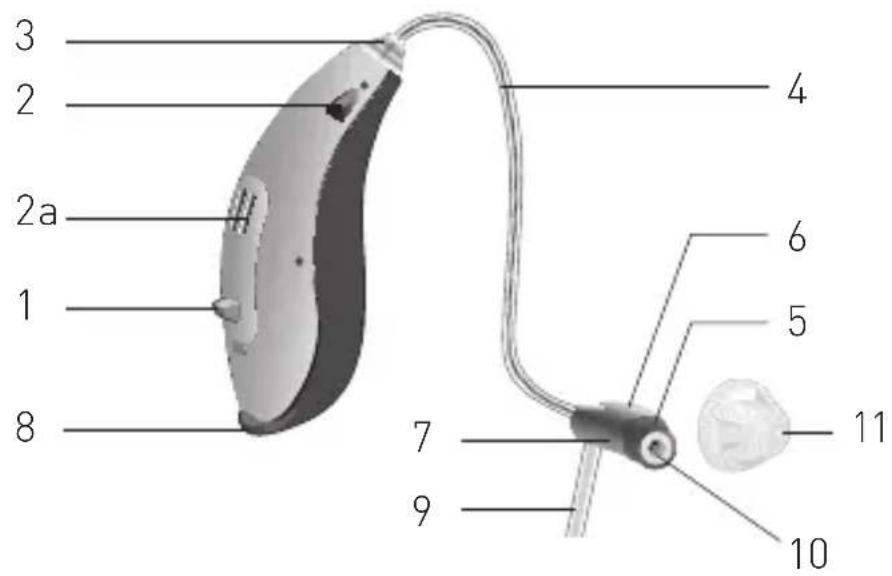
1 Program Button
2 Front microphone
2a Rear microphone
3 Connector Plug
4 Speaker wire
5 Left/right indicator
6 Speaker
7 Speaker unit size marking
8 Battery door
9 Retention lock
10 ProWax filter
11 Dome
Nano RITE Model
Option B: with speaker unit and custom mold
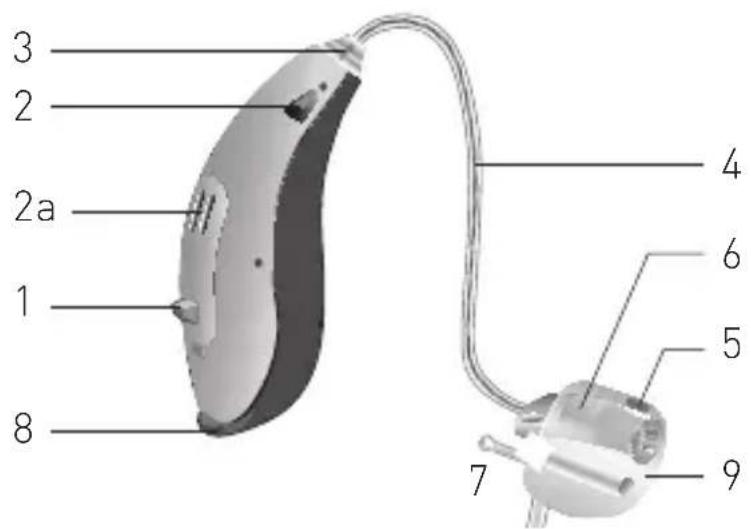
1 Program Button
2 Front microphone
2a Rear microphone
3 Connector Plug
4 Speaker wire
5 Left/right indicator
6 Speaker
7 Pull out cord
8 Battery door
9 Custom mold
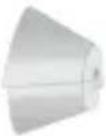
Earpiece Overview
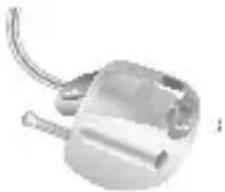
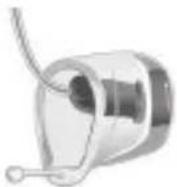
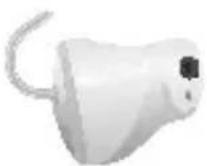
Domes and custom molds are earpieces used to secure the speaker in your ear canal and to protect the sound outlet from wax.
| Open Dome | Tulip Dome | Power Dome |
| □ | □ | □ |
 |  | 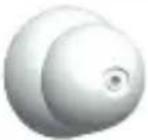 |
| Micro Mold Lite Tip Power Mold | ||
| □ | □ | □ |
 |  |  |
Battery Size
Your hearing instrument uses a size 312 battery.

Note!
Please recycle your hearing instruments and batteries according to your local regulations or return them to your hearing care provider for disposal.
Step-by-Step Instructions for Using Your Hearing Instrument
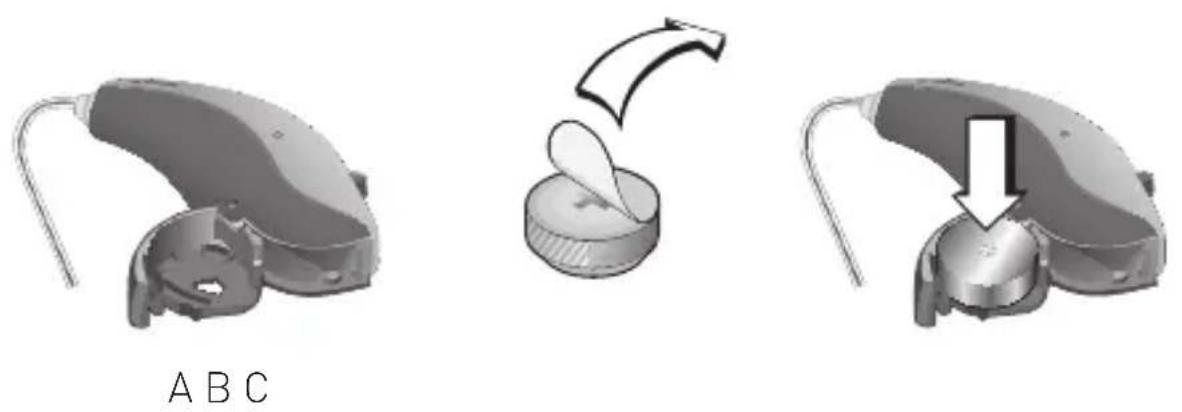
Step 1: Inserting the Battery
- Gently swing the battery door fully open, but do not force it (A)
- Remove the sticker from the new battery (B)
- Place the battery into the empty compartment. The + sign on the battery should face up. (C)
Step 2: Turning the Hearing Instrument ON
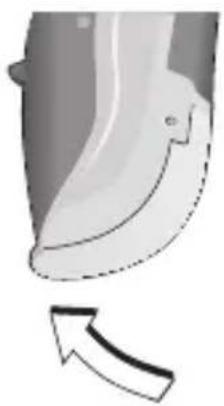
Close the battery door completely. You should notice a click. The hearing instrument is now ON.
natural_image
Close-up of a curved mechanical component with an arrow indicating direction (no text or symbols)Click "ON"

Note!
Never use excessive force to open or close the battery door.
Step 3: Inserting Your Hearing Instrument
Your hearing instrument has been programmed individually for your right or left ear.
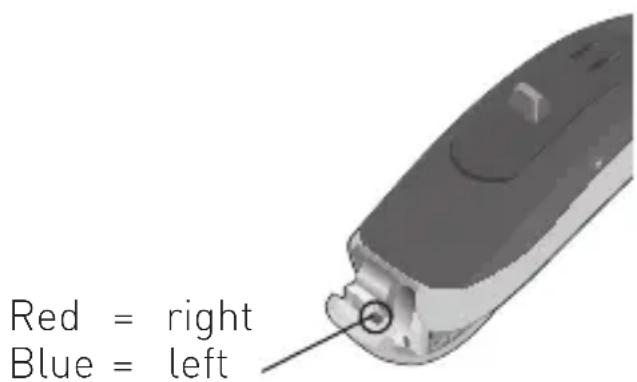
You will see a color marking inside the battery door. This can help you to distinguish between the left and right hearing instrument.
Inserting Your Hearing Instrument
- Make sure the dome is pushed firmly onto the speaker.
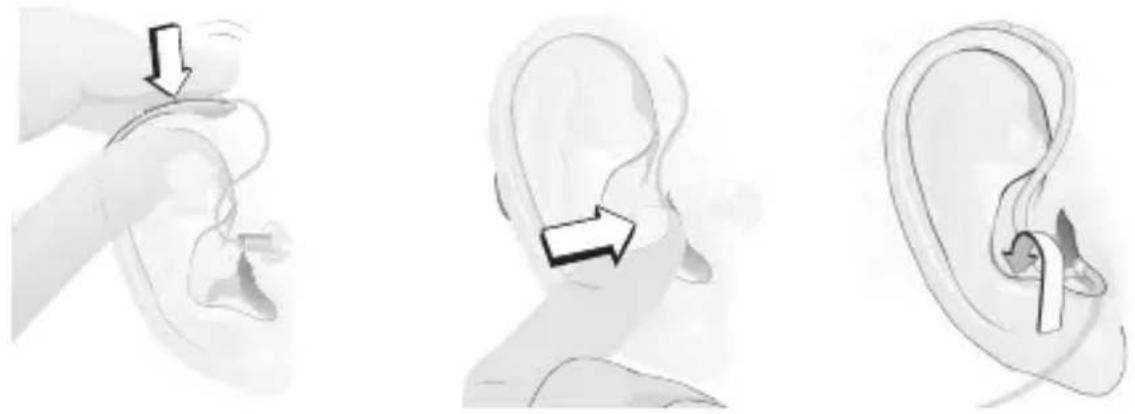
- Position the hearing instrument behind your ear (A)
- Grasp the speaker between your thumb and index finger. The dome or custom mold should point towards the ear canal opening.
- Gently push the speaker into your ear canal, until the wire sits flush against the side of your head (B)
- If you have an retention lock attached to the speaker, push the retention lock into the bowl of your ear. If the retention lock is sticking out, it has not been positioned correctly. Try adjusting it again. (C)
When looking in the mirror, the speaker should be difficult to see.
natural_image
Illustration of ear ear anatomy showing three stages: intact ear, ear with earbell, and ear with earbell (no text or labels)A B C

Note!
Never insert the speaker in the ear canal without the dome attached. Do not force the speaker too deeply into your ear canal. Do not apply any lubrication to the earpiece as this may damage the speaker.

Note!
If the dome is not correctly attached and falls off in the ear canal, please see your medical practitioner.
Step 4: Changing the Volume
Your hearing instruments are programmed to be at a comfortable volume level for your hearing loss. They are designed to automatically adjust to changes. If you want to change the volume yourself, your hearing care provider can program the Program Button to be used as a volume control.
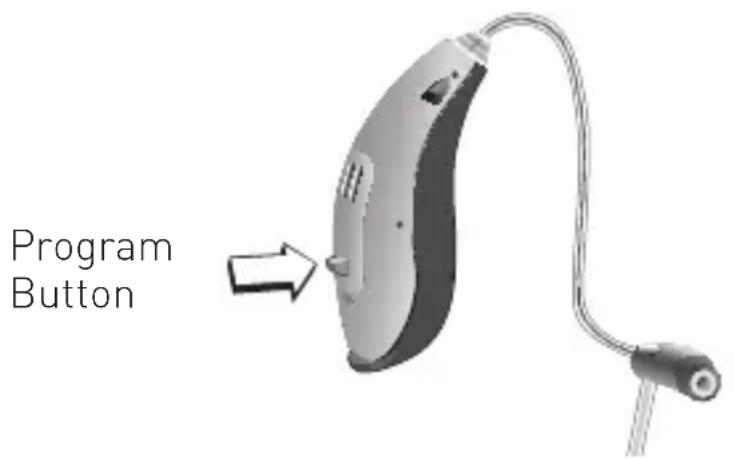
The hearing instrument will click to confirm that the volume has been changed and then will beep when you reach the programmed maximum or minimum.

Note!
Your hearing instrument automatically returns to a preset loudness level when it starts, the battery is low, or when the program is changed. If the default volume of your hearing instrument is too loud or soft, your hearing care provider may need to make changes to your listening program.
Step 5: Changing the Programs
A short press (about 1-2 seconds) on the Program Button will cause the listening program to change. You will hear the same number of beeps as the program you are in each time you push the button. When you turn the hearing instrument off and then on, it will automatically return to your default listening program
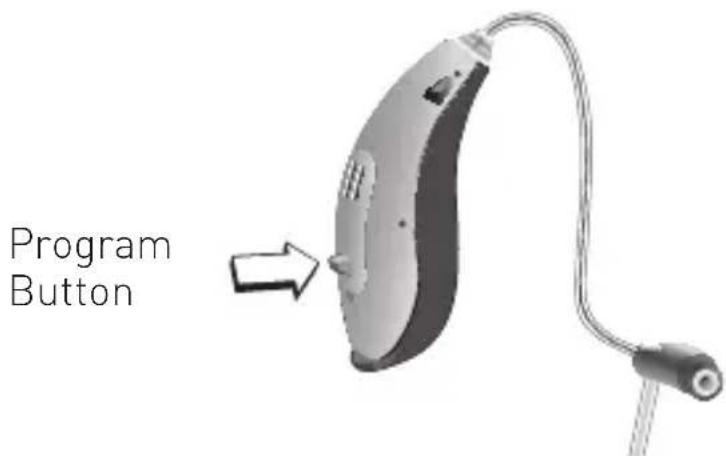
Your hearing instrument can be configured with up to 4 listening programs (Charm 40 provides a maximum of 3 listening programs). Please ask your hearing care provider about the programs that are available with your hearing instrument.
Step 6: Muting Your Hearing Instrument
Your hearing instrument may have the mute function. Please ask your hearing care provider if this function is available with your hearing instrument.
A press on the Program Button will cause your hearing instrument to mute. Please ask your hearing care provider how the Program Button has been configured.
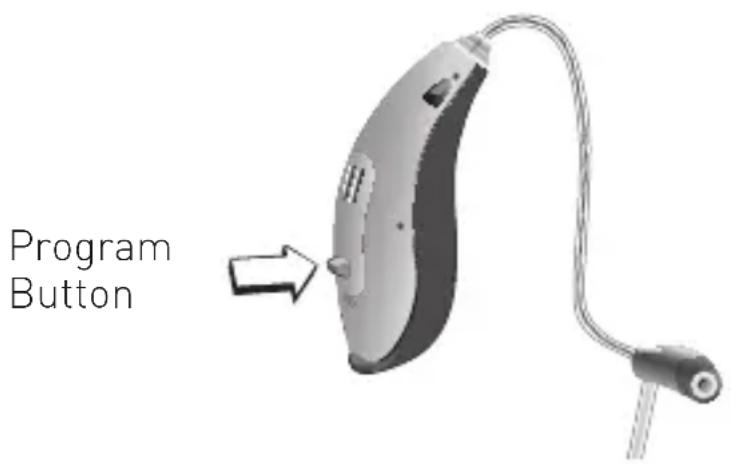
To un-mute the hearing instrument, give any control on the hearing instrument a push.

Note!
Do not use the mute function to turn off the hearing instrument. In this mode, the hearing instrument is still drawing current from the battery.
Step 7: Removing Your Hearing Instrument
- Grasp the wire of the speaker unit between your thumb and index finger. Do not pull on the retention lock.
- Gently pull the speaker out of your ear

Note!
Do not remove the instrument by pulling on the hearing instrument case, as the receiver may be damaged at the connector. Should the Dome become separated from the speaker and remain lodged in your ear canal after removal of the hearing instrument, do not attempt to remove the Dome yourself. Seek immediate care from your hearing care provider or physician.
Step 8: Turning the Hearing Instrument OFF
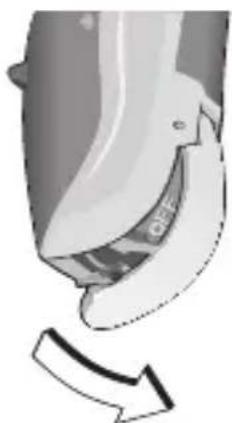
To prolong battery life, turn off your hearing instrument when not in use. Before turning your hearing instrument off, wipe away any moisture with a soft cloth. Open the battery door slightly until a click is felt. The hearing instrument is now OFF.
natural_image
Close-up of a mechanical component with a curved arrow indicating direction (no text or symbols visible)Click "OFF"
Step 9: Changing the Battery
When the battery power level is low, your hearing instrument will beep at regular intervals. You should be prepared to replace the battery. The time until the hearing instrument stops working depends on the battery type and manufacturer. Mercury-free batteries generally cause earlier warning beeps.
Change batteries regularly
When your battery needs to be changed, you will hear three beeps: a low tone, followed by a high tone and another low tone. The exact battery life you experience may vary, but you should expect approximately 120–160 hours of total hearing instrument use per battery.
Battery type
Stainless steel zinc-air batteries are recommended. Your hearing instrument uses a #312 battery.
Features of Your Hearing Instrument
The following feature may be activated in your hearing instrument. Please consult your hearing care provider to find out how your hearing instrument is configured.
☐ Telecoil helps you hear better when using a telephone or in buildings where inductive loop systems are installed.

natural_image
Symbol of a human ear with a diagonal line crossing it, no text or numbers present.This symbol or a similar sign should be displayed wherever a permanent loop has been installed.
☐ Auto Telephone can be automatically activated eliminating the need to access a dedicated phone program with the Program Button.
☐ Telephone Program allows you to answer the phone on both ears or on your preferred ear when you are wearing two hearing instruments. If you have a preferred ear, the hearing instrument on the opposite side can be programmed to sound softer or to mute when the Telephone Program is active.
Caring for Your Hearing Instrument
Healthy ears produce cerumen, a waxy substance that can clog your hearing instruments. Please follow these cleaning instructions to prevent wax build-up and ensure optimal performance of your hearing instrument.
Every night
- Check your hearing instruments for earwax and wipe them clean with a cloth or tissue
- Use the cleaning tool provided to remove wax that may have accumulated in the Dome, sound outlet or vent opening if you have a Custom Mold
- Open the battery door fully to allow air to circulate
- A dry-instrument pack is recommended to remove any moisture that may have accumulated in the hearing instrument.
General Care Instructions
Treat your hearing instrument like any other delicate electronic device (check the safety guidelines on page 7) and make sure that the hearing instrument and the speaker do not come in contact with moisture or water.
- Always clean and dry your hands thoroughly before handling your hearing instrument
- Do not use your hearing instrument without a dome or mold
- Never mount a used dome on the speaker unit
Should your hearing instrument come in contact with water and stop working, please follow these guidelines:
- Gently wipe off any water on the outside of the hearing instrument
- Open the battery door and remove the battery
- Gently wipe off any water in the battery door
- Let the hearing instrument dry with the battery door open for approximately 30 minutes
- Insert a new fresh battery and close the battery door. Your hearing instrument should work normally again.
Daily Care Instructions
- Check your hearing instrument for earwax and wipe it clean with a cloth or tissue
- Clean your custom mold after every use by wiping it with a clean dry cloth
- Open the battery door fully to allow air to circulate
Specific Care Instructions
A: How to Clean Your Custom Mold
In most cases, there is a hole through the custom mold (below the speaker unit). This is the vent. The vent should never be clogged with earwax.
- Handle your hearing instrument over a soft surface to avoid damage in case you drop it
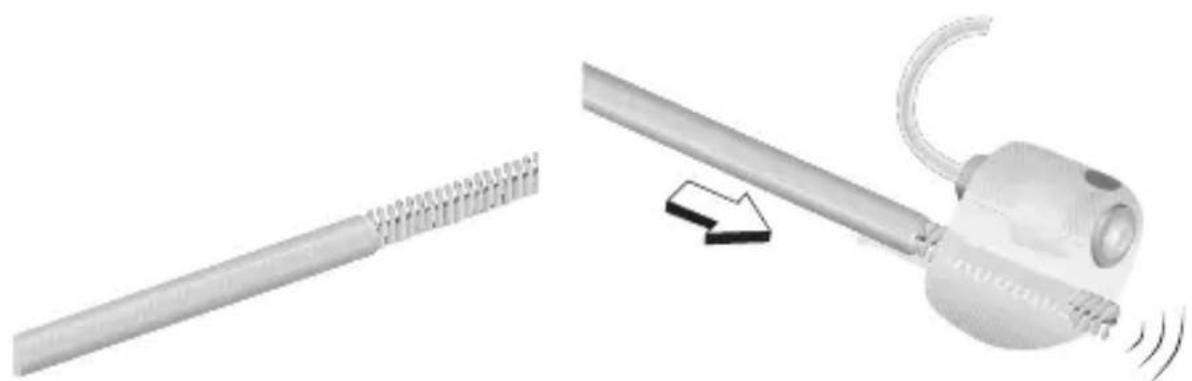
- Insert a cleaning tool from the opposite end (nearest the speaker wire), and push through to remove wax (A)
- If no cleaning tool was supplied with your hearing instrument, please contact your hearing care provider
natural_image
Illustration of a mechanical device with a spring-like tool and a curved handle, showing motion (no text or symbols)A
B: How to Exchange the Wax Protection Filter on your Custom Mold
Visually inspect the wax protection in the sound outlet of your custom mold. If it is clogged or there is no sound coming from the device, the wax protection filter needs to be replaced.
Depending on your acoustic setup, there are two different types of wax protection systems to keep the sound outlet free from wax.
Please consult your hearing care provider to get the relevant information about how to exchange the wax protection filter on your custom mold.
C: How to Exchange the Dome
The Dome should be changed regularly. The frequency of Dome changes will depend on how fast it loses pliability or earwax builds up on the Dome. Spare Domes can be obtained from your hearing care provider.
- Remove the old Dome by pulling it off the end of the Speaker Housing (A)
- With clean fingers, push a new Dome as far as possible onto the Speaker Housing (B). When attached correctly, the Dome should touch the plastic ring.
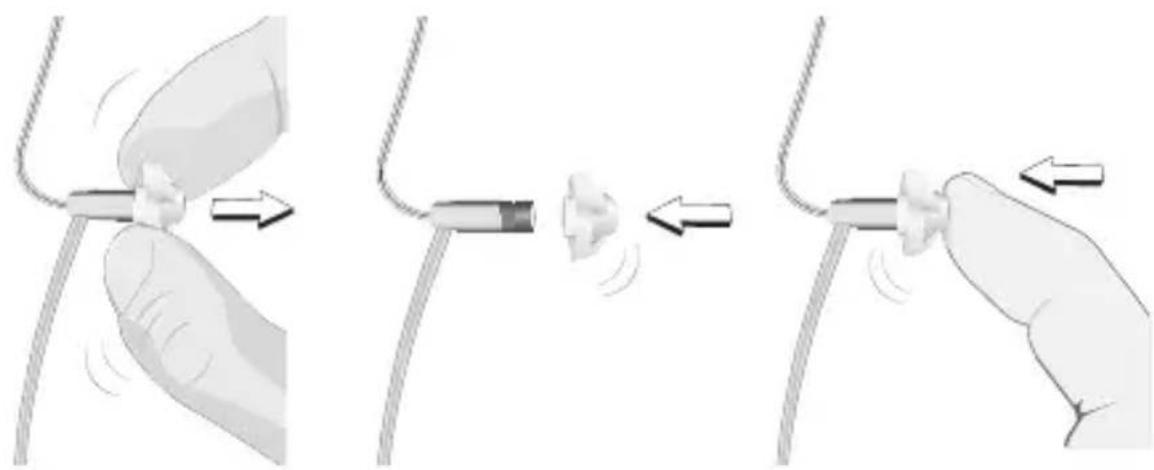
natural_image
Illustration of three-step cable installation procedure showing hand positioning, cable attachment, and wire movement (no text or symbols)A B B

Note!
If the Dome is not securely attached to the speaker, it could fall off in your ear canal. If this happens, please see your medical practitioner.

Note!
Never remount a used Dome on the speaker. A remounted Dome is more likely to fall off in the ear canal.
D: How to Exchange the Wax Protection Filter on Your Speaker Unit
- Visually inspect the wax protection in the sound outlet of your speaker unit. If it is clogged or there is no sound coming from the device, replace the wax protection filter.
- Depending on your speaker unit type (M- or P-Speaker), there are two different types of wax protection systems to keep the sound outlet free from wax
- Please consult your hearing care provider to get the relevant information about how to exchange the wax protection filter on your speaker unit
Notes
Common Problems and Solutions
| Problem | Possible cause |
| Instrument whistles or squeals | Instrument not inserted correctly |
| Earwax accumulation in ear canal | |
| Instrument may be too loose | |
| No volume, level too soft or humming noise | Instrument may not be turned ON |
| Battery may be dead or inserted wrong way | |
| Volume level too soft | |
| Instrument may be in telecoil position | |
| Earwax accumulation in ear canal | |
| Battery contacts may be dirty or corroded | |
| Sound outlet may be blocked or corroded | |
| Microphone opening may be blocked | |
| Your hearing loss may have increased |
Solution
| Re-insert instrument |
| Consult your hearing care provider or physician |
| Consult your hearing care provider |
| Check that the battery door is closed completely |
| Insert a fresh battery |
| Increase the volume level with the Volume Control on the instrument, or with the RC-P or SoundGate (if available) |
| Check to make sure you are in the intended program |
| Consult your hearing care provider or physician |
| Open and close the battery door several times or clean the battery contacts carefully with a dry Q-tip |
| Check the sound outlet and change the filter if you can see that it is clogged |
| Consult your hearing care provider, do not try to clean this yourself |
| Consult your hearing care provider |
| Problem | Possible cause |
| Whirring noise, fading, weak or motor-boating sounds | Battery contacts may be dirty or corroded |
| Moisture in hearing instrument | |
| Low battery | |
| Instrument switches from ON to OFF periodically | Low battery |
Solution
Open and close the battery door several times or clean the battery contacts with a dry Q-tip
Place hearing instrument in dry-instrument pack. Remove battery first. Consult your hearing care provider.
Insert a fresh battery
Insert a fresh battery
Accessories
Sonic offers a wide range of optional accessories that may be purchased to enhance your hearing instrument. Depending on the hearing instrument type and local regulations, the following accessories are available:
☐ Remote control (RC-P)
☐ SoundGate communication device (for wireless connection to cell phones, music players, etc.)
☐ TV Adapter (for wireless connection to your television via the SoundGate)
☐ Phone Adapter (for wireless connection to your landline phone via the SoundGate)
For further information on accessories, please contact your hearing care provider.
Product Approval, Markings and Compliance
All Sonic hearing instrument models covered by these instructions for use comply with international standards concerning electromagnetic compatibility. Due to the limited size available on the hearing instrument, all relevant approval markings are found in this document.
Electromagnetic Interference
Your hearing instrument has been thoroughly tested for electromagnetic interference. However, some products may emit electromagnetic energy causing unforeseen interference with hearing instruments. Examples include induction cooking appliances, shop alarm systems, mobile phones, fax machines, personal computers, X-rays, CT scans, etc.
Even though your hearing instrument is designed to comply with the most stringent international standards of electromagnetic compatibility, it may emit electromagnetic energy that can cause interference with other devices.
Your hearing instrument contains a radio transmitter using short range magnetic induction technology working at 3.84 MHz. The magnetic field strength of the transmitter is < - 42 dBμA/m @ 10 m.
The electromagnetic emission from the radio system is well below international limits for human exposure. By comparison, the electromagnetic energy of the hearing instrument is lower than that generated by household items such as halogen lamps, computer monitors, dishwashers, etc.
Cell Phone and Hearing Instrument Compatibility
Some hearing instrument users have reported a buzzing sound in their hearing instrument when they are using cell phones, indicating that the cell phone and hearing instrument may not be compatible.
The compatibility of a particular hearing instrument and cell phone can be predicted by adding the rating for the hearing instrument immunity to the rating for the cell phone emissions (ANSI C63.19-2006 American National Standard Methods of Measurement of Compatibility between Wireless Communication Devices and Hearing Instruments).
For example, the sum of a hearing instrument with a rating of 2 (M2/T2) and a telephone with a rating of 3 (M3/T3) would result in a combined rating of 5. According to the standard, any combined rating that equals at least 5 would provide “normal use”; a combined rating of 6 or greater would indicate “excellent performance.”
The immunity of all Sonic hearing instrument models covered by these instructions for use is at least M2/T2. The equipment performance measurements, categories and system classifications are based upon the best information available but Sonic cannot guarantee that all users will be satisfied.
Compliance with Requirements for Europe
All devices covered in these instructions for use are in conformance with the requirements of the Directive 93/42/EEC of the Council of the European Communities concerning medical devices, MDD. This is certified by applying the following marking:
CE 0543
All devices with wireless functionality also comply with the essential requirements of the Directive 1999/5/EC of the European Parliament on radio equipment and telecommunications terminal equipment, R&TTE. It operates as an inductive application in a harmonized frequency band according to the Commission Decision 2008/432/EC and may be used in all member states of the EU and EFTA. This is certified by applying the following marking:
CE 0682
Declaration of conformity is available at:
Sonic Innovations, Inc. 2501 Cottontail Lane Somerset, NJ 08873 USA
Compliance with Radio Communications Requirements for the USA and Canada
Sonic Innovations, Inc.
Bliss hearing instrument models: BL100 NR; BL80 NR
Charm hearing instrument models: CH60 NR

Nano RITE
FCC ID: ZTOF2RITE2
IC: 9799A-F2RITE2
Statement of compliance:
This device complies with part 15 of the FCC Rules and RSS-210 of Industry Canada. Operation is subject to the following two conditions:
- This device may not cause harmful interference, and
- This device must accept any interference received, including interference that may cause undesired operation.
This Class B digital apparatus complies with Canadian ICES-003.
This equipment has been tested and found to comply with the limits for a Class B digital device, pursuant to part 15 of the FCC Rules.
These limits are designed to provide reasonable
protection against harmful interference in a residential installation.
This equipment generates, uses and can radiate radio frequency energy and, if not installed and used in accordance with the instructions, may cause harmful interference to radio communications. However, there is no guarantee that interference will not occur in a particular installation.
If this equipment does cause harmful interference to radio or television reception, which can be determined by turning the equipment off and on, the user is encouraged to try to correct the interference by one or more of the following measures:
- Reorient or relocate the receiving antenna
- Increase the separation between the equipment and speaker
- Connect the equipment into an outlet on a circuit different from that to which the speaker is connected
- Consult the dealer or an experienced radio/TV technician for help.

Note!
Changes or modifications not expressly approved by Sonic Innovations, Inc. could void the user's authority to operate the equipment.
International Warranty
Your hearing instrument has a limited warranty, covering defects in materials and workmanship.
This warranty covers the hearing instrument itself, but not accessories such as batteries, tubing, earmolds, etc.
This warranty is void if a defect is the result of misuse or mistreatment. The warranty is also void if the hearing instrument has been repaired by nonauthorized service personnel.
Please review the warranty with your hearing care provider and make sure that your warranty card is completed correctly.

Note!
Your hearing care provider may charge a service fee for processing warranty repairs.
Information and Explanation of Symbols
 | The CE conformity marking indicates conformance to all applicable European Directives |
 | This symbol indicates that the products described in these instructions for use adhere to the requirements for an applied part of Type B of EN 60601-1. The surface of the hearing instrument is specified as applied part of Type B. |
 | This symbol indicates that it is important for the user to read and take into account the relevant information in these instructions for use |
  | This symbol indicates that class of protections against harmful ingress of water and particulate matter according to EN 60529 : 1991/A1:2000. IP5X indicates dust protection. IPX7 indicates the protection against the effects of temporary immersion in water.This sign indicates important safety information that must be observed to minimize risks or to avoid hazardous situations |
 | Important information for handling and product safety |
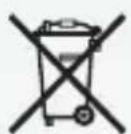
 | The crossed-out wheeled bin indicates that the European Directive 2002/96/EC on waste of electronic equipment applies |
| Operating conditions | The product is designed such that it functions without problem or restrictions if used as intended, unless otherwise noted in these instructions for use |
| Transport and storage conditions | During transport or storage, the temperature should not exceed the limit value of -13°/140°Fahrenheit (-25°/60°Celsius) |
Operating conditions
Transport and storage conditions
Service
If none of the actions listed in the previous pages correct a problem you may have with your hearing instrument, contact your authorized Sonic service representative.
Do not attempt to service your hearing instruments yourself or your warranty may be voided.
Place stamp with dispenser name and address here:

World Headquarters
Sonic Innovations, Inc.
2501 Cottontail Lane
Somerset, NJ O8873 USA
+1 888 423 7834

International
Sonic AG
Morgenstrasse 131B
3018 Bern, Switzerland
+ 41 31 560 21 21
Canada
Sonic Innovations Canada Ltd.
2885-B le Corbusier Blvd
Laval, Québec H7L 4J5
+1 800 667 7664
IP57
07.14 | 142692 | US

0543 0682


www.sonici.com
SONIC
Everyday Sounds Better