
LITE TOUCH ZOOM 150ED-QD - Film camera NIKON - Free user manual and instructions
Find the device manual for free LITE TOUCH ZOOM 150ED-QD NIKON in PDF.


| Product type | 35mm (135) autofocus film camera with shutter and zoom |
| Brand | Nikon |
| Model | Lite Touch Zoom 150ED-QD |
| Lens | 38mm f/5.4 – 150mm f/12 zoom, 7 elements in 5 groups (one ED element and one aspherical) |
| Film type | 35mm DX-coded cartridges |
| Film speed | Auto 25-3200 ISO (DX); without DX code: 25 ISO |
| Image format | Normal 24×36 mm; Panoramic (QD) 13.3×36 mm |
| Shutter | Programmed electronic, 2 to 1/500 s |
| Viewfinder | Real-image zoom, coverage >80%, diopter adjustment -3 to +1 m⁻¹, anti-fog |
| Focus | Multi-zone passive AF, 0.75 m to ∞ (38mm) / 0.8 m to ∞ (150mm), focus lock |
| Built-in flash | Range with 400 ISO: 0.75-7.6 m (WIDE) / 0.8-3.2 m (TELE) |
| Flash modes | Auto, off, forced, portrait/night (slow sync), red-eye reduction |
| Self-timer | 10 s, cancelable, LED indicator |
| Remote control | Optional ML-L3 (QD only) – infrared, range ~5 m, 2 s delay |
| Date/time imprint | QD only: multiple formats, no imprint possible |
| Film advance | Automatic (loading, frame by frame, rewind at end, partial rewind) |
| Power source | 1 CR123A or DL123A 3V lithium battery |
| Battery life | Approx. 10 rolls of 24 exposures (flash for half) |
| Dimensions (W×H×D) | Approx. 117×60×46 mm |
| Weight (without battery) | Approx. 195 g |
| Maintenance and cleaning | Clean the lens with a blower brush and a soft cloth moistened with ethanol. Avoid water, sand, magnetic fields. Store in a dry place, remove battery if not used for a long time. |
| Safety | Do not look at the sun through the viewfinder; turn off if smoke appears; do not use near flammable gas; handle batteries with care (leak/explosion); keep out of reach of children. |
| Spare parts and repairability | Have all repairs done by a Nikon authorized service center. Optional accessories: CS-L29 case, ML-L3 remote (QD). Replacement battery CR123A. |
Frequently Asked Questions - LITE TOUCH ZOOM 150ED-QD NIKON
User questions about LITE TOUCH ZOOM 150ED-QD NIKON
0 question about this device. Answer the ones you know or ask your own.
Ask a new question about this device
Download the instructions for your Film camera in PDF format for free! Find your manual LITE TOUCH ZOOM 150ED-QD - NIKON and take your electronic device back in hand. On this page are published all the documents necessary for the use of your device. LITE TOUCH ZOOM 150ED-QD by NIKON.
USER MANUAL LITE TOUCH ZOOM 150ED-QD NIKON
(Caring for the Camera and Battery)
To prevent damage to your Nikon product or injury to yourself or to others, read the following safety precautions in their entirety before using this equipment. Keep these safety instructions where all those who use the product will read them.
The consequences that could result from failure to observe the precautions listed in this section are indicated by the following symbols:

This icon marks warnings, information that should be read before using your Nikon product to prevent possible injury.
WARNING
Do not look at the sun through the viewfinder
Viewing the sun or other strong light source through the viewfinder could cause permanent visual impairment.
Turn off immediately in the event of malfunction
Should you notice smoke or an unusual smell coming from the equipment, remove the battery immediately, taking care to avoid burns. Continued operation could result in injury. After removing the battery, take the equipment to a Nikonauthorized service center for inspection.
Do not use in the presence of flammable gas
Do not use electronic equipment in the presence of flammable gas, as this could result in explosion or fire.
Observe caution when using the camera strap
Caution should be exercised to prevent strangulation when wearing the camera strap around your neck. Never place the strap around the neck of an infant or child.
Do not disassemble
Touching the product's internal parts could result in injury. In the event of a malfunction, the product should be repaired only by a qualified technician. Should the product break open as the result of a fall or other accident, remove the battery and then take the product to a Nikon-authorized service center for inspection.
Observe proper precautions when handling batteries
Batteries may leak or explode if improperly handled. Observe the following precautions when handling batteries for use in this product:
- Be sure the product is off before replacing the battery.
- Use only a 3 V CR123A or DL123A lithium battery.
- When inserting the battery, do not attempt to insert it upside down or backwards.
- Do not short or disassemble the battery.
- Do not expose the battery to flame or to excessive heat.
- Do not immerse in or expose to water.
- Do not transport or store with metal objects such as necklaces or hairpins.
- Immediately after use, or when the product is used on battery power for an extended period, the battery may become hot. Before removing the battery, turn the camera off and allow the battery to cool.
- Discontinue use immediately should you notice any changes in the battery, such as discoloration or deformation.
Keep out of the reach of children
Particular care should be taken to prevent infants from putting the battery or other small parts into their mouths.
Observe caution when operating the flash
Using the flash close to your subject's eyes could cause temporary visual impairment. Particular care should be observed if photographing infants, when the flash should be no less than one meter from the subject.
Caring for the Camera and Battery
Keep dry
This product is not waterproof, and may malfunction if immersed in water or exposed to high levels of humidity. Rusting of the internal mechanism can cause irreparable damage.
Keep free of salt, sand, and dust
After using your camera at the beach or seaside, wipe off any sand or salt with a lightly dampened cloth and then dry your camera thoroughly.
Do not touch the lens with your fingers
Use a blower brush to remove dirt and dust from the lens. To remove fingerprints or smudges from the lens' surface, use a soft, clean cotton cloth or lens tissue moistened with ethanol (alcohol) or lens cleaner.
■ Handle the slide cover and all moving parts with care
Do not apply force to the lens or flash unit, or to the battery chamber cover or slide cover. These parts are especially susceptible to damage.
Do not drop
The product may malfunction if subjected to strong shocks or vibration.
Keep away from strong magnetic fields
Do not use or store this device in the vicinity of equipment that generates strong electromagnetic radiation or magnetic fields. Strong static charges or the magnetic fields produced by equipment such as radio transmitters could affect the product's internal circuitry.
Avoid sudden changes in temperature
Sudden changes in temperature, such as occur when entering or leaving a heated building on a cold day, can cause condensation inside the device. To prevent condensation, place the device in a carrying case or a plastic bag before exposing it to sudden changes in temperature.
Batteries
- When you turn the device on, check the battery-level displayed on the LCD panel to determine whether the battery needs to be replaced. The battery needs to be replaced the low battery power indicator appears on the LCD panel.
- Ready a spare battery when taking pictures on important occasions. Depending on your location, you may find it difficult to purchase replacement batteries on short notice.
- On cold days, the capacity of batteries tends to decrease. Use a fresh battery at low temperatures. Keep a spare battery in a warm place and exchange the two as necessary. Once warmed, a cold battery may recover some of its charge.
- Should the battery terminals become dirty, wipe them off with a clean, dry cloth before use.
Storage
- To prevent mold or mildew, store the camera in a dry, well-ventilated area. If you will not be using the product for a long period of time, remove the battery to prevent leakage and store the camera in a plastic bag containing a desiccant. Do not, however, store the camera case in a plastic bag, as this may cause the material to deteriorate. Note that desiccant gradually loses its capacity to absorb moisture and should be replaced at regular intervals.
- Do not store the camera with naphtha or camphor moth balls, close to equipment that produces strong magnetic fields, or in areas subject to extremes of temperature, for example near a space heater or in a closed vehicle on a hot day.
- To prevent mold or mildew, take the camera out of storage at least once a month. Turn the camera on and release the shutter a few times before putting the camera away again.
- Store the battery in a cool, dry place.
Thank you for purchasing the Nikon Lite Touch Zoom 150ED/Lite Touch Zoom 150ED QUARTZ DATE (QD) camera.
Be sure to read this manual thoroughly before use, and keep it handy until you feel confident using the camera.
Some of the illustrations show the model with the date function (Lite Touch Zoom 150ED QD).
Accessory
(The following item is supplied with this camera.)
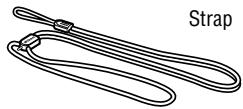
Optional accessories
- Camera case CS-L29
(Remote control unit can be stored in the pocket inside.)
Remote control unit ML-L3 (p. 39) (Lite Touch Zoom 150ED QD only)
Symbols used in this manual

: Indicates items to be checked, such as requirements and restrictions.

: Indicates notes and cautions you are requested to follow.

: Indicates supplementary descriptions.

: Indicates pages for reference.

Before using the camera for the first time
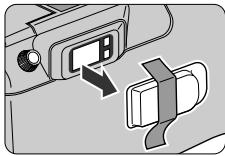
To protect the viewfinder eyepiece, a plastic cover is attached to the viewfinder eyepiece. Please remove it before using the camera.
Table of Contents
| For your safety Caring for the Camera and Battery To take a picture right away (Quick operation guide) -- 8 Camera parts Body LCD panel Viewfinder Installing a battery Turning the camera on Checking the battery power Loading the film Imprinting the date/time on pictures (Lite Touch Zoom 150ED QD only) Adjusting diopter Holding the camera properly Operating the shutter release button Selecting Regular or Panorama mode (Lite Touch Zoom 150ED QD only) Shooting Zooming Rewinding the film Removing the film When the main subject is not in the center of the picture Difficult-to-focus subjects Flash photography Selecting flash mode To use the flash automatically To cancel flash operation To use the flash always To photograph a person in a night view Button To reduce the "Red-eye" effect Close-up photography Shooting a distant view or landscape through a window Using the self-timer Using the remote control (optional) (Lite Touch Zoom 150ED QD only) Replacing the remote control battery Correcting the date and time (Lite Touch Zoom 150ED QD only) Troubleshooting Specifications | |
| Preparations | |
| Basic Operations | |
| Advanced Operations | |
| Additional Information |
To take a picture right away
(Quick operation guide)
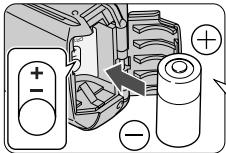
1 Insert a battery. (p. 14)
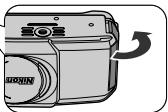
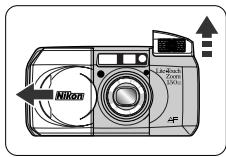
2 Open the slide cover to turn the camera on. (p. 15)
Make sure that the sufficient Battery Power indicator ( ) appears on the LCD panel. (p. 15)
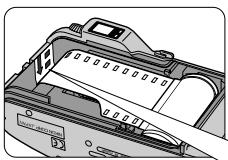
3 Load the film. (p. 16)
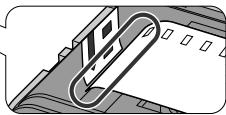
Pull the film leader across to the red index mark inside the film compartment.
Regular mode
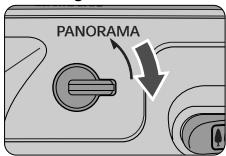
4 Select Regular or Panorama mode (Lite Touch Zoom 150ED QD only). (p.21)
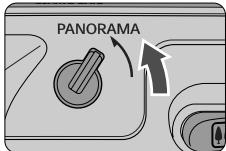
Panorama mode
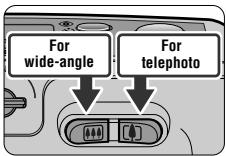
5 Press the Zoom buttons and compose your picture. (p. 24)
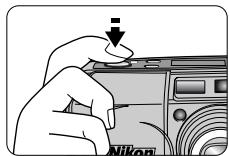
6 Press the shutter release button halfway. (p. 20)
- When you press the button halfway, focus and exposure are automatically achieved, and the green LED lights up.
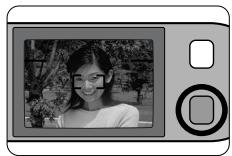
7 Check the green LED is on, then press the shutter release button all the way to release the shutter. (p. 22)
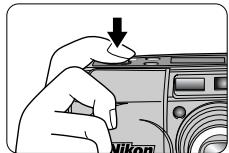
The film starts to rewind automatically, when film reaches the end of the roll. (p. 25)
Remove the film cartridge. (p. 25)

Take trial shots
Take trial shots before shooting at important occasions like weddings or graduations.
- Nikon will not be held liable for any damages resulting from the use of this product.
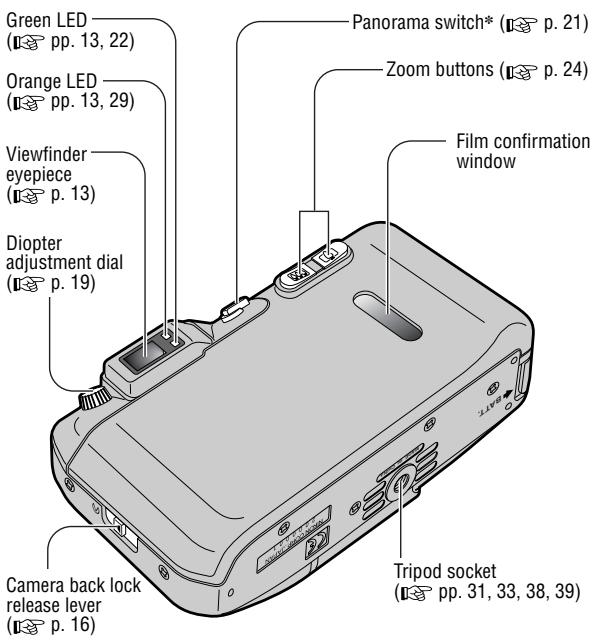
Body
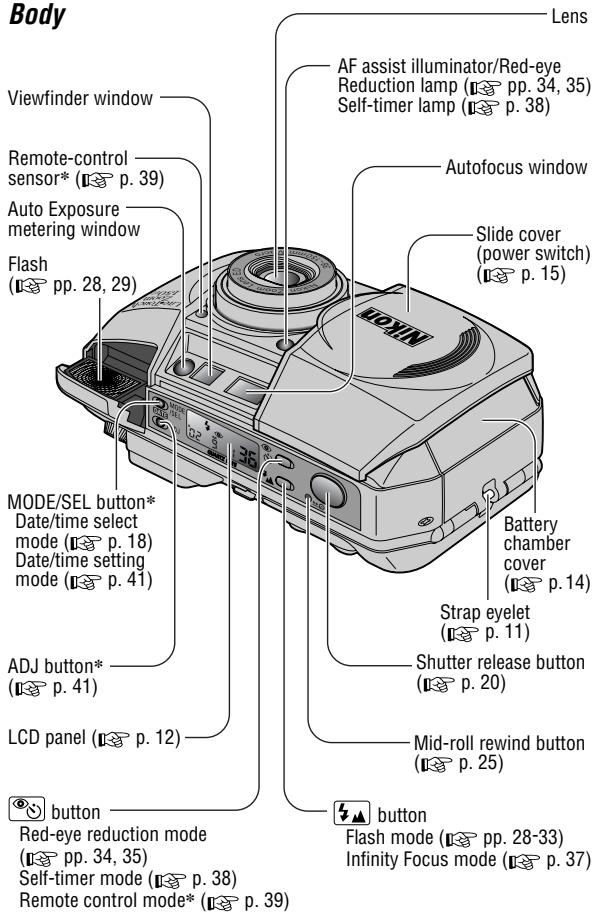
* Lite Touch Zoom 150ED QD only
Attaching the strap
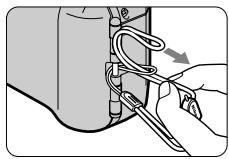
Attach the strap as shown in the illustration.
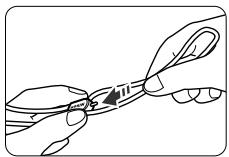
Adjust the length using the lug on the strap.
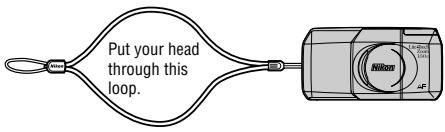
Camera parts (continued)
LCD panel
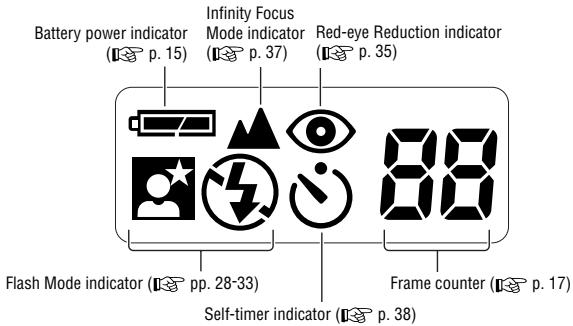
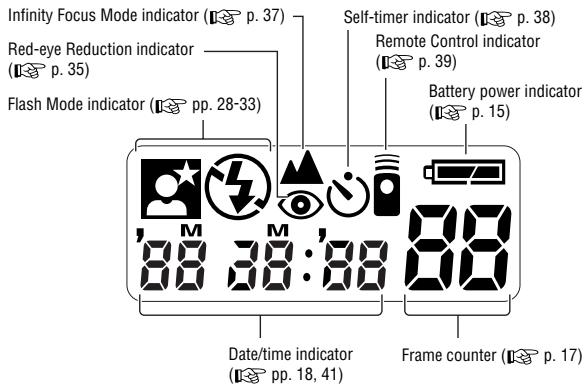
The illustrations are fully labeled for your reference.
Viewfinder
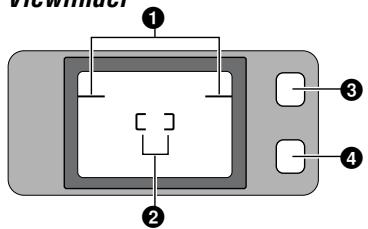
Regular viewfinder
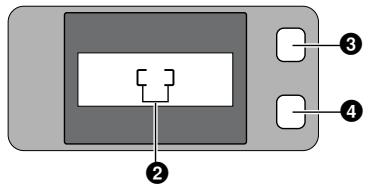
Panorama viewfinder (Lite Touch Zoom 150ED QD only)
1Parallax compensation marks (p.36)
Use for close-up shooting distance less than 1m
2Autofocus frame marks (p. 22)
Center the autofocus frame marks on the subject.
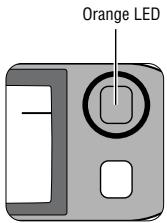
Orange LED (p. 29)
With the shutter release button pressed halfway, the orange LED lights up when the flash is ready to fire, and it slowly flashes (at 4 Hz) when the flash is charging. (If the shutter release button is kept pressed and the flash is fully charged, the LED remains to flash.) If you press down on the popped-up flash unit while the shutter release button is pressed halfway, the LED quickly flashes (at 8 Hz) as a warning.
4GreenLED(p.22)
Lights when focus is achieved. It quickly flashes (at 8Hz ) if correct focus cannot be achieved.
In close-up photography, the LED slowly flashes (at 2Hz ) as a warning if the subject is closer than approx. 0.75m for wide-angle photography, or approx. 0.8m for telephoto photography.

Battery type
Use one CR123A or DL123A type 3V lithium battery in this camera.
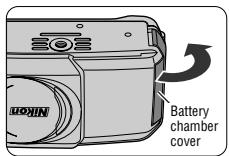
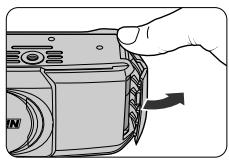
1 Open the battery chamber cover.
- While releasing the lock as indicated by the arrow in the left illustration, open the battery chamber cover.
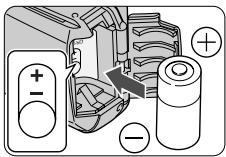
2 Install a new battery.
Insert the battery with the and ends positioned as marked inside the battery chamber.

3 Close the battery chamber cover until it clicks.

The built-in clock is reset automatically when the battery is removed. Remember to set the time and date. (Lite Touch Zoom 150ED QD only) (p. 41)
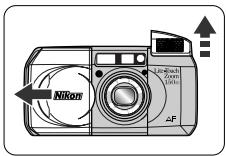
Open the slide cover until it clicks.
Once you open the slide cover in the direction of the arrow, the camera is turned on, the built-in flash automatically pops up, and the lens extends out.
The camera is set in Auto flash mode. (p. 30)

When closing the cover, first slide it slightly in to start lens retraction. When the lens is completely retracted, slowly close the cover.
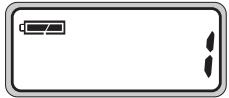
Checking the battery power
Make sure that the sufficient Battery Power indicator ( · ) is showing on the LCD panel.
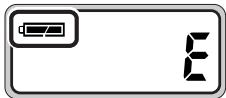
Lite Touch Zoom 150ED
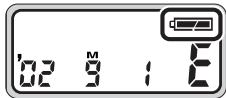
Lite Touch Zoom 150ED QD
| showing | The battery power is sufficient. |
| flashing or showing | The battery is nearing exhaustion. Have a fresh one ready. |
| No indication | Replace the battery with a new one. |

Always check the battery condition before shooting.

We recommend that you take spare batteries with you, especially when travelling.

Recommended film
Use DX-coded 35mm film with this camera. It is recommended to use DX-coded ISO 400 film, which provides good results when using the flash, and helps avoid blurred images, should camera shake occur.
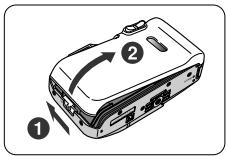
1 Close the slide cover, then open the camera back.
Slide the camera back lock release lever (1), and open the camera back (2).
- When loading/unloading film, be sure not to open the camera back cover into direct sunlight.
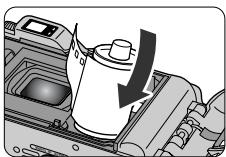
2 Insert a film cartridge.
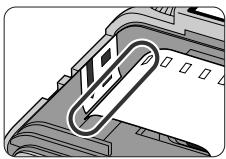
3 Pull the film leader across to the red index mark inside the film compartment.
- Make sure to align the film leader to the red index mark; if the film leader is not properly aligned to the index mark (short of or beyond the mark), film may not be loaded properly.

Hold the film cartridge and ensure film is properly positioned with no slack.
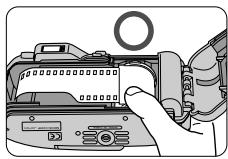
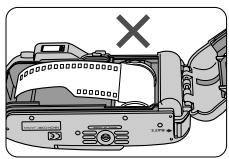
Lite Touch Zoom 150ED

Lite Touch Zoom 150ED QD
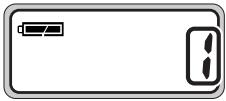
4 Close the camera back, and check that "i" appears on the film counter.
Once the camera back is closed, the film automatically advances to the first frame. Until film loading is complete, " " flashes on the LCD panel.
- When the film has been properly set, "f" appears on the LCD panel.

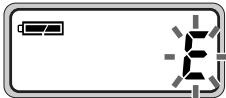
If "E" flashes on the LCD panel, film is not properly loaded. Open the camera back again and reload film.
Tips on DX-coded 35mm film
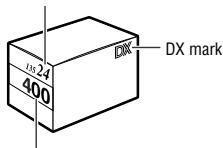
Number of frames
ISO (film speed)
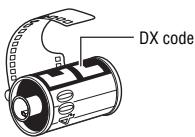
Film cartridge
With DX-coded film, film speed is set automatically.
Film speeds valid for automatic setting are ISO 25, 50, 100, 200, 400, 800, 1600, and 3200.
With a non-DX-coded film, the film speed is automatically set to ISO 25.
Imprinting the date/time on pictures
(Lite Touch Zoom 150ED QD only)
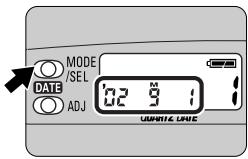
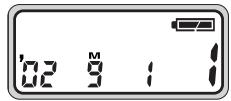
Select the date/time indicator by pressing the MODE/SEL button.
The year is indicated by the last two digits, and the time is displayed by 24-hour clock. The example in the illustration shows Sep.1,2002.
The month is indicated by "m" in the display screen. This letter is not imprinted on any pictures you take.
Each time you press the MODE/SEL button, the indicator changes as follows:
Year/Month/Day Month/Day/Year Day/Month/Year

Select “- - - ” (No imprint) to cancel data imprint.
Imprint position of date/time
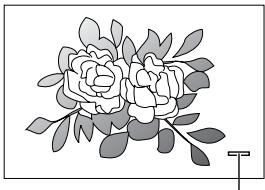
Imprint position in Regular shooting
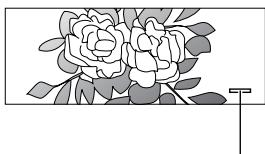
Imprint position in Panorama shooting
The imprint positions on picture are shown in the illustration.

It may be difficult to read against bright colors such as white or reddish hues.

If you take a picture exceeding the number of frames on the film, the date/time may not be imprinted correctly on the picture.
Adjusting diopter
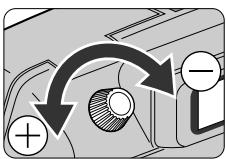
If the image in the viewfinder is unclear, turn and adjust the diopter adjustment dial to get clear image.
Caution:
As you look into the viewfinder and operate the diopter adjustment dial, make sure not to injure your eye with your finger or fingernail during adjustment.
About the Antifog Viewfinder
A specially treated plastic surface prevents the eyepiece from fogging when shooting in cold or warm, humid environments.

If the antifog viewfinder eyepiece is smeared, gently wipe it with a dry, soft cloth (e.g. a lens cloth). Avoid wiping with force; otherwise, the eyepiece may be damaged.
Holding the camera properly
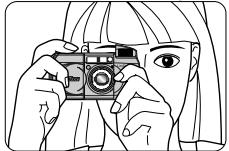
When holding the camera horizontally
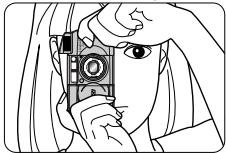
When holding the camera vertically
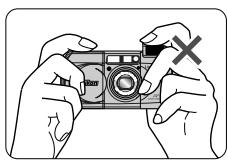
Prop your elbows against your body and hold the camera with both hands.
- When holding the camera vertically, make sure that the flash is on top as shown.

Do not block the lens, autofocus window, or flash with your fingers or hair, or the strap.

Be careful not to press down on the flash unit when it is in the popped-up position.
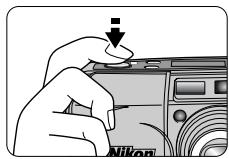
Operating the shutter release button
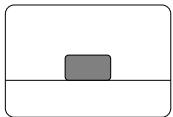
Before pressing
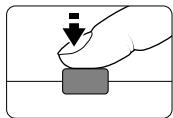
Press halfway
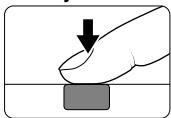
Press all the way down
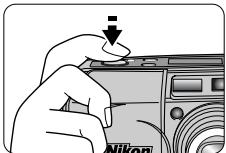
1 Press the shutter release button halfway to focus.
- When you press the button halfway, focus and exposure are automatically achieved, and the green LED lights up.
While the shutter release button is pressed halfway, the focus and exposure functions are locked. (Focus lock p. 26)
2 Press the shutter release button all the way down to take a picture.

Pressing the shutter release button abruptly can result in picture blur.
Make sure to press the shutter release button slowly.
Selecting Regular or Panorama mode
(Lite Touch Zoom 150ED QD only)

What's Panorama mode?
In panorama mode, a portion of the top and bottom part of the frame is cut exposing an area of approx. 13 × 36mm and is usually printed in approx. 89 × 254mm size.
Select Regular or Panorama mode with the Panorama switch.
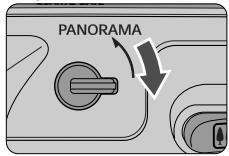
Regular mode
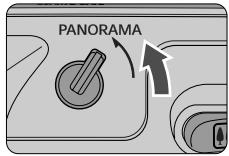
Panorama mode
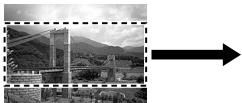
Regular mode
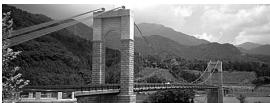
Panorama mode
The date/time can also be imprinted in Panorama mode. (p. 18)

When compared with regular-format pictures, extra time and cost may be required for developing/printing panorama pictures.
Caution:
To prevent possible injury to your eye, hold the camera away from your face when you operate the Panorama switch.
Shooting
This camera employs a highly accurate multi-area passive autofocus system, which enables easy focusing and sharp shooting of a distant view or a subject through a window.
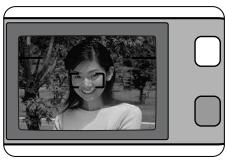
1 Center the autofocus frame marks "[]" on the main subject.

If the main subject is outside the autofocus frame marks:
Use focus lock. (p. 26)
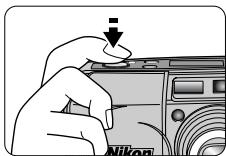
2 Press the shutter release button halfway to focus.
- When correct focus has been achieved, the green LED lights up.
- When focusing, the AF assist illuminator may sometimes light up.

Lighting/flashing of the green LED
When correct focus has been achieved, the green LED lights up.
The green LED flashes either slowly or quickly when the subject is out of focus.
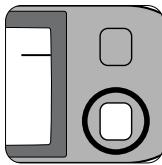
Slow flashing (at 2 Hz) indicates the subject is too close.
For correct focus to be achieved, keep the camera away from the subject for more than the distance shown below:
at 38mm: approx. 0.75m
at 150mm: approx. 0.8m.
- Quick flashing (at 8 Hz) indicates that the subject is difficult to focus.
Use the focus lock. (p. 26)
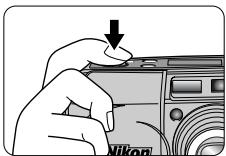
3 Confirm that the green LED lights up and slowly press the shutter release button all the way down.
- If the subject is dark or backlit in Auto Flash mode, the flash fires automatically.

Pressing the shutter release button abruptly can result in picture blur.

When not in use, close the slide cover to protect the lens, finder, etc. and to save battery power.
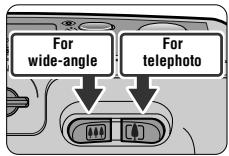
Press the Zoom button to compose the picture.
Press the zoom button for telephoto (150mm) photography or the zoom button for wide-angle (38mm) photography.
Remove your finger from the zoom button when the desired image size has been achieved.
Example of a wide-angle photograph

Example of a telephoto photograph


When the camera is not operated for more than 3 minutes, the lens automatically retracts to the wide-angle position.
Rewinding the film
Film starts to rewind automatically when film reaches the end of the roll.
- While the film is rewinding, the number on the frame counter decreases one by one. Film is completely rewound when the frame counter shows flashing “ ” for approx. 20 seconds in the LCD panel, then “ ” appears without flashing.
- If rewinding stops midway through the film roll due to a weak or dead battery, replace the battery. The film counter displays "1" and rewinding resumes automatically as soon as the battery is replaced.

Do not open the camera back until “E” starts flashing.
To rewind the film in mid-roll.
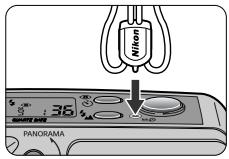
Press the mid-roll rewind (± 0) button using the stud on the strap lug or a ball-point pen.
- Once rewinding starts, there is no need to keep the button pressed.
Removing the film
Lite Touch Zoom 150ED
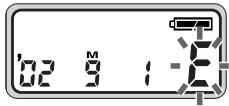
Lite Touch Zoom 150ED QD
1 Confirm that film is completely rewound.
Film is completely rewound when "E" is flashing ("E" appears without flashing) in the LCD panel.
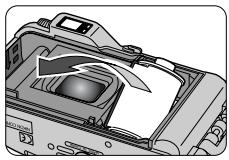
2 Open the camera back and remove the film.
When the main subject is not in the center of the picture (Focus lock photography)
Focus lock is useful in autofocus shooting when you want to capture a subject that's framed outside of the autofocus frames marks, and in situations where subjects may be difficult to focus. (p. 27)
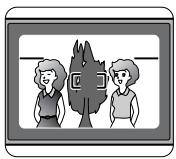
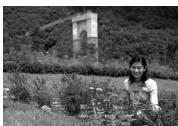
Depending on the effect you want to achieve, your subject may not be at the center of the final composition in the left example. If your subject is not at the center of the frame marks when the shutter release button is pressed halfway, the camera will focus on the background and the main subject may not be in focus. Focus lock allows you to adjust the composition after focusing on your subject.
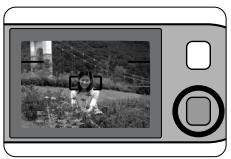
1 Center the autofocus frame marks on the main subject, then press the shutter release button halfway.
The green LED lights up when the subject is in focus, and the focus is locked as long as the shutter release button is pressed halfway.

Do not change the camera-to-subject distance
While the green LED lights up, the focus is locked. Do not change the camera-to-subject distance.
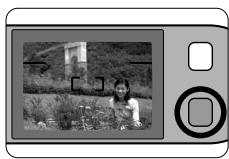
2 Compose the picture, while pressing the shutter release button halfway and press the shutter release button all the way down.
Example
En
Difficult-to-focus subjects
The following subjects may be difficult to focus.
Use the focus lock (p. 26) to focus on another subject equidistant from the camera, then compose the picture to shoot.
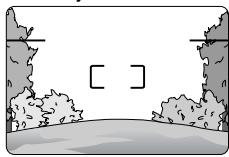
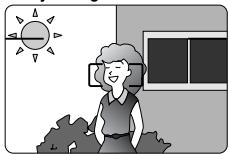
Subjects of low contrast such as blue sky, or shiny subjects such as a shiny car body or water surface.
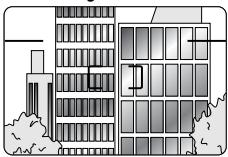
Subjects with continuous and repeated patterns such as buildings.
Scenes with subjects at different distances within the autofocus frame marks.
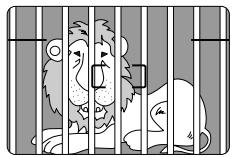
Strongly back lit subjects or those having a bright shiny background.
Flash photography
Selecting flash mode.
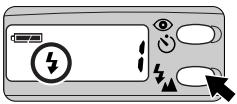
Lite Touch Zoom 150ED
Select flash mode by pressing the 4 button.
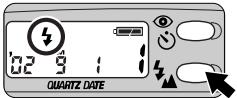
Lite Touch Zoom 150ED QD
You can select any of five flash modes by pressing the button.

| Indicator | Explanation |
| No indicator | Auto Flash (p. 30) The flash automatically fires when lighting is poor, or the subject is backlit. |
| ▲ | Infinity Focus (p. 37) For shooting a distant scene or landscape more sharply. |
| ● | Flash Cancel (p. 31) Flash will not fire even when lighting is poor. |
| ↓ | Anytime Flash (p. 32) Flash fires whenever photo is taken. |
| ← | Night Portrait (Slow Sync Flash) (p. 33) Use to capture both subject and background at night or under dim light. Flash fires whenever photo is taken. |

Lighting/flashing of the orange LED when the shutter release button is pressed halfway
The orange LED lights up:
Flash charging is completed. The flash is ready to fire.
The orange LED flashes slowly (at 4Hz
The flash is charging. Take your finger off the shutter release button once, then press the button halfway again. If the orange LED lights up, the shutter can be released.
The orange LED flashes quickly (at 8 Hz):
The popped-up flash unit is being pressed down. The flash will not fire when you release the shutter, even if in Flash mode. Do NOT touch the flash unit.

Flash shooting range
The reference distance ranges between the camera and subject are shown below.
With ISO 100 film speed
(11) (wide-angle) setting: approx. 0.75 to 3.8m
(telephoto) setting: approx. 0.8 to 1.6m
With ISO 400 film speed
(wide-angle) setting: approx. 0.75 to 7.6m
(telephoto) setting: approx. 0.8 to 3.2m
To use the flash automatically
(Auto Flash mode)
Use this mode for automatic flash operation when lighting is poor or the subject is backlit.

Automatic flash firing for a backlit scene
When the subject is backlit, the flash automatically fires while simultaneously compensating exposure for the main subject and the background.
Lite Touch Zoom 150ED
Lite Touch Zoom 150ED QD
1 Open the slide cover.
- When you open the slide cover, the power is turned on and the built-in flash automatically pops up.
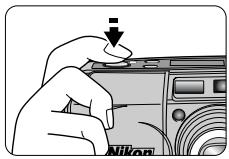
2 Compose the picture, then press the shutter release button halfway.
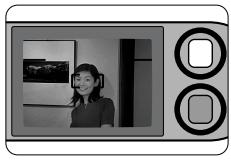
3 Check that the orange and green LEDs light up, then shoot.

Example

If there is enough light, "①" appears on the LCD panel, and the flash does not fire.
To cancel flash operation
(Flash Cancel mode)
Use this mode in places, where use of a flash is prohibited, or to achieve a natural lighting effect at dusk or for night scenes.

Use a tripod for the Flash Cancel mode
Since slow shutter speeds are usually selected in this mode, use a tripod to prevent camera shake.
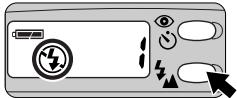
Lite Touch Zoom 150ED
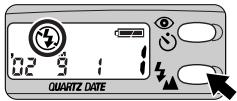
Lite Touch Zoom 150ED QD
1 Press the 3 button until "4" appears on the LCD panel.
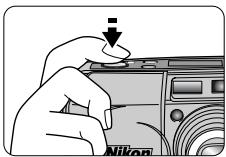
2 Compose the picture, then press the shutter release button halfway.
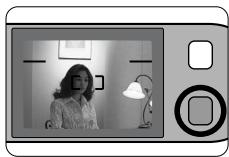
3 Check that the green LED lights up, then shoot.

Example
To use the flash always
(Anytime Flash mode)
Use this mode to intentionally fire the flash regardless of light conditions.
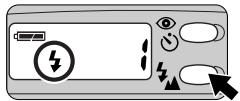
Lite Touch Zoom 150ED
Lite Touch Zoom 150ED QD
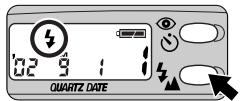
1 Press the button until "4" appears on the LCD panel.
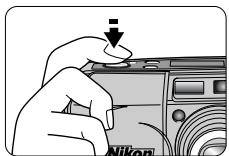
2 Compose the picture, then press the shutter release button halfway.
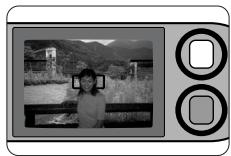
3 Check that the orange and green LEDs light up, then shoot.

Example
To photograph a person in a night view
Night Portrait mode)
Use this mode to capture both subject and background at night or under dim light. Flash fires whenever photo is taken.

Use a tripod for the Night Portrait (Slow Sync Flash) mode
Since slow shutter speeds are usually selected in this mode, use a tripod to prevent camera shake.
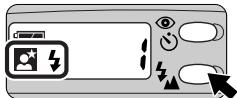
Lite Touch Zoom 150ED
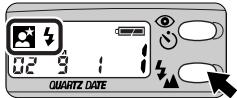
Lite Touch Zoom 150ED QD
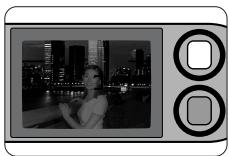
1 Press the 3 button until " appears on the LCD panel.
2 Compose the picture, then press the shutter release button halfway.
3 Check that the orange and green LEDs light up, then shoot.

Example
Select the mode by pressing button, for the red-eye reduction or self-timer/remote control.
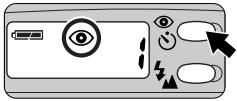
Lite Touch Zoom 150ED
Select the mode by pressing the button.
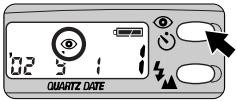
Lite Touch Zoom 150ED QD
Each time you press the 6 button, the indicator changes as follows:
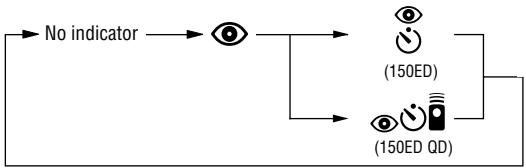
| Indicator | Explanation |
| No indicator | Red-eye Reduction mode canceled To cancel Red-eye Reduction mode. |
| Red-eye Reduction mode (I p. 35) To reduce the “Red-eye” effect. | |
| Self-Timer mode (I p. 38)/Remote Control mode (Lite Touch Zoom 150ED QD only) (I p. 39) | |
| For self-timer or remote control operation. Note that Red-eye Reduction is automatically set when the flash is used. |
To reduce the "Red-eye" effect
(Red-eye Reduction mode)
In flash photographs, the subject's eyes may sometimes appear bright red. To reduce this "red-eye" effect, use this mode.

About Red-eye Reduction mode
- The Red-eye Reduction lamp lights up approx. 1sec. before the flash fires. Be careful not to move the camera or let the subject move until the shutter is released.
This mode is not recommended in shooting situations where shutter release is your top priority.

Lite Touch Zoom 150ED
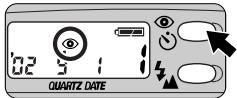
Lite Touch Zoom 150ED QD
Press the button until " ⑥ ” appears on the LCD panel.
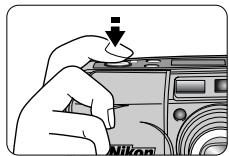
2 Compose the picture, then press the shutter release button halfway.
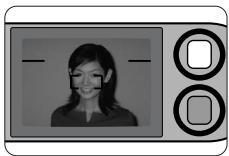
3 Check that the orange and green LEDs light up, then shoot.
- When the flash is not used, neither the orange LED nor the red-eye reduction lamp light up.

The Red-eye Reduction mode is not automatically canceled by turning the power off. To cancel the Red-eye Reduction mode, press the button until " " disappears from the LCD panel.
Close-up photography
Use the parallax compensation marks when the camera-to-subject distance is shorter than 1 meter.

Minimum camera-to-subject distance is approx. 0.75m or approx. 0.8m in Telephoto shooting
If you wish to shoot a subject such as a flower as large as possible in a picture, you can get up to as close as approx. 0.75m in Wide-angle setting, or approx. 0.8m in Telephoto setting from the subject. By setting the Zoom button to the (telephoto) position, a larger image can be obtained.
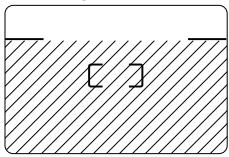
Regular mode
Panorama mode
(Lite Touch Zoom 150ED QD only)
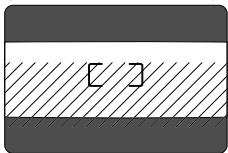
1 Compose the picture within the parallax compensation marks, then press the shutter release button halfway.
- The shaded area (marked with 山山 ) in the left illustrations is included in the picture.
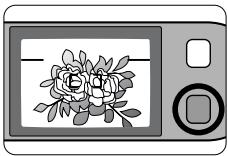
2 Check that the green LED lights up, then shoot.

If the subject is closer than approx. 0.75m in Wide-angle setting or 0.8m in Telephoto setting, the green LED slowly flashes as a warning. Move away from the subject until the green LED lights up.
Shooting a distant view or landscape through a window
(Infinity Focus mode)
Use Infinity Focus mode to shoot a distant view more sharply, or a landscape through a window.
Lite Touch Zoom 150ED
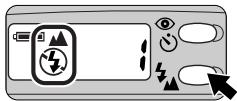
Lite Touch Zoom 150ED QD

1 Press the button until " 喜 appears on the LCD panel.
En
2 Compose the picture, then press the shutter release button halfway.
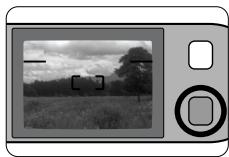
3 Check that the green LED lights up, then shoot.

Flash is automatically canceled in this mode.
Using the self-timer
Use the self-timer when you want to be in the picture.
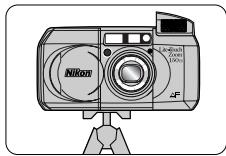
1 Use a tripod or place the camera on a stable flat surface.
Lite Touch Zoom 150ED
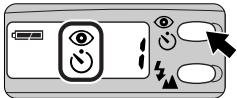
2 Press the button until " 念 " or "心" appears on the LCD panel.
Lite Touch Zoom 150ED QD
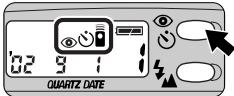
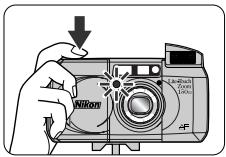
3 Compose the picture, and press the shutter release button.
Focus and exposure are achieved by pressing the shutter release button halfway.
- When the shutter release button is pressed all the way down, the self-timer lamp flashes for approx. 8 seconds, then lights up for 2 seconds before the shutter is released.
After the shot, self-timer mode is canceled.

Self-timer mode is automatically canceled if the camera is not operated for more than approx. 3 minutes or when the slide cover is closed.
Using the remote control (optional)
(Lite Touch Zoom 150ED QD only)
Use the optional remote control to release the camera's shutter from a distance.
When you use the remote control for the first time, pull out the transparent insulation sheet from the remote control.
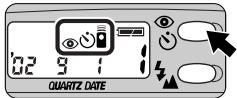
Lite Touch Zoom 150ED QD
Press the button until " 念 appears on the LCD panel.
- Use a tripod or place the camera on a stable flat surface.
The controllable distance of the remote control is within approx. 5m while facing the camera. If the camera-to-subject distance is more than 5m away, use the self-timer.
Remote Control mode will be automatically canceled if the camera is not operated for more than approx. 3 minutes or when the slide cover is closed.
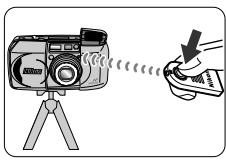
2 Compose the picture, aim the remote control at the camera, and press the transmission button on the remote control.
The self-timer lamp lights up for approx. 2 seconds before the shutter is released.
- Within 3 minutes after taking the last shot using the remote control, you can still continue to shoot by remote control.
Remote control operation cannot be performed when the camera has extreme backlighting. Change the camera position in this case.
The life of the battery in the remote control is approx. 5 years. If the battery is exhausted, the shutter may not be released with the remote control. Replace the battery inside the remote control with a new one. (p. 40)
Replacing the remote control battery
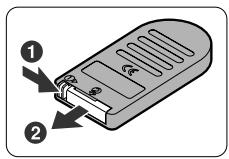
1 While keeping the battery holder release lever pressed as the arrow on the remote control indicates to release the lock ①, pull out the battery holder from the remote control ②.
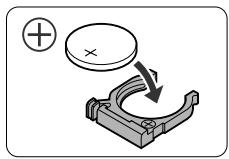
2 Replace the battery.
Use one 3V lithium (CR2025 type) battery.
- Insert the battery with polarity side facing up into the battery holder.
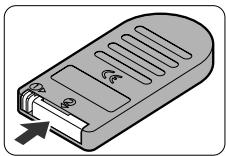
3 Insert the battery holder into the remote control until it clicks closed.
Warning:
Keep the batteries out of the reach of children. If a battery is swallowed, consult a doctor immediately.
Correcting the date and time
(Lite Touch Zoom 150ED QD only)
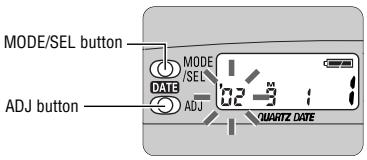
1 Press and hold the MODE/SEL button for more than 2 seconds.
- When the date/time display format is Year/Month/Day, Month/Day/Year, or Day/Month/Year, "Year" indicator flashes first. For Day/Hour/Minute display, "Hour" indicator flashes first.
- The date/time correction can be performed with the camera either on or off. When the camera is on, the data will be immediately registered if the slide cover is closed, or the Mid-roll Rewind button or a Zoom button is pressed while the setting is in progress.
2 Press the ADJ button to set the flashing digit.
Each time you press the ADJ button, the number advances by one.
- Holding the ADJ button pressed for more than 2 seconds advances the number quickly.
3 When the flashing indicator is correctly set, press the MODE/SEL button again so that the next indicator flashes.
Repeat steps 2 and 3 to set all the digits. When the Year/Month/Day or Day/Hour/Minute have been adjusted, press the MODE/SEL button to finish the adjustment procedure. If the Year/Month/Day or Day/Hour/Minute are all displayed correctly, adjustments has been completed.

When the battery is replaced
The LCD panel shows "00 00".
The date/time is not imprinted in pictures taken while "00 00" is indicated. Set the date and time following the above procedure.
- If the battery is replaced immediately, the date and time previously set remain in memory and you do not need to set again.
Track down the cause of trouble using the following chart. It may save you a trip to your nearest Nikon service center.
| Problem | Check points and solution | Ref. page | |
| Shutter | The shutter cannot be released. | ● The slide cover is not completely open. → Open the slide cover all the way until it clicks to turn the camera on. ● The orange LED flashes. → The flash is charging. Release the shutter after the orange LED lights up. ● “E” lights up on the LCD panel. → A rewind roll of film is inside. Replace it with a new roll. ● No indicator on the LCD panel. → The battery is exhausted. Replace it with a new one. ● All indicators on the LCD panel flash. → The camera has detected a malfunction. Once open the slide cover and close it again, then the power is turned on. If the camera still does not work properly, remove the battery from the camera and confirm the indicators turns off, then Install the battery in place again.* | 15 13,29 16,17,25 14,15 14,15 |
| Flash | The flash does not fire. | ● The orange LED flashes. → The flash is charging. Release the shutter after the orange LED lights up. ● “◎” lights up on the LCD panel. → The flash does not fire when the subject is bright enough. To fire the flash, set the camera to the Anytime Flash mode. ● No indicator, or the “←→” flashes or lights on the LCD panel. → Battery power is low or the battery is exhausted. Replace the battery with a new one. ● The orange LED is flashing quickly (at 8 Hz). → Check that the flash unit is not pressed down. Do not touch the flash unit. | 13,29 30,32 14,15 13,29 |
| Focus | The subject appears out of focus in the print. | ● Camera shake. →Gently press the Shutter Release button, or use a tripod or place the camera on a stable flat surface. ● Something in front or behind the subject is in focus. →Be sure to center the autofocus frame marks on the subject before releasing the shutter. When correct focus cannot be easily achieved, use the focus lock. ● The green LED is flashing quickly (at 8 Hz). →Use the focus lock for taking pictures. | 20,31,33 22,26,27 26,27 |
| LCD panel | No indicator appears even when the camera is turned on. | ● The battery is installed the wrong way round. →Insert the battery with the⊕and⊗ends positioned as marked inside the battery chamber.* ● No battery or dead battery. →Install a new battery.* | 14 14,15 |
| The numeral “+” does not appear even when film is loaded. | ● “E” flashes or lights up. →Remove the film and load it again. | 16,17 | |
| Remote control (optional) | The shutter cannot be released using the remote control. | ● You are out of the remote control working range. →Operate the remote control in a range within 5m facing the camera. ● Two or more minutes have elapsed since you set the camera to Remote Control mode. →Set the camera to the Remote Control mode again. ● The remote control is operated in backlit. →Change the position of the remote control. ● The service life of the battery in the remote control has lapsed (5 years). →Install a new battery. | 39 39 39 40 |
- When the battery is replaced or re-installed, the date and time you set are cleared. Reset them. (p. 41)
A characteristic of electronic cameras
In certain cases, due to static electricity, the Lite Touch Zoom 150ED/Lite Touch Zoom 150ED QD microcomputer may turn the camera off, even with fresh, properly installed batteries. For the same reason, the film may not advance properly. In each of these cases, to resume operation, simply turn the power off, then turn it on again. Or, remove and reinstall the batteries. When the battery is removed, the date/time you set are cleared. Reset them after reinstalling the battery. (p. 41) Additional Information
Type of camera
35mm autofocus lens-shutter camera with Nikon zoom lens
Usable film
DX-coded 35mm film in film cartridge
Picture format
Normal: 24 × 36mm
Panorama (Lite Touch Zoom 150ED QD only): 13.3 × 36mm
Lens
38mm f/5.4 - 150mm f/12, 7 elements in 5 groups (ED lens and aspheric lens are used)
Shutter
Programmed electronic type; also serves as diaphragm blades; Shutter speed: 2 to 1/500 seconds
Viewfinder
Real-image viewfinder; frame coverage: approx. over 80% in regular-size frame; approx. 0.38 × magnification at 38mm , approx. 1.2 × at 150mm ; Diopter adjustment: -3m^-1 + +1m^-1 , Antifog viewfinder
Viewfinder information
Image size frame with parallax compensation marks; Panorama-format frame marks (Lite Touch Zoom 150ED QD only); Autofocus frame marks: Green LED (in-focus indicator) - Lights up: subject focused, Flashes slowly (at 2Hz ); subject is too close to achieve correct focus, Flashes quickly (at 8Hz ); subject is difficult to focus; Orange LED (flash-ready light) - Lights up: flash ready, Flashes slowly (at 4Hz ); flash being charged, Flashes quickly (at 8Hz ); the popped-up flash unit is being pressed down
Focusing
Multi-Area Passive Autofocus system; Activated by lightly pressing shutter release button; Distance range from approx. 0.75m to infinity at 38mm, approx. 0.8m to infinity at 150mm
Focus lock
Focus is locked as long as the shutter release button lightly pressed
Exposure control
Electronically controlled program AE:
auto exposure range (ISO 100): EV 6 - 16 at 38mm or EV 6.5 - 16 at 150mm, (ISO 400): EV 8 - 17 at 38mm, EV 8 - 18 at 150mm
Film speed setting
ISO 25, 50, 100, 200, 400, 800, 1600, and 3200 film automatically set;
With non-DX-coded film, automatically set to ISO 25
Film loading
Film automatically advances to the first frame upon completion of film loading; With a film cartridge confirmation window
Frame counter
Shown in the LCD panel; Additive type; Counts back during film rewind
Self-timer
Electronically controlled; Activated by depressing the shutter release button; Self-timer lamp flashes and lights up to show when ready; Timer duration 10 seconds; Cancellable
Film advance
Film automatically advances by one frame after each shot; Auto rewind at the end of film roll; Mid-roll rewind function available
Remote control (optional) (Lite Touch Zoom 150ED QD only)
Infrared wireless remote control; 2 sec. delay shutter release; Effective range is within approx. 5m straight in front of the camera; One 3 V lithium (CR2025) battery. Battery will last for approx. 5 years; Dimensions (W× H× D) : approx. 60× 28× 7mm; Weight (including battery): approx. 10 g
Built-in flash
Four flash modes available: Auto Flash, Flash Cancel, Anytime Flash, and Night Portrait (Slow Sync Flash); Flash automatically fires when there is not enough light or subject is backlit; Flash shooting range (ISO 100): approx. 0.75 - 3.8m at 38mm, approx. 0.8 - 1.6m at 150mm, (ISO 400): approx. 0.75 - 7.6m at 38mm, approx. 0.8 - 3.2m at 150mm; Shutter release button is locked during flash charging; Recycling time approx. 5 sec.
Red-eye Reduction mode
Red-eye Reduction lamp lights up for approx. 1 sec. before flash fires.
Battery life
Approx. 10 rolls of 24-exposure film when flash is used for half the exposures
LCD panel (Power is on)
Frame counter, Flash mode, Red-eye Reduction, Self-timer, Remote Control (Lite Touch Zoom 150ED QD only), Infinity Focus mode, Low battery power, Time/ Date (Lite Touch Zoom 150ED QD only)
Power source
One 3 V lithium battery (CR123A type or DL123A)
Date imprint function (Lite Touch Zoom 150ED QD only)
Functions with panorama-format pictures; Auto film speed setting with DX codes (ISO 25 - 3200); Imprinted date include year, month, day, hour, (24-hour cycle with no AM/PM) and minute with five choices; Year/Month/Day, Month/Day/Year, Day/Month/Year, Day/Hour/Minute, and no-imprint; Leap year adjustment until 2040; Power source is the same as the camera body; Built-in clock with timing accuracy within ± 90 seconds a month
Dimensions (W× H× D)
Approx. 117× 60× 46mm
Weight (without battery)
Lite Touch Zoom 150ED/Lite Touch Zoom 150ED QD: Approx. 195 g
- Specifications apply when a fresh battery is used at normal temperature (20^)
- Specifications and design are subject to change without notice.
Sicherheitshinweise
No reproduction in any form of this manual, in whole or in part (except for brief quotation in critical articles or reviews), may be made without written authorization from NIKON CORPORATION.
- (Caring for the Camera and Battery)
- WARNING
- Do not look at the sun through the viewfinder
- Turn off immediately in the event of malfunction
- Do not use in the presence of flammable gas
- Observe caution when using the camera strap
- Do not disassemble
- Observe proper precautions when handling batteries
- Keep out of the reach of children
- Observe caution when operating the flash
- Caring for the Camera and Battery
- Keep dry
- Keep free of salt, sand, and dust
- Do not touch the lens with your fingers
- ■ Handle the slide cover and all moving parts with care
- Do not drop
- Keep away from strong magnetic fields
- Avoid sudden changes in temperature
- Batteries
- Storage
- Accessory
- (The following item is supplied with this camera.)
- Optional accessories
- Symbols used in this manual
- Before using the camera for the first time
- Table of Contents
- To take a picture right away
- (Quick operation guide)
- Take trial shots
- Attaching the strap
- Camera parts (continued)
- LCD panel
- Viewfinder
- Battery type
- Open the battery chamber cover.
- Install a new battery.
- Close the battery chamber cover until it clicks.
- Open the slide cover until it clicks.
- Checking the battery power
- Make sure that the sufficient Battery Power indicator ( · ) is showing on the LCD panel.
- Recommended film
- Close the slide cover, then open the camera back.
- Insert a film cartridge.
- Pull the film leader across to the red index mark inside the film compartment.
- Close the camera back, and check that "i" appears on the film counter.
- Tips on DX-coded 35mm film
- Imprinting the date/time on pictures
- Select the date/time indicator by pressing the MODE/SEL button.
- Imprint position of date/time
- Adjusting diopter
- Caution:
- About the Antifog Viewfinder
- Holding the camera properly
- Operating the shutter release button
- Press the shutter release button halfway to focus.
- Press the shutter release button all the way down to take a picture.
- Selecting Regular or Panorama mode
- What's Panorama mode?
- Select Regular or Panorama mode with the Panorama switch.
- Shooting
- Press the shutter release button halfway to focus.
- Lighting/flashing of the green LED
- Confirm that the green LED lights up and slowly press the shutter release button all the way down.
- Press the Zoom button to compose the picture.
- Example of a wide-angle photograph
- Example of a telephoto photograph
- Rewinding the film
- Film starts to rewind automatically when film reaches the end of the roll.
- To rewind the film in mid-roll.
- Press the mid-roll rewind (± 0) button using the stud on the strap lug or a ball-point pen.
- Removing the film
- Confirm that film is completely rewound.
- Open the camera back and remove the film.
- When the main subject is not in the center of the picture (Focus lock photography)
- Center the autofocus frame marks on the main subject, then press the shutter release button halfway.
- Do not change the camera-to-subject distance
- Difficult-to-focus subjects
- Flash photography
- Selecting flash mode.
- Lighting/flashing of the orange LED when the shutter release button is pressed halfway
- The orange LED lights up:
- The orange LED flashes slowly (at 4Hz
- The orange LED flashes quickly (at 8 Hz):
- Flash shooting range
- To use the flash automatically
- (Auto Flash mode)
- Automatic flash firing for a backlit scene
- Open the slide cover.
- Compose the picture, then press the shutter release button halfway.
- Check that the orange and green LEDs light up, then shoot.
- To cancel flash operation
- (Flash Cancel mode)
- Use a tripod for the Flash Cancel mode
- To use the flash always
- (Anytime Flash mode)
- To photograph a person in a night view
- Night Portrait mode)
- Use a tripod for the Night Portrait (Slow Sync Flash) mode
- Select the mode by pressing the button.
- To reduce the "Red-eye" effect
- (Red-eye Reduction mode)
- About Red-eye Reduction mode
- Close-up photography
- Minimum camera-to-subject distance is approx. 0.75m or approx. 0.8m in Telephoto shooting
- Compose the picture within the parallax compensation marks, then press the shutter release button halfway.
- Check that the green LED lights up, then shoot.
- Shooting a distant view or landscape through a window
- (Infinity Focus mode)
- Using the self-timer
- Using the remote control (optional)
- (Lite Touch Zoom 150ED QD only)
- Press the button until " 念 appears on the LCD panel.
- Compose the picture, aim the remote control at the camera, and press the transmission button on the remote control.
- Replacing the remote control battery
- Warning:
- Correcting the date and time
- Press and hold the MODE/SEL button for more than 2 seconds.
- Press the ADJ button to set the flashing digit.
- When the flashing indicator is correctly set, press the MODE/SEL button again so that the next indicator flashes.
- When the battery is replaced
- A characteristic of electronic cameras
- Type of camera
- Usable film
- Picture format
- Lens
- Shutter
- Viewfinder information
- Focusing
- Focus lock
- Exposure control
- Film speed setting
- Film loading
- Frame counter
- Self-timer
- Film advance
- Remote control (optional) (Lite Touch Zoom 150ED QD only)
- Built-in flash
- Red-eye Reduction mode
- Battery life
- LCD panel (Power is on)
- Power source
- Date imprint function (Lite Touch Zoom 150ED QD only)
- Dimensions (W× H× D)
- Weight (without battery)
- Sicherheitshinweise
Brand : NIKON
Model : LITE TOUCH ZOOM 150ED-QD
Category : Film camera