
LITE TOUCH ZOOM 140ED-QD - Film camera NIKON - Free user manual and instructions
Find the device manual for free LITE TOUCH ZOOM 140ED-QD NIKON in PDF.


| Product type | Autofocus zoom film camera |
| Brand | NIKON |
| Model | Lite Touch Zoom 140ED-QD |
| Image format | 24 × 36 mm (normal) or 13.3 × 36 mm (panoramic) |
| Lens | Zoom 38–140 mm f/5.3–10.5, 10 elements in 8 groups (ED and aspherical lens) |
| Viewfinder | Real-image zoom, coverage >80%, diopter correction -1.5 to +1.5, antifog |
| Focusing | Passive large-area autofocus, minimum distance 0.74 m |
| Shutter | Programmed electronic, 2 s to 1/500 s |
| Built-in flash | 4 modes (auto, off, forced, slow sync), max range 8.8 m (400 ISO, 38 mm) |
| Power supply | 1 lithium battery 3 V CR123A or DL123A |
| Date imprinting | Yes, on QD model: format selection and imprinting on film |
| Self-timer | Electronic, 10 s delay |
| Remote control | Optional ML-L3, infrared, range 5 m |
| Panoramic mode | Yes (QD model), mechanical selector |
| Red-eye reduction | Yes, lamp before flash |
| Frame counter | LCD display, additive |
| Film advance | Automatic, auto rewind at end of film |
| Maintenance | Soft dry cloth, blower brush, avoid humidity and shocks |
| Operating temperature | Normal temperature (20 °C) recommended, precautions at low temperature |
Frequently Asked Questions - LITE TOUCH ZOOM 140ED-QD NIKON
User questions about LITE TOUCH ZOOM 140ED-QD NIKON
0 question about this device. Answer the ones you know or ask your own.
Ask a new question about this device
Download the instructions for your Film camera in PDF format for free! Find your manual LITE TOUCH ZOOM 140ED-QD - NIKON and take your electronic device back in hand. On this page are published all the documents necessary for the use of your device. LITE TOUCH ZOOM 140ED-QD by NIKON.
USER MANUAL LITE TOUCH ZOOM 140ED-QD NIKON
Instruction Manual (Pages 2-49)
Thank you for purchasing the Nikon Lite Touch Zoom 140ED / Lite Touch Zoom 140ED QD camera.
Be sure to read this manual thoroughly before use, and keep it handy until you feel confident using the camera.
Some of the illustrations show the model with the date function.
Your Nikon camera features:
- Compact, light-weight construction with built-in 3.7X zoom lens from 38 to 140mm focal length range. (p. 21)
- A Nikon ED (Extra-low Dispersion) lens with low chromatic aberration (popularly used as lenses for Nikon single-lens reflex cameras), as well as a high-contrast, high-resolution aspherical lens.
- The flash automatically fires when there is not enough light, or the subject is backlit. (p. 32)
- A specially treated viewfinder eyepiece that will not easily become fogged up when shooting in cold or warm, humid environments. (p. 17)
Symbols used in this manual

: Indicates items to be checked, such as requirements and restrictions.

: Indicates notes and cautions you are requested to follow.

: Indicates supplementary descriptions.

: Indicates pages for reference.

Before using the camera for the first time
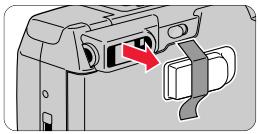
To protect the viewfinder eyepiece, a plastic cover is attached to the viewfinder eyepiece. Please remove it before using the camera.
natural_image
Diagram of a device's internal structure with a red arrow indicating a component (no text or symbols present)Accessories
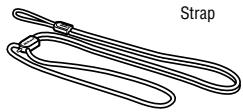
(The following item is supplied with this camera.)
natural_image
Line drawing of a strap with two loops and a small attached strap (no text or symbols)Optional accessories
- Camera case CS-L23
(Remote control unit can be stored in the pocket inside.) - Remote control unit ML-L3 (p. 39)
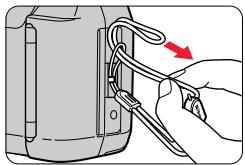
Attaching the strap
natural_image
Illustration of a hand using a tool to adjust or install a device component, with no visible text or symbols.Attach the strap as shown in the illustration.
natural_image
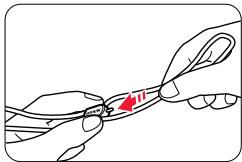
Illustration of hands manipulating a thin wire with a red arrow indicating the cable (no text or symbols present)Adjust the length using the lug on the strap.
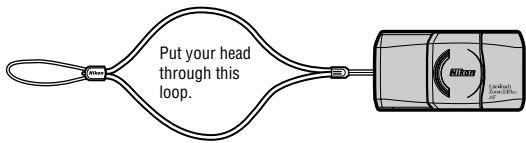
Table of Contents
To take a picture right away \_\_\_\_ 6
Camera parts 8-10
Body 8-9
LCD panel 10
Indications in the viewfinder 11
1 Preparations
Installing a battery 12
Turning the camera on ____ 13
Checking the battery power ____ 13
Loading the film 14
2 Basic Operations
Imprinting the date/time on pictures (Lite Touch Zoom 140ED QD only) ____ 16
Adjusting diopter 17
Holding the camera properly ____ 18
Operating the Shutter Release button 19
Selecting Regular or Panorama mode (Lite Touch Zoom 140ED QD only) ____ 20
Zooming 21
Shooting 22
Rewinding the film 24
Removing the film 25
3 Advanced Operations
When the main subject is not in the center of the picture ____ 26
Difficult-to-focus subjects 28
Close-up photography 29
Flash photography 30
Selecting the flash mode 30
To automatically fire the flash 32
To cancel flash operation ____ 33
To fire the flash intentionally 34
To photograph a person in a night view 35
To reduce the "Red-eye" effect 36
Shooting a distant view or landscape through a window ____ 38
Using the self-timer 38
Using the remote control (optional) 39
Replacing the remote control battery ____ 40
4 Additional Information
Correcting the date and time
(Lite Touch Zoom 140ED QD only) ____ 41
Troubleshooting 42
Camera care tips 44
Specifications 46
For safe handling of the camera 48
To take a picture right away
Quick operation guide
If you wish to use this camera immediately, proceed as follows: For details see the pages indicated for reference.
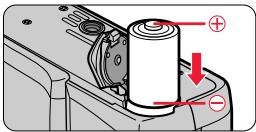
- Insert a battery. (p. 12)
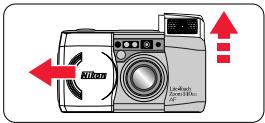
- Turn the camera on. (p. 13)
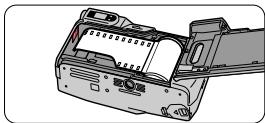
- Load film. (pp. 14, 15)
natural_image
Technical illustration of a device casing with internal components (no text or symbols visible)- Select the Regular or Panorama mode (Lite Touch Zoom 140ED QD only). (p. 20)

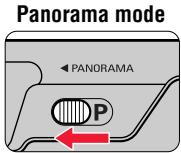
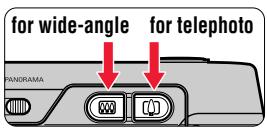
- Press the Zoom buttons and compose your picture. (p. 21)
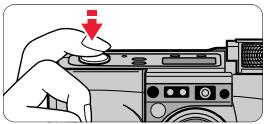
- Lightly press the Shutter Release button.
(Ⅱ p. 19)
natural_image
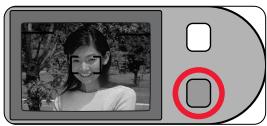
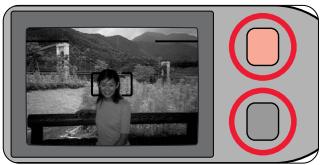
Hand pressing a button on a device (no text or symbols visible)- Check the green LED, then shoot.
(Ⅲ p. 23)
natural_image
Black-and-white photo of a smiling person outdoors, with a red circular button highlighting a location (no text or symbols)When the end of the film roll is reached, The film is automatically rewound. (p. 24) Remove the film. (p. 25)

Take some trial shots
Before taking important pictures, it is strongly recommended to take a few trial shots first to familiarize yourself with the camera and all of its features.
Nikon cannot be held responsible for malfunctions caused by using the Lite Touch Zoom 140ED / Lite Touch Zoom 140ED QD in ways not specified in this manual.
Camera parts (Body)
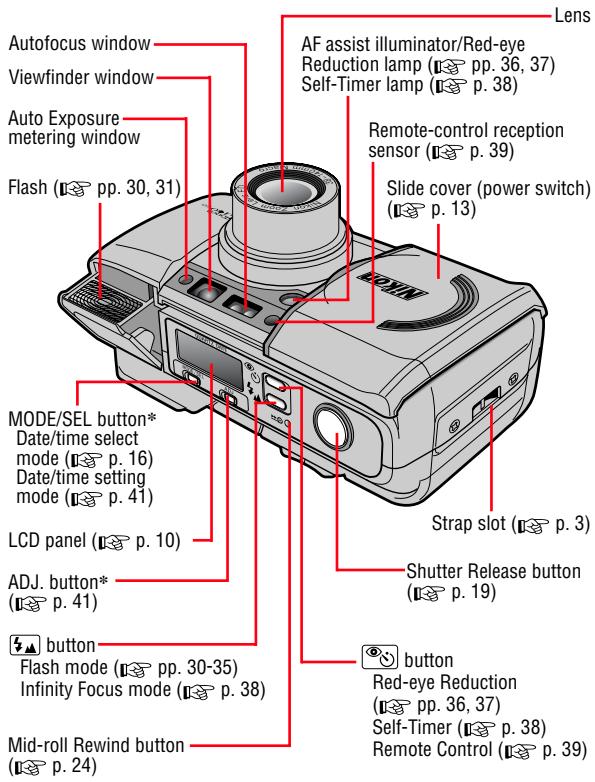
* Lite Touch Zoom 140ED QD only
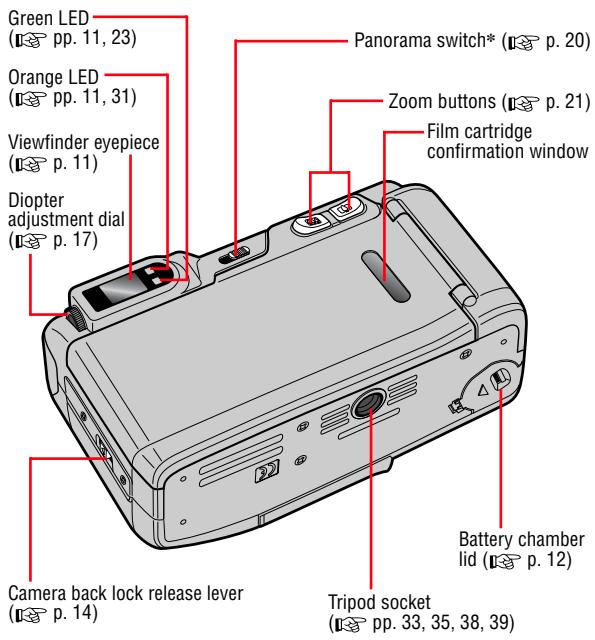
Camera parts (continued)
LCD panel
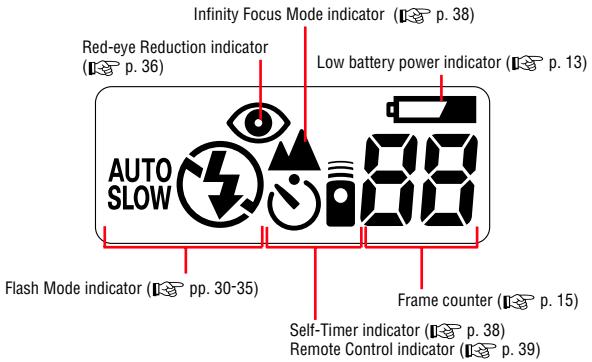
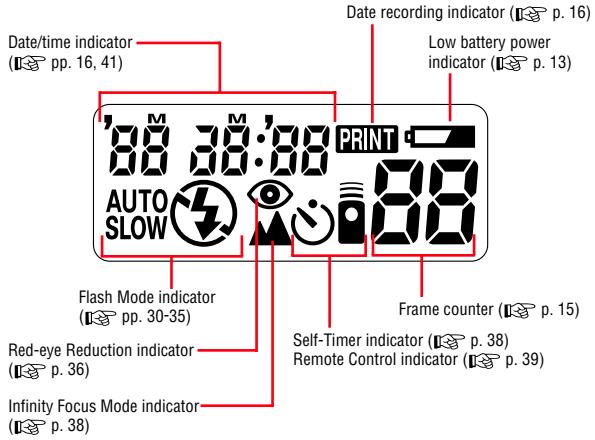
The illustrations are fully labeled for your reference.
Indications in the viewfinder
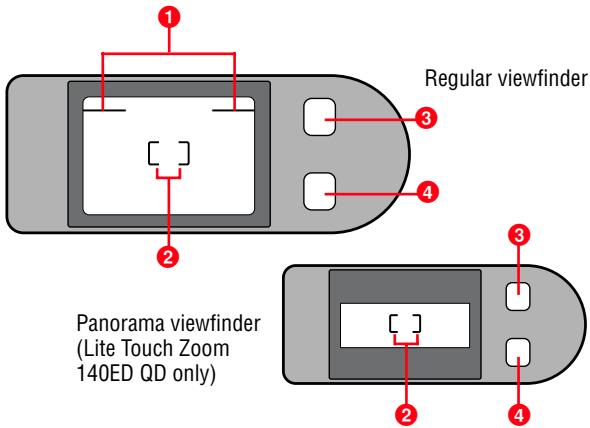
1 Parallax compensation marks (p. 29)
For close-up shooting at a distance less than 1m.
②Autofocus frame marks (p. 22)
Center the main subject to be in focus within this frame.
3 Orange LED (p. 31)
Slowly blinks while the flash is being charged, and lights up when the flash is ready to fire.
If you press down on the popped-up flash unit, the LED blinks rapidly as a warning.
4 Green LED (p. 23)
Lights when focus is achieved. It blinks if correct focus cannot be achieved.
In close-up photography, the LED slowly blinks as a warning if the subject is closer than approx. 0.74m.
Installing a battery

Battery type
Use one CR123A or DL123A 3 V lithium battery in this camera.
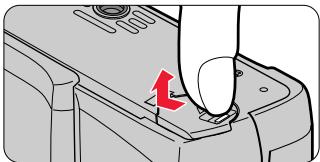
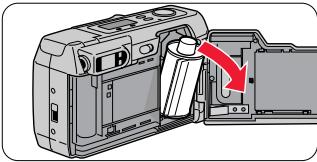
1. Open the battery chamber lid.
natural_image
Close-up of a hand pressing a button on a device (no text or symbols visible)- While releasing the lock as indicated by the arrow in the illustration above, open the battery chamber lid.
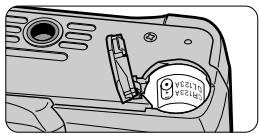
2. Install a new battery.
natural_image
Close-up of a mechanical component with a knob and handle (no visible text or symbols)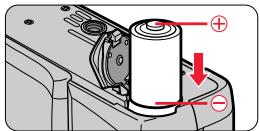
- Observe the correct polarities and insert the battery in the direction shown in the illustration above.
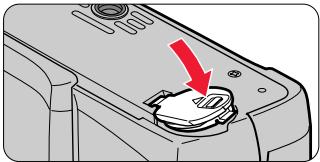
3. Close the battery chamber lid.
natural_image
Close-up of a device's lid with a red arrow pointing to a button (no text or symbols visible)- Firmly press the battery chamber lid until it clicks shut.

The built-in clock is reset when the battery is removed. Remember to set the time and date. (Lite Touch Zoom 140ED QD only) (p. 41)
Turning the camera on
Open the slide cover.
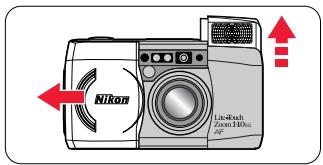
- Once you open the cover in the direction of the arrow, the camera is turned on, the built-in flash automatically pops up, and the lens extends out to the wide-angle position.

Slide the cover until it clicks.

When closing the cover, first slide it slightly in to start lens retraction. When the lens is completely retracted, slowly close the cover.
Checking the battery power
■ Make sure that the Low Battery Power indicator (☐) is not appeared on the LCD panel.
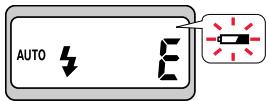
Lite Touch Zoom 140ED
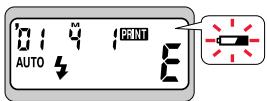
Lite Touch Zoom 140ED QD
- If “☐” is not appeared, battery power is sufficient.
- If “☐” is blinking, or all the indicators on the LCD panel do not appear, the battery is exhausted. Replace it with a new one.
Always check the battery condition before shooting.
It is recommended to carry spare batteries with you. The batteries may be difficult to obtain in some areas.
Loading the film
Tips on DX-coded 35mm film
Number of frames
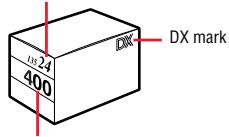
Film speed
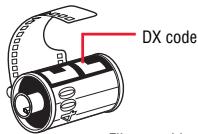
Film cartridge
- Use DX-coded 35mm film with this camera.
- For DX-coded film, film speed is automatically set.
Film speeds valid for automatic setting are ISO50, 100, 200, 400, 800, 1600, and 3200. - With a non-DX-coded film, the film speed is automatically set to ISO100.

When loading/unloading film, be sure not to open the camera back cover into direct sunlight.

Film recommended
It is recommended to use ISO400 film, which provides good results in flash photography, and reasonable protection against camera shake.
1. Open the camera back.
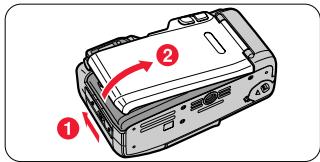
- Slide the camera back lock release lever (1), and open the camera back (2).
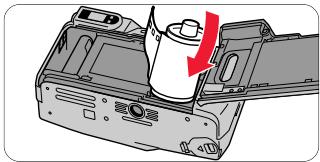
2. Insert a film cartridge.
natural_image
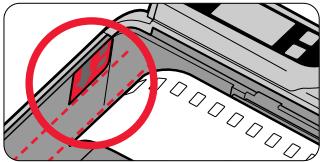
Illustration of a printer's internal structure with a red arrow indicating compression or disassembly (no text or symbols present)3. Pull the film leader out to the red index mark.
natural_image
Diagram showing a red circle highlighting a specific object on a document or interface (no text or symbols present)- If the film leader is inserted farther than the red index mark or the end of the film leader is folded, the film may not be wounded up properly.

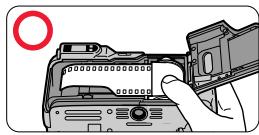
Hold the film cartridge and ensure film is properly positioned with no slack.
natural_image
Illustration of a hand installing or adjusting a DSLR camera module (no text or symbols visible)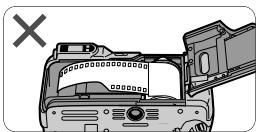
natural_image
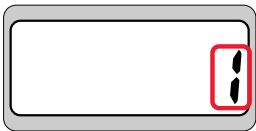
Diagram of a device interior with a hand holding a screen, showing no text or symbols.4. Close the camera back, and check that the film has been correctly loaded.
natural_image
Simple diagram with two black dots inside a red box, no text or symbols presentLite Touch Zoom 140ED
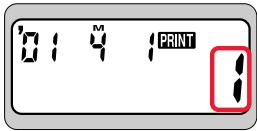
Lite Touch Zoom 140ED QD
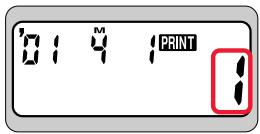
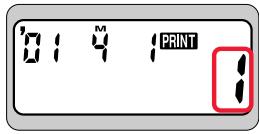
- Once the camera back is closed, the film automatically advances to the first frame. Until film loading is complete, “- -” blinks on the LCD panel.
- When the film has been properly set, “!” is displayed on the LCD panel.

If the letter “E” blinks on the LCD panel, film is not properly loaded. Open the camera back again and reload film.
Imprinting the date/time on pictures
(Lite Touch Zoom 140ED QD only)
- Select the date/time indicator by pressing the MODE/SEL button.
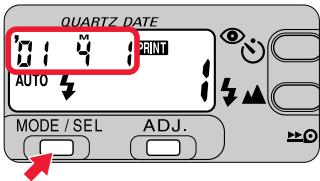
The year is indicated by the lower two digits, and the time is in the 24-hour cycle. The example in the illustration shows Apr. 1, 2001.
- The letter “M” appears to label the month indication, but it is not imprinted on pictures.
- Each time you press the MODE/SEL button, the indicator changes in the order shown below:
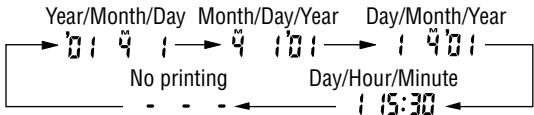
- If “PRINT” is displayed on the LCD panel, the date/time of the shot will be imprinted on the picture.
- Set to “ - - -” (No printing) if you prefer the date/time not to be imprinted.
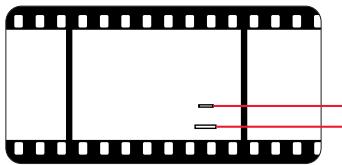
Imprint position of date/time
natural_image
Simple line drawing of a film strip with black and red horizontal lines (no text or symbols)Imprint position in Panorama shooting Imprint position in Regular shooting
- The imprint positions on film are shown in the illustration.

The imprinted date/time may be difficult to recognize if the imprint position or the subject is:
- White or bright.
- Orange or yellow.

If you take a picture exceeding the number of frames on the film, the date/time may not be imprinted correctly on the picture.
Adjusting diopter
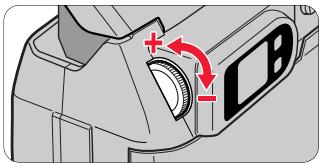
■ Turn the diopter adjustment dial.
natural_image
Mechanical component diagram showing a camera lens and screen with red directional arrows indicating motion (no text or symbols)- If the image in the viewfinder is unclear, turn and adjust the diopter adjustment lever.
Caution:
As you look into the viewfinder and operate the diopter adjustment dial, make sure not to injure your eye with your finger or fingernail during adjustment.
About the Antifog Viewfinder
A specially treated plastic surface prevents the eyepiece from fogging when shooting in cold or warm, humid environments.

If the antifog viewfinder eyepiece is smeared, gently wipe it with a dry, soft cloth (e.g. a lens cloth). Avoid wiping with force; otherwise, the eyepiece may be damaged.
Holding the camera properly
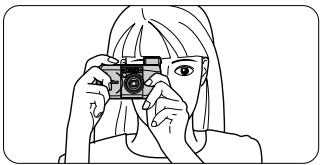
Hold the camera firmly.
natural_image
Line drawing of a person holding a camera (no text or symbols)- Prop your elbows against your body and hold the camera with both hands.
natural_image
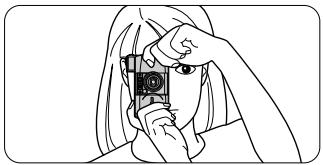
Line drawing of a person holding a camera, no text or symbols present- When holding the camera vertically, make sure that the flash is on top as shown.

Do not block the lens, autofocus window, or flash with your fingers or hair, or the strap.

Be careful not to press down on the flash unit when it is in the popped-up position.
Operating the Shutter Release button
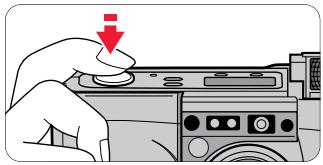
1. Lightly press the button and confirm the green LED lights up.
natural_image
Illustration of a hand pressing down on a computer control panel with a red downward arrow (no text or symbols)- When you press the button lightly, the focus and exposure are achieved, and the green LED lights up.
- The focus is locked (Focus lock 📋 p. 26) while the Shutter Release button is depressed lightly.
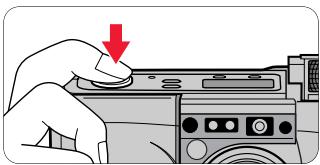
2. Fully depress the Shutter Release button to take the picture.
natural_image
Hand pressing a button on a device with a red arrow indicating the action (no text or symbols present)- The flash automatically fires when there is not enough light or the subject is backlit.

Pressing the Shutter Release button abruptly in one stroke may result in camera shake. Be sure to slowly press the Shutter Release button.
Selecting Regular or Panorama mode
(Lite Touch Zoom 140ED QD only)

What's Panorama mode?
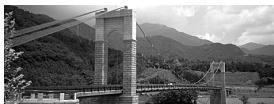
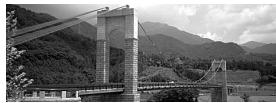
In panorama mode, a portion of the top and bottom part of the frame is cut exposing an area of approx. 13 × 36mm and is usually printed in approx. 89 × 254mm size.
Select the Regular or Panorama mode.
Regular mode
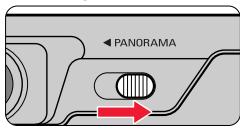
Set the Panorama switch to the right position.
Panorama mode
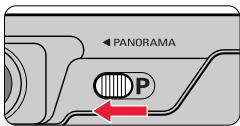
Set the Panorama switch to the left position.
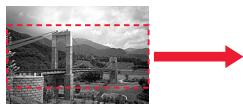
natural_image
Black-and-white landscape photo showing a suspension bridge over hills, with a red arrow pointing right (no text or symbols)Regular mode

natural_image
Black-and-white exterior view of a suspension bridge over water with mountainous background (no visible text or symbols)Panorama mode
- The date/time can also be printed in the Panorama mode. (p. 16)

When compared with regular-format pictures, extra time and cost may be required for developing/printing panorama pictures.
Caution:
To prevent possible injury to your eye, hold the camera away from your face when you operate the Panorama switch.
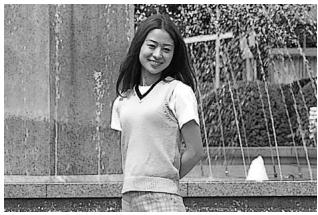
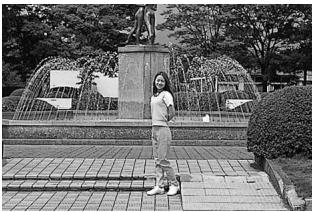
Press the Zoom button to compose the picture.

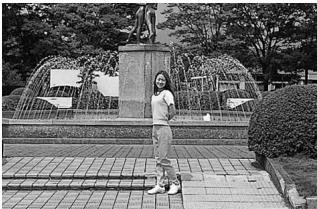
- Press the zoom button for telephoto (140mm) photography or the zoom button for wide-angle (38mm) photography.
- Remove your finger from the button when the desired image size is obtained.

When the camera is not operated for more than 2 minutes, the lens automatically retracts to the ⏻ (wide-angle) position.
Example of a telephoto photograph
natural_image
Black-and-white photo of a smiling young woman standing outdoors near a fountain and water feature (no text or symbols visible)Example of a wide-angle photograph
natural_image
Black-and-white photo of a young girl standing in front of a fountain with a statue on top (no visible text or symbols)Shooting
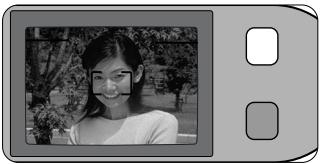
This camera employs a highly accurate wide-area passive-type autofocus system, which enables easy focusing and sharp shooting of a distant view or a subject through a window.
- Center the autofocus frame mark on the main subject.
natural_image
Black-and-white photo of a smiling woman outdoors, no visible text or symbols
If the main subject is outside the autofocus frame:
Use the focus lock to achieve focus. (p. 26)
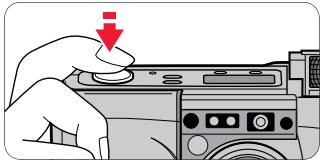
- Lightly press the Shutter Release button.
natural_image
Hand pressing a button on a camera module with a red downward arrow indicating action (no text or symbols present)
Lighting/blinking of the green LED
When correct focus has been achieved, the green LED lights up. The green LED blinks either slowly or quickly when the subject is out of focus.
● Slow blinking indicates the subject is too close.
For correct focus to be achieved, keep the camera away from the subject for more than approx. 0.74m.
● Quick blinking indicates that the subject is difficult to focus.
Use the focus lock. (p. 26)
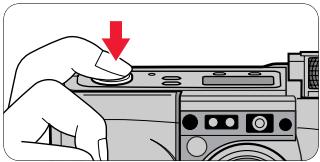
3. Slowly press the Shutter Release button all the way.
natural_image
Hand pressing a button on a computer monitor (no text or symbols visible)- If the subject is dark or backlit in Auto Flash mode, the flash fires automatically.

Pressing the Shutter Release button abruptly in one stroke may result in camera shake.

When not in use, close the slide cover to save battery power.
Rewinding the film
Film rewinds automatically.
- At the end of the film roll, the film rewinding starts automatically.
- While the film is rewinding, the number on the frame counter decreases one by one. When rewinding is complete, the letter “ ” blinks for approx. 20 seconds, then stops blinking and remains lit.
- If rewinding stops midway through the roll because of a dead battery, it resumes automatically as soon as the battery is replaced.

Do not open the camera back until the letter “E” starts blinking.
To rewind the film at mid-roll.
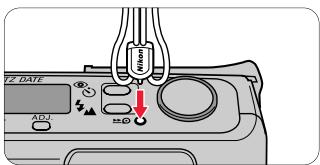
Press the mid-roll rewind (▶) button using the stud on the strap lug or the point of ball-point pen.
- Once rewinding starts, there is no need to keep the button pressed.
Removing the film
- Make sure rewind is complete by checking the letter “ ” indication.
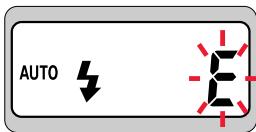
Lite Touch Zoom 140ED
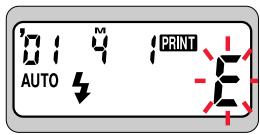
Lite Touch Zoom 140ED QD
- Open the camera back and remove the film.
natural_image
Diagram of a device being inserted into a housing, showing a red arrow indicating the process (no text or symbols present)When the main subject is not in the center of the picture
Focus lock photography
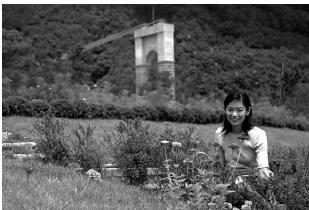
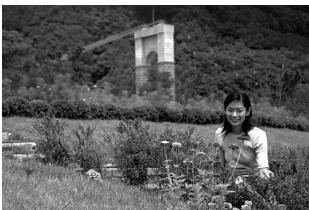
When the subject to be focused is outside the autofocus frame in the center of the picture, use focus lock, which enables you to change the picture composition while locking the focus.
1. Compose the picture.
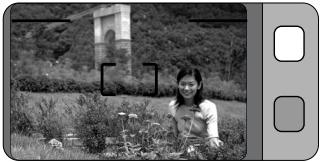
natural_image
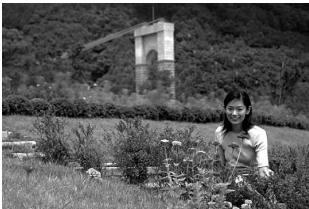
Black-and-white photo of a woman sitting among plants in a grassy field, with a stone tower and shrubs in the background (no visible text or symbols)- If the shutter is released in a condition like that in the above example where the main subject is outside the autofocus frame, the background is in focus, and the main subject is out of focus. In such situations, use focus lock to change the picture composition while temporarily locking the focus on the main subject.
2. Center the autofocus frame on the main subject and lightly press the Shutter Release button.
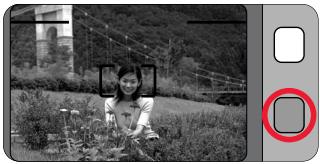
natural_image
Black-and-white photo of a person sitting in a field with trees and a building in the background (no visible text or symbols)- The green LED lights up when correct focus has been achieved, and the focus is locked as long as the Shutter Release button is depressed lightly.

Do not change the camera-to-subject distance
While the green LED lights up, the focus is locked. Do not change the camera-to-subject distance.
- While depressing the Shutter Release button lightly, recompose the picture and depress the Shutter Release button all the way.
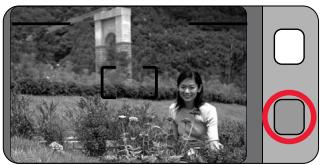
natural_image
Black-and-white photo of a woman standing outdoors near a stone monument and greenery (no visible text or symbols)Example
natural_image
Black-and-white photo of a person tending to plants in a field with a stone structure and hills in the background (no visible text or symbols)Difficult-to-focus subjects
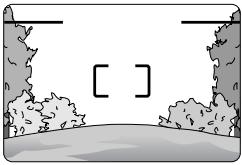
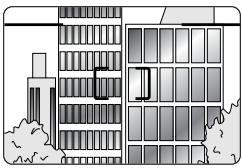
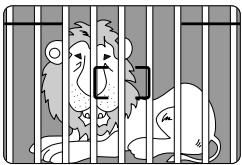
The following subjects may be difficult to focus.
Use the focus lock (p. 26) to focus on another subject equidistant from the camera, then compose the picture to shoot.
■ Subjects of low contrast, such as blue sky, or shiny subjects, such as a shiny car body or water surface.
natural_image
Simple line drawing of a landscape with trees and a path, no text or symbols present■ Subjects with continuous and repeated patterns such as buildings.
natural_image
Architectural line drawing of a multi-story building with windows and a door, no text or symbols present■ Scenes with subjects at different distances within the autofocus frame.
natural_image
Illustration of a cage with birds and a smartphone, no text or symbols present■ Strongly back lit subjects or those having a bright shiny background.
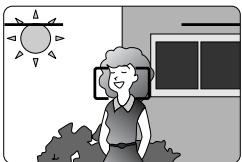
natural_image
Illustration of a smiling woman sitting outdoors with a sun and window in the background (no text or symbols)Close-up photography

Minimum camera-to-subject distance is approx. 0.74m
If you wish to shoot a subject such as a flower as large as possible in a picture, you can get as close to the subject as approx. 0.74m.
- By setting the Zoom button to the 📁 (telephoto) position, a larger image can be obtained.
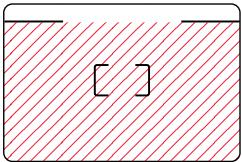
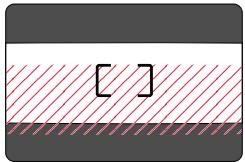
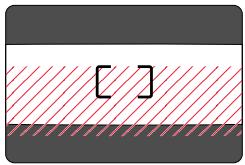
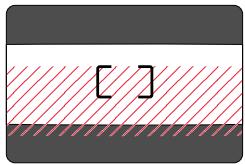
1. Compose the picture within the parallax compensation marks.
natural_image
Simple diagram with a shaded rectangular area and two small rectangular cutouts, no text or symbols present.Regular
natural_image
Simple diagram with a red hatched band and a black bracket, no text or symbols present.Panorama (Lite Touch Zoom 140ED QD only)
The area marked with ⌘ in the illustration is included in the picture.
Use the parallax compensation marks when the camera-to-subject distance is less than 1m.
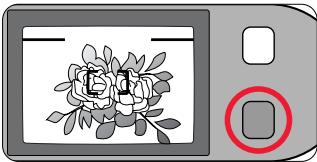
2. Check that the green LED lights up, then shoot.
natural_image
Illustration of a digital camera with a rose image and a red circular button (no text or symbols)If the subject is closer than approx. 0.74m, the green LED slowly blinks as a warning. Move away from the subject until the green LED lights up.
Flash photography
Selecting the flash mode
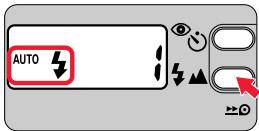
Lite Touch Zoom 140ED
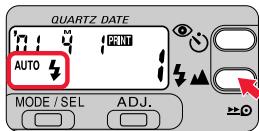
Lite Touch Zoom 140ED QD
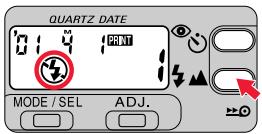
- You can select any of five flash modes by pressing the ↓▲ button.

flowchart
graph LR
    A["AUTO"] --> B["⚡"]
    B --> C["⚡"]
    C --> D["⚡"]
    D --> E["AUTO SLOW"]
    E --> F["⚡"]
AUTO

The flash automatically fires when there is not enough light, or the subject is backlit.


: Infinity Focus (p. 38)
For shooting a distant scene or landscape more sharply.

: Flash Cancel (p. 33)
To cancel flash operation in lighting conditions where normally the flash would automatically fire.

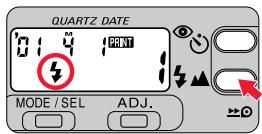
: Anytime Flash (p. 34)
To fire the flash intentionally regardless of the available light.
AUTO SLOW

: Slow-Sync Flash (p. 35)
To brighten both the subject and the background at dusk or in night scenes.

Lighting/blinking of the orange LED
●The orange LED lights up:
Flash charging is completed.
The flash is ready to fire.
● The orange LED blinks slowly:
The flash is being charged. The shutter cannot be released until the LED lights up. Once take your finger away from the Shutter Release button, and lightly press the button again. If the orange LED lights up, the shutter can be released.
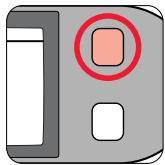
natural_image
Simple icon of a computer monitor with a square button and a red circle, no text or symbols present.● The orange LED blinks quickly:
The popped-up flash unit is being pressed down. The flash will not fire when you release the shutter, even if in the Flash mode.
Do NOT touch the flash unit.
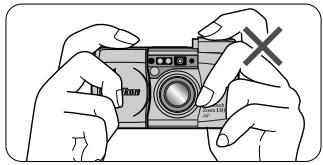
natural_image
Illustration of hands holding a camera with a 'X' mark, no text or symbols present
Flash shooting range
The reference distance values are shown below.
With ISO100 film speed
(wide-angle) setting: approx. 0.74 to 4.4m
(telephoto) setting: approx. 0.74 to 2.5m
With ISO400 film speed
(wide-angle) setting: approx. 0.74 to 8.8m
(telephoto) setting: approx. 0.74 to 5.0m
To automatically fire the flash
Auto Flash mode
The flash automatically fires when there is not enough light or the subject is backlit.
1. Open the slide cover.

Lite Touch Zoom 140ED
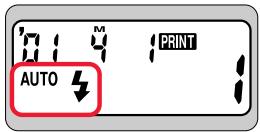
Lite Touch Zoom 140ED QD
- When you open the slide cover, the power is turned on and the built-in flash automatically pops up. The “AUTO ↓” mark appears on the LCD panel and Auto Flash mode is automatically selected.
Automatic flash firing for a backlit scene
When the subject is backlit, the flash is automatically fired while simultaneously compensating exposure for the main subject and the background.
2. Check that the orange and green LEDs light up, then shoot.
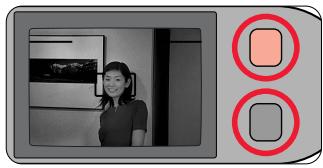
natural_image
Interior scene with a person standing and two red circular buttons on the right (no text or symbols visible)Example
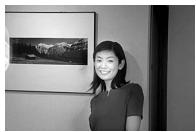
natural_image
Black-and-white photo of a woman standing in front of a framed landscape painting (no visible text or symbols)If there is enough light, “AUTO” appears on the LCD panel, and the flash does not fire.
While the orange LED is blinking with the Shutter Release button pressed lightly, the flash is being charged, and the shutter cannot be released. Lightly press the Shutter Release button again, and release the shutter after the orange LED stops blinking and stays lit.
Pressing down on the popped-up flash unit will prevent the flash from firing. Do NOT touch the flash unit.
To cancel flash operation
Flash Cancel mode
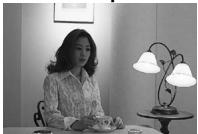
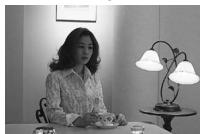
Use this mode in places, such as museums, where flash photography is prohibited, or to achieve a natural lighting effect at dusk or for night scenes.
1. Use a tripod or place the camera on a stable flat surface.

Use a tripod for the Flash Cancel mode
Since slow shutter speeds are usually selected in this mode, use a tripod to prevent camera shake.
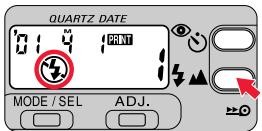
2. Press the ⏻ button until “⚡” appears on the LCD panel.
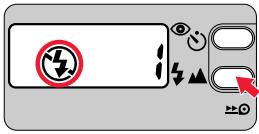
Lite Touch Zoom 140ED
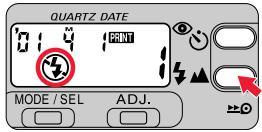
Lite Touch Zoom 140ED QD
3. Check that the green LED lights up, then shoot.
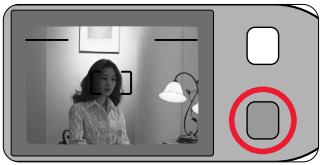
natural_image
Black-and-white photo of a person sitting indoors near a lamp and framed picture frame (no visible text or symbols)Example

natural_image
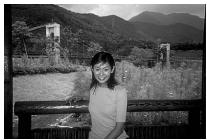
Black-and-white photo of a woman sitting at a desk with a lamp and framed picture on the wall (no visible text or symbols)To fire the flash intentionally
Anytime Flash mode
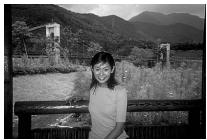
Use this mode to intentionally fire the flash without regard to light conditions.
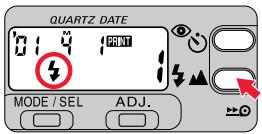
- Press the ↓▲ button until “↓” appears on the LCD panel.
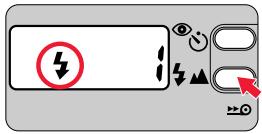
Lite Touch Zoom 140ED
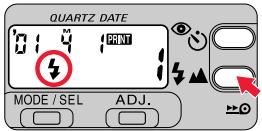
Lite Touch Zoom 140ED QD
- Check that the orange and green LEDs light up, then shoot.
natural_image
Black-and-white photo of a person standing on a balcony overlooking a scenic landscape with mountains and buildings (no text or symbols visible)Example

natural_image
Black-and-white photo of a woman standing by a railing with a scenic mountain backdrop (no visible text or symbols)
While the orange LED is blinking with the Shutter Release button pressed lightly, the flash is being charged, and the shutter cannot be released. Lightly press the Shutter Release button again, and release the shutter after the orange LED stops blinking and stays lit.

Pressing down on the popped-up flash unit will prevent the flash from firing. Do NOT touch the flash unit.
To photograph a person in a night view
Slow Sync Flash mode
Use this mode to brighten both the subject and the background in a night view or at dusk.
1. Use a tripod or place the camera on a stable flat surface.

Use a tripod for the Slow Sync Flash mode
Since slow shutter speeds are usually selected in this mode, use a tripod to prevent camera shake.
2. Press the ↓ button until “AUTO SLOW ↓” appears on the LCD panel.
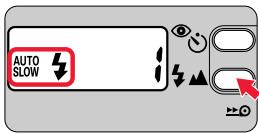
Lite Touch Zoom 140ED
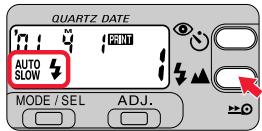
Lite Touch Zoom 140ED QD
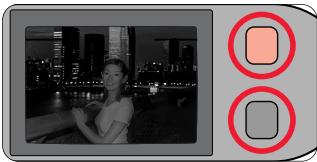
3. Check that the orange and green LEDs light up, then shoot.
natural_image
Black-and-white photo of a woman at night with city skyline and waterfront, next to two red square button icons (no text or symbols)Example

natural_image
Black-and-white photo of a woman smiling at the waterfront with city skyline in background (no visible text or symbols)- If there is enough light, AUTO SLOW appears on the LCD panel, and the flash does not fire.

While the orange LED is blinking with the Shutter Release button pressed lightly, the flash is being charged, and the shutter cannot be released. Lightly press the Shutter Release button again, and release the shutter after the orange LED stops blinking and stays lit.

Pressing down on the popped-up flash unit will prevent the flash from firing. Do NOT touch the flash unit. Advanced Operations
To reduce the "Red-eye" effect
Red-eye Reduction mode
In flash photography, the subject's eyes may sometimes appear bright red. To reduce this “red-eye” effect, use this mode.

Both camera and subject be still
The Red-eye Reduction lamp lights up for approx. a second before the flash fires. Be careful not to move the camera or let the subject move until the flash fires.
1. Press the 📋 button until “💡” appears on the LCD panel.
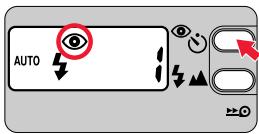
Lite Touch Zoom 140ED
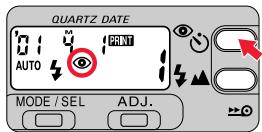
Lite Touch Zoom 140ED QD
- Each time you press the ⏻ button, the indicator changes in the order shown below:

flowchart
graph LR
    A["No indicator"] --> B(( ))
    B --> C(( ))
    C --> D(( ))
No indicator: Red-eye Reduction mode canceled
To cancel Red-eye Reduction mode.

: Red-eye Reduction mode
To reduce the "Red-eye" effect.

: Self-Timer (p. 38)/Remote Control (p. 39) mode
For self-timer or remote control operation.
Note that Red-eye Reduction is automatically set when the self-timer is used.
2. Compose the picture, then lightly press the Shutter Release button.
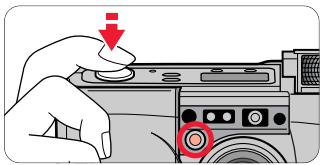
natural_image
Hand pressing down on a device with a red downward arrow and a circular button (no text or symbols visible)3. Check that the orange and green LEDs light up, then shoot.
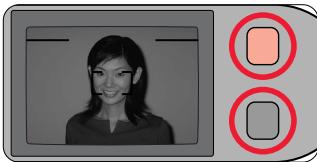
natural_image
Portrait of a smiling woman in front of a screen, with two red square buttons on the right side (no text or symbols)While the orange LED is blinking with the Shutter Release button pressed lightly, the flash is being charged, and the shutter cannot be released. Lightly press the Shutter Release button again, and release the shutter after the orange LED stops blinking and stays lit.
The Red-eye Reduction mode is not automatically canceled by turning the power off. To cancel the Red-eye Reduction mode, press the button until “☐” disappears from the LCD panel.

About Red-eye Reduction mode
This mode is not recommended when shooting fast-moving subjects. Because the shutter actually releases approximately one second after pressing the Shutter Release button to light up the subject by the Red-eye Reduction lamp.
Shooting a distant view or landscape through a window
Use the Infinity Focus mode to shoot a distant view more sharply, or a landscape through a window.
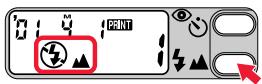
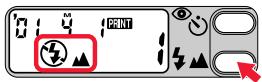
- Press the ↓▲ button until “↓▲” appears on the LCD panel.
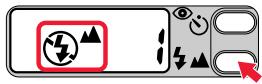
Lite Touch Zoom 140ED
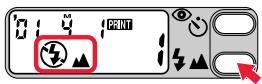
Lite Touch Zoom 140ED QD
- Check that the green LED lights up, then shoot.

Flash is automatically canceled in this mode.
Using the self-timer
Use the self-timer when you wish to include yourself in the picture.
- Press the 📷 button until “💡” appears on the LCD panel.
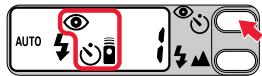
Lite Touch Zoom 140ED
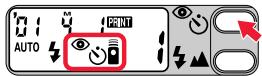
Lite Touch Zoom 140ED QD
- Use a tripod or place the camera on a stable flat surface when using the self-timer.
-
Compose the picture, and press the Shutter Release button.
-
Focus and exposure are achieved by pressing the Shutter Release button lightly.
- When the Shutter Release button is pressed all the way, the Self-timer lamp blinks for approx. 8 seconds, then lights up for 2 seconds before the shutter is released.
- After the shot, Self-Timer mode is canceled.

Self-Timer mode is automatically canceled if the camera is not operated for more than approx. 2 minutes or when the slide cover is closed.
Using the remote control (optional)
For releasing the shutter from a distance.

When you use the remote control for the first time, pull out the transparent insulation sheet from the remote control.
1. Press the 📋 button until “💡” appears on the LCD panel.
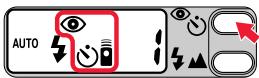
Lite Touch Zoom 140ED
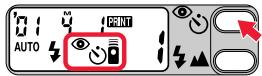
Lite Touch Zoom 140ED QD
- Use a tripod or place the camera on a stable flat surface when using the remote control.
The shooting distance of the remote control is within approx. 5m while facing the camera. If the camera-to-subject distance is more than 5m away, use the self-timer.
Remote Control mode will be automatically canceled if the camera is not operated for more than approx. 2 minutes or when the slide cover is closed.
2. Compose the picture, aim the remote control unit at the camera, and press the Shutter Release button on the unit.
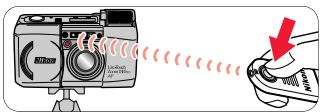
- The Self-timer lamp lights up for approx. 2 seconds before the shutter is released.
- Within 2 minutes after taking the last shot, you can still continue to shoot by remote control.
If the reception sensor on the camera is exposed to strong light, the remote control may not operate properly.
The life of the battery in the remote control unit is approx. 5 years. If the battery is exhausted, the shutter may not be released with the remote control. Replace the battery inside the remote control with new one. (p. 40)
Replacing the remote control battery
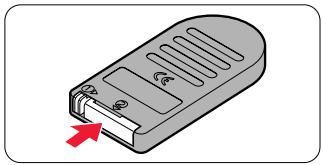
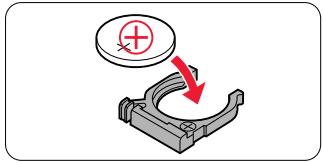
- While keeping the battery holder release lever pressed as the arrow ① on the remote control unit indicates to release the lock, pull out the battery holder from the remote control unit ②.
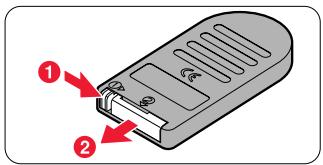
- Replace the battery.
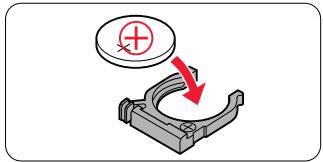
- Use one 3 V lithium (CR2025) battery.
-
Insert the battery with ⊕ polarity side facing up into the battery holder.
-
Insert the battery holder into the remote control unit until it clicks closed.
natural_image
Illustration of a remote control device with a red arrow pointing to its side panel (no text or symbols present)Warning:
Keep the batteries out of the reach of children. If a battery is swallowed, consult a doctor immediately.
Correcting the date and time
(Lite Touch Zoom 140ED QD only)
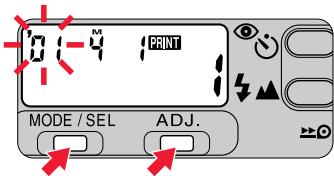
1. Press the MODE/SEL button for more than 2 seconds.
- When the date/time display format is Year/Month/Day, Month/Day/Year, or Day/Month/Year, the left most number indicator blinks first. For Day/Hour/Minute display, the center number indicator blinks first.
- The date/time correction can be performed with the camera either on or off. When the camera is on, the data will be immediately registered if the slide cover is closed, or the Mid-roll Rewind button or a Zoom button is pressed while the setting is in progress.
2. Press the ADJ. button to set the blinking digit.
- Each time you press the ADJ. button, the number advances by one.
- Holding the ADJ. button pressed for more than 2 seconds advances the number quickly.
3. When the blinking indicator is correctly set, press the MODE/SEL button again so that the next indicator blinks.
- Repeat steps 2 and 3 to set all the digits. When the year/month/date or date/hour/minute have been adjusted, press the MODE/SEL button to finish the adjustment procedure. If the year/month/date or date/hour/minute are all displayed correctly, adjustments are completed.

When the battery is replaced
●The LCD panel shows "00 000."
- The date/time is not imprinted in pictures taken while “00 0 00” is indicated. Set the date and time following the above procedure.
Troubleshooting
Track down the cause of trouble using the following chart. It may save you a trip to your nearest Nikon service center.
* When the battery is replaced or re-installed, the date and time you set are cleared. Reset them. (p. 41)
| Problem | Check points and solution | Ref. page | |
| Shutter | The shutter cannot be released. | ● The slide cover is not completely open.→ Open the slide cover all the way until it clicks to turn the camera on.● The orange LED blinks.→ The flash is being charged. Once take your finger away from the Shutter Release button, lightly press the button again, and release the shutter after the orange LED stops blinking and stays lit.● Letter “ ” lights up on the LCD panel.→ A rewound roll of film is inside. Replace it with a new roll.● No indicator on the LCD panel.→ The battery is exhausted. Replace it with a new one.*● All indicators on the LCD panel blink.→ The camera has detected a malfunction. Once open the slide cover and close it again, then turn the power on. If the camera still does not work properly, remove the battery from the camera and confirm the indicators turns off, then Install the battery in place again.* | 1311,3114,1524,251212,13 |
| Flash | The flash does not fire. | ● The orange LED blinks.→ The flash is being charged. Once take your finger away from the Shutter Release button, lightly press the button again, and release the shutter after the orange LED stops blinking and stays lit.● “ ⓧ ” lights up on the LCD panel.→ The flash does not fire when the subject is bright enough. To fire the flash, set the camera to the Anytime Flash mode.● No indicator or the “ ▪ ” blinks on the LCD panel.→ Battery power is low or the battery is exhausted. Replace the battery with a new one.*● The orange LED blinks quickly.→ Check that the flash unit is not pressed down. Do not touch the flash unit. | 11,3132,34351211,31 |
| Focus | The subject appears out of focus in the print. | ● Camera shake.→Gently press the Shutter Release button, or use a tripod or place the camera on a stable flat surface.● Something in front or in back of the subject is in focus.→Be sure to center the autofocus frame mark on the subject before releasing the shutter. When correct focus cannot be easily achieved, use the focus lock. | 18,1933,3522,2627 |
| LCD panel | No indicator appears even when the camera is turned on. | ● The battery is installed with wrong polarities.→Install it with the correct polarities.*● No battery or dead battery.→Install a new battery.* | 1212,13 |
| The numeral “f” does not appear even when film is loaded. | ● The letter “E” blinks or lights up.→Remove the film and load it again. | 14,15 | |
| Remote control (optional) | The shutter cannot be released using the remote control. | ● You are out of the remote control working range.→Operate the remote control in a range within 5m facing the camera.● Two or more minutes have elapsed since you set the camera to the Remote Control mode.→Set the camera to the Remote Control mode again.● The remote control is operated in backlit.→Change the position of the remote control.● The service life of the battery in the remote control has lapsed (5 years).→Install a new battery. | 39393940 |
A characteristic of electronic cameras
In rare cases, when strong static electricity or the like is applied to the camera, the camera may not work properly.
If this happens, remove the battery and re-install it.
When the battery is removed, the date/time you set are cleared.
Reset them after reinstalling the battery. (p. 41)
Camera care tips
When the camera is not in use:
Close the slide cover to turn the camera off when not in use. This prevents accidental release of the shutter and resulting battery drain.
When the camera will not be used for a long period:
Remove the battery and store the camera in a cool, dry, clean place. It is recommended to install a battery once a month and fire the flash several times to prevent deterioration of the capacitors.
Keep the camera dry:
The Nikon Lite Touch Zoom 140ED / Lite Touch Zoom 140ED QD is not waterproof, and therefore should not be exposed to rain or saltwater.
Do not apply strong shock to the camera:
Do not drop the camera or hit it against a hard surface.
When storing the camera:
Do not leave the camera in an excessively hot and humid place, such as inside a closed car or car trunk or in front of a heater, or a place exposed to chemicals such as camphor or naphthalene. Using a desiccant during storage is recommended.
Maintenance:
Use a dry, soft cloth or commercially available blower brush or lens cleaner to remove dirt and smudges.
Lightly wipe away the dirt on the Antifog Viewfinder eyepiece with a dry soft cloth (e.g. a lens cloth).
Use the flash intermittently:
Firing the flash repeatedly makes the battery and camera hot. Allow sufficient time for them to cool off before taking pictures again.
When using the camera at low temperature:
The camera may not operate at low temperature with a nearly exhausted battery. Use a fresh battery at low temperatures, keep spare batteries warm, and use them alternately.
Battery power may be restored when the temperature returns to normal.
Specifications
Type of camera
35mm autofocus lens-shutter camera with Nikon zoom lens
Usable film
DX-coded 35mm film in film cartridge
Picture format
Normal: 24 × 36mm
Panorama (Lite Touch Zoom 140ED QD only): 13.3 × 36mm
Lens
38mm f/5.3 – 140mm f/10.5, 10 elements in 8 groups (ED lens and aspheric lens are used)
Shutter
Programmed electronic type; also serves as diaphragm blades; Shutter speed: 2 to 1/500 seconds
Viewfinder
Real-image viewfinder; frame coverage: approx. over 80 % in regular-size frame; approx. 0.44 × magnification at 38mm, approx. 1.29 × at 140mm;
Diopter adjustment: -1.5\ m-1 +1.5\ m-1 , Antifog viewfinder
Viewfinder information
Image size frame with parallax compensation marks; Panorama-format frame marks (Lite Touch Zoom 140ED QD only); Autofocus frame marks: Green LED (in-focus indicator) – Lights up: subject focused, Blinks slowly (at 2 Hz): subject is too close to achieve correct focus, Blinks quickly (at 8 Hz): subject is difficult to focus; Orange LED (flash-ready light) – Lights up: flash ready, Blinks slowly (at 4 Hz): flash being charged, Blinks quickly (at 8 Hz): the popped-up flash unit is being pressed down
Focusing
Wide-Area Passive Autofocus system; Activeated by lightly pressing Shutter Release button; Distance range from approx. 0.74m to infinity
Focus lock
Focus is locked as long as the Shutter Release button lightly pressed
Exposure control
Electronically controlled program AE: auto exposure range (ISO100): EV 4 – 16 at 38mm or EV 6 – 16 at 140mm, (ISO 400): EV 6 – 17 at 38mm, EV 6 – 18 at 140mm; Flash fires automatically if the available light is low
Film speed setting
ISO50, 100, 200, 400, 800, 1600, and 3200 film automatically set
Film loading
Film automatically advances to the first frame upon completion of film loading; With a film cartridge confirmation window
Frame counter
Shown in the LCD panel; Additive type; Counts back during film rewind
Self-timer
Electronically controlled; Activated by depressing the Shutter Release button; Self-timer lamp blinks and lights up to show when ready; Timer duration 10 seconds; Cancellable
Film advance
Film automatically advances by one frame after each shot; Auto rewind at the end of film roll; Mid-roll rewind function available
Remote control (optional)
Infrared wireless remote control; 2 sec. delay shutter release; Effective range is within approx. 5m straight in front of the camera; One 3 V lithium (CR2025) battery. Battery will last for approx. 5 years; Dimensions (W × H × D): approx. 60 × 28 × 7mm; Weight (including battery): approx. 10 g
Built-in flash
Four flash modes available: Auto Flash, Flash Cancel, Anytime Flash, and Slow Sync Flash; Flash automatically fires when there is not enough light or subject is backlit; Flash shooting range (ISO 100): approx. 0.74 – 4.4m at 38mm, approx. 0.74 – 2.5m at 140mm, (ISO 400): approx. 0.74 – 8.8m at 38mm, approx. 0.74 – 5.0m at 140mm; Shutter release button is locked during flash charging; Recycling time approx. 6 sec.
Red-eye Reduction mode
Red-eye Reduction lamp lights up for approx. 1 sec. before flash fires.
Battery life
Approx. 10 rolls of 24-exposure film when flash is used for half the exposures
LCD panel (Power is on)
Frame counter, Flash mode, Red-eye Reduction, Self-timer/Remote Control, Infinity Focus mode, Low battery power, Date recording (Lite Touch Zoom 140ED QD only), Time/Date (Lite Touch Zoom 140ED QD only)
Power source
One 3 V lithium battery (CR123A type or DL123A)
Date imprint function (Lite Touch Zoom 140ED QD only)
Imprint uses 7-dot LED; Functions with panorama-format pictures; Auto film speed setting with DX codes (ISO 50 – 3200); Printed date include year, month, day, hour, (24-hour cycle with no AM/PM) and minute with five choices; Year/Month/Day, Month/Day/Year, Day/Month/Year, Day/Hour/Minute, and no-imprint; Leap year adjustment until 2040; Power source is the same as the camera body; Built-in clock with timing accuracy within ± 90 seconds a month
Dimensions (W × H × D)
Approx. 114 × 62.5 × 43mm
Weight (without battery)
Lite Touch Zoom 140ED: Approx. 220 g
Lite Touch Zoom 140ED QD: Approx. 225 g
- Specifications apply when a fresh battery is used at normal temperature (20 °C).
- Specifications and design are subject to change without notice.
For safe handling of the camera
WARNING (regarding the camera)
- Do NOT attempt to disassemble, repair, or modify the camera yourself. Such actions could cause electric shock and the camera to malfunction.
- If the camera is dropped and damaged, do NOT touch any exposed interior metal parts.
This may cause electric shock or injury.
Remove the battery and take the camera to an authorized Nikon dealer or service center. - If you detect smoke coming from the camera, immediately remove the battery.
Continued use in such condition may cause burns. Sufficient care must be taken when removing the battery. Remove the battery and take the camera to an authorized Nikon dealer or service center. - Do NOT submerge the camera in water or allow water or rain to splash on it.
This may cause fire or electric shock. - Do NOT operate the camera in a place where fire or explosion may be expected.
Use in an environment containing combustible gas or dust may cause fire or explosion. - Do NOT fire the flash at someone who is operating a vehicle. This may cause an accident.
- Do NOT fire the flash close to a person's eyes. This may damage his/her eyesight.
For flash photography of a baby or small child, keep a distance of more than 1 meter. - Keep the small accessories out of the reach of children.
They may swallow the batteries. If a battery is swallowed, immediately call a doctor. - Do NOT let the strap wind around your neck. In particular, NEVER put the strap around a child's neck.
This may cause accidental strangulation. - Do NOT look directly at the sun or other strong light source through the viewfinder.
This may cause permanent visual impairment.
CAUTION (regarding the camera)
- Do NOT operate the camera with wet hands.
This may cause electric shock.
- Keep the camera out of the reach of children.
If not, they may suffer injury.
- Do NOT operate the Panorama switch while looking through the viewfinder.
This may cause injury to your eye with your finger or fingernail.
- As you look through the viewfinder and adjust the diopter, make sure not to injure your eye during adjustment.
This may cause injury to your eye with yourfinger or fingernail.
- When the camera is not in use, keep the slide cover closed and avoid placing it in direct sunlight.
Strong sunlight entering the lens may cause a fire.
- Do NOT carry the camera while it is mounted on a tripod.
You might bump into something and injure yourself or others.
WARNING (regarding batteries)
- Do NOT throw used batteries into a fire.
This may cause leakage or the batteries to catch fire or explode.
- Do NOT short-circuit or disassemble batteries.
This may cause leakage or the batteries to catch fire or explode.
• Always follow the warning instructions printed on batteries.
Otherwise leakage, fire, or explosion may occur.
- Never use batteries not specified in this instruction manual.
Otherwise leakage, fire, or explosion may occur.
- Keep batteries out of the reach of children.
They may swallow the batteries. If a battery is swallowed, immediately call a doctor.
- Do NOT submerge batteries in water or allow water or rain to splash on them.
This may cause leakage, or the batteries to catch fire or explode.
- Do NOT try to charge batteries other than rechargeable batteries.
Otherwise leakage, fire, or explosion may occur.
natural_image
Mechanical component diagram showing a lever mechanism with a red arrow indicating direction (no text or symbols present)Accessoires
natural_image
Line drawing of a dragon rope with labeled 'Dragonne' (no other text or symbols)Accessoires en option
natural_image
Illustration of a hand using a tool to adjust or install a device component, with no visible text or symbols.natural_image
Illustration of hands manipulating a thin wire with a red arrow indicating the cable direction (no text or symbols present)natural_image
Technical illustration of a printer internal structure (no text or symbols visible)natural_image
Hand pressing down on a computer interface with a red downward arrow indicating action (no text or symbols present)natural_image
Black-and-white photo of a person with facial features, next to a gray device with a red circular button (no text or symbols)natural_image
Close-up of a hand pressing a button on a device (no visible text or symbols)natural_image
Close-up of a mechanical component with a dial indicator (no visible text or symbols)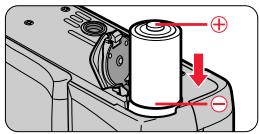
natural_image
Close-up of a device's lid with a red arrow pointing to a small component (no text or symbols visible)natural_image
Diagram of a printer's internal structure with a red arrow indicating compression or disassembly (no text or symbols present)natural_image
Diagram showing a red circle highlighting a specific area on a textured surface with no visible text or symbolsnatural_image
Illustration of a hand inserting a camera into a DSLR camera module (no text or symbols visible)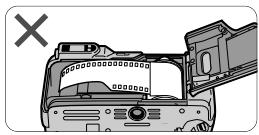
natural_image
Diagram of a device with an open lid and a cross mark, no text or symbols presentnatural_image
Simple diagram with two black dots inside a red box, no text or symbols presentLite Touch Zoom 140ED
Lite Touch Zoom 140ED QD
natural_image
Simple line drawing of a film strip with black and red horizontal lines (no text or symbols)natural_image
Diagram of a camera lens assembly with red directional arrows indicating motion (no text or symbols)natural_image
Line drawing of a person holding a camera (no text or symbols)natural_image
Line drawing of a person adjusting a camera (no text or symbols)natural_image
Hand holding a button on a computer interface with a red downward arrow indicating action (no text or symbols present)natural_image
Illustration of a hand pressing down on a computer interface with a red arrow indicating the action (no text or symbols present)natural_image
Black-and-white photo of a suspension bridge over a valley with mountains in the background, featuring a red arrow pointing right (no text or symbols visible)Mode normal
natural_image
Black-and-white exterior view of a suspension bridge over water with mountainous background (no visible text or symbols)Mode panoramique
natural_image
Black-and-white photo of a young woman standing outdoors near a fountain and water feature (no visible text or symbols)Exemple de cadrage large
natural_image
Black-and-white photo of a person standing in front of a fountain with statues and architectural elements (no visible text or symbols)Prise de vues
natural_image
Black-and-white photo of a smiling woman outdoors, no visible text or symbols
natural_image
Illustration of a hand pressing down on a camera module with a red downward arrow indicating the press (no text or symbols present)
natural_image
Hand pressing a button on a device (no text or symbols visible)natural_image
Diagram of a device being inserted into a case, showing a magnified view with a red arrow indicating the process (no text or symbols present)natural_image
Black-and-white photo of a woman tending to plants in a grassy field with a stone tower in the background (no visible text or symbols)natural_image
Black-and-white photo of a person standing in a grassy field with trees and a distant building (no visible text or symbols)natural_image
Black-and-white photo of a woman standing outdoors near plants and a stone monument (no visible text or symbols)Exemple
natural_image
Black-and-white photo of a person tending to plants in a field with a stone structure and hills in the background (no visible text or symbols)natural_image
Simple line drawing of a landscape with trees and a path, no text or symbols presentnatural_image
Architectural illustration of a multi-story building with windows and adjacent structures (no text or symbols)natural_image
Illustration of a cage with animals in various poses (no text or symbols)natural_image
Illustration of a smiling woman sitting outdoors with a sun and window in the background (no text or symbols)natural_image
Simple diagram of a container with two rectangular sections and a central square, no text or symbols present.Normal
natural_image
Simple diagram with a shaded rectangular region and a single black square, no text or symbols present.Panorama (Lite Touch Zoom 140ED QD uniquement)
natural_image
Illustration of a digital camera with a rose display and a red circular button (no text or symbols)natural_image
Simple icon of a computer monitor with a square button and two buttons, no text or symbols present.natural_image
Illustration of hands holding a camera with a 'X' mark, no text or symbols present
natural_image
Black-and-white photo of a woman in front of a wall, with two red circular icons on the right side (no text or symbols)Exemple

natural_image
Black-and-white photo of a woman standing beside a framed landscape painting on the wall (no visible text or symbols)Lite Touch Zoom 140ED
Lite Touch Zoom 140ED QD
natural_image
Black-and-white photo of a woman in a room with a lamp and framed picture frame (no visible text or symbols)Exemple
natural_image
Black-and-white photo of a woman sitting at a desk with a lamp and framed picture on the wall (no visible text or symbols)Lite Touch Zoom 140ED
Lite Touch Zoom 140ED QD
natural_image
Black-and-white photo of a person taking a selfie with a smartphone, next to two circular icons (no text or symbols)Exemple
natural_image
Black-and-white photo of a woman standing by a railing with a scenic mountain backdrop (no visible text or symbols)
natural_image
Black-and-white photo of a person at night with city skyline and waterfront, alongside two red square buttons (no text or symbols)Exemple

natural_image
Black-and-white photo of a smiling woman standing on a waterfront promenade with city skyline in the background (no visible text or symbols)natural_image
Hand pressing a button on a computer monitor (no text or symbols visible)natural_image
Black-and-white photo of a smiling woman in front of a digital interface element (no text or symbols visible)Lite Touch Zoom 140ED
Lite Touch Zoom 140ED QD
- Remplacez la pile.
natural_image
Illustration of a remote control device with a red arrow pointing to its internal structure (no text or symbols)Avertissement :
Dimensions (W × H × D)
Approx. 114 × 62,5 × 43mm
Poids (sans pile)
Lite Touch Zoom 140ED: Approx. 220 g
Lite Touch Zoom 140ED QD: Approx. 225 g
natural_image
Mechanical component diagram showing a bracket with a red arrow indicating a specific part (no text or symbols present)natural_image
Line drawing of a trageschlaufe rope with two loop ends (no text or symbols)Sonderzubehör
natural_image
Hand holding a tool interacting with a device component, no visible text or symbolsnatural_image
Illustration of hands manipulating a thin wire with a red arrow indicating the cable (no text or symbols present)natural_image
Technical line drawing of a mechanical device with internal components (no text or symbols)natural_image
Hand pressing down on a device component with a red downward arrow (no text or symbols visible)natural_image
Black-and-white photo of a person outdoors with trees and foliage, next to a gray device icon with a red square (no text or symbols)natural_image
Close-up of a hand pressing down on a device component with a red arrow indicating the action point (no text or symbols visible)natural_image
Close-up of a device's lid with a red arrow pointing to a button (no text or symbols visible)natural_image
Diagram of a printer's internal structure with a red arrow indicating a component (no text or symbols present)natural_image
Diagram showing a mechanical component with a red circle highlighting a feature, no text or symbols presentnatural_image
Illustration of a hand installing or adjusting a camera module into a device (no text or symbols visible)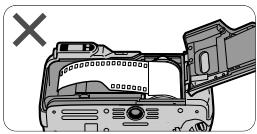
natural_image
Diagram of a device casing with an open lid and a cross mark, no text or symbols presentnatural_image
Simple diagram with two black dots inside a red box, no text or symbols presentLite Touch Zoom 140ED
Lite Touch Zoom 140ED QD
natural_image
Simple line drawing of a film strip with black and red horizontal lines (no text or symbols)natural_image
Mechanical component diagram showing a camera lens and screen with red directional arrows indicating motion (no text or symbols)natural_image
Line drawing of a person holding a camera (no text or symbols)natural_image
Illustration of a person holding a camera, no text or symbols presentnatural_image
Illustration of a hand pressing down on a computer control panel with a red downward arrow (no text or symbols)natural_image
Hand pressing down on a computer monitor with a red downward arrow indicating action (no text or symbols present)natural_image
Black-and-white photo of a suspension bridge over a river with mountains in the background, featuring a red arrow pointing right (no text or symbols visible)Normaler Modus
natural_image
Black-and-white exterior view of a suspension bridge over water with mountains in the background (no visible text or symbols)Panoramamodus
natural_image
Black-and-white photo of a young woman standing outdoors near a fountain and water spray (no text or symbols visible)natural_image
Black-and-white photo of a person standing in front of a fountain with a statue on top (no visible text or symbols)Fotografieren
natural_image
Black-and-white photo of a young girl outdoors, no visible text or symbols
natural_image
Illustration of a hand pressing down on a camera module with a red downward arrow indicating the press (no text or symbols present)
natural_image
Illustration of a hand pressing down on a device component with a red arrow indicating the downward motion (no text or symbols present)natural_image
Diagram of a digital camera module being inserted into a case, showing internal components and a red arrow indicating direction (no text or symbols present)natural_image
Black-and-white photo of a woman sitting among plants in a garden, with a stone monument and greenery in the background (no visible text or symbols)natural_image
Black-and-white photo of a person outdoors in a grassy field with trees and a distant building (no visible text or symbols)natural_image
Black-and-white photo of a person standing in a grassy field with a building and garden in the background (no visible text or symbols)Beispiel
natural_image
Black-and-white photo of a person tending to plants in a field with a stone structure and forested hills in the background (no visible text or symbols)natural_image
Simple line drawing of a landscape with trees and a path, no text or symbols presentnatural_image
Architectural line drawing of a multi-story building with windows and a door, surrounded by trees (no text or symbols)natural_image
Illustration of two cartoon animals in a cage-like structure, one standing and one sitting, with no visible text or symbols.natural_image
Illustration of a smiling woman sitting outdoors with a sun and window in the background (no text or symbols)Nahaufnahmen

natural_image
Simple diagram with a red hatched rectangle and two small rectangular cutouts, no text or symbols present.Normal
natural_image
Simple diagram with a shaded rectangular region and a single black square, no text or symbols present.Panorama (nur Lite Touch Zoom 140ED QD)
natural_image
Illustration of a digital camera with a rose display and a red circular button (no text or symbols)flowchart
graph LR
    A["AUTO"] --> B["Directional Arrow"]
    B --> C["Directional Arrow"]
    C --> D["Directional Arrow"]
    D --> E["AUTO SLOW"]
AUTO
: Blitzautomatik (S. 128)
natural_image
Simple icon of a computer monitor with a red square button and two white buttons (no text or symbols)natural_image
Illustration of hands holding a camera with a 'X' mark, no text or symbols present
natural_image
Black-and-white photo of a woman standing indoors next to a wall-mounted screen, with two red circular buttons on the right side (no text or symbols visible)Beispiel

natural_image
Black-and-white photo of a smiling woman standing in front of a framed landscape painting (no visible text or symbols)Lite Touch Zoom 140ED
Lite Touch Zoom 140ED QD
natural_image
Black-and-white photo of a woman in a room with a lamp and a red button, no visible text or symbolsBeispiel
natural_image
Black-and-white photo of a woman seated at a table with a lamp and framed picture on the wall (no visible text or symbols)Lite Touch Zoom 140ED
Lite Touch Zoom 140ED QD
natural_image
Black-and-white photo of a person taking a selfie with a smartphone on a balcony, next to two circular button symbols (no text or symbols present)Beispiel
natural_image
Black-and-white photo of a woman standing by a railing with mountainous background and a small building in the background (no visible text or symbols)
natural_image
Black-and-white photo of a woman at night with city lights in the background, next to two red square buttons (no text or symbols)Beispiel

natural_image
Black-and-white photo of a smiling woman standing on a waterfront promenade with city skyline in the background (no visible text or symbols)natural_image
Hand pressing a button on a computer monitor with a red downward arrow indicating action (no text or symbols present)natural_image
Black-and-white photo of a woman with shoulder-length hair, overlaid with two red square buttons (no text or symbols)
Lite Touch Zoom 140ED
Lite Touch Zoom 140ED QD
natural_image
Illustration of a gray remote control box with a red arrow pointing to its side (no text or symbols)Achtung:
- Your Nikon camera features:
- Symbols used in this manual
- Before using the camera for the first time
- Accessories
- Optional accessories
- Attaching the strap
- Table of Contents
- To take a picture right away \_\_\_\_ 6
- Preparations
- Basic Operations
- Advanced Operations
- Additional Information
- To take a picture right away
- Quick operation guide
- Take some trial shots
- Camera parts (Body)
- Camera parts (continued)
- LCD panel
- Indications in the viewfinder
- Installing a battery
- Battery type
- Open the battery chamber lid.
- Install a new battery.
- Close the battery chamber lid.
- Turning the camera on
- Open the slide cover.
- Checking the battery power
- ■ Make sure that the Low Battery Power indicator (☐) is not appeared on the LCD panel.
- Loading the film
- Tips on DX-coded 35mm film
- Film recommended
- Open the camera back.
- Insert a film cartridge.
- Pull the film leader out to the red index mark.
- Close the camera back, and check that the film has been correctly loaded.
- Imprinting the date/time on pictures
- (Lite Touch Zoom 140ED QD only)
- - Select the date/time indicator by pressing the MODE/SEL button.
- Imprint position of date/time
- Adjusting diopter
- ■ Turn the diopter adjustment dial.
- Caution:
- About the Antifog Viewfinder
- Holding the camera properly
- Hold the camera firmly.
- Operating the Shutter Release button
- Lightly press the button and confirm the green LED lights up.
- Fully depress the Shutter Release button to take the picture.
- Selecting Regular or Panorama mode
- What's Panorama mode?
- Select the Regular or Panorama mode.
- Press the Zoom button to compose the picture.
- Example of a telephoto photograph
- Example of a wide-angle photograph
- Shooting
- Lighting/blinking of the green LED
- Slowly press the Shutter Release button all the way.
- Rewinding the film
- Film rewinds automatically.
- To rewind the film at mid-roll.
- Press the mid-roll rewind (▶) button using the stud on the strap lug or the point of ball-point pen.
- Removing the film
- When the main subject is not in the center of the picture
- Focus lock photography
- Compose the picture.
- Center the autofocus frame on the main subject and lightly press the Shutter Release button.
- Do not change the camera-to-subject distance
- Difficult-to-focus subjects
- Close-up photography
- Minimum camera-to-subject distance is approx. 0.74m
- Compose the picture within the parallax compensation marks.
- Check that the green LED lights up, then shoot.
- Flash photography
- AUTO
- : Infinity Focus (p. 38)
- : Flash Cancel (p. 33)
- : Anytime Flash (p. 34)
- AUTO SLOW
- : Slow-Sync Flash (p. 35)
- Lighting/blinking of the orange LED
- Flash shooting range
- To automatically fire the flash
- Auto Flash mode
- Open the slide cover.
- Automatic flash firing for a backlit scene
- Check that the orange and green LEDs light up, then shoot.
- To cancel flash operation
- Flash Cancel mode
- Use a tripod or place the camera on a stable flat surface.
- Use a tripod for the Flash Cancel mode
- Press the ⏻ button until “⚡” appears on the LCD panel.
- Check that the green LED lights up, then shoot.
- To fire the flash intentionally
- Anytime Flash mode
- To photograph a person in a night view
- Slow Sync Flash mode
- Use a tripod for the Slow Sync Flash mode
- Press the ↓ button until “AUTO SLOW ↓” appears on the LCD panel.
- Check that the orange and green LEDs light up, then shoot.
- To reduce the "Red-eye" effect
- Red-eye Reduction mode
- Both camera and subject be still
- Press the 📋 button until “💡” appears on the LCD panel.
- Compose the picture, then lightly press the Shutter Release button.
- About Red-eye Reduction mode
- Shooting a distant view or landscape through a window
- Using the self-timer
- Using the remote control (optional)
- Compose the picture, aim the remote control unit at the camera, and press the Shutter Release button on the unit.
- Replacing the remote control battery
- Warning:
- Correcting the date and time
- Press the MODE/SEL button for more than 2 seconds.
- Press the ADJ. button to set the blinking digit.
- When the blinking indicator is correctly set, press the MODE/SEL button again so that the next indicator blinks.
- When the battery is replaced
- Troubleshooting
- A characteristic of electronic cameras
- Camera care tips
- When the camera is not in use:
- When the camera will not be used for a long period:
- Keep the camera dry:
- Do not apply strong shock to the camera:
- When storing the camera:
- Maintenance:
- Use the flash intermittently:
- When using the camera at low temperature:
- Specifications
- Type of camera
- Usable film
- Picture format
- Lens
- Shutter
- Viewfinder
- Viewfinder information
- Focusing
- Focus lock
- Exposure control
- Film speed setting
- Film loading
- Frame counter
- Self-timer
- Film advance
- Remote control (optional)
- Built-in flash
- Battery life
- LCD panel (Power is on)
- Power source
- Date imprint function (Lite Touch Zoom 140ED QD only)
- Weight (without battery)
- For safe handling of the camera
- WARNING (regarding the camera)
- CAUTION (regarding the camera)
- WARNING (regarding batteries)
- Accessoires
- Accessoires en option
- Prise de vues
- Avertissement :
- Dimensions (W × H × D)
- Poids (sans pile)
- Sonderzubehör
- Fotografieren
- Nahaufnahmen
- Achtung:
Brand : NIKON
Model : LITE TOUCH ZOOM 140ED-QD
Category : Film camera