
V-12M - Controller JobSite - Free user manual and instructions
Find the device manual for free V-12M JobSite in PDF.


| Product Type | 12-Step Muting Wall Mount Volume Control |
| Brand | JobSite |
| Model | V-12M |
| Power Rating | 100W RMS per channel, 200W peak |
| Impedance Settings | 1x, 2x, 4x, 8x |
| Attenuation | 54dB maximum |
| Wiring | Accepts 14-18 AWG speaker wire; snap-lock connectors |
| Muting | Programmable automatic mute with LED indicator |
| Faceplates | Includes Decora® and standard wall plates |
| Color Insert | Snap-on color insert included |
| Mounting | Fits single gang junction boxes |
| Dimensions (W x H x D) | 1-5/8" x 2-5/8" x 2-9/16" |
| Depth Behind Faceplate | 2-9/16" |
| Certifications | UL Listed |
| Warranty | 2-year limited |
| Package Includes | V-12M, color insert, two wall plates, knob, screws, connectors |
| Speaker Pairs Supported | Up to 8 pairs (with proper impedance setting) |
| Mute Control Voltage | 12V DC (from V-T4M or external source) |
| Compatibility | Home audio systems, multi-room setups |
| Material | Plastic housing, metal connectors |
Frequently Asked Questions - V-12M JobSite
User questions about V-12M JobSite
0 question about this device. Answer the ones you know or ask your own.
Ask a new question about this device
Download the instructions for your Controller in PDF format for free! Find your manual V-12M - JobSite and take your electronic device back in hand. On this page are published all the documents necessary for the use of your device. V-12M by JobSite.
USER MANUAL V-12M JobSite
INSTALLATION & USER GUIDE

natural_image
Close-up of a white wall-mounted switch with a circular button and handle (no text or symbols visible)
For Precise Volume Adjustment
with Programmable Muting
in Any Room
12 STEP MUTING WALL MOUNT VOLUME CONTROL
V-12M
V-12M
12 STEP MUTING WALL MOUNT VOLUME CONTROL
TABLE OF CONTENTS
Features....1
Product Overview....2
Package Contents ....3
Preparing for Installation....3
Installation....4
Operation....6
Programming Muting Volume Controls....7
Specifications....7
Warranty....8
FEATURES
■ Includes both Decora ® style and standard faceplates
Programmable circuit mutes selected speakers upon system turn-on
Safely connect up to eight speaker pairs to a single amplifier or receiver
■ UL listed to comply with local building codes
■ Stylish indicator knob
12 step make before break volume control switch design
Installation friendly design:
■ Accepts up to 14-gauge wire
Snap and lock connector secures wire in place without the use of a screwdriver

PRODUCT OVERVIEW

(a) Electrical Box
(b) Speaker Wire
(c) V-12M Volume Control (supplied)
(d) Snap-on Color Insert (supplied)
(e) Knob (supplied)
(f) Device Screws (2 supplied)
(g) Decora® style Wallplate (supplied)
(h) Faceplate Screws (2 supplied)
PACKAGE CONTENTS
V-12M volume control x 1
Snap-on Decora® style color insert x 1
Blank Decora ® style wall plate x 1
Standard wall plate x 1
Knob x 1
■ Device mounting screws x 2
Faceplate screws x 2
Snap and Lock removable speaker connectors x 2

heatmap
AMPLIFIER'S MINIMUM SPEAKER LOAD IS 4 OHMS 8 OHM Speaker Pairs | Position | AMPLIFIER'S | MINIMUM | SPEAKER | LOAD | IS | 4 OHMS | | :--- | :--- | :--- | :--- | :--- | :--- | :--- | | 0 | 1x | 2x | 4x | 8x | 9 | 10 | | 1 | 2x | 4x | 8x | 8x | 9 | 10 | | 2 | 2x | 4x | 8x | 8x | 9 | 10 | | 3 | 2x | 4x | 8x | 8x | 9 | 10 | | 4 | 2x | 4x | 8x | 8x | 9 | 10 | | 5 | 2x | 4x | 8x | 8x | 9 | 10 | | 6 | 2x | 4x | 8x | 8x | 9 | 10 | | 7 | 2x | 4x | 8x | 8x | 9 | 10 | | 8 | 2x | 4x | 8x | 8x | 9 | 10 | Figure 3Figure 2
PREPARING FOR INSTALLATION
V-12M
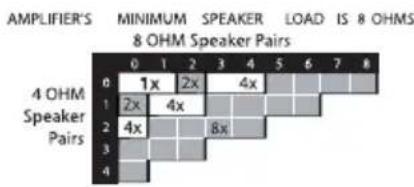
If you are installing the V-12M into an existing wall, take time to consider any possible obstructions which may be hidden inside the wall, such as wood or metal studs, electrical, telephone or other types of wiring, plumbing, AC or heating conduit. Count the number of pairs of 4 ohm speakers and the number of pairs of 8 ohm speakers you are connecting. Count pairs of 6 ohm speakers as 4 ohm pairs. Determine the correct switch position from the impedance charts below.
See figures 2, 3 and 4.
heatmap
| AMPLIFIER'S | MINIMUM | SPEAKER | LOAD | IS | 8 OHMS | |---|---|---|---|---|---| | 4 OHM Speaker Pairs | 0 | 1x | 2x | 4x | | | 4 OHM Speaker Pairs | 1 | 2x | 4x | | | | 4 OHM Speaker Pairs | 2 | 4x | | | | | 4 OHM Speaker Pairs | 3 | | 8x | | | | 4 OHM Speaker Pairs | 4 | | | | |Figure 3 Figure 4
Using Speaker Selectors with IM Muting Volume Controls
We recommend using the JobSite V-T4M muting volume control connection terminal to connect the V-12M and V-12M/AWE muting volume controls to a system. If you choose not to use a V-T4M connection terminal, you must provide 12 volts to each muting volume control for the muting circuit to work. We do not recommend using Speaker Selectors with Muting Volume Controls.
The programmable muting feature serves the same purpose as an On/Off switch on a Speaker Selector
Tools Required
1/8" Slotted screwdriver
1/4" Slotted screwdriver
No.2 Phillips screwdriver
Wire stripper
Wire labels
INSTALLATION
V-12M
- Identify the Speaker wire, V-T4M connection terminal wire and 12V wire. Label the wires for future reference.
-
Strip 1/4" of insulation from the end of each wire. Tightly twist the end of each wire until no frayed ends remain.
-
Locate the Snap and Lock connectors and remove them if they are plugged in. See figure 5.
-
Use a small flathead screwdriver or your thumb to raise the locking tabs, exposing the holes on the connector.
-
Insert each wire into the appropriate hole and snap down the locking tabs.

natural_image
Technical line drawing of an electronic component with a housing and wiring, no visible text or symbolsFigure 5
- Insert the smooth side of the connector plug into the smooth side of the V-12M socket.
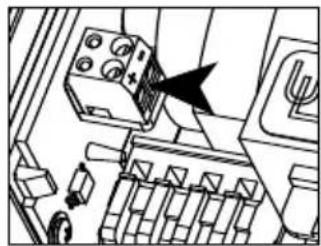
- Locate the 2-pin 12V connector.
- Insert each 12V wire into the appropriate hole on the connector. See figure 6.
- Use a small flathead screwdriver to tighten the screws in place.
- Install the V-12M into the device ring.
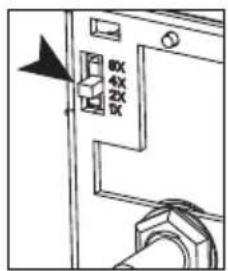
- Set the Impedance Magnification Switch as determined by the impedance charts.
- Set the switches, on all of the controls, to the same position (1x, 2x, 4x, or 8x).
- Attach the cover plate.
See installation diagram.
natural_image
Technical diagram of a mechanical assembly with no visible text or symbolsFigure 6
INSTALLATION DIAGRAM

OPERATION
- Make sure the amplifier or receiver power is OFF and set the volume to minimum.
- Set the volume on the volume control to maximum (fully clockwise).
- Turn ON the amplifier or receiver and select a source, such as the tuner or CD player.
- Slowly turn up the amplifier or receiver volume and set it to a comfortable – not maximum – listening level. Don't overdrive or "clip" your amplifier. If the sound becomes muddy or distorted, you have reached the limit of your amplifier's volume capability. Reduce the volume at once to avoid damaging your speakers.
- JobSite Muting Volume Controls come from the factory pre-programmed in the automatic mute mode. When the Amplifier turns on, you should see the Mute Button on the volume
control, light up Red. No sound will be present in the Mute mode.
-
To turn ON the speakers in a room, tap the Mute Button, on the Volume Control, once. The Mute Button will change from Red to Green. Adjust the volume of the speakers to the desired listening level using the volume control knob. If all the speaker pairs in your system are equipped with JobSite volume controls, you can set the amplifier or receiver volume at one position and use the JobSite controls exclusively.
-
To turn OFF the speakers in a room, tap the Mute button, on the Volume Control, once. The Mute button will change from Green to Red and the speakers will turn off.
PROGRAMMING MUTING VOLUME CONTROLS
You can program individual JobSite Muting Volume Controls, allowing certain locations (such as the guest bedroom and porch) to remain muted when system turns on, while other locations (such as the kitchen and family room) play music.
Place the volume control in the desired turn-on state (muted or unmuted) by pressing the mute button. Then press and hold the mute button for 10 seconds. The LED blinks to indicate that programming has occurred.
JobSite Muting Volume Controls come from the factory pre-programmed in the automatic mute mode
SPECIFICATIONS
High power rating:
100 watts per channel RMS, 200 watts peak
Adjustable impedance:
1x, 2x, 4x, 8x settings
Total attenuation:
54dB maximum
Wiring requirements:
2 individual runs of 2-conductor 14-18-gauge speaker wire or 1 run of 4 conductor.
1 run of two conductor wire for muting control, originating from the V-T4M.
V-T4M muting volume control connection terminal recommended
Mounting:
Fits most single gang junction boxes
Dimensions:
1-5/8" wide x 2-5/8" high x 2-9/16" deep
Depth behind faceplate:
2-9/16"
Warranty: 2 year limited
LIMITED WARRANTY
JobSite Systems (“JOBSITE”), a Niles Audio Corporation company, warrants its passive products (those not requiring AC or battery power) to the original purchaser to be free of manufacturing defects in material and workmanship for a period of ten years from date of purchase.
JOBSITE warrants its passive loudspeaker products (those not requiring AC or battery power) to the original purchaser to be free of manufacturing defects in material and workmanship for a period of five years from date of purchase.
JOBSITE warrants its indoor/outdoor loudspeaker products to the original purchaser to be free of manufacturing defects in material and workmanship for a period of two years from date of purchase.
JOBSITE warrants its all weather rock loudspeaker products to the original purchaser to be free of manufacturing defects in material and workmanship for a period of five years from date of purchase.
JOBSITE warrants its active products (those requiring AC or battery power) to the original purchaser to be free of manufacturing defects in material and workmanship for a period of two years from date of purchase.
This Warranty is subject to the following additional conditions and limitations. The Warranty is void and inapplicable if JOBSITE deems that the product has been used or handled other than in accordance with the instructions provided by the manufacturer, including, but not limited to, damage caused by accident, mishandling, improper installation, abuse, negligence, or normal wear and tear, or any defect caused by repair to the product other than by JOBSITE or an authorized JOBSITE wholesale distributor.
To obtain warranty service, you must write to JOBSITE: Include your name, address, telephone number, model number and serial number of your unit, and a brief description of the problem. A factory Return Authorization Number will be sent to you. DO NOT RETURN ANY UNIT WITHOUT FIRST RECEIVING WRITTEN AUTHORIZATION AND SHIPPING INSTRUCTIONS FROM JOBSITE.
If the above conditions are met, the purchaser's sole remedy shall be to return the product to JOBSITE, in which case JOBSITE will repair or replace, at its sole option, the defective product without charge for parts or labor. JOBSITE will return the unit repaired or replaced under warranty by shipping it by its usual shipping method from the factory (only) at its expense within the United States of America. THERE ARE NO OTHER WARRANTIES, INCLUDING, WITHOUT LIMITATION, EITHER EXPRESS OR IMPLIED WARRANTIES OF MERCHANTABILITY OR FITNESS FOR A PARTICULAR PURPOSE, WITH RESPECT TO THE PRODUCT.
REPAIR OR REPLACEMENT AS PROVIDED UNDER THIS WARRANTY IS THE EXCLUSIVE REMEDY OF THE CONSUMER/PURCHASER. NILES SHALL NOT BE RESPONSIBLE FOR ANY INCIDENTAL OR CONSEQUENTIAL DAMAGES EXCEPT TO THE EXTENT PROVIDED (OR PROHIBITED) BY APPLICABLE LAW.
Some states do not allow the exclusion or limitation of incidental or consequential damages, so the above limitation may not apply to you. This warranty gives you specific legal rights, and you may also have other rights, which vary from state to state.
For the name of the nearest authorized JOBSITE wholesale distributor, contact:
JobSite Systems
12331 S.W. 130 Street, Miami, Florida 33186
WWW.JOBSITESYSTEMS.COM

JOBSITE SYSTEMS
12331 S.W. 130 STREET, MIAMI, FLORIDA 33186
P 866.4JB.SITE (866.452.7483) - F 305.238.0185
WWW.JOBSITESYSTEMS.COM
© 2004 JobSite Systems. All rights reserved. JobSite, Pure Custom and Niles are registered trademarks of Niles Audio Corporation and the JobSite Logo is a trademark of Niles Audio Corporation. All other trademarks are the property of their respective owners. Some JobSite products (or components thereof) are manufactured under one or more U.S. Patents, foreign equivalents and/or pending patents (see product for details). Because we constantly strive to improve our products, JobSite reserves the right to change product specifications, descriptions, and prices without notice. The technical and other specifications of information contained herein are not intended to set forth all technical and other specifications of JobSite products. Additional information can be obtained at WWW.JOBSITESYSTEMS.COM or by calling JobSite at 866.452.7483. Printed in China. 7/04 DS00396BCN


- INSTALLATION & USER GUIDE
- V-12M
- STEP MUTING WALL MOUNT VOLUME CONTROL
- TABLE OF CONTENTS
- FEATURES
- Installation friendly design:
- PACKAGE CONTENTS
- PREPARING FOR INSTALLATION
- Using Speaker Selectors with IM Muting Volume Controls
- Tools Required
- INSTALLATION
- OPERATION
- PROGRAMMING MUTING VOLUME CONTROLS
- SPECIFICATIONS
- High power rating:
- Adjustable impedance:
- Total attenuation:
- Wiring requirements:
- Mounting:
- Dimensions:
- Depth behind faceplate:
- LIMITED WARRANTY
Brand : JobSite
Model : V-12M
Category : Controller