
S-6 - Unspecified JobSite - Free user manual and instructions
Find the device manual for free S-6 JobSite in PDF.


| Product Type | Speaker Selector Switch |
| Brand & Model | JobSite S-6 |
| Dimensions (W x H x D) | 11-1/2" x 2" x 6-3/4" (292 x 51 x 171 mm) |
| Weight | Approx. 2 lbs (0.9 kg) |
| Power Handling | 100 watts per channel |
| Frequency Response | +/- 0 dB from 20 Hz to 20 kHz |
| Impedance Compatibility | All 4 ohm capable amplifiers or receivers |
| Number of Speaker Pairs | Up to 6 pairs |
| Protection Circuit | Built-in impedance correction circuitry (Protection button) |
| Connector Type | Snap and lock removable screwless connectors |
| Wire Gauge Accommodated | 14-22 AWG (16 AWG recommended) |
| Mounting | Tabletop with non-skid feet |
| Included Accessories | Room/Zone labels |
| Warranty | 10-year limited (passive products) |
| Maintenance | Wipe with dry cloth; do not use liquids |
| Safety Warning | Do not overdrive amplifier; avoid clipping |
| Spare Parts / Repairability | Non-repairable by user; contact manufacturer for service |
Frequently Asked Questions - S-6 JobSite
User questions about S-6 JobSite
0 question about this device. Answer the ones you know or ask your own.
Ask a new question about this device
Download the instructions for your Unspecified in PDF format for free! Find your manual S-6 - JobSite and take your electronic device back in hand. On this page are published all the documents necessary for the use of your device. S-6 by JobSite.
USER MANUAL S-6 JobSite
INSTALLATION & USER GUIDE


For Connecting
Four/Six Pairs of
Speakers to an
Amplifier or Receiver
Package Contents ....3
Preparing for Installation....3
Installation....3
Operation....5
Specifications....7
Warranty....7
FEATURES
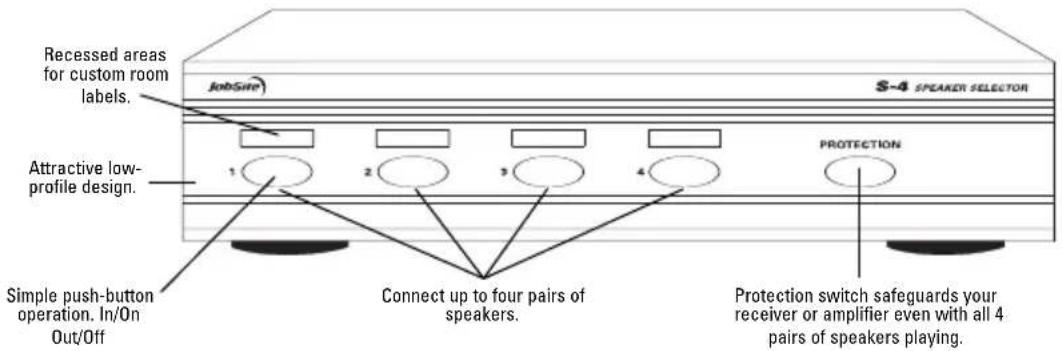
S-4: Safely connect up to four speaker pairs to a single amplifier or receiver
S-6: Safely connect up to six speaker pairs to a single amplifier or receiver
■ High power handling capability
Built-in protection circuit
■ Compatible with all 4 ohm capable amplifiers or receivers
Non-skid feet for unit stability
■ Includes customized room labels
Installation friendly design:
- Accepts up to 14-gauge wire
Snap and lock connector secures wire in place without the use of a screwdriver

PRODUCT OVERVIEW
![graph TD A["INPUT FROM AMP"] --> B["OUTPUTS TO SPEAKERS"] B --> C["S-4 SPEAKER SELECTOR"] C --> D["Removable screwless connectors."] D --> E["CE"]](/content/2026/06/1224380/images/d27da108bedbe4f00c3f059a7f22273e78580fd37c857940c970b6cf613989b2.jpg)
PACKAGE CONTENTS S-4
S-4 x 1
Room/Zone labels x 1
PACKAGE CONTENTS S-6
S-6 x 1
Room/Zone labels x 1
PREPARING FOR INSTALLATION
The Speaker wires and Amplifier wires must reach the proposed location of the S-4/S-6 Speaker Selector. Mark the cables with Wire labels, describing where the cables originate from, rather than where they will terminate.
Tools Required
Wire stripper
Wire labels
INSTALLATION
- Select an appropriate location for the S-4/S-6.
- Run all the necessary wiring to the S-4/S-6. Label the wires for future reference.
- Strip 1/4" of insulation from the end of each wire. Tightly twist the end of each wire until no frayed ends remain.
- Locate the Snap and lock connectors and remove them if they are plugged in.
- Use a small flathead screwdriver or your thumb to raise the locking tabs, exposing the holes on the connector.
- Insert each wire into the appropriate hole and snap down the locking tabs.
-
Insert the smooth side of the connector plug into the smooth side of the S-4/S-6 socket.
-
Connect the receiver or amplifier to the connector terminal labeled AMPLIFIER.
- Connect the speakers to the connector terminals labeled SPEAKERS.
- Locate the pre-printed Room Labels. Affix the appropriate label to the recessed area over each on/off selector button.
See installation diagram.
INSTALLATION DIAGRAM
![graph TD A["Audio Player"] --> B["S-4"] B --> C["JobSite S-4 Back"] C --> D["Stereo Receiver"] D --> E1["Speaker Pair 4"] D --> E2["Speaker Pair 3"] D --> E3["Speaker Pair 2"] D --> E4["Speaker Pair 1"] D --> E5["Speaker Pair 100.3"] E1 --> F E2 --> G E3 --> H E4 --> I E5 --> J](/content/2026/06/1224380/images/a4848cd58ec409fb0d08ab2f4e25b6cfed3c8c76dad6d630c3a30c467146d60d.jpg)
OPERATION
Playing One Pair of Speakers At a Time:
- Make sure the amplifier or receiver power is OFF and set the volume to minimum.
- Locate the on/off button on the unit's front panel, which corresponds to the speaker pair you wish to play. Set it to the ON position by engaging the button.
- Turn on the amplifier or receiver and select a source, such as the tuner or CD player.
-
Slowly turn up the amplifier or receiver volume and set it to a comfortable (not maximum) listening level. Be careful not to overdrive or "clip" your amplifier. If the sound becomes muddy or distorted, you have reached the limit of your amplifier's volume capability and should quickly reduce the volume to avoid damaging your speakers.
-
To turn off the speaker pair, simply press the corresponding on/off button on the S-4/S-6.
Playing Two or More Speaker Pairs Simultaneously:
- Make sure the amplifier or receiver power is OFF and set the volume to minimum.
-
On the right side of the S-4/S-6's front panel is a button labeled PROTECTION. This button activates the S-4/S-6's impedance correction circuitry. The circuitry assures that your receiver or amplifier will see a safe operating load when playing multiple speaker pairs simultaneously. Since most receivers and amplifiers are not rated for use below a 4-ohm load, you will need to activate the Protection button whenever the overall system impedance might fall below 4 ohms. Use the following chart as a guide for setting the Protection button.
-
Locate the on/off buttons on the S-4/S-6, which correspond to the speaker pairs you wish to play. Set them to the ON position.
- Turn on the amplifier or receiver and select a source, such as the tuner or CD player.
- Slowly turn up the amplifier or receiver volume and set it to a comfortable (not maximum) listening level. Be careful not to overdrive or "clip" your amplifier. If the sound becomes muddy or distorted,
you have reached the limit of your amplifier's volume capability and should quickly reduce the volume to avoid damaging your speakers.
- To turn off one or more speaker pairs, simply press the corresponding on/off button(s) on the S-4/S-6. Refer to the Protection chart for the correct setting of the Protection button.
| When playing the following speakers: | The Protection button should be: |
| 1 or 2 pair of 8-ohm speakers | OFF |
| 3 or more pairs of 8-ohm speakers | ON |
| 1 pair of 4-ohm speakers | OFF |
| 2 or more pairs of 4-ohm speakers | ON |
| Any combination of 4 and 8 ohm speakers | ON |
Set the Protection button to the correct position using the chart shown above.
SPECIFICATIONS
Power handling:
100 watts per channel
Frequency response:
+/- 0 dB from 20Hz to 20kHz
Wiring requirements:
Individual runs of 2-conductor speaker wire to each speaker
Removable connectors accommodate 14-22 gauge wire (16 gauge recommended)
Mounting
Tabletop component
Dimensions
S-4: 8-1/2" wide x 2" high x 6-3/4" deep
S-6: 11-1/2" wide x 2" high x 6-3/4" deep
Warranty:
10 year limited
LIMITED WARRANTY
JobSite Systems ("JOBSITE"), a Niles Audio Corporation company, warrants its passive products (those not requiring AC or battery power) to the original purchaser to be free of manufacturing defects in material and workmanship for a period of ten years from date of purchase.
JOBSITE warrants its passive loudspeaker products (those not requiring AC or battery power) to the original purchaser to be free of manufacturing defects in material and workmanship for a period of five years from date of purchase.
JOBSITE warrants its indoor/outdoor loudspeaker products to the original purchaser to be free of manufacturing defects in material and workmanship for a period of two years from date of purchase.
JOBSITE warrants its all weather rock loudspeaker products to the original purchaser to be free of manufacturing defects in material and workmanship for a period of five years from date of purchase.
JOBSITE warrants its active products (those requiring AC or battery power) to the original purchaser to be free of manufacturing defects in material and workmanship for a period of two years from date of purchase.
This Warranty is subject to the following additional conditions and limitations. The Warranty is void and inapplicable if JOBSITE deems that the product has been used or handled other than in accordance with the instructions provided by the manufacturer, including, but not limited to, damage caused by accident, mishandling, improper installation, abuse, negligence, or normal wear and tear, or any defect caused by repair to the product other than by JOBSITE or an authorized JOBSITE wholesale distributor. To obtain warranty service, you must write to JOBSITE: Include your name, address, telephone number, model number and serial number of your unit, and a brief description of the problem.
A factory Return Authorization Number will be sent to you. DO NOT RETURN ANY UNIT WITHOUT FIRST RECEIVING WRITTEN AUTHORIZATION AND SHIPPING INSTRUCTIONS FROM JOBSITE.
If the above conditions are met, the purchaser's sole remedy shall be to return the product to JOBSITE, in which case JOBSITE will repair or replace, at its sole option, the defective product without charge for parts or labor. JOBSITE will return the unit repaired or replaced under warranty by shipping it by its usual shipping method from the factory (only) at its expense within the United States of America. THERE ARE NO OTHER WARRANTIES, INCLUDING,
WITHOUT LIMITATION, EITHER EXPRESS OR IMPLIED WARRANTIES OF MERCHANTABILITY OR FITNESS FOR A PARTICULAR PURPOSE, WITH RESPECT TO THE PRODUCT.
REPAIR OR REPLACEMENT AS PROVIDED UNDER THIS WARRANTY IS THE EXCLUSIVE REMEDY OF THE CONSUMER/PURCHASER. NILES SHALL NOT BE RESPONSIBLE FOR ANY INCIDENTAL OR CONSEQUENTIAL DAMAGES EXCEPT TO THE EXTENT PROVIDED (OR PROHIBITED) BY APPLICABLE LAW.
Some states do not allow the exclusion or limitation of incidental or consequential damages, so the above limitation may not apply to you. This warranty gives you specific legal rights, and you may also have other rights, which vary from state to state.
For the name of the nearest authorized JOBSITE wholesale distributor, contact:
JobSite Systems
12331 S.W. 130 Street, Miami, Florida 33186
WWW.JOBSITESYSTEMS.COM

JOBSITE SYSTEMS
12331 S.W. 130 STREET, MIAMI, FLORIDA 33186
P 866.4JB.SITE (866.452.7483) - F 305.238.0185
WWW.JOBSITESYSTEMS.COM
© 2004 JobSite Systems. All rights reserved. JobSite, Pure Custom and Niles are registered trademarks of Niles Audio Corporation and the JobSite Logo is a trademark of Niles Audio Corporation. All other trademarks are the property of their respective owners. Some JobSite products (or components thereof) are manufactured under one or more U.S. Patents, foreign equivalents and/or pending patents (see product for details). Because we constantly strive to improve our products, JobSite reserves the right to change product specifications, descriptions, and prices without notice. The technical and other specifications of information contained herein are not intended to set forth all technical and other specifications of JobSite products. Additional information can be obtained at WWW.JOBSITESYSTEMS.COM or by calling JobSite at 866.452.7483. Printed in China. 7/04 DS00370BCN

- INSTALLATION & USER GUIDE
- FEATURES
- INSTALLATION FRIENDLY DESIGN
- PRODUCT OVERVIEW
- PACKAGE CONTENTS S-4
- PACKAGE CONTENTS S-6
- PREPARING FOR INSTALLATION
- TOOLS REQUIRED
- INSTALLATION
- OPERATION
- PLAYING ONE PAIR OF SPEAKERS AT A TIME
- PLAYING TWO OR MORE SPEAKER PAIRS SIMULTANEOUSLY
- SPECIFICATIONS
- POWER HANDLING
- FREQUENCY RESPONSE
- WIRING REQUIREMENTS
- MOUNTING
- DIMENSIONS
- WARRANTY
- LIMITED WARRANTY
Brand : JobSite
Model : S-6
Category : Unspecified