
KAS53ZSDCINVA - Air conditioner GORENJE - Free user manual and instructions
Find the device manual for free KAS53ZSDCINVA GORENJE in PDF.


| Product Type | Split-type Room Air Conditioner |
| Brand | Gorenje |
| Model | KAS53ZSDCINVA |
| Cooling Function | Yes |
| Heating Function | Yes |
| Drying Function | Yes |
| Fan Only Mode | Yes |
| Auto Mode | Yes |
| Sleep Mode | Yes (auto temperature adjustment and 7-hour timer) |
| Timer | On/Off programmable timer |
| Airflow Direction Control | Horizontal louver via remote, vertical louver manually or remote (model dependent) |
| Swing Function | Yes (horizontal louver swing) |
| Turbo Mode | Yes |
| Silence Mode | Yes |
| Self Clean Function | Yes (prevents mildew on heat exchanger) |
| Follow Me Function | Yes (remote controller temperature sensor) |
| Refrigerant Leakage Detection | Yes (displays 'EC') |
| Louver Angle Memory | Yes |
| Air Filter | Washable, clean every 2 weeks |
| Air Freshening Filter | Clean monthly, replace every 4-5 months |
| Power Supply | 220-240 V ~ 50 Hz |
| Operating Temperature Range (Cooling) | Indoor: 17°C – 32°C; Outdoor: 0°C – 50°C |
| Operating Temperature Range (Heating) | Indoor: 0°C – 30°C; Outdoor: -15°C – 30°C |
| Auto-Restart | Yes (after power failure preserves previous settings) |
| Compressor Protection | 3-minute restart delay |
Frequently Asked Questions - KAS53ZSDCINVA GORENJE
User questions about KAS53ZSDCINVA GORENJE
0 question about this device. Answer the ones you know or ask your own.
Ask a new question about this device
Download the instructions for your Air conditioner in PDF format for free! Find your manual KAS53ZSDCINVA - GORENJE and take your electronic device back in hand. On this page are published all the documents necessary for the use of your device. KAS53ZSDCINVA by GORENJE.
USER MANUAL KAS53ZSDCINVA GORENJE
natural_image
Pure electrical circuit lines without any symbols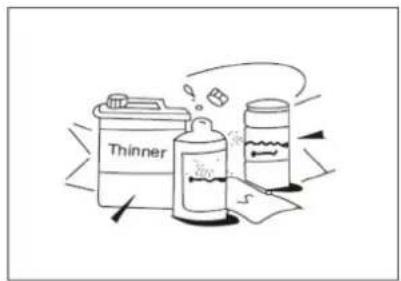

natural_image
Diagram of hands holding a rectangular device with internal components, no text or symbols present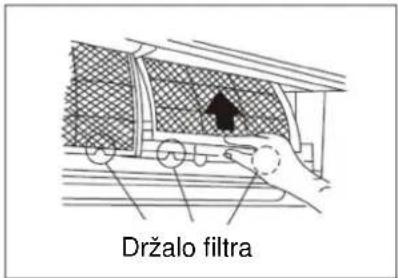

natural_image
Hand holding a car interior panel with a black arrow pointing to a textured surface (no text or symbols)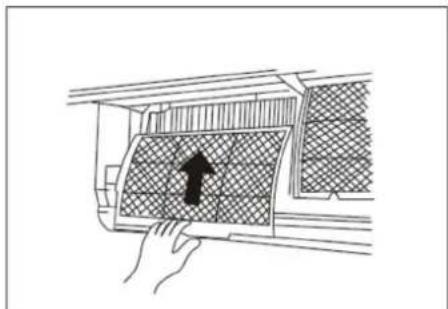
natural_image
Diagram of a hand pressing down on a car air vent with a black arrow indicating the direction (no text or symbols present)-
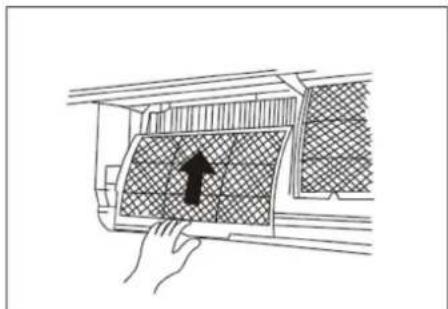
Snemite filter za osveževanje zraka iz okvirja (snemanje in montaža filtra je različna, odvisna od modela. Glejte sliki 1 in 2).
-
Filter za osveževanje zraka očistite najmanj enkrat na mesec, ter ga zamenjajte na 4 – 5 mesecev.
- Očistite ga s sesalnikom za prah, potem ga osušite na hladnem.
- Filter za osveževanje zraka montirajte nazaj.
- Zgornji del zračnega filtra vstavite nazaj v napravo. Pazite, da sta levi in desni rob pravilno poravnana, potem filter vstavite v ustrezen položaj.
Vzdrževanje
Before using your air conditioner, please read this manual carefully and keep it for future reference.
SPLIT-TYPE ROOM AIR CONDITIONER
USER MANUAL
Read This Manual
Inside you will find many helpful hints on how to use and maintain your air conditioner properly. Just a little preventative care on your part can save you a great deal of time and money over the life of your air conditioner. You'll find many answers to common problems in the chart of troubleshooting tips. If you review the chart of Troubleshooting Tips first, you may not need to call for service.
SOCIABLE REMARK
Sociable remark....3
SAFETY PRECAUTIONS
Warning 4
Caution 5
OPERATING INSTRUCTIONS
Description....6
Operating temperature....8
Manual operation 8
Airflow direction control 9
How the air conditioner works 10
CARE AND MAINTENANCE
Care and maintenance 11
OPERATION TIPS
Operation tips 13
TROBLESHOOTING TIPS
Troubleshooting tips 15
CAUTION
- Contact an authorized service technician for repair or maintenance of this unit.
- Contact the installer for installation of this unit.
- The air conditioner is not intended for use by young children or invalids without supervision.
- Installation work must be performed in accordance with the national wiring standards by authorized personnel only.
When using this air conditioner in the European countries, the follow information's must be followed:
DISPOSAL:
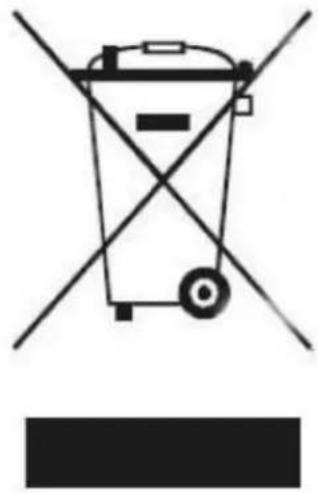
Do not dispose this product as unsorted municipal waste. Collection of such waste separately for special treatment is necessary.
It is prohibited to dispose of this appliance in domestic household waste.
For disposal, there are several possibilities:
- The municipality has established collection systems, where electronic waste can be disposed of at least free of charge to the user.
- When buying a new product, the retailer will take back the old product at least free of charge.
- The manufacture will take back the old appliance for disposal at least free of charge to the user.
- As old products contain valuable resources, they can be sold to scrap metal dealers.
Wild disposal of waste in forests and landscapes endangers your health when hazardous substances leak into the ground-water and find their way into the food chain.
natural_image
Pure electrical circuit lines without any symbolsTo prevent injury to the user or other people and property damage, the following instructions must be followed. Incorrect operation due to ignoring of instructions may cause harm or damage. The seriousness is classified by the following indications.
| WARNING! | This symbol indicates the possibility of death or serious injury. |
| CAUTION! | This symbol indicates the possibility of injury or damage to property. |
Meanings of symbols used in this manual are as shown below.:
| Never do this. | |
| Always do this. |
WARNING
| Connect with the power properly. | Do not operate or stop the unit by switching on or off the power. | Do not damage or use an unspecified power cord. | |
| Otherwise, it may cause electric shock or fire due to excess heat generation. | It may cause electric shock or fire due to heat generation. | It may cause electric shock or fire. | |
| Do not modify power cord length or share the outlet with other appliances | Do not operate with wet hands or in damp environment. | Do not direct airflow at room occupants only. | |
| It may cause electric shock or fire due to heat generation. | It may cause electric shock. | This could damage your health. | |
| Always ensure effective earthling. | Do not allow water to run into electric parts. | Always install circuit breaker and a dedicated power circuit. | |
| No earthling may cause electric shock. | It may cause failure of machine or electric shock. | No installation may cause fire and electric shock. | |
| Disconnect the power if strange sounds, smell, or smoke comes from it. | Do not drink water drained from air conditioner. | Do not open the unit during operation. | |
| It may cause fire and electric shock. | It is contaminated and could make you sick. | It may cause electric shock. | |
| Use the correctly rated breaker or fuse. | Do not use the power cord close to heating appliances. | Do not use the power cord near flammable gas or combustibles, such as gasoline, benzene, thinner, etc. | |
| There is risk of fire or electric shock. | It may cause fire and electric shock. | It may cause an explosion or fire. | |
| Ventilate room before operating air conditioner if there is a gas leakage from another appliance. | Do not disassemble or modify unit. | ||
| It may cause explosion, fire and, burns. | It may cause failure and electric shock. | ||
CAUTION
| When the air filter is to be removed, do not touch the metal parts of the unit. | Do not clean the air conditioner with water. | Ventilate the room well when used together with a stove, etc. |
| It may cause an injury. | Water may enter the unit and degrade the insulation. It may cause an electric shock. | An oxygen shortage may occur. |
| When the unit is to be cleaned, switch off, and turn off the circuit breaker. | Do not put a pet or house plant where it will be exposed to direct air flow. | Do not use for special purposes. |
| Do not clean unit when power is on as it may cause fire and electric shock, it may cause an injury. | This could injure the pet or plant. | Do not use this air conditioner to preserve precision devices, food, pets, plants, and art objects. It may cause deterioration of quality, etc. |
| Stop operation and close the window in storm or hurricane. | Do not place obstacles around air-inlets or inside of air-outlet. | Turn off the main power switch when not using the unit for a long time. |
| Operation with windows opened may cause wetting of indoor and soaking of household furniture. | It may cause failure of appliance or accident. | It may cause failure of product or fire. |
| Do not use strong detergent such as wax or thinner. Use a soft cloth for cleaning. | Ensure that the installation bracket of the outdoor appliance is not damaged due to prolonged exposure. | Always insert the filters securely. Clean filter once every two weeks. |
| Appearance may be deteriorated due to change of product color or scratching of its surface. | If bracket is damaged, there is concern of damage due to falling of unit. | Operation without filters may cause failure. |
| Do not place heavy object on the power cord and take care so that the cord is not compressed. | Use caution when unpacking and installing. Sharp edges could cause injury. | If water enters the unit, turn the unit off and disconnect the power, contact a qualified service technician. |
| There is danger of fire or electric shock. |
Description
Indoor unit

Indoor unit
- Front panel
- Air inlet
- Air filter
- Air outlet
- Horizontal air flow grille
- Vertical air flow louver
- Display panel
- Remote controller
Outdoor unit
-
Connecting pipe, drain hose
-
Air inlet (side and rear)
-
Air outlet
NOTE:
All the pictures in this manual are for explanation purposes only. Your air conditioner may be slightly different. The actual shape shall prevail.
Indicator Lights on Display panel
The display panel on the indoor unit:
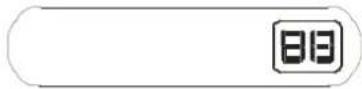
Digital display:
Displays the temperature settings when the air conditioner is operational. Displays the room temperature in FAN mode.
Displays the self-diagnostic codes. Displays 'on' for three seconds when Timer ON, Fresh, Swing, Turbo or Silence feature is activated.
Displays 'of' for three seconds when Timer OFF is set. Displays 'of' for three seconds when Fresh, Swing, Turbo or Silence feature is cancelled. Displays 'dF' under defrosting operation. Displays 'cF' when anti-cold air feature is activated under heating mode. Displays 'SC' during self clean operation (if applicable). Displays 'FP' under 8 °C heating operation (if applicable). When ECO function(optional) is activated, the 'E->C->O->set temperature->E...' illuminates gradually one by one in one second interval.
Special functions.
Refrigerant leakage detection
In case that control electronics of an AC detects leakage of the refrigerant, error 'EC' is presented on display and identification lights are blinking.
Louver angle memory function
In case that the user changes angle of horizontal louver with remote controller, this new set angle is memorized. After restart of the AC the horizontal louver will be positioned in memorized angle. Position of the horizontal louver will be changed in case of power failure or repositioning of the louver with a remote controller.
SELF CLEAN function
This function is used after shut down of cooling operation to clean heat exchanger on the indoor unit. It prevents building of mildew on indoor units heat exchanger and with it bad smell coming from indoor unit after a long pause in operation. Function needs to be started with a remote controller. When SELF CLEAN function is activated all timer settings will be canceled
FOLLOW ME function
Remote controller has temperature sensor installed. When FOLLOW ME function is activated the air conditioner controls temperature on the position of the remote controller. There should be no obstacles between indoor unit and remote controller. External influence on remote controller temperature sensor must be eliminated (direct sunlight, other heat sources, ..).
NOTE: This manual does not include remote controller operations, see the <
Operating temperature
| Model Temperature | Cooling | Heating | Drying |
| Room temperature | 17^ ÷ 32^ 0^ ÷ 30^ 10^ | ^0C 10^ | ^0C ÷ 32^ |
| Outside temperature | 0^ ÷ 50^ | -15^ ÷ 30^ | 0^ ÷ 50^ |
| CAUTION:1. If air conditioner is used outside of the above conditions, certain safety protection features may come into operation and cause the unit to function abnormally.2. Room relative humidity less than 80%. If the air conditioner operates in excess of this figure, the surface of the air conditioner may attract condensation. Please sets the vertical air flow louver to its maximum angle (vertically to the floor), and set HIGH fan mode.3. Optimum performance will be achieved within this operating temperature. | |||
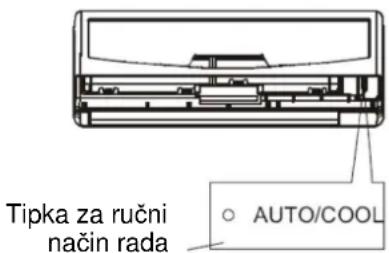
Manual operation
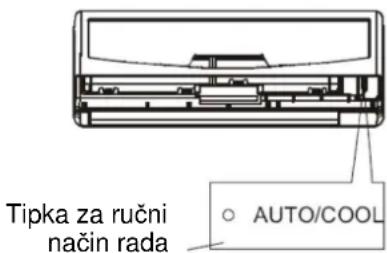
Manual operation can be used temporarily in case the remote controller is disable or maintenance necessary.
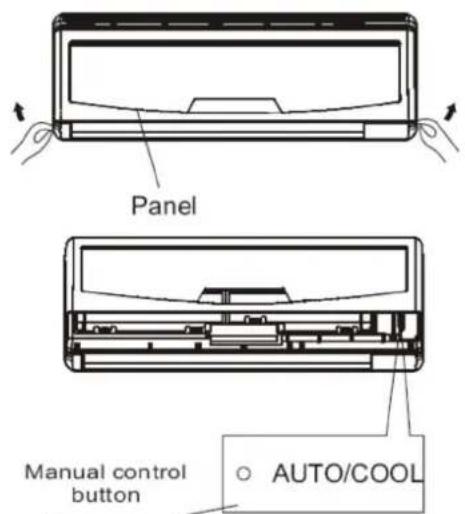
Note:
To restore the remote controller operation use remote controller directly
- Open and lift the front panel up to an angle until it remains fixed with a clicking sound.
- Push the button until the AUTO indicator is lit, the unit will work in forced AUTO mode (the default setting temperature is 24^ C).
- Close the panel firmly to its original position.
Warning:
This button is used for testing purposes only
Airflow direction control
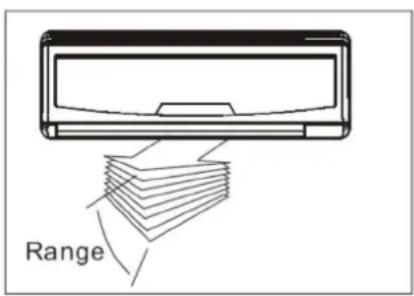
- Adjust the air flow direction properly otherwise, it might cause discomfort or cause uneven room temperatures.
- Adjust the horizontal louver using the remote controller.
- Adjust the vertical louver manually.
To set the vertical air flow (Up--Down) direction
Perform this function while the unit is in operation. Keep pressing the AIR DIRECTION button on the remote controller to move the louver to the desired direction. The readjusting angle of the horizontal louver is 6 for each press.

To set the horizontal air flow direction (Left - Right)
Adjust the vertical louver manually using the lever on the left or right side of the vertical louver arm (Depending on model). For some models, the vertical louver can be adjusted by remote controller. For detailed explanation refer to the remote controller manual.
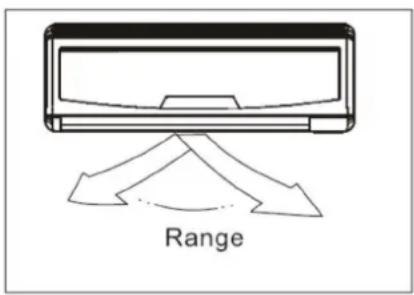
WARNING
- Before you manually set vertical louver disconnect power supply.
- The SWING and AIR DIRECITON button will be disabled when the air conditioner is not in operation (including when the TIMER ON is set).
- Do not operate the air conditioner for long periods with the air flow direction set downward in cooling or dry mode. Otherwise, condensation may occur on the surface of the horizontal louver causing moisture to drop on to the floor or on furnishings.
- Do not move the horizontal louver manually. Always use remote controller
- When the air conditioner is started immediately after it was stopped, the horizontal louver might not move for approximately 10 seconds.
- Open angle of the horizontal louver should not be set too small, as COOLING or HEATING performance may be impaired due to too restricted air flow area.
- Do not operate AC with closed horizontal louver.
- When AC is connected to the power supply for the first time (or after power failure) the horizontal louver may generate a sound. This is normal operation!
- Open angle of the horizontal louver should not be set too small, as COOLING or HEATING performance may be impaired due to too restricted air flow area.
How the air conditioner works
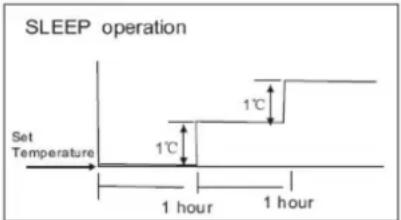
Cooling

flowchart
graph TD
    A["Set Temperature"] --> B["1 hour"]
    B --> C["1 hour"]
    C --> D["1°C"]
    D --> E["7 hours timer off"]
Heating
Auto operation
- When you set the air conditioner in AUTO mode, it will automatically select cooling, heating (cooling/heating models only), or fan only operation depending on what temperature you have selected and the room temperature.
- The air conditioner will control room temperature automatically round the temperature point set by you.
- If the AUTO mode is uncomfortable, you can select desired conditions manually.
Sleep operation
When you push SLEEP button on remote controller during cooling, heating (cooling only type without), or AUTO operation, the air conditioner will automatically increase (cooling) or decrease (heating) 1 per hour. The set temperature will be steady 2 hours later. And the air conditioner will be timer off in 7 hours. The fan speed will be automatically controlled. This feature can maintain the most comfortable temperature and save more energy for you.
Drying operation
- The dry mode will automatically select the dehumidifying operation based on the difference between the set temperature and the actual room temperature.
- The temperature is regulated while dehumidifying by repeating turning on and off of the cooling operation or fan only. The fan speed indicator will display AUTO and low speed will be used.
Optimal operation
To achieve optimal performance, please note the following:
- Adjust the air flow direction correctly so that it is not directed on people.
- Adjust the temperature to achieve the highest comfort level. Do not adjust the unit to excessive temperature levels.
- Close doors and windows on COOL or HEAT modes, or performance may be reduced.
- Use TIMER ON button on the remote controller to select a time you want to start your air conditioner.
- Do not put any object near air inlet or air outlet, as the efficiency of the air conditioner may be reduced and the air conditioner may stop running.
- Clean the air filter periodically, otherwise cooling or heating performance may be reduced.
- Do not operate unit with horizontal louver in closed position.


natural_image
Diagram of hands holding a rectangular device with internal components, no text or symbols present

natural_image
Hand placing a grid-patterned panel with a black arrow pointing downward (no text or symbols)Cleaning the Grille, Case and Remote Controller
NOTE: Power supply must be disconnected before cleaning air conditioner.
- Turn off the system before cleaning. To clean, wipe with a soft, dry cloth. Do not use bleach or abrasives.
CAUTION!
A cloth dampened with cold water may be used on the indoor unit if it is very dirty. Then wipe it with a dry cloth.
Do not use a chemically treated cloth or duster to clean the unit.
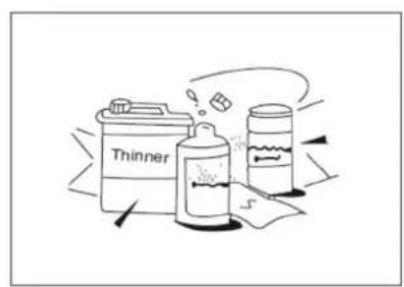
Do not use gasoline, thinner, polishing powder, or similar solvents for cleaning. These may cause the plastic surface to crack or deform.
Never use water hotter than 40 C to clean the front panel, it could cause deformation of discoloration.
Cleaning the air filter
A clogged air filter reduces the cooling efficiency of this unit. Please clean the filter once every 2 weeks.
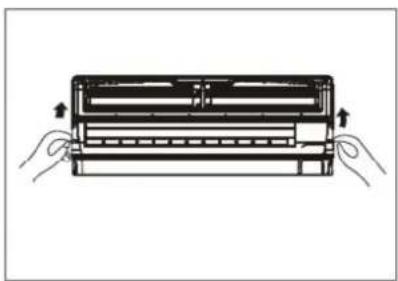
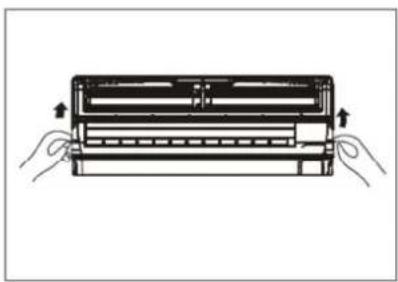
- Lift the indoor unit panel up to an angle until it stops with a clicking sound.
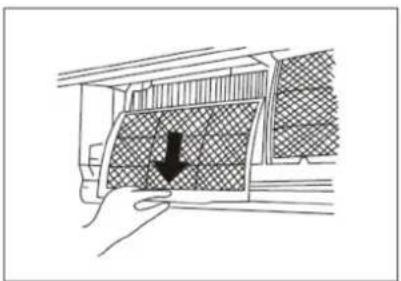
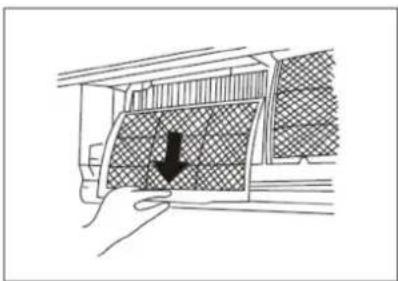
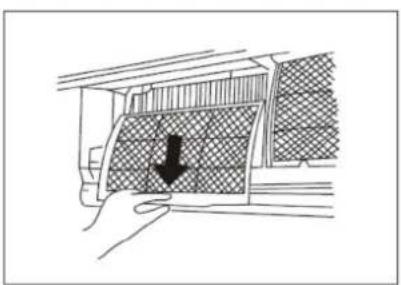
- Take hold of the handle of the air filter and lift it up slightly to take it out from the filter holder, then pull it downwards.
- Remove the AIR FILTER from the indoor unit.
- Clean the AIR FILTER once two weeks.


natural_image
Illustration of two hand-drawn keyboard designs with no text or symbols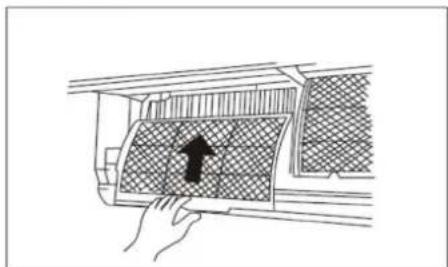
natural_image
Hand placing a grid-patterned panel into an air conditioner unit (no text or symbols visible)- Remove the air freshening filter from its support frame (The installation and removing method of the air freshening filter is different depending on the models, see the pictures marked and on the left.
- Clean the air freshening filter at least once a month, and replace it every 4-5 months.
- Clean it with vacuum cleaner, then dry it in cool place.
-
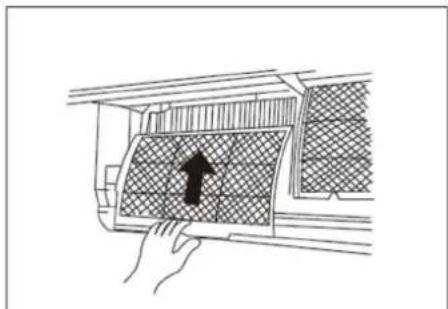
Install the air freshening filter back into position.
-
Insert the upper portion of air filter back into the unit taking care that the left and right edges line up correctly and place filter into position.
Maintenance
If you plan to idle the unit for a long time, perform the following:
-
Operate the fan for about half a day to dry the inside of the unit.
-
Stop the air conditioner and disconnect power. Remove the batteries from the remote controller.
-
The outdoor unit requires periodic maintenance and cleaning. Do not attempt to do this yourself. Contact your dealer or servicer.
Checks before operation
- Check that the wiring is not broken off or disconnected.
- Check that the air filter is installed.
- Check if the air outlet or inlet is blocked after the air conditioner has not been used for a long time.
▲ Warning
- Do not touch the plasma dust collector filter within 10 minutes after opening the front panel. It may cause electric shock.
- Do not touch the metal parts of the unit when removing the filter. Injuries can occur when handling sharp metal edges.
- Do not use water to clean inside the air conditioner.
- Exposure to water can destroy the insulation, leading to possible electric shock.
- When cleaning the unit, first make sure that the power and circuit breaker are turned off.
Operation tips
The following events may occur during normal operation.
1. Protection of the air conditioner.
Compressor protection
- The compressor can't restart for 3 minutes after it stops.
Anti-cold air (Cooling and heating models only)
- The unit is designed not to blow cold air on HEAT mode, when the indoor heat exchanger is in one of the following three situations and the set temperature has not been reached.
a) When heating has just starting.
b) Defrosting.
c) Low temperature heating.
- The indoor or outdoor fan stop running when defrosting (Cooling and heating models only).
Defrosting (Cooling and heating models only)
- Frost may be generated on the outdoor unit during heat cycle when outdoor temperature is low and humidity is high resulting in lower heating efficiency of the air conditioner.
- During this condition air conditioner will stop heating operation and start defrosting automatically.
- The time to defrost may vary from 4 to 10 minutes according to the outdoor temperature and the amount of frost builds up on the outdoor unit.
2. A white mist coming out from the indoor unit
- A white mist may generate due to a large temperature difference between air inlet and air outlet on COOL mode in an indoor environment that has a high relative humidity.
- A white mist may generate due to moisture generated from defrosting process when the air conditioner restarts in HEAT mode operation after defrosting.
3. Low noise of the air conditioner
- You may hear a low hissing sound when the compressor is running or has just stopped running. This sound is the sound of the refrigerant flowing or coming to a stop.
- You can also hear a low "squeak" sound when the compressor is running or has just stopped running. This is caused by heat expansion and cold contraction of the plastic parts in the unit when the temperature is changing.
- A noise may be heard due to louver restoring to its original position when power is first turned on.
4. Dust is blown out from the indoor unit.
- This is a normal condition when the air conditioner has not been used for a long time or during first use of the unit.
- A peculiar smell comes out from the indoor unit.
- This is caused by the indoor unit giving off smells permeated from building material, from furniture, or smoke.
- The air conditioner turns to FAN only mode from COOL or HEAT (for cooling and heating models only) mode.
- When indoor temperature reaches the temperature setting on air conditioner, the compressor will stop automatically, and the air conditioner turns to FAN only mode. The compressor will start again when the indoor temperature rises on COOL mode or falls on HEAT mode (For cooling and heating models only) to the set point.
-
Dripping water may generate on the surface of the indoor unit when cooling in a high relatively humidity (relative humidity higher than 80%). Adjust the horizontal louver to the maximum air outlet position and select HIGH fan speed.
-
Heating mode (For cooling and heating models only)
The air conditioner draws in heat from the outdoor unit and releases it via the indoor unit during heating operation. When the outdoor temperature falls, heat drawn in by the air conditioner decreases accordingly. At the same time, heat loading of the air conditioner increases due to larger difference between indoor and outdoor temperature. If a comfortable temperature can't be achieved by the air conditioner, we suggest you use a supplementary heating device.
- Auto-restart function
Power failure during operation will stop the unit completely. For the unit without Auto-restart feature, when the power restores, the OPERATION indicator on the indoor unit starts flashing. To restart the operation, push the ON/OFF button on the remote controller. For the unit with Auto-restart feature, when the power restores, the unit restarts automatically with all the previous settings preserved by the memory function.
-
Lightning or a wireless telephone operating nearby may cause the unit to malfunction. Disconnect the unit with power and then re-connect the unit with power again. Push the ON/OFF button on the remote controller to restart operation.
-
Outdoor low temperature protection (on some models)
Protection can be activated only in HEATING mode. The unit will stop operating and display on the indoor unit will show ' ' when outdoor temperature is lower than -15°C for one hour. The unit will restart automatically with all previous settings:
- When outdoor temperature is higher than -12^ for 10 minutes and compressor was not running for one hour.
- When outdoor temperature is higher than 5^ C for more than 10 minutes.
Troubleshooting tips
| Stop the air conditioner immediately if one of the following faults occurs.Disconnect the power and contact the nearest customer service center. | |
| Trouble | OPERATION indicator or other indicators flash rapidly (5 times every second) and this flash can't be fixed by disconnecting the power, and then connect it in again. |
| Fuse blows frequently or circuit breaker trips frequently. | |
| Other objects or water penetrate the air conditioner. | |
| The remote controller won't work or works abnormally. | |
| If one of the following codes appears on the display area:E0, E1, E2, E3... or P0, P1, P2, ... | |
| Trouble | Couse | What should be done? |
| Unit does not start | Power cut Wait for power to be restored. | |
| Unit may be unplugged Check that plug is securely in wall receptacle. | ||
| Fuse may have blown. Replace the fuse. | ||
| Battery in the remote controller may be empty. | Replace the battery. | |
| The time you have set with timer is incorrect. | Wait or cancel timer setting. | |
| Unit not cooling or heating (Cooling/ heating models only) room very well while air flowing out from the air conditioner | Inappropriate temperature setting. | Set temperature correctly. For detailed method please refer to "Using remote control" section. |
| Air filter is blocked. Clean the air filter. | ||
| Doors or Windows are open. | Close the doors or windows. | |
| Air inlet or outlet of indoor or outdoor unit has been blocked. | Clear obstructions away first, then restart the unit. | |
| Compressor 3 minutes protection has been activated. | Wait. | |
| If the trouble has not been corrected, please contact a local dealer or the nearest customer service center. Be sure to inform them of the detailed malfunctions and unit model. | ||
Notes: Do not attempt to repair the unit yourself. Always consult an authorized service provider for Gorenje appliances.
HRVATSKI
KAS XX DCINV A
Prije prve uporabe klima-uređaja pozorno pročitajte ove upute te ih pohranite za buduću uporabu.
SPLIT SOBNI KLIMA-UREĐAJ
UPUTE ZA UPORABU
natural_image
Pure diagram of a trash bin with diagonal lines crossing it, no text or symbols presentnatural_image
Diagram of a device with arrows indicating force or movement, no text or symbols presentprednja ploča
Napomena


natural_image
Diagram of hands holding a rectangular device with internal components, no text or symbols present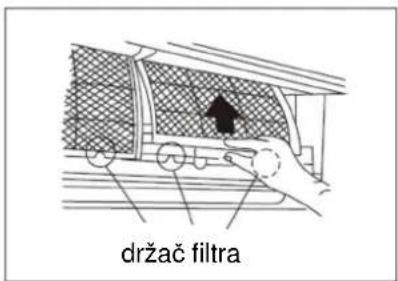
natural_image
Hand holding a car interior panel with a black arrow pointing to a textured surface (no text or symbols)Čišćenje rešetke, kućišta i daljinskog upravljača
NAPOMENA! Prije čišćenja unutarnje jedinice prekinite dovod električne energije.
natural_image
Diagram of a hand pressing down on a car air vent with a black arrow indicating the direction (no text or symbols present)- Skinite filtar za osvježavanje zraka iz okvira (skidanje i montaža filtra mogu se razlikovati ovisno o modelu. Vidi slike 1 i 2).
natural_image
Symbol of a trash bin crossed with diagonal lines, representing waste sorting or anti-poverty (no text or labels)
безбеднос
natural_image
Diagram of a device with arrows indicating orientation, no text or symbols presentпредња плоча

natural_image
Cross-sectional diagram of a mechanical device showing internal components (no text or labels)

natural_image
Diagram of hands holding a rectangular device with internal components, no text or symbols present
natural_image
Hand holding a car interior panel with a black arrow pointing to a textured surface (no text or symbols)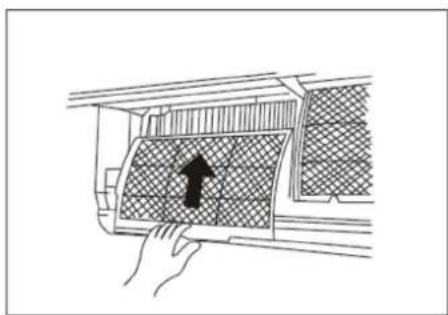
natural_image
Diagram showing a hand pressing down on a car air vent with a black arrow indicating the direction (no text or symbols present)SPLIT SOBNI KLIMA-UREĐAJ
UPUTE ZA UPORABU
natural_image
Pure diagram of a trash bin with diagonal lines crossing it, no text or symbols presentnatural_image
Diagram of a device with arrows indicating force or movement, no text or symbols presentprednja ploča
Napomena


natural_image
Diagram of hands holding a rectangular device with internal components, no text or symbols present

natural_image
Hand holding a car interior panel with a black arrow pointing to a textured surface (no text or symbols)Čišćenje rešetke, kućišta i daljinskog upravljača
NAPOMENA! Prije čišćenja unutarnje jedinice prekinite dovod električne energije.
natural_image
Diagram showing a hand pressing down on a car air vent with a black arrow indicating the direction (no text or symbols present)- Skinite filtar za osvježavanje zraka iz okvira (skidanje i montaža filtra mogu se razlikovati ovisno o modelu. Vidi slike 1 i 2).
natural_image
Symbol of a trash bin crossed with diagonal lines, representing waste sorting or anti-poverty (no text or labels)
безбеднос
natural_image
Diagram of a device with arrows indicating motion or force direction (no text or symbols)предња плоча
natural_image
Cross-sectional diagram of a mechanical device showing internal components (no text or labels)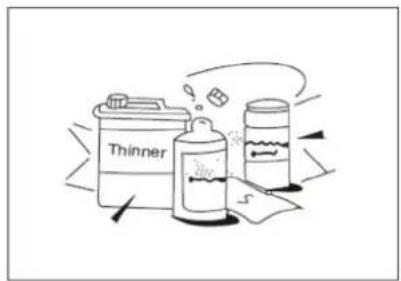

natural_image
Diagram of hands holding a rectangular device with internal components, no text or symbols present

natural_image
Hand holding a car interior panel with a black arrow pointing to a textured surface (no text or symbols)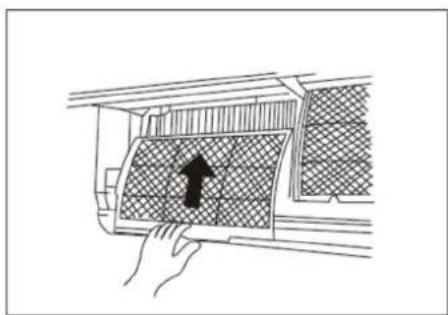
natural_image
Diagram showing a hand pressing down on a car air vent with a black arrow indicating the direction (no text or symbols present)SPLIT SOBNI KLIMA-UREĐAJ
UPUTE ZA UPORABU
natural_image
Pure diagram of a trash bin with diagonal lines crossing it, no text or symbols presentnatural_image
Diagram of a device with arrows indicating force or movement, no text or symbols presentprednja ploča

Napomena

natural_image
Diagram of hands holding a rectangular device with internal components, no text or symbols present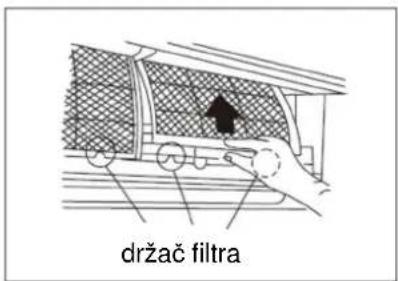

natural_image
Hand holding a car interior panel with a black arrow pointing to a textured surface (no text or symbols)Čišćenje rešetke, kućišta i daljinskog upravljača
NAPOMENA! Prije čišćenja unutarnje jedinice prekinite dovod električne energije.

natural_image
Diagram showing a hand pressing down on a car air vent with a black arrow indicating the direction (no text or symbols present)- Skinite filtar za osvježavanje zraka iz okvira (skidanje i montaža filtra mogu se razlikovati ovisno o modelu. Vidi slike 1 i 2).
natural_image
Simple line drawing of a trash bin with crossed lines indicating no waste or prohibition (no text or symbols)
Răcire

Încălzire
natural_image
Diagram of hands holding a mechanical component with arrows indicating force or movement (no text or symbols)
natural_image
Diagram showing a hand pressing down on a textured panel with a black arrow indicating the direction (no text or symbols present)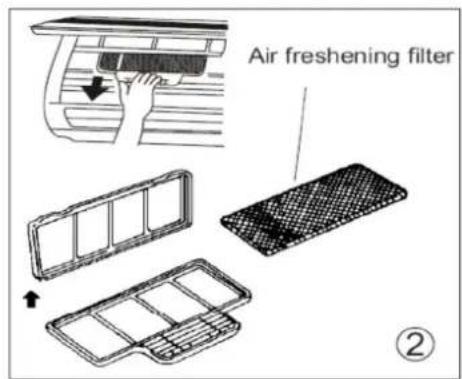

natural_image
Illustration of two hand-drawn keyboard designs with no text or symbols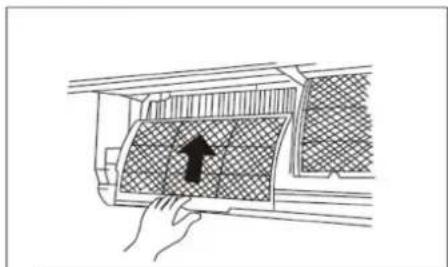
natural_image
Diagram of a hand pressing down on a textured panel with an arrow indicating the direction (no text or symbols present)
- Vzdrževanje
- SPLIT-TYPE ROOM AIR CONDITIONER
- USER MANUAL
- Read This Manual
- SOCIABLE REMARK
- SAFETY PRECAUTIONS
- OPERATING INSTRUCTIONS
- CARE AND MAINTENANCE
- OPERATION TIPS
- TROBLESHOOTING TIPS
- CAUTION
- When using this air conditioner in the European countries, the follow information's must be followed:
- DISPOSAL:
- Description
- Indoor unit
- Outdoor unit
- NOTE:
- Indicator Lights on Display panel
- Special functions.
- Refrigerant leakage detection
- Louver angle memory function
- SELF CLEAN function
- FOLLOW ME function
- Manual operation
- Warning:
- Airflow direction control
- To set the vertical air flow (Up--Down) direction
- To set the horizontal air flow direction (Left - Right)
- WARNING
- How the air conditioner works
- Auto operation
- Sleep operation
- Drying operation
- Optimal operation
- Cleaning the Grille, Case and Remote Controller
- NOTE: Power supply must be disconnected before cleaning air conditioner.
- CAUTION!
- Cleaning the air filter
- Maintenance
- Checks before operation
- ▲ Warning
- Protection of the air conditioner.
- Compressor protection
- Anti-cold air (Cooling and heating models only)
- Defrosting (Cooling and heating models only)
- A white mist coming out from the indoor unit
- Low noise of the air conditioner
- Dust is blown out from the indoor unit.
- SPLIT SOBNI KLIMA-UREĐAJ
- UPUTE ZA UPORABU
- Napomena
- Čišćenje rešetke, kućišta i daljinskog upravljača
- NAPOMENA! Prije čišćenja unutarnje jedinice prekinite dovod električne energije.
Brand : GORENJE
Model : KAS53ZSDCINVA
Category : Air conditioner