101L - Receiver Kramer - Free user manual and instructions
Find the device manual for free 101L Kramer in PDF.


User questions about 101L Kramer
0 question about this device. Answer the ones you know or ask your own.
Ask a new question about this device
Download the instructions for your Receiver in PDF format for free! Find your manual 101L - Kramer and take your electronic device back in hand. On this page are published all the documents necessary for the use of your device. 101L by Kramer.
USER MANUAL 101L Kramer
This guide helps you install and use your product for the first time. For more detailed information, go to http://www.kramerelectronics.com/support/product_downloads.asp to download the latest manual or scan the QR code on the left.
Step 1: Check what's in the box

101L Video Line Amplifier 1 Power supply (12V DC)

4 Rubber feet 1 Quick Start sheet

Save the original box and packaging materials in case you need to return your 101L for service.
Step 2: Install the 101L
Attach the rubber feet and place on a table or mount the 101L in a rack (using an optional RK-1 rack mount).
Step 3: Connect the inputs and outputs
Always switch off the power on each device before connecting it to your 101L.
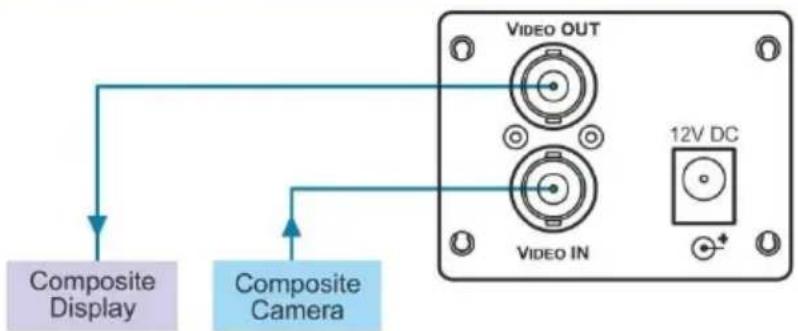
flowchart
graph TD
    A["Composite Display"] --> B["Composite Camera"]
    C["VIDEO OUT"] --> D["12V DC"]
    E["VIDEO IN"] --> D
    D --> F["Output"]
Always use Kramer high-performance cables for connecting AV equipment to the 101L.
Step 4: Connect the power
Connect the 12V DC power adapter to the 101L and plug the adapter into the mains electricity.

Step 5: Operate the 101L
If needed, adjust the equalization and level.


natural_image
Silhouette of a screwdriver with a pointed tip (no text or symbols)Contents
1 Introduction 1
2 Getting Started 2
2.1 Achieving the Best Performance 2
2.2 Safety Instructions 3
2.3 Recycling Kramer Products 3
3 Overview 4
3.1 Defining the 101L Video Line Amplifier 4
4 Connecting the 101L 5
5 Technical Specifications 6
Figures
Figure 1: 101L Video Line Amplifier 4
Figure 2: Connecting the 101L Video Line Amplifier 5
1 Introduction
Welcome to Kramer Electronics! Since 1981, Kramer Electronics has been providing a world of unique, creative, and affordable solutions to the vast range of problems that confront video, audio, presentation, and broadcasting professionals on a daily basis. In recent years, we have redesigned and upgraded most of our line, making the best even better!
Our 1,000-plus different models now appear in 11 groups that are clearly defined by function: GROUP 1: Distribution Amplifiers; GROUP 2: Switchers and Routers; GROUP 3: Control Systems; GROUP 4: Format/Standards Converters; GROUP 5: Range Extenders and Repeaters; GROUP 6: Specialty AV Products; GROUP 7: Scan Converters and Scalers; GROUP 8: Cables and Connectors; GROUP 9: Room Connectivity; GROUP 10: Accessories and Rack Adapters and GROUP 11: Sierra Products.
Congratulations on purchasing your Kramer 101L Video Line Amplifier, which is ideal for the following typical applications:
- Professional display systems that require long distance delivery of high quality video
• CCTV, medical, and sports applications
2 Getting Started
We recommend that you:
- Unpack the equipment carefully and save the original box and packaging materials for possible future shipment
- Review the contents of this user manual

Go to http://www.kramerelectronics.com to check for up-to-date user manuals, application programs, and to check if firmware upgrades are available (where appropriate).
2.1 Achieving the Best Performance
To achieve the best performance:
- Use only good quality connection cables (we recommend Kramer high-performance, high-resolution cables) to avoid interference, deterioration in signal quality due to poor matching, and elevated noise levels (often associated with low quality cables)
- Do not secure the cables in tight bundles or roll the slack into tight coils
- Avoid interference from neighboring electrical appliances that may adversely influence signal quality
• Position your Kramer 101L away from moisture, excessive sunlight and dust

This equipment is to be used only inside a building. It may only be connected to other equipment that is installed inside a building.
2.2 Safety Instructions

Caution: There are no operator serviceable parts inside the unit
Warning: Use only the Kramer Electronics input power wall adapter that is provided with the unit
Warning: Disconnect the power and unplug the unit from the wall before installing
2.3 Recycling Kramer Products
The Waste Electrical and Electronic Equipment (WEEE) Directive 2002/96/EC aims to reduce the amount of WEEE sent for disposal to landfill or incineration by requiring it to be collected and recycled. To comply with the WEEE Directive, Kramer Electronics has made arrangements with the European Advanced Recycling Network (EARN) and will cover any costs of treatment, recycling and recovery of waste Kramer Electronics branded equipment on arrival at the EARN facility. For details of Kramer's recycling arrangements in your particular country go to our recycling pages at http://www.kramerelectronics.com/support/recycling/.
3 Overview
The high performance 101L Video Line Amplifier is used for amplifying the video signal intensity and improving the image sharpness (the picture quality) when a video signal is transmitted over a long cable.
In particular, the 101L features:
• Extra-wide bandwidth of 500MHz
- Gain and equalization trimmer controls to compensate for signal losses inherent in long cable runs, recessed to prevent tampering
3.1 Defining the 101L Video Line Amplifier
This section defines the 101L.
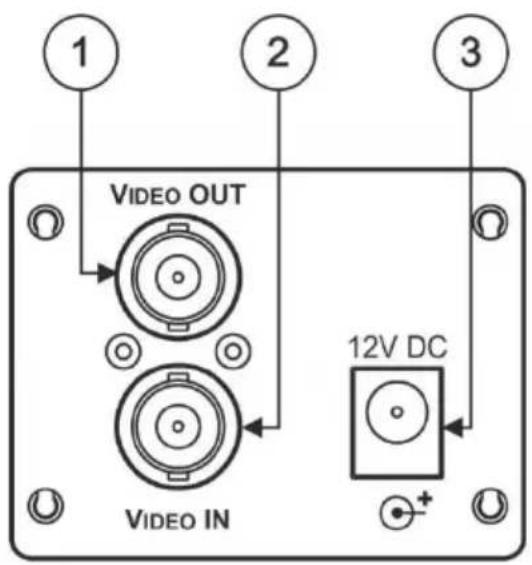
text_image
1 2 3 VIDEO OUT VIDEO IN 12V DC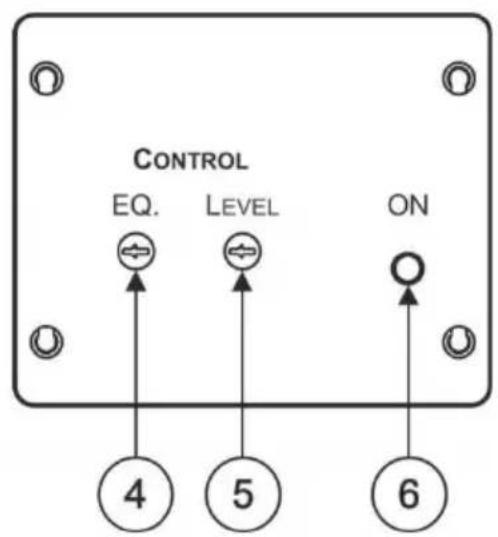
text_image
CONTROL EQ. LEVEL ON 4 5 6Figure 1: 101L Video Line Amplifier
| # | Feature | Function |
| 1 | VIDEO OUT BNC Connector | Connects to a video acceptor |
| 2 | VIDEO IN BNC Connector | Connects to the video source |
| 3 | 12V DC | +12V DC connector for powering the unit |
| 4 | CONTROL EQ. Trimmer | Adjusts the cable compensation equalization level |
| 5 | CONTROL LEVEL Trimmer | Adjusts the output signal level |
| 6 | ON LED | Illuminates when receiving power |
4 Connecting the 101L

Always switch off the power to each device before connecting it to your 101L. After connecting your 101L, connect its power and then switch on the power to each device.
To connect the 101L, as illustrated in the example in Figure 2, do the following:
- Connect the video source (for example, a composite video camera) to the VIDEO IN BNC connector.
It is recommended that you connect the 101L closer to the source than to the acceptor. - Connect the VIDEO OUT BNC connector to a video acceptor (for example, a composite display).
- Connect the 12V DC power adapter to the power socket on the 101L, and connect the adapter to the mains electricity.
The ON LED illuminates. - If required, adjust the output signal level (LEVEL) and/or cable compensation equalization level (EQ.) with a small screwdriver.
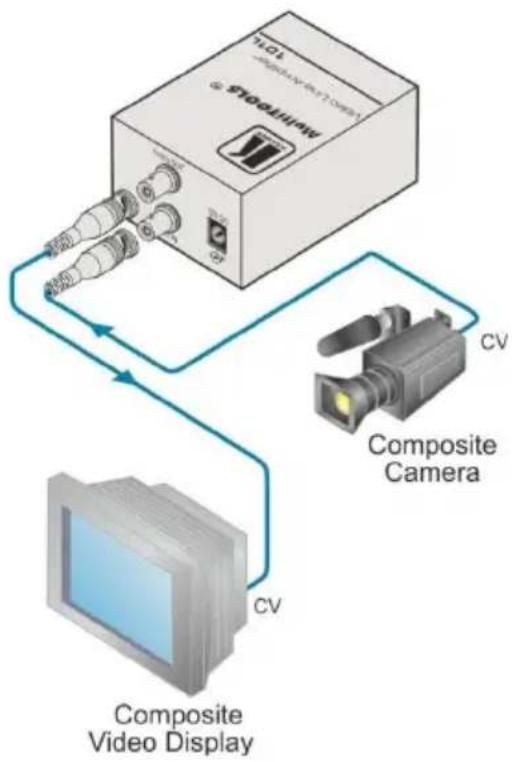
flowchart
graph TD
    A["STOOLY Device"] -->|CV| B["Composite Camera"]
    B -->|CV| C["Composite Video Display"]
    C -->|CV| A
Figure 2: Connecting the 101L Video Line Amplifier
5 Technical Specifications
| INPUT: | 1 composite video, 1Vpp/75Ω on a BNC connector |
| OUTPUT: | 1 composite video, 1Vpp/75Ω on a BNC connector |
| MAX. OUTPUT LEVEL: | 2.5Vpp |
| BANDWIDTH: | 500MHz |
| DIFF. GAIN: | 0.03% |
| DIFF. PHASE: | 0.03Deg. |
| S/N RATIO: | 75dB |
| CONTROLS: | Level: -0.8dB to 6.5dB; equalization: 0dB to 8dB @ 5MHz |
| COUPLING: | DC |
| POWER CONSUMPTION: | 12V DC, 60mA |
| OPERATING TEMPERATURE: | 0° to +40°C (32° to 104°F) |
| STORAGE TEMPERATURE: | -40° to +70°C (-40° to 158°F) |
| HUMIDITY: | 10% to 90%, RHL non-condensing |
| DIMENSIONS: | 5.32cm x 4.36cm x 7.25cm (2.09" x 1.72" x 2.85") W, D, H |
| WEIGHT: | 0.15kg (0.55lbs) approx. |
| ACCESSORIES: | Power supply |
| OPTIONS: | RK-1 19" rack adapter |
| Specifications are subject to change without notice at http://www.kramerelectronics.com | |
LIMITED WARRANTY
The warranty obligations of Kramer Electronics for this product are limited to the terms set forth below:
What is Covered
This limited warranty covers defects in materials and workmanship in this product.
What is Not Covered
This limited warranty does not cover any damage, deterioration or malfunction resulting from any alteration, modification, improper or unreasonable use or maintenance, misuse, abuse, accident, neglect, exposure to excess moisture, fire, improper packing and shipping (such claims must be presented to the carrier), lightning, power surges, or other acts of nature. This limited warranty does not cover any damage, deterioration or malfunction resulting from the installation or removal of this product from any installation, any unauthorized tampering with this product, any repairs attempted by anyone unauthorized by Kramer Electronics to make such repairs, or any other cause which does not relate directly to a defect in materials and/or workmanship of this product. This limited warranty does not cover cartons, equipment enclosures, cables or accessories used in conjunction with this product.
Without limiting any other exclusion herein, Kramer Electronics does not warrant that the product covered hereby, including, without limitation, the technology and/or integrated circuit(s) included in the product, will not become obsolete or that such items are or will remain compatible with any other product or technology with which the product may be used.
How Long Does this Coverage Last
Seven years as of this printing; please check our Web site for the most current and accurate warranty information.
Who is Covered
Only the original purchaser of this product is covered under this limited warranty. This limited warranty is not transferable to subsequent purchasers or owners of this product.
What Kramer Electronics will do
Kramer Electronics will, at its sole option, provide one of the following three remedies to whatever extent it shall deem necessary to satisfy a proper claim under this limited warranty:
- Elect to repair or facilitate the repair of any defective parts within a reasonable period of time, free of any charge for the necessary parts and labor to complete the repair and restore this product to its proper operating condition. Kramer Electronics will also pay the shipping costs necessary to return this product once the repair is complete.
- Replace this product with a direct replacement or with a similar product deemed by Kramer Electronics to perform substantially the same function as the original product.
- Issue a refund of the original purchase price less depreciation to be determined based on the age of the product at the time remedy is sought under this limited warranty.
What Kramer Electronics will not do Under This Limited Warranty
If this product is returned to Kramer Electronics or the authorized dealer from which it was purchased or any other party authorized to repair Kramer Electronics products, this product must be insured during shipment, with the insurance and shipping charges prepaid by you. If this product is returned uninsured, you assume all risks of loss or damage during shipment. Kramer Electronics will not be responsible for any costs related to the removal or re-installation of this product from or into any installation. Kramer Electronics will not be responsible for any costs related to any setting up this product, any adjustment of user controls or any programming required for a specific installation of this product.
How to Obtain a Remedy under this Limited Warranty
To obtain a remedy under this limited warranty, you must contact either the authorized Kramer Electronics reseller from whom you purchased this product or the Kramer Electronics office nearest you. For a list of authorized Kramer Electronics resellers and/or Kramer Electronics authorized service providers, please visit our web site at www.kramerelectronics.com or contact the Kramer Electronics office nearest you.
In order to pursue any remedy under this limited warranty, you must possess an original, dated receipt as proof of purchase from an authorized Kramer Electronics reseller. If this product is returned under this limited warranty, a return authorization number, obtained from Kramer Electronics, will be required. You may also be directed to an authorized reseller or a person authorized by Kramer Electronics to repair the product.
If it is decided that this product should be returned directly to Kramer Electronics, this product should be properly packed, preferably in the original carton, for shipping. Cartons not bearing a return authorization number will be refused.
Limitation on Liability
THE MAXIMUM LIABILITY OF KRAMER ELECTRONICS UNDER THIS LIMITED WARRANTY SHALL NOT EXCEED THE ACTUAL PURCHASE PRICE PAID FOR THE PRODUCT. TO THE MAXIMUM EXTENT PERMITTED BY LAW, KRAMER ELECTRONICS IS NOT RESPONSIBLE FOR DIRECT, SPECIAL, INCIDENTAL OR CONSEQUENTIAL DAMAGES RESULTING FROM ANY BREACH OF WARRANTY OR CONDITION, OR UNDER ANY OTHER LEGAL THEORY. Some countries, districts or states do not allow the exclusion or limitation of relief, special, incidental, consequential or indirect damages, or the limitation of liability to specified amounts, so the above limitations or exclusions may not apply to you.
Exclusive Remedy
TO THE MAXIMUM EXTENT PERMITTED BY LAW, THIS LIMITED WARRANTY AND THE REMEDIES SET FORTH ABOVE ARE EXCLUSIVE AND IN LIEU OF ALL OTHER WARRANTIES, REMEDIES AND CONDITIONS, WHETHER ORAL OR WRITTEN, EXPRESS OR IMPLIED. TO THE MAXIMUM EXTENT PERMITTED BY LAW, KRAMER ELECTRONICS SPECIFICALLY DISCLAIMS ANY AND ALL IMPLIED WARRANTIES, INCLUDING, WITHOUT LIMITATION, WARRANTIES OF MERCHANTABILITY AND FITNESS FOR A PARTICULAR PURPOSE. IF KRAMER ELECTRONICS CANNOT LAWFULLY DISCLAIM OR EXCLUDE IMPLIED WARRANTIES UNDER APPLICABLE LAW, THEN ALL IMPLIED WARRANTIES COVERING THIS PRODUCT, INCLUDING WARRANTIES OF MERCHANTABILITY AND FITNESS FOR A PARTICULAR PURPOSE, SHALL APPLY TO THIS PRODUCT AS PROVIDED UNDER APPLICABLE LAW. IF ANY PRODUCT TO WHICH THIS LIMITED WARRANTY APPLIES IS A 'CONSUMER PRODUCT' UNDER THE MAGNUSON-MOSS WARRANTY ACT (15 U.S.C.A. §2301, ET SEQ.) OR OTHER APPLICABLE LAW, THE FOREGOING DISCLAIMER OF IMPLIED WARRANTIES SHALL NOT APPLY TO YOU, AND ALL IMPLIED WARRANTIES ON THIS PRODUCT, INCLUDING WARRANTIES OF MERCHANTABILITY AND FITNESS FOR THE PARTICULAR PURPOSE, SHALL APPLY AS PROVIDED UNDER APPLICABLE LAW.
Other Conditions
This limited warranty gives you specific legal rights, and you may have other rights which vary from country to country or state to state.
This limited warranty is void if (i) the label bearing the serial number of this product has been removed or defaced, (ii) the product is not distributed by Kramer Electronics or (iii) this product is not purchased from an authorized Kramer Electronics reseller. If you are unsure whether a reseller is an authorized Kramer Electronics reseller, please visit our Web site at
www.kramerelectronics.com or contact a Kramer Electronics office from the list at the end of this document.
Your rights under this limited warranty are not diminished if you do not complete and return the product registration form or complete and submit the online product registration form. Kramer Electronics thanks you for purchasing a Kramer Electronics product. We hope it will give you years of satisfaction.

For the latest information on our products and a list of Kramer distributors, visit our Web site where updates to this user manual may be found.
We welcome your questions, comments, and feedback.
Web site: www.kramerelectronics.com
E-mail: info@kramerel.com



SAFETY WARNING
Disconnect the unit from the power supply before opening and servicing
P/N:

2900-000160
Rev: 2

2