VP-5R - Receiver Kramer - Free user manual and instructions
Find the device manual for free VP-5R Kramer in PDF.


| Product Type | Twisted Pair Receiver |
| Brand | Kramer |
| Model | VP-5R |
| Input | 1 RJ-45 (Twisted Pair) |
| Output | 1 VGA 15-pin HD (Analog) |
| Max Resolution | 1920 x 1200 (WUXGA) |
| Max Range | Up to 100 m (328 ft) |
| Video Bandwidth | 300 MHz (-3dB) |
| Equalization Control | Variable via trimmer |
| EDID Pass-through | Yes |
| Power Supply | 12V DC, 150mA (external adapter included) |
| Power Consumption | 1.8W (max) |
| Dimensions (W x D x H) | 11.4 x 7.2 x 2.5 cm (4.5 x 2.8 x 1 in) |
| Weight | 0.28 kg (0.62 lbs) |
| Housing Type | Metal (aluminum) |
| Operating Temperature | 0° to 40°C (32° to 104°F) |
| Storage Temperature | -20° to 70°C (-4° to 158°F) |
| Humidity | 10% to 90% RH (non-condensing) |
| Maintenance | Clean with dry soft cloth; no user-serviceable parts inside |
| Safety | Use only supplied power adapter; avoid moisture |
| Repairability | Contact Kramer or authorized service center |
| General Information | Designed for extending VGA signals over twisted pair cable |
Frequently Asked Questions - VP-5R Kramer
User questions about VP-5R Kramer
0 question about this device. Answer the ones you know or ask your own.
Ask a new question about this device
Download the instructions for your Receiver in PDF format for free! Find your manual VP-5R - Kramer and take your electronic device back in hand. On this page are published all the documents necessary for the use of your device. VP-5R by Kramer.
USER MANUAL VP-5R Kramer
Kramer Electronics, Ltd.

text_image
KRAMERUSER MANUAL
Models:
VP-200XLTHD XGA Line Amp/CAT 5 Transmitter
VP-5THD 1:4 VGA/UXGA Distributor/CAT 5 Transmitter
VP-5R CAT 5 Receiver/1:5 VGA/UXGA Distributor
Contents
1 Introduction 1
2 Getting Started 1
2.1 Quick Start 2
3 Overview 4
3.1 About the Power Connect™ Feature 4
3.2 Shielded Twisted Pair/Unshielded Twisted Pair 4
3.3 Recommendations for Achieving the Best Performance 5
4 Defining the VP-200XLTHD XGA Line Amp/CAT 5 Transmitter 6
5 Defining the V P-5THD 1:4 VGA/UXGA Distributor/CAT 5 Transmitter 8
6 Defining the VP-5R CAT 5 Receiver/1:5 VGA/UXGA Distributor 10
7 Con necting the VP-200XLTHD 11
8 Connecting the VP-5THD and the VP-5R 13
8.1 Wiring the CAT 5 LINE IN/LINE OUT RJ-45 Connectors 15
9 Technical Specifications 15
Figures
Figure 1: VP-200XLTHD XGA Line Amp/CAT 5 Transmitter 6
Figure 2: VP-200XLTHD XGA Line Amp/CAT 5 Transmitter Underside 7
Figure 3: VP-5THD 1:4 VGA/UXGA Distributor/CAT 5 Transmitter 8
Figure 4: VP-5THD 1:4 VGA/UXGA Distributor/CAT 5 Transmitter Underside 9
Figure 5: VP-5R CAT 5 Receiver/1:5 VGA/UXGA Distributor 10
Figure 6: VP-5R CAT 5 Receiver/1:5 VGA/UXGA Distributor Underside 11
Figure 7: Connecting the VP-200XLTHD 12
Figure 8: Connecting the VP-5THD and the VP-5R 14
Figure 9: TP Connector 15
Tables
Table 1: VP-200XLTHD XGA Line Amp/CAT 5 Transmitter Features 7
Table 2: VP-200XLTHD XGA Line Amp/CAT 5 Transmitter Underside Features 7
Table 3: VP-5THD 1:4 VGA/UXGA Distributor/CAT 5 Transmitter Features 9
Table 4: VP-5THD 1:4 VGA/UXGA Distributor/CAT 5 Transmitter Underside Features 9
Table 5: VP-5R CAT 5 Receiver/1:5 VGA/UXGA Distributor Features 10
Table 6: VP-5R CAT 5 Receiver/1:5 VGA/UXGA Distributor Underside Features 11
Table 7: TP Connector Pinout 15
Table 8: Technical Specifications of the VP-200XLTHD (with 30m CAT 5 cable) 15
Table 9: Technical Specifications of the VP-5THD (with 60m CAT 5 cable) 16
Table 10: Technical Specifications of the VP-5R (with 30m CAT 5 cable) 16
1 Introduction
Welcome to Kramer Electronics! Since 1981, Kramer Electronics has been providing a world of unique, creative, and affordable solutions to the vast range of problems that confront the video, audio, presentation, and broadcasting professional on a daily basis. In recent years, we have redesigned and upgraded most of our line, making the best even better! Our 1,000-plus different models now appear in 11 groups ^1 that are clearly defined by function.
Thank you for purchasing the Kramer: VP-200XLTHD XGA Line Amp/CAT 5 Transmitter, VP-5THD 1:4 VGA/UXGA Distributor/CAT 5 Transmitter, and/or VP-5R CAT 5 Receiver/1:5 VGA/UXGA Distributor which are ideal for:
- Presentation and multimedia applications
- Long range graphics distribution for schools, hospitals, security, and stores
The package includes:
• One or more VP-200XLTHD, and/or VP-5THD, and/or VP-5R
- Power cord ^2
- This user manual ^3
2 Getting Started
We recommend that you:
- Unpack the equipment carefully and save the original box and packaging materials for possible future shipment
- Review the contents of this user manual
- Use Kramer high-performance high-resolution cables ^4
2.1 Quick Start
This quick start chart summarizes the basic setup and operation steps.
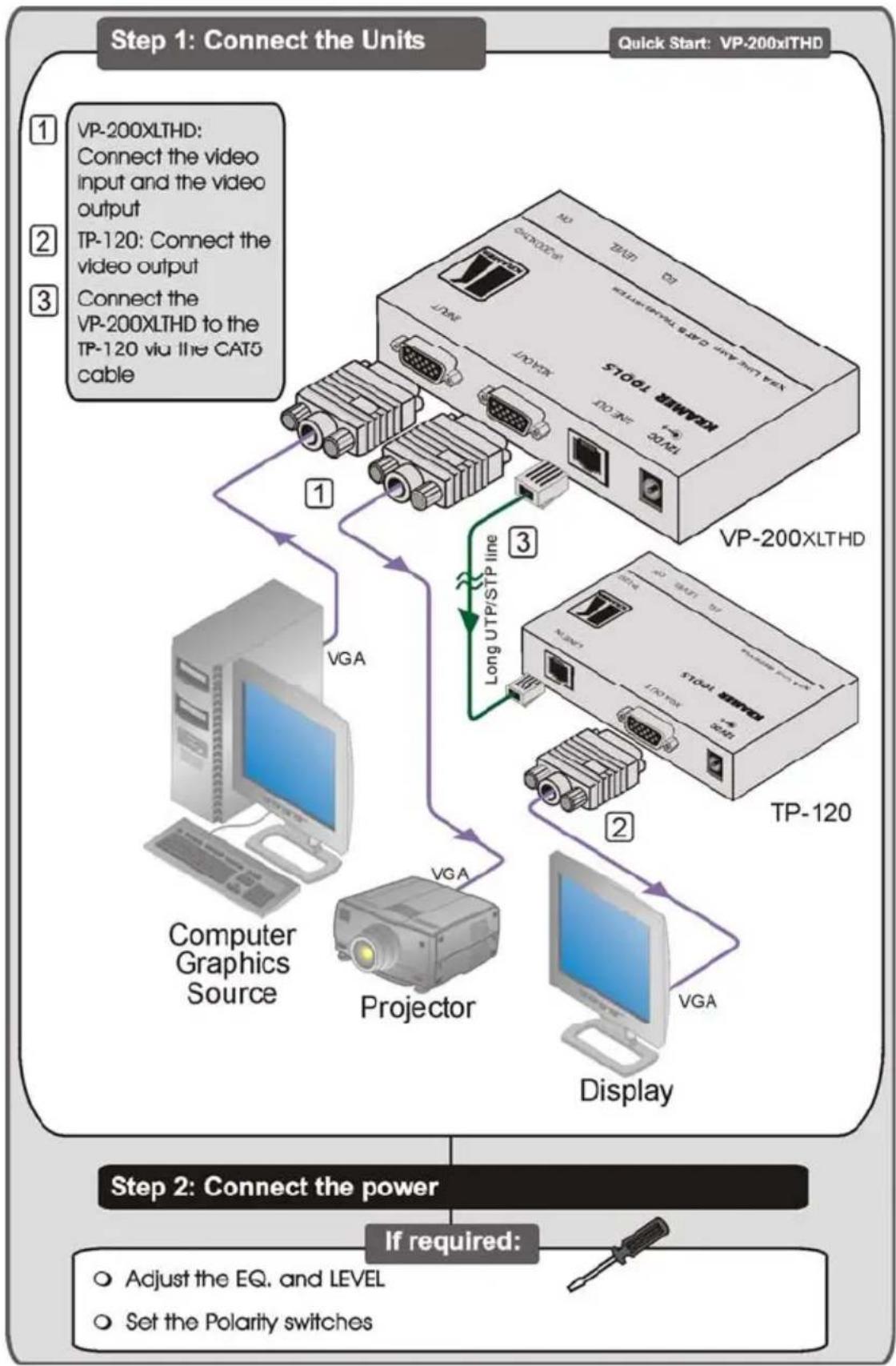
flowchart
graph TD
    A["Computer Graphics Source"] -->|VGA| B["Projector"]
    B -->|VGA| C["Display"]
    C -->|VGA| D["TP-120"]
    D -->|Long UTP/STP line| E["Workstation Tools"]
    E -->|Connect the video input and the video output| F["Quick Start: VP-200xITHD"]
    F --> G["Step 1: Connect the Units"]
    G --> H["Step 2: Connect the power"]
    H --> I["If required:"]
    I --> J["Adjust the EQ. and LEVEL"]
    I --> K["Set the Polarity switches"]
Step 1: Connect the Units
Quick Start: VP-5THD VP-5R
1 VP-5THD: Connect the video input
2| VP-5THD: Connect up to 4 video outputs
3| VP-5R: Connect up to 5 video outputs
4 Connect the VP-5THD to the VP-5R via the CAT 5 cable

flowchart
graph TD
    A["Computer Graphics Source"] -->|1| B["Local Display 1"]
    A -->|2| C["Local Display 4"]
    A -->|3| D["Display 1"]
    A -->|4| E["Display 5"]
    B --> F["VP-5THD"]
    C --> F
    D --> G["VP-5R*"]
    style A fill:#f9f,stroke:#333
    style B fill:#ccf,stroke:#333
    style C fill:#ccf,stroke:#333
    style D fill:#ccf,stroke:#333
    style E fill:#ccf,stroke:#333
    note right of A: Long UTR/STPLine
        * Located up to 300ft (>100 meters) away from the Computer Graphics Source
    end
Step 2: Connect the power
FOR THE VP-5THD:
○ Adjust the EQ. and LEVEL
- Set the ID Bit Control switches
- Set the Polarity switches
FOR THE VP-5R:
○ Adjust the input EQ. and LEVEL
○ Adjust the output EQ.
- Set the Polarity switches
3 Overview
This user manual describes the following products:
- Kramer TOOLS VP-200XLTHD XGA Line Amp/CAT 5 Transmitter, which accepts one computer graphics input and distributes the signal to its 15-pin HD connector output, as well as transmitting it over STP cabling (CAT 5 or similar) to its appropriate receiver (see Section 4)
- Kramer VP-5THD 1:4 VGA/UXGA Distributor/CAT 5 Transmitter, which is a distributor for computer graphics signals, accepting one input, and distributing the signal to its identical 4 outputs, as well as transmitting it over CAT 5 STP cable to its appropriate receiver (see Section 5)
- Kramer VP-5R CAT 5 Receiver/1:5 VGA/UXGA Distributor, which is a distributor for computer graphics signals, receiving the computer graphics signal via CAT 5 STP cable, and distributing the signal to 5 identical 15-pin HD outputs (see Section 6)
This section describes:
• The Power Connect feature (see Section 3.1)
- Using Shielded Twisted Pair/Unshielded Twisted Pair cable (see Section 3.2)
- Recommendations for achieving the best performance (see Section 3.3)
3.1 About the Power Connect™ Feature
The Power Connect feature applies as long as the cable can carry power. This feature is available when using STP cable and the distance does not exceed 50m on standard CAT 5 cable. For longer distances, heavy gauge cable should be used ^1 . For units which are connected via RJ-45 connectors, make sure that the shield of the STP cable is connected to the metal casing of the connectors on both ends of the cable. For units which are connected via terminal block connectors, the shield of the STP cable must be connected to a ground terminal on the units at both ends (use the ground terminal of the power supply connection if necessary).
For a CAT 5 cable exceeding a distance of 50m, separate power supplies should be connected to the transmitter and to the receiver simultaneously.
3.2 Shielded Twisted Pair/Unshielded Twisted Pair
We recommend that you use Shielded Twisted Pair (STP) cable. There are different levels of STP cable available, and we advise you to use the best quality STP cable that you can afford. Our non-skew-free cable, Kramer BC-STP is intended for analog signals where skewing is not an issue. For cases where there is
skewing, our UTP skew-free cable, Kramer BC-XTP, may be used. Bear in mind, though, that we advise using STP cables where possible, since the compliance to electromagnetic interference was tested using those cables.
Although Unshielded Twisted Pair (UTP) cable might be preferred for long range applications, the UTP cable should be installed far away from electric cables, motors and so on, which are prone to create electrical interference.
However, since the use of UTP cable might cause inconformity to electromagnetic standards, Kramer does not commit to meeting the standard with UTP cable.
3.3 Recommendations for Achieving the Best Performance
To achieve the best performance:
- Use only good quality connection cables ^1 to avoid interference, deterioration in signal quality due to poor matching, and elevated noise levels (often associated with low quality cables).
- Avoid interference from neighboring electrical appliances that may adversely influence signal quality and position your Kramer product away from moisture, excessive sunlight and dust

Caution:
No operator serviceable parts inside unit
Warning:
Use only the Kramer Electronics input power wall adapter that is provided with the unit
Warning:
Disconnect power and unplug unit from wall before installing or removing the device or servicing unit
4 Defining the VP-200XLTHD XGA Line Amp/CAT 5 Transmitter
The VP-200XLTHD is a high-performance XGA line amp/CAT 5 transmitter that accepts one computer graphics (XGA) input, provides necessary buffering and isolation, and distributes the signal to the 15-pin HD connector output, as well as transmitting it over STP cable to its appropriate receiver.
In particular, the VP-200XLTHD:
- Can also accept HD signals (high-definition resolutions: 480p, 576p, 720p, 1080i and 1080p)
- Has a transmission range of more than 300ft (100m) over STP cabling
- Has a video bandwidth exceeding 400MHz, ensuring transparency even when operating at the highest resolutions
- Includes output level control and cable equalization control, via two trimmers on the front panel of the unit
Figure 1 and Table 1 define the VP-200XLTHD.

text_image
KRAMER TOOLS XGA Line Amp / CAT5 Transmitter VP-200XLTHD ① ② ③ ④ ⑤ ⑥ ⑦ ④ ③ ② ① INPUT XGA OUT LINE OUT 12V DC LEVEL EQ. ON ⑤ ⑥ ⑦Figure 1: VP-200XLTHD XGA Line Amp/CAT 5 Transmitter
Table 1: VP-200XLTHD XGA Line Amp/CAT 5 Transmitter Features
| # | Feature Function | |
| 1 | 12V DC | Connect to the 12V DC power adapter |
| 2 | LINE OUT RJ-45 Connector | Connect to ^1 the LINE IN RJ-45 connector on the TP-120 ^2 or the VP-5R |
| 3 | XGA OUT 15-pin HD Connector | Connect to the XGA acceptor |
| 4 | INPUT 15-pin HD Connector Connect to the XGA source | |
| 5 | LEVEL trimmer Turn to adjust | ^3 the output signal level |
| 6 | EQ. trimmer Turn to adjust | ^3 the video EQ. (equalization) compensation |
| 7 | ON LED Lights when the VP-200XLTHD receives power | |
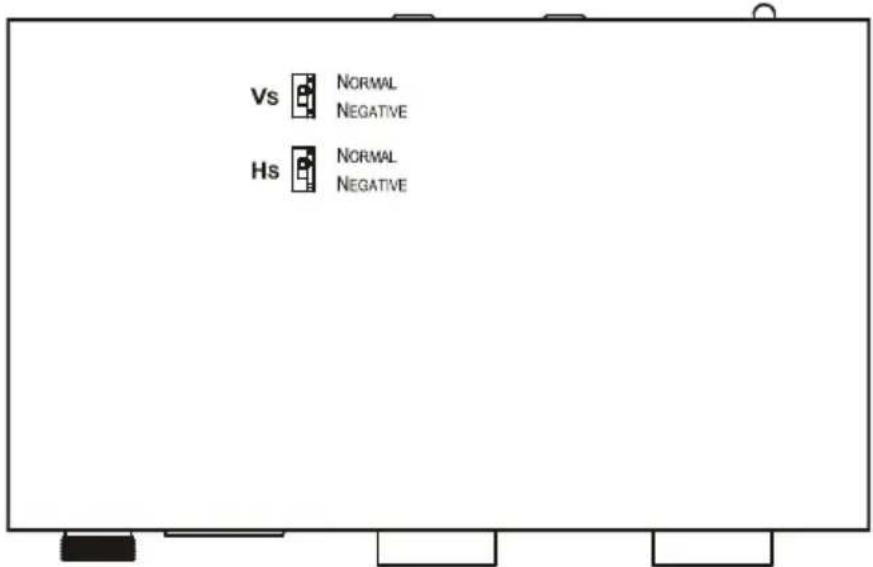
Figure 2 and Table 2 define the VP-200XLTHD.
text_image
Vs NORMAL NEGATIVE Hs NORMAL NEGATIVEFigure 2: VP-200XLTHD XGA Line Amp/CAT 5 Transmitter Underside
Table 2: VP-200XLTHD XGA Line Amp/CAT 5 Transmitter Underside Features
| Switch Function | |
| VS Switch Slide the switch downward to change the VS polarity to negative polarity switch upward to retain the polarity (default) | ^4 ; slide the |
| HS Switch Slide the switch downward to change the HS polarity to negative polarity switch upward to retain the polarity (default) | ^4 ; slide the |
5 Defining the VP-5THD 1:4 VGA/UXGA Distributor/CAT 5 Transmitter
The VP-5THD is a high-performance distributor for computer graphics signals, accepting one input, providing necessary buffering and isolation, and distributing the signal to its four identical outputs, as well as transmitting it over STP CAT 5 cable to an appropriate receiver.
In particular, the VP-5THD:
• Features front panel EQ. control
- Has switches on the underside for ID Bit control
- Has a video bandwidth exceeding 440MHz, ensuring transparency even when operating at the highest resolutions
- Has a transmission range of more than 300ft (more than 100m) over STP cabling
- Is mains fed and housed in a half-width 19" enclosure
- Has Hs and Vs polarity switches on its underside
- Supports HD signals (high-definition resolutions: 720p, 1080i and 1080p) and SD signals
Figure 3 and Table 3 define the VP-5THD.

flowchart
graph TD
    A["1:4 VGA/UXGA Distributor / CAT5 Transmitter"] --> B["POWER"]
    B --> C["KRAMER"]
    D["VP-5THD"] --> E["EQ."]
    F["INPUT"] --> G["3"]
    H["4"] --> I["4"]
    J["5"] --> K["5"]
    L["OUTPUT 1"] --> M["OUTPUT 3"]
    N["OUTPUT 2"] --> O["OUTPUT 4"]
    P["6"] --> Q["6"]
Figure 3: VP-5THD 1:4 VGA/UXGA Distributor/CAT 5 Transmitter
Table 3: VP-5THD 1:4 VGA/UXGA Distributor/CAT 5 Transmitter Features
| # Feature Function | ||
| 1 | POWER Switch | Illuminated switch for turning the unit ON or OFF |
| 2 EQ. | Trimmer Turn to adjust | ^1 the video EQ. (equalization) compensation |
| 3 INPUT | 15-pin HD Connector Connect | to the VGA/UXGA source |
| 4 | CAT 5 OUT RJ-45 Connector | Connect to ^2 the LINE IN RJ-45 connector on the VP-5R |
| 5 | OUTPUT 15-pin HD Connector | Connect to the VGA/UXGA acceptor(s) (from 1 to 4) |
| 6 Power | Connector with Fuse Connect | to the AC mains using the supplied power cable |
Figure 4 and Table 4 define the underside of the VP-5THD 1:4 VGA/UXGA Distributor/CAT 5 Transmitter.

text_image
Polarity Vs 100 Ito 100 PIN 11 ON OFF ID BIT CONTROL PIN 4 ON OFF 3 4 ① Enlarged View ID BIT CONTROL PIN 11 ON OFF PIN 4 ON OFFFigure 4: VP-5THD 1:4 VGA/UXGA Distributor/CAT 5 Transmitter Underside
Table 4: VP-5THD 1:4 VGA/UXGA Distributor/CAT 5 Transmitter Underside Features
| # | Feature Function | ||
| 1 | ID BIT CONTROL Switches | PIN 11 | Slide to the left to set to ON ^3 ; to the right to set to OFF |
| 2 | PIN 4 | Slide to the left to set to ON ^3 ; to the right to set to OFF | |
| 3 | POLARITY Switches | VS Switch | Slide the switch to the right to change the VS polarity to negative polarity ^4 ; slide the switch to the left to retain the polarity (default) |
| 4 | HS Switch | Slide the switch to the right to change the HS polarity to negative polarity ^4 ; slide the switch to the left to retain the polarity (default) | |
6 Defining the VP-5R CAT 5 Receiver/1:5 VGA/UXGA Distributor
The VP-5R is a high-performance distributor for computer graphics signals, receiving the computer graphics signal via STP CAT 5 cable, and distributing the signal to five identical 15-pin HD outputs.
In particular, the VP-5R:
- Features front panel line input level and EQ. control, as well as output EQ. control
- Is mains fed
• Is housed in a half-width 19" enclosure
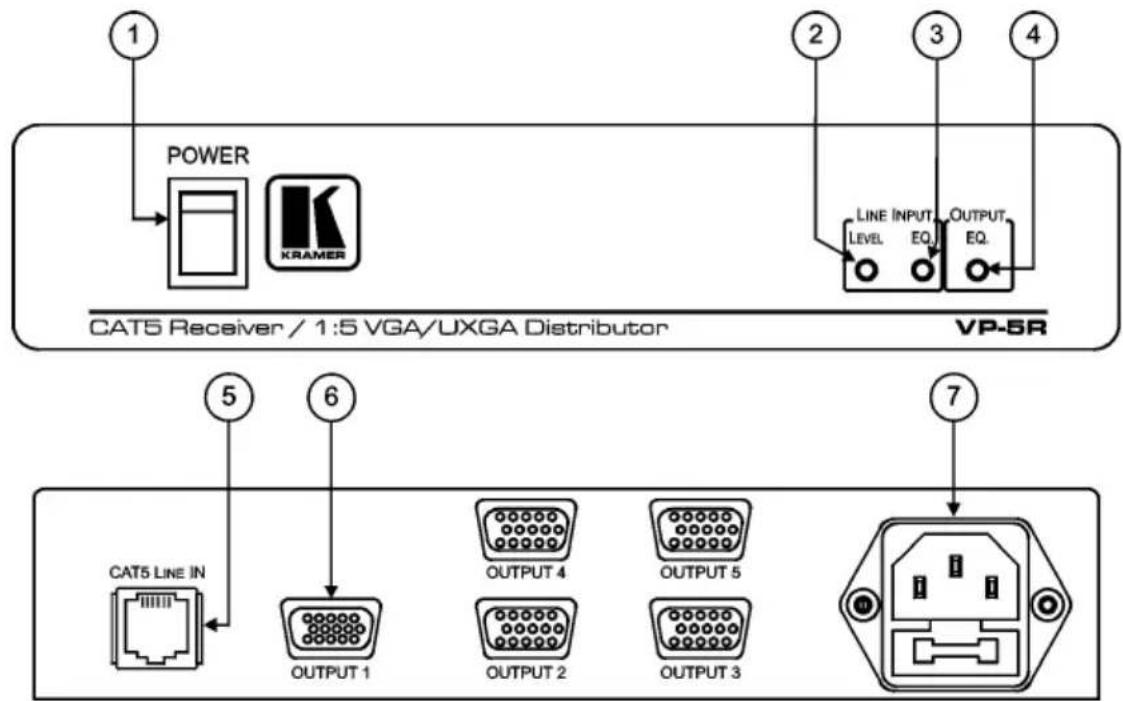
Figure 5 and Table 5 define the VP-5R.
text_image
1 POWER KRAMER CAT5 Receiver / 1:5 VGA/UXGA Distributor 2 3 4 LINE INPUT LEVEL EQ. OUTPUT EQ. VP-5R 5 6 CAT5 LINE IN OUTPUT 1 OUTPUT 4 OUTPUT 2 OUTPUT 5 OUTPUT 3 7Figure 5: VP-5R CAT 5 Receiver/1:5 VGA/UXGA Distributor
Table 5: VP-5R CAT 5 Receiver/1:5 VGA/UXGA Distributor Features
| # | Feature Function | |
| 1 | POWER Switch | Illuminated switch for turning the unit ON or OFF |
| 2 | LINE INPUT LEVEL Trimmer | Turn to adjust ^1 the video input level |
| 3 | LINE INPUT EQ. Trimmer | Turn to adjust ^1 the video input EQ. (equalization) compensation |
| 4 | OUTPUT EQ. Trimmer | Turn to adjust ^1 the video output EQ. (equalization) compensation |
| 5 | CAT 5 LINE IN RJ-45 Connector | Connect to ^2 the LINE OUT RJ-45 connector on the VP-5THD |
| 6 | OUTPUT 15-pin HD Connector | Connect to the VGA/UXGA acceptor(s) (from 1 to 5) |
| 7 | Power Connector with Fuse Connect | to the AC mains using the supplied power cable |
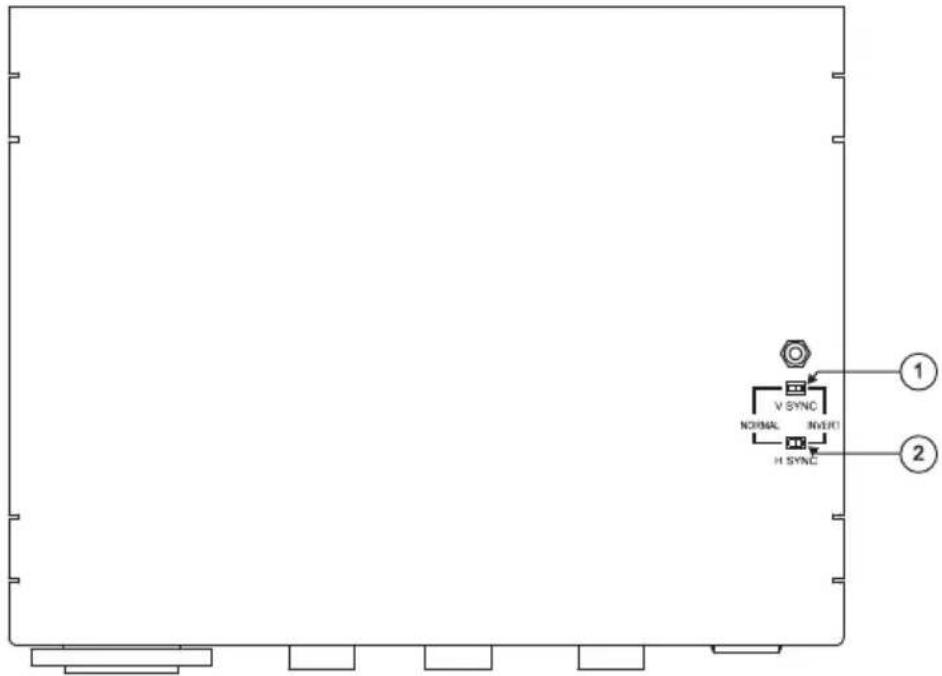
Figure 6 and Table 6 define the underside of the VP-5R CAT 5 Receiver/1:5 VGA/UXGA Distributor.
text_image
V SYNC NOSMAL NOSPT H SYNC ① ②Figure 6: VP-5R CAT 5 Receiver/1:5 VGA/UXGA Distributor Underside
Table 6: VP-5R CAT 5 Receiver/1:5 VGA/UXGA Distributor Underside Features
| # | Feature Function | |
| 1 | V SYNC Switch Slide the switch to the right ^1 to change the V SYNC polarity;slide the switch to the left to retain the polarity | |
| 2 | H SYNC Switch Slide the switch to the right ^1 to change the H SYNC polarity;slide the switch to the left to retain the polarity | |
7 Connecting the VP-200XLTHD
You can use the VP-200XLTHD and, for example, the TP-120 to configure an XGA line-to-Twisted Pair transmitter and receiver system.
To connect the VP-200XLTHD to the TP-120, as the example in Figure 7 illustrates:
- On the VP-200XLTHD connect the:
■ Computer graphics (XGA) source (for example, a computer) to the INPUT 15-pin HD connector
■ XGA OUT 15-pin HD connector to the acceptor (for example, to a projector)
-
On the TP-120, connect the XGA OUT 15-pin HD connector to the XGA acceptor (for example, a display).
-
Connect the LINE OUT RJ-45 connector on the VP-200XLTHD to the LINE IN RJ-45 connector on the TP-120 via STP cabling (see Section 8.1).
- Connect the 12V DC power adapter to the power socket on the VP-200XLTHD and plug the adapter into the mains electricity socket.
- Connect the other 12V DC power adapter to the power socket on the TP-120, and plug the adapter into the mains electricity socket.
- On the VP-200XLTHD, if required, use a screwdriver to adjust the:
■ Video output signal level
■ Cable compensation equalization level
-
On the TP-120, if required:
-
Adjust ^1 the video output signal level and/or cable compensation equalization level
- On the underside, set the H SYNC and V SYNC switches ^2

flowchart
graph TD
    A["Computer Graphics Source"] -->|VGA| B["Projector"]
    B -->|VGA| C["Display"]
    C -->|VGA| D["VP-200XLTHD"]
    D -->|Long UTP/STP Ine| B
    B -->|Long UTP/STP Ine| E["TP-120"]
Figure 7: Connecting the VP-200XLTHD
8 Connecting the VP-5THD and the VP-5R
You can use the VP-5THD 1:4 VGA/UXGA Distributor/CAT 5 Transmitter and the VP-5R CAT 5 Receiver/1:5 VGA/UXGA Distributor to configure an XGA line-to-Twisted Pair transmitter and receiver system.
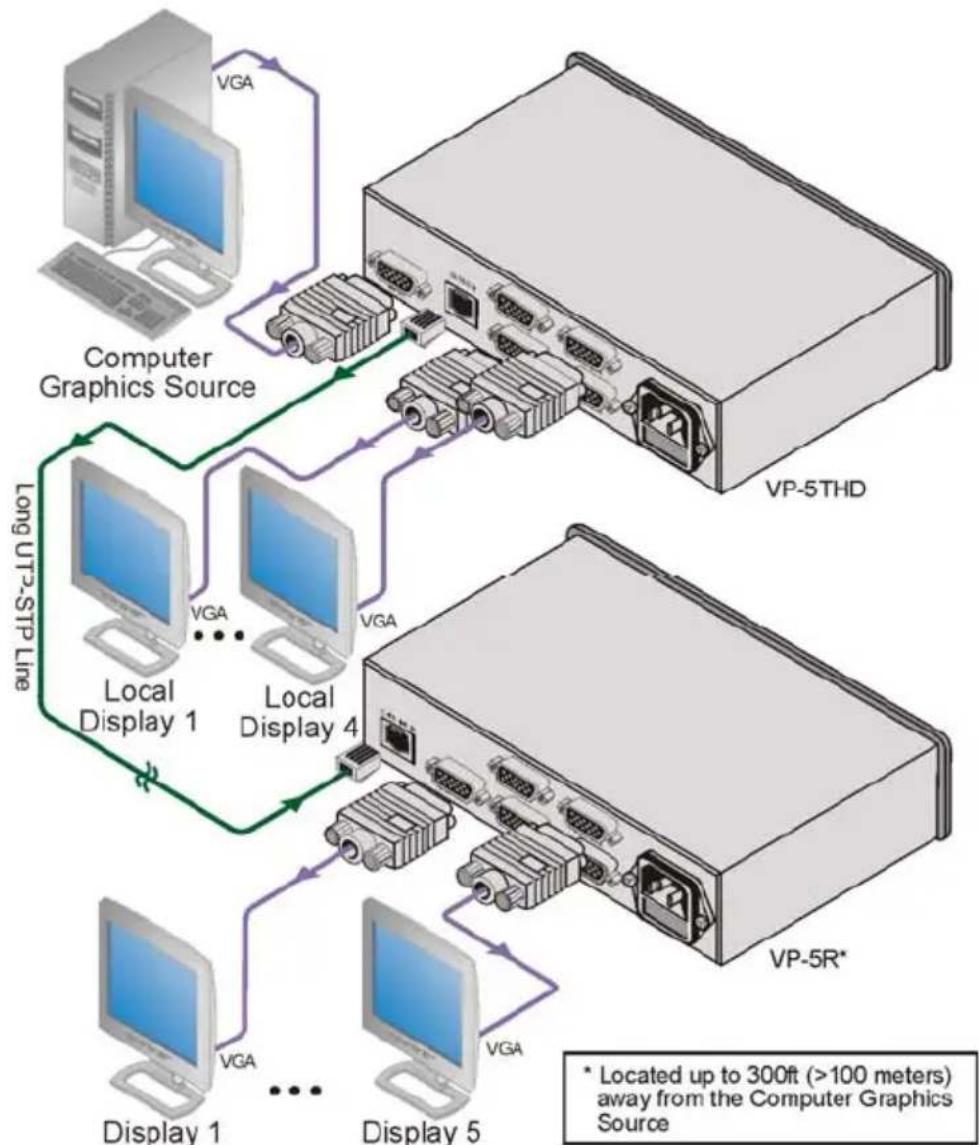
To connect the VP-5THD to the VP-5R, as the example in Figure 8 illustrates:
- On the VP-5THD connect the computer graphics source (for example, a computer) to the INPUT 15-pin HD connector, and connect up to ^1 four acceptors (for example, local displays) to the OUTPUT 15-pin HD connectors 1 to 4.
- On the VP-5R connep to five acceptors (for example, displays) to the OUTPUT 15-pin HD connectors 1 to 5.
- Connect the CAT 5 OUT RJ-45 connector on the VP-5THD to the CAT 5 LINE IN RJ-45 connector on the VP-5R via STP cabling (see Section 8.1).
- Connect the supplied power cord ^2 to the VP-5THD ^3 .
- Connect the supplied power cord ^2 to the VP-5R ^3 .
- On the VP-5THD, if required:
- Set the H SYNC and V SYNC switches ^4 on the underside
- Adjust ^5 the front panel cable compensation equalization level
- On the VP-5R, if required:
- Adjust ^5 the front panel LINE INPUT signal level and/or cable compensation equalization level, and/or OUTPUT compensation equalization level
- On the underside, set the V SYNC and H SYNC switches ^2
flowchart
graph TD
    A["Computer Graphics Source"] -->|VGA| B["Local Display 1"]
    A -->|VGA| C["Local Display 4"]
    B --> D["Display 1"]
    C --> E["Display 5"]
    D --> F["Local Display 2"]
    E --> G["Local Display 3"]
    F --> H["Local Display 4"]
    G --> I["Local Display 5"]
    H --> J["Local Display 4"]
    I --> K["Local Display 5"]
    style A fill:#f9f,stroke:#333
    style B fill:#ccf,stroke:#333
    style C fill:#ccf,stroke:#333
    style D fill:#cfc,stroke:#333
    style E fill:#cfc,stroke:#333
    style F fill:#fcc,stroke:#333
    style G fill:#fcc,stroke:#333
    style H fill:#fcc,stroke:#333
    style I fill:#fcc,stroke:#333
    style J fill:#fcc,stroke:#333
    style K fill:#fcc,stroke:#333
Figure 8: Connecting the VP-5THD and the VP-5R
8.1 Wiring the CAT 5 LINE IN/LINE OUT RJ-45 Connectors
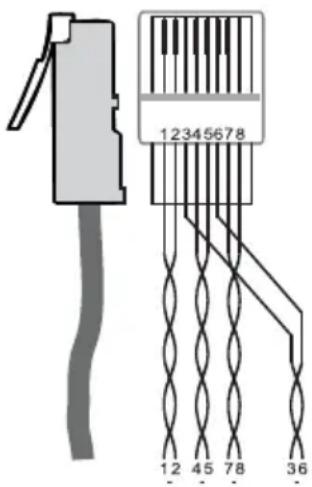
Table 7 and Figure 9 define the TP CAT 5 pinout, using a straight pin to pin cable with RJ-45 connectors. When using STP cable, connect/solder the cable shield to the RJ-45 connector shield.
Table 7: TP Connector Pinout
| EIA /TIA 568A | EIA /TIA 568B | |||
| PIN | Wire Color | PIN | Wire | Color |
| 1 | Green/White | 2 | 1 | |
| 2 | Green | |||
| 3 | Orange/White | 3 | ||
| 4 | Blue | |||
| 5 | Blue/White | 5 | ||
| 6 | Orange | |||
| 7 | Brown/White | 7 | ||
| 8 | Brown | |||
| Pair 1 | 4 and 5 | Pair 1 | ||
| Pair 2 | 3 and 6 | Pair 2 | ||
| Pair 3 | 1 and 2 | Pair 3 | ||
| Pair 4 | 7 and 8 | Pair 4 | ||
text_image
12345678 12 45 78 36Figure 9: TP Connector
9 Technical Specifications
Table 8 lists the technical specifications of the VP-200XLTHD.
Table 8: Technical Specifications ^1 of the VP-200XLTHD (with 30m CAT 5 cable)
| INPUT: | 1 XGA on a 15-pin HD connector |
| OUTPUTS: | 1 XGA on a 15-pin HD connector; 1 RJ-45 connector |
| MAX. OUTPUT LEVEL ^2 : | 2.4Vpp (XGA), 1.5Vpp (CAT 5) |
| BANDWIDTH (-3dB): | 405MHz (XGA) |
| RESOLUTION: Up to UXGA, up to 1080p | |
| DIFF. GAIN ^2 : | 0.03% (XGA), 3.3% (CAT 5) |
| DIFF. PHASE ^2 : 0.03Deg (XGA), 0.3Deg (CAT 5) | |
| K-FACTOR ^2 : | <0.02% (XGA and CAT 5) |
| S/N RATIO ^2 : | 78dB (XGA), 71dB (CAT 5) |
| CONTROLS ^2 : | XGA: LEVEL: -1.6dB to +1.9dB; EQ.: 0 to 4dB @50MHz |
| COUPLING ^2 : | DC (XGA), AC (CAT 5) |
| POWER SOURCE: | 12V DC, 105mA |
| DIMENSIONS: | 12cm x 7.5cm x 2.5cm (4.7" x 2.95" x 0.98") W, D, H |
| WEIGHT: | 0.3kg (0.67lb) approx. |
| ACCESSORIES: | Power supply |
Table 9 lists the technical specifications of the VP-5THD.
Table 9: Technical Specifications of the VP-5THD (with 60m CAT 5 cable)
| INPUT: 1 XGA on a 15-pin HD connector | |
| OUTPUTS: 4 XGA on 15-pin HD connectors; 1 RJ-45 connector | |
| MAX. OUTPUT LEVEL ^1 : 1.7Vpp (XGA), 1.7Vpp (CAT 5) | |
| BANDWIDTH (-3dB): 445MHz (XGA), 154MHz (CAT 5) | |
| RESOLUTION: Up to UXGA, up to 1080p ^2 | |
| DIFF. GAIN ^1 : 0.8% (XGA) | 3.2% (CAT 5) |
| DIFF. PHASE ^1 : 0.08Deg (XGA), 0.06Deg (CAT 5) | |
| K-FACTOR ^1 : 0.1% (XGA) | <0.05% (CAT 5) |
| S/N RATIO ^1 : 76dB (XGA), 73dB (CAT 5) | |
| CONTROLS ^1 : LEVEL: -7.4dB to 3.5dB (CAT 5)EQ.: 0 to 37.8dB @50MHz (CAT 5) | |
| COUPLING ^1 : DC (XGA), AC (CAT 5) | |
| POWER SOURCE: 230 VAC, 50/60 Hz. (115VAC, U.S.A.) 13VA | |
| DIMENSIONS: 22cm x 18cm x 4.5cm (8.7" x 7" x 1.7") W, D, H (half 19", 1U) | |
| WEIGHT: 1.2kg (2.6 lbs) approx. | |
| ACCESSORIES: | Power cord |
Table 10 lists the technical specifications of the VP-5R.
Table 10: Technical Specifications of the VP-5R (with 30m CAT 5 cable)
| INPUT: | 1 RJ-45 connector |
| OUTPUTS: | 5 XGA on 15-pin HD connectors |
| MAX. OUTPUT LEVEL3: | 1.4Vpp |
| BANDWIDTH (-3dB): 150MHz | |
| DIFF. GAIN3: | 3.4% |
| DIFF. PHASE3: | 0.05Deg |
| K-FACTOR3: | <0.05% |
| S/N RATIO3: | 74dB |
| CONTROLS3: LEVEL: -8.2dB to 4.3dBLINE EQ.: 0 to 30dB; OUT EQ.: 0 to 8.6dB | |
| COUPLING3: | AC |
| POWER SOURCE: 230V AC, 50/60 Hz. (115V AC, U.S.A.) 9.2VA | |
| DIMENSIONS: 22cm x 18cm x 4.5cm (8.7" x 7" x 1.7") W, D, H (half 19", 1U) | |
| WEIGHT: 1.2kg (2.6 lbs) approx. | |
| ACCESSORIES: | Power cord |
LIMITED WARRANTY
Kramer Electronics (hereafter Kramerants this product free from defects in material and workmanship under the following terms.
HOW LONG ISTHE WARRANTY
Labor and parts are warranted for seven years from the date of the first customer purchase.
WHO IS PROTECTED?
Only the first purchase customer may enforce this warranty.
WHAT IS COVERED AND WHAT IS NOT COVERED
Except as below, this warranty covers all defects in material or workmanship in this product. The following are not covered by the warranty:
- Any product which is not distributed by Kramer, or which is not purchased from an authorized Kramer dealer. If you are uncertain as to whether a dealer is authorized, please contact Kramer at one of the agents listed in the Web site www.kramerelectronics.com.
- Any product, on which the serial number has been defaced, modified or removed, or on which the WARRANTY VOID IF TeamRIRE Distriker has otherwise interfered with.
- Damage, deterioration or malfunction resulting from:
i) Accident, misuse, abuse, neglect, fire, water, lightning or other acts of nature
ii) Product modification, or failure to follow instructions supplied with the product
iii) Repair or attempted repair by anyone not authorized by Kramer
iv) Any shipment of the product (claims must be presented to the carrier)
v) Removal or installation of the product
vi) Any other cause, which does not relate to a product defect
vii) Cartons, equipment enclosures, cables or accessories used in conjunction with the product
WHAT WE WILL PAY FOR AND WHAT WE WILL NOT PAY FOR
We will pay labor and material expenses for covered items. We will not pay for the following:
- Removal or installations charges.
- Costs of initial technical adjustments (set-up), including adjustment of user controls or programming. These costs are the responsibility of the Kramer dealer from whom the product was purchased.
- Shipping charges.
HOW YOU CAN GET WARRANTY SERVICE
- To obtain service on you product, you must take or ship it prepaid to any authorized Kramer service center.
- Whenever warranty service is required, the original dated invoice (or a copy) must be presented as proof of warranty coverage, and should be included in any shipment of the product. Please also include in any mailing a contact name, company, address, and a description of the problem(s).
- For the name of the nearest Kramer authorized service center, consult your authorized dealer.
LIMITATION OF IMPLIED WARRANTIES
All implied warranties, including warranties of merchantability and fitness for a particular purpose, are limited in duration to the length of this warranty.
EXCLUSIONOFDAMAGES
The liability of Kramer for any effective products is limited to the repair or replacement of the product at our option. Kramer shall not be liable for:
- Damage to other property caused by defects in this product, damages based upon inconvenience, loss of use of the product, loss of time, commercial loss; or:
- Any other damages, whether incidental, consequential or otherwise. Some countries may not allow limitations on how long an implied warranty lasts and/or do not allow the exclusion or limitation of incidental or consequential damages, so the above limitations and exclusions may not apply to you.
This warranty gives you specific legal rights, and you may also have other rights, which vary from place to place.
NOTE: All products returned to Kramer for service must have prior approval. This may be obtained from your dealer.
This equipment has been tested to determine compliance with the requirements of:
EN-50081: "Electromagnetic compatibility (EMC);
generic emission standard.
Residential, commercial and light industry"
EN-50082: "Electromagnetic compatibility (EMC) generic immunity standard.
Part 1: Residential, commercial and light industry environment".
CFR-47: FCC* Rules and Regulations:
Part 15: "Radio frequency devices
Subpart B Unintentional radiators"
CAUTION!
Servicing the machines can only be done by an authorized Kramer technician. Any user who makes changes or modifications to the unit without the expressed approval of the manufacturer will void user authority to operate the equipment.
Use the supplied DC power supply to feed power to the machine.
☒ Please use recommended interconnection cables to connect the machine to other components.
* FCC and CE approved using STP cable (for twisted pair products)
For the latest information on our products and a list of Kramer distributors visit www.kramerelectronics.com
where updates to this user manual may be found.
We welcome your questions, comments and feedback.

text_image
Warning symbol image with exclamation mark inside triangleCaution
Safety Warning:
Disconnect the unit from the power supply before opening/servicing.

text_image
ISO 9001:2008 IQC Institute of Quality & Control Certified Quality Management SystemCE
PN:

2900-000635

Rev: