PMPRA514GR - Megaphone Pyle - Free user manual and instructions
Find the device manual for free PMPRA514GR Pyle in PDF.


User questions about PMPRA514GR Pyle
0 question about this device. Answer the ones you know or ask your own.
Ask a new question about this device
Download the instructions for your Megaphone in PDF format for free! Find your manual PMPRA514GR - Pyle and take your electronic device back in hand. On this page are published all the documents necessary for the use of your device. PMPRA514GR by Pyle.
USER MANUAL PMPRA514GR Pyle
Lightweight and Portable Bullhorn Megaphone
Aux (3.5mm) Input for MP3/Music, Automatic Siren,
50-Watt, MIC/TALK (Green)
PYLE
PyleUSA.com
USER GUIDE
This user manual contains important information for safe operation and optimal megaphone performance. Please carefully read and follow safety notes and instructions. Save this manual for future reference.
Ensure it is available to all persons using this device.
SAFETY
This megaphone is intended to be used only as described in this user manual. Any other use or use under different operating conditions is considered improper and may result in personal injury or device damage. Please use the megaphone as described and supervise its use when used by children or minors.
- Ensure that plastic bags, packaging, etc., are removed.
- Never let children use electrical devices unattended.
- Observe proper polarity when inserting batteries. Incorrectly inserted batteries may cause damage & the risk of fire.
- Leaking batteries can cause permanent damage to the device.
- Remove batteries if the megaphone will not be used for long periods.
PRECAUTIONS
- Ensure correct polarity of cells used. Insert the batteries in the correct direction by aligning the (-) marks on the batteries with the spring in the back cover.
- Use new batteries/cells whenever possible.
- When the megaphone is not in use for a long period, remove the dry cells and replace them.
Drained cells or rechargeable batteries will not provide sufficient sound volume.
BATTERY INSERTION
- Unfasten the clip located near the top, back side of the unit.
- The clip will release the lid to reveal the battery compartment.
- Please observe the correct battery direction placement on the top side of the opening battery compartment lid. Insert batteries, close the cover, and fasten the clip until locked.
NOTE:
Make sure the batteries are inserted correctly, observing correct polarity.
text_image
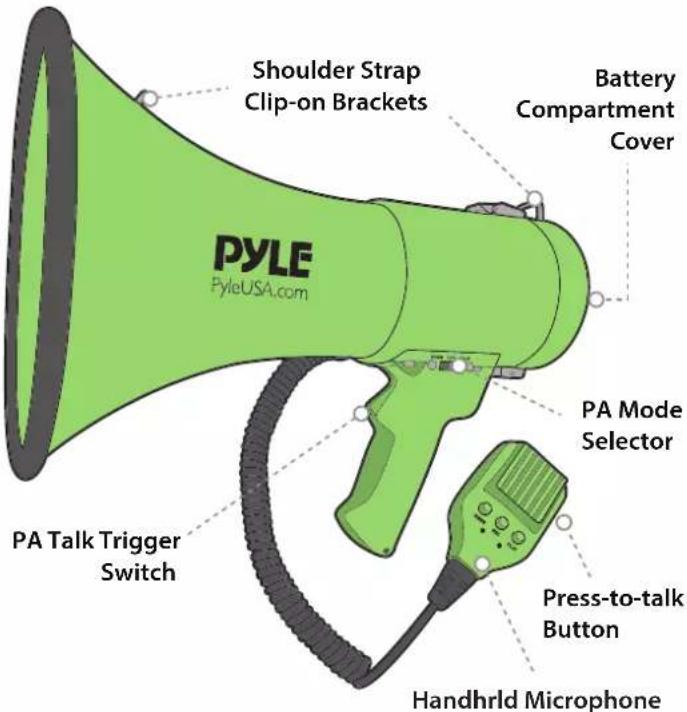
Shoulder Strap Clip-on Brackets Battery Compartment Cover PYLE PyleUSA.com PA Mode Selector PA Talk Trigger Switch Press-to-talk Button Handhrld MicrophoneTO REPLACE BATTERIES
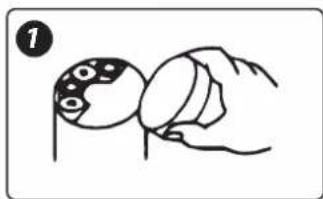
- Loosen the locking screw of the battery compartment cover on the back of the body.
The battery compartment cover comes off.
- Insert 8 x type-C (UM-2) batteries into the battery case, observing correct polarity.
- Insert the battery case with batteries into the battery compartment of the megaphone, paying attention to polarity.
natural_image
Illustration of a hand holding a ball with patterned top (no text or symbols)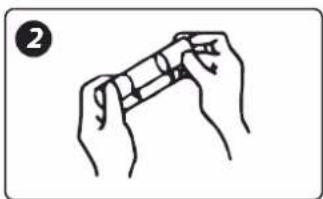
natural_image
Illustration of two hands holding a cylindrical object, no text or symbols present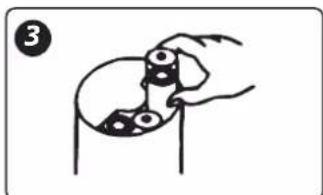
natural_image
Simple line drawing of a hand holding a small object with circular elements, no text or symbols present.OPERATING INSTRUCTIONS
- When carrying the megaphone on the shoulder, press the (1) press-to-talk power on-off switch on the left side of the microphone.
- When holding the megaphone at the grip, fix the microphone hanger inlet in the microphone fixing hanger, then press the (2) press-to-talk power on-off switch back with your index finger.
- Position the speaker opening mouth towards the object and speak through the microphone mouthpiece. Bring the microphone mouthpiece close to your lips and speak normally.
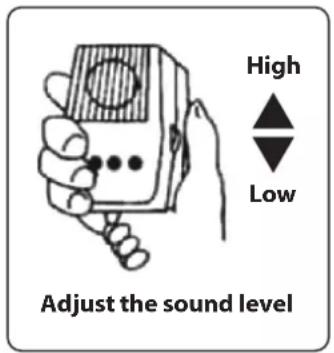
- Turn the sound volume control on the right-hand side of the microphone and adjust the sound level to the maximum without causing howling.
- Adjust the volume control to the min. before recording.
- To record, press the RECORD button. Now your megaphone is ready for recording.
The longest record time is about 60 seconds. Press the RECORD button again after recording is done. - Press the PLAY button to activate the recorded materials circularly.
text_image
High Low Adjust the sound level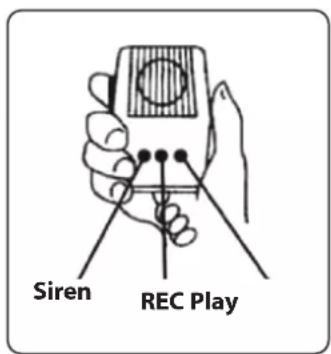
text_image
Siren REC Play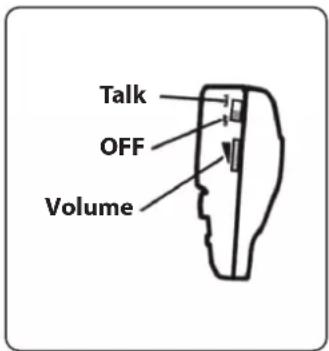
text_image
Talk OFF Volume- Slide the 'PA Mode Selector Switch' on the side of the megaphone to choose the desired PA mode and to power on/off the unit. Choose between 'Siren,' 'Talk,' and 'Off' modes.
- Talk: While in 'Talk' mode, speak through the microphone mouthpiece while holding the 'Press-to-Talk' button on the detachable handheld differential mic. Users also have the ability to use the 'PA Talk Trigger Switch' on the megaphone's handheld pistol grip. NOTE: An adjustable volume control slider is also located on the handheld mic.
- Siren: Selecting this mode activates an automatic, continuous alarm siren. Switch to another mode to discontinue the alarm siren play.
- Off: Powers the unit off.
Features:
• Audio Modes: Talk, Siren, Music, Whistle, Record 60 seconds
• Aux (3.5mm) Input Connector Jack
• Stream MP3 & Digital Audio Files
- Includes Plug-in Handheld Microphone
- Button Activated Automatic Siren Alarm
- Adjustable Volume Control and Shoulder Strap
- Ergonomic Pistol Grip and Lightweight Chassis For Indoor/Outdoor Use
• Built-in Automatic Siren Function
• Talk, Music, and Siren Switch
- Ability to Connect External Devices
(iPhone, Android, Smartphone, iPad, Tablet, etc.)
Technical Specs:
• Constructional Materials: ABS
• Power Output: 50-Watt MAX
• Bell Width: 13.8" -inches
• Projection Range: Up to 1200 Square Yards
- Battery Powered: Requires 8 x 'C' Batteries, Not Included
- Item Weight: 4.40 lbs.
- Product Dimensions (L x W x H): 9.0" x 9.0" x 13.8" –inches
Questions? Comments?
We are here to help!
Phone: (1) 718-535-1800
Email: support@pyleusa.com