EV-520 - Scale Orava - Free user manual and instructions
Find the device manual for free EV-520 Orava in PDF.


| Product Type | Digital Bathroom Scale |
| Brand | Orava |
| Model | EV-520 |
| Maximum Capacity | 150 kg (330 lb) |
| Division (Precision) | 50 g (0.1 lb) |
| Display Type | LCD, 4-digit |
| Power Source | 1 x CR2032 battery (included) |
| Auto-Off | Yes, after 10 seconds of inactivity |
| Platform Material | Tempered glass |
| Unit Options | kg / lb / st |
| Tare Function | Yes |
| Overload Indicator | Yes ("OL" displayed) |
| Low Battery Indicator | Yes ("LO" displayed) |
| Dimensions (L x W x H) | 300 x 300 x 25 mm |
| Net Weight | Approx. 1.5 kg |
| Color | White (with black accents) |
| Activation | Step-on (automatic) |
| Cleaning | Wipe with a damp cloth; do not use abrasive cleaners |
| Safety Precautions | Use on a hard, flat surface; avoid water exposure |
| Repairability | Battery replacement only; no user-serviceable parts inside |
Frequently Asked Questions - EV-520 Orava
User questions about EV-520 Orava
0 question about this device. Answer the ones you know or ask your own.
Ask a new question about this device
Download the instructions for your Scale in PDF format for free! Find your manual EV-520 - Orava and take your electronic device back in hand. On this page are published all the documents necessary for the use of your device. EV-520 by Orava.
USER MANUAL EV-520 Orava
Intended use of the device
- The device is intended solely for the informative determination of body weight and (possibly) human body construction in the home, to the extent determined by technical and operational parameters and functions, safety and user instructions and external influences of the operating environment.
- This equipment does not in any way replace the exact medical body weight measurement on calibrated scales specifi cally designed for this purpose. The results of body weight measurements at home are only for guidance, and therefore, if you are interested in fi nding out the exact values, contact your doctor.
- Weight must not be used to determine weight in business relationships, to calculate fees and penalties and similar types of payments, in the judiciary, healthcare, pharmaceutical laboratories, for pricing, and for other purposes requiring the use of measuring instruments subject to the requirements set out for designated meters.
- ORAVA electrical appliances are manufactured according to the state of the art and recognized safety rules. Nevertheless, improper and unprofessional use or use contrary to the intended use may result in injury or danger to the life of the user or third party, damage to equipment and other material values.
1. GENERAL SAFETY INSTRUCTIONS AND NOTIFICATIONS
This document contains important safety instructions and warnings for the safe, correct and economical operation of electrical/electronic equipment. Its compliance helps the user avoid risks, increase product reliability and durability.
1.1 General Safety Instructions
- Before operating the equipment, we recommend that you carefully read the operating instructions and operate the equipment according to the instructions!
- The safety instructions and warnings contained in this manual do not cover all possible conditions and situations that may arise when using the equipment. The user needs to understand that a factor that cannot be built into any of the products is personal responsibility and caution. These factors must therefore be ensured by users operating this device.
- Failure to observe the safety instructions and warnings does not warrant the manufacturer for any damage to health or property!
- Keep the operating instructions as close as possible to the equipment throughout its life. Always keep these operating instructions together with the appliance for future reference and use by new users
- Use the equipment only for its intended purpose and in the manner specified by the manufacturer.
• This is not a professional commercial use device. - Do not change the specifications and characteristics of the equipment by unauthorized modification or modification of any part of the equipment.
- The manufacturer is not liable for damages caused during transportation, improper use, damage or destruction of the equipment due to adverse weather conditions.
Safety of the operating environment
- Do not use the device in an industrial environment or outdoors!
- Do not expose the device to:
- sources of excessive heat or open flame,
- dripping or splashing water
- vibration, shock and excessive mechanical stress
- insects, animals and plants,
- aggressive and chemical substances.
- The operating environment of the equipment must always be in accordance with the established essential characteristics.
Operating environment characteristics:
- Ambient temperature: +5 ÷ +40 °C
- Humidity: 5 ÷ 85%
- Altitude: 000 2,000 m
- Water occurrence: occasional water condensation or water vapor
- Occurrence of foreign bodies: the amount and type of dust are insignificant
- Degree of protection: min. IP20 (the device is protected against contact with dangerous parts by the fi nger and unprotected against water)
Electrical safety
- Electrical Class III electrical devices are those that are powered by a low-voltage (battery or accumulator) source and do not pose a hazard to the user due to electric shock.
Personal safety
- This appliance is intended for use and operation by persons without electrical qualifications - by the layman, following the manufacturer's instructions.
- Operators of the equipment include activities such as switching the equipment on and off, user manipulation and setting of operating parameters, visual or auditory control of the equipment and user cleaning and maintenance.
- This appliance may be used by children from 8 years of age and persons with reduced physical, sensory or mental abilities or with a lack of experience or knowledge if they are supervised or instructed in the safe use of the appliance and understand the dangers involved.
• Children must not play with the appliance. - Cleaning and maintenance by users must not be performed by children without supervision.
Cleaning, maintenance and repair
- Only carry out normal cleaning and maintenance of the appliance in the recommended manner. Do not use solvents or abrasive cleaning items for cleaning. Pollution and visible spots from touching fingers or hands can be cleaned using cleaning agents designed to clean household appliances.
- Never clean the device in a way that may cause immersion in liquid and liquid flow into the device.
- Clean the electrical/electronic parts only with a damp cloth and wipe dry or allow to dry.
- Keep the appliance clean and dry.
- Do not disassemble the appliance!
- Never repair the electric appliance yourself!
2. Special safety precautions
- The electrical/electronic equipment is designed and manufactured in such a way as to allow safe operation and use by persons without professional qualifications. Despite all the precautions that have been taken by the manufacturer for safe use, operation and use carry some residual risks and associated hazards.
- The following symbols and their meanings have been used on the device and in the accompanying documentation to warn of potential hazards:
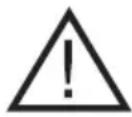
This symbol warns users that there is a danger that the safety instructions for use and operation are not observed: Risk of serious injury!
Risk of equipment damage or other property damage!

This symbol warns users that there is a risk of falling if they do not follow the safety instructions when using or operating the equipment:
Danger of falling!
- Failure to observe the safety instructions for use and operation of the device: Risk of serious danger to health or life!
Transportation/Transfer
- When transporting and carrying, take care when moving to avoid tipping the machine.
- Carry the device firmly by the bottom of the base or the solid parts of the body. Make sure your hands and equipment are not damp or slippery when carrying. There is a risk of serious injury or danger to life!
There is a risk of damage to the equipment!
Unpack/Packaging
- Unpack the equipment and remove any parts of the packaging materials and labels from the machine before putting it into operation. Store packaging materials in a safe place, especially out of the reach of children and incapacitated persons, or dispose of them safely.
Inspection/Commissioning
- We recommend that you perform both initial and follow-up periodic inspections of the equipment.
- Never use the appliance if it is incomplete, damaged, or any part of it is damaged during use.
- Do not use non-original and incomplete equipment and accessories. There is a risk of serious injury!
- If the equipment has been transported and stored at low temperatures or excessive humidity (eg winter), leave it for about „Acclimatize“ at room temperature for 1 hour to remove any moisture in the electronic components that occurs when the ambient temperature changes.
There is a risk of damage to the equipment!
Location/Installation
- Only place the device on:
- fl at, strong and stable mats - for fl oors and stable mats with a solid surface fi nish and with suffi cient load-bearing capacity.
- Always make sure that the space you want to place the equipment has suffi cient space, mechanical strength and load capacity.
- Do not use the appliance on a wet and slippery floor and mat. There is a risk of serious injury!
There is a risk of damage to the equipment or other material damage!
Warning!
Do not place the device:
- uneven, unstable and dirty surface
- on the tight edge of stairs or other floor irregularities,
- near containers with water or other liquids.
Warning!
- Place the machine in a place where children cannot reach it freely.
- Keep children away from the machine. The device may fall over children and cause injury.
- Mechanical damage (eg rupture of plastic or glass covers) may cause serious injury.
There is a risk of serious injury!
There is a risk of damage to the equipment or other material damage!
Operation/Use
Warning!
- The device is intended for use only with replaceable batteries that can be replaced by the user and whose type is specified in the operating instructions.
- For proper and reliable operation of the electronic equipment that has been stored at low temperatures and under excessive humidity (eg in winter), have the device “acclimatized” first.
- Use the machine horizontally and placed on a solid and stable surface. Uneven, unstable, or soft mats may adversely affect the accuracy of weight measurement results.
- Keep the device dry and in a dry and clean environment.
- Do not use the device on wet, slippery and dirty floors. Do not step on the device when the feet are wet. Do not step on the edges of the machine's functional surface. Be careful about personal stability.
There is a risk of falling!
There is a risk of damage to the equipment!
- Do not use the device near strong electromagnetic fi elds. Electromagnetic fi eld effects can affect the correctness of electronic device functions.
- Store the equipment in a clean and dry place. Do not load the device when storing.
- Never overload the equipment beyond the limits specified in the technical data!
- Do not overload the device above the measuring range.
- Do not continue to use the device if you notice any non-standard features while using the device. Have the device checked by a specialist garage.
- If any safety part/component (mechanical, electrical/electronic) is part of the equipment, never disassemble this part/component! if it is safety part/component damaged or inoperative, do not use the device!
- Never underestimate possible hazards and be careful!
Power Supplies/Batteries
Safety instructions for changing and loading the power supply - batteries
Warning!
- When using electrical/electronic equipment that is equipped with a DC power source - battery, always follow important safety and operating instructions and handling of these sources.
Warning!
- Never recharge batteries!
- Never disassemble the batteries!
- Never heat or dispose of batteries in a fire!
- Failure to follow the safety instructions may result in: Risk of serious injury! Danger of explosion!
Chemical hazard!
Risk of equipment damage or other material damage!
Warning!
- There is a danger of incorrect replacement and handling - electric short circuit, explosion, electrolyte leakage, chemical burns.
- Dispose of the batteries in accordance with the applicable regulations and disposal of electronic equipment.
Warning!
• Always store batteries out of the reach of children, disabled people and pets.
- Keep the used batteries in a safe place so that they cannot be swallowed by children and dispose of as soon as possible. Seek medical advice immediately if swallowed.
- Use only the same or equivalent type of batteries specified by the manufacturer. Do not use new batteries with old ones. This may cause damage to the device.
- Wipe the batteries with a dry cloth before loading them into the machine. This ensures better electrical contact.
- Insert the batteries so that the „+“ and „-“ symbols on the batteries and on the inside of the machine cover match.
- Do not handle batteries with metal tools (eg tweezers, etc.). Conductive contact of both battery poles can cause a short circuit.
- If you do not use your device for a long time, it is recommended that you remove the batteries from the device. This protects the device from damage from leaking batteries. If battery leakage occurs, have the device cleaned by an authorized service center.
Preparation
Power supply
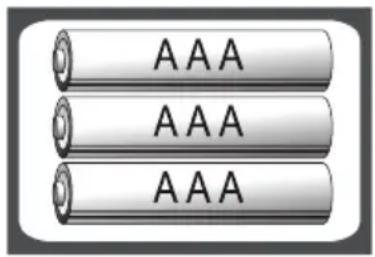
The device works on three 1.5 V AAA batteries.
Before using the device, you must insert the batteries into the device. Open the battery cover and insert three 1.5 V batteries.
Observe the correct polarity + and -.
Close the battery cover.
text_image
AAA AAA AAAWeighing
Location
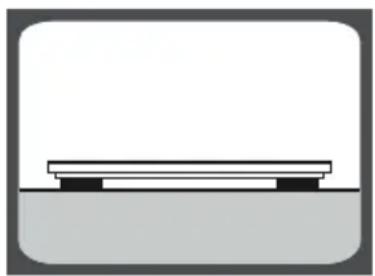
Place the device on a fl at, fi rm and hard surface.
Do not place it, for example on the carpet.
1 Switch on the balance by pressing your feet on the lower right edge of the glass and wait a while until the display shows „ 0.00“ or stand directly on the scale.
natural_image
Simple line drawing of a bench placed on a platform (no text or symbols)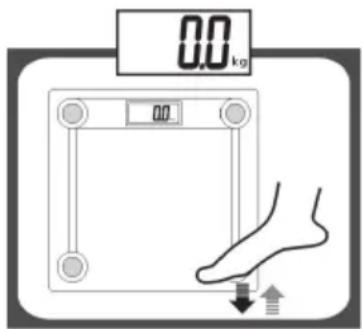
text_image
0.0 kg 0.0 ↓↑If the display shows „Err“ error message, instead „0.00“, repeat step 1.

text_image
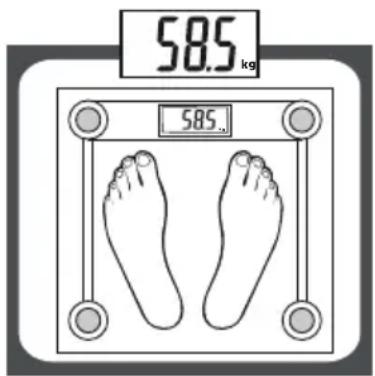
Err2 Carefully stand on the scales. Stand in the middle of it as shown and distribute the weight evenly on both legs. Stand upright and stationary during weighing. Wait until your weight appears on the display (eg „58.55kg“). The measured weight will be displayed for about 10 seconds, then the display will turn off.
text_image
58.5 kg 58.5Switching units of measure
If you need to change the weight units, you can do so by pressing the „kg/lb“ switch. The scale will then weigh in metric or English units of weight.
Switch location
A The switch is located on the bottom of the scale next to the batteries.
B Press the unit switch repeatedly to select kg (metric weight unit) or lb (English weight unit). The selection of weighing units is only possible with the balance switched on. The units will appear alternately on the display.

natural_image
Simple line drawing of a circular connector or switch (no text or symbols)Switching off the scale
Automatic shutdown
If you do not use the scale (no one is standing on it) and the display shows „0.00“ for approx. 15 seconds, the scale switches off automatically.
natural_image
Simple line drawing of a square frame with four circular ends and a central rectangular block (no text or symbols)Warning indicators
1 „Lo“
Weak batteries. The batteries need to be replaced with new ones.
2 „Err“
The maximum load capacity of the scale has been exceeded. Assemble the object to be weighed immediately to prevent damage to the scale. The maximum load is indicated on the display.
3 „C“
Incorrect measurement. Repeat the measurement.

text_image
Lo
text_image
Err
text_image
[Battery replacement
If „Lo“ appears on the display, the batteries must be replaced.
A Open the battery compartment cover on the underside of the scale.
B Remove the batteries
C Insert new batteries (use only the same type). Observe the correct polarity + and -!
D Close the battery cover.

text_image
Lo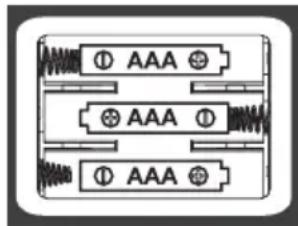
text_image
① AAA ② AAA ③ AAACleaning and maintenance
Only clean the scale with a dry cloth slightly moistened with water. Do not use harsh cleaners or solvents such as alcohol, benzine, or thinner to clean.
Do not immerse the scale in water.
Clean the glass when it is already dirty from the feet.
Warning!
If the display shows the error message „Err“ permanently, or if the balance does not work even though you have replaced (removed and re-inserted) the batteries, contact your supplier or an authorized service center.
Technical specifications
Power supply: 4,5 V
(3x 1,5 V batérie AAA batteries - not supplied)
Units of measure: metric (kg)/british (lb)
Maximum capacity: 180 kg (100 g increments)
Measurements (W x D x H): 30,2 x 30,2 x 2,2 cm
Weight: 1,54 kg (without batteries)
We reserve the right to make changes!