HF-1 (PS3) - Controller Gioteck - Free user manual and instructions
Find the device manual for free HF-1 (PS3) Gioteck in PDF.


User questions about HF-1 (PS3) Gioteck
0 question about this device. Answer the ones you know or ask your own.
Ask a new question about this device
Download the instructions for your Controller in PDF format for free! Find your manual HF-1 (PS3) - Gioteck and take your electronic device back in hand. On this page are published all the documents necessary for the use of your device. HF-1 (PS3) by Gioteck.
USER MANUAL HF-1 (PS3) Gioteck
text_image
gioteck Cable Set Guide MODEL G302A This product is not designed, manufactured sponsored or enclosed by Sony Computer Entertainment Inc. or one of its divisions. PS3TM is the implement of Sony Computer Entertainment, Inc. Specialization 2 applications as well as a result. On change without promotion. Copyright © 2008, 2010 SBB Group All Rights Reserved. HF-1 WIRELESS CONTROLLER FOR PS3™ ERGONOMIC FPS CONTROLLER
text_image
gioteck COME GET COSTThank you for purchasing the FP 1W wireless Controller from Google. We note that this product will go beyond your expectations for a quality mode accessories. Please read this booklet. Quarterly before using the product and review the PSATM manual for additional details regarding PSATM operation. Thank you it enjoy!
CENTERS
02 Conferences & Precautions
03 Features & Details
04 Setup
05 Battery Replacement
06 Pairing
07 | Assigning Ports
08 Operation
10 | Trougleshooting
11 | Care & Maintenance
o precautions
- List only as intended
• This is a precision product and
should be handled with care. - In avoid electrical shock, do
of take the product sport.
• Ile not store in areas n
extremenes, at cold
• Do not allow product to get
water dirt; doing
carrage the product.
• The person with pensione, - is the first of that, then the second, then the third
- Vosturns, 2017, 695
Not suitable for children
under 3 years of age
Warnings

This symbol in boxes important
installation, operation or
Mehrlande instructions. Always
To the time of the first class
the year to the average of
or potentially beautiful or bright source
substances within the product's
and closure This symbe may also
indicate a procedure that will
you your product We'll help?

Recycling is important and will
help to protect our environment
[Unreadable]
The symbol on the product.
3.11.1.01: 0540, and 109:52 E-170.
should NOT be installed.
parma, burschrd werte at
the concept of life
fectures & details
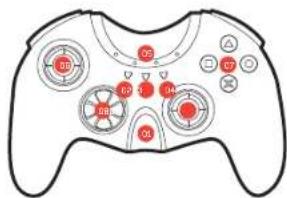
The HF I has been ergonomically designed to enhance the 'First Person Shooter' game replay experience. You'll find it's the little touches that make all the difference.
01 | Home Button
02 | Select Bidden
03 | Turbo Button
041 Street Button
Q5 | Compact with LED feedback
06.1.3 Thumbstick
(1) AD = BD = 1
3. ② ③ ④
08 | Directional Pad
09 | H3 thumbstick
10 | R1 Button
11 | E=Button
12/14 7:10
(2) 本次股东大会的决议
15 | LE DUTCH
14 | Min -USB Port
15 | Fio Switch
16 | Battery Compartment.
text_image
05 80 60 4 94 80 94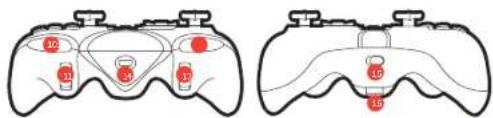
text_image
Diagram showing two identical gaming controllers with labeled buttons and red buttons, likely illustrating a game interface or player control system.set up
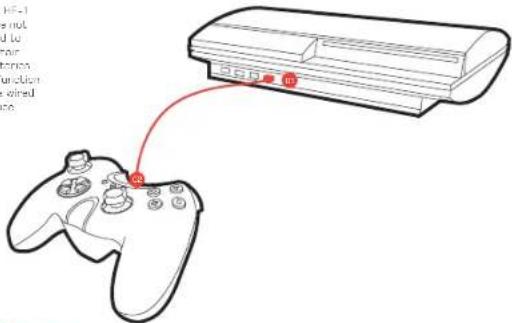
The HF-1 Controller is very easy to set up, and for your convenience it can be used as either a wired or wireless device.
To use your controller as a wired device connect the USB to the PS3TM [01] and the mini JSB to the controller's changing socket [12].

The HF-1
does not
need to
1.2017年
u "ui:liu"
as a wired
device
text_image
Diagram showing a game controller connected to a remote device, with Chinese text annotations on the left side.battery replacement
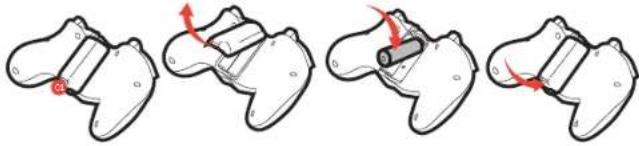
To use your controller wirelessly, remove the battery compartment cover and insert two AA batteries on a 61.2ck battery back.
natural_image
Four-step diagram showing a mechanical assembly with red arrows indicating motion or force direction (no text or symbols)Using your home,
press, be cast
door oil
[Non-Text]
(1) 10000. Верховка
nsta (al, snes,
17.3.4.20
2017.4.26
Replac
setter's door
pairing your controller
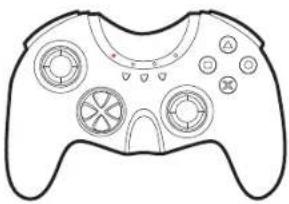
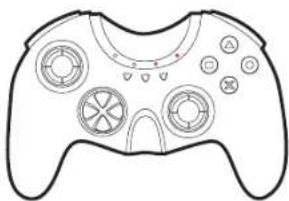
The HF. I must be placed to you - PS3TM to use it wire easily. To ensure pairing, connect your controller to the PS3TM via a USB cable and pairing will happen automatically. Once placed one or two LEDs within the crescent of the controller will light depending on which part the controller has been assigned to
natural_image
Line drawing of a game controller with multiple circular buttons and a central gear-like mechanism (no text or symbols)Controller assigned to port 1
natural_image
Line drawing of a game controller with multiple circular buttons and a central hub (no text or symbols)Controller assigned to part 7.
assigning ports
To assign the FF-1 to a different port, follow the instructions below.
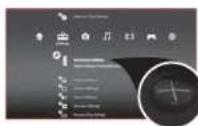
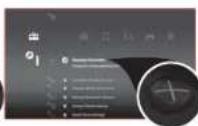
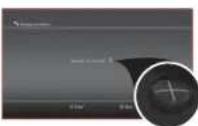
1. Presse X on Accessory Settings, 2. Presse X on Repsign Controllers, 3. Scroll to assign the controller to your desired portu
operating your controller
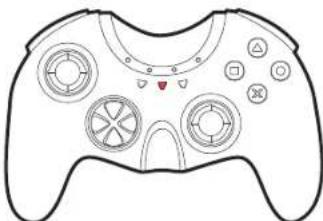
To power on your controller, press and hold the home button for 2 seconds until a red LED appears in the crescent. To power off your controller, press and hold the home button for 1 second.
natural_image
Line drawing of a game controller with multiple circular buttons and a heart-shaped scroll (no text or symbols)turbo function
Froeing an action button assigned with Turbo will simulate the button being pressed rapidly e.g. "boost firepower".
To enable turbo function: While pressing the turbo button, press b release the action button you wish to turbo To switch turbo off, repeat the procours clone. NDT: More than one button can be assigned the turbo
To clear all turbo functions: Prox A hold the Turbo button ONLY for 12 seconds.
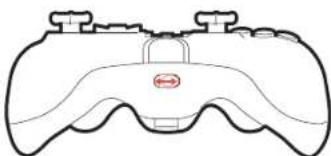
flip switch
The Flo switch serves the functions designed to test 1.812 and RTB H2 buttons
natural_image
Line drawing of a game controller with no text or symbols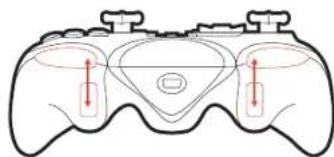
natural_image
Diagram of a game controller with red directional arrows indicating movement or force (no text or symbols)
The I-7-I will go into sleep mode if not used for 10 minutes. To wake up the controller, press the home button
08 | OPERATION
OPERATION 09
troubleshooting
Having trouble with your HF-1 controller? These troubleshooting steps will show you the smoothest path to resolving your test. Be sure to perform troubleshooting before having your product serviced.
The HF-1 will not turn on.
- Check to make sure that the batteries or battery pack is fully charged.
• Make sure that the beaveries are properly installed.
The LED is flashing even though the rechargeable batteries are fully charged
- Rechargeable batteries provide a low voltage which trippers the LED to flash.
Even it is low voltage, the batteries will be provide substantial game time.
The HF-1 is switched on but is not recognized by the PS3 ^®
• Make sure Just The IT 1 is paired to the 201M (see page 6)
• Press the HOME button [the large ended button on the front, to wake the
(1) 2017 (after UP) did not change from the end of the year.
The SixAxis function is not working in my game
• The 17 does not have S outside support.
For further assistance please contact our customer support, learn on our website at www.gioteck.com
care & maintenance
This product has been designed with the highest concern for safety. However, any electrical device if used in properly, has the potential to cause harm. To help ensure risk: Tree operation please pay attention on to the guidance below.
storage
It is best to store the controller in a city and dust-free area. Do not store in areas of extreme heat or cold, and avoid direct sunlight or heat sources such as a heater.

Never attempts to open the controller, doing so will void your warranty.
environment

Please help to conserve the environment by recycling the inner cardboard packing of this product.

This controller should NOT be disposed of in normal household waste. It should be disposed of apparently Plastic Lake 1 to an electrical waste collection point.
declaration

Dioteck hereby declares that this controller is a compliance with the essential requirements and other provisions of Directive 1999/CTC. To view the full version of the Declaration of Conformity please go online to doc.gioteck.com.

This device complies with Port 16 at the FCC Rules operation, a sign out to the following two conditions: (1) This device may not cause harmful interference, and (2) This device must accept any interference received, reducing inattention that may occur uncontrolled operation. The device and its users must not be controlled or operating in conjunction with any other operator or transporter. However, are not reasonable for any interference causes by unauthorized changes to this equipment.
This equipment generates, uses, and can radiate radio frequency energy end, if not installed correctly, may cause harmful interference to radio communications. If this equipment does cause harmful interference to radio/electrical equipment by the following
- Reorient or relocate the receiving system. - Increase distance between the equipment is received - Connect the equipment into an outlet on a circuit
• Consult the dealer or a radio/TV technician.